Quick verdict
RightBlogger is one of those tools I would not judge only by the number of AI tools on the homepage.
The real question is narrower: does it help you move from content idea to publishable blog post faster without lowering the quality of what goes live?
If you publish regularly, the answer may be yes. RightBlogger makes the most sense for bloggers, affiliate site builders, creators, and small agencies that already have a repeatable content workflow. Its appeal is not just “AI writing.” It is the combination of topic planning, SEO article drafting, brand voices, AI images, content planner automation, direct publishing integrations, and a free-first path that lets buyers test the workflow before committing.
I would be more careful if you are looking for a deep SEO database, technical crawler, backlink tool, or a magic autoblogging system that can replace editorial judgment. RightBlogger can speed up the route to a draft. It cannot decide whether the article is accurate, original, useful, well-sourced, internally linked, or commercially responsible.
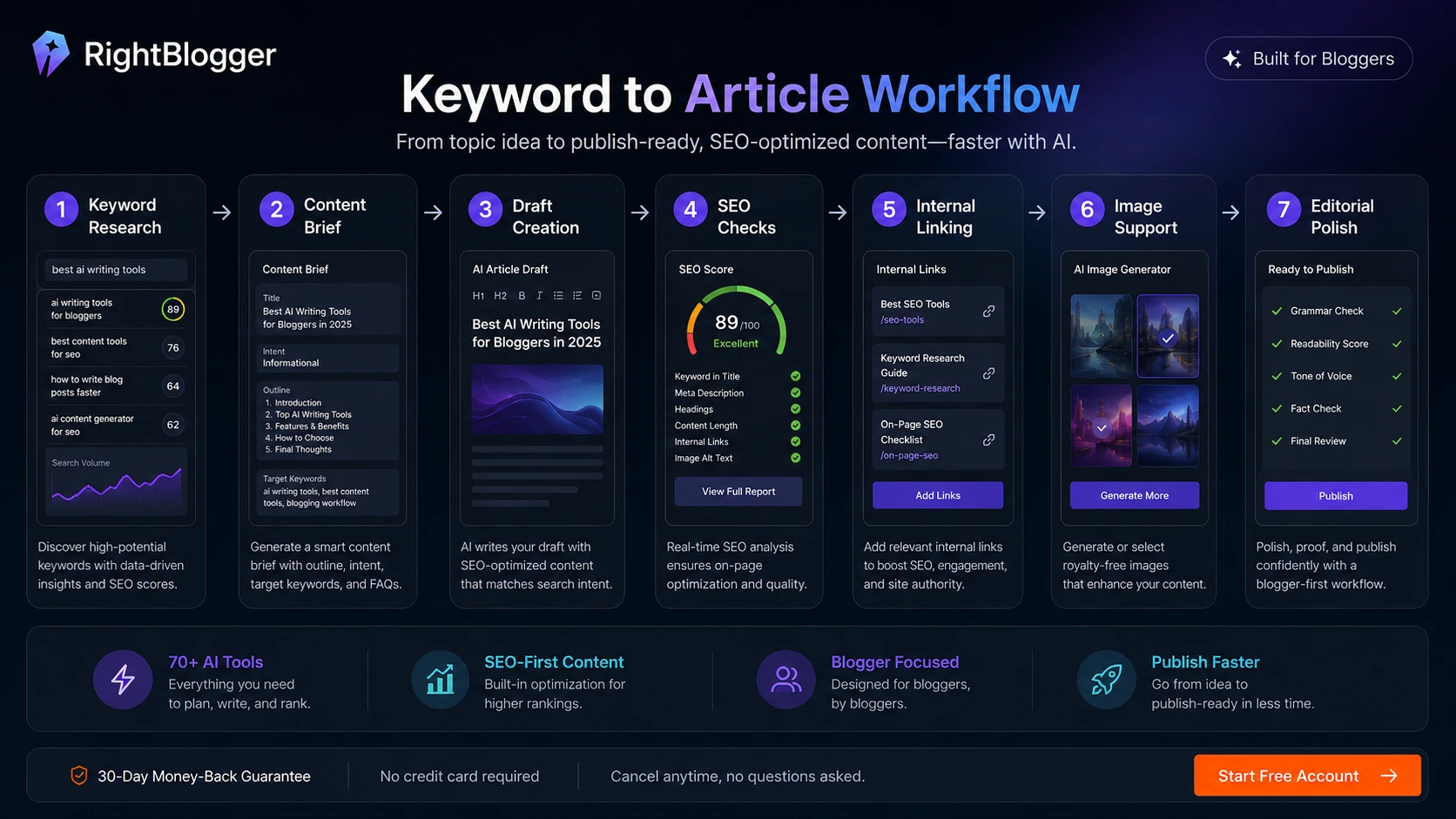
For my money, RightBlogger is most interesting when it sits in the middle of a real publishing system: choose a keyword or topic, create a draft, inspect the SEO direction, apply brand voice, add images, review the facts, publish through the right CMS, and track whether the content earns traffic. If that workflow already matters to your business, the tool is worth testing. If you only need the occasional paragraph rewrite, it may be too much platform for the job.
Next step: If RightBlogger still fits your publishing workflow, test the current free path and verify the live plan limits before choosing a paid plan.
Review snapshot
| Review point | Practical take |
|---|---|
| Best for | Bloggers, affiliate site operators, creators, and small agencies that publish regularly |
| Not ideal for | Rare publishers, deep SEO teams, technical SEO buyers, or anyone expecting hands-off quality |
| Main use case | Turning topics, keywords, and videos into SEO-oriented blog drafts and publishing workflows |
| Free path | Free account with an automation trial and limited manual tool access |
| Paid path | Makes sense when connected sites, SEO reports, team seats, and automation save real work |
| Main strength | All-in-one blog production workflow, not just AI text generation |
| Main risk | Publishing too quickly without editorial review, source checking, and workflow measurement |
| Best alternatives to compare | Frase, Dashword, KeywordsPeopleUse, NeuronWriter |
| Best next step | Run one real article workflow before paying annually |
What RightBlogger actually is
RightBlogger is best understood as an AI blogging and content automation platform built around repeatable publishing.
That sounds simple, but it changes how I would evaluate it. A generic AI writing app is judged mostly by output quality and price. RightBlogger needs a different test. You have to ask whether it can reduce friction across the whole blogging process: idea, keyword, draft, image, brand voice, optimization, publishing, and review.
The official positioning leans heavily into blog automation, AI writing for bloggers, SEO-oriented content creation, brand voices, AI images, content planning, and direct publishing. The platform also supports publishing connections such as WordPress, Shopify, Webflow, Ghost, Wix, Duda, BlogMaker, and webhooks. That makes it more workflow-oriented than a simple “write me a blog post” tool.
But I would not confuse “workflow-oriented” with “hands-off.”
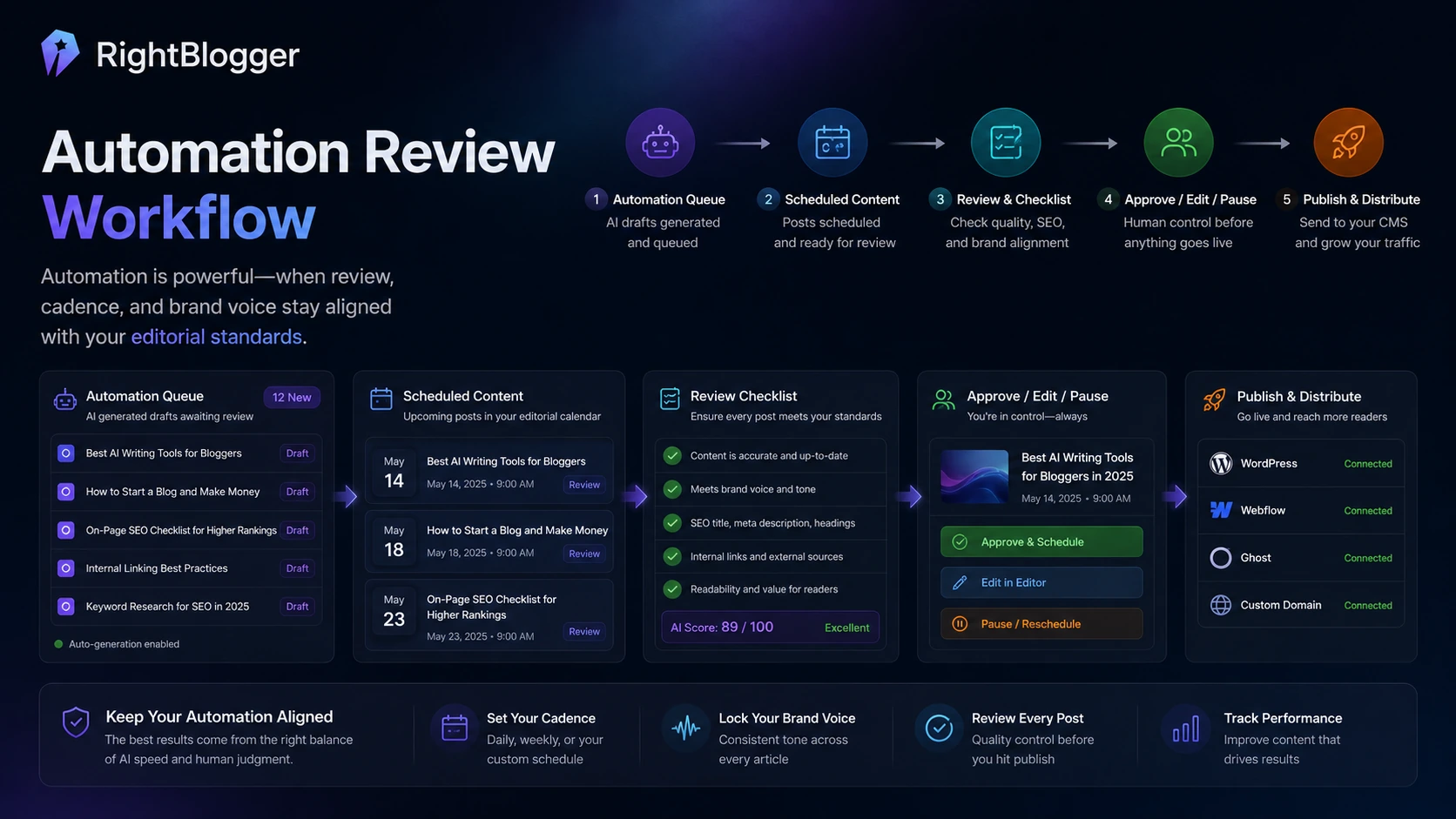
The homepage makes automation look attractive because it reduces blank-page friction. That part is real. The dangerous part is assuming that a generated article is automatically ready for a serious website. AI-assisted content still needs fact checks, examples, internal links, affiliate disclosure awareness, source review, formatting, and a human sense of whether the page deserves to exist.
RightBlogger can help get you to a draft faster. The buyer’s job is to decide whether that draft is worth editing and publishing.
Who should use RightBlogger?
RightBlogger makes the most sense for people who publish often enough that the workflow savings matter.
A solo blogger can use it to move from keyword idea to article draft faster, especially when the site already has a clear niche and publishing cadence. In that situation, the value is not that RightBlogger writes a perfect article. The value is that it gives the blogger a starting structure, SEO direction, content ideas, titles, images, and a cleaner path into publishing.
An affiliate site builder may also find it useful. Affiliate content usually has a lot of repeatable work: topic clustering, article outlines, comparison angles, product summaries, metadata, FAQs, and internal publishing. RightBlogger can support that workflow, but the buyer still has to add product judgment, current pricing checks, screenshots, verified claims, and conversion logic.
YouTube creators are another natural fit. If you already publish videos, RightBlogger’s video-to-blog and repurposing angle can turn existing content into search assets. That is more believable than using AI to invent topics from nothing, because the creator already has source material. I would still review the transcript, claims, examples, and formatting before publishing the article.
Small agencies may have the clearest business case if they manage multiple blogs or client sites. The higher plans only make sense when the agency actually needs connected sites, team seats, SEO reports, onboarding, and a repeatable content production process.
Who should avoid RightBlogger?
I would skip RightBlogger if you only need a simple AI paragraph writer. In that case, a lighter AI writing tool or even a general AI assistant may be enough.
I would also be careful if your main need is serious SEO research. RightBlogger has keyword and SEO support, but it is not trying to replace specialist tools for backlink research, rank tracking, competitive SERP analysis, technical crawling, or deep site audits. If your workflow starts with technical SEO and large-scale data, RightBlogger may feel too content-production focused.
Publishers in high-trust niches should be especially disciplined. Health, finance, legal, education, and enterprise software content need careful source review. A faster draft can help, but it can also create more risk if the team publishes too quickly.
And if you publish rarely, the plan value may not work. A tool built around blogging cadence is easier to justify when you use it every week. If you only create one article every few months, the cheapest plan is not automatically a good deal.
How RightBlogger fits into a real blog workflow
A realistic RightBlogger workflow does not begin with the “generate” button.
It begins with a publishing decision.
Here is the workflow I would use to evaluate it:
- Choose one real site, not a throwaway test.
- Pick one topic that matters to that site’s audience.
- Generate or research a keyword idea.
- Create a draft with the article writer or content planner.
- Check the SEO direction, title, headings, and search intent.
- Apply brand voice and images only where they improve the article.
- Review facts, claims, links, product mentions, and examples manually.
- Publish as draft first when possible.
- Track whether the content earns impressions, clicks, engagement, or conversions.
That process tells you more than browsing the tool list.
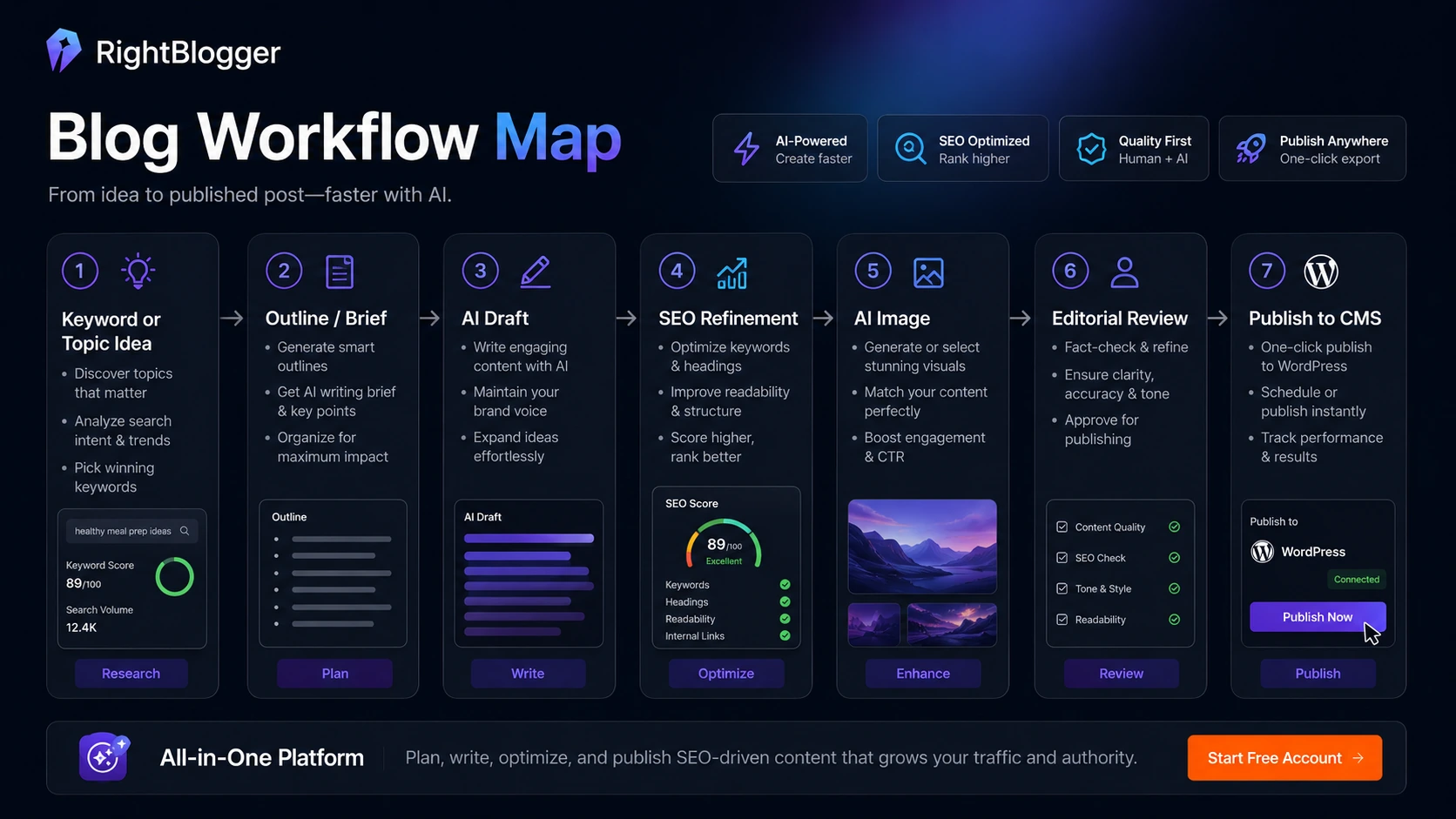
The part I would watch most closely is the handoff between draft and publish. If RightBlogger gives you a draft that needs light editing, structure cleanup, and source verification, it can save meaningful time. If the draft needs a full rewrite, the automation may feel more impressive than useful.
Workflow check: RightBlogger is easier to judge with one real blog post than with a feature list. Test the full path from keyword to publish-ready draft before upgrading.
Features that matter most
RightBlogger has a broad feature set, but not every feature matters equally to the buying decision.
The article writer matters because it is the core time-saver. If it cannot produce a useful first draft for your niche, the rest of the workflow becomes less important.
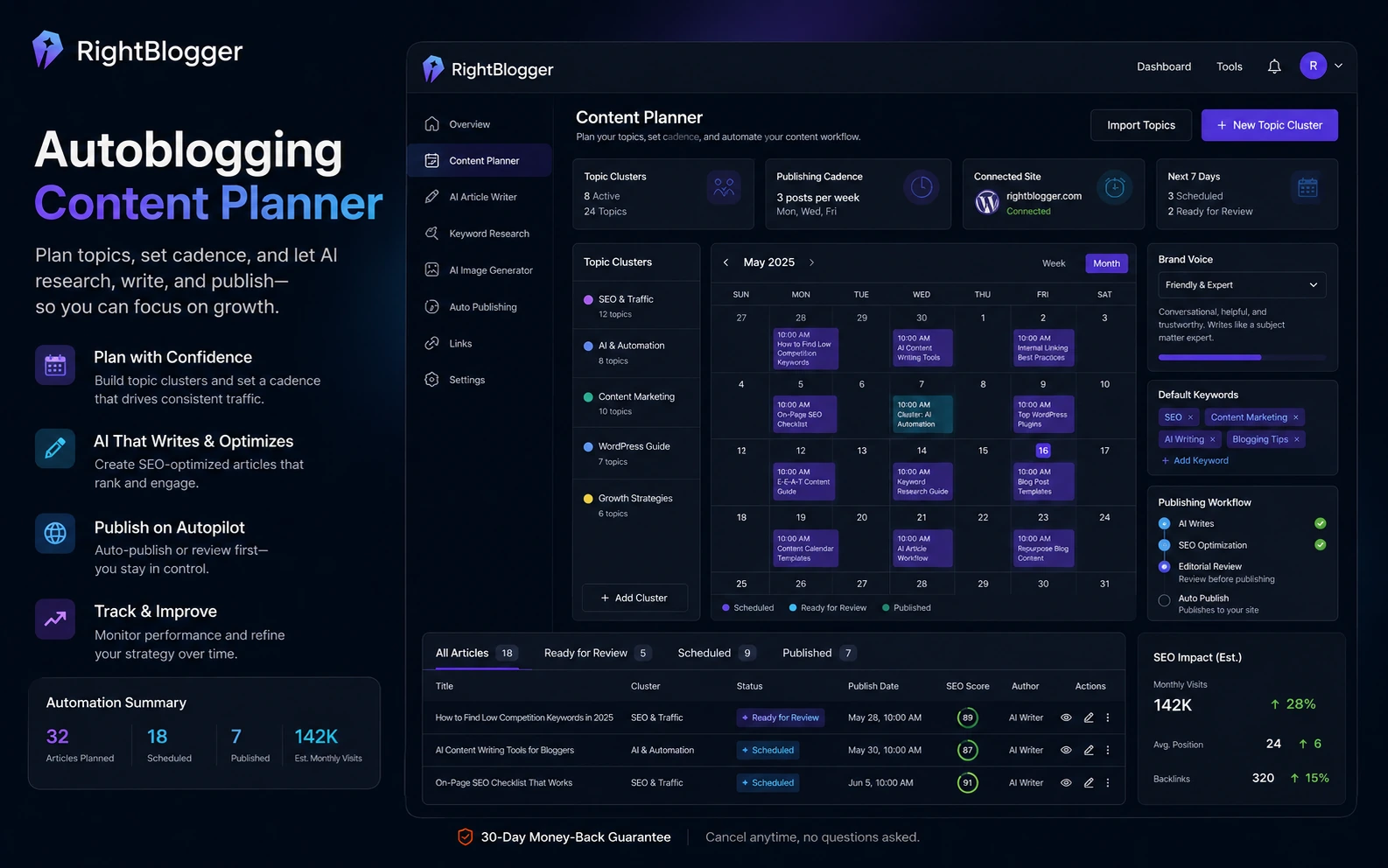
The content planner and autoblogging features matter because they move RightBlogger from “AI writer” into “publishing system.” This is where the product becomes more interesting for bloggers and agencies. You can plan topics, set cadence, use automation, and publish through connected platforms. That can save time, but it also increases the need for review discipline.
Brand voice matters if you care about repeatable style. For affiliate sites, creator blogs, and agency clients, generic AI tone can weaken trust. A brand voice system can help, but it still needs human calibration.
AI images matter only if they support the article. I would not use image generation as filler. It is more useful for hero concepts, article visuals, thumbnails, or simple explanatory graphics than for pretending to show real product screenshots.
Publishing integrations matter a lot. A tool that can push content into WordPress, Webflow, Ghost, Wix, Shopify, Duda, BlogMaker, or webhooks can remove annoying copy-paste work. But buyers should verify how drafts, formatting, images, categories, and review steps behave inside their own CMS.
SEO reports and keyword tools matter, but I would treat them as content-focused support, not full SEO intelligence. They can guide topics and drafts. They do not remove the need for stronger SEO tools if your business depends on technical audits, backlinks, rank tracking, or deep competitor data.
Pricing and plan value
RightBlogger’s current public pricing is easier to understand than many AI tools, but buyers still need to choose by workflow, not by the lowest displayed number.
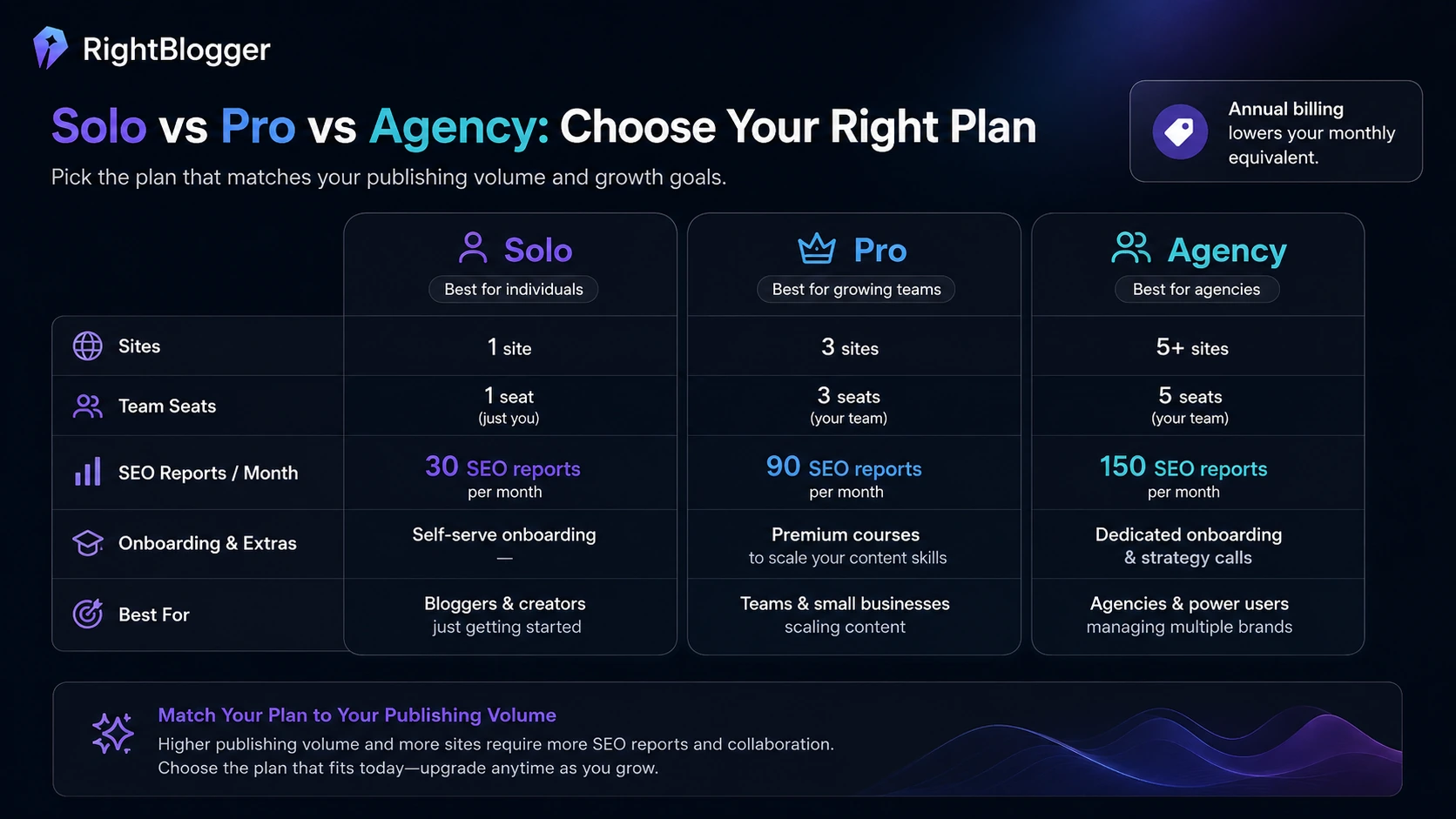
The plan structure is built around Solo, Pro, and Agency. The current official pricing page shows annual monthly-equivalent pricing for Solo, Pro, and Agency, with differences around connected sites, team seats, SEO report limits, premium courses, and onboarding or strategy calls. The important point is that the plan decision is not only about AI words. It is about how many sites you manage, how many people need access, and how often you rely on SEO reports and automation.
Solo makes the most sense for one primary blog or website. If you are a solo creator with one site and a manageable publishing schedule, this is the plan I would compare first after the trial.
Pro makes more sense when you have multiple sites, team members, or a larger SEO report need. A blogger with several projects or a small team may outgrow Solo quickly.
Agency should be treated as a business workflow decision. It is not the plan I would choose just because it has more capacity. It makes sense when client work, multi-site publishing, onboarding, and team process justify the larger commitment.
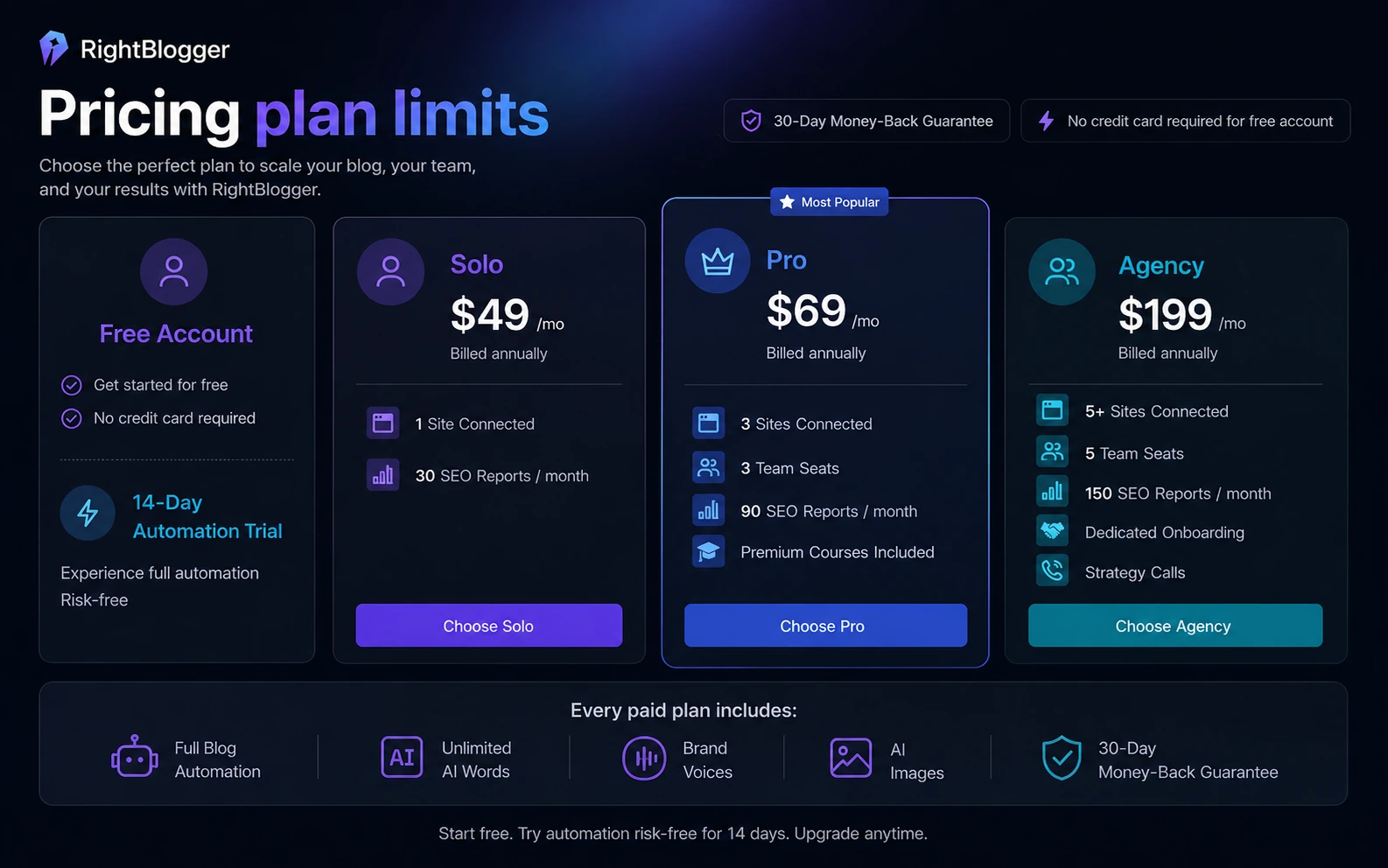
The cheapest plan is not automatically the best deal. The best deal is the plan that matches the way you publish.
Pricing check: Before choosing monthly or annual billing, verify the current connected-site limits, SEO report limits, team seats, and refund language at checkout.
Free account, trial, coupon, and checkout notes
The safer path with RightBlogger is to start free, test the automation trial with a real workflow, and only then compare paid plans.
A free account is useful because it reduces first-test risk. But I would not evaluate the product by clicking around random tools. Pick one real use case. For example: one keyword-to-blog workflow, one YouTube-to-blog workflow, or one connected-site automation. That gives you a more honest read on whether the platform saves time.
The automation trial is especially important because RightBlogger’s strongest value is not manual AI writing. It is the ability to support a recurring publishing workflow. If you do not test automation, content planning, CMS connection, and review steps, you may be judging the wrong product.
Coupon codes should not be assumed. RightBlogger’s more reliable savings path is usually the free account, the automation trial, annual billing when justified, and any current checkout or DealBestDaily offer that is clearly active. A discount can improve the purchase, but it should not be the reason you buy.
The refund guarantee is a useful safety signal, but I would still treat it as a backup, not a plan. Buyers should read the live refund and billing language before annual billing, then test quickly and seriously within the eligible window.
Offer path: Check the current offer only after RightBlogger passes your workflow test. A lower price does not fix weak content fit.
What I would check before buying RightBlogger
Before paying, I would check six things.
First, I would check output quality in my niche. Some topics are easy for AI-assisted drafting. Others require sources, examples, product details, and expert judgment. A tool that works well for general blogging may need more review in technical or high-trust topics.
Second, I would check the CMS connection. If you use WordPress, Webflow, Ghost, Wix, Shopify, Duda, BlogMaker, or webhooks, verify how formatting, images, drafts, categories, and review steps work in your real setup.
Third, I would check SEO report volume. If you plan many articles, report limits may matter more than AI word count.
Fourth, I would check team seats. Solo publishing and client workflow are different buying decisions.
Fifth, I would check annual billing. Annual savings can be attractive, but only after the workflow proves itself.
Sixth, I would check editorial control. Autoblogging can save time, but it can also publish weak content faster. If the tool removes your review step, I would consider that a risk, not a feature.
A simple RightBlogger test before paying
The best test is not complicated.
Choose one article that you would have written anyway.
Start with a keyword or topic that has real value for your site. Use RightBlogger to research, draft, structure, and prepare the post. Add a brand voice if that is part of your workflow. Generate or choose an image only if it improves the article. Push the draft into your CMS if that is why you are considering the tool.
Then ask three questions:
- Did RightBlogger save enough time to matter?
- Did the draft require editing or a full rewrite?
- Would I feel comfortable publishing the final article under my brand after review?
If the answer to all three is positive, a paid plan becomes more rational. If the draft still needs heavy rewriting, or if the SEO direction feels thin, compare alternatives before paying.
This test also protects you from buying based on tool count. A platform can have dozens of tools and still fail the one workflow you actually need.
Pros and cons explained
RightBlogger’s biggest strength is workflow compression. It puts several blogging tasks in one environment: idea generation, keyword support, drafting, images, brand voice, content planning, and publishing. For regular bloggers, that can reduce the drag between “I should publish something” and “this draft is ready for editing.”
Its second strength is the free-first path. A buyer can test the tool before deciding whether Solo, Pro, or Agency makes sense. That matters because AI writing quality is personal. A draft that feels good enough for one niche may feel too generic for another.
Its third strength is platform fit for bloggers. Some tools feel built for enterprise content teams. RightBlogger feels more creator- and blogger-friendly, which can be a positive if you want speed and clarity rather than a heavy SEO suite.
The main weakness is depth. If you need advanced keyword databases, backlink research, technical SEO crawling, rank tracking, or detailed content scoring, RightBlogger may not be enough. It can support SEO writing, but it is not the same category as a specialist SEO platform.
The second weakness is automation risk. Autoblogging sounds efficient, but it can create thin or generic pages if the buyer does not review the output. I would rather publish fewer reviewed articles than more unchecked AI drafts.
The third weakness is plan fit. A paid plan can be worth it, but only when your publishing cadence justifies the monthly or annual commitment.
Green flags and red flags
The strongest green flag is that RightBlogger has a clear audience. It is built for bloggers, creators, marketers, and agencies that need recurring content production. That focus is healthier than trying to be every AI tool for every person.
Another green flag is the publishing workflow. Integrations and webhooks make the product more operational than a standalone writing prompt.
The free account, automation trial, and refund guarantee also reduce the first-purchase risk, assuming the buyer tests quickly and reads the current terms.
The red flag is not the product itself. It is buyer behavior.
If someone buys RightBlogger expecting automatic rankings, automatic expertise, or publish-ready content with no review, they are likely to be disappointed. The product can speed the content machine. It cannot decide whether the content deserves trust.
Another red flag is using RightBlogger as a replacement for specialist SEO tools. If your workflow depends on competitive analysis, backlinks, technical audits, and rank tracking, keep those tools in the stack.
RightBlogger vs alternatives
RightBlogger’s alternatives depend on what job you are hiring the tool to do.
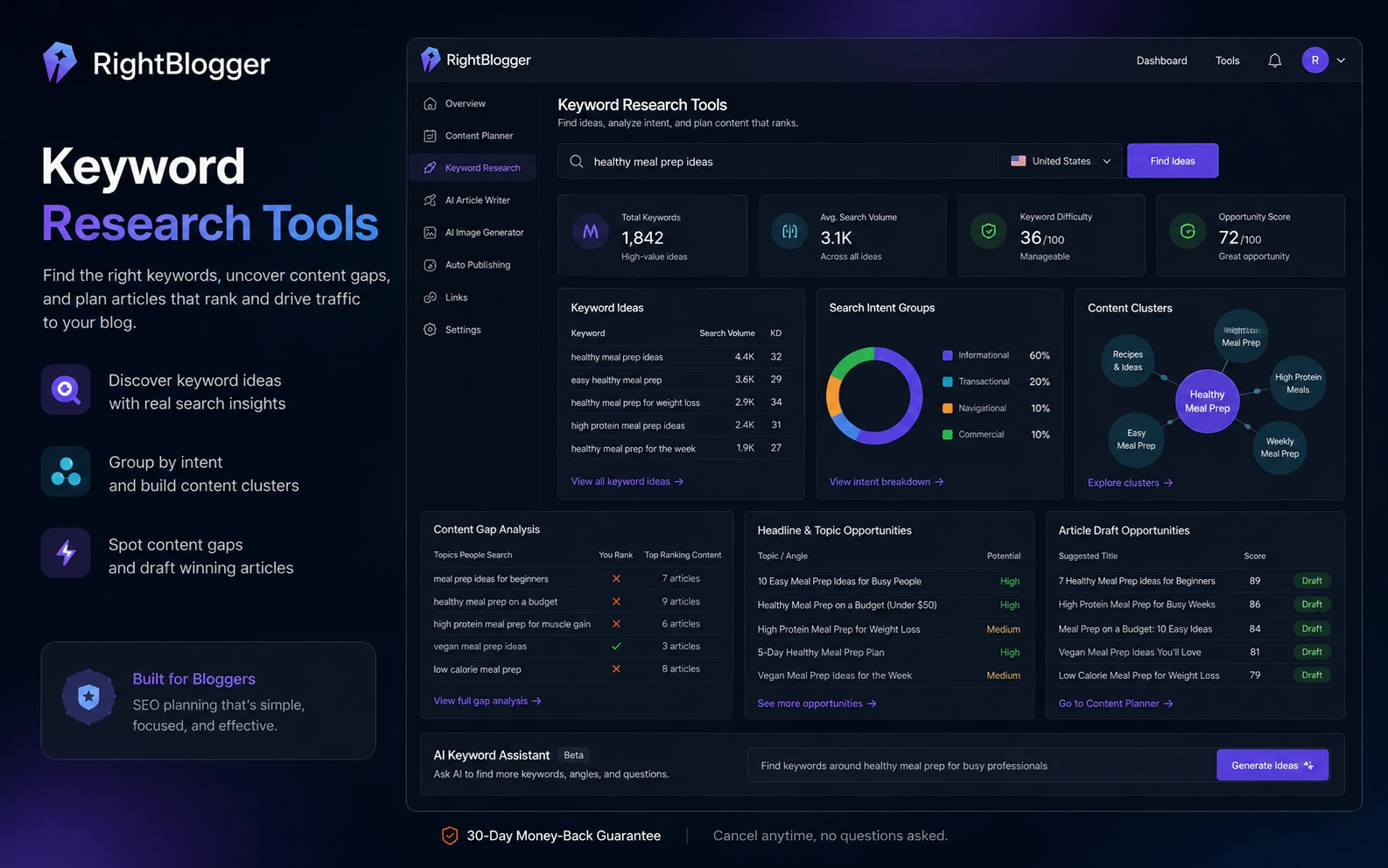
If you want SEO briefs and content optimization, compare Frase. Frase is usually a better fit when the work starts with analyzing search results, building briefs, and optimizing articles around competitive content structure. RightBlogger is better when you want ideation, writing, images, automation, and publishing in one blogger-friendly workflow.
If you want clean content reports and focused brief creation, compare Dashword. Dashword is narrower and more report-oriented. That can be an advantage if your team already has writers and only needs better SEO direction.
If your main pain is finding audience questions and content angles, compare KeywordsPeopleUse. It is stronger for question-led research and topic discovery. RightBlogger becomes more relevant after you want to turn those ideas into drafts and published posts.
If you care more about SERP-guided optimization and NLP-style content scoring, compare NeuronWriter. NeuronWriter is more optimization-focused, while RightBlogger is more production-workflow focused.
The practical split is this: choose RightBlogger when the bottleneck is publishing workflow. Choose a narrower alternative when the bottleneck is research, briefing, or optimization depth.
Evidence confidence and review method
My confidence is high on RightBlogger’s broad positioning, pricing structure, automation trial language, connected-site and SEO report differences, refund signal, and integration direction because those points are visible in official public sources and align with the provided store data.
My confidence is moderate on long-term output quality because that depends heavily on niche, prompts, editorial standards, and how carefully the buyer reviews drafts.
My confidence is mixed on whether RightBlogger can replace other SEO tools. It can support a blogger’s SEO workflow, but specialist SEO platforms still have a stronger role for technical audits, backlink analysis, deep keyword data, and rank tracking.
That is why I would evaluate RightBlogger with one real workflow, not with a feature checklist.
Final verdict
RightBlogger is worth testing if blogging is already a serious part of your workflow and you want to reduce the friction between topic idea, SEO draft, image, review, and publishing.
I would consider it if you publish often, manage one or more content sites, repurpose videos into blog posts, or run client blogs where speed and repeatability matter. In that situation, RightBlogger can act less like a random AI writer and more like a practical content production layer.
I would skip it if you only need occasional AI text, deep SEO data, technical crawling, backlink research, or guaranteed hands-off publishing. Those are different jobs.
The safest next step is simple: start with the free account or automation trial, run one real article workflow, review the output honestly, and only then compare Solo, Pro, Agency, or current offer paths.