
Dashword Pricing, Plans & SEO Workflow Fit
Dashword is an SEO content optimization platform for teams that need faster content briefs, SERP-informed outlines, content scoring, AI-assisted writing, and monitoring of published pages. It is not a broad SEO suite with backlink data or technical crawling. Its buyer fit is narrower: planning and improving content so writers can produce more relevant, competitive pages.
Fit → price → checkout
Use these routes after the official-site check: coupon first, review for fit, compare if unsure.
Dashword pricing snapshot
Fast commercial checks before pricing, coupons, or a deeper review.
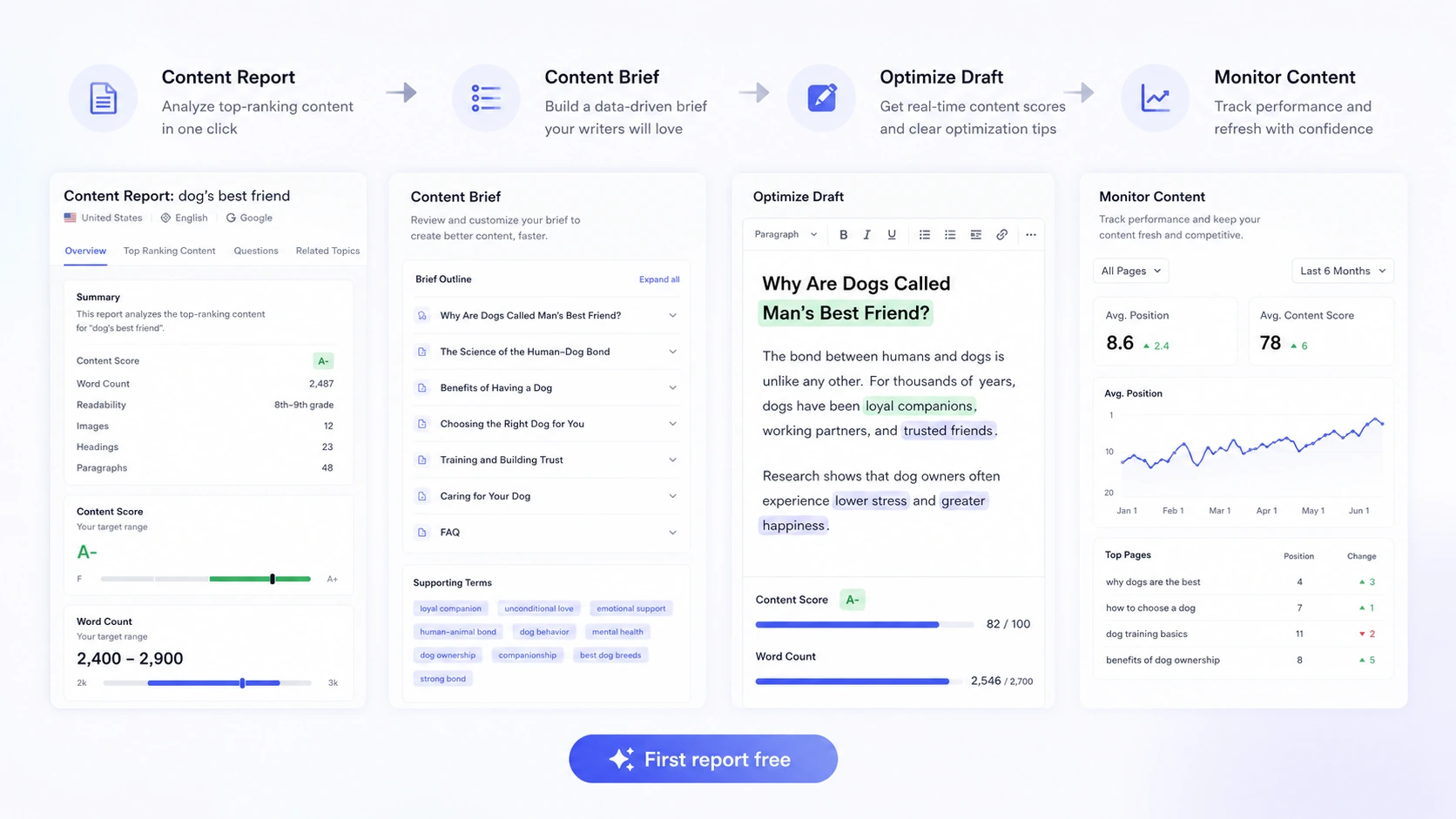
Dashword product tour
The product tour should show Dashword as an SEO content workflow tool: keyword report, content brief, optimization editor, and monitoring or pricing limits. Abstract AI visuals are not useful because buyers need to understand the report-based workflow.
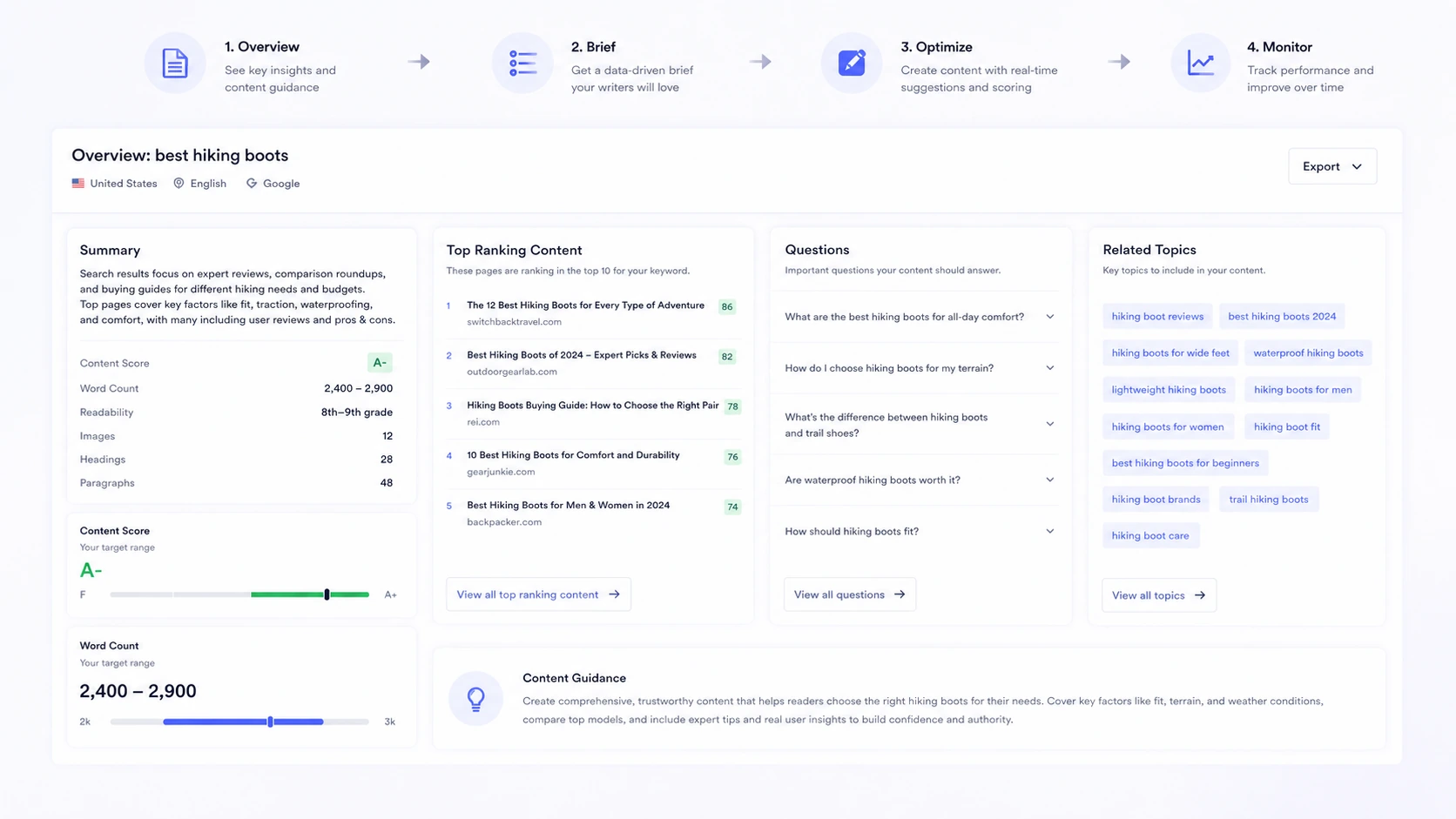
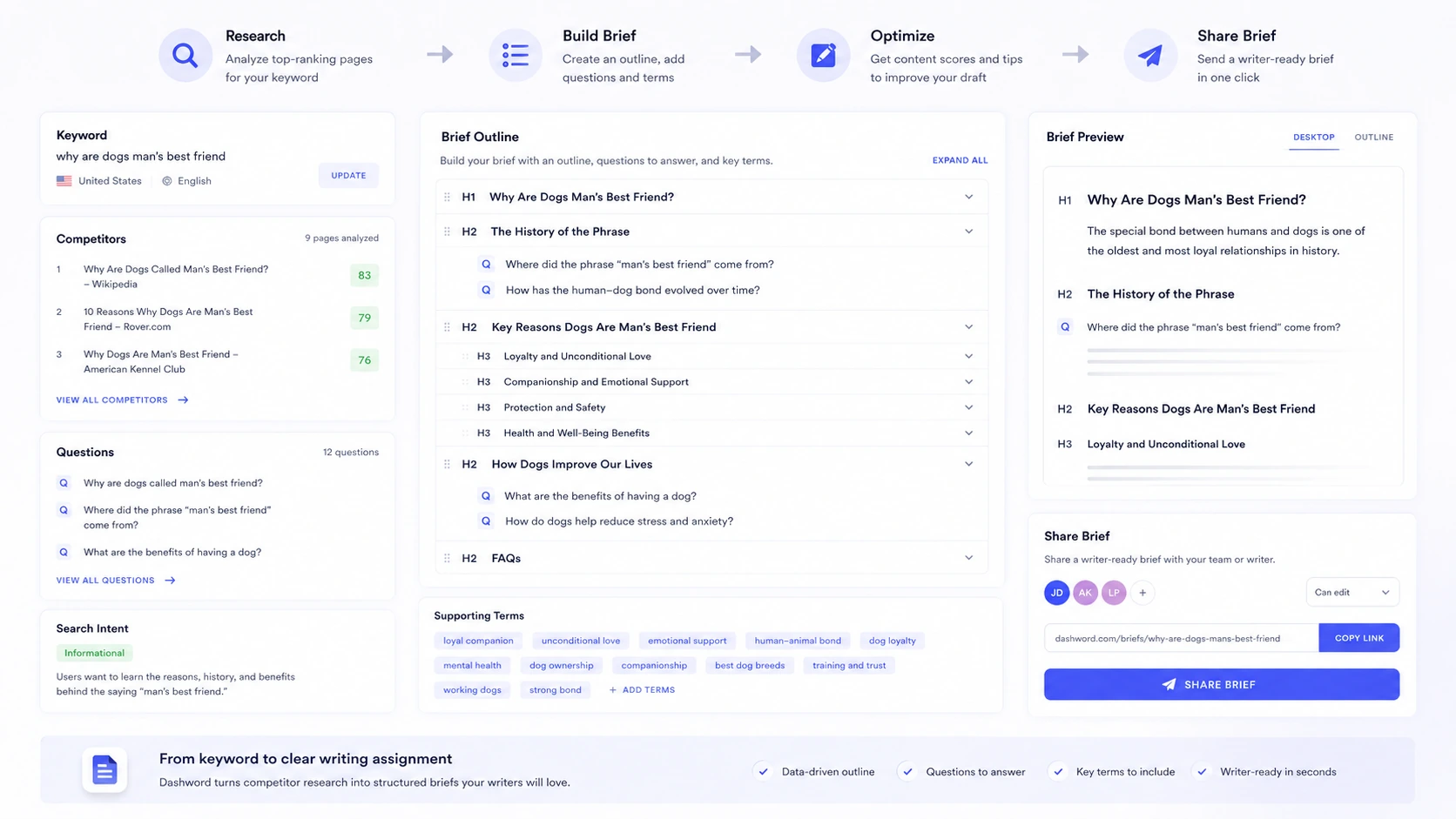
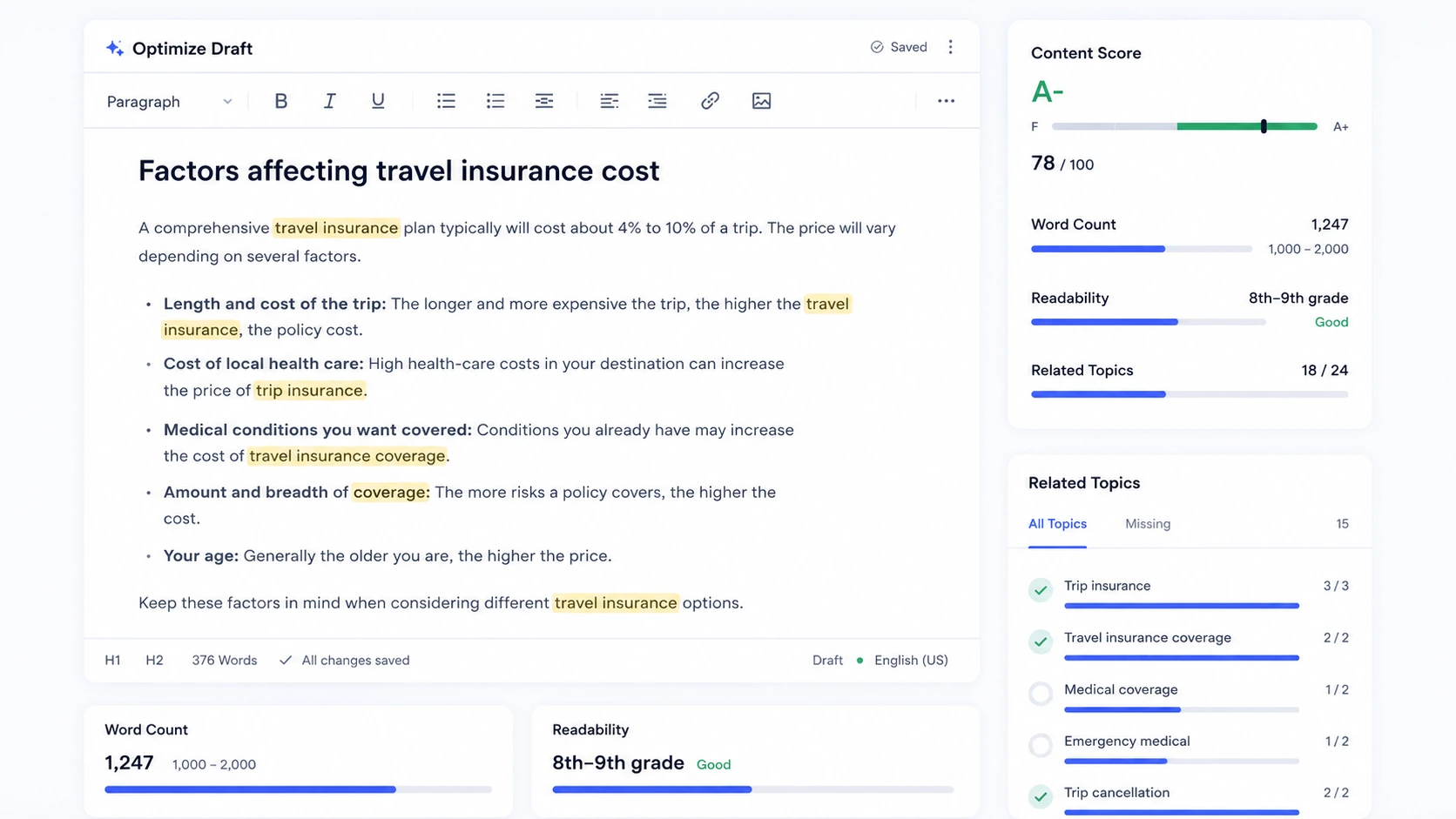
Dashword should be evaluated as a content optimization workflow, not as a broad SEO suite. It helps teams turn a target keyword into a content report, brief, optimization guidance, and a better-informed draft. That can be valuable for writers and editors, but only if the report quality improves the actual articles your team publishes.
What Dashword actually does
Dashword helps content teams create SEO briefs, understand top-ranking content, optimize drafts, and monitor content performance. The buyer value is in reducing research time and making writer handoff clearer. It is not designed to replace a full keyword database, backlink index, technical crawler, or complete SEO platform.
- Generate content reports from target keywords
- Create writer-ready SEO briefs
- Optimize drafts against SERP-informed recommendations
- Monitor published content on higher-tier workflows
How the content optimization workflow feels
Dashword's optimization workflow is built around comparing a draft against what top-ranking content covers. The goal is not to force every suggested term into the article. The goal is to help writers understand missing topics, questions, subtopics, and search intent before the piece is published.
- Use optimization suggestions as editorial guidance, not a checklist to stuff
- Compare missing subtopics against the article's real angle
- Review recommendations manually before sending to a writer
Pricing and report limits
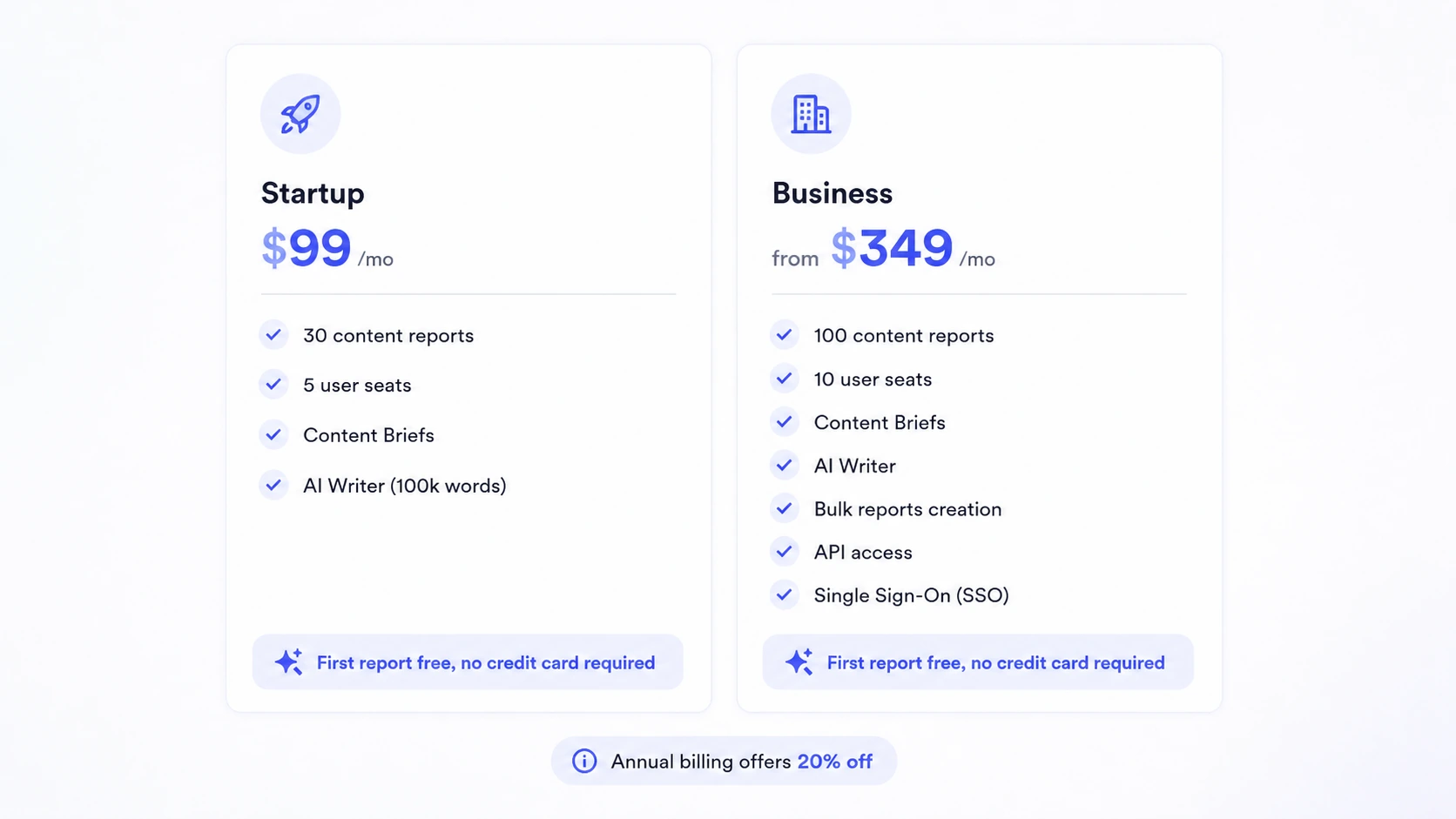
Dashword is not a cheap casual writing assistant. Startup at $99/month is positioned for individuals and small teams working on new content, with 30 content reports and 5 seats. Business starts at $349/month and is more relevant for teams that need more reports, more seats, monitoring, bulk report creation, SSO, or API access.
- Startup fits smaller content teams with about 30 report needs per month
- Business fits agencies and larger teams that need monitoring, bulk work, API access, and SSO
- The first report is free, so buyers should test before paying
- Report volume should be calculated before checkout
Where Dashword fits best
Dashword fits teams that want a simpler optimization workflow than enterprise content intelligence tools. It is useful when the bottleneck is briefing writers, comparing competitor coverage, improving draft relevance, and giving editors a repeatable process. It is less useful if your biggest problem is keyword discovery, backlink authority, technical site health, or content distribution.
- Good for content marketers, SEO writers, editors, and agencies
- Useful when briefs and draft optimization are recurring bottlenecks
- Less suitable as the only SEO tool in a complete SEO program
Monitoring and update workflows
Dashword's Business plan includes content monitoring, which matters for teams that update old pages instead of only publishing new ones. Monitoring can help identify pages that need attention, but buyers should confirm exactly what is included and whether it replaces or complements their existing analytics and ranking tools.
- Useful for teams that refresh older content regularly
- Can support content decay and update workflows
- Should be compared against existing analytics, Search Console, and rank tracking tools
Where Dashword may disappoint
Dashword may disappoint buyers who expect a complete SEO suite or a budget AI writer. It does not replace tools like Ahrefs, Semrush, Screaming Frog, Surfer SEO, Clearscope, Content Harmony, or Frase in every use case. Its narrower value is clean content reports, briefs, and optimization guidance.
- Not a full technical SEO audit platform
- Not a backlink analysis or keyword database replacement
- Not the lowest-cost option for casual AI writing
- Not ideal if you rarely create SEO-focused content
Best next step with Dashword
Use the first free report on a real keyword that matters to your site. Build a brief, compare the suggestions with your current SERP research, and test whether the optimization editor improves an actual draft. If the report saves time and improves editorial direction, compare Startup and Business. If it feels like a nicer version of work you already do well, wait before paying.
- Use a real keyword for the first free report
- Test brief quality with an actual writer or editor
- Check whether report limits match your monthly production
- Confirm cancellation and refund terms before starting a paid plan
Best savings path from this store page
This is the clearest savings route to check once the product already looks like a fit.
Dashword says annual billing can reduce the subscription price by 20%. Buyers should contact Dashword or use the live pricing path to confirm the annual setup before paying.
Use this as the safest primary Dashword offer because the discount is stated on the official pricing FAQ.
Free first report
$99/month entry plan
Use comparison routes when the category fit is still open
Use these comparison routes when the product still looks plausible, but the category fit is not fully settled.
AISEO.ai is broader for AI writing, humanizing, GEO, and LLM SEO, while Dashword is cleaner for SEO briefs and traditional content optimization reports.
Voila helps with everyday browser writing and summaries, while Dashword is specifically for SEO content briefs and draft optimization.
Sider AI supports browser research, PDF, YouTube, and multi-model chat, while Dashword focuses on optimizing content for target keywords.
Windsor.ai connects marketing data to BI and AI tools, while Dashword helps writers and editors plan and optimize SEO content.
Verification points worth checking before you click out
Where this store usually fits best in the workflow
Dashword can help strategists and editors turn a target keyword into a clearer writer brief with competitor topics, questions, and outline direction.
Writers can use Dashword's optimization feedback to identify missing topics and improve content quality before an article goes live.
Agencies can use Dashword to make SEO instructions easier for freelance writers or internal teams to follow.
Teams on plans with monitoring can use Dashword to support ongoing content refresh and update workflows.
Practical checkpoints before and after signup
- Choose one real keyword with commercial or strategic value.
- Prepare a draft or planned article so the first free report has a meaningful test case.
- Evaluate the brief, competitor coverage, topic suggestions, and optimization guidance.
- Ask whether the report saves time compared with your normal SERP research process.
- Compare report volume, seats, AI Writer usage, monitoring, bulk reports, API access, and SSO needs.
- Confirm cancellation and refund terms directly because a clear official refund window was not found.
- Use Dashword as part of an editorial workflow, not as a replacement for human judgment.
- Track whether optimized content actually improves production speed and ranking outcomes.
Fast-read signals for workflow fit and buying friction
Questions readers usually ask before choosing this store
What is Dashword best for?
Dashword is best for SEO teams, content marketers, writers, editors, and agencies that need faster content briefs, SERP-informed reports, optimization guidance, and a repeatable draft-to-publish workflow.
Does Dashword have a free plan?
Dashword does not appear to offer a broad permanent free plan, but the official pricing page says the first report is free and no credit card is required.
How much does Dashword cost?
Dashword's official pricing page lists Startup at $99/month and Business from $349/month. Buyers should verify annual billing, report limits, seats, AI Writer usage, and Business features before checkout.
Does Dashword offer refunds?
A clearly verified official refund window was not found during this editorial pass. Buyers should use the first free report and confirm cancellation or refund terms directly before paying.
Is Dashword a full SEO suite?
No. Dashword is better understood as a content optimization and brief-building tool. Most teams will still need separate tools for keyword research, analytics, rank tracking, backlinks, and technical SEO.
Choose the next route that matches what you still need to decide
The strongest next click depends on whether you still need product judgment, a savings route, or a broader category comparison.