Quick verdict
FlyingWeb is worth a serious look only if the buying decision is really about FlyingPress for WordPress speed optimization.
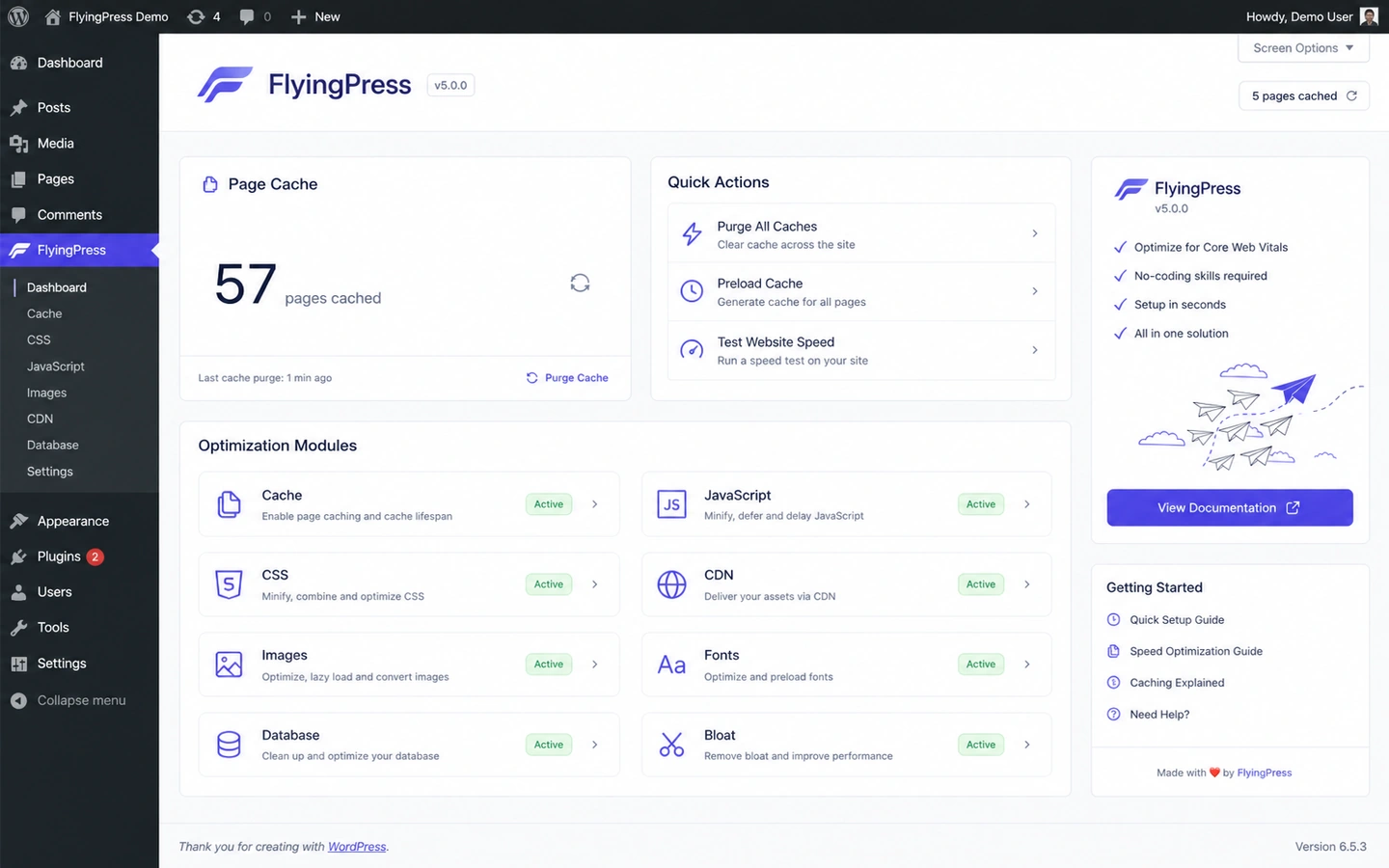
That distinction matters. The name FlyingWeb can sound like a broad software or AI productivity product, but the public product path points to FlyingPress: a paid WordPress performance plugin focused on caching, page optimization, image optimization, font handling, Core Web Vitals, and fewer moving pieces in a speed stack.
For a WordPress buyer, that can be useful. For everyone else, it is probably the wrong lane.
The strongest reason to consider FlyingWeb is focus. If you manage a WordPress site and you are tired of stacking separate tools for caching, lazy loading, image compression, font tweaks, database cleanup, and performance monitoring, FlyingPress gives you one product to test. The pricing is also easier to understand than many SaaS tools because it is based mainly on yearly license tiers and website count.
The main caution is not the feature list. It is the testing process. A performance plugin can make a site faster, but it can also disturb scripts, forms, checkout pages, logged-in areas, ads, analytics, or page-builder behavior if the buyer enables settings too aggressively.
For my money, the safest path is simple: start the 14-day trial only when you can test a real WordPress site, record before-and-after performance, check critical pages, and decide before the charge date. A coupon or offer path should come after that decision, not before it.
Next step: If FlyingPress still fits your WordPress speed problem, verify the live pricing and trial route before you install it on an important site.
Review snapshot
| Review point | Practical take |
|---|---|
| Best for | WordPress site owners, freelancers, agencies, bloggers, and WooCommerce operators testing a paid speed optimization plugin |
| Not ideal for | Non-WordPress sites, Shopify stores, static sites, custom apps, or buyers who want a free-only cache setup |
| Main use case | Simplifying WordPress performance work across caching, images, fonts, scripts, database cleanup, and Core Web Vitals |
| Pricing model | Yearly license tiers by website count |
| Free path | 14-day free trial before the first charge |
| Main strength | Focused WordPress performance workflow with public docs and active product updates |
| Main concern | Needs careful testing on real pages, especially conversion, form, and logged-in flows |
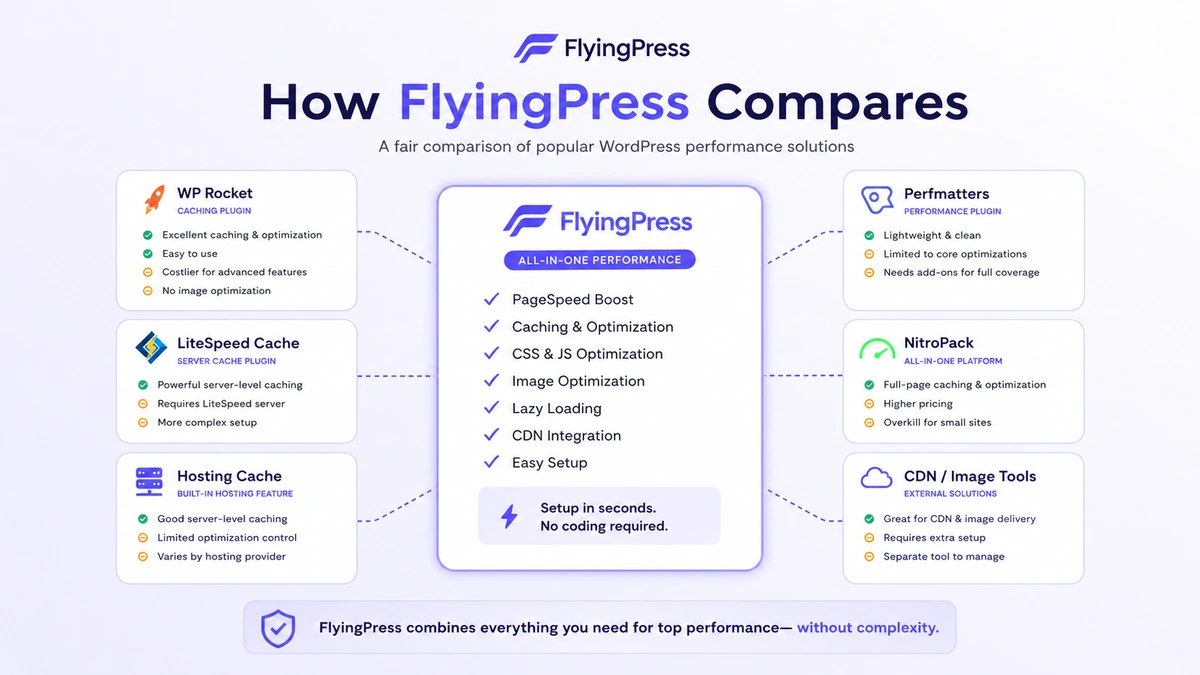
| Best alternatives to compare | WP Rocket, Perfmatters, LiteSpeed Cache, NitroPack, hosting-level caching, CDN/image optimization tools |
| Best next step | Benchmark one real WordPress site during the trial before choosing a yearly plan |
What is FlyingWeb?
FlyingWeb is best understood as the company and store layer behind FlyingPress, the WordPress performance plugin buyers are actually evaluating.
That is the first reality check.
This is not a general AI assistant. It is not a creative generator. It is not an automation platform. The buyer job is narrower: make a WordPress site faster with a paid optimization plugin that can handle several performance jobs in one place.
FlyingPress focuses on the kinds of tasks WordPress owners usually spread across multiple plugins or manual tweaks: page caching, cache preloading, CSS and JavaScript optimization, lazy loading, image optimization, Google Fonts handling, database cleanup, Cloudflare-related workflows, Core Web Vitals tracking, and documentation for compatibility or troubleshooting.
The common wrong expectation is that a speed plugin fixes every performance issue by itself. It does not. Poor hosting, a heavy theme, too many third-party scripts, badly built page templates, ad stacks, slow external embeds, and WooCommerce complexity can still create work. A good optimization plugin can reduce friction, but it cannot turn a messy site into a clean site without testing.
Our review approach: we compare public product pages, pricing details, refund terms, documentation, changelog activity, buyer workflow fit, and nearby WordPress performance alternatives. We do not treat a free trial, discount route, or low entry price as proof that the product fits the buyer. The useful question is whether the plugin improves real pages without breaking important user paths.
Who should use FlyingWeb?
FlyingWeb makes sense for buyers who already know they have a WordPress performance problem.
A single-site WordPress owner may be the simplest fit. If you run a blog, content site, niche affiliate site, or business site and want one tool to handle a large part of the speed stack, the Starter tier can be a clean test. The condition is that you must actually benchmark the site during the trial, not just install the plugin and hope.
A freelancer managing a small number of client sites may also find it useful. The Pro or Business tiers are easier to justify when several active WordPress sites need similar performance work. The buyer check here is support responsibility: if you install FlyingPress for clients, you should document the settings, exclusions, and rollback path.
A small agency can consider FlyingPress if it wants to standardize performance work across repeatable WordPress builds. The value is not only faster pages. It is also having a more consistent process for caching, images, fonts, scripts, and page-level checks.
WooCommerce operators should consider it carefully, not casually. A faster store can matter, but cart, checkout, account pages, product filters, payment scripts, and customer sessions need more careful testing than a simple blog post page.
Performance-focused publishers may also like FlyingPress if Core Web Vitals and mobile load experience affect SEO and user engagement. The important condition is that the tool should improve real visitor experience, not only a lab report or a single homepage benchmark.
Who should avoid FlyingWeb?
I would skip FlyingWeb entirely if the site is not WordPress. That includes Shopify stores, static sites, custom apps, Webflow builds, and headless setups where a WordPress plugin is not the right optimization layer.
I would also be careful if you only want a free cache plugin. FlyingPress has a trial, but the commercial model is a paid yearly license. If your budget is zero, the better comparison is a free WordPress caching or hosting-level optimization path, not FlyingPress.
Buyers who do not have time to test should slow down. The 14-day trial is useful only if you use it like a test sprint. Starting the trial during a busy week and forgetting about it is the wrong way to evaluate a product with a narrow post-charge refund window.
Teams with complex ecommerce, membership, learning-management, ad, or logged-in workflows should not install and enable every option blindly. These sites often need cache exclusions and careful checking. A plugin can help, but a careless configuration can create support problems.
I would also avoid buying just because a coupon page exists. The main savings path is choosing the right license tier and making a clear keep-or-cancel decision before the trial ends. A weak public coupon is less important than whether FlyingPress actually improves the site safely.
How FlyingWeb fits into a real workflow
A good FlyingWeb workflow starts before the plugin is installed.
First, identify the real performance issue. Is the site slow because of heavy images, render-blocking scripts, poor caching, unused CSS, font loading, database bloat, third-party scripts, a weak host, or a bloated page builder? FlyingPress can help with several of those problems, but the buyer should know what they are trying to improve.
Second, record a baseline. Check mobile page experience, key templates, product pages, lead forms, checkout pages, account pages, ads, analytics, and any page that should not be cached. You do not need to turn this into a laboratory project, but you do need a before point.
Third, install FlyingPress and enable settings carefully. The safer workflow is not “turn everything on.” The safer workflow is to activate a group of optimizations, test the site, then continue.
Fourth, check the business-critical paths. A homepage may feel faster while a form, menu, popup, payment widget, or logged-in page misbehaves. That is not a win.
Fifth, compare the result with the yearly price and site-count tier. If the improvement is meaningful and the site still works correctly, FlyingPress becomes easier to justify. If the results are mixed, cancel before the trial ends and compare alternatives.
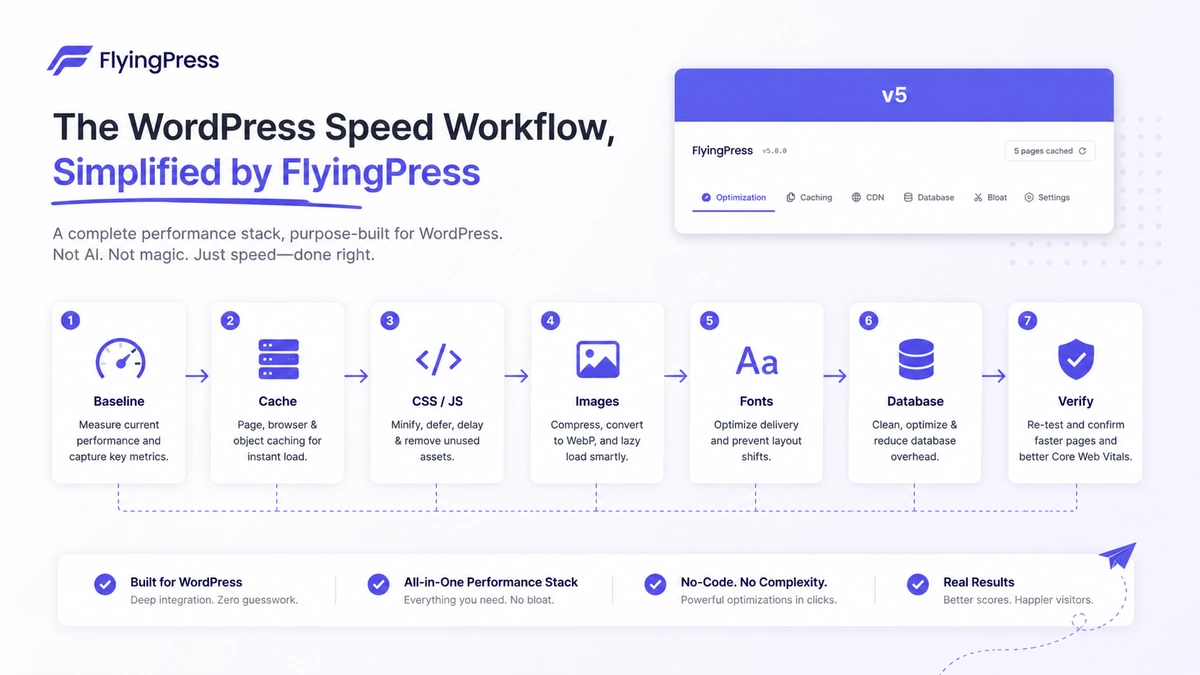
Workflow check: If you can test FlyingPress on a real WordPress site this week, the trial is more useful than a long feature comparison.
Real-world buyer scenarios
Solo blogger with a slow WordPress site
A solo blogger may want a faster site without learning every performance detail from scratch. FlyingPress can make sense if the site runs on WordPress, the owner can test during the trial, and the yearly Starter license fits the budget.
The risk is shallow testing. If the buyer only checks one homepage metric and ignores mobile posts, ads, email forms, or affiliate tables, the decision is incomplete.
Freelancer managing client websites
A freelancer may like FlyingPress because it can become part of a repeatable optimization checklist. The Pro or Business tier may fit when several active client sites need similar treatment.
The condition is process discipline. The freelancer should record baseline metrics, document settings, save cache exclusions, and make sure the client understands that future theme or plugin changes can affect performance again.
WooCommerce store owner
A WooCommerce buyer should be more cautious. Faster pages can help user experience, but checkout, cart fragments, payment scripts, product filters, customer accounts, and logged-in sessions are sensitive.
FlyingPress may still fit. But the test should include real store flows, not only category and product pages.
Agency simplifying its performance stack
An agency might use FlyingPress to reduce tool overlap across caching, image optimization, font handling, and Core Web Vitals work. The Unlimited tier may look attractive if many active sites genuinely need the same plugin.
The mistake would be buying unlimited capacity before proving that the plugin fits the agency’s real mix of hosts, themes, page builders, and client maintenance routines.
Key features that actually matter
WordPress caching and cache preloading
Caching is the basic layer most buyers expect from a performance plugin. FlyingPress can help generate and serve faster pages, while preloading can reduce the delay after cache clearing.
Buyer note: caching needs exclusions. Checkout pages, logged-in experiences, dynamic pages, membership content, and forms may need special handling. The buyer should not judge the product only by a faster public page.
CSS and JavaScript optimization
Script and style handling can improve perceived speed, but it is also where many performance problems begin. Delaying scripts, reducing unused CSS, or changing loading behavior can affect menus, popups, sliders, analytics, ads, forms, and page-builder effects.
Buyer note: this is useful when tested carefully. It becomes risky when a buyer enables settings without checking real interactions.
Image optimization
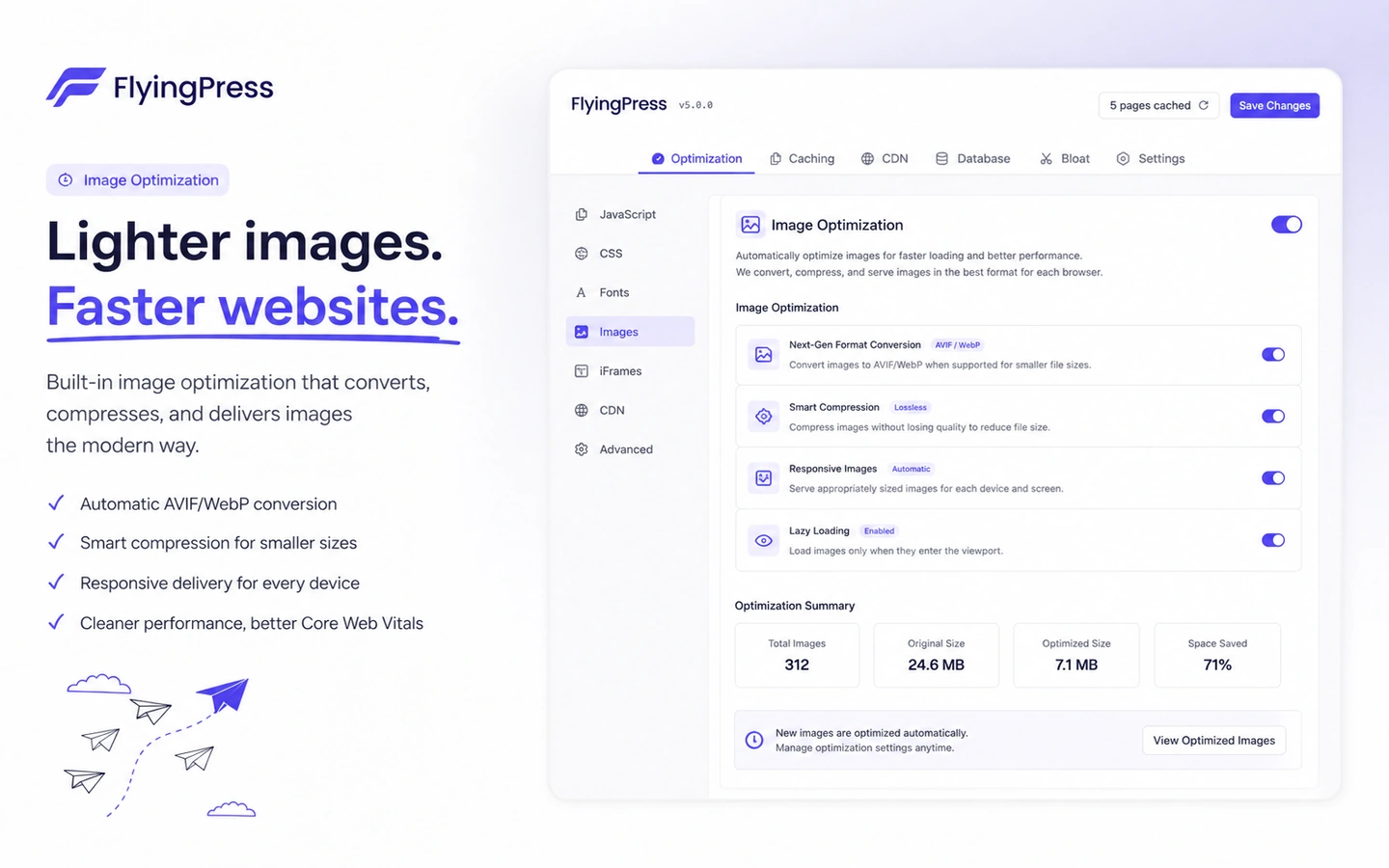
FlyingPress has moved more heavily into built-in image optimization, including compression and WebP or AVIF conversion. That matters because many WordPress sites are slow partly because images are too heavy.
Buyer note: image optimization can reduce the need for a separate media plugin, but buyers should check backup behavior, visual quality, conversion settings, excluded images, and how the site serves fallbacks for older browsers.
Font and above-the-fold optimization
Fonts, critical assets, and above-the-fold loading can affect the first impression of a page. FlyingPress is useful when it helps reduce font delay and prioritize important visual elements without making the site feel broken.
Buyer note: check real pages, not just one test URL. Different templates may behave differently.
Core Web Vitals tracking
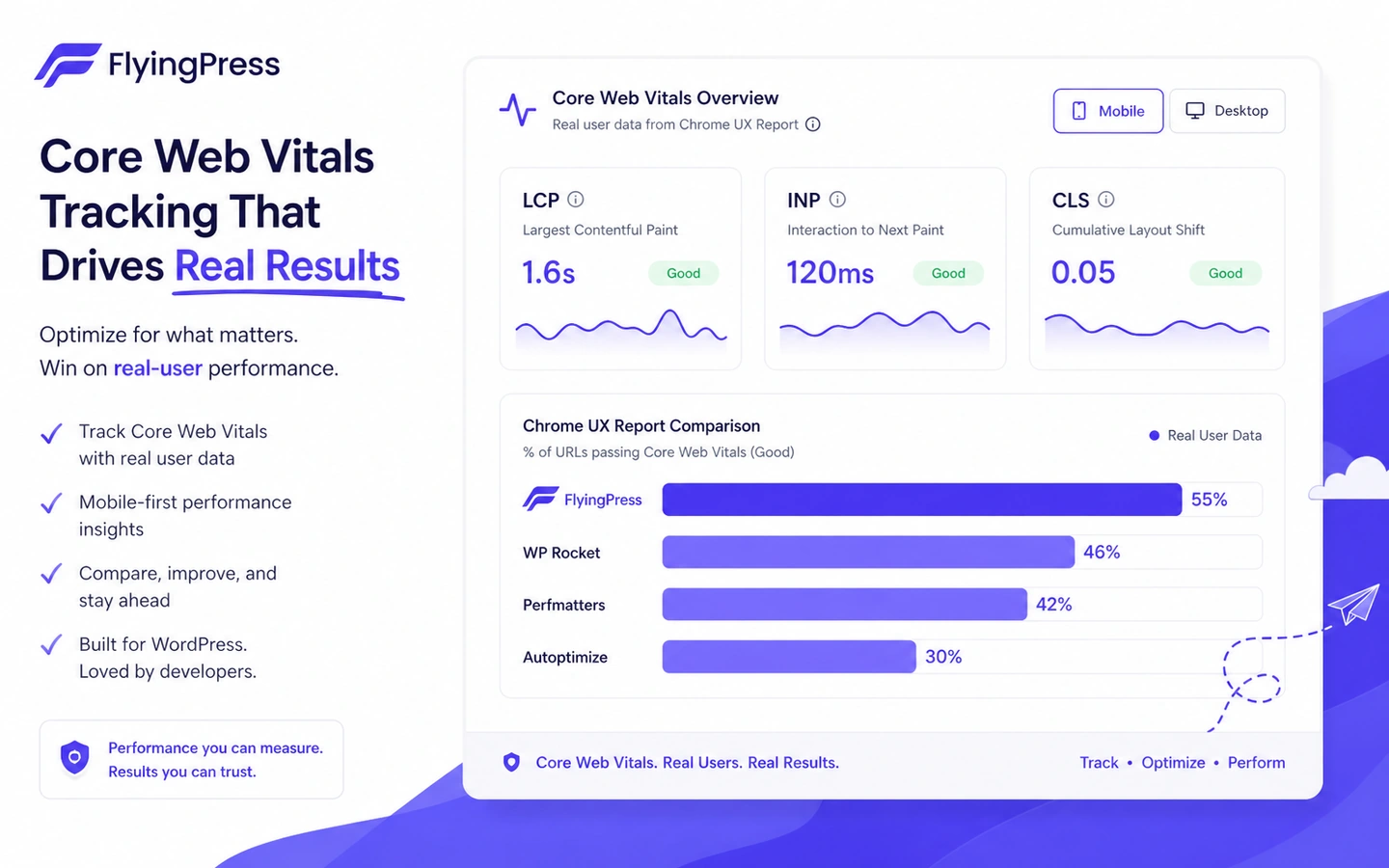
Core Web Vitals matter because they are closer to real user experience than a single synthetic test. FlyingPress has been adding more product direction around real-user Core Web Vitals tracking.
Buyer note: this is helpful only if the buyer uses it to decide what to fix. Metrics should guide changes, not become decoration in a dashboard.
Pricing and plan value
FlyingWeb pricing is really FlyingPress pricing, and the current public structure is easy to understand: yearly licenses by site count.
The public pricing page lists Starter at $59/year for one website, Pro at $109/year for three websites, Business at $229/year for ten websites, and Unlimited at $279/year for unlimited websites. All visible plans show a 14-day free trial, and the pricing page says the card is not charged until the trial ends.
That makes the pricing decision more practical than emotional.
For one WordPress site, the Starter plan is the natural test. The question is whether FlyingPress improves that site enough to justify a yearly paid tool instead of a free cache plugin, hosting-level cache, or a different paid plugin.
For freelancers, the Pro and Business tiers are mainly site-count decisions. Three sites and ten sites are not just numbers; they represent how many active client installs you can support responsibly.
For agencies, Unlimited can look efficient, but I would still avoid buying it too early. A plugin that works well on five sites may still require different exclusions and settings on another ten. Unlimited only makes sense after the workflow is proven across the kinds of sites you actually maintain.
Annual billing is normal for this category, but it still deserves a reminder. The license renews yearly, and support or updates depend on an active license. That makes renewal planning part of the cost, not an afterthought.
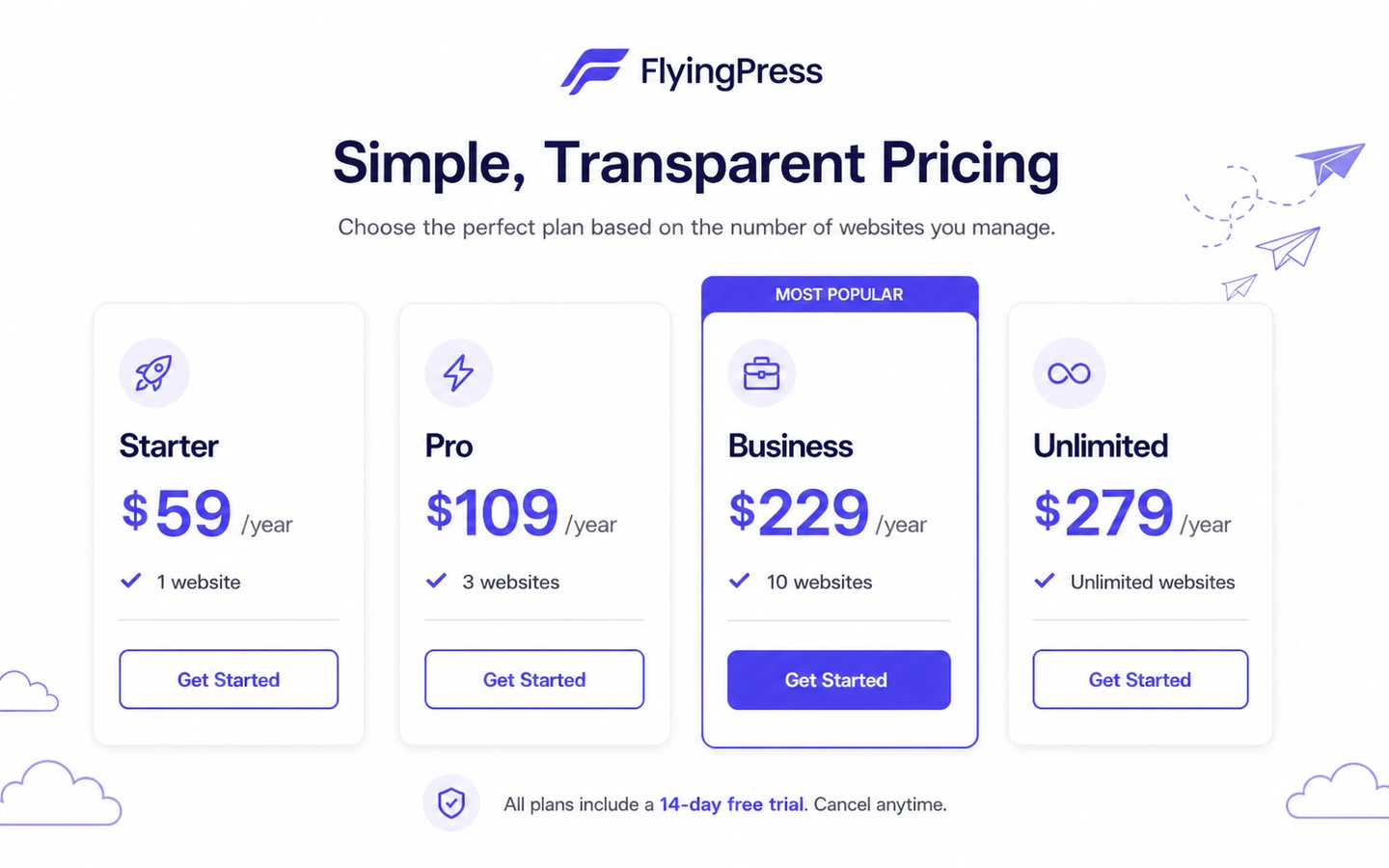
Pricing check: If the trial result is promising, verify the current yearly plan, renewal behavior, and site-count tier before checkout.
Free plan, trial, coupon, and checkout notes
FlyingWeb is not best judged as a coupon-first product.
The stronger buyer path is the 14-day trial. A trial lets the buyer test real pages before the first charge. That is more useful than a small discount because performance products can be highly site-specific.
There is no permanent free plan presented in the supplied buyer route. The free path is a time-limited trial. That means the buyer should start the trial only when there is time to install, benchmark, configure, check key pages, and make a keep-or-cancel decision.
The coupon path is secondary. You can check the FlyingWeb coupon page before checkout, but I would not let that drive the decision. A discount does not solve a compatibility issue. It does not prove that checkout pages work. It does not tell you whether the one-site, three-site, ten-site, or unlimited license is the correct fit.
The refund policy also pushes the buyer toward trial discipline. The safer behavior is to cancel before the charge date if the product is not a fit. If a buyer forgets and gets charged, the full-refund window is short, and the policy becomes less favorable after that.
Trial-first route: Use the offer path only after FlyingPress has passed a real WordPress performance test on your own site.
What I would check before buying FlyingWeb
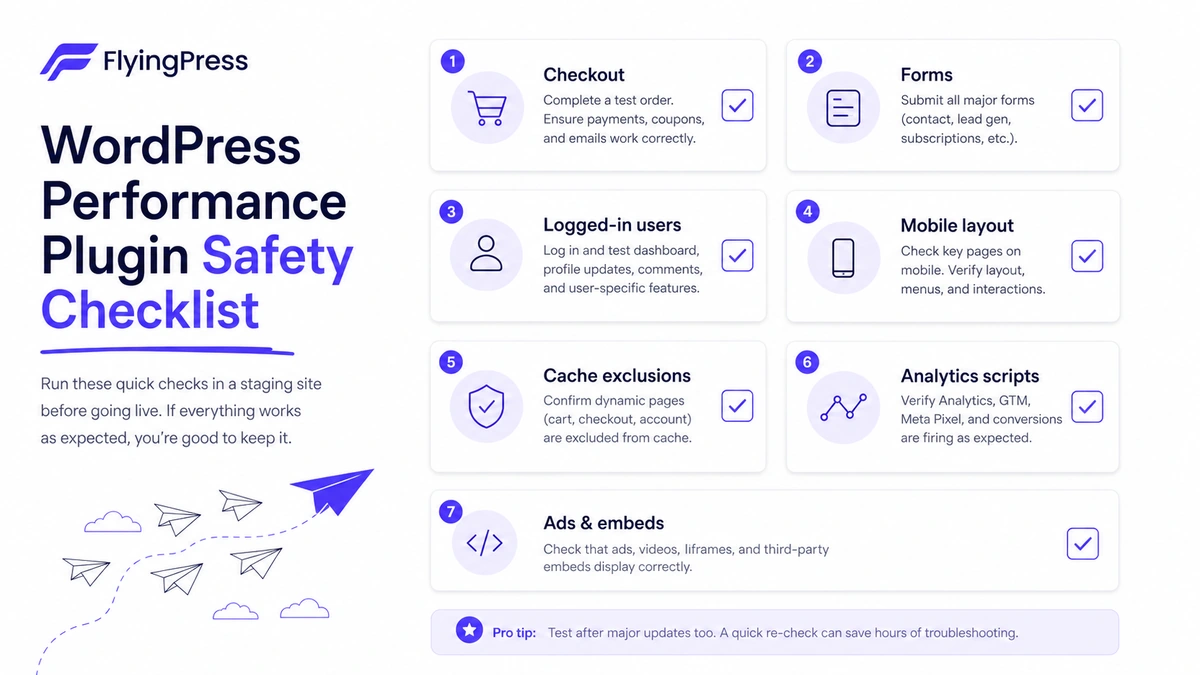
If I were buying FlyingWeb for a real WordPress workflow, I would check seven things before letting the trial convert into a paid yearly license.
- The site is actually a good fit for plugin-level optimization. If the bigger issue is poor hosting, a bloated theme, or heavy third-party scripts, FlyingPress may help but may not solve the root problem.
- The current plan matches real site count. One site, three sites, ten sites, and unlimited sites are different buying decisions. Do not overbuy for vague future projects.
- Critical pages still work. Check forms, checkout, cart, account pages, login areas, search, filters, popups, ads, embeds, analytics, and membership pages.
- Mobile experience improves. A desktop-only improvement is not enough for most sites.
- Image optimization settings are safe. Review compression, AVIF or WebP conversion, original-image handling, exclusions, and visual quality.
- Hosting and CDN features do not overlap badly. If your host already handles caching or CDN logic, understand which layer does what.
- The trial deadline is managed. Set a reminder before the charge date and keep notes on whether the plugin created enough value to stay installed.
A simple test before paying
Before paying, I would run a small test like this:
- Pick one real WordPress site, preferably one with enough traffic or business value to matter.
- Record baseline metrics for the homepage, one content page, one conversion page, and any ecommerce or form page.
- Install FlyingPress during a low-risk window.
- Enable optimization settings gradually instead of activating every option at once.
- Check mobile layout, navigation, forms, checkout, logged-in behavior, analytics, ads, embeds, and page-builder interactions.
- Compare before-and-after performance and user-path safety.
- Decide whether the yearly license tier is justified before the trial ends.
This test is intentionally simple. The goal is not to prove that FlyingPress is the best performance product on the market. The goal is to know whether it makes your site better without creating new problems.
Pros explained
Focused WordPress performance stack
The biggest pro is focus. FlyingPress is not trying to be every kind of software tool. It is built for WordPress speed work, and that makes the buyer decision easier to frame.
This matters when the buyer wants fewer plugins and a clearer optimization process. It stops being enough when the site’s bottleneck is outside the plugin layer.
Clear site-count pricing
The pricing page is structured around website count, which is useful for freelancers and agencies. A buyer can compare one, three, ten, or unlimited websites without decoding complicated seat rules.
This matters when the buyer knows their active site count. It becomes weaker when the buyer is guessing future client volume or buying unlimited capacity too early.
Trial before charge
The 14-day trial is a real advantage because performance tools should be tested on a real site. Buyers can judge compatibility before the first charge if they use the trial properly.
This matters only when the buyer has time to test. A forgotten trial is not the same as a successful evaluation.
Public documentation and product activity
FlyingPress has public documentation, developer reference material, and a recent changelog showing active product movement around image optimization, Cloudflare-related fixes, language support, and real-user Core Web Vitals tracking.
This matters because performance products need maintenance. It does not remove the need for buyer-side testing, but it does make the product feel more actively supported than a stale plugin.
Cons explained
WordPress-only fit
FlyingWeb is not useful if your site cannot use a WordPress plugin. That sounds obvious, but it matters because broad software directories can make tools look more general than they are.
If you run Shopify, Webflow, a static Astro site, a custom app, or a headless stack, this is not the direct route.
Configuration risk
Performance settings can affect how a site behaves. CSS, JavaScript, lazy loading, caching, and font changes are not purely cosmetic. They can affect user interactions.
The buyer risk is highest on WooCommerce, membership, logged-in, booking, advertising, and form-heavy websites. The fix is careful staged testing, not avoiding optimization entirely.
Narrow post-charge refund flexibility
The trial gives buyers time before charge, but the refund policy becomes less forgiving after the charge happens. That makes calendar management important.
The safe move is to make a decision before the trial ends, not to rely on refund handling afterward.
Coupon value is secondary
Public coupon signals are not the strongest reason to buy FlyingPress. The better savings decision is choosing the correct license tier and canceling if the plugin does not improve a real site during the trial.
If a buyer only wants a discount, they may miss the actual decision: performance fit.
Green flags and red flags
Green flags
- You run WordPress and know performance is a real problem.
- You can test during the full 14-day trial window.
- You have a clear site count for the license tier.
- You want to reduce overlap between caching, image, font, and page optimization tools.
- You are willing to check critical pages before keeping the plugin active.
Red flags
- You do not run WordPress.
- You want a permanent free plan.
- You are starting the trial without time to test.
- Your site has complex checkout, membership, ad, or logged-in flows and you are not prepared to check exclusions.
- You are buying mainly because of a coupon path rather than real performance improvement.
FlyingWeb vs alternatives
FlyingWeb should be compared with WordPress performance alternatives, not broad AI or software tools.
WP Rocket vs FlyingWeb
WP Rocket is the most obvious comparison for many WordPress buyers because it is a widely known premium caching and performance plugin. It may feel more familiar, especially for buyers who want a long-established product with a broad user base.
FlyingWeb may still make sense if the buyer prefers FlyingPress’s current product direction around Core Web Vitals, built-in image optimization, and a lighter-feeling setup. The tradeoff is that the buyer should test both against their own site rather than assuming one brand wins universally.
Perfmatters vs FlyingWeb
Perfmatters is often attractive for buyers who want granular control over scripts, bloat reduction, and performance settings. It can be powerful for technical users.
FlyingWeb may be better for buyers who want a more all-in-one speed optimization plugin rather than a separate performance-tuning layer. The tradeoff is control versus packaged workflow.
LiteSpeed Cache vs FlyingWeb
LiteSpeed Cache can be a strong route when the site is on a LiteSpeed server and the hosting environment is aligned with it. It can also be attractive because the plugin itself has a free path.
FlyingWeb is more relevant when the buyer wants a paid performance product that is not tied to one server stack in the same way. The tradeoff is price versus environment fit.
NitroPack vs FlyingWeb
NitroPack is a broader cloud-based performance solution. It can appeal to buyers who want more of the optimization handled off-site and are comfortable with that model.
FlyingWeb may be more appealing to WordPress buyers who want a plugin-centered approach and a yearly license model. The tradeoff is workflow preference and how much control the buyer wants over settings.
Hosting-level caching and CDN tools vs FlyingWeb
Some buyers may not need another plugin at all. A better host, better CDN setup, image CDN, or server-level cache may solve the bigger problem.
FlyingWeb still makes sense if plugin-level controls are needed on top of hosting. The buyer should avoid duplicate optimization layers that fight each other.
Adjacent internal software routes
1min.AI and Aikeedo may appear as broader software routes inside the DealBestDaily ecosystem, but they are not direct alternatives to FlyingPress. 1min.AI belongs closer to general AI utility workflows, while Aikeedo belongs closer to AI SaaS/software-building routes. They may be relevant for a different buyer journey, but they should not be used to decide whether FlyingPress is the right WordPress speed plugin.
Trust, refund, and buyer-risk notes
My confidence is strongest around FlyingWeb’s current public product role: FlyingPress is a WordPress speed optimization plugin with clear public pricing, a 14-day trial, published documentation, a visible refund policy, and active product updates.
I am more cautious around site-specific value. Performance tools are not universal because each WordPress site has different hosting, themes, plugins, scripts, images, traffic patterns, and business-critical pages.
The refund policy is also a real buyer check. The trial is the primary protection. Once a charge happens, the refund window becomes narrow, and after the stated window buyers should not expect flexibility.
The terms also matter because an active license is needed for ongoing access, updates, and support. This is not a one-time lifetime plugin purchase. Treat it as a yearly performance service that needs to keep earning its place in the stack.
Data and technical buyers should also read the documentation before assuming how cloud optimization, image processing, Cloudflare integration, or developer references fit their site. Exact behavior can depend on configuration and environment.
Finally, do not judge FlyingWeb from old third-party pricing references. The current public pricing page should be the source for checkout decisions, especially because older reviews and deal pages may mention outdated tiers or site counts.
Final verdict
I would consider FlyingWeb if I had a WordPress site with real performance problems and enough time to test FlyingPress properly during the 14-day trial.
I would skip it if the site is not WordPress, if the buyer wants a free-only setup, or if the buyer is not willing to check key pages after enabling performance settings.
I would compare it with WP Rocket if I wanted the most obvious premium caching comparison, Perfmatters if I wanted more granular control, LiteSpeed Cache if my hosting stack is LiteSpeed-friendly, NitroPack if I wanted a broader cloud-based performance route, and hosting/CDN improvements if the bottleneck sits outside WordPress plugin configuration.
The safest next step is not to chase a coupon first. The safer move is to test FlyingPress on one real WordPress site, watch the trial deadline, verify the current yearly license tier, and only keep the subscription if the site is faster and the important user paths still work.
