Quick verdict
Emergent is worth considering if you want to turn a real app idea into working web or mobile software faster than a traditional development route.
It is not the kind of tool I would judge by the homepage promise alone.
The better question is narrower: can Emergent help you build the first useful version of your app without burning through credits, losing control of the project, or confusing a good demo with a production-ready business system?
That is where the buying decision gets more serious. Emergent is currently presented as an AI app builder and vibe-coding platform, not a general AI chatbot. Its public positioning is about building production-ready apps through conversation, with AI agents helping design, code, test, and deploy the application. The pricing page also makes the free path attractive: Free includes 10 monthly credits, while Standard and Pro raise the credit limits and builder capacity.
For my money, Emergent makes the most sense for founders, product managers, operators, and agencies who already have a concrete app idea. It is weaker for buyers who only want a lightweight productivity assistant, a simple landing page, or a fully controlled engineering workflow.
The safest next step is simple: test one narrow app idea on the free path first. Do not start with a coupon or annual plan. Start with the real workflow.
Next step: If Emergent still fits your app-building workflow, test the live builder route and compare the current plan details before paying.
Review snapshot
| Review point | Practical take |
|---|---|
| Best for | Founders, operators, agencies, product managers, and builders testing real app ideas |
| Not ideal for | Buyers who need full manual engineering control, strict compliance workflows, or a simple writing assistant |
| Main use case | Turning a clear app brief into a working web or mobile application with AI help |
| Free path | Free plan with 10 monthly credits |
| Paid path | Standard and Pro are credit-based annual paths with higher builder capacity |
| Main strength | AI app-building workflow across planning, interface, backend, testing, and deployment |
| Main concern | Credits, deployment cost, annual billing, and refund flexibility need careful review |
| Direct alternatives to compare | Lovable, Replit Agent, Bolt-style AI builders |
| Adjacent routes | 1min.AI for broad AI utility; Aikeedo for a self-hosted AI SaaS starter-kit path |
| Best next step | Build one small real project before choosing Standard or Pro |
What is Emergent?
Emergent is best understood as an AI app builder for people who want to describe software in plain language and let AI agents help turn that idea into a working web or mobile application.
That makes it different from a normal AI productivity assistant.
The current public positioning is about building production-ready apps through conversation. Emergent describes agents that design, code, and deploy an application from start to finish. Its pricing also reinforces the app-builder model: the real plan decision is not only “monthly price,” but credits, private hosting, GitHub integration, deployment, larger context, custom agents, and support depth.
The common misunderstanding is assuming this is just another prompt box.
It is closer to a vibe-coding platform for app creation. You bring the product idea, user flow, feature expectations, and feedback. The platform helps generate and iterate toward software. That can be valuable, but it also means the buyer still owns the hard parts: product clarity, testing, data decisions, maintainability, security review, and deciding when a first build is good enough.
Our review approach compares public product pages, pricing details, help documentation, deal terms, buyer workflow fit, and nearby alternatives. We do not treat a coupon, free credits, or a low monthly-equivalent price as proof that the product fits the buyer.
Who should use Emergent?
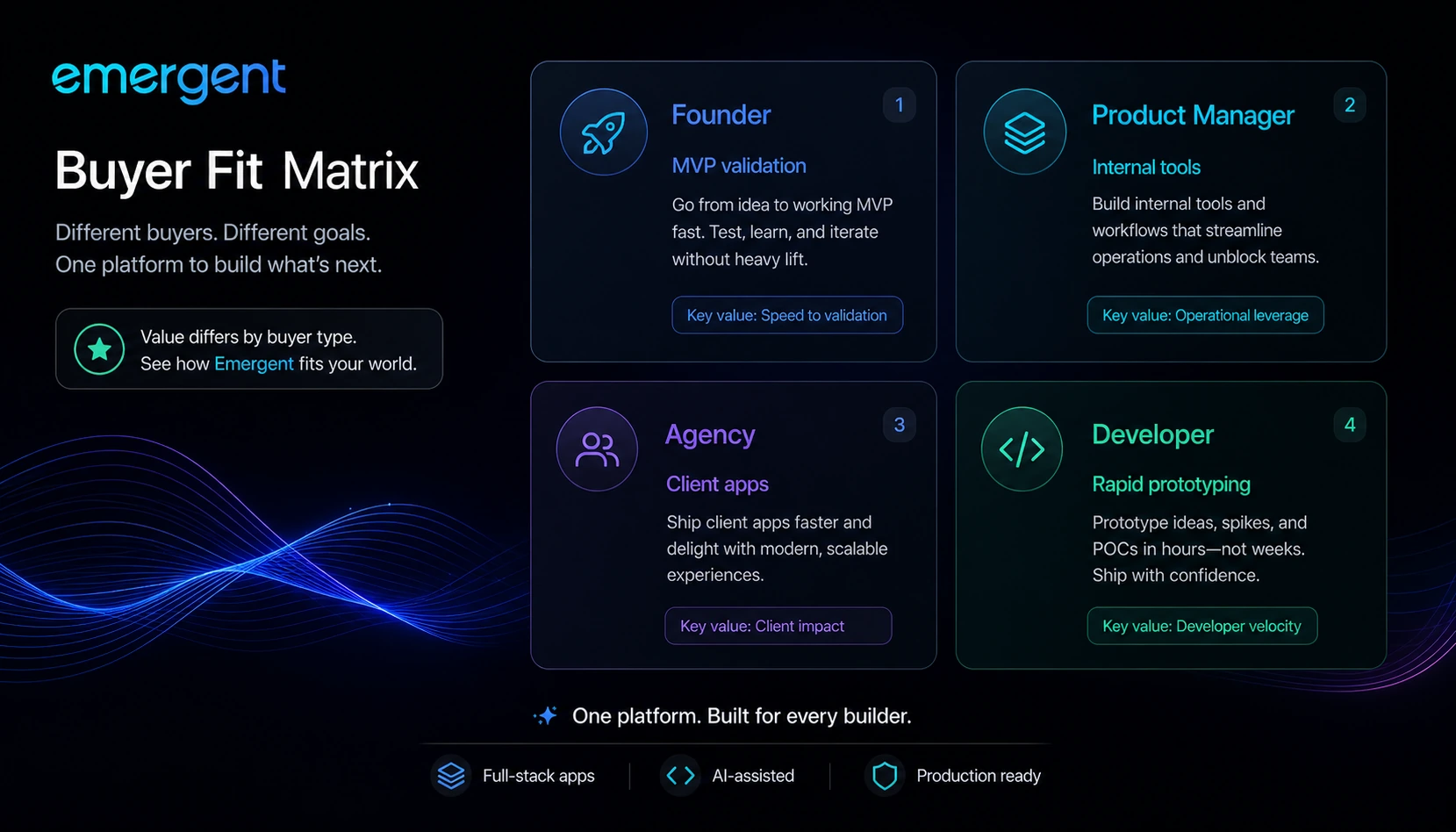
Emergent makes the most sense for non-technical founders with a specific MVP idea. The key phrase is “specific.” A vague app dream can waste credits quickly. A clear brief with target users, required screens, data flows, and success criteria gives the builder something useful to work with.
It can also fit product managers and operators who need internal tools, dashboards, workflow apps, or quick prototypes. In that setting, Emergent can reduce the friction between “we should build this” and “let us see a working version.”
Agencies and freelancers may find it useful for client proof-of-concept work. A fast working version can make a client conversation more concrete. The caution is scope. If the client expects production delivery, maintenance, code review, and long-term support, the agency needs to be clear about what Emergent does and what still needs human oversight.
Solo builders and technical founders may use it as an acceleration layer. A developer may not need Emergent to understand the code, but may still value a faster first pass, preview flow, deployment help, or AI-assisted iteration.
The strongest fit is when speed matters, the first version does not need perfect architecture, and the buyer is willing to review the generated app with real user and technical expectations.
Who should avoid Emergent?
I would be careful with Emergent if you are only trying to create a simple note, blog draft, chatbot response, or one-off AI output. That is not where the product is most naturally positioned. A broad AI workspace like 1min.AI may be a more relevant route if your real need is general utility across many small AI tasks.
I would also slow down if your team needs strict manual engineering control from the first commit. Emergent may help you move quickly, but a serious software project still needs architecture review, security thinking, maintainability checks, and a clear handoff plan.
Regulated teams should be cautious as well. If the project touches sensitive customer data, legal obligations, payment flows, healthcare, finance, or internal company systems, do not treat an AI-built first version as automatically safe to ship.
Coupon-first buyers should avoid jumping straight to checkout. A code may reduce the price, but it does not solve the main question: can Emergent build the app you actually need inside the credit and plan limits?
Finally, avoid annual billing until the free test has answered a practical question: how many credits does your real workflow consume before the app becomes usable?
How Emergent fits into a real workflow
A realistic Emergent workflow does not start with “build me an app.”
It starts with a tighter brief.
A careful buyer should define the app idea, the user type, the core workflow, the must-have screens, the data that needs to be stored, the integrations that matter, and the point where the first version becomes useful enough to test. Then the buyer can bring that brief into Emergent and judge how well the platform turns it into working software.
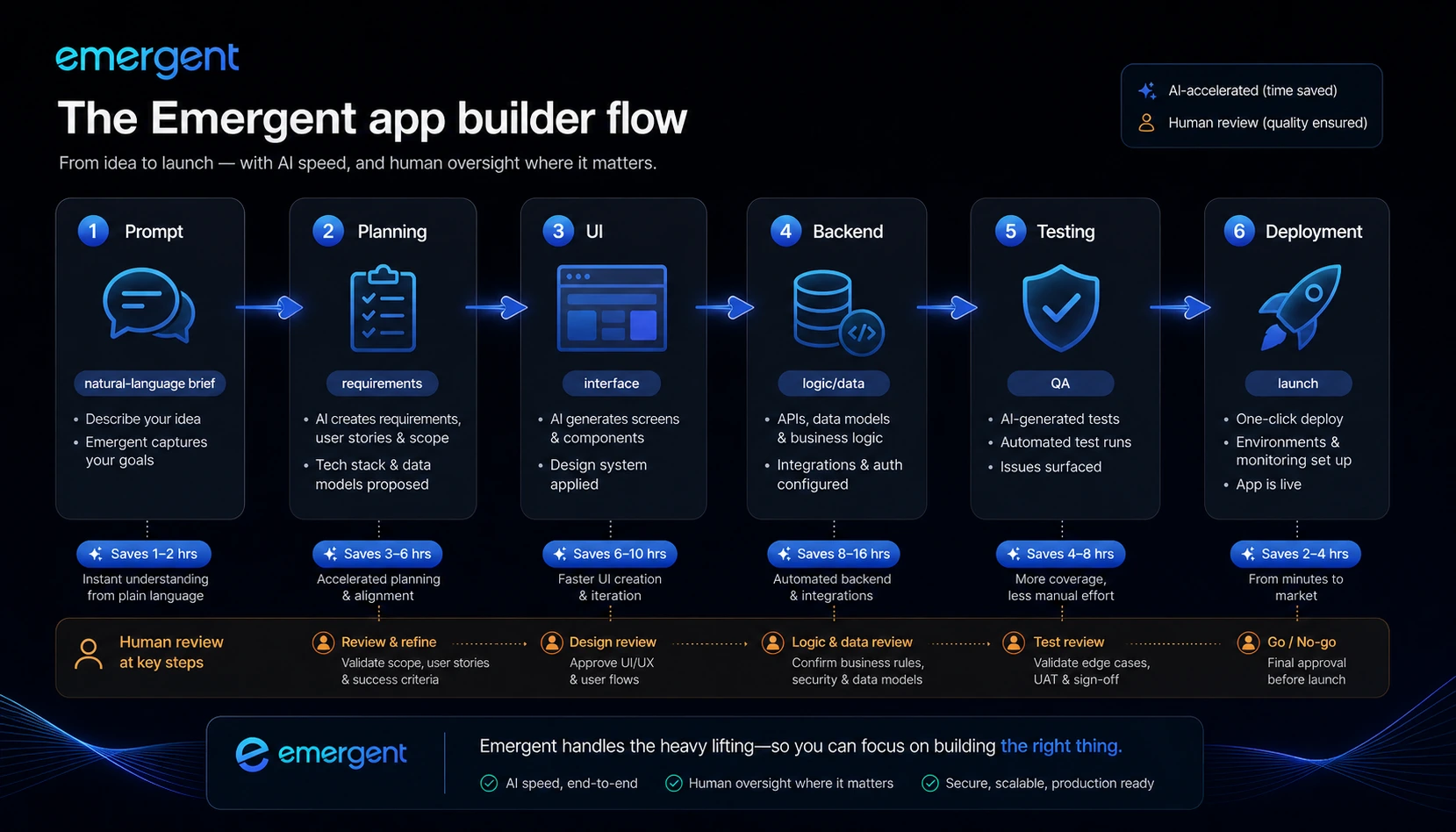
The workflow usually looks like this:
- Clarify the app problem and minimum useful version.
- Prompt Emergent with user, feature, data, and interface expectations.
- Review the planned structure before overbuilding.
- Preview the generated app and test the core interactions.
- Ask for fixes, refinements, and missing pieces.
- Check whether deployment, hosting, and handoff needs are clear.
- Decide whether the project deserves paid credits, GitHub integration, or Pro-level capacity.
That is a different mindset from casual AI experimentation.
Emergent becomes more compelling when the buyer treats it as a guided app-building environment. It becomes riskier when the buyer treats it as a magic builder that removes product thinking.
Workflow check: Before choosing a paid plan, use one real app idea to see whether Emergent can handle your prompt quality, revision needs, and deployment expectations.
Real-world buyer scenarios
A founder testing a SaaS idea
A founder may use Emergent to turn a narrow SaaS idea into a first working version. This is a strong use case if the goal is validation, demos, or early user feedback.
The risk is confusing “working demo” with “ready company infrastructure.” The founder still needs to test onboarding, permissions, data structure, edge cases, payments, security, and support needs.
A product manager building an internal tool
A product manager may use Emergent to prototype a dashboard, approval workflow, inventory tracker, or operations tool. This can be valuable when the internal team is blocked by engineering capacity.
The condition is data sensitivity. If the app uses internal business data or connects to important systems, the buyer needs a review step before rollout.
An agency creating client prototypes
An agency can use Emergent to move from client brief to working concept faster. This is useful for proposals, discovery calls, and early product scoping.
The failure point is expectation management. The agency should not promise a fully engineered product just because the first build looks impressive.
A developer accelerating early structure
A developer may use Emergent to produce a starting point, explore UI flows, or create a functional draft of an idea.
The developer should still inspect maintainability, deployment choices, dependencies, and code handoff. Speed is useful only if the resulting project remains understandable.
Key features that actually matter
Natural-language app building
Emergent’s core feature is letting buyers describe an application in plain language. This matters because many product ideas die before a prototype exists.
The buyer note: the prompt still matters. Weak project descriptions can produce shallow or misaligned outputs. The better the app brief, the fairer the test.
Web and mobile app creation
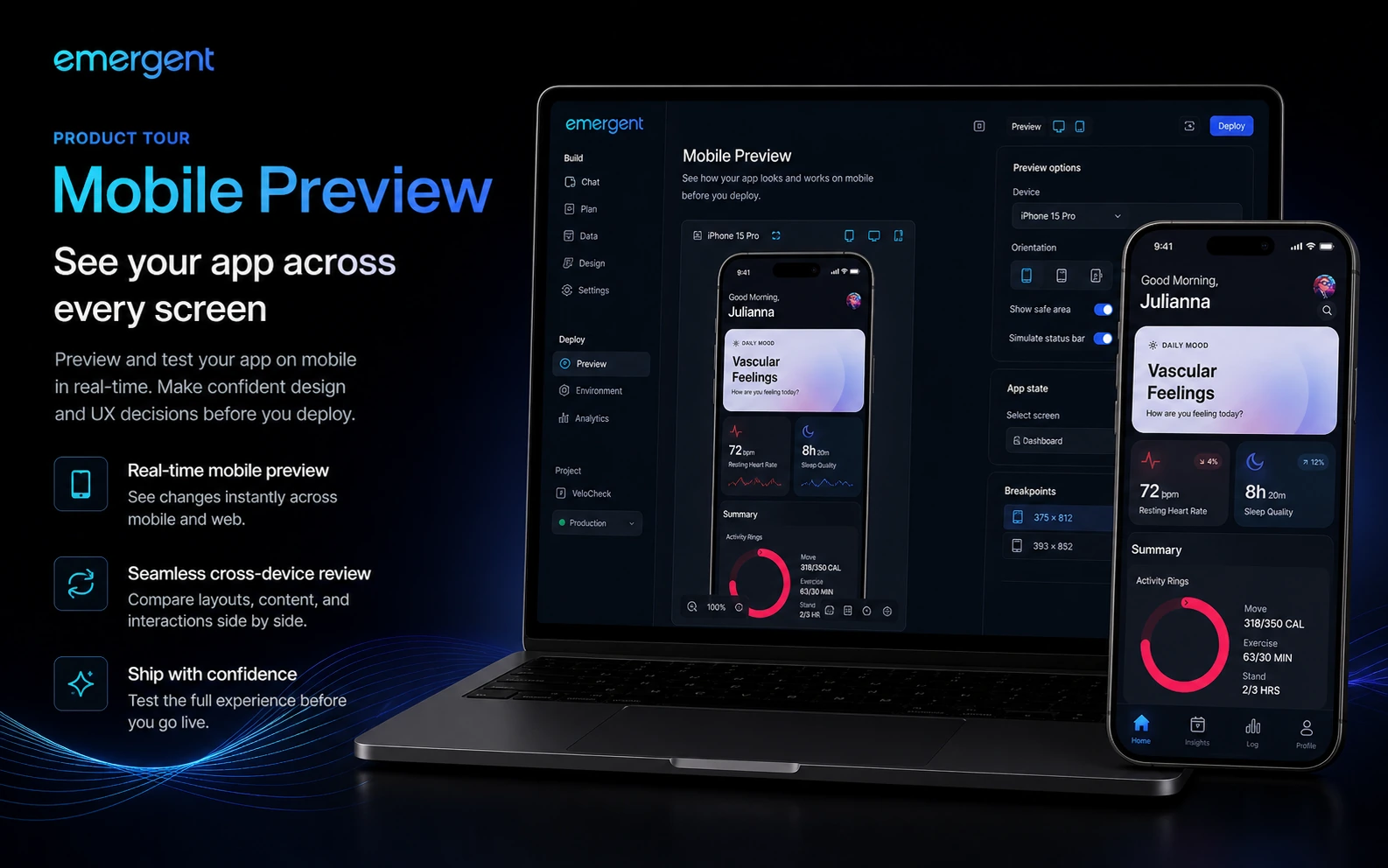
The platform is positioned around both web and mobile app experiences. That is useful for buyers who need more than a static website or desktop-only prototype.
The caution is that cross-device confidence should be tested. Do not assume a mobile-ready flow is good enough until you review the app on the devices and screen sizes that matter.
Credits and paid capacity
Credits are not a side detail. They are central to the buying decision.
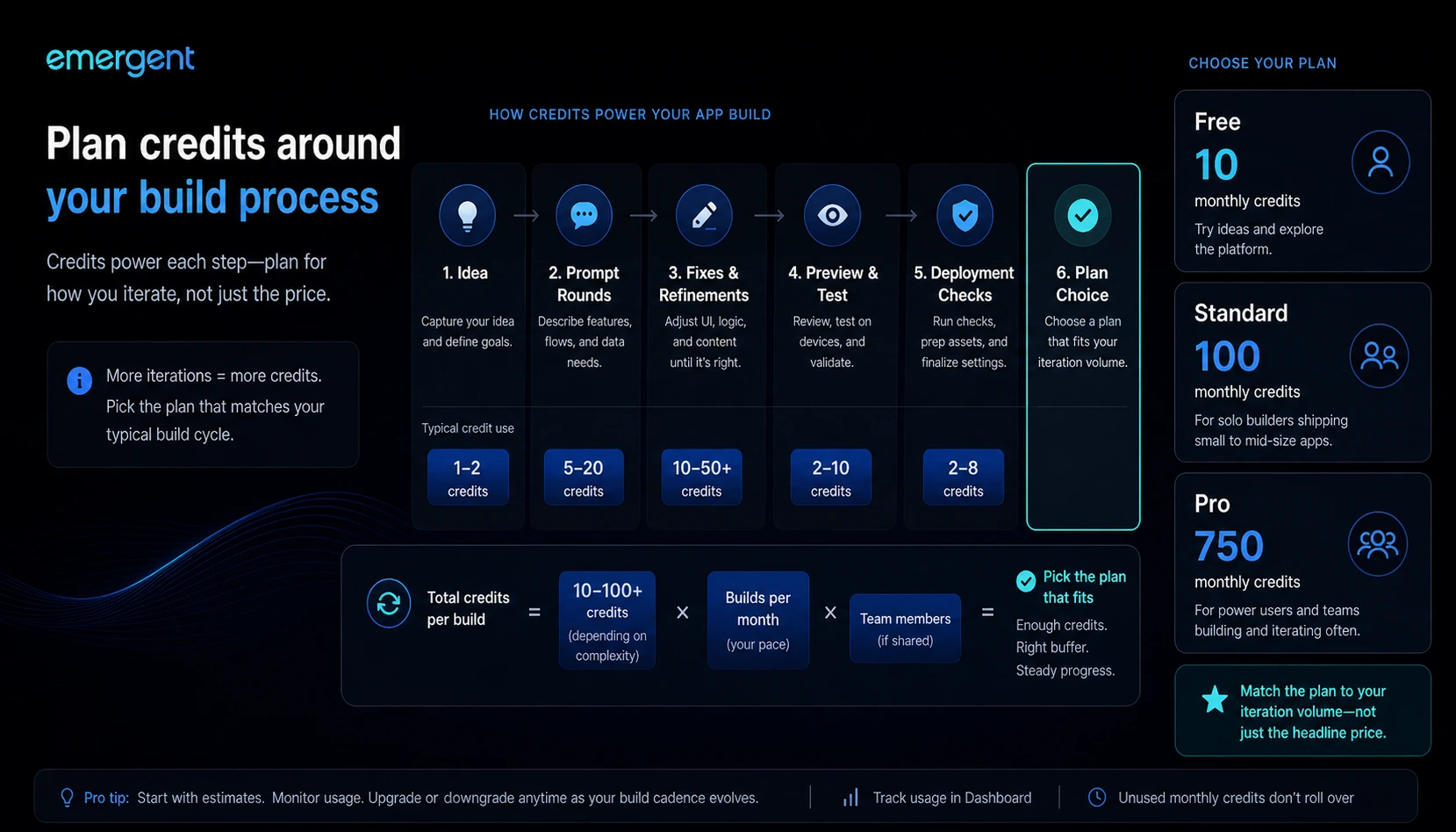
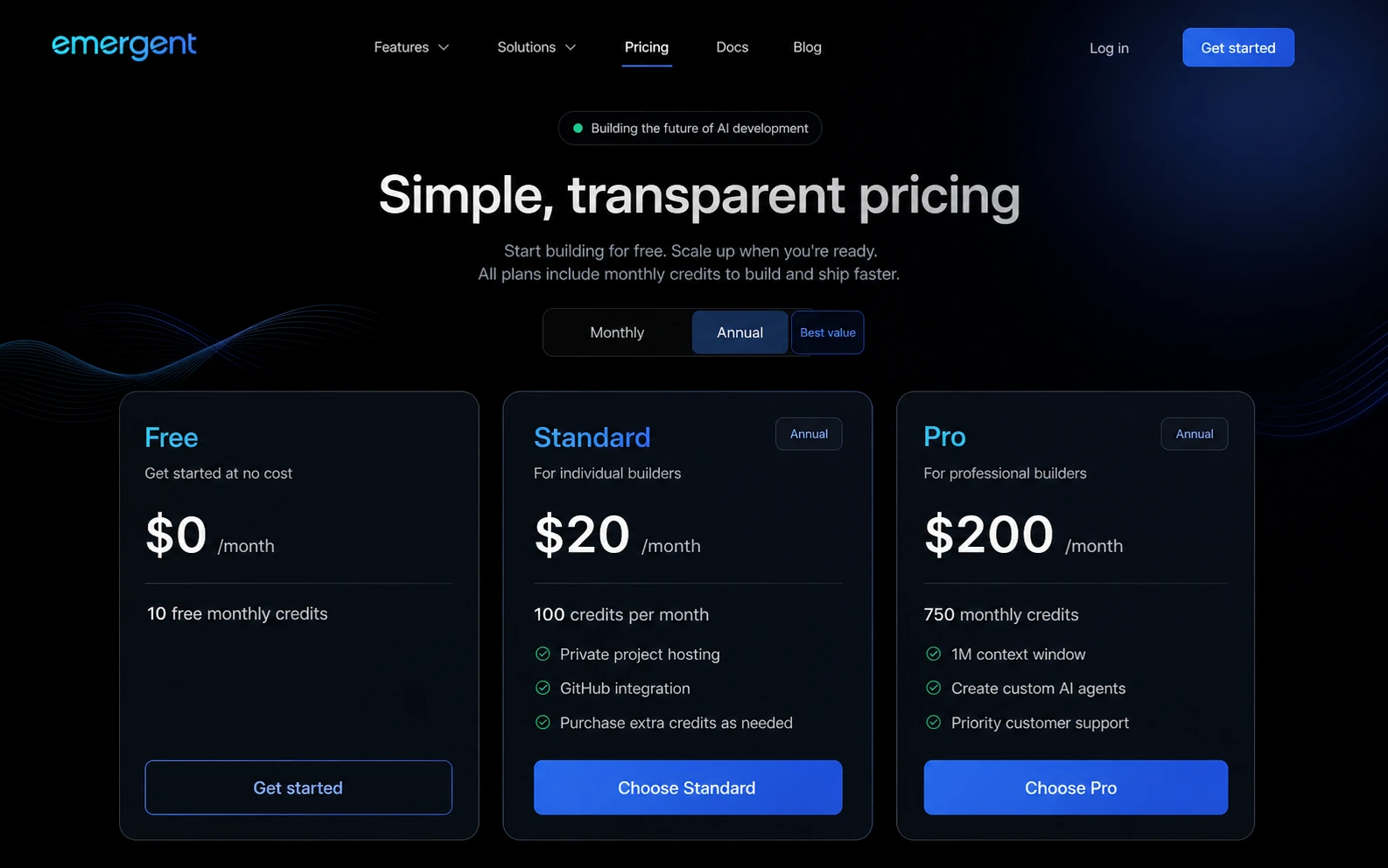
Free gives room to experiment, Standard gives a more serious monthly allowance, and Pro gives deeper capacity. But app building often involves iteration. The first build, fixes, previews, and deployment choices can all affect the real value of a plan.
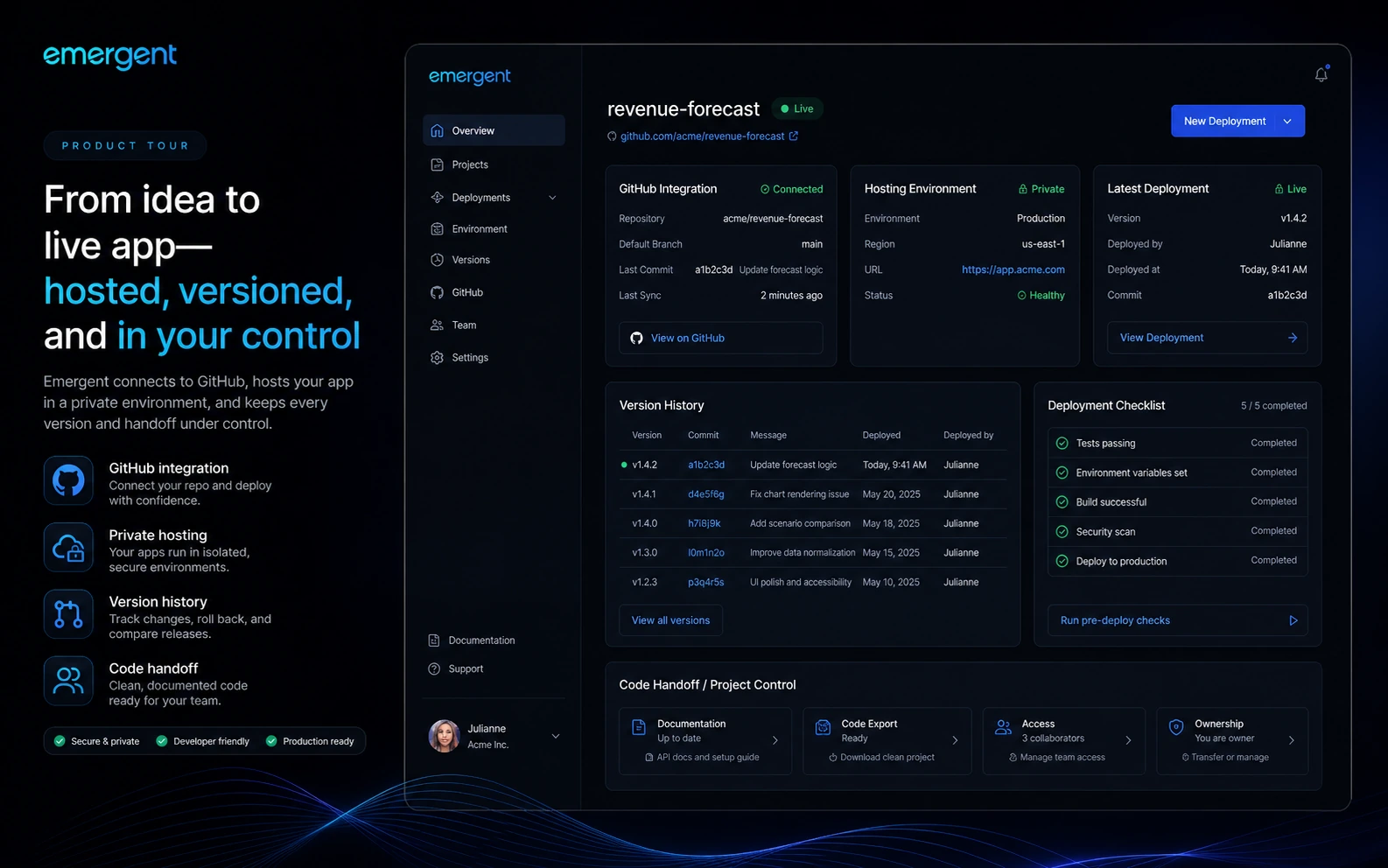
Private hosting and GitHub integration
Standard includes private project hosting and GitHub integration on the pricing page. That is a meaningful step beyond a toy builder because serious buyers eventually care about code access, handoff, and ongoing development.
The buyer note: confirm how your project moves from Emergent to your longer-term technical process before relying on it for client or business-critical work.
Pro-level context and custom agents
Pro adds features such as a 1M context window, ultra thinking, system prompt editing, custom AI agents, high-performance computing, 750 monthly credits, and priority support.
That sounds attractive, but it is not automatically necessary. Pro makes more sense when project complexity, iteration volume, or serious build capacity justifies the jump.
Pricing and plan value
Emergent’s pricing is clear enough to evaluate, but not simple enough to ignore the details.
The current public pricing page shows a Free plan at $0/month with 10 free monthly credits. Standard is shown as an annual path at $20/month with 100 credits per month, private project hosting, GitHub integration, extra-credit purchasing, and fork tasks. Pro is shown as an annual path at $200/month with 750 monthly credits, a larger context window, ultra thinking, system prompt editing, custom AI agents, high-performance computing, and priority support.
That makes the free plan important.
I would not skip it.
With an AI app builder, the first question is not whether the paid plan has more capacity. Of course it does. The first question is whether your real project consumes credits at a pace that makes the paid plan logical.
There is another cost detail that matters: Emergent’s deployment guide says deployment can cost credits per deployed app per month. That makes deployment planning part of the pricing decision, not a technical footnote.
For a tiny prototype, Free may be enough to judge the platform. For a serious MVP, Standard may be the first realistic paid option. For a more complex product, Pro may be easier to justify, but only after the buyer understands actual credit consumption.
Pricing check: If the free test looks promising, compare Standard and Pro by credits, deployment needs, GitHub access, and support—not just the monthly-equivalent price.
Free plan, trial, coupon, and checkout notes
Emergent’s free plan is the cleanest starting point because it gives buyers a real way to test the platform before paying.
That matters more than a coupon.
A coupon or public deal path can make a good purchase cheaper, but it cannot prove that the tool fits your app-building workflow. With Emergent, the first buying test should be practical: can it build a useful first version of your app within a reasonable credit cost?
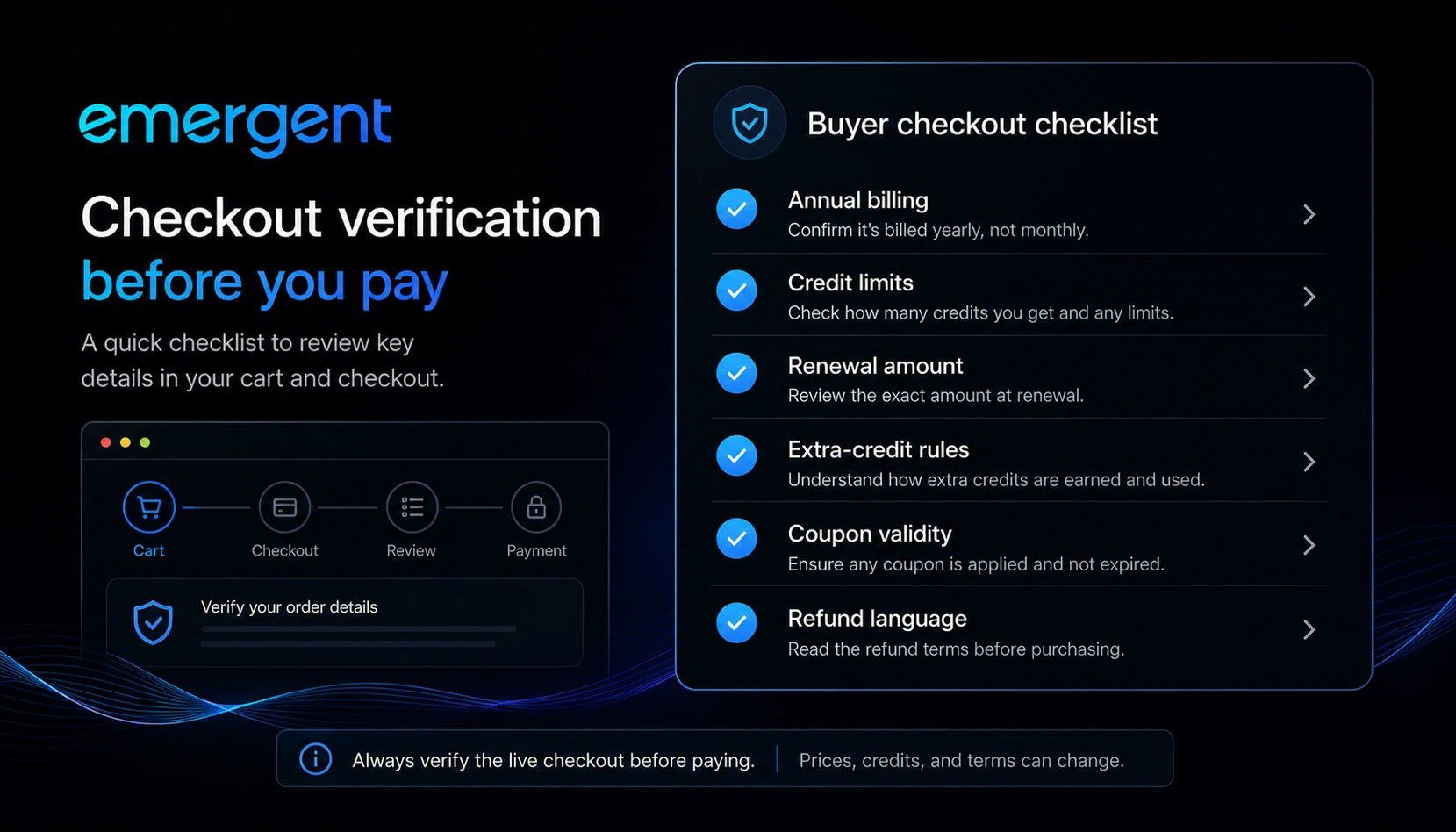
The annual pricing view also deserves attention. Monthly-equivalent pricing can look comfortable, but annual commitment changes the risk. Before checkout, buyers should confirm the billing interval, renewal price, credit allowance, extra-credit options, deployment credit needs, and refund language.
Emergent’s public deal landscape includes third-party coupon claims. I would treat those as checkout-test paths, not guaranteed savings. Check the Emergent coupon page only after product fit is clear.
Checkout order: Test the free credits first, then verify billing interval, credits, and any current offer before choosing a paid plan.
What I would check before buying Emergent
If I were buying Emergent for a real project, I would check seven things before paying.
- The real app brief. Is the idea specific enough for a fair test?
- Credit consumption. How many credits does one useful version actually require?
- Deployment cost. Will deployed apps create ongoing credit use?
- GitHub and hosting needs. Do you need private hosting, handoff, or external development?
- Annual billing. Are you comfortable with the actual billing commitment?
- Refund language. Are payments flexible enough for your risk tolerance?
- Alternative fit. Would a different builder give you more control, a simpler prototype, or a better developer workflow?
The big mistake is paying before you know your credit pattern.
That is easy to do with AI builders. The first generated version creates excitement. The second and third rounds reveal whether the tool is actually usable.
A simple test before paying
Before paying, I would run a small test like this:
- Pick one app idea that represents your real use case.
- Write a short brief: users, screens, data, must-have features, and success criteria.
- Use the free credits to build the smallest useful version.
- Preview the app and test the main user flow.
- Ask for one or two realistic revisions.
- Check how many credits were used.
- Decide whether Standard or Pro matches your real monthly build pattern.
Do not use a novelty app for this test.
Use something close to what you actually want to build. A fun demo can make the platform look better than it will feel in a serious workflow.
Pros explained
The free path lowers the first-test risk
The Free plan is a real advantage because buyers can test Emergent before paying. That matters in a category where marketing demos often look smoother than real projects.
The limit is that 10 credits may only answer the first question: does the builder make sense for your project shape? It may not prove long-term value.
Emergent fits real app-building intent
Emergent’s strongest angle is not general productivity. It is app creation. That focus makes the tool easier to evaluate: either it helps you build useful software faster, or it does not.
This matters for founders and teams who need working versions rather than static documents.
Standard includes useful serious-builder features
Private project hosting, GitHub integration, extra-credit purchasing, and fork tasks make Standard more credible for buyers moving beyond casual experimentation.
The caution is that those features are only valuable if your project actually needs them.
Pro raises the ceiling for complex building
Pro’s larger context window, custom agents, high-performance computing, and 750 monthly credits can matter for serious creators and brands.
But this is where buyers should be careful. Pro is not the safer choice just because it is bigger. It is the safer choice only when your workload proves you need that capacity.
Cons explained
Credit-based app building can surprise buyers
App building is iterative. A buyer may spend credits on the first build, fixes, preview work, deployment, and ongoing changes.
That does not make the pricing bad. It means the buyer needs to measure real use before committing.
Annual pricing requires extra caution
The pricing page emphasizes annual plan paths for Standard and Pro. Monthly-equivalent pricing is helpful for comparison, but it can hide the psychological weight of paying for a longer commitment.
I would not choose annual before running a real free-plan test.
Output quality still needs human review
Emergent can help generate and deploy software, but the buyer still needs to evaluate product logic, user experience, data handling, security expectations, maintainability, and edge cases.
The first working version is not the final buying proof.
Refund flexibility should not be assumed
The public terms language suggests payments may be limited in refund flexibility unless Emergent decides otherwise. That makes the free plan more important.
Do not buy a paid plan expecting a casual refund path unless the live checkout and terms clearly support that expectation.
Green flags and red flags
Green flags
A green flag is that Emergent has a clear free entry point. That gives cautious buyers a practical way to test before paying.
Another green flag is that the pricing page clearly separates Free, Standard, Pro, and Enterprise paths. The plan logic is understandable if you think in terms of credits and project complexity.
The strongest green flag is fit. If you already have a clear app idea and need help moving from brief to working version, Emergent is aiming at a real buyer problem.
Red flags
A red flag is trying to buy Emergent before you know how many credits your workflow consumes.
Another red flag is needing strict engineering control, compliance approval, or long-term code governance before the first build. Emergent may still help with exploration, but it should not replace a proper engineering process.
The final red flag is coupon-first thinking. A discount path should come after workflow fit, not before it.
Emergent vs alternatives
Emergent’s alternatives need to be separated carefully.
Some tools are direct AI app-builder comparisons. Others are adjacent routes for buyers whose actual goal is different.
Lovable vs Emergent
Lovable is a direct comparison if the buyer wants an AI builder for fast web app and MVP creation. It may feel more natural for buyers who want a polished visual product-building flow and quick iteration around frontend-heavy ideas.
Emergent may be the stronger comparison if the buyer cares more about agent-style planning, web and mobile app positioning, deployment flow, and a builder experience that feels closer to describing an app system.
The tradeoff is control and workflow feel. Buyers should test the same app idea in both platforms if the decision matters.
Replit Agent vs Emergent
Replit Agent is a direct comparison for buyers who are more comfortable inside a developer environment. It may be better for users who want code visibility, coding tools, and a clearer bridge into manual development.
Emergent may feel better for buyers who want a more product-brief-driven app-building path and do not want to start inside a coding workspace.
The question is whether you want an AI app builder that feels like a product team or an AI development assistant inside a coding environment.
Bolt-style browser builders vs Emergent
Bolt-style builders can be a direct comparison for fast web app prototyping in the browser. They may fit buyers who want quick frontend and full-stack experiments with a more developer-adjacent feel.
Emergent may be more attractive if the buyer values its agentic app-builder framing, mobile positioning, pricing credits, and deployment flow.
The practical test is simple: use the same app brief and compare what each tool produces after one or two revision rounds.
1min.AI vs Emergent
1min.AI is an adjacent route, not a direct app-builder replacement.
It makes more sense if the buyer wants a broad AI utility workspace for writing, image, audio, document, and general productivity tasks. Emergent makes more sense when the buyer’s main job is software creation.
If your question is “Which AI workspace gives me many small tools?” 1min.AI may be closer. If your question is “Can I turn this product idea into a working app?” Emergent is the more relevant comparison.
Aikeedo vs Emergent
Aikeedo is also adjacent, but in a different way.
Aikeedo is more relevant if you want to own or run a self-hosted AI SaaS-style product. Emergent is more relevant if you want to build apps through prompts and AI agents.
That distinction matters. Aikeedo is a product ownership and deployment path. Emergent is an app-building workflow. They can appeal to similar founder energy, but they solve different buying problems.
Trust, refund, and buyer-risk notes
Emergent has a stronger trust story when the buyer treats it as a testable workflow rather than a guaranteed shortcut.
The homepage presents the product as a way to build production-ready apps through conversation and also displays SOC 2 Type I positioning. That is useful context, but buyers should still review privacy, data handling, project requirements, and deployment expectations before putting sensitive workflows into any AI builder.
Pricing risk is more immediate. Credits, deployment, extra-credit purchases, and annual billing can change how affordable Emergent feels after the first demo. A buyer who only compares headline prices may miss the actual cost of iteration.
Refund risk also deserves caution. If payment terms are limited, the free plan becomes the buyer’s protection layer. Use it.
I would also be careful with older third-party pricing references. Emergent appears in a fast-moving category, and some outside pages may lag behind the current public pricing page. For any paid decision, verify the live checkout route and current pricing page rather than relying on older commentary.
Finally, treat coupon claims as secondary. A coupon can improve a purchase, but it cannot make a vague app idea clearer, reduce credit burn, or replace review of the generated app.
Final verdict
I would consider Emergent if you have a real app idea, a clear first-version target, and a need to move from brief to working web or mobile software faster than a traditional development cycle.
I would skip it if you mainly need a general AI assistant, a low-effort content tool, or a fully controlled engineering workflow where every architecture and code decision must be reviewed manually from the start.
I would compare it with Lovable, Replit Agent, and Bolt-style builders if your decision is truly about AI app building. I would compare it with 1min.AI only if your need is broader AI utility, and with Aikeedo only if your goal is owning a self-hosted AI SaaS system rather than building an app through prompts.
The safest next step is not complicated: use the free credits on one narrow, realistic app idea. If the result is useful and the credit pattern makes sense, then the paid plan conversation becomes much easier. If the first test feels messy, expensive, or hard to control, compare alternatives before paying.
