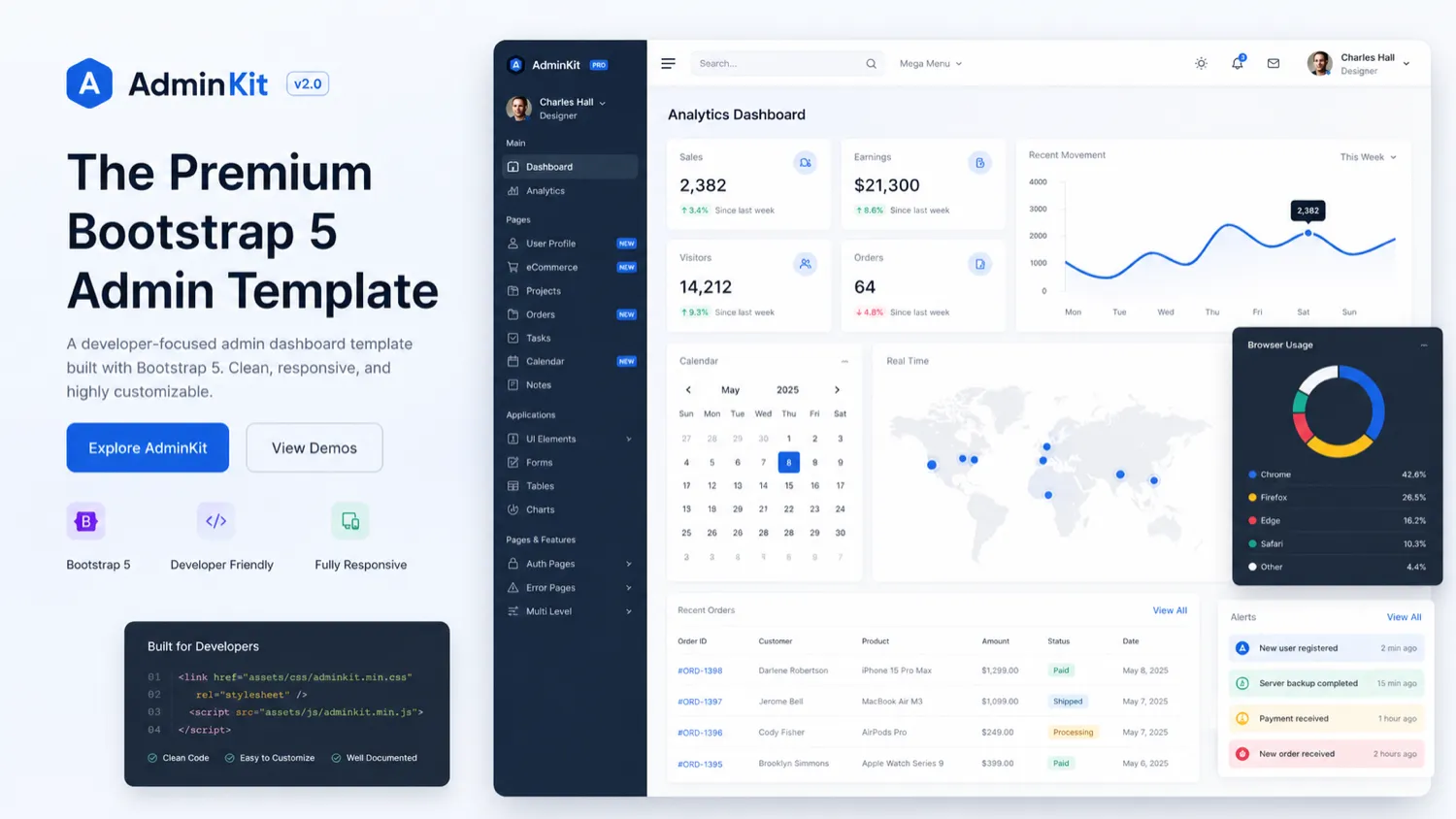
Quick verdict
AdminKit is worth a serious look if you are a developer who already knows you need a Bootstrap 5 admin interface. It is not the kind of product I would judge like a normal SaaS tool.
The buying question is narrower: will this template remove enough dashboard, layout, forms, table, chart, sidebar, plugin, and page-building work to justify adopting its structure?
If the answer is yes, AdminKit can be a practical shortcut. The free version gives you a lower-risk way to inspect the code, demo, and design language before paying. The PRO license then becomes a one-time purchase decision: do the extra pages, UI elements, plugins, dashboards, color schemes, source files, and support rights save more time than they cost?
If the answer is no, AdminKit can turn into template debt. A polished dashboard shell still needs backend logic, data models, authentication, permissions, deployment, testing, and real product decisions. It does not build the application for you.
The main strength is clear: AdminKit can save front-end interface work for Bootstrap-friendly projects. The main caution is just as clear: it only helps when the included patterns map to the screens you actually need. For my money, the free version and live demo should come before the paid checkout page.
Next step: If AdminKit fits your Bootstrap 5 workflow, verify the current license path before choosing a paid tier.
Review snapshot
| Review point | Practical take |
|---|---|
| Best for | Developers and teams building Bootstrap 5 admin panels, SaaS dashboards, internal tools, and client portals |
| Not ideal for | Non-technical buyers, no-code users, and teams that need a finished backend or framework-native component system |
| Main use case | Starting a dashboard UI faster with prebuilt layouts, components, forms, tables, charts, and pages |
| Free path | Free open-source version and live demo for technical inspection |
| Paid path | PRO one-time license when extra pages, components, plugins, support, and source assets are needed |
| Current pricing note | Public PRO pricing starts at $59 one-time for Hobby, with higher Company and Enterprise licenses |
| Main strength | Faster UI foundation for Bootstrap-friendly dashboard projects |
| Main concern | Template adoption can create rework if the stack, license, or screen needs do not match |
| Direct alternatives | Tabler, CoreUI, Metronic, Vuexy, Volt, Sneat, and other Bootstrap admin templates |
| Adjacent DealBestDaily routes | AnotherWrapper, Jet Admin, Adalo, BASE44 |
| Best next step | Demo first, free version second, docs third, pricing fourth |
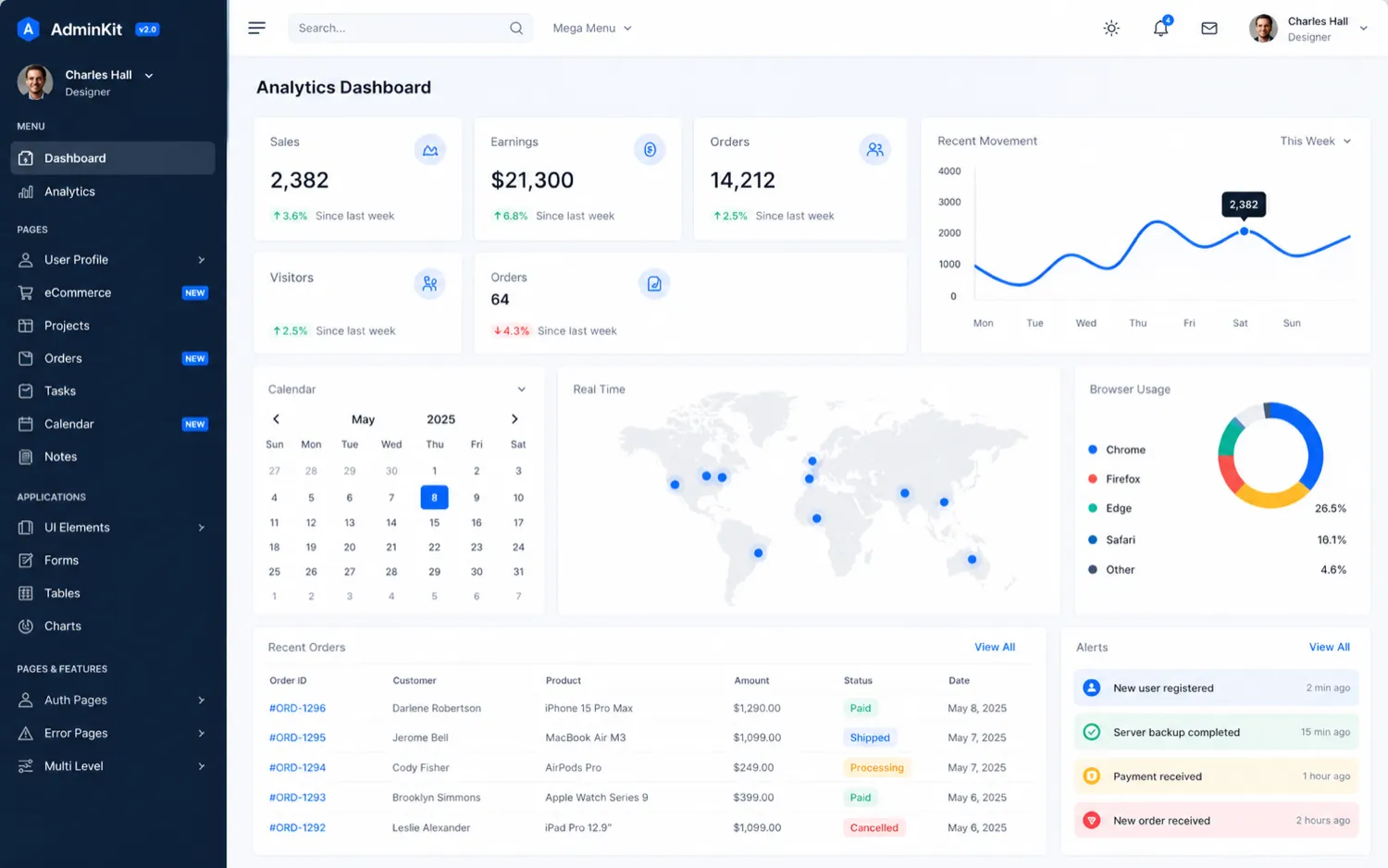
What is AdminKit?
AdminKit is a free and premium Bootstrap 5 admin and dashboard template. In plain buyer language, it gives developers a ready-made front-end foundation for admin panels, dashboards, analytics views, forms, tables, charts, icons, navigation, and related interface patterns.
That sounds simple, but the distinction matters.
AdminKit is not a hosted internal tool builder. It is not a no-code database app. It is not a SaaS dashboard that connects your data automatically. It does not replace authentication, backend permissions, application logic, billing logic, deployment, or product architecture.
It is a UI starting point.
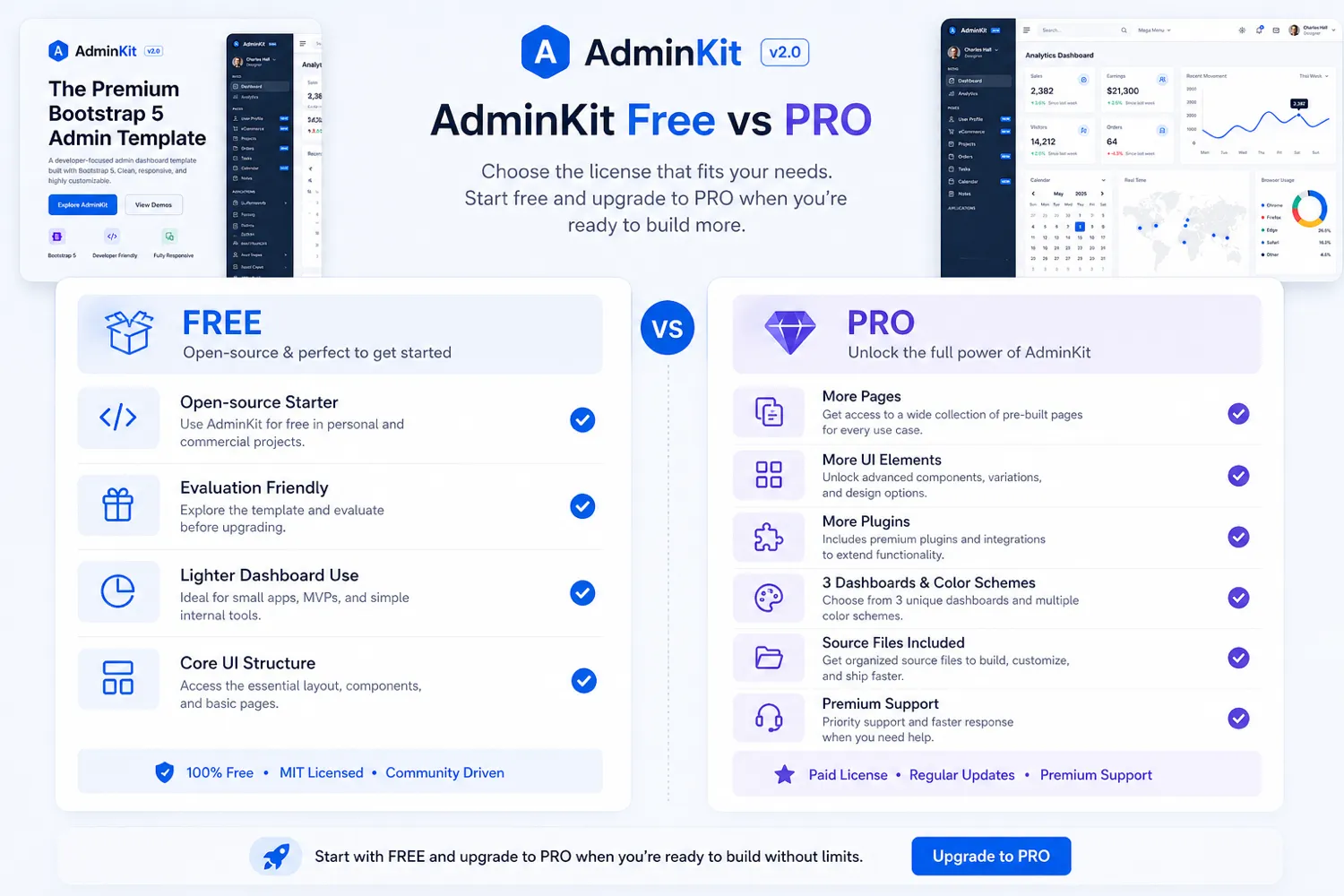
The official positioning is around a free and premium Bootstrap 5 admin template with hundreds of UI components, forms, tables, charts, pages, and icons. The free GitHub version is open source and gives buyers a way to inspect the structure before paying for PRO. The PRO version expands the package with more demo pages, plugins, color schemes, dashboard patterns, and support.
Our review approach compares public product pages, pricing details, documentation, license terms, refund conditions, developer workflow fit, and nearby alternatives. I would not treat a low one-time price or a polished demo as proof that AdminKit fits your project. With templates, the better question is always this: how much of the template can you keep after the real application requirements arrive?
The easy mistake is buying a dashboard template because the demo looks close enough. The safer approach is to map your real screens first.
Who should use AdminKit?
AdminKit is a good fit for developers building Bootstrap-based dashboards where the front-end structure is a meaningful part of the work.
A SaaS founder with a small technical team may use AdminKit to avoid designing the first admin area from scratch. If the product needs analytics cards, settings pages, user tables, charts, billing screens, profile pages, and admin navigation, a template can remove a lot of blank-page work. The condition is that the team is comfortable adapting HTML, CSS, JavaScript, Sass, or a build workflow into the actual app.
An agency may use AdminKit as a client project foundation. That can make sense when the team builds similar back-office screens repeatedly and wants a consistent visual system. The part to verify is license scope: developer count, product count, support duration, and whether the license allows the kind of client or commercial use you need.
A Bootstrap-focused developer may also get value from the free version. It can be useful for learning structure, prototyping a dashboard, or testing whether the AdminKit design language fits the project before buying PRO.
A small internal tools team may consider AdminKit if the internal app already has developers and only needs the front-end admin layer. In that case, the tool is not replacing the internal tool platform. It is giving the team a more polished interface starting point.
The strongest fit is not “anyone who needs a dashboard.” The strongest fit is a buyer who can use the template directly enough that the saved design and component work outweighs the integration cost.
Who should avoid AdminKit?
AdminKit is a poor fit for non-technical buyers who want a finished admin system. If you need a tool that handles the database, workflows, permissions, user management, and deployment for you, AdminKit is the wrong category. A no-code or low-code internal tool builder will probably be closer.
It is also not ideal for teams locked into a different front-end component stack. If your product is deeply React, Vue, Angular, Svelte, or another framework-specific environment, you need to check whether adapting an HTML Bootstrap template makes sense. Sometimes it does. Sometimes it creates more translation work than expected.
I would also be careful if you are buying for only one or two simple screens. The free version may be enough, or a lighter open-source template may do the job without paying for a broader PRO package.
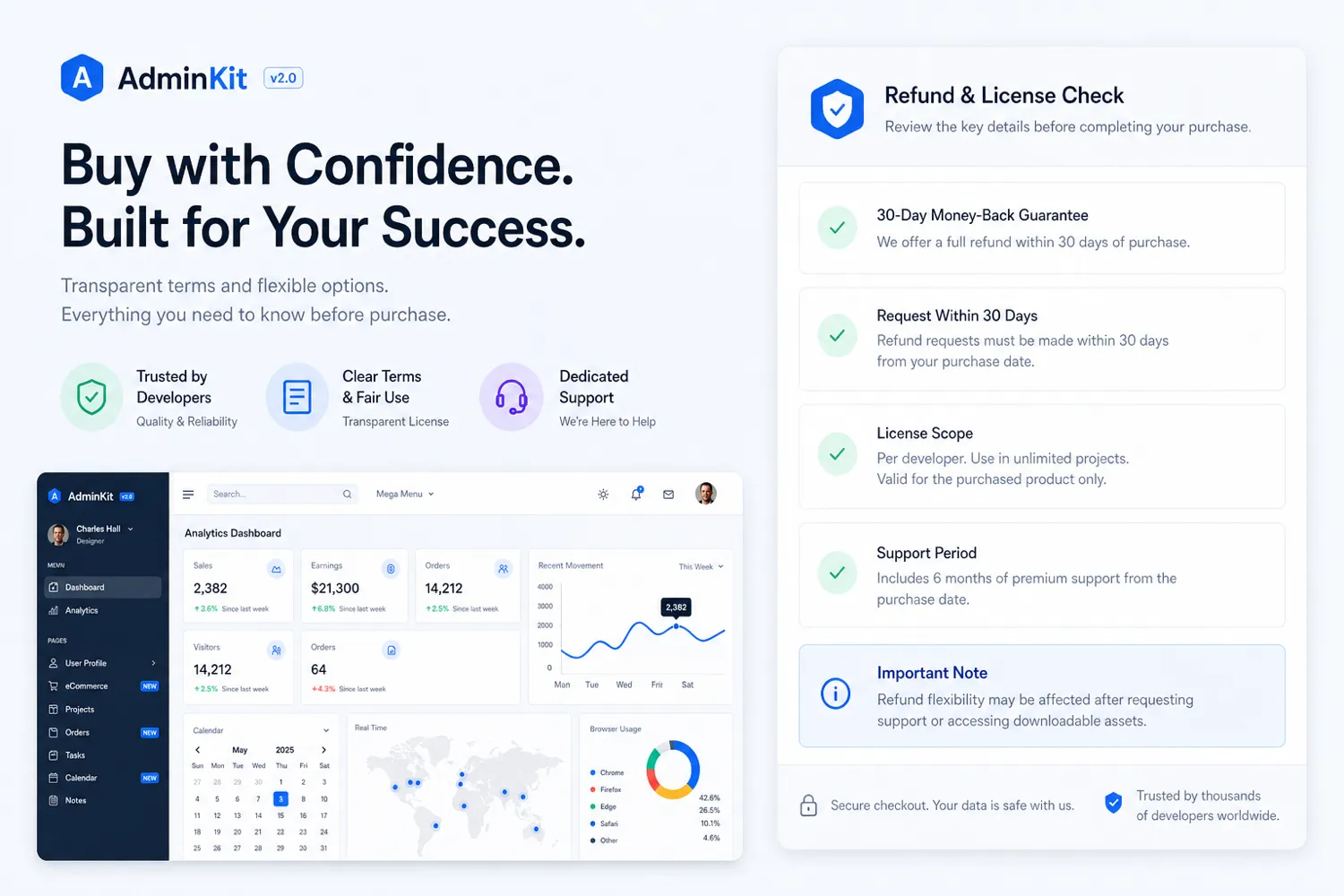
Buyers who may need support before deciding should pay close attention to refund wording. The license language says refund eligibility depends on requesting within the window and not having requested support. That does not make the policy bad, but it does mean you should do your self-checking before you open a support path.
Finally, avoid buying AdminKit only because the entry license looks cheap. A $59 template can be expensive if it sends the project in the wrong direction.
How AdminKit fits into a real workflow
A realistic AdminKit workflow starts before the download.
First, list the screens your application actually needs. Not “dashboard,” but specific screens: overview, users, roles, settings, invoices, profile, notifications, tables, reports, charts, forms, audit trails, support queues, or whatever your product requires.
Then open the live demo and compare those screens against the included patterns. This is where the template either becomes useful or starts to feel decorative. A good match means you can keep large parts of the structure. A weak match means you may spend time undoing design decisions.
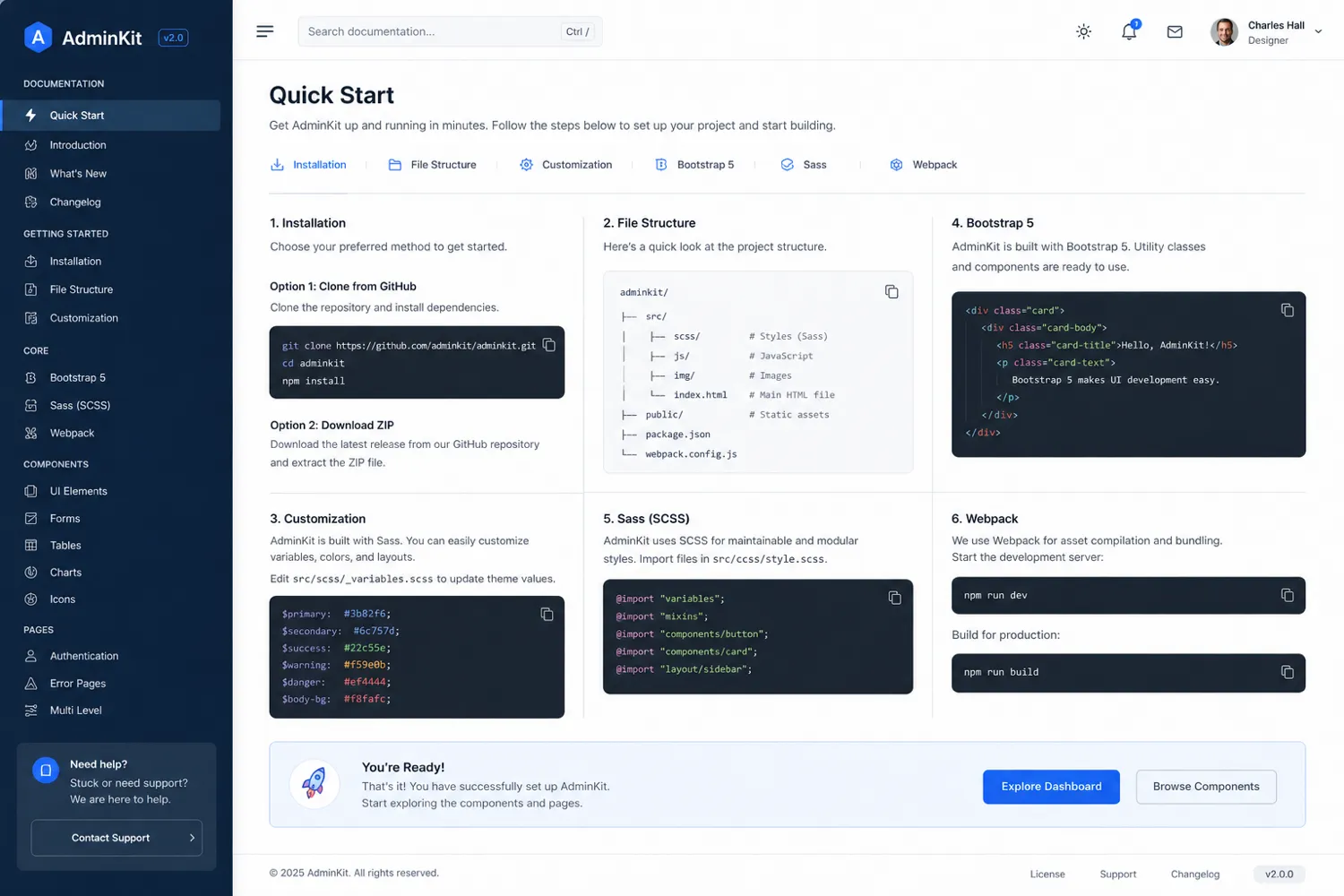
Next, inspect the free version or repository. Check the file structure, dependencies, build path, styling approach, and customization surface. If static files are enough, the workflow is simpler. If you need Webpack, Sass, or deeper source customization, make sure that fits your team.
After that, build one narrow screen. Do not start by converting the entire product. Take one realistic dashboard page and connect it to actual data. That test will reveal whether AdminKit is saving time or merely looking good in isolation.
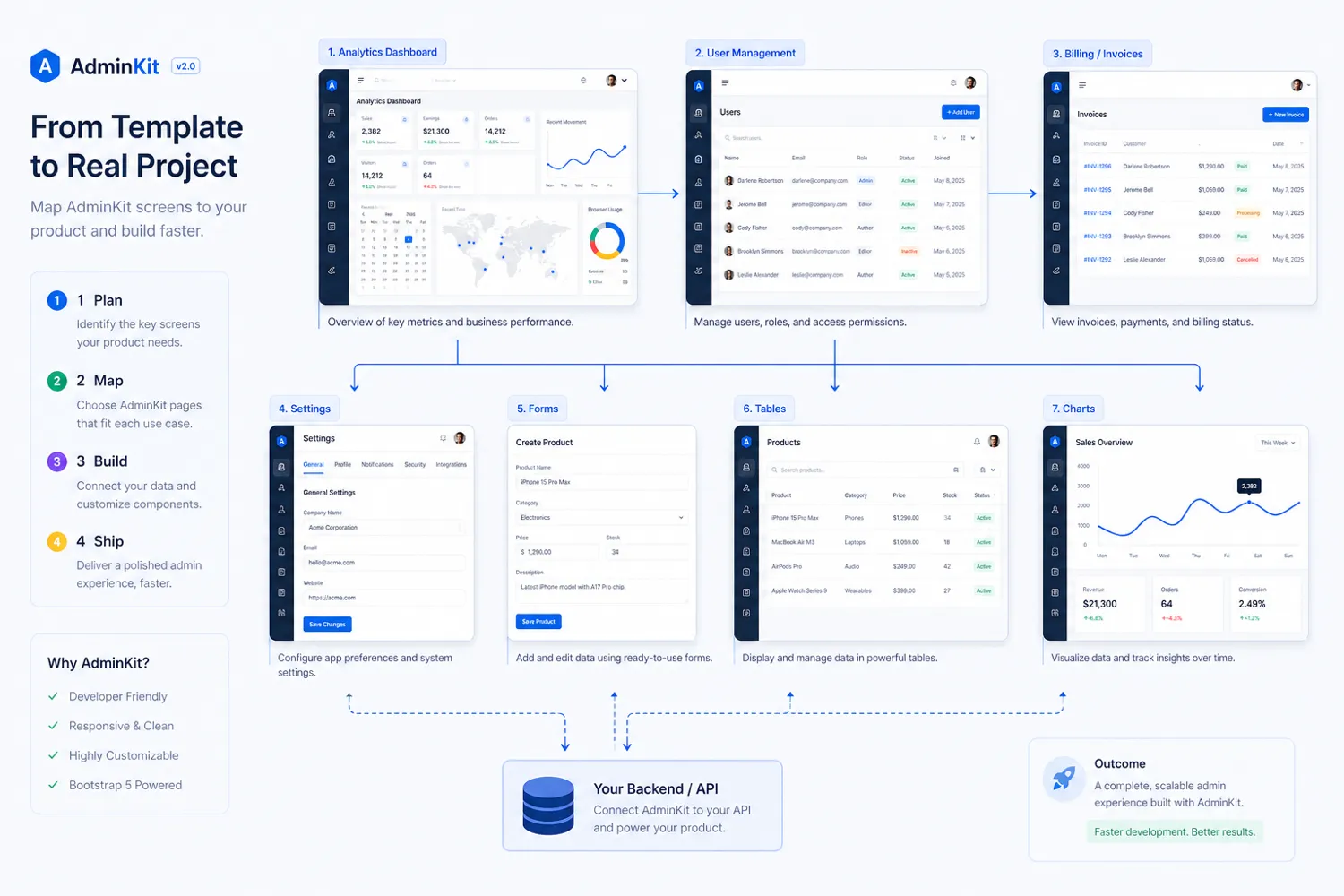
Workflow check: If the demo maps to a real admin screen, use the free version or pricing route to verify whether PRO adds enough value.
Real-world buyer scenarios
A SaaS founder building the first admin dashboard
This is one of the clearest AdminKit scenarios. A small SaaS product needs a user dashboard, settings pages, account area, invoices, chart panels, and basic admin navigation. AdminKit may help the team get from blank canvas to usable UI faster.
The risk is assuming the template solves product logic. It does not. The founder still needs backend logic, permission rules, and real data flows. AdminKit is useful if the team needs a front-end dashboard shell, not if they need the entire SaaS application built for them.
An agency building client admin screens
An agency can get value if AdminKit becomes a reusable foundation across similar client projects. The buyer should be careful with license scope here. Client work, multiple products, number of people accessing the source files, and commercial usage rights all matter.
For this scenario, I would compare the Hobby, Company, and Enterprise license terms before assuming the entry license is enough.
A developer prototyping an internal tool
AdminKit can be a good prototyping shortcut. The free version may be enough to validate a dashboard direction, especially if the internal tool is simple. A paid license becomes more reasonable if the prototype starts needing PRO-only pages, plugins, dashboards, or support.
The buyer check is simple: do not pay before you have tried one screen with realistic data.
A no-code buyer looking for an admin app
This is where AdminKit is usually the wrong fit. If you want to configure tables, connect data, assign permissions, and build workflows without coding, look at a tool like Jet Admin or another internal tool builder instead. AdminKit is closer to a developer UI kit than a no-code operations product.
Key features that actually matter
Bootstrap 5 foundation
The Bootstrap 5 foundation is the reason AdminKit makes sense for many developers. If your team already works comfortably with Bootstrap patterns, AdminKit can feel familiar and direct. It gives you a dashboard surface that can be customized inside a known front-end ecosystem.
Buyer note: Bootstrap fit should be verified before price. If your team does not want Bootstrap, AdminKit is probably not the right starting point.
Free open-source version
The free version is more than a marketing hook. It reduces buying risk because developers can inspect the template, code structure, demo pages, and integration path before paying for PRO.
Buyer note: use the free version as a real evaluation path, not just a quick preview. The best test is whether you can build one real screen without fighting the template.
PRO pages, plugins, and UI depth
AdminKit PRO is attractive when the project needs more than a basic dashboard shell. The paid package expands the available pages, plugins, dashboards, color schemes, components, and source assets.
Buyer note: more components are only valuable if they match your project. Do not buy PRO because the number looks large. Buy it because the included pieces reduce work on screens you actually need.
One-time license model
A one-time license is easier to reason about than a monthly SaaS subscription. For a developer template, that can be a real advantage. You pay once, then use the code within the purchased license terms.
Buyer note: one-time pricing still has license boundaries. Developer count, product count, support duration, and commercial use matter more than the headline price.
Documentation and demo visibility
AdminKit has a visible demo, documentation, GitHub repository, pricing page, support page, license agreement, and public privacy/terms pages. That gives technical buyers more to inspect than a screenshot-only marketplace listing.
Buyer note: transparent material helps, but it does not remove your responsibility to check stack fit and license terms.
Pricing and plan value
AdminKit pricing is easier to understand than many SaaS tools because it is not a subscription-first product. The public pricing path presents AdminKit PRO as a one-time payment, with the entry Hobby license starting at $59. The pricing and checkout pages should still be verified live before purchase, especially if license details or offers change.
The free version is the safest first step. It is not a fake trial. It is the practical way to inspect whether the template fits your project before you pay.
The Hobby license makes sense when one developer and one product are enough. I would treat it as the side-project or small personal project path, not the default for agency or SaaS work.
The Company license is more relevant when multiple developers or multiple products matter. It is the tier I would examine more closely for agencies, product teams, or commercial SaaS work.
The Enterprise license is for broader developer and product scope. Do not jump there because it sounds complete. Choose it only if the license scope, support period, and reuse rights match how the template will actually be used.
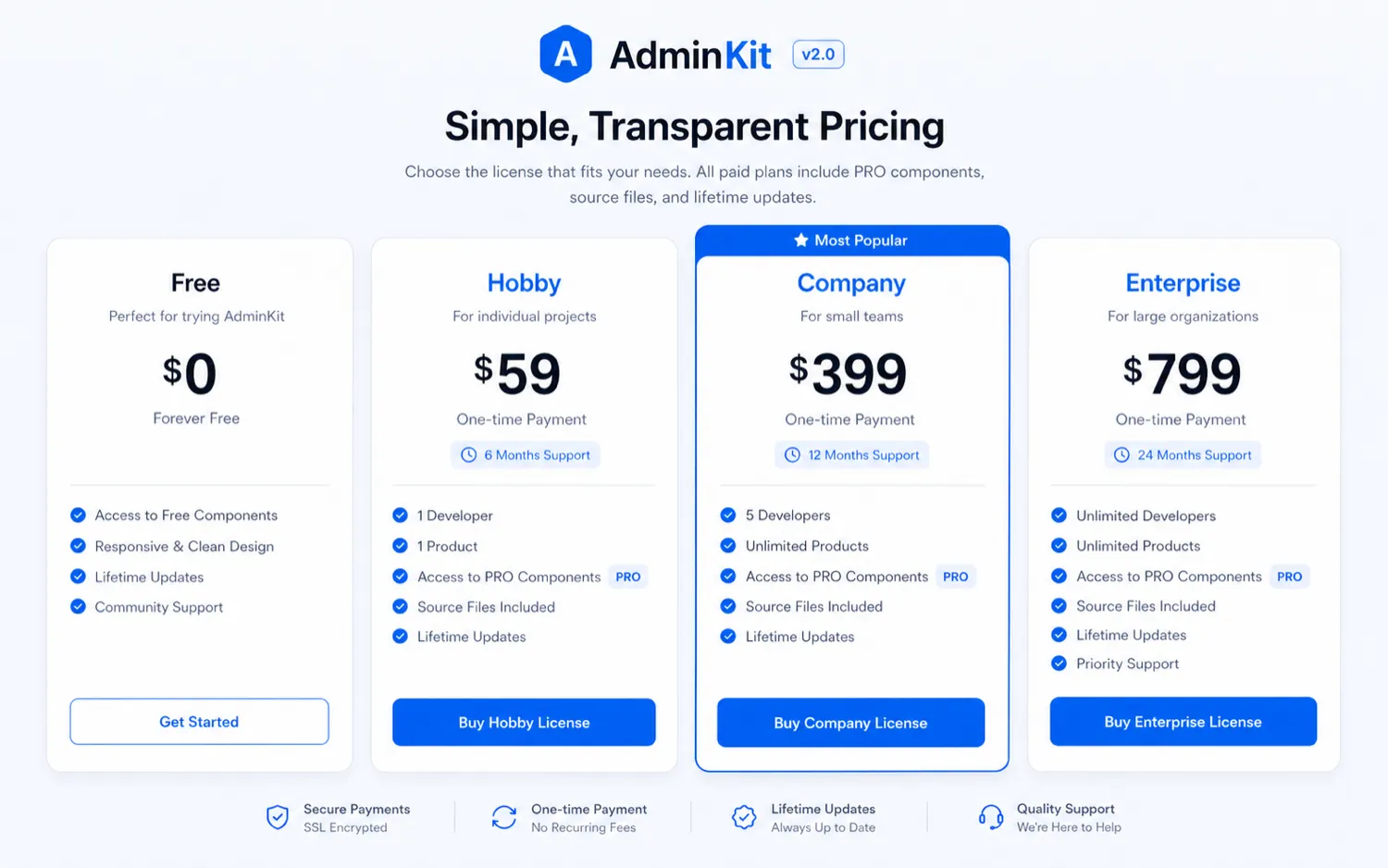
Pricing check: If AdminKit still fits your project, compare the live pricing page against the license terms before paying.
Check AdminKit pricing Check current offers Read store guide
Free plan, trial, coupon, and checkout notes
AdminKit’s best “deal” is the free version. That is not just a price point; it is a safer evaluation sequence.
I would use this order: live demo, free version, documentation, license page, then checkout. A coupon or current offer can improve the purchase, but it should not be the reason you buy. With templates, the biggest risk is not overpaying by a few dollars. The bigger risk is buying something your project cannot use cleanly.
A reliable public coupon code should not be assumed. If a current offer exists, treat it as a checkout bonus after fit is proven. The AdminKit coupon page is only useful once you already know the template and license route make sense.
There is no normal SaaS trial dynamic here. The free version is the test path. The PRO license is the paid expansion path.
What I would check before buying AdminKit
If I were buying AdminKit for a real dashboard project, I would check these items before paying:
- Does the free version map to one real screen? Build or adapt one actual dashboard page before judging the template.
- Does the project truly want Bootstrap 5? If the team prefers another design system or framework-native components, expect adaptation work.
- Which PRO features are actually needed? Identify the exact pages, plugins, dashboards, or source assets that justify paying.
- Which license tier matches the project? Check developer count, product count, commercial use, client use, and support duration.
- Can the team integrate the files cleanly? Review static file use, Sass, Webpack, and customization workflow.
- What happens if support is needed? Read the refund language before requesting support during evaluation.
- Are alternatives a better fit? Compare direct Bootstrap templates and adjacent no-code or app-building routes before buying.
A simple test before paying
Before paying for AdminKit PRO, I would run a small test like this:
- Open the live demo and choose one screen that looks close to your real product need.
- Download or inspect the free version.
- Rebuild one realistic screen using your own labels, data shape, navigation, and components.
- Estimate how much custom styling or structural change is required.
- Check whether the missing PRO-only pieces are genuinely needed.
- Read the license terms for developer count, product count, commercial usage, support, and refund conditions.
- Only then compare the Hobby, Company, and Enterprise pricing paths.
That test is more useful than reading a component count. A dashboard template earns its place when it survives contact with a real screen.
Pros explained
The first real advantage is the free evaluation path. Many template purchases are made from screenshots and feature lists. AdminKit gives developers a better starting point because they can inspect the free version and repository before paying. That does not guarantee fit, but it lowers the risk.
The second advantage is Bootstrap familiarity. For teams that already like Bootstrap, AdminKit can feel practical instead of exotic. The value is not only visual polish; it is the ability to move faster inside a familiar front-end structure.
The third advantage is one-time pricing. For a template, this model makes sense. You are not buying a hosted tool with ongoing processing. You are buying code and license rights. That can be easier to budget than another monthly tool, especially for agencies or developers who want reusable UI foundations.
The fourth advantage is PRO depth. If your project needs dashboards, forms, editors, charts, tables, calendars, plugins, and multiple page types, a deeper template package can save real hours.
The fifth advantage is transparency. Public docs, a demo, GitHub material, pricing, support, terms, license details, and privacy pages give careful buyers enough material to do a real pre-purchase check.
Cons explained
The biggest limitation is category mismatch. AdminKit is not an application builder. If you need backend logic, database management, automation, permissions, and workflows, the template is only one piece of the puzzle.
The second limitation is integration uncertainty. A template may look ready in the demo but still require meaningful adaptation inside your actual stack. This matters more for teams using framework-specific component patterns or custom design systems.
The third limitation is that PRO value is project-dependent. A large component count sounds attractive, but unused components do not save time. If your project needs only a simple dashboard, a lighter template or the free version may be enough.
The fourth limitation is refund nuance. The guarantee is useful, but the license page adds conditions. Buyers who are unsure should read the terms before requesting support or purchasing for a client project.
The fifth limitation is that license tiers require real attention. Hobby, Company, and Enterprise are not just price points. They map to developer count, product count, support duration, and usage rights.
Green flags and red flags
Green flags:
- Your project already uses Bootstrap 5 or can adopt it without friction.
- The free version lets you build one real screen quickly.
- The PRO-only pages and plugins match specific screens in your roadmap.
- Your team understands the difference between a UI template and a full app platform.
- The license tier clearly fits your developer count, product count, and commercial use.
Red flags:
- You are buying because the demo looks polished, but you have not mapped real screens.
- You need no-code workflows rather than developer-controlled front-end files.
- You expect AdminKit to handle backend, authentication, permissions, or database logic.
- Your team needs React, Vue, Angular, or another framework-native path without adaptation.
- You may need support before deciding whether to keep the purchase.
AdminKit vs alternatives
AdminKit should be compared in two layers: direct Bootstrap admin template alternatives and adjacent product-building routes.
Direct alternatives solve roughly the same buyer job: dashboard UI, admin interface, Bootstrap components, pages, and template foundations. Adjacent routes solve nearby but different jobs, such as boilerplate creation, internal tools, or no-code app building.
Tabler vs AdminKit
Tabler is a strong direct comparison if you want a mature open-source Bootstrap admin interface with a large ecosystem and a broad design language. It may be better for buyers who want a free-first, widely recognized dashboard foundation.
AdminKit may still make sense if its demo, docs, and PRO package line up better with your project screens.
CoreUI vs AdminKit
CoreUI is a stronger comparison for teams that want multi-framework options, especially if React, Angular, Vue, or framework consistency matters. If your team is not committed to static HTML and Bootstrap files, CoreUI may be the safer comparison.
AdminKit is more straightforward when the project wants a Bootstrap 5 HTML admin template and does not need a broader framework family.
Metronic vs AdminKit
Metronic is a more expansive premium admin template ecosystem. It may be better for teams that want a very deep, enterprise-grade template package with many layouts and app patterns.
AdminKit may be cleaner if you want something more focused, simpler to evaluate, and easier to start from without entering a much larger template universe.
AnotherWrapper vs AdminKit
AnotherWrapper is an adjacent developer route, not a direct Bootstrap template replacement. It makes more sense if the buyer wants a broader boilerplate or product-starting foundation rather than only an admin UI layer.
AdminKit is the better fit when the specific problem is dashboard interface speed.
Jet Admin vs AdminKit
Jet Admin is an adjacent no-code internal tool route. It is more relevant if the buyer wants to configure internal tools without manually adapting a Bootstrap template.
AdminKit is the better fit when a developer wants source files and front-end control.
Adalo and BASE44 vs AdminKit
Adalo and BASE44 are app-building routes, not direct template alternatives. They matter when the buyer wants to create an application rather than integrate a coded dashboard UI.
AdminKit remains the clearer choice when the buyer already has an application stack and needs the admin interface layer.
Trust, refund, and buyer-risk notes
AdminKit has several positive trust signals: official pricing, documentation, a live demo, a public license agreement, support page, privacy page, terms page, and GitHub repository for the free version. That is better than a template that only shows screenshots and a checkout button.
The refund policy deserves careful reading. The pricing page presents a 30-day guarantee, while the license agreement gives the operational conditions: the request must be within the purchase window and support must not have been requested. The practical takeaway is simple: do your demo, free-version, documentation, and license checks before asking support questions if refund flexibility matters.
Privacy risk is lower than with many AI or SaaS tools because AdminKit is primarily a template purchase, not a hosted content-processing product. Still, the website has normal privacy and terms pages, and buyers should read them if payment, account, or support interactions matter.
The biggest buyer risk is not security theater or hidden AI behavior. It is fit. A template can be technically good and still wrong for your project.
Do not buy on headline price alone. Verify live pricing, license rights, developer limits, product limits, support duration, refund conditions, and integration effort. And if you are building for a client, check the license before you promise reuse.
Final verdict
I would consider AdminKit if I were building a Bootstrap 5 admin panel, SaaS dashboard, internal dashboard, or client admin interface and the free version already proved useful against a real screen.
I would skip it if I needed a no-code admin app, backend logic, database workflows, authentication, permissions, or a framework-native component system that AdminKit does not provide directly.
I would compare it with Tabler, CoreUI, Metronic, and similar Bootstrap admin templates if the decision is purely about dashboard UI. I would compare it with AnotherWrapper, Jet Admin, Adalo, or BASE44 only if the real buyer question is broader than a template.
The safest path is not complicated: inspect the demo, test the free version, read the docs, confirm the license, and only then choose PRO. AdminKit is useful when it saves real interface work. It becomes weaker when the buyer expects a template to do the job of a full product platform.
