
Magiclight AI Pricing, Plans & Video Fit
Magiclight AI is a long-form AI video and animation platform built around turning ideas, scripts, images, music, and stories into finished videos. Its strongest store-page fit is not a simple short clip generator. It is more useful for creators who want longer story videos, character consistency, voice, captions, and export options in one workflow.
Fit → price → checkout
Use these routes after the official-site check: coupon first, review for fit, compare if unsure.
Magiclight AI pricing snapshot
Fast commercial checks before pricing, coupons, or a deeper review.
Limited creation access for testing the workflow
7,000 credits per month during the checked promotional pricing
45,000 credits per month and higher generation capacity
Ultra and Ultimate add larger credit pools and stronger volume economics
Magiclight AI product tour for video creators
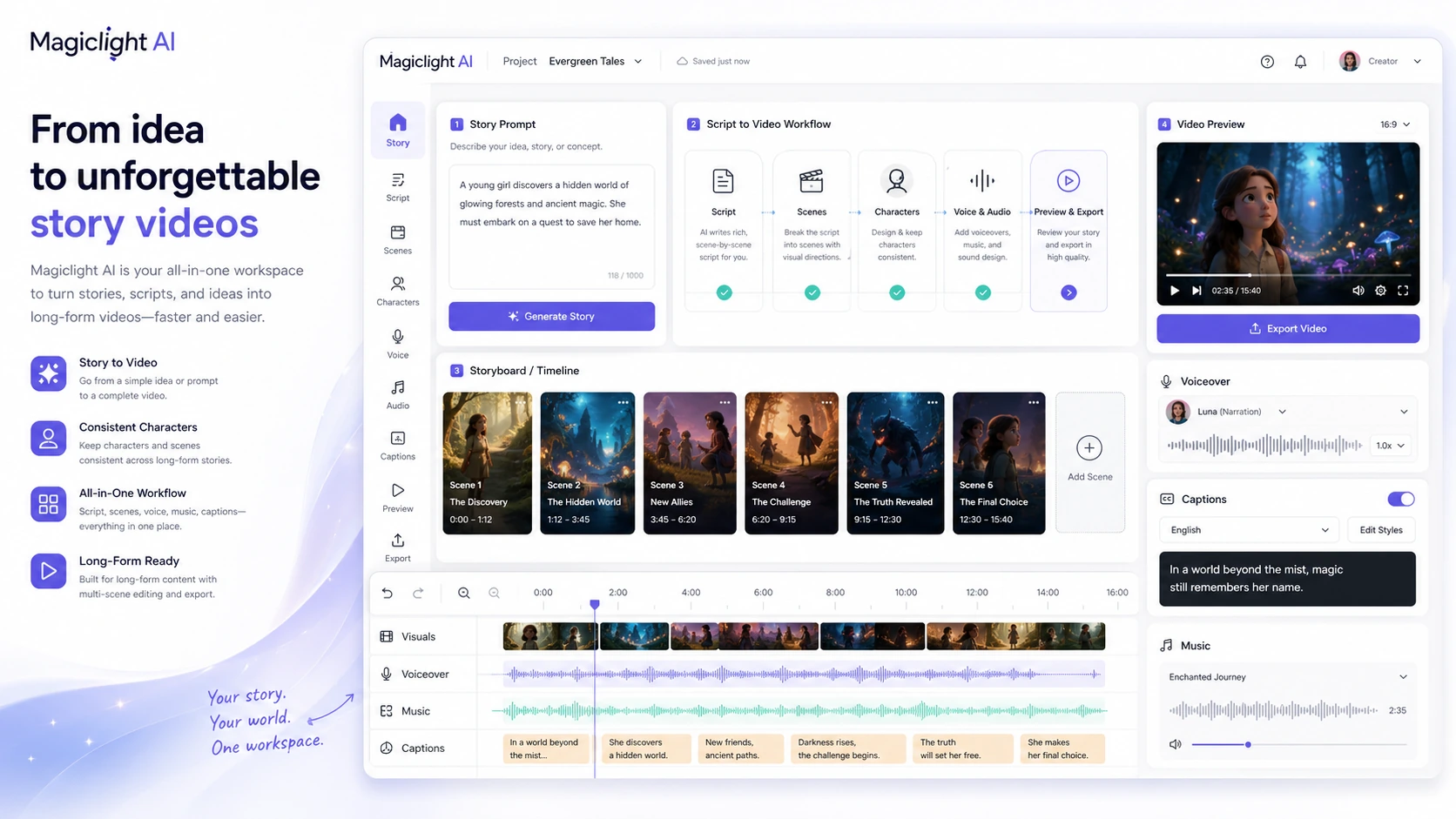
Magiclight needs a visual tour because the buying decision depends on workflow, not only price. The useful views are the pricing table, story-to-video flow, long-video generator, and mobile app path.
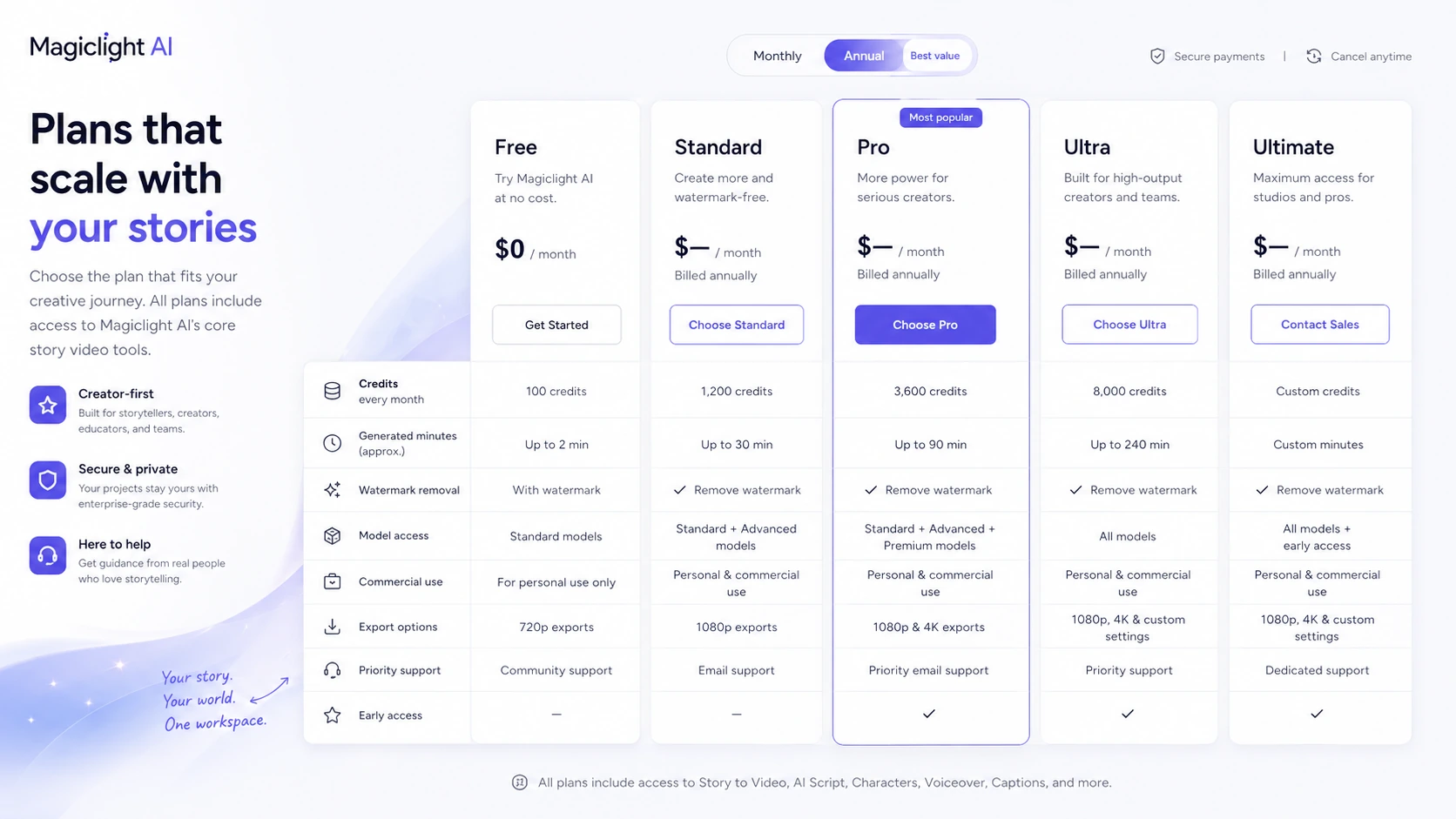
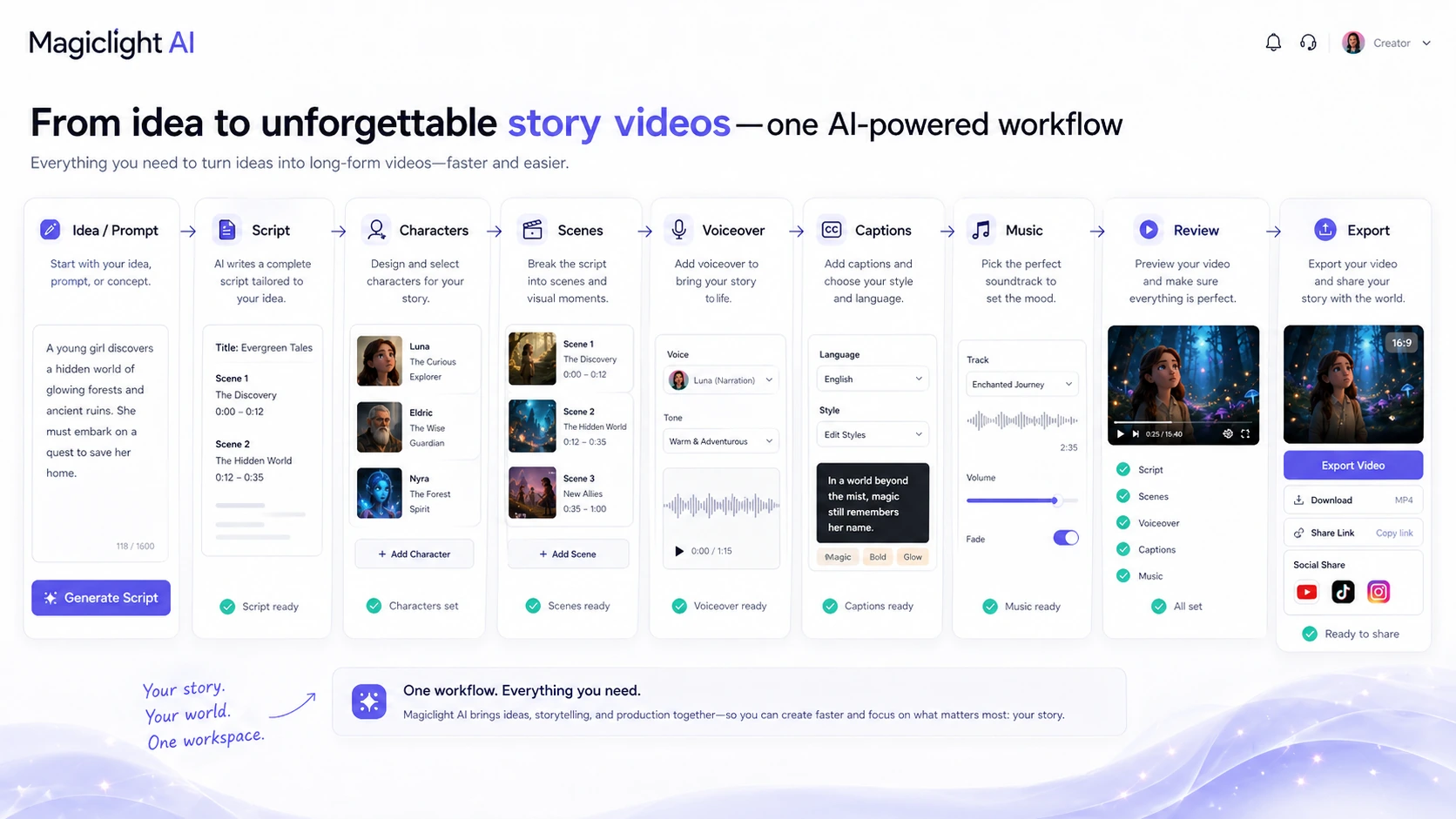
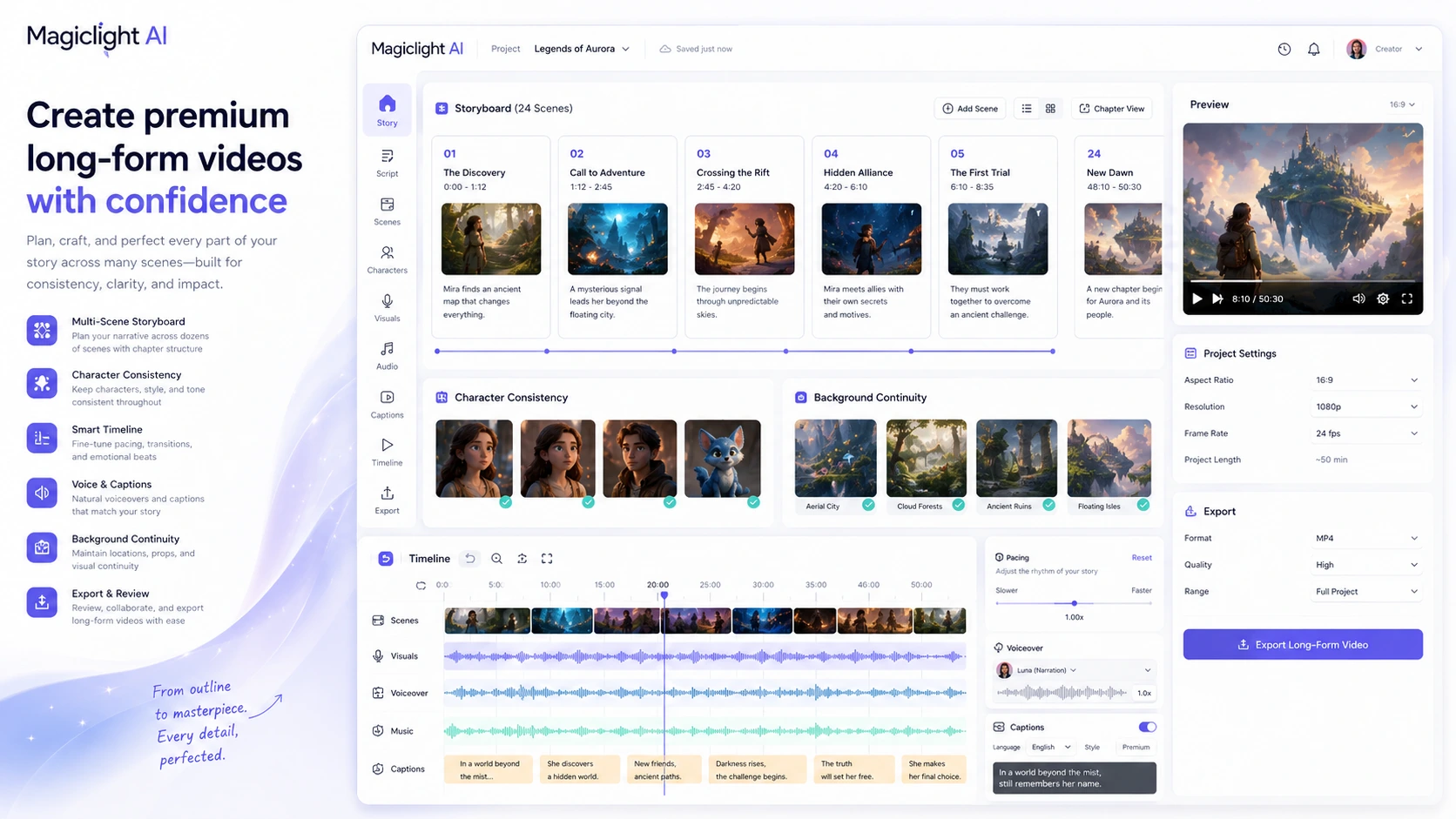
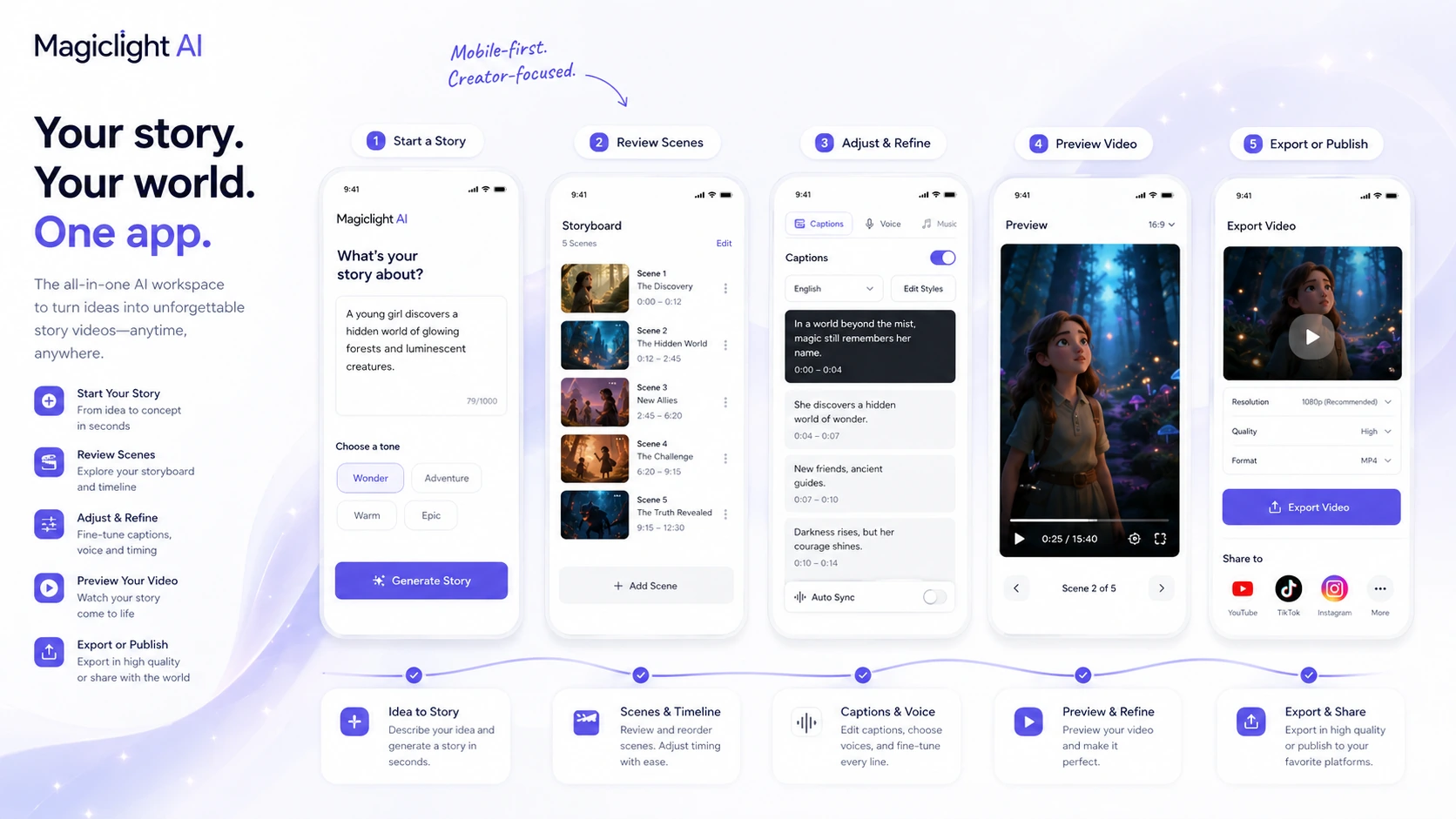
Magiclight AI is a store-page decision for creators who want longer AI videos, not just another quick clip generator. The tool is built around story creation, character consistency, animation, voice, captions, and export. That makes it attractive for faceless YouTube channels, story videos, educational explainers, children's content, faith content, history videos, sci-fi shorts, and social repurposing.
The buying question is simple but important: does the free plan prove enough workflow value to justify a paid credit package? Magiclight's pricing can look inexpensive when the discount is active, but credits, generated minutes, annual billing, and refund wording matter more than the first visible price.
What Magiclight AI actually does
Magiclight AI turns ideas, scripts, text prompts, images, and other inputs into animated or AI-generated videos. Its strongest public positioning is long-form story video, with a workflow that can handle script generation, character setup, visual scenes, captions, voiceover, music, and export.
This matters because many AI video tools are strongest at short clips. Magiclight is trying to solve a different buyer problem: how to produce a complete story or channel-ready video without jumping between a scriptwriter, image generator, video model, voice tool, caption tool, and editor.
- Turn ideas, scripts, and prompts into AI story videos.
- Use long-form video workflows for fuller narratives instead of isolated clips.
- Add voice, captions, music, and export steps inside the broader creation flow.
Pricing and plan fit
Magiclight has a free plan and several paid tiers. During this store update, Standard appeared at $6 per month billed annually with 7,000 credits, Pro at $17.50 per month billed annually with 45,000 credits, Ultra at $45 per month billed annually with 150,000 credits, and Ultimate at $75 per month billed annually with 280,000 credits.
The right plan depends on how often you generate, how many revisions you expect, whether you need watermark-free 1080p exports, and whether the included commercial license matters for your publishing plan. A creator testing one YouTube format should start low. A high-volume channel or agency-style workflow should compare the higher tiers by credit cost, not by the plan names.
- Free is best for proving the workflow.
- Standard fits light testing and early creator use.
- Pro and above make more sense when generation volume becomes predictable.
- Ultra and Ultimate should be judged by credit economics and publishing volume.
Free plan, discounts, and coupon reality
Magiclight's free plan is the safest first step. The pricing page says users can start creating AI story videos for free with limited credits and no card required. That is important because long-form AI video quality is workflow-dependent. You need to see how the tool handles your story structure, characters, pacing, and final export before paying.
For savings, the official pricing page is more reliable than random coupon pages. The current checked pricing page showed a limited-time 50 percent discount and annual billing savings. A verified public coupon code was not strong enough to make coupon hunting the main path.
Long-form video strengths and limits
Magiclight's long-video page says the product supports videos from 10 to 50 minutes, character consistency, stable backgrounds, custom duration, custom storyboarding, captions, voiceover, and music. This is the main reason the tool stands out from simpler text-to-video apps.
The limit is that long-form AI video is harder to quality-control. Small problems with character faces, pacing, scene logic, voice timing, captions, or repeated visuals can become more obvious over a 10 or 30 minute output. Buyers should plan for review time, not assume the first render is publish-ready.
- Best fit: story-heavy videos where structure and consistency matter.
- Main risk: output quality can drift across longer scenes.
- Workflow need: review, regenerate, edit, and check platform suitability before publishing.
Commercial usage and publishing path
Magiclight's paid pricing page lists general commercial usage rights, HD video, and no watermark on paid plans. That matters for YouTube, TikTok, Instagram, educational publishing, client work, and monetized content. The FAQ also says AI-generated videos are acceptable on major platforms when the content is original and follows platform guidelines.
Buyers should still keep one practical rule in mind: commercial rights do not replace platform quality standards. A video can be allowed and still perform poorly if the story is thin, the visuals feel repetitive, or the voice and captions look low-effort.
- Check whether the paid plan includes watermark-free export.
- Keep records of the plan and rights active when exporting commercial work.
- Review content quality against the platform where it will be published.
Refund, terms, and buyer protection
Magiclight's terms include a clear caution for paid buyers: paid features may require fees, and all fees are non-refundable unless the terms specifically say otherwise. That means the buyer should not treat a paid plan as a risk-free trial unless a checkout-specific refund promise appears.
The practical next step is to test free, confirm the annual total, check the billing cycle, and start with the smallest plan that can produce a real sample. If the workflow is already useful after a complete sample, upgrading becomes easier to justify.
- Read the terms before paying.
- Confirm whether the plan is billed monthly or annually.
- Check whether the current promotional price changes at renewal.
- Avoid buying a high tier before testing your real content format.
Relevant alternatives to compare
Magiclight should be compared with other AI video and animation tools based on workflow, not just output style. Runway, Pika, Kling, Luma, and Hailuo are stronger references for short generative video clips. InVideo AI, Fliki, and Pictory are more relevant when the buyer wants script-to-video, voiceover, captions, and social-ready editing. DeeVid AI and similar tools are useful comparisons when the buyer wants template-driven video generation or video-to-video workflows.
Magiclight's edge is the long-form story angle. If that is not your use case, a shorter video model or a more conventional AI video editor may be easier to control.
- Compare Runway or Pika for short cinematic generation.
- Compare InVideo AI or Fliki for script-to-video publishing workflows.
- Compare Kling, Luma, or Hailuo if raw video model quality matters most.
- Compare DeeVid AI if you want broader video-to-video or template-style generation.
Best savings path from this store page
This is the clearest savings route to check once the product already looks like a fit.
MagicLight lists yearly billing with a limited-time 50% off message on its pricing flow. This is the strongest official savings path for creators who already know they need recurring AI video credits rather than a one-off free test.
Use this offer as a buyer-safe entry point. Pricing, plan limits, and promotional availability can change at checkout.
Free plan is listed at $0 with limited creation access
Standard annual pricing starts from the lower paid tier
Use comparison routes when the category fit is still open
Use these comparison routes when the product still looks plausible, but the category fit is not fully settled.
Often a more direct fit for script-to-video social and explainer workflows with stronger conventional editing expectations.
Better to compare when voiceover, captions, and presenter-style video creation matter more than long animated storytelling.
More relevant for short cinematic generation and creative clip control rather than full story-video assembly.
Worth comparing when the buyer wants broader video generation modes and a different credit or template workflow.
Verification points worth checking before you click out
Where this store usually fits best in the workflow
Magiclight fits creators who want to turn one idea or script into longer animated videos for a repeatable channel format.
The long-form and character consistency angle can help creators build story-based or teaching videos without manual animation.
Magiclight is useful when the video needs a beginning, middle, and end instead of a disconnected visual montage.
Creators can test whether one larger story workflow can produce assets that later become Shorts, Reels, or TikTok clips.
Practical checkpoints before and after signup
- Create one real sample with the free plan.
- Compare current plan limits by credits, video minutes, image-to-video seconds, export quality, model access, and commercial rights.
- Read the non-refundable fee wording in the terms before choosing a paid tier.
- Start with a structured story prompt or script instead of a vague idea.
- Check character consistency, scene flow, captions, voice timing, and music before exporting.
- Use regeneration carefully because credits can disappear quickly during experimentation.
- Watch the entire video for repeated visuals, pacing problems, and awkward scene transitions.
- Confirm that commercial usage rights and watermark removal apply to the plan used for export.
- Review the final content against YouTube, TikTok, Instagram, or client quality expectations.
Fast-read signals for workflow fit and buying friction
Questions readers usually ask before choosing this store
What is Magiclight AI best for?
Magiclight AI is best for creators who want to turn stories, scripts, or ideas into longer AI videos with characters, scenes, voice, captions, music, and export support. It is especially relevant for faceless YouTube, educational stories, children's content, animated explainers, and narrative social video formats.
Does Magiclight AI have a free plan?
Yes. Magiclight's pricing page lists a free plan, and its website says users can start creating for free without a credit card. The free plan should be treated as a workflow test before choosing a paid credit package.
How much does Magiclight AI cost?
During this store update, the pricing page showed Standard at $6 per month billed annually, Pro at $17.50 per month billed annually, Ultra at $45 per month billed annually, and Ultimate at $75 per month billed annually under a limited-time discount. Buyers should verify the live price and annual total before checkout.
Can Magiclight AI create long videos?
Yes. Magiclight's official long-video page says it supports videos from 10 to 50 minutes depending on plan and workflow, with character consistency, stable visual style, captions, voiceover, music, and export controls.
What should I verify before buying Magiclight AI?
Verify the current pricing discount, annual billing total, credit allowance, export quality, watermark rules, commercial usage rights, refund wording, and whether your free-plan sample is good enough for the platform where you plan to publish.
Choose the next route that matches what you still need to decide
The strongest next click depends on whether you still need product judgment, a savings route, or a broader category comparison.