Quick verdict
Magiclight AI is worth a closer look if your real problem is not “I need one flashy AI clip,” but “I need a repeatable way to turn stories, scripts, or ideas into longer videos.”
That difference matters.
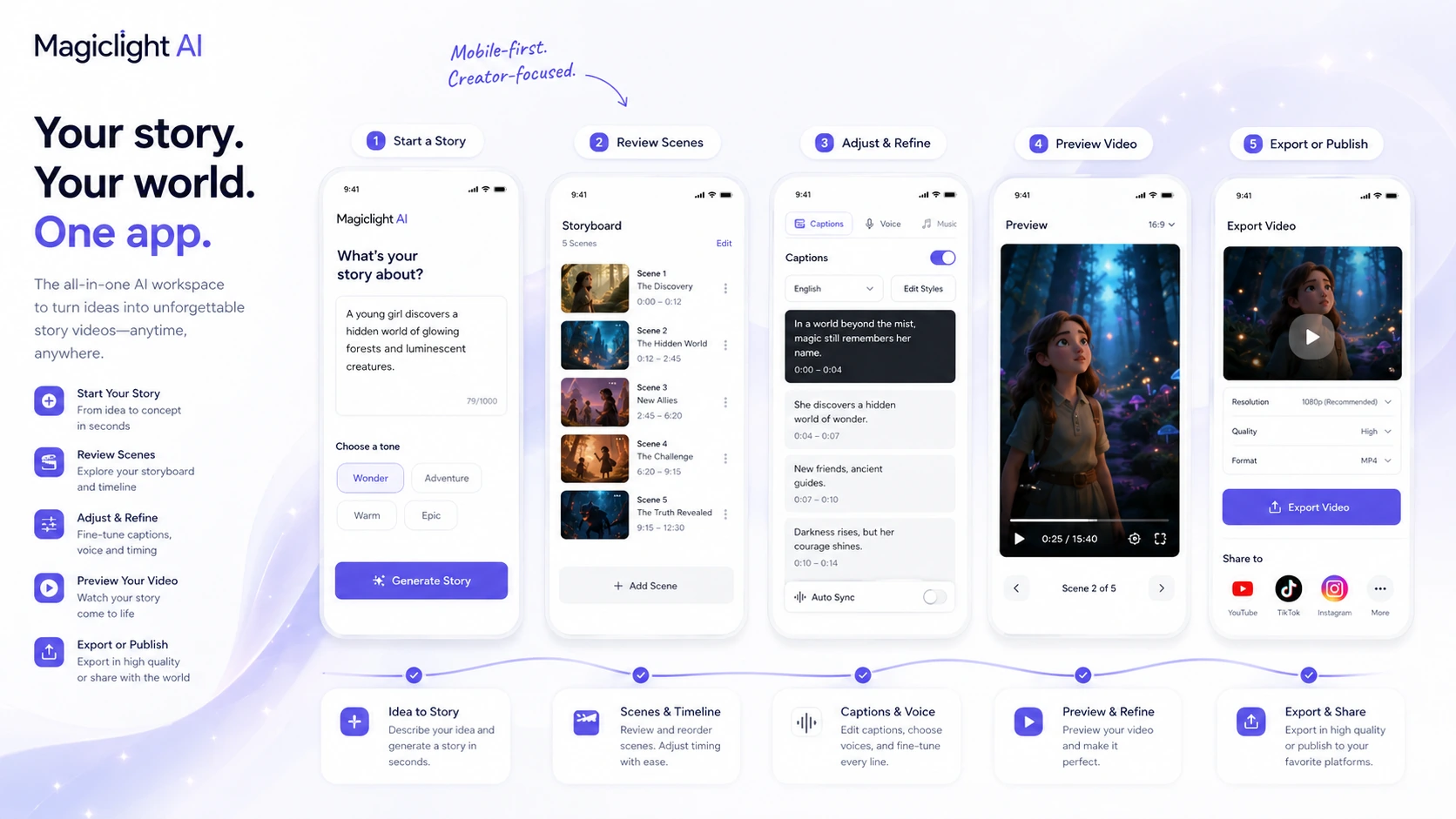
Most AI video tools are easier to judge when the output is short. You type a prompt, get a few seconds, and decide whether the motion looks usable. Magiclight is trying to solve a harder workflow: longer story videos with characters, scenes, voice, captions, music, and export options in one place. That makes the buying decision more interesting, but also riskier.
For my money, Magiclight makes the most sense for faceless YouTube creators, story channels, educational explainers, faith or history channels, children’s story formats, and creators who want a repeatable animated video process. It is less convincing if you only need cinematic B-roll, already use a mature editing stack, or expect long-form AI video to be publish-ready without review.
The main strength is focus. Magiclight is publicly positioned around long-form AI video and story-to-video workflows, not just random prompt-to-video experiments. The main caution is credit math. The pricing page can look attractive when a limited-time annual discount is active, but credits, generated minutes, image-to-video seconds, model access, watermark removal, commercial rights, and refund wording matter more than the first visible monthly number.
The safer path is simple: start free, create one real sample, watch the entire output, then decide whether paid credits are justified.
Next step: If Magiclight still fits your video workflow, test the current buyer route before choosing a paid credit package.
Review snapshot
| Review point | Practical take |
|---|---|
| Best for | Faceless YouTube, story videos, educational explainers, faith/history/sci-fi formats, and creators testing long-form animated content |
| Not ideal for | Buyers who only need short cinematic clips, formal team workflows, API access, or risk-free refund flexibility |
| Main use case | Turning ideas, scripts, and stories into longer AI videos with characters, scenes, voice, captions, music, and export |
| Free path | Free plan with limited creation capacity and no card required on the public pricing page |
| Paid path | Paid annual plans are credit-based and should be judged by usage volume, export needs, and commercial rights |
| Main strength | Long-form story-video positioning instead of only short prompt clips |
| Main concern | Credit burn, quality control across long outputs, annual billing, and limited refund flexibility |
| Direct alternatives | InVideo AI, Fliki, Runway, DeeVid AI |
| Best next step | Build one real sample with the free plan before paying |
What is Magiclight AI?
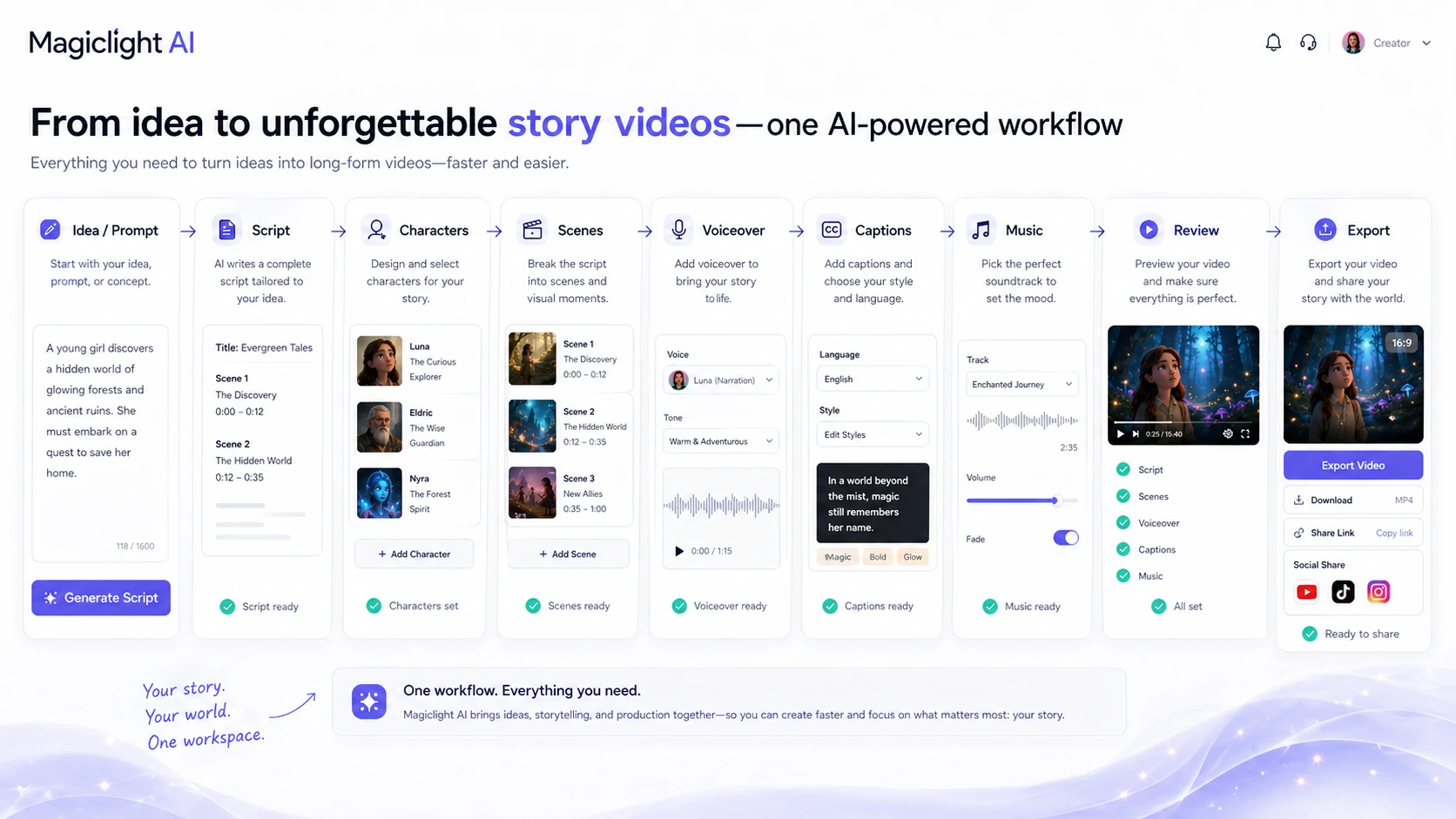
Magiclight AI is an AI video generation platform built around long-form story videos. In plain buyer language, it is trying to take a creator from idea or script to a more complete video workflow: story structure, characters, scenes, voice, captions, music, and export.
That is different from a short clip generator.
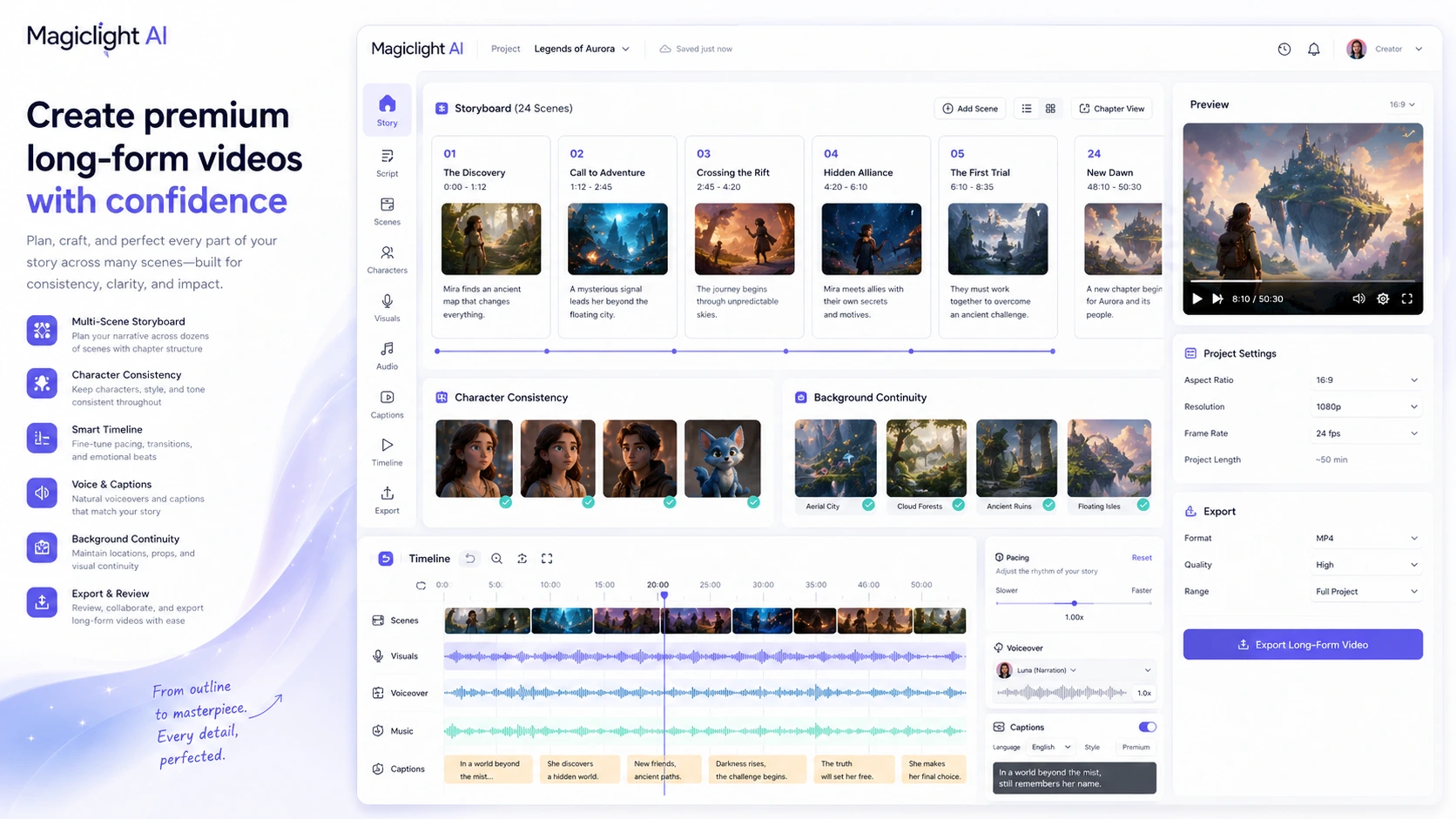
The homepage frames Magiclight as an AI video generator for long-form content, with the ability to turn ideas, scripts, or stories into finished videos. The official long-video page goes further, positioning the tool around 10-to-50-minute video generation, character consistency, stable visual style, pacing, storyboarding, captions, voiceover, music, and export.
The common wrong expectation is thinking that “long-form AI video” means a fully polished YouTube video appears without judgment. I would not evaluate Magiclight that way. The more realistic question is whether it can reduce the number of separate tools a creator needs while still producing output that survives a full watch-through.
Our review approach compares public product positioning, pricing details, terms, FAQ language, buyer workflow fit, and nearby alternatives. I do not treat a discount, free plan, or attractive monthly headline as proof that the product fits a real publishing workflow.
The product belongs in the AI video category, but its most specific buyer job is narrower: story-to-video and long-form animated video creation for creators who need repeatable formats.
Who should use Magiclight AI?
Magiclight AI makes the most sense for creators who already know they want story-based video.
A faceless YouTube creator is the clearest fit. If your channel depends on mythology, history, faith stories, bedtime stories, sci-fi concepts, Reddit-style storytelling, educational explainers, or narrative videos, Magiclight’s long-form angle is more relevant than a tool that only creates a few seconds at a time. The condition is that the generated characters, pacing, voice, and captions must be good enough for your audience.
A children’s story or educational creator may also find it useful. The value is not only animation. It is the ability to move from a story idea into scenes, characters, and export without building an animation pipeline manually. The buyer check is whether the visual style stays consistent and age-appropriate across the whole video.
A solo creator testing multiple content formats may like the free entry path. If you are not sure whether AI story videos belong on your channel, Magiclight gives you a way to run a small experiment before paying. The mistake would be buying a larger plan before one complete sample proves the concept.
A small publisher or agency could consider Magiclight for low-stakes video experiments, especially when the goal is social repurposing or lightweight content formats. I would be more careful for client work. Before using it commercially, verify the paid-plan rights, watermark rules, quality controls, and whether the output meets the client’s actual standard.
Who should avoid Magiclight AI?
I would avoid Magiclight if you only need short cinematic clips. In that case, Runway, Pika, Kling, Luma, or another clip-focused video model may give you more direct creative control.
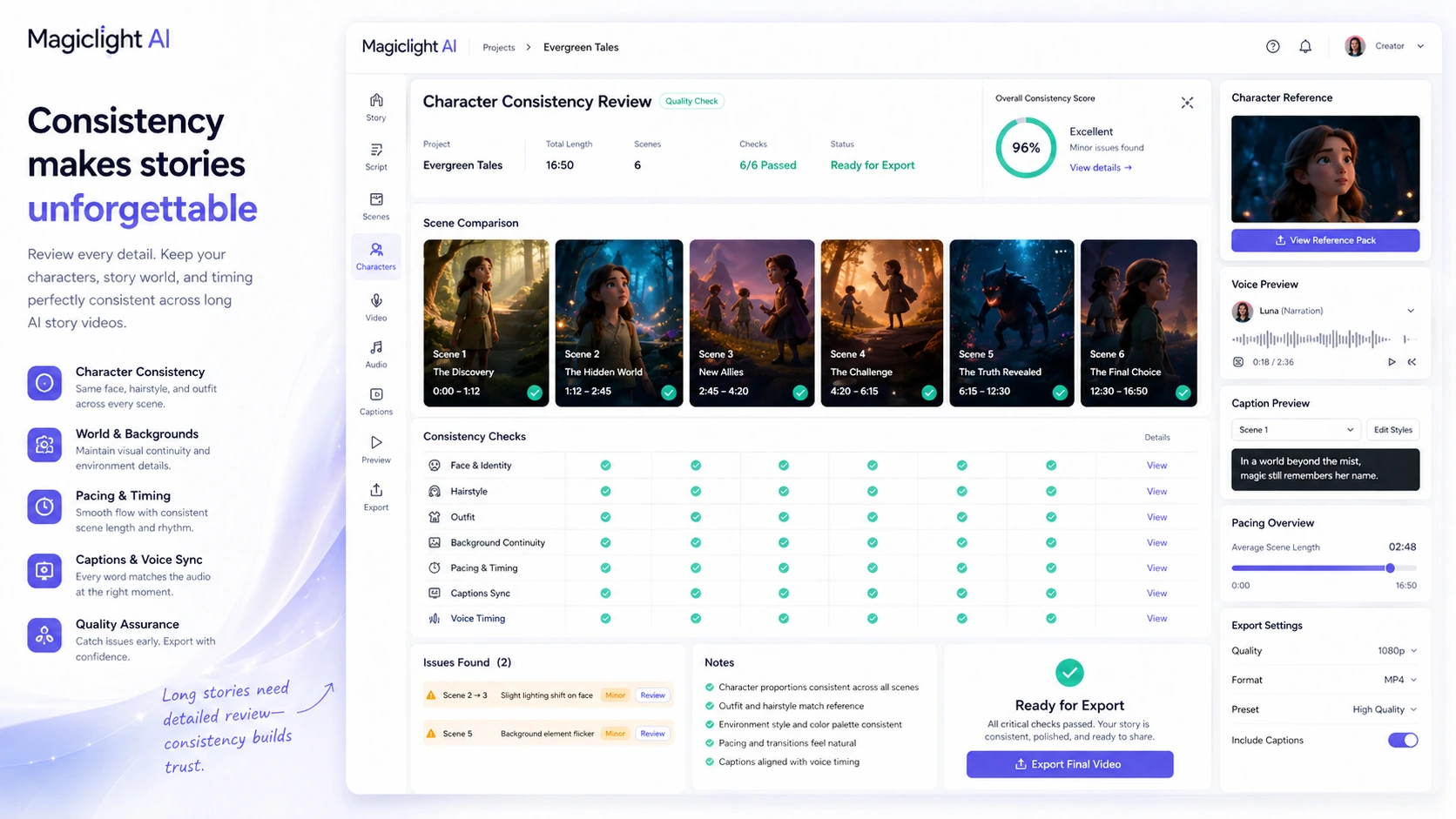
I would also be careful if you expect a long video to be finished after one generation. Long-form AI video has more places to drift: character faces, scene continuity, captions, voice timing, background consistency, story logic, and pacing. A 30-second flaw is annoying. A 30-minute flaw can sink the entire video.
Teams that need formal workspace administration, approvals, procurement controls, API documentation, user seats, or strict enterprise workflows should also slow down. The store data and public positioning are creator-centric. Team and API clarity are not strong enough to assume a serious organization can run everything through Magiclight without extra checks.
Buyers who dislike credit systems may also feel friction. Credits can disappear quickly when you test longer videos, regenerate scenes, change formats, or experiment with premium models. If you prefer predictable flat usage, Magiclight may feel harder to budget.
Finally, I would not buy Magiclight only because the pricing page shows a promotion. A discount can improve a good purchase. It should not be the reason you buy a creative workflow you have not tested.
How Magiclight AI fits into a real workflow
A practical Magiclight workflow starts before the generation button.
The better process looks like this:
- Choose one real content format you might publish.
- Write or outline a structured story, not a vague prompt.
- Generate a sample video with the free plan if possible.
- Watch the output from start to finish.
- Check character consistency, scene flow, voice timing, captions, music, and pacing.
- Estimate how many revisions or regenerations a normal video would require.
- Compare that credit use against the paid plan you are considering.
- Only then decide whether the workflow is worth scaling.
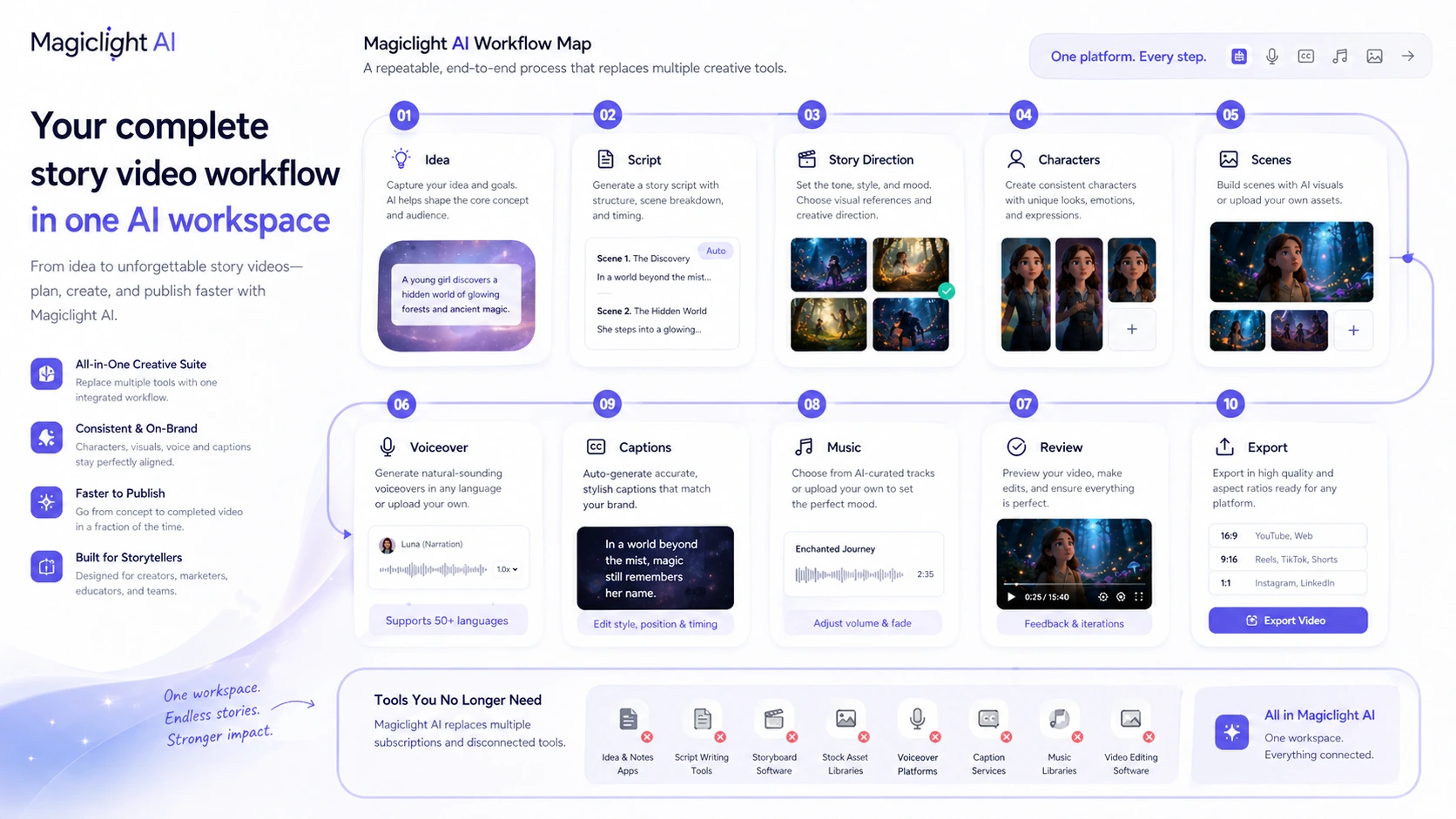
This is where Magiclight can become useful. Instead of stitching a scriptwriter, image generator, short video model, voice tool, caption tool, music tool, and editor together manually, Magiclight tries to keep more of that process in one creation path.
The tradeoff is control. An all-in-one story-video workflow can save time, but it can also hide quality problems until the full output is generated. That is why I would judge Magiclight by a complete sample, not a homepage demo or one attractive clip.
Workflow test: Magiclight is easier to judge after one real video sample, not from the pricing page alone.
Real-world buyer scenarios
A faceless YouTube creator might use Magiclight to test a repeatable story format. The fit is strong if the channel depends on narrative structure and animated scenes. The risk is that long videos can become repetitive, especially if pacing and scene variety are weak.
An education creator might use it for simple explainers or story-based lessons. Magiclight’s templates and long-form positioning are relevant here, but the buyer still needs to fact-check claims, check captions, and make sure the final video does not feel like low-effort AI filler.
A children’s story creator could use Magiclight for character-led videos. The useful part is repeatability: similar structure, consistent characters, and a predictable story flow. The part to test first is whether the style, voice, and pacing feel polished enough for the intended audience.
A social creator might generate a longer story and cut it into shorter assets later. That can work, but Magiclight is not automatically the best short-form editing stack. If your main output is Shorts, Reels, or TikTok clips, compare it with Fliki, InVideo AI, or a more conventional editor before committing.
Key features that actually matter
Long-form story video generation
This is the feature that makes Magiclight worth discussing. Public pages position the tool around videos up to 50 minutes, depending on plan and workflow. That is more ambitious than most prompt-to-video tools.
Buyer note: long duration is useful only if the output stays watchable. Test pacing, story logic, and visual consistency before judging the plan value.
Character consistency
Magiclight’s long-video pitch depends heavily on character consistency. For story channels, that can matter more than raw cinematic effects. A recurring character that changes face, clothing, or style too often can make a video feel cheap.
Buyer note: do not trust this from screenshots alone. Create a real character-led sample and watch whether consistency survives multiple scenes.
Script, captions, voice, music, and export in one flow
The all-in-one workflow is attractive because creators often lose time moving between tools. If Magiclight can handle enough of the chain, it may reduce friction for simple video formats.
Buyer note: all-in-one does not always mean best-in-class. A dedicated voice tool, caption editor, or video editor may still produce stronger results for demanding projects.
Credit-based generation
Credits are the pricing engine behind the workflow. The FAQ says credits are consumed based on video length, complexity, and resolution, and that processing begins to consume resources once it starts.
Buyer note: the real cost is not just the monthly plan. It is the number of usable videos you can create after revisions, failed outputs, and experiments.
Commercial usage and watermark removal
Paid plans list 1080p HD, no watermark, and general commercial license language. That matters for YouTube, social publishing, and client-facing work.
Buyer note: commercial usage rights do not replace quality control. A video can be allowed for publishing and still perform poorly if it feels repetitive or under-edited.
Pricing and plan value
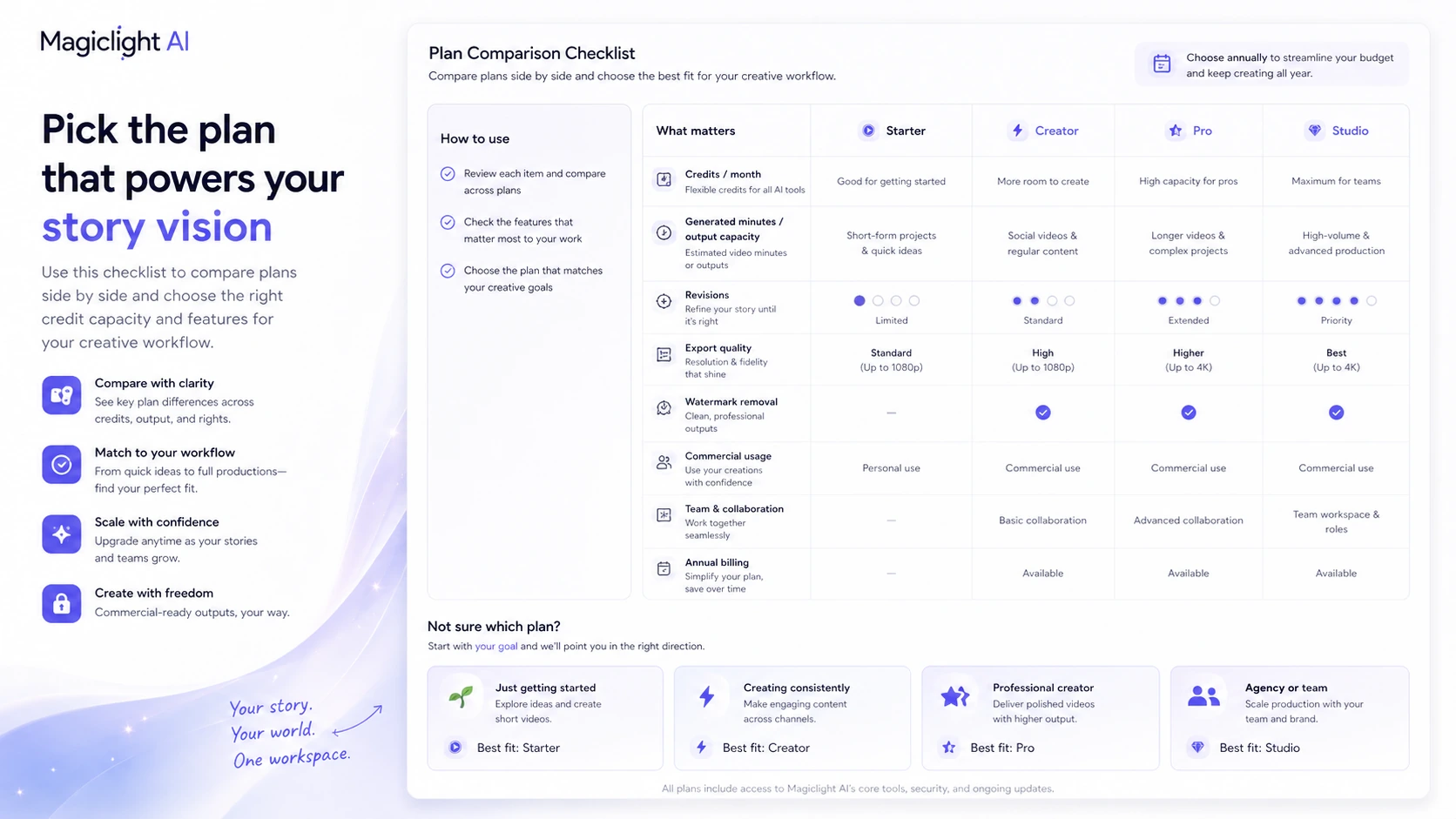
Magiclight has a free plan and several paid plans. At the time of review, the public pricing page showed a limited-time 50% off annual pricing with Standard at $6/month billed annually, Pro at $17.50/month billed annually, Ultra at $45/month billed annually, and Ultimate at $75/month billed annually. The pricing page also displayed credits, video generation minutes, image-to-video seconds, model access, 1080p HD, no watermark, and commercial license details.
That sounds simple until you look closer.
The plan comparison area and top pricing cards can present slightly different credit figures in different parts of the page. That does not automatically mean the offer is bad. It does mean buyers should verify the live checkout screen before paying.
For most creators, the free plan is the right starting point. Standard may be enough for early testing, especially if you only need a few outputs. Pro starts to make more sense when you have a real channel format and predictable generation volume. Ultra and Ultimate are harder to justify unless you already know how many videos you will produce and how many revisions you typically need.
The cheapest plan is not automatically the best deal. If one usable long video takes multiple attempts, a lower tier can feel limiting quickly. At the same time, buying a high tier before proving the format can waste money.
For my money, the plan decision should follow this order: sample quality first, credit burn second, export rights third, annual discount last.
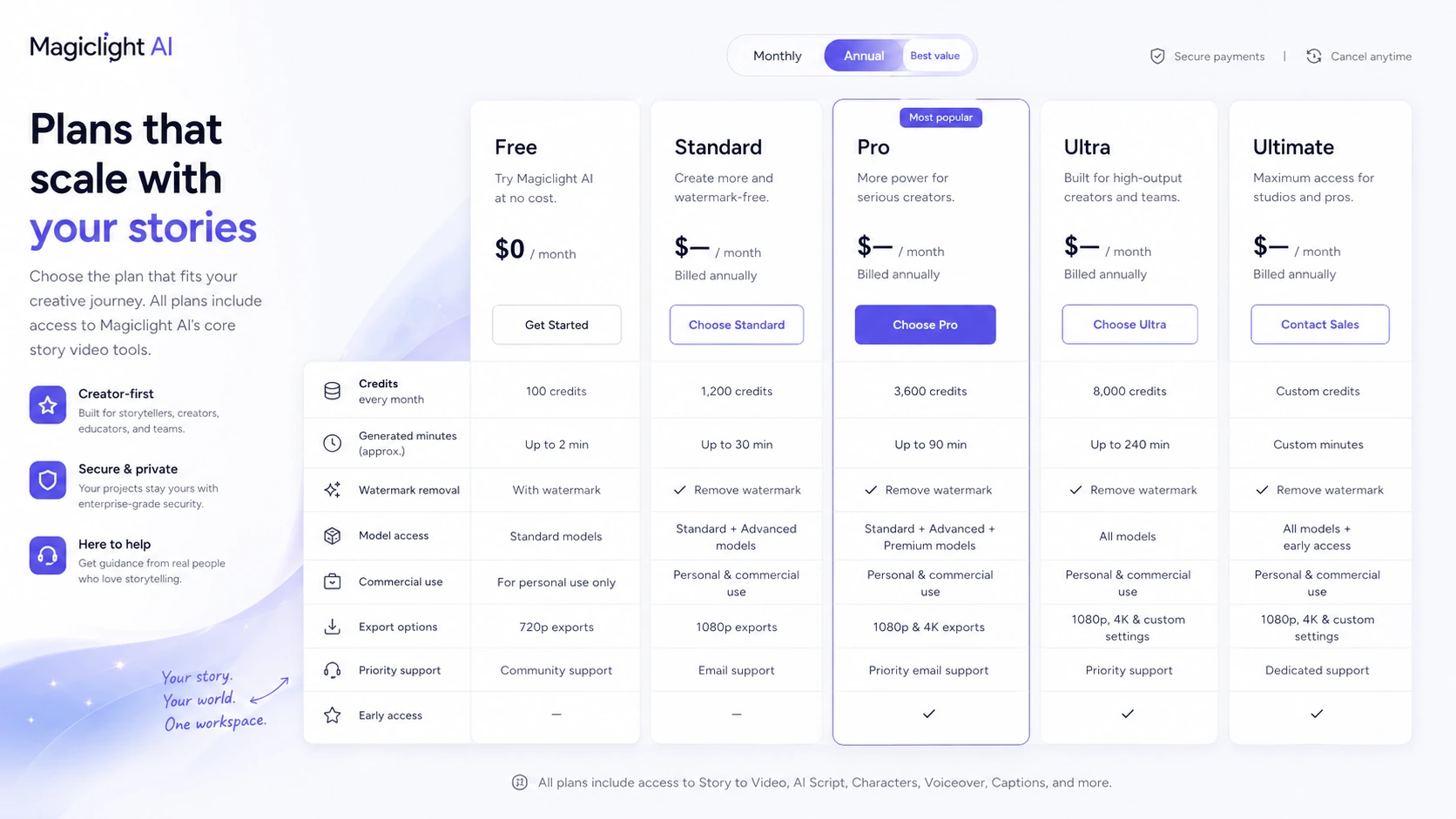
Pricing check: Before paying, compare the live plan limits against the sample workflow you actually want to publish.
Free plan, trial, coupon, and checkout notes
The free plan is the most important buyer-protection feature here. Magiclight’s public pricing page says users can start creating AI story videos for free with limited credits and no card required. For this product category, that matters more than a coupon.
Long-form AI video is not something I would buy blind. You need to test your own niche, story length, character setup, voice expectations, and revision habits. If the free output does not meet your quality bar, a bigger package may only give you more attempts at the same mismatch.
For savings, the official pricing promotion is the cleaner route than random coupon hunting. The public pricing page shows a limited-time annual discount. That can be useful, but it should be checked at live checkout. Do not assume the promotion, credit amounts, or annual total will remain unchanged.
Refund language also needs caution. Magiclight’s terms say fees are non-refundable unless the terms specifically provide otherwise. The FAQ also says credits cannot be refunded once used because processing consumes computational resources. That makes the free test more important.
The safe checkout order is: test free, estimate credit use, verify annual total, read current terms, then pay only if the sample supports your actual publishing goal.
What I would check before buying Magiclight AI
If I were buying Magiclight for a real creator workflow, I would check these points before paying:
- Whether one complete free-plan sample is good enough to publish or edit into publishable shape.
- How many credits a normal project consumes after failed outputs, scene changes, image-to-video tests, and regenerations.
- Whether the current annual price, discount, and renewal path are clear at checkout.
- Whether the plan includes the export quality, watermark removal, and commercial usage rights needed for the intended platform.
- Whether character consistency holds across the kind of long video I actually want to make.
- Whether voice, captions, pacing, music, and scene flow reduce work or create more cleanup.
- Whether refund and credit-consumption terms are acceptable before choosing a higher tier.
The easy mistake is treating “up to 50 minutes” as the buying proof. The better question is narrower: can Magiclight produce the kind of long video your audience would actually watch?
A simple test before paying
Before paying, I would run a small test like this:
- Pick one real story idea from your actual channel or campaign.
- Write a short but structured outline with characters, conflict, pacing, and target length.
- Generate a sample with the free plan or the lowest practical route.
- Watch the full result without skipping.
- Mark every issue: character drift, repeated visuals, weak captions, odd voice timing, scene confusion, or pacing problems.
- Estimate how many regenerations would be needed for a publishable version.
- Compare that estimate against the paid plan credits.
This test is more useful than reading another feature list. If the sample shows promise, Magiclight may deserve a paid test. If the sample feels weak, the safer move is to compare alternatives before buying.
Pros explained
The biggest pro is Magiclight’s long-form angle. Many AI video tools are still strongest when they generate short clips. Magiclight is trying to support complete story workflows, which gives it a clearer identity.
The second pro is the free entry path. A no-card free plan lowers the risk of testing a creative workflow that may or may not match your style.
The third pro is the all-in-one structure. Script, scenes, characters, voice, captions, music, and export in one workflow can save time for solo creators who do not want to assemble a full production stack.
The fourth pro is paid-plan publishing support. 1080p export, no watermark, and commercial usage rights are the kinds of plan details creators should care about when content is meant for YouTube, TikTok, Instagram, or client work.
The fifth pro is niche fit. Magiclight’s strongest examples are not generic corporate explainers. It is more interesting for story-heavy niches where repeatable narrative formats matter.
Cons explained
The first con is credit complexity. Credit-based video tools can look affordable until you realize how many attempts are needed to get one usable output.
The second con is quality-control pressure. Long videos make small AI weaknesses more visible. Character drift, repeated shots, caption errors, and pacing problems are more damaging when the viewer spends several minutes with the same story.
The third con is refund caution. Once credits are used or processing begins, refund flexibility appears limited. Buyers should not treat a paid plan like a risk-free trial unless the live checkout terms clearly say so.
The fourth con is team and API uncertainty. Magiclight may be fine for creators, but it is not the first tool I would assume for structured team approvals, procurement, developer workflows, or enterprise governance.
The fifth con is alternative fit. If you only need short cinematic video, Magiclight may be the wrong comparison. A dedicated video model can be more direct and controllable for clip-level creation.
Green flags and red flags
Green flags are easy to identify here.
Magiclight is more promising if you already have a repeatable story format, if the free sample looks close enough to edit, if you understand your monthly generation volume, and if the paid plan gives you the export quality and rights you need.
Another green flag is willingness to review output manually. A creator who expects to edit, adjust, and improve the result will probably evaluate Magiclight more fairly than someone expecting one-click perfection.
Red flags are just as important.
Slow down if you are buying only because of a discount, if you have not created a sample, if your niche needs high factual accuracy, if your audience expects polished animation, or if your plan choice depends on unclear credit math.
Also slow down if refund flexibility matters to you. For this type of tool, used credits and server-side processing can become the line between testing and sunk cost.
Magiclight AI vs alternatives
Magiclight should be compared by buyer job, not by the broad phrase “AI video generator.”
InVideo AI vs Magiclight AI
InVideo AI is usually a stronger comparison if your main job is script-to-video publishing with a more conventional editing expectation. It may fit creators who want explainers, marketing videos, or social-ready videos without leaning as heavily into long animated storytelling.
Magiclight may still make sense if the story-video angle is central to your channel.
Fliki vs Magiclight AI
Fliki is a better comparison when voiceover, captions, presenter-style videos, and text-to-video publishing matter more than long animated narratives. If your videos are more informational than cinematic, Fliki may feel easier to control.
Magiclight is more interesting when character-led story output is the point.
Runway vs Magiclight AI
Runway is a direct creative-generation comparison, but not for the same workflow. It is stronger for short cinematic clips, visual experiments, and creative control over individual shots.
Magiclight is trying to handle the broader story assembly. If you want clips, compare Runway. If you want a full story workflow, Magiclight is more relevant.
DeeVid AI vs Magiclight AI
DeeVid AI is worth comparing if you want broader video generation modes or a different credit and template workflow. It may fit buyers who want flexibility across video-to-video, templates, or shorter generation tasks.
Magiclight’s edge remains the long-form narrative focus.
Trust, refund, and buyer-risk notes
The main trust signal is that Magiclight publishes a homepage, pricing page, FAQ, terms, app listings, tools pages, academy content, and affiliate page. That gives buyers several public checkpoints.
The main buyer-risk signal is that AI video generation is expensive to process and hard to predict. The FAQ says credits are consumed based on video length, complexity, and resolution, and credits are consumed when processing begins. The terms state that fees are non-refundable unless otherwise provided.
That combination should shape the buying decision.
Do not buy on headline price alone. Verify the current plan, annual charge, renewal path, credit allowance, model access, watermark rules, commercial rights, and refund language. If you need commercial output, keep a record of the plan terms active at the time you export.
Also remember that platform acceptance and content performance are different things. Even if a paid plan includes commercial usage, YouTube, TikTok, Instagram, or client audiences may still reject weak storytelling, repetitive visuals, poor captions, or low-quality voice work.
Magiclight can reduce production friction. It cannot remove editorial responsibility.
Final verdict
I would consider Magiclight AI if I were building a repeatable story-video workflow and wanted one tool to handle more of the path from idea to export.
I would skip it if I only needed short cinematic clips, had no clear publishing format, or disliked credit-based experimentation.
I would compare it with InVideo AI or Fliki if the real job is script-to-video publishing. I would compare it with Runway if the real job is short cinematic generation. I would compare it with DeeVid AI if broader video modes matter more than long-form story structure.
The safest next step is not to choose the biggest plan. It is to create one real sample, watch the full output, estimate credit burn, read the current terms, and only then decide whether Magiclight deserves a paid role in your creator workflow.
