Quick verdict
Klap is useful if you already have long-form videos and need a faster way to turn them into short-form clips. It is less convincing if you are buying it because the homepage makes AI clipping look effortless.
That difference matters.
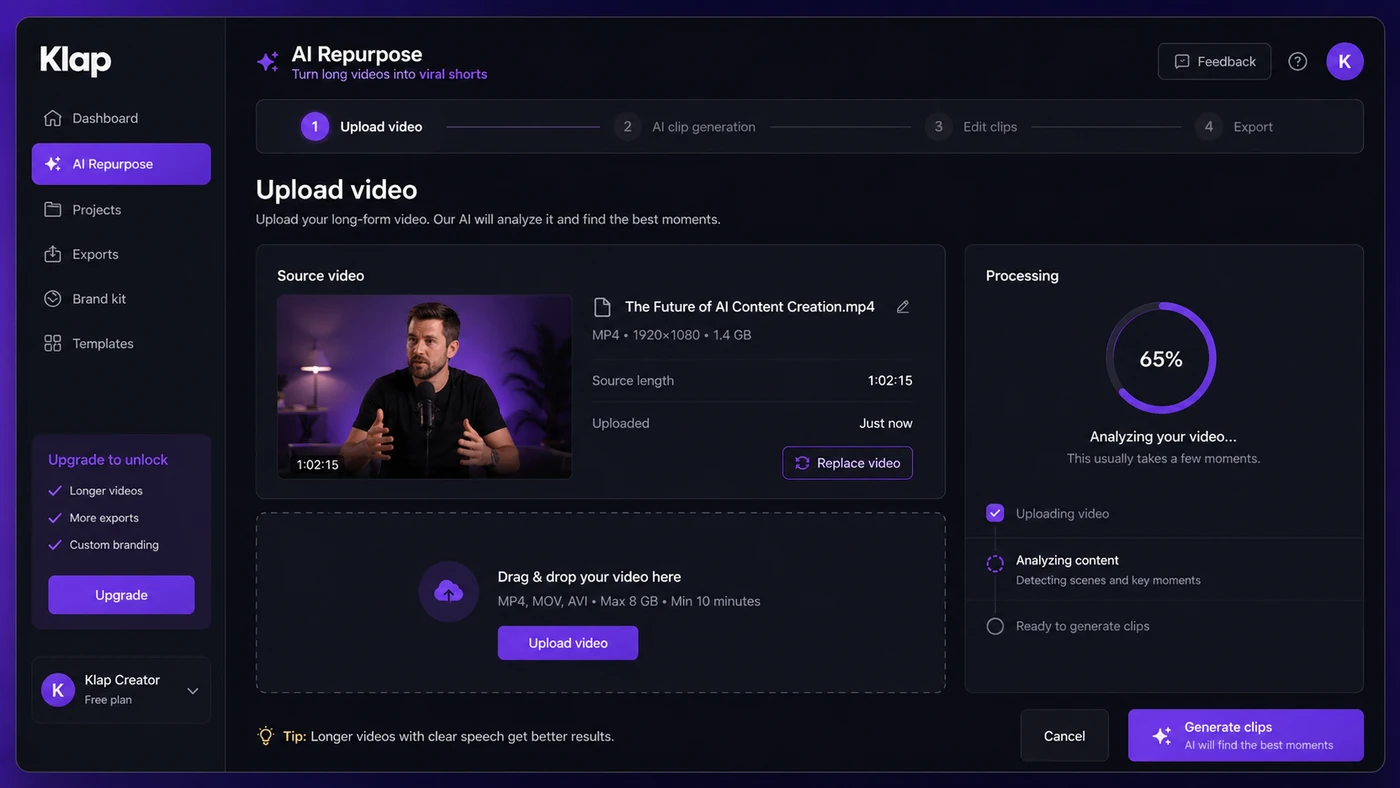
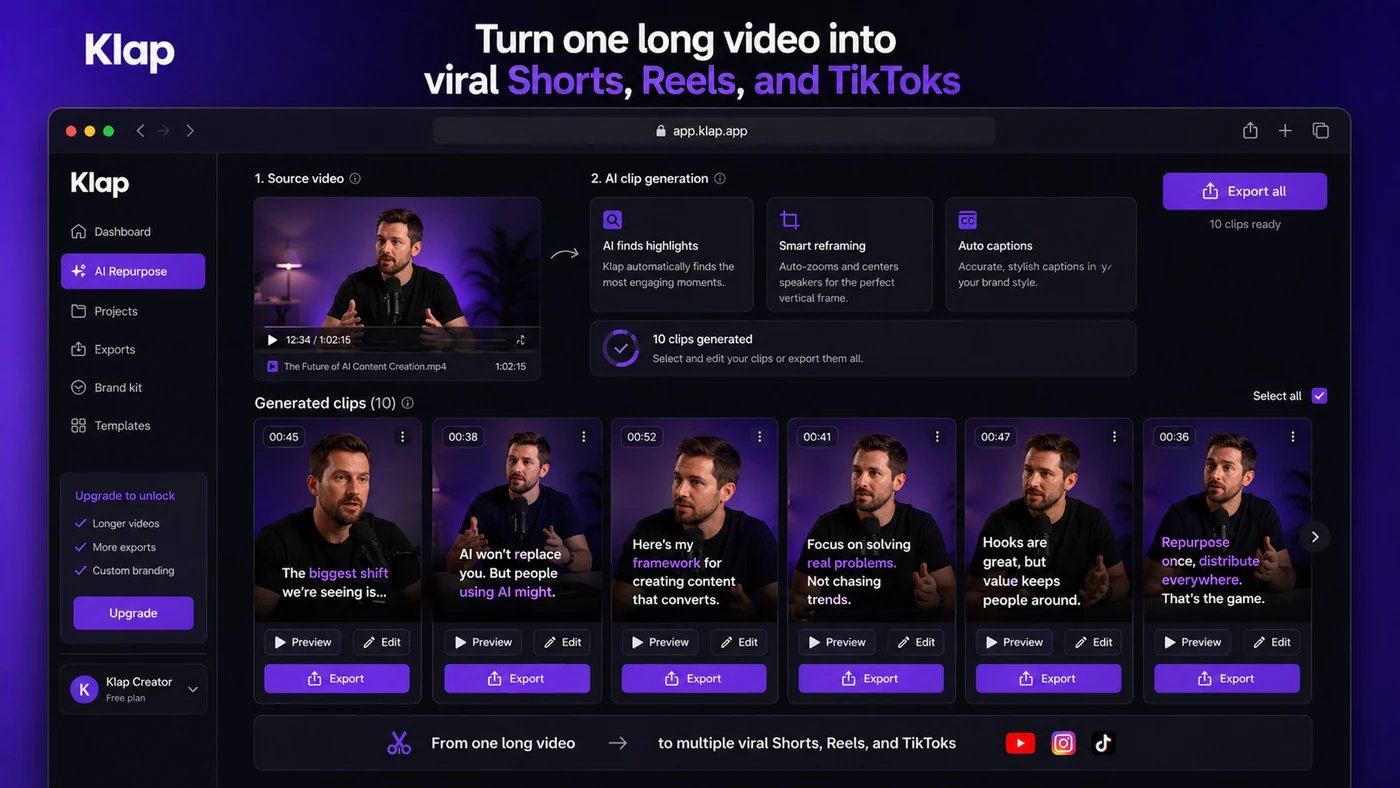
The product’s core promise is easy to understand: upload a long video or paste a YouTube link, let Klap find short-form moments, reframe them vertically, add captions, and export clips for platforms such as TikTok, Instagram Reels, YouTube Shorts, and LinkedIn. For a creator with podcasts, interviews, webinars, tutorials, or talking-head YouTube videos, that can remove a lot of repetitive editing work.
But I would not judge Klap only by the number of clips it can generate. The real question is narrower: does it reliably find usable moments from your own videos, and do the plan limits match how often you publish?
The current public pricing page shows a paid ladder built around monthly video uploads, source-video length, generated clips, export quality, and AI dubbing. That is helpful because the buying decision is not just about price. A solo creator with shorter videos may fit the entry plan. A podcast editor or agency can outgrow it quickly.
For my money, Klap makes the most sense when short-form repurposing is already part of the workflow. It is not a full video editor, and it does not remove the need to review context, caption accuracy, framing, and brand style before publishing.
Next step: If Klap sounds useful, test it against one real source video before judging the paid plan ladder.
Review snapshot
| Review point | Practical take |
|---|---|
| Best for | Creators and teams repurposing long videos into Shorts, Reels, TikToks, and LinkedIn clips |
| Not ideal for | Buyers who need full timeline editing, deep brand review, or unlimited clipping from the lowest plan |
| Main use case | Turning speech-heavy long-form content into candidate vertical clips with captions and reframing |
| Current pricing note | Public pricing shows paid plans from $23/month when billed yearly, with higher limits on Pro and Pro+ |
| Free or test path | Klap promotes free tools and test-friendly entry paths, but export and usage details should be checked live |
| Main strength | Fast long-video-to-short workflow with automatic clip selection, captions, reframing, and export support |
| Main concern | Clip quality, plan limits, refund eligibility, billing changes, and support experience need buyer verification |
| Direct alternatives | Opus Clip, Vizard AI, Vidyo.ai, Submagic |
| Best next step | Upload one real video and compare output quality before annual billing |
What is Klap?
Klap is an AI video repurposing tool. Its main job is to take long videos and turn them into short vertical clips for social platforms.
That sounds simple, but the category is easy to misunderstand. Klap is not primarily a full manual editor like Premiere Pro, Final Cut, or a traditional timeline tool. It is also not just a subtitle generator. The buyer job is more specific: find potentially useful moments inside a longer video, reframe them for vertical viewing, add captions, and make the clips easier to publish.
The strongest fit is speech-heavy content. Podcasts, interviews, talking-head YouTube videos, webinars, tutorials, coaching calls, educational videos, and commentary-style videos usually give the AI more context to work with. A cinematic montage, music video, silent product demo, or highly visual edit may need more manual direction than a tool like Klap can provide on its own.
The homepage leans into speed and audience growth. That is expected. A review has to ask a more grounded question: does Klap save enough editing time to justify the subscription, or does it create a pile of clips that still need heavy fixing?
Our review approach compares public product pages, pricing details, API documentation, refund language, buyer workflow fit, and nearby alternatives. I would not treat a low price, a large clip count, or a yearly discount as proof that the product fits. With AI clipping tools, the real proof is whether a buyer can run the same type of video through the product and get clips worth publishing.
Who should use Klap?
Klap makes sense for creators who already publish long-form videos and want short-form discovery without manually hunting through every timeline.
A YouTuber can use it to turn one long video into several Shorts candidates. That works best when the original video has clear segments, strong spoken hooks, or moments that stand alone without too much missing context. The buyer should still review each clip before posting because AI can choose a moment that sounds energetic but does not fully explain itself.
A podcaster or interview host is another natural fit. Long conversations often contain many short moments, but finding them manually takes time. Klap can reduce the first-pass editing workload, especially when the content is dialogue-heavy and the speakers are easy to follow. The condition is simple: if the podcast is messy, has overlapping speakers, or depends on long context, the clips may need more cleanup.
A coach, educator, or course creator may use Klap for promotional snippets and teaching clips. This is useful when the source video contains clear lessons, questions, or answers. The buyer should verify whether captions and framing remain accurate enough for educational material.
A social media team can also consider Klap if the team has a predictable long-form content pipeline. In that case, Klap becomes less of a novelty and more of a production step: upload, generate, review, edit, schedule, publish. The plan limits matter more here because a team can burn through uploads and clip volume faster than a solo creator.
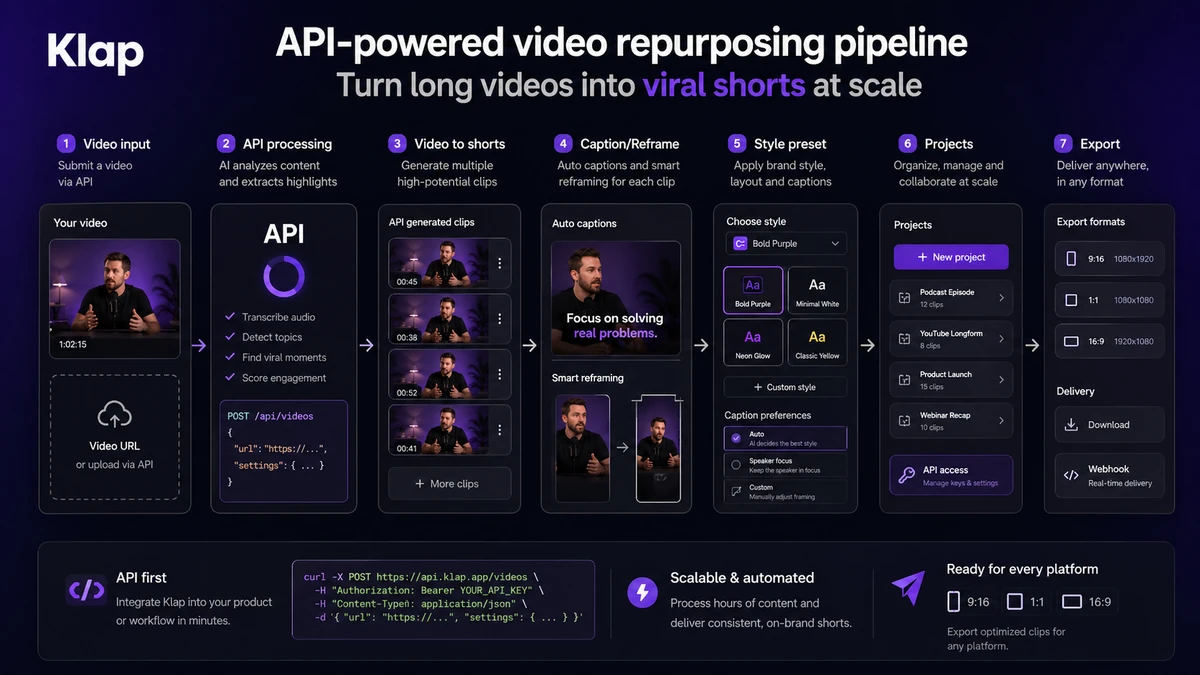
A developer or platform team may care about Klap’s API. The official API docs describe programmatic video-to-shorts workflows, caption/reframe operations, managed users, embeds, and endpoint-based usage. That opens a different buying path, but it should be evaluated separately from the normal dashboard plan.
Who should avoid Klap?
I would avoid Klap if you do not already have long-form content to repurpose. A video clipping subscription can feel exciting for a week, then sit unused if your real bottleneck is producing the original videos.
I would also be careful if you need frame-level creative control. Klap is built for speed. If you want detailed pacing, sound design, transitions, b-roll decisions, color work, custom storytelling, and brand review on every second of the short, a full editor or a more manual video workflow may be a better fit.
Klap is not ideal for buyers who expect the lowest plan to handle heavy production. The entry plan may be enough for a smaller creator, but upload count, source-video length, generated clip count, and export quality can become real constraints. A podcast editor working with long episodes should check these limits before assuming the cheapest plan is enough.
I would also slow down if annual billing is tempting but the workflow has not been tested. The yearly discount can be useful, but only after you know Klap chooses good moments from your actual content.
Finally, teams with sensitive client videos should read the privacy policy and terms before uploading. Klap’s privacy page discusses personal data, business customer processing, and a separate Data Protection Agreement for certain business use cases. That is a real checkpoint for agencies and organizations handling other people’s content.
How Klap fits into a real workflow
A realistic Klap workflow starts before the upload.
First, the buyer needs a source video that is likely to produce short-form moments. A tight interview, tutorial, Q&A, webinar, or commentary video is a better test than a random file. If the video does not contain clear moments, no clipping tool can magically turn it into a strong content calendar.
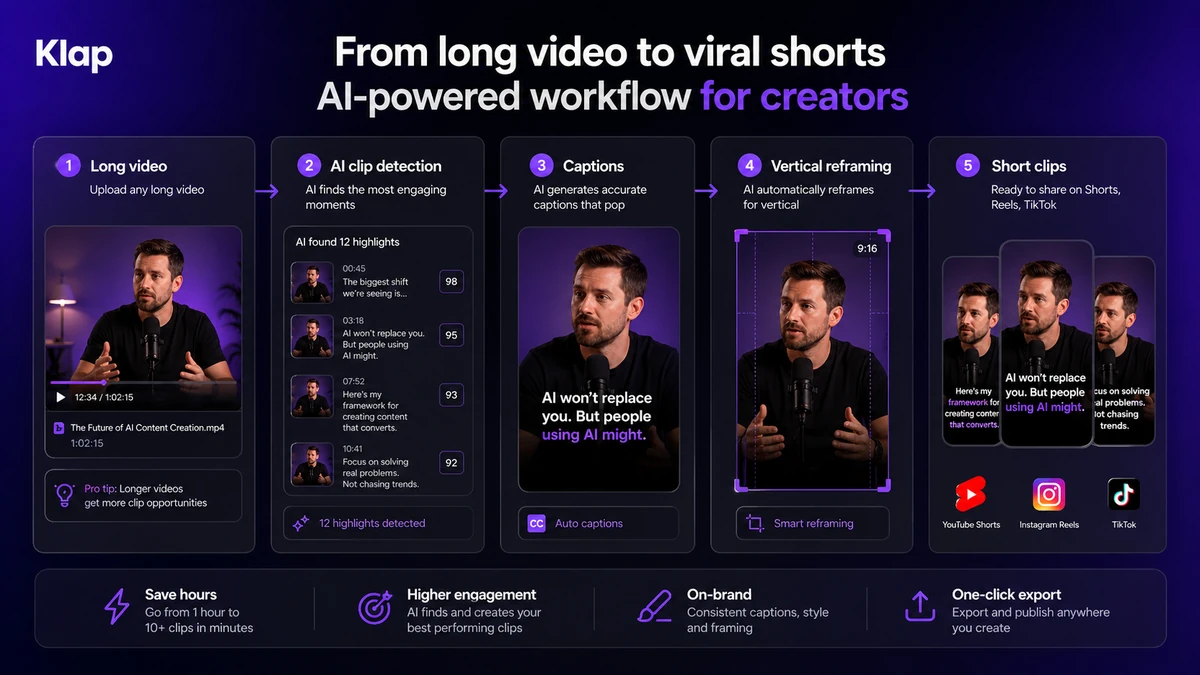
Then the buyer uploads a video file or uses a source link. Klap processes the content, identifies candidate clips, reframes the footage vertically, adds captions, and prepares outputs for short-form platforms. From there, the useful work begins.
The buyer still has to review the clips. Does the opening make sense without the missing context? Are captions correct? Is the speaker framed well? Do emojis, subtitle style, and pacing match the brand? Is the clip strong enough to publish, or is it only interesting because it came from a larger video?
That last question is where Klap’s value becomes visible. If most clips need only light editing, the product can save serious time. If every clip needs major repair, the subscription may not solve the real problem.
Workflow check: Use Klap on a real long-form video, then judge the generated clips before choosing a higher plan.
Real-world buyer scenarios
A solo YouTuber with one weekly long video is probably the cleanest Klap scenario. The creator can upload each new video, generate several Shorts candidates, polish the best ones, and use them to feed short-form discovery. The entry plan may be enough if the videos are under the length limit and the creator does not need 4K export.
A podcast editor has a slightly different problem. The source files are often longer, and the best clips may require context. Klap can help with the first pass, but the buyer should check maximum video length carefully. If episodes run past the entry limit, Pro or Pro+ may become necessary faster than the headline price suggests.
A course creator or coach may use Klap to cut lessons, webinars, or live sessions into promotional snippets. The risk is that an educational clip can become misleading if it starts too late or removes important setup. In this scenario, Klap is useful only if the buyer reviews each clip for clarity before publishing.
An agency or platform team may look at Klap differently. The dashboard workflow is only one path. API usage can support programmatic short creation, captioning, reframing, styling presets, and managed users. That is more powerful, but also more technical. The buyer needs to verify API pricing, operation volume, developer resources, and support expectations before treating Klap as infrastructure.
Key features that actually matter
AI clip extraction
Klap’s most important feature is automatic clip selection. It analyzes long videos and produces short-form candidates that may work for Shorts, Reels, TikToks, LinkedIn, or similar channels.
This matters because searching a long video manually is often the most boring part of repurposing. The limitation is that AI can mistake a loud or energetic moment for a useful clip. Buyer note: judge the clips by publishability, not by count.
Auto reframing
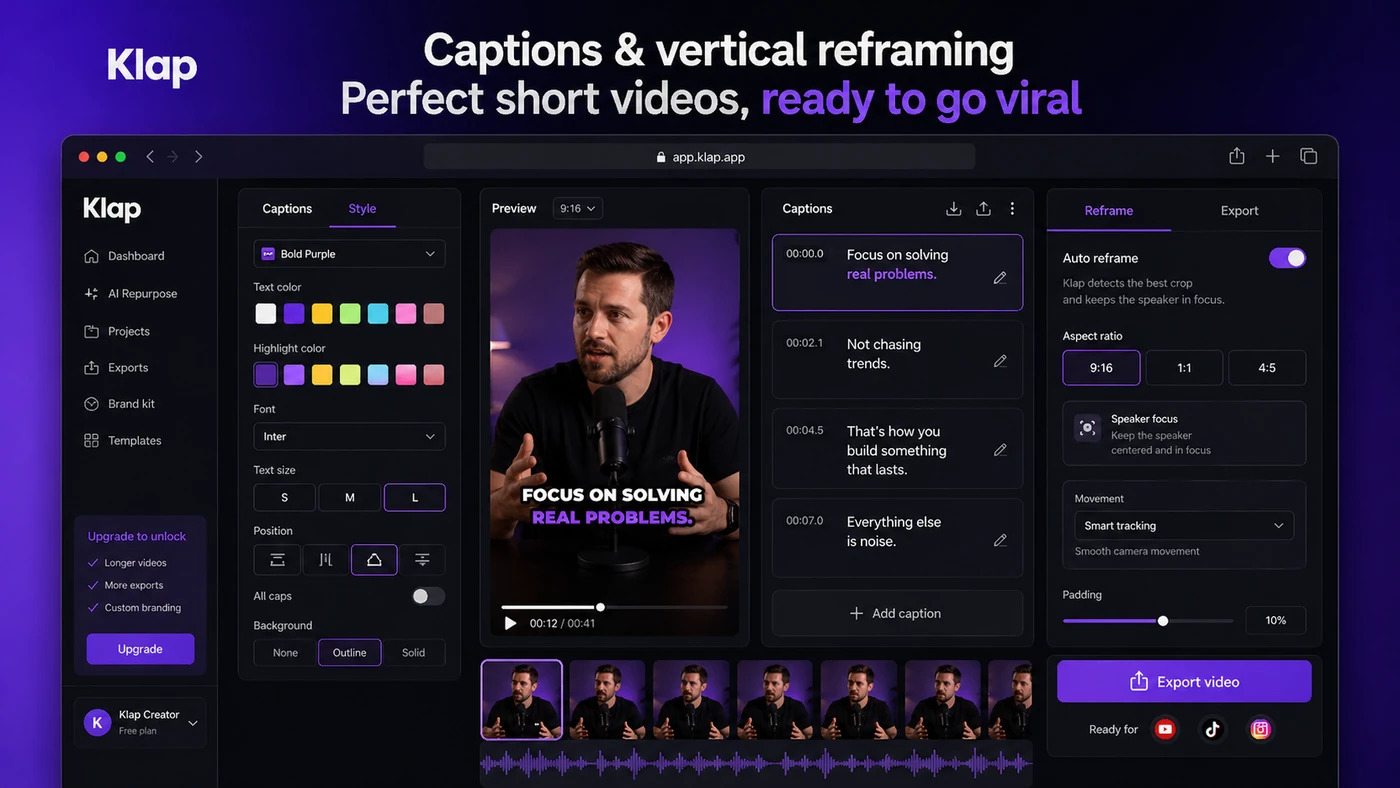
Klap reframes horizontal or long-form video into vertical formats. That can save time for talking-head videos, interviews, and screen-based content.
The caution is that automatic framing is not always the same as creative framing. Buyer note: check speaker position, screen visibility, split-screen behavior, and whether important visual context is cropped out.
Captions and customization
Captions are central to short-form video, and Klap includes caption styling and customization such as fonts, colors, logos, and framing choices.
This matters because good captions can make clips easier to watch without sound. It may disappoint buyers who need highly branded caption design or complex motion graphics. Buyer note: test one video with your preferred brand style before assuming the defaults are enough.
Social publishing support
Klap’s public pages describe publishing and scheduling support for platforms such as TikTok, YouTube, Instagram, and LinkedIn.
This can be useful if the buyer wants a simple path from clipping to posting. It also means platform permissions and third-party account access deserve attention. Buyer note: read the terms and manage connected account permissions carefully if you link social accounts.
API access
The API path is a meaningful differentiator. Klap’s official API docs describe programmatic video-to-shorts generation, caption/reframe workflows, managed users, embeds, and technical endpoints.
This matters for agencies, SaaS builders, internal media teams, or content platforms. It is less relevant for a solo creator who only needs a dashboard. Buyer note: API pricing is usage-based, so it should be evaluated separately from subscription pricing.
Pricing and plan value
Klap’s pricing is easy to read but not something to judge casually.
At the time of review, the public pricing page showed yearly-billed plans starting at $23/month for the entry plan. That plan included 10 video uploads monthly, source videos up to 45 minutes, 100 generated clips monthly, and HD download. Pro was shown at $63/month billed yearly with 30 uploads, videos up to 2 hours, 300 clips, 4K download, and AI dubbing translation to 29 languages. Pro+ was shown at $151/month billed yearly with 100 uploads, videos up to 3 hours, 1000 clips, 4K download, and AI dubbing translation.
Those details matter more than the headline price.
If you publish one shorter YouTube video each week, the entry plan may be reasonable. If you edit long podcast episodes, client webinars, or multiple creator channels, the 45-minute entry limit and 10-upload cap can become tight. If 4K export or AI dubbing matters, the entry plan is not the right comparison point.
The API is a separate decision. Klap’s API documentation describes usage-based pricing with operation-level costs for generating shorts, processing video input, and exporting. That can be attractive for technical teams, but it is not the same as a simple creator subscription.
The easy mistake is choosing the cheapest plan because it looks affordable. The better way to judge Klap is to count your real monthly uploads, average source-video length, required export quality, and expected clip volume.
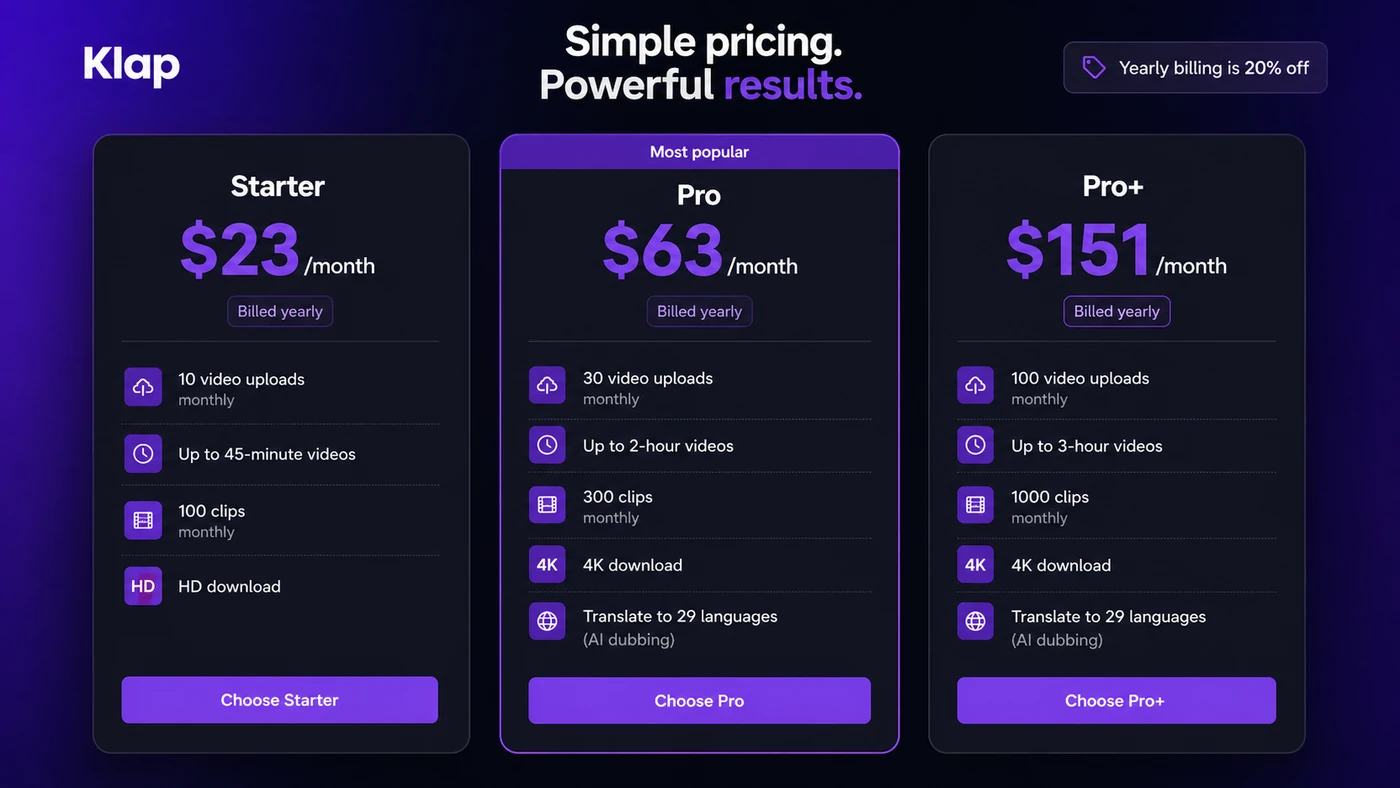
Pricing check: If the entry limits fit your actual publishing rhythm, verify the current plan details before checkout.
Free path, trial, coupon, and checkout notes
Klap promotes free creation tools, and some public Klap content describes a free test path for processing one video. I would still treat the live signup and checkout flow as the source of truth because free access, export rules, watermark behavior, and usage limits can change.
For this review, I would not make a coupon the center of the decision. The safer savings path is plan-fit first, annual billing second, and any active offer last.
That is not anti-discount. It is buyer protection.
A discount can improve a good purchase. It cannot make a weak workflow fit better. If Klap does not generate useful clips from your videos, a lower annual price only locks in a tool you may not use.
The practical checkout order is simple:
- Test Klap with a real source video.
- Check whether clips need light editing or heavy repair.
- Count monthly upload and clip needs.
- Decide whether HD is enough or 4K is necessary.
- Read refund and cancellation language.
- Only then compare monthly, yearly, or any current deal path.
Checkout note: Treat any savings path as secondary until Klap has produced usable clips from your own content.
What I would check before buying Klap
If I were buying Klap for a real video workflow, I would check these points before paying:
- Whether my average source video fits the plan’s maximum length.
- How many videos I realistically upload each month.
- Whether the generated clips preserve enough context to publish.
- Whether captions, speaker framing, and subtitle style need heavy manual cleanup.
- Whether HD download is enough or 4K export is necessary.
- Whether AI dubbing translation matters for my audience.
- Whether refund eligibility, cancellation flow, and annual billing terms feel acceptable.
For technical teams, I would add another layer: API operation costs, project structure, managed-user needs, embed requirements, and developer support expectations.
The part I would check first is not the price. It is clip quality. If the AI picks the wrong moments, every other feature becomes less important.
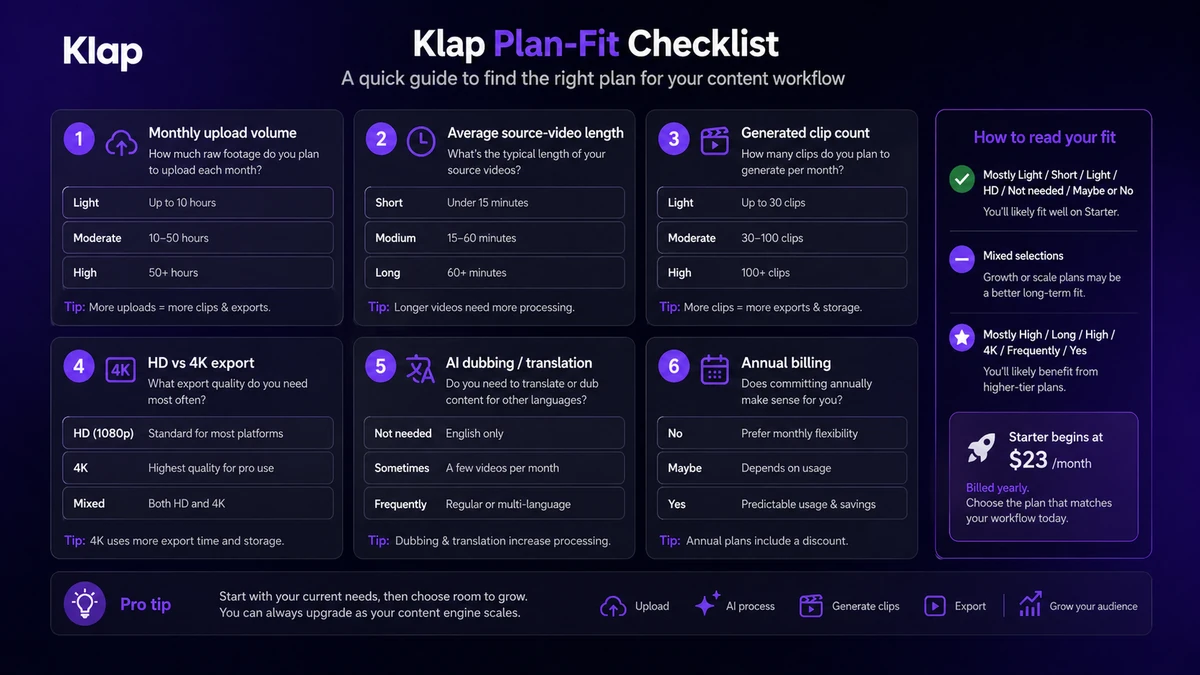
A simple test before paying
Before paying, I would run a small Klap test like this:
- Choose one real video from your normal workflow, not a polished sample.
- Upload it or use the normal source path you expect to repeat.
- Review every generated clip without editing first.
- Mark which clips are immediately usable, which need light edits, and which are not worth saving.
- Check captions, framing, context, and pacing on the best clips.
- Estimate how many uploads and exports you would need in a normal month.
- Compare the result against one direct alternative using the same source video.
This test is simple, but it prevents a common buyer mistake: assuming that because Klap can generate clips, it can generate the right clips for your channel.
If the output needs only small fixes, Klap may be a strong fit. If every clip needs a heavy rewrite, reframing correction, or manual edit, a more controlled video workflow may be safer.
Pros explained
The first real pro is speed. Klap can remove the tedious first pass of searching a long video for short-form moments. For creators who already publish regularly, that can save meaningful time.
The second pro is workflow clarity. Klap is not trying to be everything. It has a clear job: long video in, short clips out, with captions and vertical formatting. That makes it easier to understand than broader creative suites.
The third pro is pricing transparency. The public pricing page shows plan limits in a practical way: uploads, video length, generated clips, export quality, and dubbing. This helps buyers estimate fit before checkout.
The fourth pro is the API path. Most solo creators will not need it, but agencies, platforms, and technical teams may find the programmatic video-to-shorts workflow useful.
The final pro is category fit. Short-form repurposing is a real content problem. If Klap works with your source videos, it can help turn long-form authority content into short-form discovery content without starting from scratch every time.
Cons explained
The biggest con is that AI clip selection is not editorial judgment. A tool can identify a moment that looks active, emotional, or quotable, but the buyer still needs to decide whether it makes sense as a standalone clip.
The second con is plan pressure. The entry plan can look affordable, but creators with longer videos, frequent uploads, or higher export needs may end up comparing Pro or Pro+ instead.
The third con is creative control. Klap is built for speed and automation. If your brand depends on precise pacing, b-roll decisions, sound design, transitions, and heavy manual editing, Klap may only help with part of the job.
The fourth con is public feedback consistency. Trustpilot and Product Hunt include positive signals around speed and potential, but also complaints about billing, support, changing tiers, limits, bugs, and API documentation. I would not ignore that. It does not mean every buyer will have a bad experience, but it does mean testing and cancellation awareness matter.
Green flags and red flags
A green flag is a repeatable long-form pipeline. If you publish podcasts, webinars, lessons, interviews, or commentary every week, Klap has a clear job to do.
Another green flag is light-edit output. If the first test produces clips that need only caption or framing tweaks, the tool may save enough time to justify a paid plan.
A third green flag is clear usage math. If you already know your upload count, average video length, and export requirements, plan selection becomes much safer.
A red flag is buying before testing. Klap is too workflow-dependent to judge from the homepage alone.
Another red flag is expecting automation to replace editing judgment. The product can speed up clipping, but it cannot know every brand nuance, narrative setup, or audience expectation.
A final red flag is annual billing before the first real production cycle. I would not move to yearly billing until Klap has handled several normal source videos well enough to trust the process.
Klap vs alternatives
Klap has several nearby alternatives, but not all of them solve the same buyer job.
Opus Clip vs Klap
Opus Clip is probably the closest direct comparison if the buyer wants automated long-video-to-short discovery. It is a better first comparison when viral clip selection and creator growth workflow are the main focus.
Klap may still make sense if its interface, pricing limits, or API path fit the buyer’s production style better. I would compare both tools using the same source video.
Vizard AI vs Klap
Vizard AI is a strong comparison when the buyer wants broader video repurposing and team-friendly workflows. It may fit better for marketing teams that need more structure around collaboration, editing, and repurposing.
Klap is cleaner when the main job is simple: long video to vertical clips as fast as possible.
Vidyo.ai vs Klap
Vidyo.ai sits in the same short-form repurposing conversation. It is worth checking when a creator wants AI clipping, captions, and social-ready outputs with a different workflow feel.
Klap may be the better fit if the buyer prefers its plan structure, reframing, or API direction. The comparison should be output-based, not brand-based.
Submagic vs Klap
Submagic is more of a caption and short-form polish route than a pure long-video extraction comparison. It can be a better fit when the buyer already knows which clips to edit and mainly wants better captions, hooks, and short-form presentation.
Klap is the stronger comparison when the buyer wants the tool to find clips from long videos first.
Broader video editors vs Klap
Tools like VEED, Filmora, Camtasia, or Premiere-style editors are adjacent routes. They can be better when manual control matters more than automated clipping.
They are not always direct Klap replacements. A buyer may use Klap for first-pass clip discovery and a broader editor for final polish.
Trust, refund, and buyer-risk notes
Klap is a tool I would buy with a test-first mindset.
The official pricing page is clear enough to compare plan limits, but pricing can still change. Buyers should verify live pricing, monthly versus yearly toggle details, source-video length limits, export quality, and any current checkout terms before paying.
Refund language deserves attention. Klap’s terms say users can request a refund before the end of the first month if they are not satisfied. They also describe refund paths for unused service and more limited yearly-subscription refunds after the first month. That is more detailed than many AI tools, but it is not a reason to be careless. Eligibility depends on timing and usage.
Cancellation and third-party account access also matter. Klap interacts with platforms such as YouTube, Instagram, TikTok, and LinkedIn. If you connect social accounts, you should know how to manage or revoke access later.
For agencies and business users, privacy is not just a checkbox. If you process client videos or employee content, review the privacy policy and any applicable data processing terms before uploading sensitive material.
For API buyers, the risk is different. The question is not only whether the API exists. It is whether pricing, documentation, managed-user behavior, endpoint coverage, and support expectations fit the production system you want to build.
Do not buy on homepage speed alone. Test with real videos, check the current terms, and compare one direct alternative before annual billing.
Final verdict
Klap is worth considering if you already have long videos and want a faster way to turn them into short-form clips. It is especially sensible for YouTubers, podcasters, educators, coaches, and social teams that repeatedly repurpose speech-heavy content.
I would skip Klap if you need a full video editor, if your source videos are rare, if your content requires heavy manual storytelling, or if you expect AI to choose publish-ready moments without human review.
I would compare it with Opus Clip if automated clip discovery is the main job. I would compare Vizard AI or Vidyo.ai if broader repurposing workflow matters. I would compare Submagic if captions and short-form polish matter more than extracting clips from long videos.
The safest next step is not annual billing. It is one real test. Upload a normal source video, review the generated clips honestly, check the plan limits against your monthly publishing rhythm, and then decide whether Klap belongs in your workflow.