Quick verdict
Superpower ChatGPT is worth testing if ChatGPT has turned into a messy work archive for you: old drafts, research threads, prompts, client notes, image generations, planning chats, and half-finished ideas you keep meaning to find again.
That is the real buying question.
It is not a separate AI model. It is not a full team workspace. It is not a magic productivity upgrade for every casual ChatGPT user. Superpower ChatGPT is a browser extension that adds folders, search, prompt management, exports, notes, image gallery tools, minimap navigation, reference chats, and other power-user features around ChatGPT.
For the right person, that can be useful. Very useful, actually.
But I would not upgrade to Pro just because the feature list is long. The free version already covers a lot of the basic value, and the paid plan makes sense only when the Pro-only features save time in a workflow you repeat. If you are mostly asking ChatGPT occasional questions, the extra controls may feel like clutter. If ChatGPT is where you organize research, write content, reuse prompts, and retrieve older work, Superpower ChatGPT becomes much easier to justify.
The main strength is workflow depth. The main caution is billing and complexity: paid fees are presented as non-refundable, and a feature-heavy extension can make the interface feel busier than some buyers want.
The safest next step is simple: install the free extension, test it with real ChatGPT history, then check the Superpower ChatGPT store guide or current offer route only if the workflow actually improves.
Next step: If Superpower ChatGPT sounds useful, test the free extension with real ChatGPT conversations before deciding whether Pro is worth the recurring cost.
Visit Superpower ChatGPT Read store guide Check current offers
Review snapshot
| Review point | Practical take |
|---|---|
| Best for | ChatGPT power users who need folders, search, exports, prompt reuse, notes, and better conversation management |
| Not ideal for | Casual users, minimal-interface buyers, teams needing formal admin controls, or buyers uncomfortable with browser extensions |
| Main use case | Turning ChatGPT into a more organized work archive instead of a long scrolling chat history |
| Free path | Useful free plan with many core features and limits |
| Paid path | Pro is currently presented with annual and monthly billing options; buyers should verify live pricing before upgrading |
| Main strength | Deep ChatGPT productivity layer with organization, prompt, export, and navigation tools |
| Main concern | Feature density, non-refundable paid fees, recurring billing, and extension permission comfort |
| Direct comparison angle | Prompt-library or ChatGPT-interface extensions if prompt reuse is the main need |
| Adjacent routes | Sider AI for broader browser AI, Saner AI for personal knowledge, 1min.AI for multi-tool AI utility |
| Best next step | Use the free plan with real chats before choosing Pro or annual billing |
What is Superpower ChatGPT?
Superpower ChatGPT is a browser extension that adds power-user features to ChatGPT.
That sounds simple, but it is easy to judge the product the wrong way. The homepage lists many features: folders, subfolders, search, custom instruction profiles, prompt chains, prompt optimizer, prompt templates, pinned messages, exports, minimap, image gallery, notes, reference chats, side-by-side voice mode, right-click tools, enhanced GPT Store access, and more.
The better way to think about it is this:
Superpower ChatGPT is trying to make ChatGPT behave less like a temporary chat window and more like a reusable work environment.
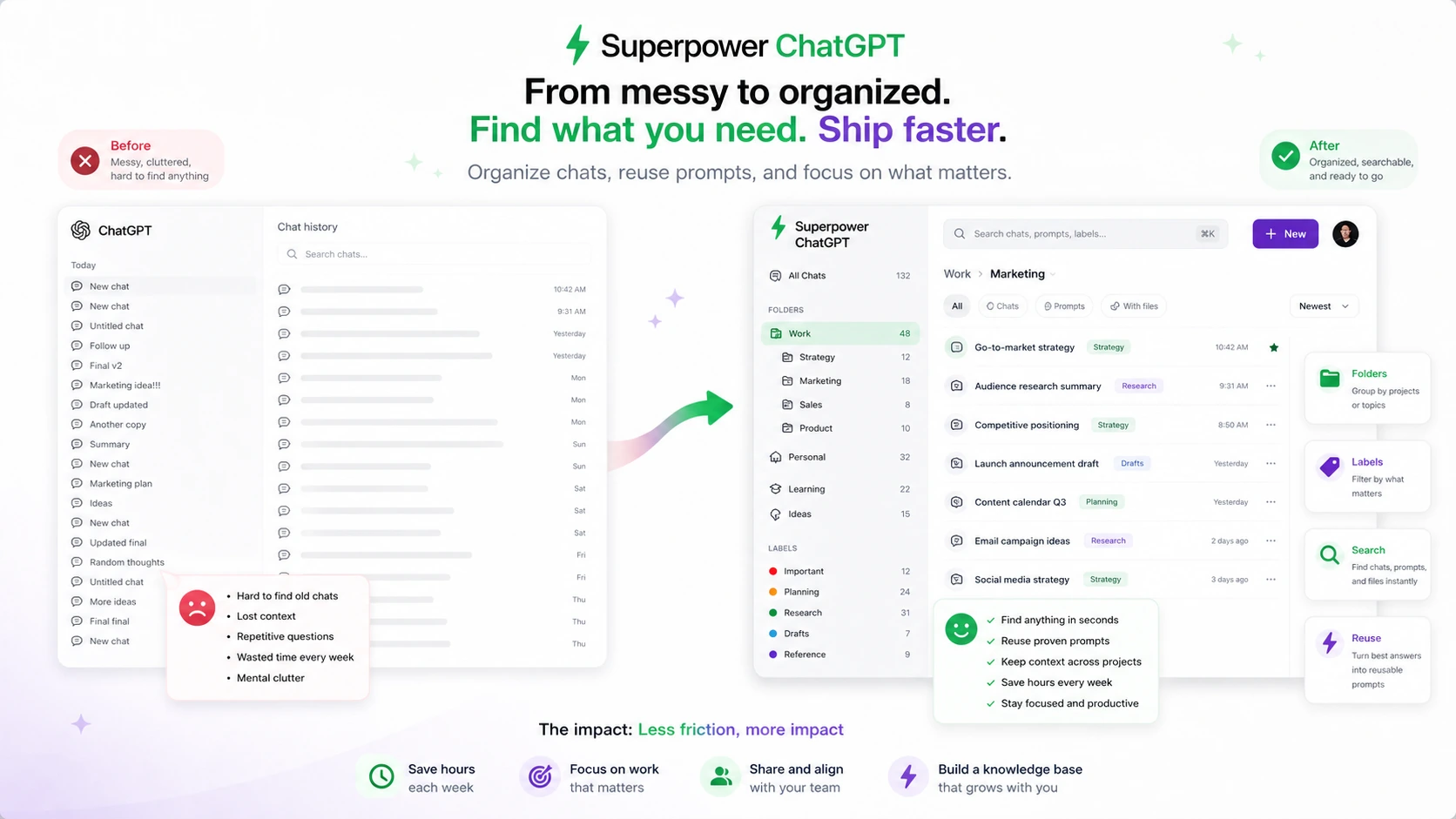
If you use ChatGPT once in a while, that may not matter. If you use it every day, the native chat history can become painful. Useful conversations get buried. Reusable prompts disappear. Generated images are hard to manage. Long chats become awkward to navigate. Exporting or backing up work takes extra effort. You remember that ChatGPT helped you solve something two months ago, but finding the exact thread becomes its own task.
That is the problem Superpower ChatGPT is trying to solve.
Our review approach looks at public product pages, pricing details, billing terms, browser-extension trust signals, buyer workflow fit, and nearby alternatives. I would not treat a long feature list as proof of value by itself. With this product, the value depends on how much of your ChatGPT work is worth organizing, retrieving, reusing, exporting, or protecting.
It is also important to say what Superpower ChatGPT is not. It is not a replacement for ChatGPT Plus, Pro, Team, or Enterprise. It does not create a separate AI model. It is not a full project management system. It is not a formal enterprise knowledge base. It is a productivity layer around your ChatGPT usage.
That makes the buying decision narrower, but clearer.
Who should use Superpower ChatGPT?
Superpower ChatGPT makes the most sense for people who already feel friction inside ChatGPT.
Writers and content operators are one clear group. If you use ChatGPT for outlines, drafts, research summaries, keyword ideas, headline testing, editing passes, client deliverables, or repeated content workflows, conversation organization can matter. A folder system and searchable chat history may save time if your past outputs are worth revisiting.
Researchers and students may also benefit, but only when ChatGPT conversations contain work they need to reference later. If you are collecting explanations, study notes, reading summaries, or project research, the ability to organize and export conversations can be more useful than another generic AI tool.
Marketers, SEO freelancers, and solo operators may like the prompt side. Favorite prompts, prompt templates, prompt history, public prompts, prompt optimizer, and prompt chains are helpful when you run similar ChatGPT tasks every week. The condition is repetition. If every prompt is one-off, the prompt manager becomes less important.
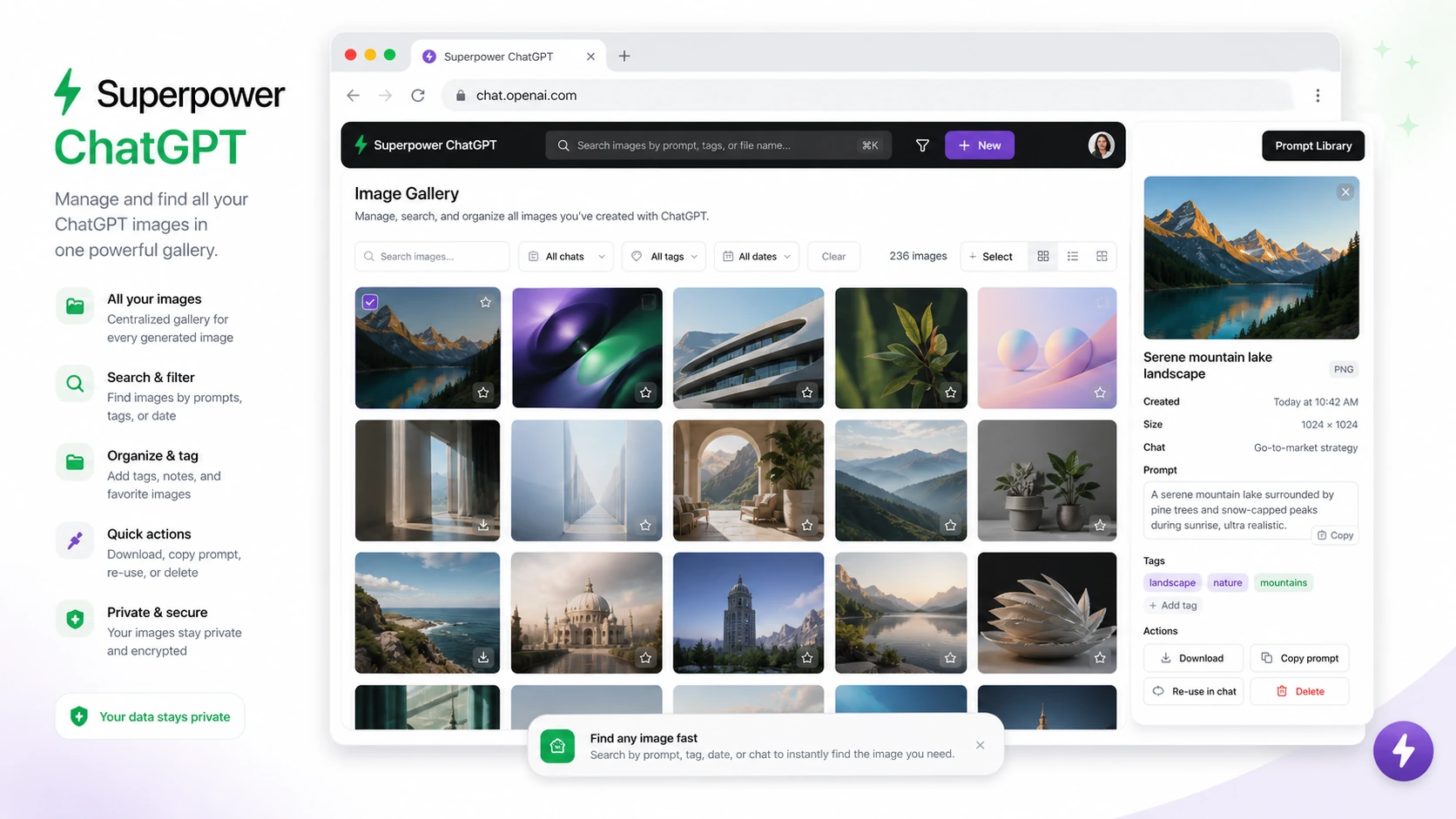
Heavy image users may also find value in the image gallery. If generated images and prompts keep getting buried in chat history, a gallery and download workflow can reduce friction.
The final group is the ChatGPT power user who simply wants a more controlled interface. Minimap navigation, pinned messages, timestamps, bulk actions, export formats, and reference chats are not glamorous features. But for someone who spends hours inside ChatGPT, small navigation improvements can add up.
Before paying, I would check one thing: are you solving a weekly problem, or are you just attracted to a long list of features?
Who should avoid Superpower ChatGPT?
Casual ChatGPT users should probably start slowly.
If you open ChatGPT a few times a week for quick questions, simple brainstorming, or short edits, Superpower ChatGPT may feel like too much. The native interface is already enough for light use. Adding folders, prompt systems, minimaps, notes, and bulk tools can create more structure than the workflow needs.
Buyers who want the cleanest possible interface should also be careful. Superpower ChatGPT is feature-rich by design. That is the point. But feature depth has a cost: more buttons, more settings, more things to learn, and more possibility that ChatGPT feels less lightweight.
Teams with formal governance needs should not treat this as an enterprise admin solution. If you need centralized billing, admin controls, team permissions, compliance workflows, shared workspace governance, or procurement-level approval, Superpower ChatGPT is not the obvious first stop. It is a browser extension for individual productivity, not a full enterprise deployment layer.
I would also be cautious if browser extension permissions make you uncomfortable. The official pages give privacy and browser-extension explanations, but the buyer still needs to review the current permissions and install only from official sources. This is especially true if your ChatGPT usage includes client information, company research, private documents, or sensitive planning.
Finally, avoid upgrading because of a discount alone. A lower price does not solve a workflow mismatch. With Superpower ChatGPT, the free version gives you enough room to test the fit before making a paid decision.
How Superpower ChatGPT fits into a real workflow
A practical Superpower ChatGPT workflow starts before the extension does anything.
First, you need to know which ChatGPT pain you are actually trying to fix. Is it conversation organization? Prompt reuse? Exporting? Image management? Notes? Long-chat navigation? Reference chats? If you cannot name the friction, it is hard to judge the product.
A realistic workflow might look like this:
- Install Superpower ChatGPT from an official source.
- Use it with your real ChatGPT history, not a blank test account.
- Create folders for actual work areas: content, research, client work, coding, learning, product ideas, or images.
- Search for older conversations you know you will reuse.
- Save or favorite prompts you repeat often.
- Export a few important chats and see whether the formats match your workflow.
- Test whether notes, pinned messages, minimap, and image gallery features reduce friction.
- Decide whether the free feature set is enough or whether Pro-only tools are genuinely worth paying for.
The value is not in using every feature. The value is in removing a few recurring annoyances.
For example, a writer may only need folders, search, and export. A marketer may care more about prompt templates and prompt chains. A student may care about notes and navigation. An image-heavy creator may care about gallery and download tools. A power user may use most of it.
That is why the free-first path matters. You do not need to guess whether Superpower ChatGPT fits your workflow. You can try the extension, organize real chats, and see whether it makes ChatGPT feel clearer or more crowded.
Workflow test: Use Superpower ChatGPT on existing conversations before upgrading, because the product is easiest to judge when your ChatGPT history is already messy enough to organize.
Real-world buyer scenarios
A solo SEO writer with hundreds of ChatGPT threads is one of the clearest fits. The problem is not generating another answer. The problem is finding the old brief, the useful prompt, the rewritten intro, or the research thread that disappeared into chat history. Superpower ChatGPT can help if folders, search, export, and pinned messages make that archive usable again.
A student or researcher has a different decision. The extension can help organize study conversations, summaries, explanations, and notes. But the buyer should still be careful about privacy, source accuracy, and what gets stored inside ChatGPT in the first place. Organization does not turn AI output into verified research.
A marketer who repeats workflows may care most about prompt management. If the same prompt structures are used for social posts, ad angles, product research, email drafts, or SEO briefs, templates and prompt chains can reduce repetitive setup. But if the buyer already uses a separate prompt database, Notion workspace, or team documentation system, the value may overlap.
A casual ChatGPT user is the opposite case. If there are only a few chats and no recurring prompt system, the extension may feel more interesting than necessary. The better route may be to stay with the free version or skip it entirely.
A small team should be cautious. Individual users may love the extension, but team buyers need to verify deployment expectations, billing, data handling, cancellation, and whether browser-extension workflows fit company policy.
Key features that actually matter
Folders, subfolders, and conversation search
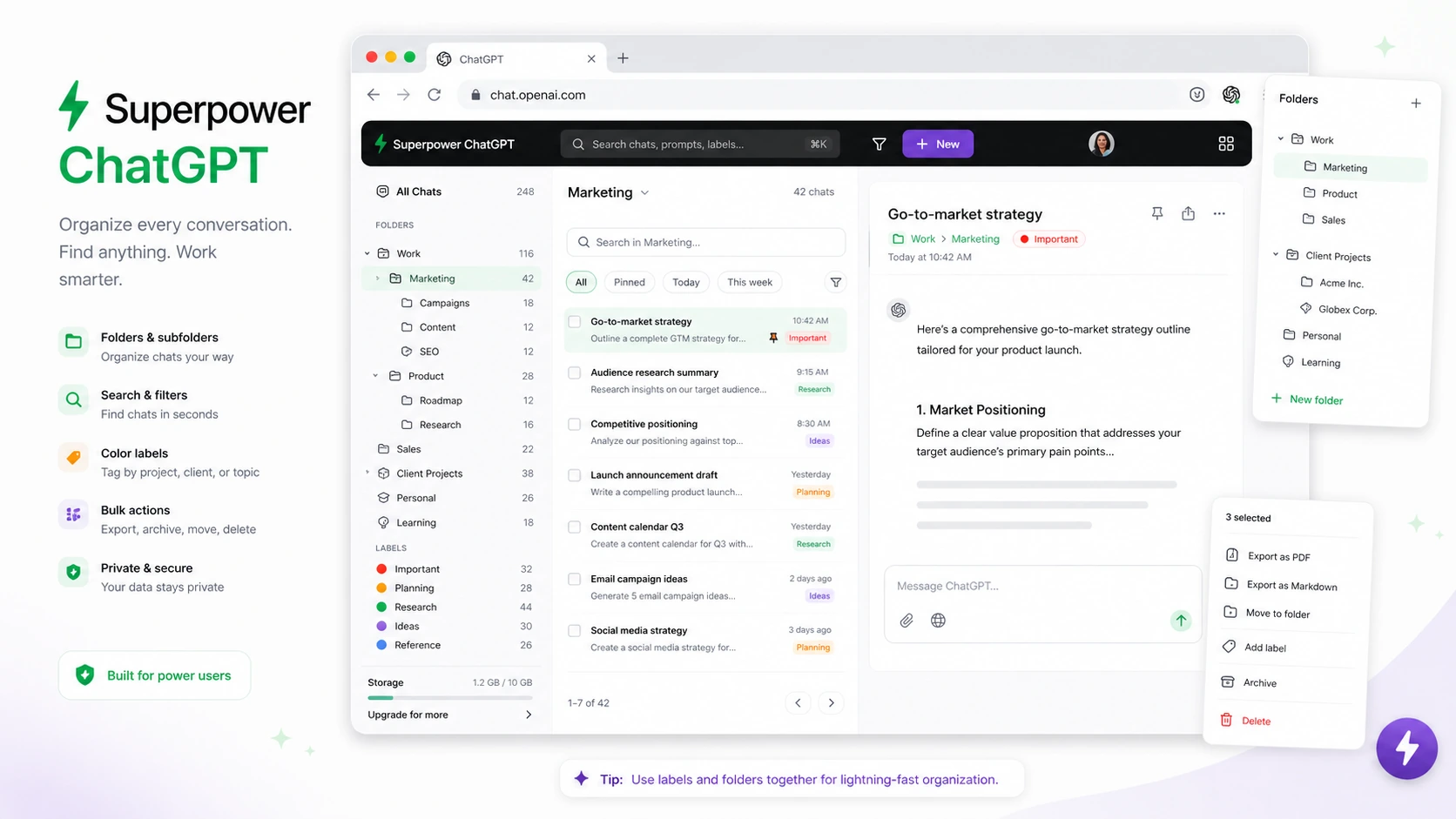
This is the core reason many people look at Superpower ChatGPT. Native ChatGPT history can become hard to navigate when the account contains months of work. Folders and search make sense when conversations have long-term value.
Buyer note: this matters most when old chats are reusable. If you rarely need to revisit conversations, organization features will not change much.
Prompt manager and prompt chains
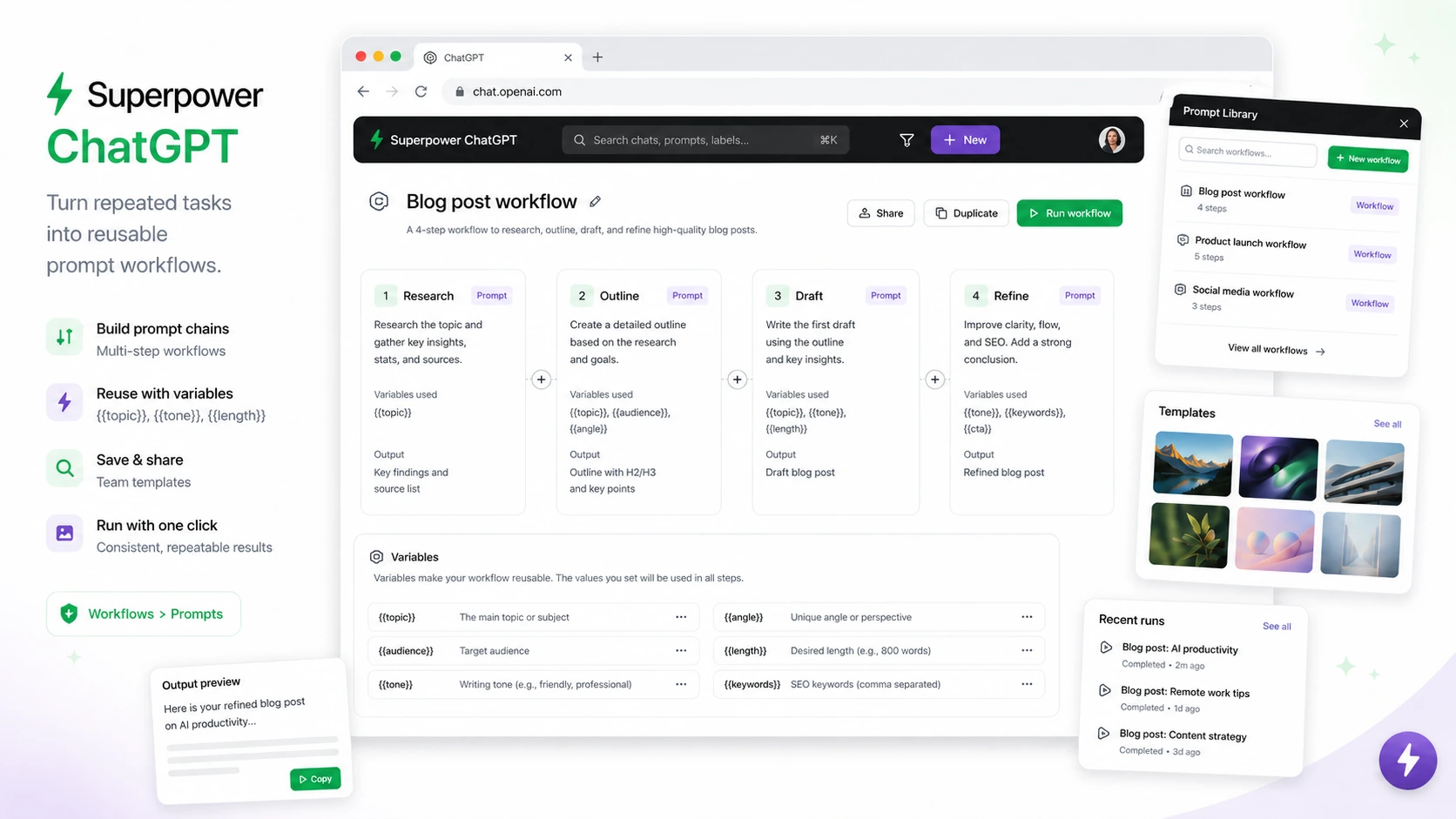
Prompt tools can be valuable for writers, marketers, researchers, and operators who repeat the same ChatGPT workflows. Favorite prompts, templates, variables, prompt history, public prompts, prompt optimizer, and prompt chains can reduce setup time.
Buyer note: prompt management is only valuable when prompts are repeated. If you write each prompt from scratch and rarely reuse instructions, this may be less important than it sounds.
Export formats and backups
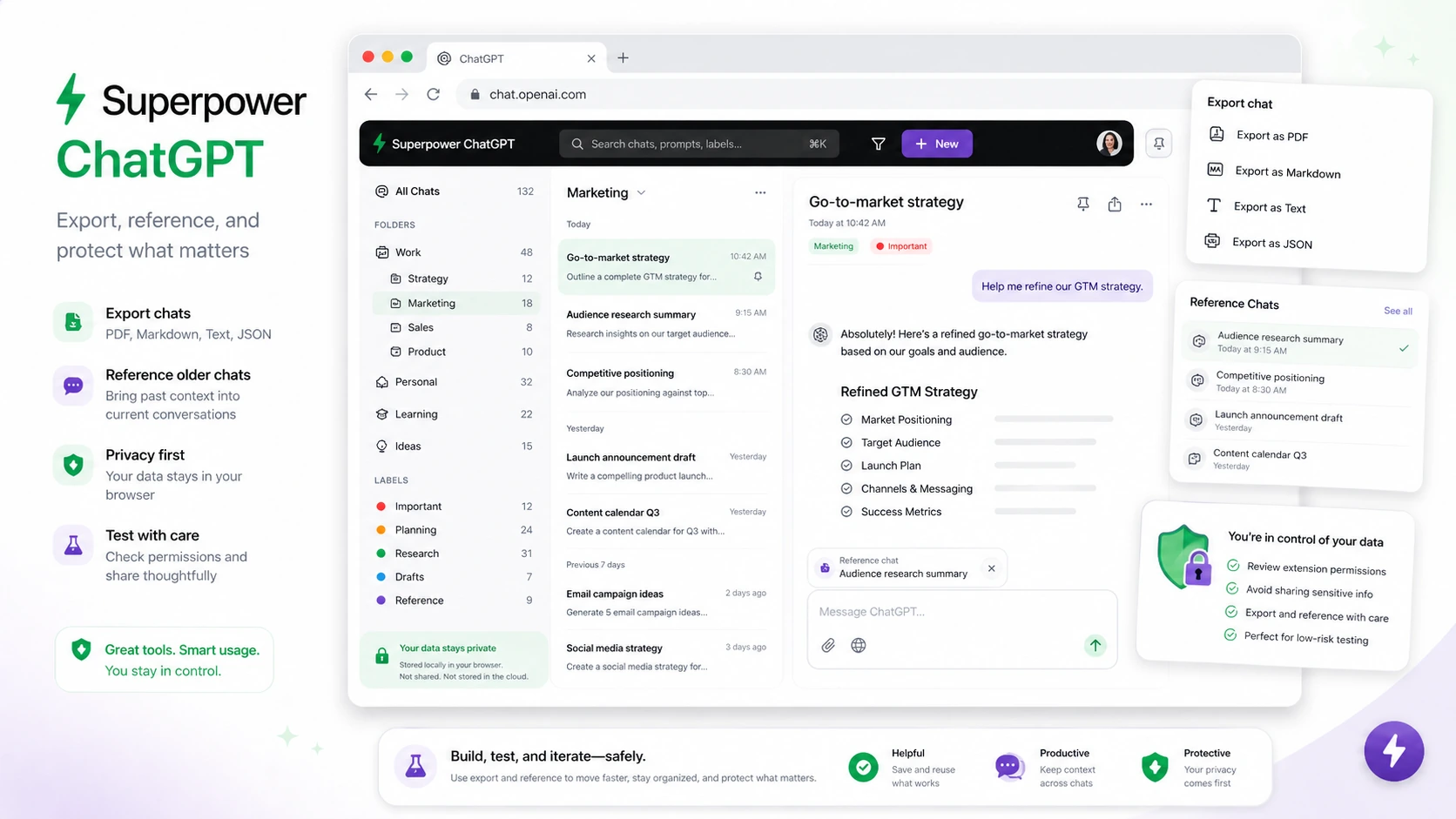
Superpower ChatGPT supports exporting chats in formats such as PDF, text, Markdown, and JSON according to the official feature list. That matters when ChatGPT outputs become assets: client notes, research, drafts, examples, instructions, or records you need outside the app.
Buyer note: export value depends on your downstream workflow. A freelancer may care a lot. A casual user may not.
Notes, pinned messages, and minimap navigation
These are navigation features for people who work inside long chats. Pinned messages help surface important context. Notes can preserve extra reminders. A minimap can make long conversations easier to scan.
Buyer note: this is useful when your ChatGPT conversations become long working documents. It is less useful for short Q&A sessions.
Image gallery and generated image management
If you use ChatGPT image features often, image outputs can become hard to find. A gallery workflow can help buyers locate prompts and generated images without digging through conversation history.
Buyer note: this is a stronger reason to consider Pro if image generation is a recurring part of your work.
Pricing and plan value
Superpower ChatGPT pricing is fairly easy to understand, but the buyer decision is still not automatic.
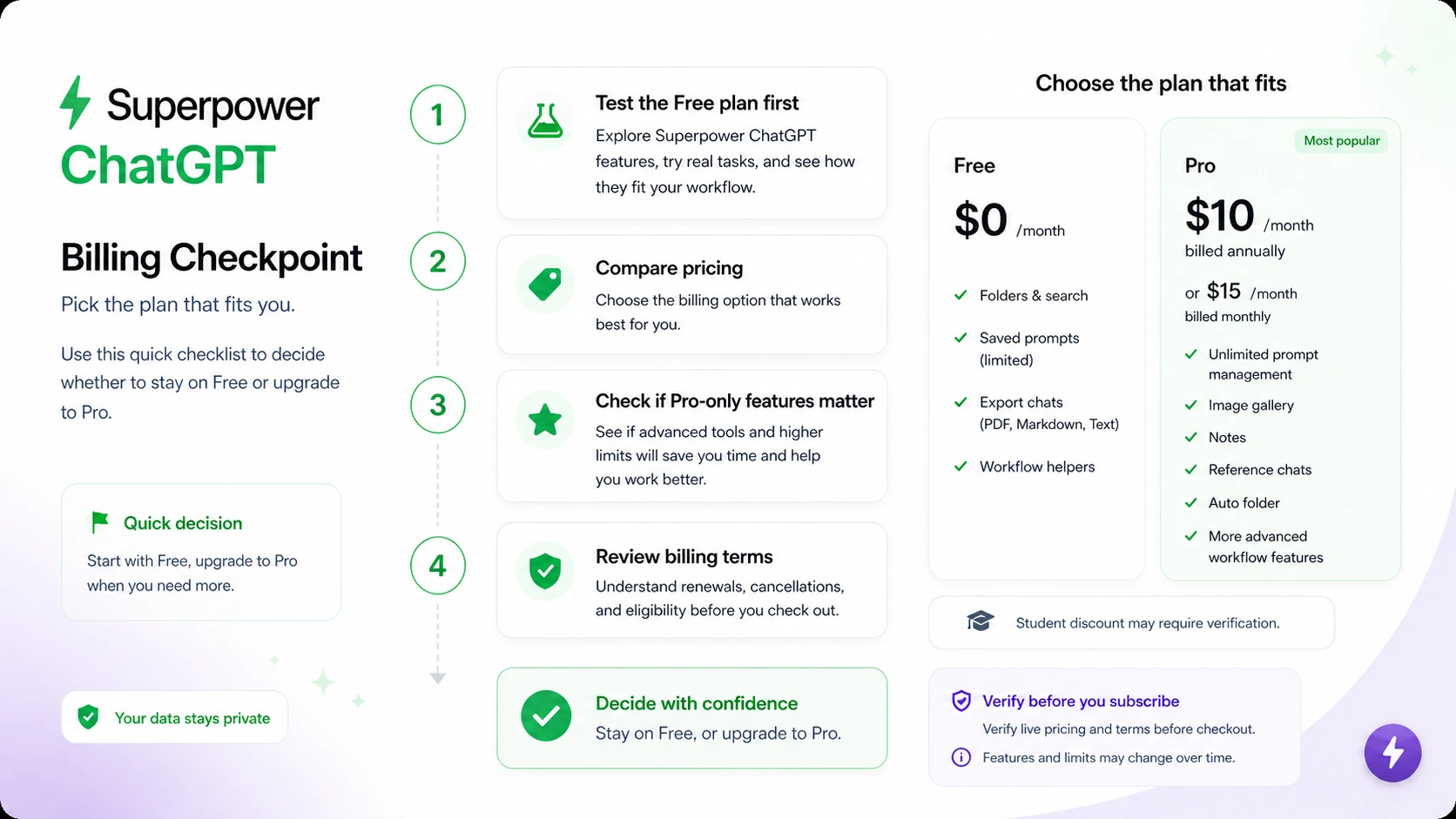
The current public pricing page presents a Free plan at $0/month and a Pro plan listed at $10/month when billed annually, or $15/month when billed monthly. Buyers should verify the live pricing block before checkout because pricing, taxes, feature limits, and renewal terms can change.
The free plan is meaningful. It includes many core features, with limits. That is good for buyers because it lowers the risk of testing the product. You can install it, organize chats, search old work, try prompt tools, export a few conversations, and see whether the extension improves your workflow.
The Pro plan is more interesting when you can clearly name the paid features you will use: unlimited prompt management, notes sync, image gallery, reference chats, side-by-side voice mode, auto folders, auto archive or delete, right-click tools, enhanced GPT Store access, priority support, or private Discord access. If those features are part of your weekly routine, the paid plan has a stronger case.
The monthly plan is safer for testing because it avoids a longer commitment. Annual billing may be cheaper per month, but I would not choose annual billing until the extension has already proved it saves time. The billing terms matter here because paid fees are presented as non-refundable and recurring.
The mistake buyers can make is upgrading too quickly because Pro sounds more complete. The better test is practical: use the free version first, identify the exact Pro features missing from your workflow, then decide whether the paid plan is worth it.
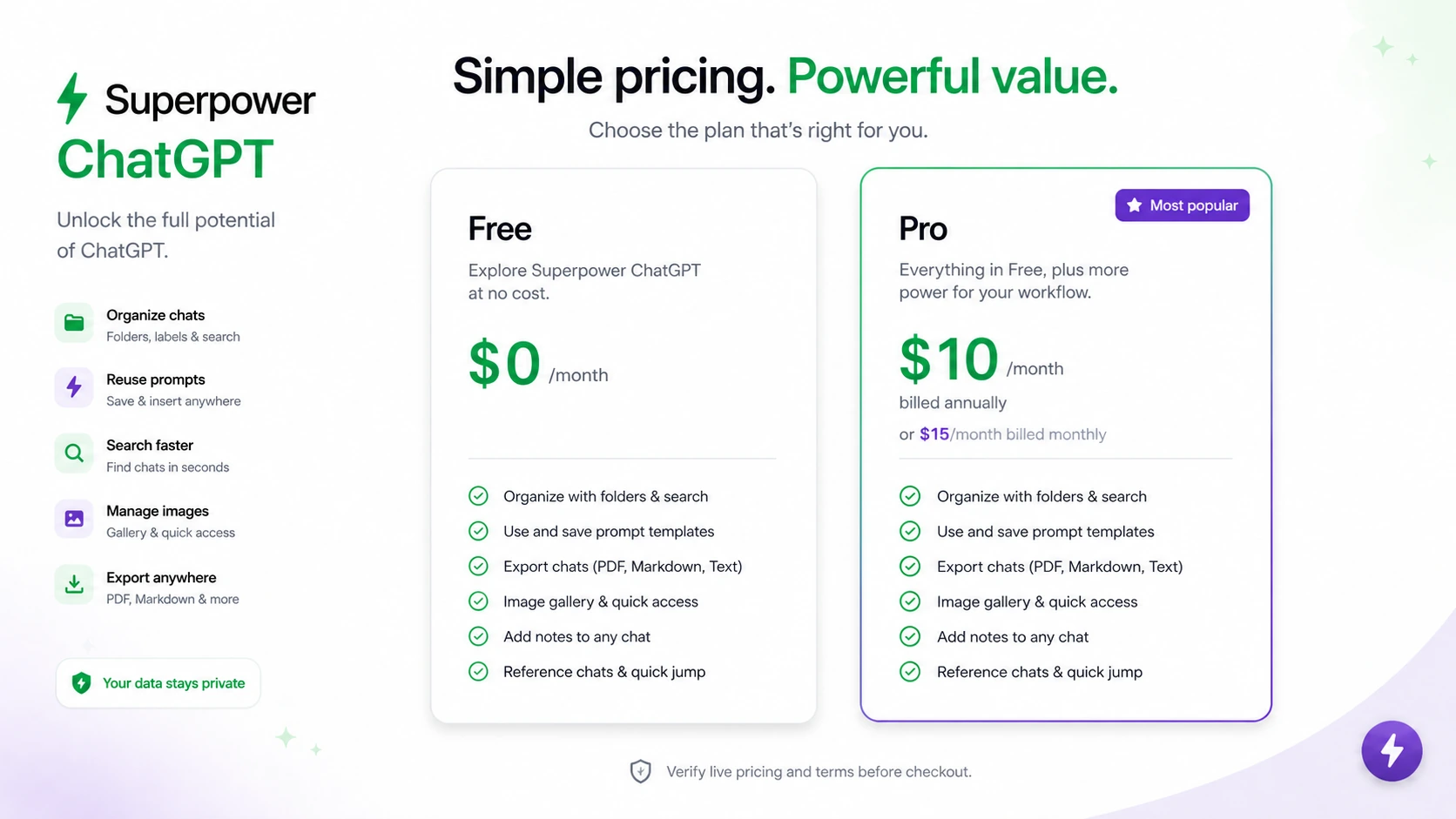
Pricing check: If the free version already solves the main problem, stay free. If Pro-only features become part of weekly work, verify current pricing and billing terms before upgrading.
Free plan, trial, coupon, and checkout notes
The safest buying path for Superpower ChatGPT is free first, paid second.
The official pricing area presents a free plan, and the FAQ says most features are available for free with a Pro version for extra features. That gives buyers a practical evaluation route. You do not need to rely on a review, coupon page, or feature list alone. You can test the extension in the place where it matters: your own ChatGPT history.
There is no need to treat a coupon as the main decision driver. A current offer may improve the price, but the more important question is whether the extension helps you organize, retrieve, reuse, and export work. If the workflow is not valuable, a lower price does not make it valuable.
Before checkout, I would verify four things:
- whether the current Pro price matches the public pricing block
- whether you are choosing monthly or annual billing
- whether any taxes or local charges apply
- whether cancellation must be handled inside the Stripe billing portal through the extension
The non-refundable billing language is the part I would take seriously. That does not make the product bad. It simply means buyers should test before paying and avoid annual billing until the extension is already part of daily or weekly work.
What I would check before buying Superpower ChatGPT
If I were buying Superpower ChatGPT for a real workflow, I would check these points before paying:
- Which pain am I solving? Folders, search, prompts, exports, notes, image gallery, and reference chats solve different problems. Name the problem first.
- Is the free version enough? Many buyers may not need Pro right away.
- Which Pro features will I use weekly? Do not upgrade for features that sound nice but stay unused.
- Does the interface feel clearer or busier? A productivity extension should reduce friction, not add it.
- Am I comfortable with browser extension permissions? Install only from official sources and review current permissions.
- Do the billing terms fit my risk tolerance? Paid fees are presented as non-refundable, and recurring billing should be managed before renewal.
- Is annual billing justified? Annual savings only make sense after the workflow has proved itself.
A simple test before paying
Before paying for Superpower ChatGPT Pro, I would run a small test like this:
- Install the free extension from the official site or official browser marketplace.
- Create folders for three real areas of work, such as writing, research, client work, coding, or learning.
- Search for several older conversations you know you may reuse.
- Export at least two useful chats and check whether the format fits your workflow.
- Save or organize five prompts you repeat often.
- Try notes, pinned messages, minimap, or gallery features if they match your work.
- After several days, write down which Pro-only features you actually missed.
That last step is the decision point.
If you cannot name the missing Pro features, stay free. If you can name them clearly and they save time every week, Pro becomes easier to justify.
Pros explained
The first real pro is organization. Superpower ChatGPT addresses a real problem for heavy users: ChatGPT history gets messy. Folders, subfolders, search, bulk actions, pinned messages, and export tools can turn that mess into something closer to a usable archive.
The second pro is prompt reuse. A prompt manager is not valuable because prompts are fancy. It is valuable because repeated work wastes time. If you run similar research, writing, editing, or marketing workflows, saved prompts and prompt chains can reduce friction.
The third pro is free-plan value. A useful free path makes the product easier to evaluate. You can test the main workflow before paying, which matters because paid fees are not positioned as refundable.
The fourth pro is category focus. Superpower ChatGPT is not trying to be every AI tool at once. It is focused on improving ChatGPT itself. That is a strength if ChatGPT is already your main workspace.
The fifth pro is feature depth. Image gallery, reference chats, side-by-side voice mode, notes, exports, right-click tools, enhanced GPT Store features, and navigation improvements give power users a lot to work with.
The limit is that not every buyer needs that depth.
Cons explained
The biggest con is complexity. Superpower ChatGPT adds many features to an interface that some users already find busy. For power users, that may be worth it. For casual users, it can be distracting.
The second con is refund risk. The billing terms present paid fees as non-refundable, with no refunds or credits for unused subscription periods. That makes the free test more important than usual.
The third con is extension dependency. Browser extensions sit close to active web interfaces. When browsers or ChatGPT change, the extension experience may need updates. Buyers should expect occasional adjustment rather than treating this like a static standalone app.
The fourth con is that it is not a formal team system. It can improve individual productivity, but buyers needing enterprise controls, team governance, procurement support, or centralized admin should verify whether this type of browser extension fits their environment.
The fifth con is feature overlap. Some buyers already use Notion, Obsidian, Google Drive, Raycast, TextExpander, prompt libraries, or project management tools to organize prompts and outputs. Superpower ChatGPT may still help, but it should not duplicate a workflow you already like.
Green flags and red flags
A green flag is clear pain inside ChatGPT. If you constantly lose conversations, rewrite the same prompts, or need exports, the product has a concrete job.
Another green flag is repeated use. Superpower ChatGPT is easier to justify when ChatGPT is part of daily work, not occasional curiosity.
A third green flag is a successful free test. If the free version improves your workflow within a few days, that is a better signal than any feature list.
The red flags are just as important.
If you only want to “try Pro” because it looks more complete, slow down. If you dislike interface additions, slow down. If your company has strict browser-extension rules, slow down. If you are thinking about annual billing before testing monthly or free use, slow down.
The strongest red flag is buying before you know which problem the extension solves.
Superpower ChatGPT vs alternatives
Superpower ChatGPT has two kinds of alternatives: direct workflow alternatives and adjacent AI productivity routes.
Direct alternatives are tools that improve ChatGPT or prompt workflows. Adjacent routes are broader AI assistants, knowledge systems, or workflow tools that may solve a different problem.
Sider AI vs Superpower ChatGPT
Sider AI is the stronger comparison if you want a broader browser-side AI assistant for reading, writing, PDFs, YouTube, research, and web workflows. It is less narrowly focused on making ChatGPT itself easier to organize.
Superpower ChatGPT makes more sense if the pain is inside ChatGPT: old conversations, folders, prompt reuse, exports, and navigation.
Saner AI vs Superpower ChatGPT
Saner AI is an adjacent route for buyers who want personal knowledge, notes, tasks, recall, and a calmer knowledge workflow. It is not a one-to-one replacement for a ChatGPT extension.
If your problem is broader knowledge management, Saner AI may be a better direction. If your problem is messy ChatGPT usage, Superpower ChatGPT is more targeted.
1min.AI vs Superpower ChatGPT
1min.AI is a broader AI utility hub. It may fit buyers who want multiple AI tools in one place rather than a browser extension focused on ChatGPT.
Superpower ChatGPT is better when the buyer already lives inside ChatGPT and wants to improve that specific workspace instead of moving into a separate AI suite.
Rella vs Superpower ChatGPT
Rella is an adjacent workflow tool for social content planning and approvals. It is not a direct Superpower ChatGPT alternative.
Rella matters only if your real job is managing social media content calendars, creator workflows, or approvals. Superpower ChatGPT is for organizing and extending ChatGPT usage itself.
Prompt-library tools vs Superpower ChatGPT
If your only need is prompt reuse, a simpler prompt-library extension may be enough. Superpower ChatGPT becomes more compelling when prompt management is only one part of a larger need: folders, search, export, notes, gallery, minimap, and reference chats.
That is the tradeoff. Simpler tools may be cleaner. Superpower ChatGPT is deeper.
Trust, refund, and buyer-risk notes
The trust question with Superpower ChatGPT is less about whether the product has a visible presence and more about whether you are comfortable with a browser extension sitting close to your ChatGPT workflow.
Official pages say chats are stored locally on the browser and that ChatGPT requests go directly from the browser to OpenAI using HTTPS. The browser terms also say the extension does not save ChatGPT login authentication on their servers. Those are important claims, but buyers should still review the current terms, privacy policy, and browser permissions before installing.
The Chrome Web Store listing adds marketplace-level confidence, but marketplace presence does not remove the need for personal permission review. Browser extensions can be powerful precisely because they interact with active pages.
Billing is the other major risk. The terms describe subscriptions as recurring, say fees are non-refundable, and place cancellation responsibility on the customer through the billing portal. That means buyers should not treat Pro as a casual impulse upgrade.
My practical rule would be this:
Test free first. Choose monthly before annual unless the workflow is already proven. Avoid Pro if you cannot name the exact paid features you need. Do not let a current offer or annual savings path override the basic workflow test.
That is not negative. It is just the safest way to buy this kind of product.
Final verdict
Superpower ChatGPT is a strong fit if ChatGPT has become part of your daily work and the native interface is starting to slow you down.
I would consider it if you need folders, search, exports, prompt reuse, prompt chains, notes, image gallery, minimap navigation, and better control over a growing ChatGPT archive. I would especially consider it if the free version quickly proves that your old conversations and prompts are worth organizing.
I would skip it if you use ChatGPT casually, dislike browser extensions, want the simplest possible interface, or need formal team governance. I would also skip paid Pro until you know which Pro-only features save enough time to justify recurring billing.
The main mistake is buying because the feature list looks impressive. The better judgment is narrower: does Superpower ChatGPT make your existing ChatGPT workflow easier to manage?
If yes, the product makes sense. If no, staying free or comparing adjacent tools is the safer path.