Quick verdict
Rella is worth a serious look if your social media workflow has become too scattered for a plain scheduler, a spreadsheet, and a few chat threads.
That is the real buying question here.
Rella is not just another AI caption tool. It is closer to a social media operations workspace: content calendar, Kanban-style planning, approvals, client feedback, scheduling, reporting, and Ella AI sitting inside the same workflow. That makes it more useful than a lightweight scheduler for the right team — and more expensive than a lightweight scheduler for the wrong buyer.
I would not judge Rella by the AI feature alone. Ella is useful, especially for captions, content ideas, strategy prompts, repurposing, and workflow support. But the stronger reason to consider Rella is coordination. If your team loses time because posts live in one tool, client approvals live in another, reporting takes manual screenshots, and no one knows which draft is ready, Rella has a clearer case.
The caution is pricing. Rella is seat-based. The official pricing page lists Rella Pro, Premium, and Premium Plus as per-member plans, and the real cost depends on how many people need editing access. Unlimited Social Spaces help agencies manage many clients, but they do not remove the need to count paid editor seats carefully.
The safer path is simple: use the trial with a real client or campaign, not a fake test board. Build one actual social workflow, invite the right people, test approvals, schedule a few posts, create a report, and check whether Ella saves time inside the process. If that flow feels cleaner, Rella can make sense. If you only need cheap publishing for one creator account, I would compare cheaper schedulers first.
Next step: If Rella still looks like a workflow fit, check the current plan and trial route before choosing a paid seat count.
Review snapshot
| Review point | Practical take |
|---|---|
| Best for | Social media managers, agencies, creators, and in-house teams that need planning, approvals, scheduling, and reporting in one workflow |
| Not ideal for | Solo users who only need low-cost post scheduling or teams that need deep enterprise analytics first |
| Main value | Replacing scattered social content handoffs with one workspace for content status, collaboration, publishing, and reports |
| AI layer | Ella supports ideation, captions, strategy, repurposing, insights, workflows, and brand-voice guidance on higher plans |
| Pricing model | Seat-based per member, with annual billing lower than monthly billing |
| Trial | 14-day free trial listed publicly |
| Refund caution | Paid fees are described as non-refundable in the terms except where law requires otherwise |
| Best buyer test | Run one real campaign through planning, approval, scheduling, reporting, and Ella before paying |
| Alternatives to compare | Buffer, HeyOrca, SocialRails, Later, Planoly, Notion, ClickUp |
What is Rella?
Rella is a social media content management and collaboration platform built around planning, project management, approvals, auto posting, analytics, client-facing workflows, and AI-assisted content support.
The homepage currently positions Rella as “project management built for social media.” That phrasing matters. Rella is not trying to be a general AI workspace for every task. It is trying to solve a narrower operational problem: social media work has too many moving pieces, and teams often glue them together with calendars, spreadsheets, project boards, message threads, schedulers, and reporting exports.
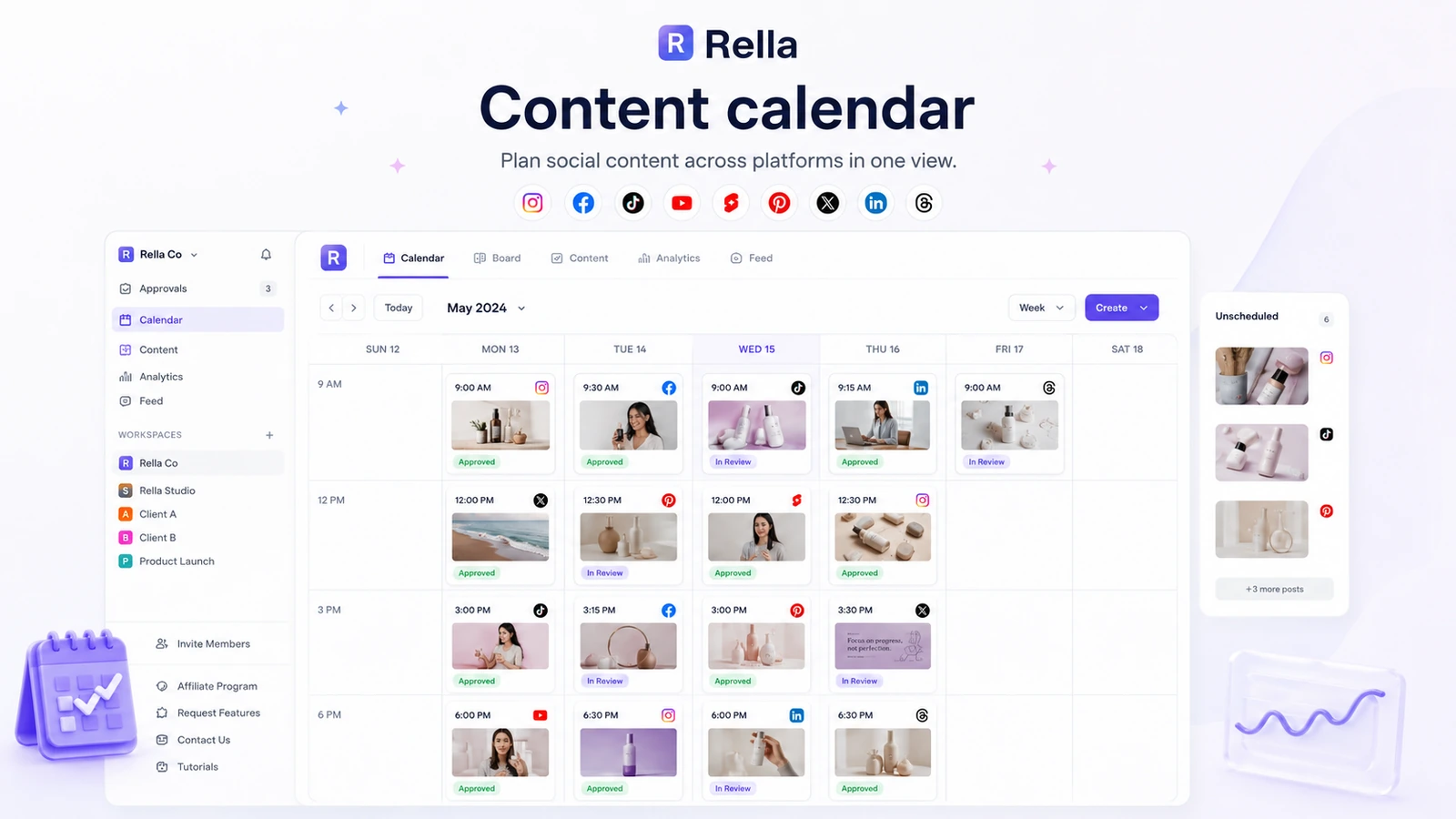
Rella brings that work into one environment. A social media manager can plan content, move posts through statuses, assign work, collect comments, schedule across supported platforms, and generate reports. Agencies can use Social Spaces to separate clients or brands. Teams can use client-facing approval flows so feedback does not disappear into email.
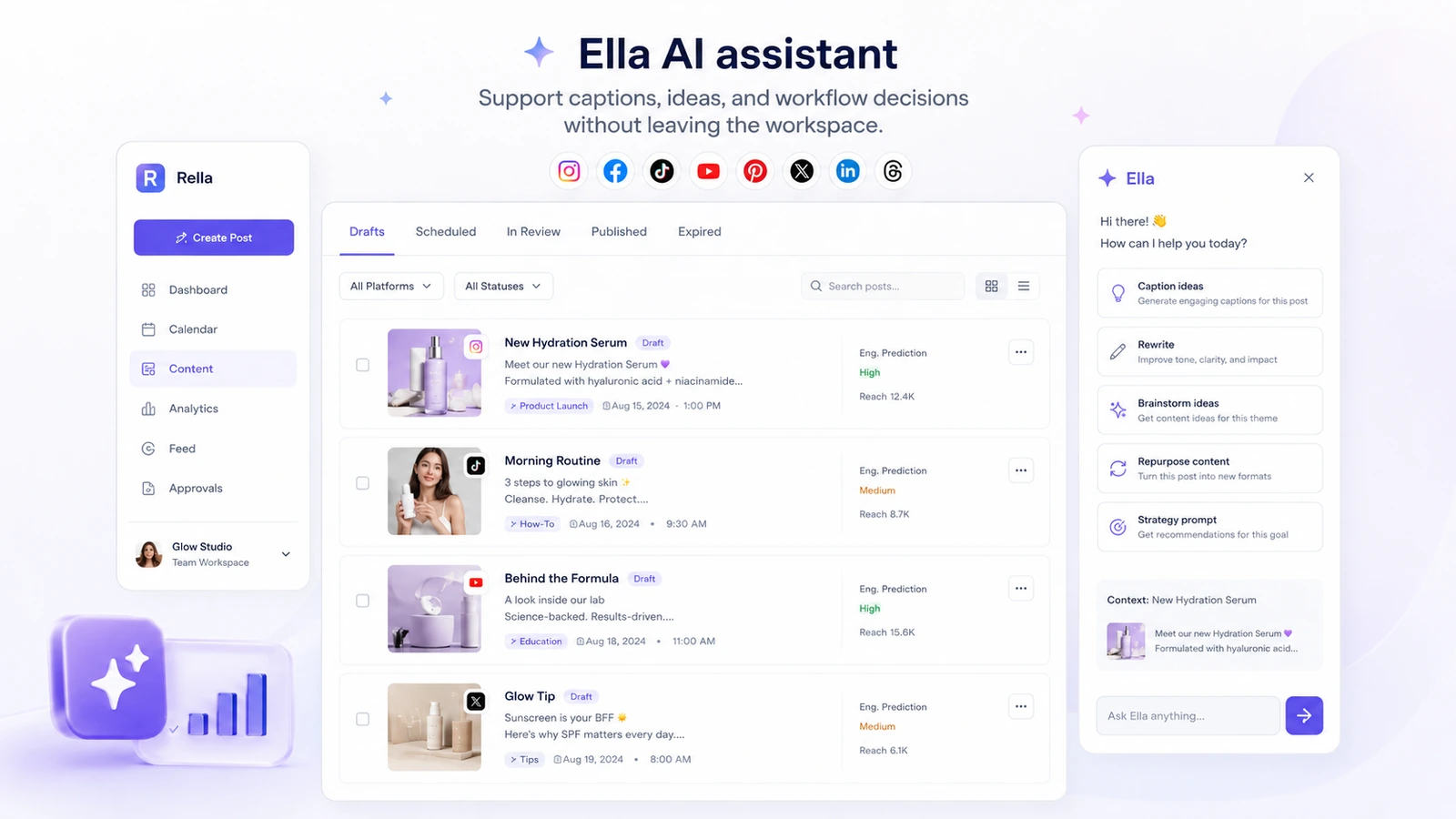
Ella is the AI layer. Rella describes Ella as an AI teammate that can help with content calendars, captions, insights, content repurposing, task support, workflows, trend sourcing, and brand-voice guidance. That is useful, but I would still treat Ella as a workflow assistant rather than the whole product.
The difference is important. A buyer who only wants AI captions can find cheaper tools. A buyer who wants a cleaner social content operating system has a better reason to evaluate Rella.
Who should use Rella?
Rella makes the most sense for social media managers who are tired of running content operations through too many disconnected tools.
A solo social media manager may use it to keep content ideas, drafts, tasks, platform plans, and reporting in one place. The value is not just a calendar. It is the ability to see where each post stands and what still needs to happen before publishing.
Small agencies are probably the clearest fit. Rella’s unlimited Social Spaces can be attractive when you manage multiple clients, because the cost pressure shifts toward paid editor seats rather than client workspaces. If clients mostly need view or comment access, the pricing story becomes more reasonable. If every client-side stakeholder needs editing access, the seat math changes.
In-house teams can also benefit when social work involves writers, designers, managers, founders, and approvers. Rella is strongest when visibility matters: who is drafting, who is reviewing, which posts are approved, which platforms are scheduled, and what performance needs to be shared after launch.
Creators and founders can use Rella too, but I would be more careful there. If the creator has a real production pipeline, brand deals, multiple platforms, and recurring content planning, Rella may be useful. If they only need to schedule a few posts each week, a lower-cost scheduler may be enough.
Who should avoid Rella?
I would avoid Rella if your main need is cheap solo scheduling.
There is no permanent free plan listed in the current pricing data, and the paid plans are priced per member. That can be fair for a team workflow, but it is not automatically friendly for a creator who only wants to queue posts.
I would also be careful if your team is large and everyone needs editing access. Rella’s unlimited Social Spaces help with client count, but the billing model still depends on members. A five-person or ten-person team can become materially more expensive than a flat-rate tool.
Rella is also not the first tool I would choose if advanced analytics is the main buying reason. It does include analytics and shareable reports, and that can be enough for client communication. But buyers who need deep competitive intelligence, enterprise-level social listening, or advanced reporting controls should compare analytics-first platforms before committing.
Finally, Rella may not be right if your team needs a general project management system outside social media. The social-specific focus is the strength. It is also the boundary.
How Rella fits into a real social media workflow
A realistic Rella workflow starts before the post exists.
The team plans a campaign or content theme, creates post ideas, assigns tasks, drafts captions, adds assets, moves items through statuses, collects internal or client comments, schedules approved posts, and then uses reporting to explain what happened.
That is where Rella becomes easier to judge.
The product is not valuable because it has a calendar. Most social tools have a calendar. It is valuable if the calendar connects to the messy parts around the calendar: feedback, approvals, tasks, client communication, content status, scheduling, and reporting.
A practical test would look like this:
- Create one real client, brand, or campaign workspace.
- Add the people who truly need editing access.
- Keep clients or external approvers in view/comment mode where possible.
- Draft several posts across different platforms.
- Move posts through idea, draft, review, approved, scheduled, and published statuses.
- Use Ella for caption support, repurposing, or planning gaps.
- Schedule content across the platforms you actually use.
- Generate a report and share it with someone who needs the performance summary.
- Decide whether the process saved enough time to justify paid seats.
That last step matters. Rella should not just look organized during the trial. It should remove enough friction that the subscription feels like a workflow upgrade.
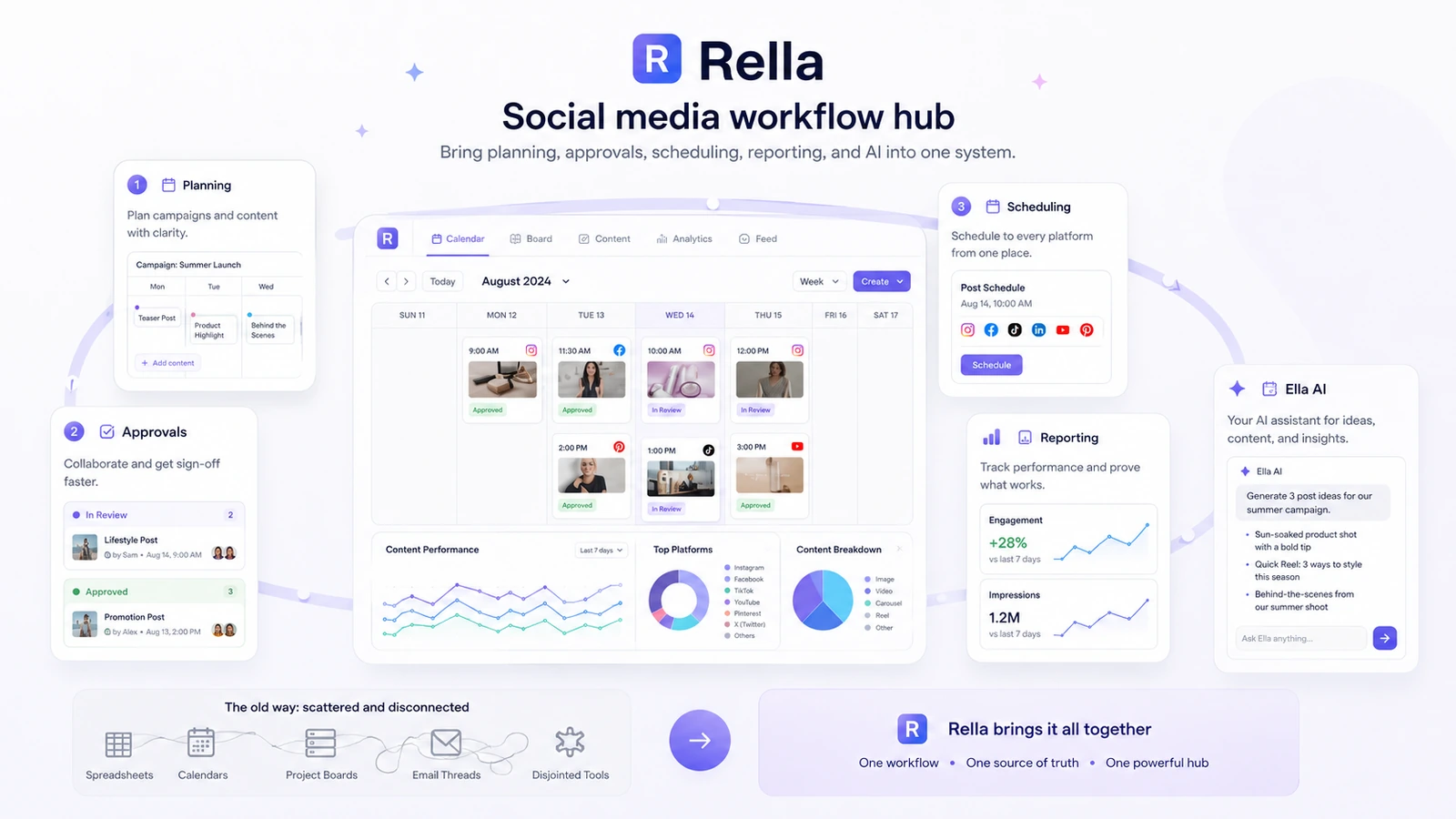
Workflow check: Rella makes the most sense after you test one real campaign through planning, review, scheduling, and reporting.
Key features that matter
The features that matter most are not necessarily the longest feature list. They are the features that reduce handoff friction.
Content calendar and scheduling
Rella supports social planning and auto posting across major social platforms listed on its pricing page, including Instagram, Facebook, TikTok, YouTube Shorts, Pinterest, X, LinkedIn, and Threads. That gives teams a practical central calendar, especially when content has to be adapted across different channels.
I would still verify platform-specific limits before relying on any scheduler. Social platform APIs change, and some publishing behaviors — especially around Stories, Reels, trending audio, and short-form video — may require manual checks.
Kanban boards, tasks, and statuses
This is where Rella becomes more than a scheduler. A Kanban-style board, tasks, statuses, and workflows help teams see content movement. That matters when posts need copy, creative assets, review, approval, scheduling, and reporting.
A simple scheduler answers, “When will this post go live?”
Rella is trying to answer, “What still has to happen before this post can go live?”
Client approvals and external collaboration
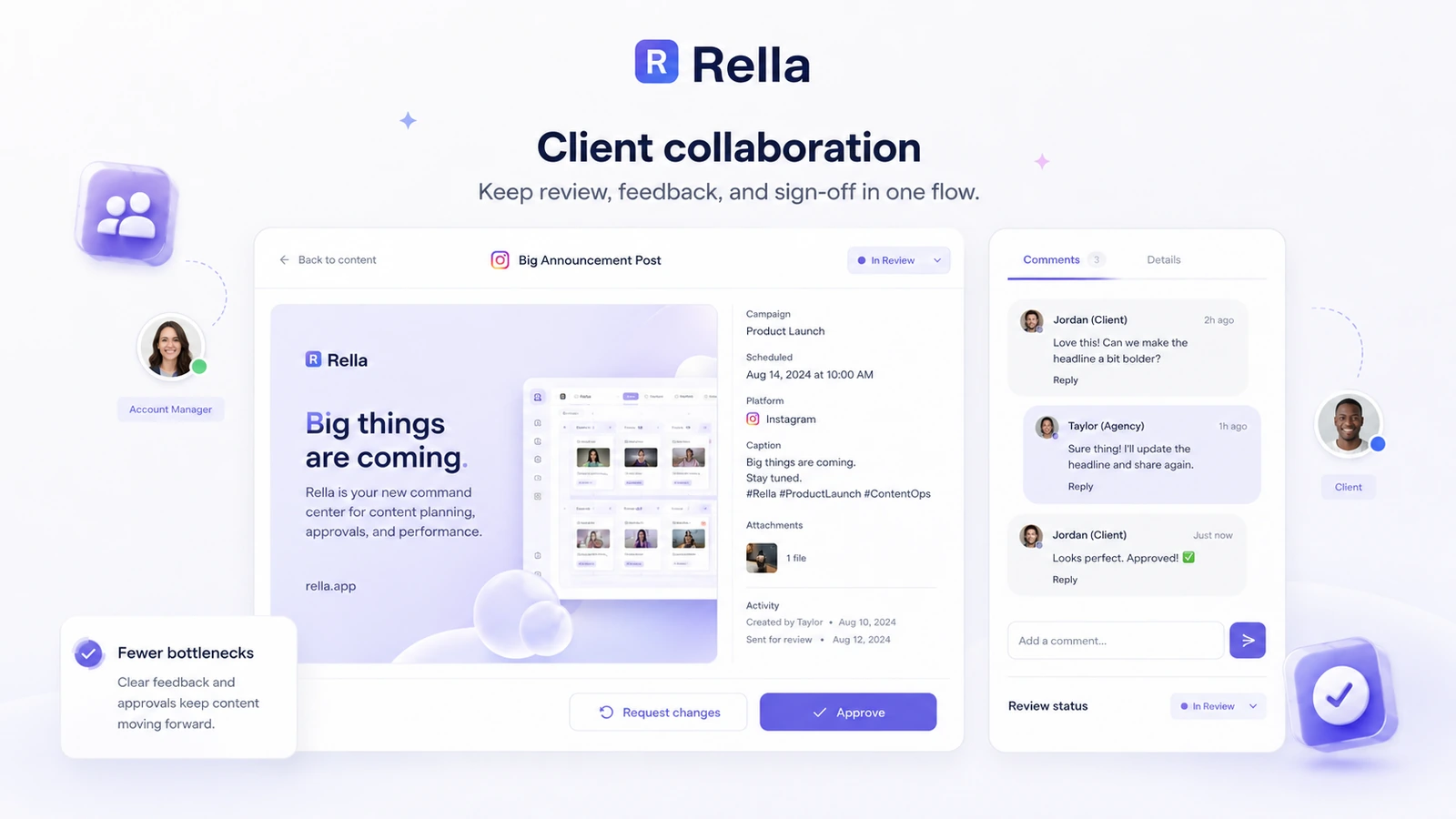
Rella’s approval flow is one of the stronger buying cases. Public communication, shared content, view/comment access, and client-facing workflows can reduce the common agency problem where feedback lives in email, Slack, Google Docs, and screenshots.
This is also where the trial should be strict. Do not just invite your own team. Test how a real client or stakeholder reacts to the shared content flow. If they understand it quickly, that is a strong sign. If they still send feedback outside the system, Rella may become another tool rather than the central workflow.
Ella AI assistant
Ella is useful when it supports the work already happening in Rella. It can help with captions, rewrites, campaign ideas, repurposing, planning, insights, workflows, and brand voice guidance.
The buyer trap is expecting Ella to carry the whole product decision. AI assistance is helpful, but if the approval and scheduling workflow does not fit, the AI layer will not fix that mismatch.
The practical question is not “Does Rella have AI?” It does. The better question is whether Ella saves time inside the social workflow enough to justify moving from Pro to Premium or Premium Plus.
Analytics and reports
Rella includes analytics reporting and tutorial content describing shareable analytics reports. That is useful for agencies and managers who need to close the loop with clients: plan content, publish content, then explain performance.
I would treat reporting as a collaboration feature, not as a replacement for every analytics platform. If the goal is simple client visibility, Rella may be enough. If the goal is deep reporting, competitive analytics, or enterprise dashboards, compare specialist tools first.
Pricing and plan value
Rella pricing needs to be judged by seat count, not by the starting price alone.
Current public pricing shows three main annual-billing tiers:
| Plan | Annual-billing price shown publicly | Buyer logic |
|---|---|---|
| Rella Pro | $24 per member/month | Best starting point for content management, calendar, approvals, private communication, reporting, task management, and scheduling |
| Rella Premium | $36 per member/month | Better fit when external collaboration, workflows, social inbox, and Ella AI Assistant matter |
| Rella Premium Plus | $48 per member/month | Better fit when onboarding, prioritized support, custom branding, and more Ella usage matter |
Monthly billing is higher, so annual billing may reduce the monthly rate. I would not choose annual billing first unless the trial proves Rella will be used consistently.
The biggest pricing detail is that Rella includes unlimited Social Spaces with each subscription, while anyone who needs to edit content must be added as a subscription member. For agencies, that can be a good structure if clients only review or comment. For teams with many active editors, it can become expensive quickly.
This is why the cheapest plan is not automatically the best deal. Pro may be enough if you mainly need calendar, approvals, scheduling, and reporting. Premium becomes more relevant if Ella, public communication, workflows, social inbox, and external collaboration are part of the reason you are buying. Premium Plus only makes sense when onboarding, support, custom branding, and larger Ella usage clearly matter.
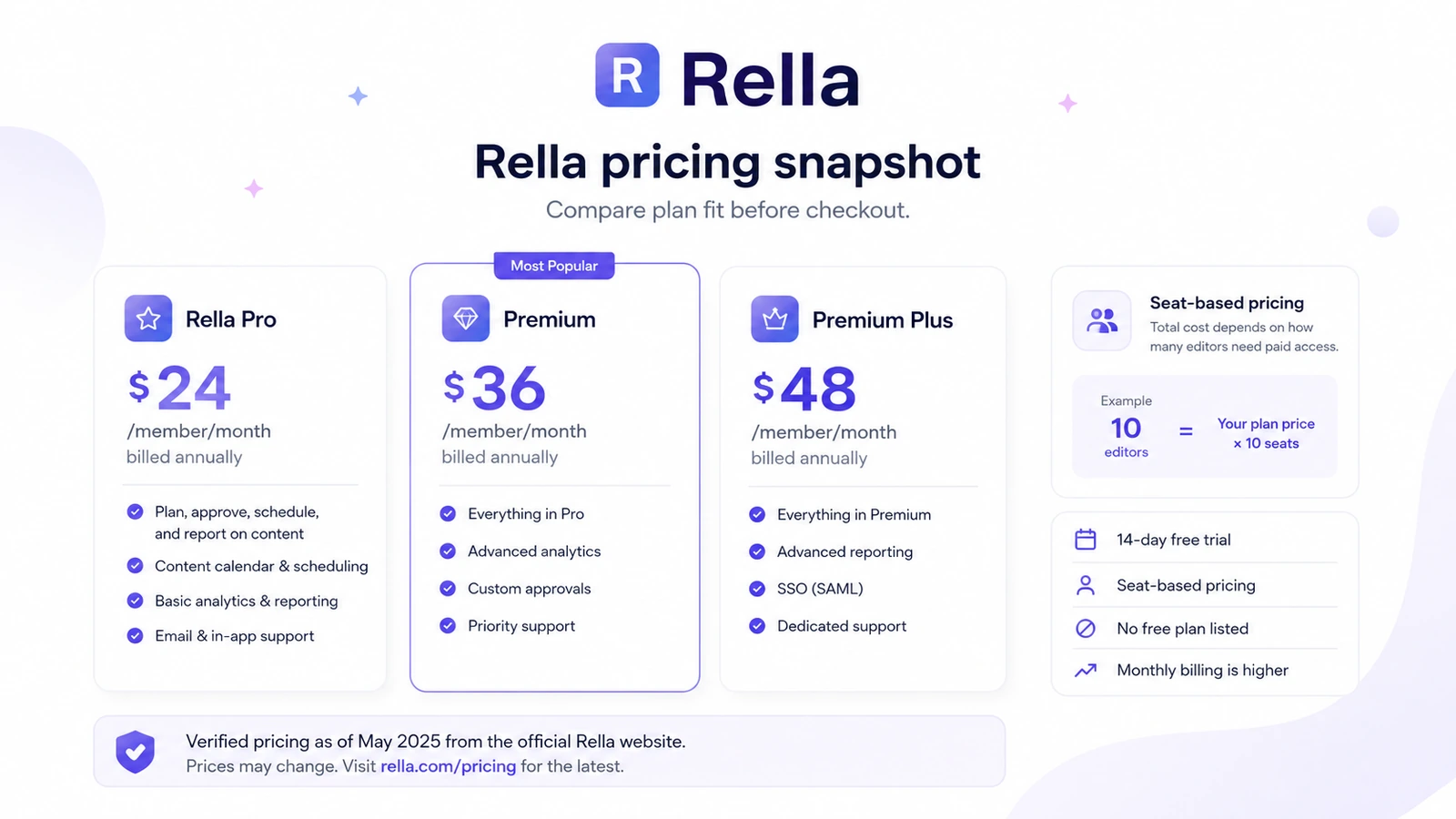
Pricing check: Before paying, calculate active editor seats and confirm whether Pro is enough or Premium features are truly needed.
Free trial, coupon, and checkout notes
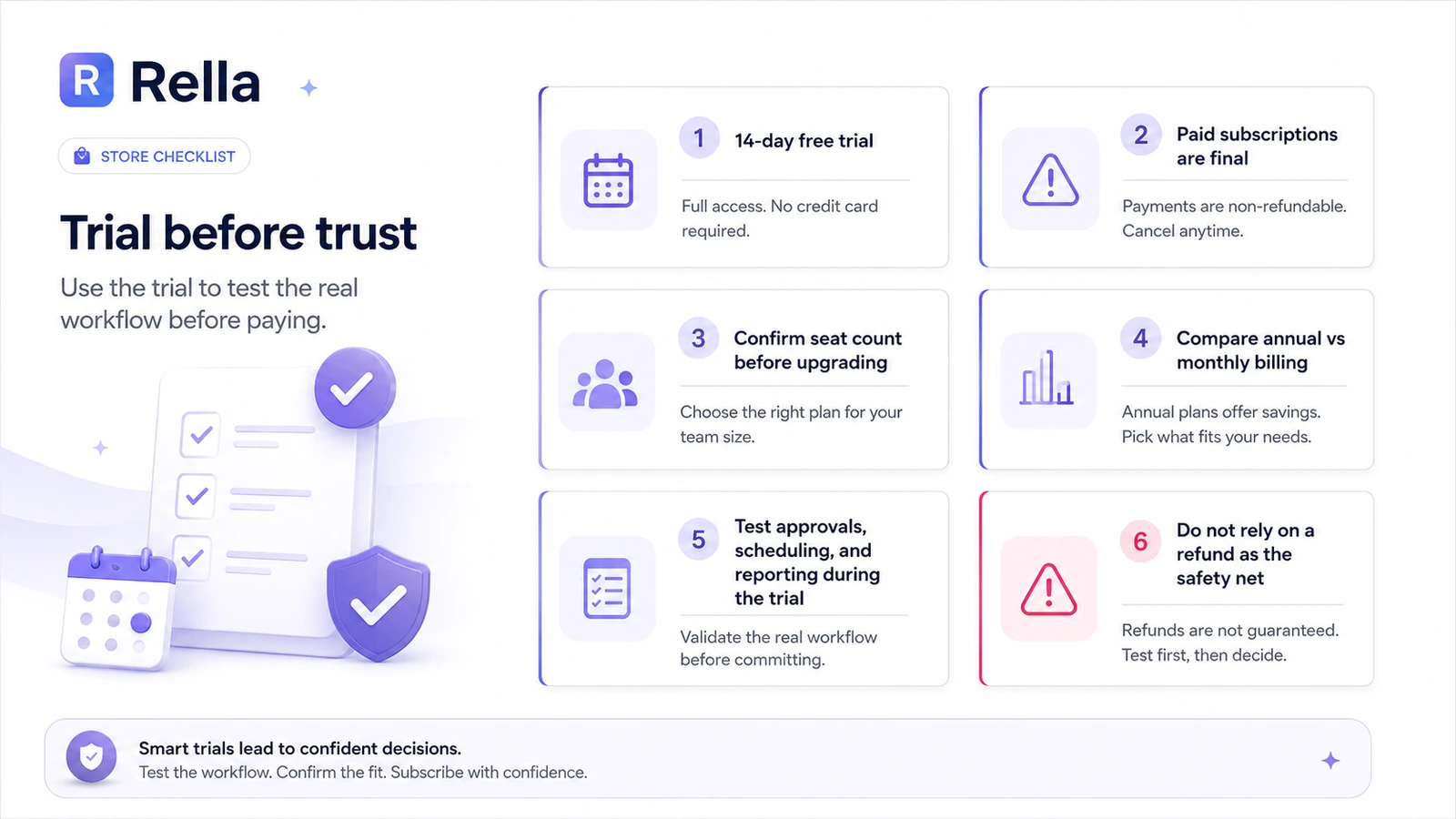
Rella lists a 14-day free trial. I would treat that trial as the main safety net.
That is especially important because the terms describe fees as non-refundable except where required by applicable law. In plain buyer terms: do not rely on a refund to fix a rushed plan choice. Use the trial properly, cancel before the billing point if the fit is wrong, and verify the renewal route before upgrading.
Rella does not list a permanent free plan in the current pricing data. That does not make it a bad product. It just changes the buying sequence. You need to prove the workflow fit during the trial, then decide whether monthly or annual billing makes sense.
Public coupon codes should not be assumed. For Rella, the more realistic savings path is:
- start with the trial;
- count paid editors carefully;
- keep clients in view/comment flows when that is enough;
- compare monthly versus annual billing only after workflow fit is proven;
- check the current DealBestDaily offer route before checkout.
A coupon can improve the purchase. It should not be the reason you buy.
What I would check before buying Rella
This is the buyer checklist I would use before paying:
1. How many people need editing access?
Do not count clients and teammates casually. Separate people who need to edit content from people who only need to view, comment, or approve. Rella’s seat-based pricing becomes much easier to understand after that split.
2. Is Pro enough?
Pro may be enough if the main needs are content calendar, approvals, task management, analytic reporting, and scheduling. Do not jump to Premium only because the AI layer looks attractive.
3. Do you need Ella every week?
Ella becomes more important when the team repeatedly needs captions, strategy, repurposing, AI insights, workflow help, and brand-voice guidance. If you only need occasional AI copy help, paying for a higher plan may not be necessary.
4. Will clients actually use the approval flow?
A client approval system only works if clients understand it. Test this during the trial. Send content for review, ask for comments, revise based on feedback, and see whether the process is easier than your current method.
5. Are reports good enough for your use case?
If your reporting need is simple client visibility, Rella may be practical. If you need deeper analytics, attribution, competitive benchmarks, or executive dashboards, compare specialized tools first.
6. Are refund and cancellation rules clear?
Read the terms before paying. The trial should be where uncertainty gets resolved.
Buyer-safe route: Use the trial to test approvals, reports, scheduling, and Ella with real content before choosing a paid plan.
A simple trial test for Rella
The best way to test Rella is not to click around the dashboard for ten minutes.
Use one real workflow.
Create a campaign for one client or brand. Add three to five posts across different platforms. Draft captions. Use Ella on at least one content idea and one repurposing task. Assign work to a teammate. Move posts through statuses. Ask a client or stakeholder to comment. Schedule at least one post. Generate a report or reporting view.
Then ask five questions:
| Trial question | What a good answer looks like |
|---|---|
| Did the team understand what to do next? | Statuses, tasks, and comments made the workflow clearer |
| Did clients or stakeholders give feedback in the right place? | Fewer side-channel comments and less screenshot confusion |
| Did Ella save real time? | Captions, ideas, insights, or repurposing helped inside the actual workflow |
| Did reporting reduce manual work? | The report was easier than exporting data or building a manual update |
| Did the seat count still feel reasonable? | The paid member count matched the people who truly needed editing access |
If the answer is yes to most of those, Rella has a serious case. If the answer is no, the tool may look polished but still fail the operational test.
Pros and cons explained
Pros
Rella is purpose-built for social media workflow.
The combination of content calendar, approvals, scheduling, tasks, Kanban-style movement, reporting, and client collaboration gives it a clearer role than a generic project board.
Unlimited Social Spaces can help agencies.
Agencies often manage multiple brands or clients. Not being charged per client workspace can be useful, as long as paid editor seats are controlled.
Ella AI works inside the planning process.
Ella is not just a generic writing box. It supports captions, strategy, repurposing, planning, workflows, and insights in the same environment where social content is managed.
Client view/comment access can reduce friction.
If clients can review or comment without becoming paid editors, Rella can make approvals cleaner and keep feedback closer to the post.
Cons
Seat-based pricing needs careful math.
Rella can be reasonable for a small team, but the total cost rises when many people need editing access.
No permanent free plan is listed.
The 14-day trial is helpful, but buyers who need a free ongoing scheduler may prefer another tool.
Refund flexibility is limited.
The terms describe paid fees as non-refundable except where required by law, so the trial matters more.
Analytics may not be deep enough for analytics-first buyers.
Rella’s reports help with collaboration and client communication. They may not replace specialist reporting or enterprise social intelligence tools.
Green flags and red flags
| Signal | Why it matters |
|---|---|
| Green flag: social-specific workflow | Rella is built around the actual movement of social content from idea to approval to publishing |
| Green flag: unlimited Social Spaces | Agencies can manage multiple client spaces without automatically paying per client workspace |
| Green flag: Ella inside the workflow | AI support is tied to planning and execution, not just isolated text generation |
| Red flag: seat-count expansion | Costs can climb when every teammate or stakeholder needs editing access |
| Red flag: refund terms | Buyers should not treat refunds as the fallback if they choose the wrong plan |
| Red flag: AI usage assumptions | Ella access and usage are plan-dependent, so buyers should confirm limits before upgrading |
Rella vs alternatives
Rella should be compared against two types of alternatives: social media workflow tools and broader productivity tools.
Rella vs Buffer
Buffer is usually the cleaner comparison for solo creators or small teams that mainly need simple scheduling. It is easier to justify when price matters more than approvals, client collaboration, and workflow structure.
Rella is stronger when the work involves approvals, statuses, team handoffs, reports, and client-facing communication.
Rella vs HeyOrca
HeyOrca is a direct comparison for agencies and client-heavy workflows. Buyers who manage many clients should compare how each tool handles approval links, client users, pricing structure, calendars, and reporting.
Rella may feel more attractive if Ella AI and Social Spaces fit the team’s process. HeyOrca may be stronger if the agency already wants a tool centered heavily around client approvals and calendar-based social management.
Rella vs SocialRails
SocialRails is a useful comparison because third-party commentary positions it around flat-rate pricing and social content workflows. If your team is sensitive to per-member pricing, compare the total cost carefully.
Rella may make more sense if its specific approval, Social Space, reporting, and Ella workflow feels better during the trial. SocialRails may be worth checking if the buyer wants flatter pricing or broader included AI usage.
Rella vs Later or Planoly
Later and Planoly may be stronger for creators who care most about visual planning, Instagram-style content workflows, and lightweight publishing. They are not necessarily direct replacements for Rella’s team workflow, but they can be a better fit when collaboration is not the main pain.
Rella vs Notion or ClickUp
Notion and ClickUp can manage social workflows if your team is disciplined. The tradeoff is setup. A general project tool can be flexible, but it often requires custom databases, templates, automations, reporting workarounds, and a separate scheduler.
Rella is stronger if you want the social media workflow already shaped for you.
Adjacent DealBestDaily routes
Inside DealBestDaily, 1min.AI is a broader everyday AI workspace, not a direct social media approval platform. Aikeedo is closer to an AI SaaS/product-building route, not a Rella replacement. They are useful adjacent routes only if your buying question shifts away from social workflow and toward broader AI productivity or AI product infrastructure.
Review methodology and evidence confidence
For this Rella review, I would treat the current official Rella pages as the source of truth for pricing, platform positioning, trial details, Social Spaces, supported platform claims, Ella usage notes, and terms. Older third-party pricing references can be useful for context, but they should not override the live pricing page.
Evidence confidence is strongest around the core positioning, pricing tiers, free trial, member-seat model, Social Spaces, and non-refundable fee language because those details are publicly stated in official Rella materials.
Evidence confidence is more cautious around user satisfaction and long-term support experience because third-party review coverage is thinner than it is for older social media platforms. That does not make the product weak. It just means buyers should run a more practical trial before committing.
The most important review judgment is not whether Rella has enough features. It does. The question is whether those features replace real workflow friction for your team.
Final verdict
Rella is a strong fit if your social media process is messy enough that a simple scheduler no longer solves the problem.
I would consider it for agencies, social media managers, in-house teams, and structured creators who need content calendars, approvals, client comments, scheduling, reporting, and AI support in one workflow. In that situation, Rella is not just another tool. It can become the operating layer for social content work.
I would be more careful if you are a solo creator with a light posting schedule, a team with many paid editors, or a buyer whose main need is advanced analytics. In those cases, Buffer, Later, Planoly, HeyOrca, SocialRails, Notion, or ClickUp may be better comparisons depending on the real job.
The cleanest way to evaluate Rella is not to chase a coupon first. Start with the trial. Test a real campaign. Count paid editor seats. Check whether clients can review without becoming paid members. Use Ella enough to see whether it saves planning time. Generate a report. Then decide whether Pro, Premium, or Premium Plus fits the workflow.
For my money, Rella makes sense when collaboration friction is already costing the team time. If that friction is not real, the paid plan may feel heavier than the problem.