Quick verdict
QuoteIQ is worth a serious look if your home service business is already outgrowing scattered estimates, calendar reminders, text threads, payment links, photo folders, and spreadsheet-style customer tracking.
I would not judge it as a generic CRM. QuoteIQ is trying to be a contractor operating system: quote the job, schedule the work, invoice the customer, collect payment, document the field work, trigger follow-ups, and use AI where it can reduce admin friction.
That can be very useful. It can also be more software than a small operator needs.
The strongest reason to consider QuoteIQ is workflow specificity. Its public pages and help content point toward estimates, invoices, scheduling, payments, customer records, MapMeasure Pro, QuoteIQ Cam, review requests, AI Autopilot, Virtual Call Team, and trade-specific field operations.
The main caution is not whether the homepage looks useful. It does. The real question is whether the plan you choose contains the workflow you actually need, whether the AI credit allowance matches your volume, and whether you are comfortable with the trial and renewal rules.
For my money, QuoteIQ makes the most sense for contractors who create estimates every week and want the estimate to connect naturally to the rest of the job. It makes less sense if you only need a simple invoice app, dislike card-required trials, or need a mature enterprise rollout with heavy implementation support.
Next step: If QuoteIQ still sounds like a real workflow fit, verify the current plan table and trial route before entering billing details.
Review snapshot
| Review point | Practical take |
|---|---|
| Best for | Home service contractors who quote, schedule, invoice, and collect payments every week |
| Not ideal for | Buyers who only need occasional invoices or a basic calendar |
| Main use case | Replacing scattered quoting, job scheduling, customer records, payments, and follow-up tools with one contractor CRM |
| Current public starting point | Essentials is presented from $29.99/month, with annual billing showing a lower monthly equivalent |
| Trial path | 14-day free trial; card required before starting |
| Main strength | Contractor-specific workflow depth, including quoting, scheduling, payments, AI tools, and field operations |
| Main concern | Trial renewal, refund limits, AI credit usage, and feature availability by tier need careful checking |
| Direct alternatives | Jobber, Housecall Pro, Markate, LMN |
| Adjacent heavier route | ServiceTitan for larger or more complex field service operations |
| Best next step | Use the trial to run one real quote-to-payment workflow before annual billing |
What is QuoteIQ?
QuoteIQ is a field service CRM and business management platform for home service contractors. In plain language, it helps a service business create quotes, send invoices, schedule work, manage customers, accept payments, document jobs, and use AI tools inside the same operating workflow.
That matters because many contractors do not start with a software problem. They start with a messy day: a lead asks for a quote, the owner checks photos, a job gets scheduled by text, the customer asks for a change, the invoice goes out late, and a review request is forgotten.
QuoteIQ is trying to compress that workflow into one platform.
The official help content describes the core flow around professional quotes, invoices, estimate types, attachments, one-click quote-to-invoice conversion, scheduling, payments, customer records, and AI features powered by IQ credits. It is not a lightweight invoice generator, a note app, or a general sales CRM that happens to accept contractor customers.
Our review approach compares public product pages, pricing details, help documentation, trial and cancellation terms, buyer workflow fit, and nearby alternatives. A low monthly starting price, a trial, or a long feature list is not proof that the product fits. The useful question is narrower: does it reduce friction in the jobs you actually run?
Who should use QuoteIQ?
QuoteIQ makes sense for contractors who already feel the pain of disconnected admin work.
A solo operator can consider it if the business regularly creates estimates, needs professional invoices, wants customer records in one place, and prefers a mobile-friendly workflow in the field. Essentials may be enough if basic quotes, invoices, scheduling, payments, and light AI support cover the real day-to-day work.
A growing crew should look more closely. Once multiple people touch jobs, the value shifts from “can I send an estimate?” to “can the team see what is happening?” Scheduling, job status, customer communication, documentation, and follow-up become more important than the entry price.
Who should avoid QuoteIQ?
I would be careful with QuoteIQ if you only need a simple way to send a few invoices each month. A full contractor CRM can become unnecessary overhead when the workflow is still very small.
I would also slow down if you dislike card-required trials. QuoteIQ’s public terms describe a 14-day trial that requires a valid credit or debit card and can convert to a paid subscription if not canceled before the trial expires.
A buyer shopping only because of a possible deal should pause too. A lower price can make a good tool easier to justify. It cannot make a workflow mismatch disappear.
Larger service companies may need a different evaluation. If your business requires deep implementation support, complex reporting, mature multi-location controls, or heavy governance, ServiceTitan or another larger field service platform may be a more natural comparison.
Contractors who expect AI to run estimating or customer communication without supervision should also be cautious. AI can assist the business owner, but pricing suggestions, job recommendations, call summaries, and customer messages still need human review.
How QuoteIQ fits into a real workflow
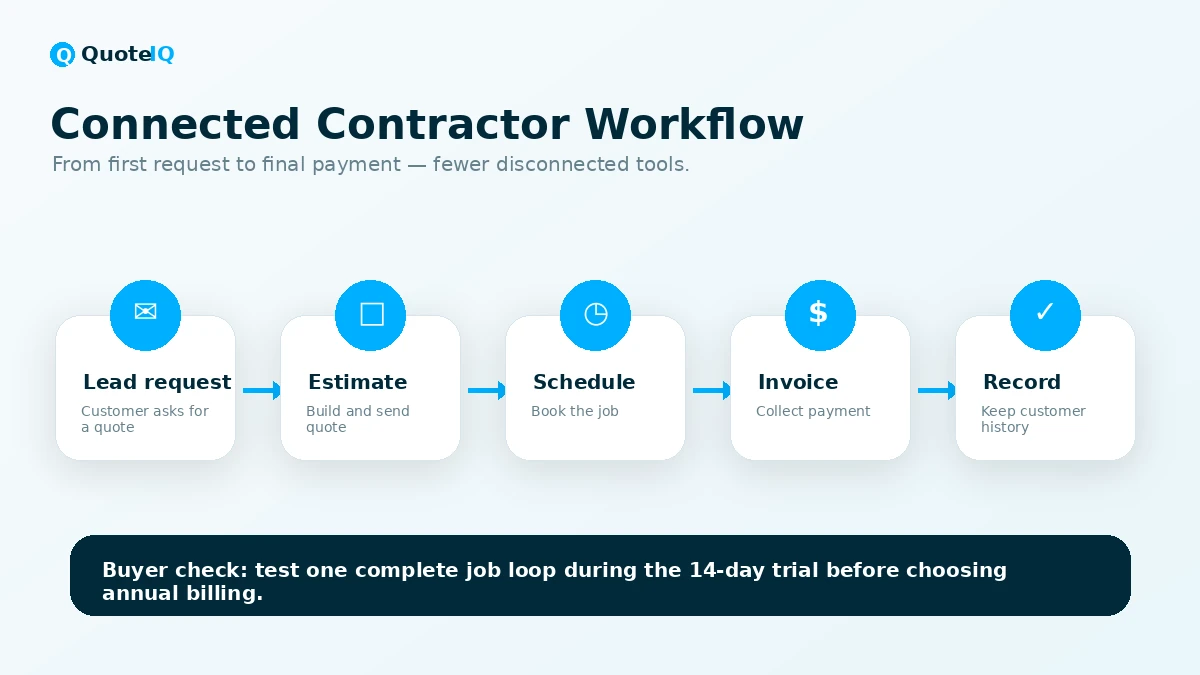
The best way to judge QuoteIQ is to follow one real customer from first request to final payment.
A sensible test workflow looks like this: a lead comes in, the contractor creates or updates the customer record, builds an estimate with services and notes, sends the quote, schedules the approved job, completes and documents the work, converts the quote into an invoice, collects payment, and sends follow-up or a review request.
If QuoteIQ makes that loop easier, it has a believable role. If you only test one isolated feature, you may miss the real buying decision.
The mobile side matters here. Contractors do not work only at a desk. If the app feels natural while moving between job sites, checking customer details, documenting work, or sending invoices in the field, QuoteIQ becomes much easier to justify.
The AI side should be tested inside the same loop. Do not ask only whether AI exists. Ask whether it saves time where you lose time now: estimating from job details, answering missed calls, generating customer messages, summarizing calls, or creating before-and-after visuals.
Workflow check: Before comparing annual pricing, test QuoteIQ with one real customer job from estimate to payment.
Real-world buyer scenarios
Solo contractor quoting and invoicing
A solo pressure washing, cleaning, painting, or landscaping operator may use QuoteIQ to build estimates, attach photos, schedule jobs, send invoices, accept payments, and keep customer records organized. The risk is buying too much too early. If quote volume is low and advanced tools are not needed, a simpler setup may still be enough.
Growing home service crew
A small crew may get more value from scheduling, recurring work, route planning, customer communication, and field notes. QuoteIQ becomes more interesting if the team wants jobs, payments, and customer records connected rather than spread across a calendar app, invoicing tool, and text messages.
Contractor losing leads to slow response
If a contractor regularly misses calls or follows up late, QuoteIQ’s AI and communication features may be worth testing. Virtual Call Team, AI Autopilot, automated messages, and review-related workflows can matter when lead response is already costing money. The caution is AI credit usage and call-related cost.
Key features that actually matter
Estimates, invoices, and payment flow
This is the center of QuoteIQ. If estimates and invoices do not feel good, the rest of the platform becomes harder to justify.
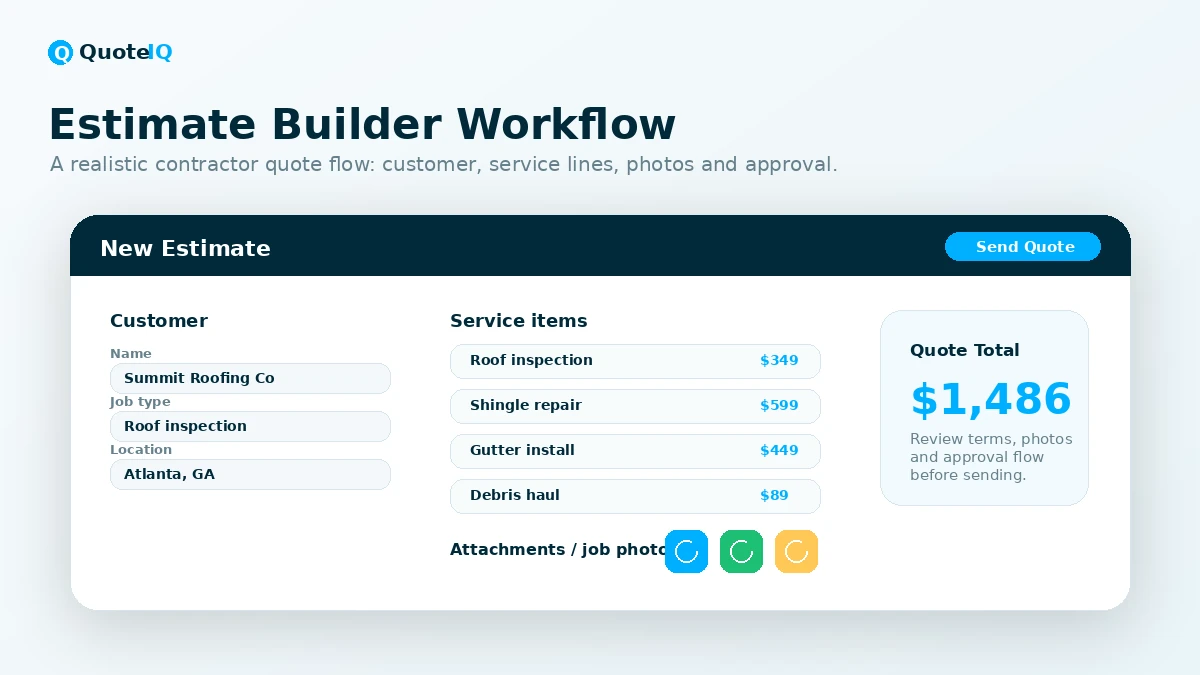
The useful part is that quotes are not isolated documents. QuoteIQ supports professional estimates, invoices, attachments, service breakdowns, quote-to-invoice conversion, and online payments. For contractors, that is more valuable than a generic proposal form.
Scheduling and field workflow
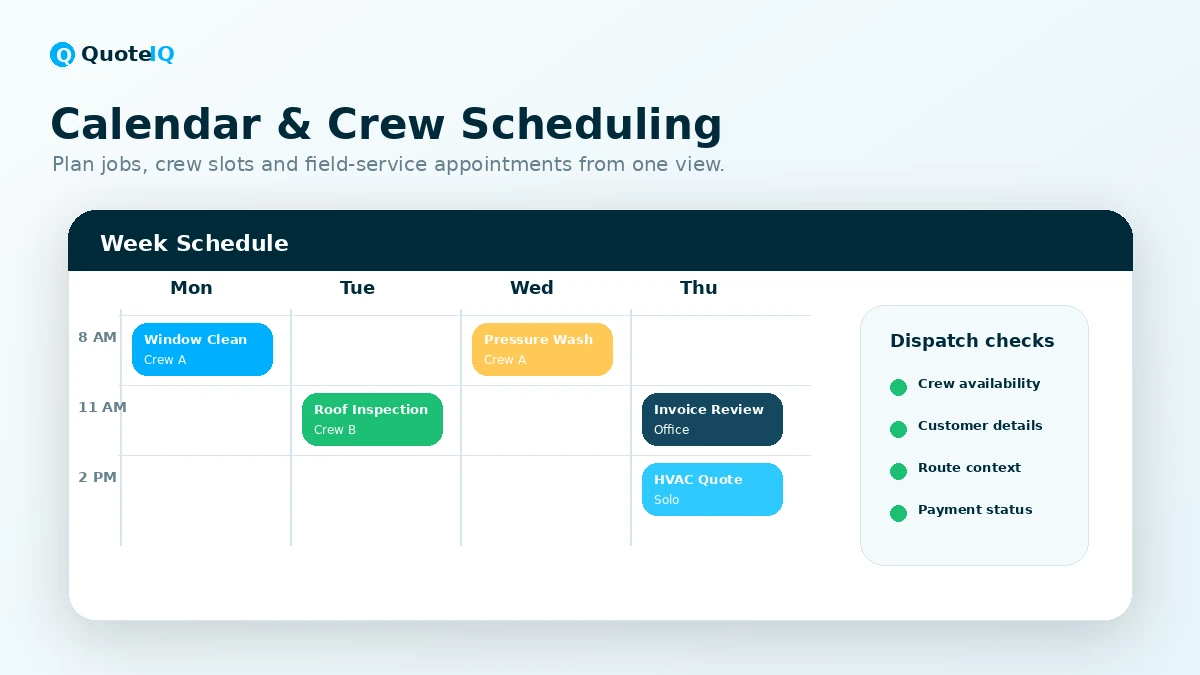
Scheduling is where a contractor CRM either saves time or becomes another place to update manually. QuoteIQ includes job calendar features, assignments, reminders, and mobile access. Higher tiers add more operational depth around employees, route optimization, self-scheduling, and related tools.
MapMeasure Pro and QuoteIQ Cam
Property measurement, street view, photo documentation, inspection reports, and before/after visuals can be valuable for trades where the job site drives pricing and customer confidence.
AI Autopilot, AI Estimator, and Virtual Call Team
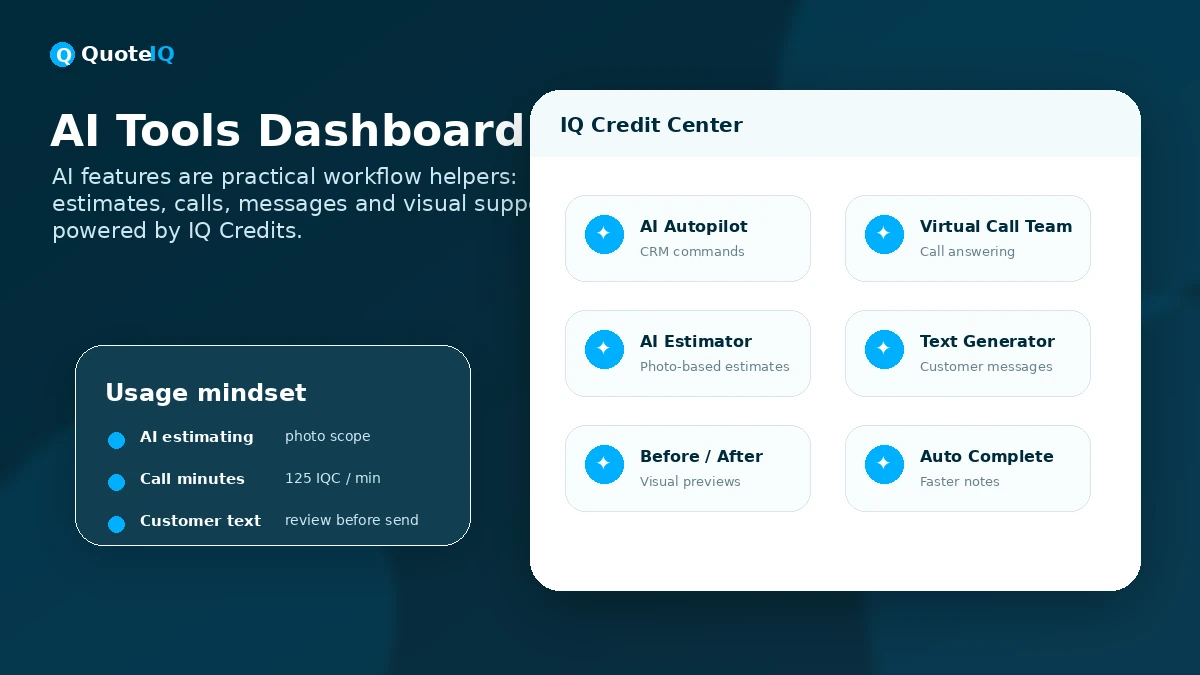
QuoteIQ’s AI layer is more operational than decorative. AI Autopilot is positioned around natural-language CRM actions. AI Estimator supports estimate generation. Virtual Call Team can help with call answering and summaries. AI text and image tools can support customer communication and visual workflows.
Communication, reviews, and follow-up
For many service businesses, the sale is not lost because the job is bad. It is lost because response time is slow, follow-up is weak, or the customer never gets a clean next step.
Pricing and plan value
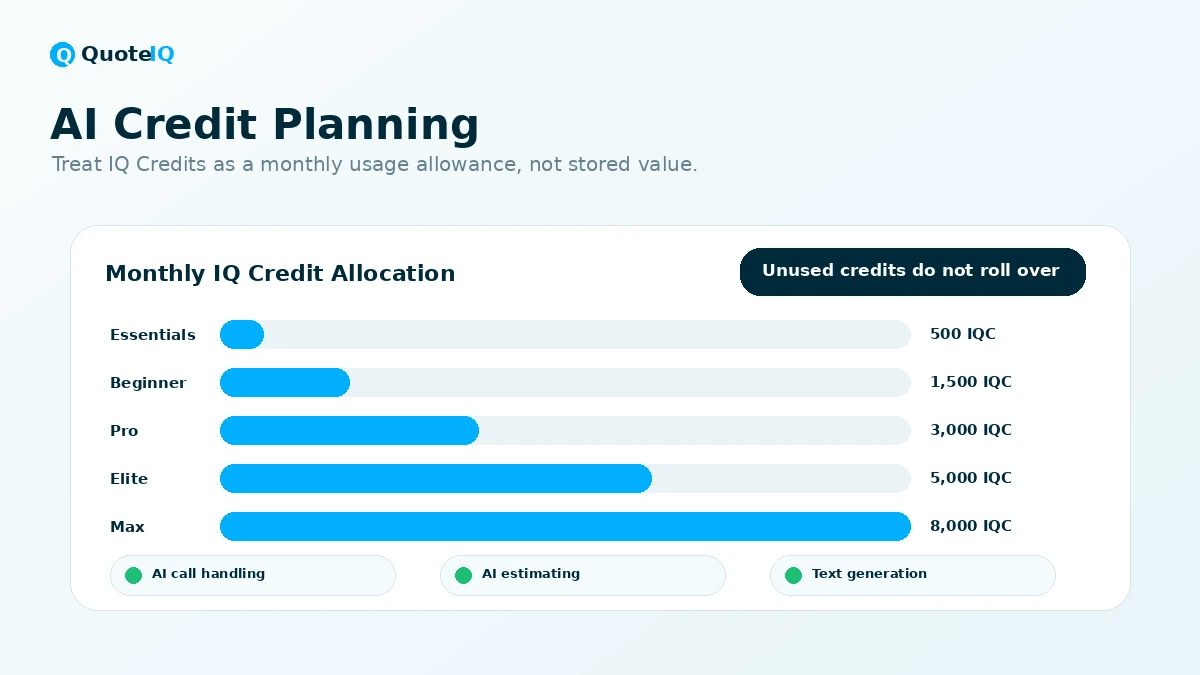
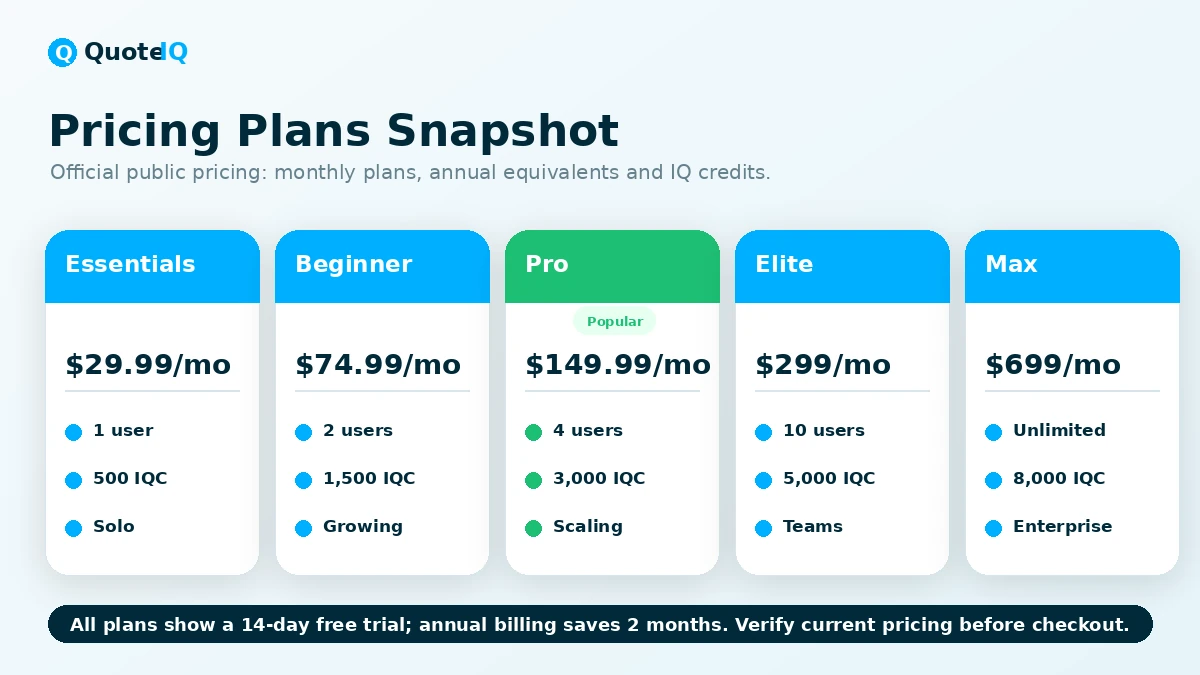
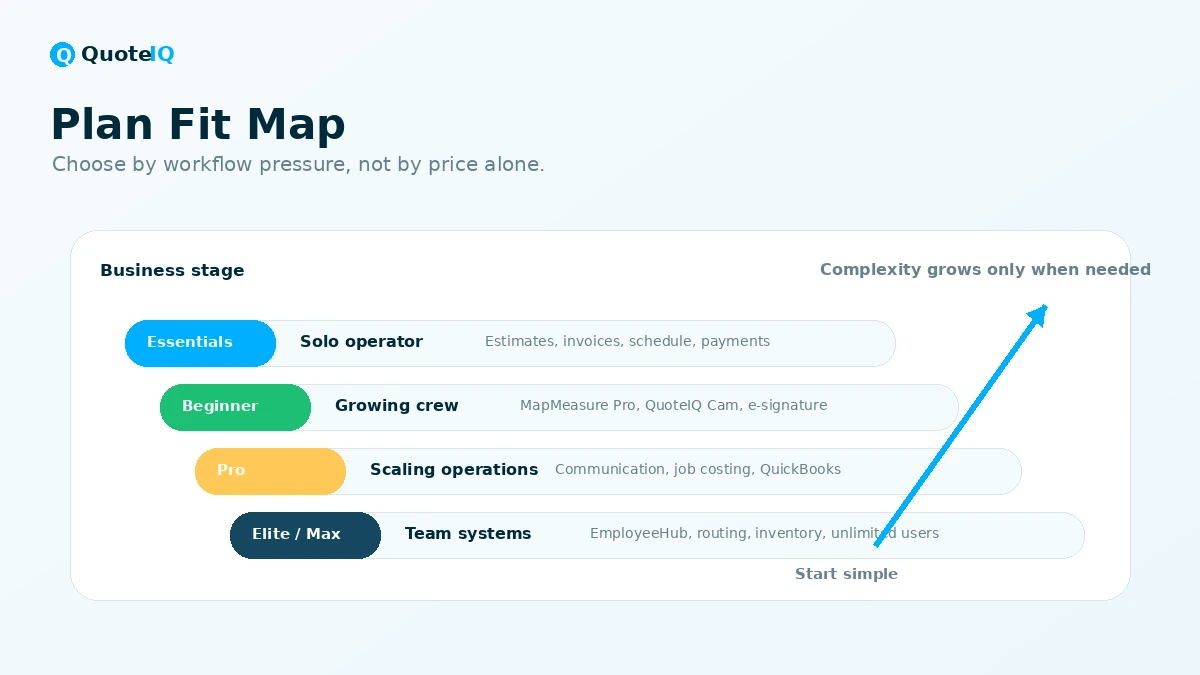
QuoteIQ’s current public pricing page presents five plans: Essentials, Beginner, Pro, Elite, and Max. Essentials is shown from $29.99 per month for one user with 500 monthly AI credits. Beginner is shown from $74.99 per month with two users and 1,500 monthly AI credits. Pro is shown from $149.99 per month with four users and 3,000 monthly AI credits. Elite and Max move the buyer into deeper team and operational territory.
The pricing page also shows annual billing equivalents that reduce the monthly equivalent, and the site presents a 14-day free trial. A credit or debit card is required to start the trial.
This is fairly clear pricing for the category, but it still needs live verification because QuoteIQ has several buying variables at once: users, AI credits, field tools, communication features, job costing, QuickBooks integration, customer self-quoting, self-scheduling, employee tools, inventory, route optimization, priority support, and whether a top-tier plan makes sense for your business size.
My pricing take is conservative: start with the lowest plan that contains the specific workflow you need to test. Do not buy up the ladder just because the demo shows an impressive feature. Do not move to annual billing until the team has used QuoteIQ on real jobs.
Pricing check: QuoteIQ pricing depends on users, AI credits, and feature access, so compare the current plan table before choosing monthly or annual billing.
Free plan, trial, coupon, and checkout notes
A free plan was not verified as the main public entry path. The safer public entry path is the 14-day trial.
That trial is useful, but only if you use it seriously. Before starting, write down the workflows you need to test: one estimate, one invoice, one scheduled job, one payment route, one customer record, one field documentation flow, and one AI feature you might actually use.
The trial requires a payment card and can convert to a paid subscription if it is not canceled before the trial expires. Set a reminder before starting, especially if you choose a higher-tier plan for testing.
The coupon path should be secondary. A reliable public coupon code was not strong enough to make it the center of the buying decision. If a current deal exists, it belongs after workflow fit and plan fit are clear.
Annual billing can be a better value if QuoteIQ becomes daily or weekly operating software. It is not automatically safer just because the monthly equivalent is lower.
What I would check before buying QuoteIQ
If I were buying QuoteIQ for a real service business, I would check these items before allowing the trial to renew:
- The exact plan tier I need. Identify the smallest plan that includes the workflow problem you are trying to solve.
- Monthly AI credit usage. Estimate likely use of AI Autopilot, Virtual Call Team, AI Estimator, AI image tools, and generated customer text.
- Trial renewal timing. Set a reminder before the 14-day trial ends.
- Refund and cancellation language. Read the current terms before annual billing.
- Mobile workflow. Test the app in the field, not just on a desktop browser.
- Crew adoption. Let employees or crew members test the workflow if they will use it.
- Alternative fit. Compare at least Jobber or Housecall Pro before choosing QuoteIQ as a long-term operating system.
The easy mistake is treating the 14-day trial as a casual free look. It is better to treat it like a short implementation test.
A simple test before paying
Before paying, I would run a small test like this:
- Pick one recent customer job that represents your normal work.
- Create the customer record with the details your business actually needs.
- Build an estimate with real services, photos, pricing notes, terms, and job context.
- Convert the approved quote into an invoice and check the payment flow.
- Schedule the job and see whether the calendar makes sense for your workday.
- Try one AI feature you would realistically use.
- Ask whether the process felt faster, clearer, and easier than your current system.
If that test feels good, QuoteIQ becomes a serious option. If it feels heavy, confusing, or mismatched, do not let annual savings pull you forward.
Pros explained
The first real pro is workflow focus. QuoteIQ is built around home service contractors, and that shows in the emphasis on estimates, invoices, scheduling, payments, property measurement, field documentation, reviews, and mobile access.
The second pro is pricing visibility. The public pricing page shows a plan ladder, included users, AI credit allocations, annual equivalents, and major feature differences. That makes early comparison easier than software that hides all pricing behind a sales call.
The third pro is the contractor-specific feature set. MapMeasure Pro, QuoteIQ Cam, Review Multiplier, InstaQuote, InstaSchedule, route optimization, job costing, and Virtual Call Team map to real contractor problems when used in the right business.
The fourth pro is that AI is built into the plan structure rather than presented only as a separate enterprise add-on. That can be useful for contractors who want AI assistance without stitching together separate tools.
Each strength has a condition. It matters when the buyer has a repeated workflow. It matters less when the buyer only wants an occasional invoice.
Cons explained
The first meaningful con is trial pressure. A 14-day card-required trial is manageable if you test with intent. It is risky if you sign up casually and only start reading the renewal terms after the charge.
The second con is refund flexibility. QuoteIQ’s published terms say buyers can cancel before renewal to avoid the next charge, but refunds are not offered after renewal for cancellations, partial usage, or unused portions of the subscription term, except for exceptional cases at QuoteIQ’s discretion.
The third con is plan-tier complexity. The entry price is attractive, but the feature that made you interested may live on Beginner, Pro, Elite, or Max.
The fourth con is AI credit planning. AI credits reset each billing cycle, unused credits do not roll over, and some AI workflows can consume meaningful usage. AI call handling also requires extra care around call minutes, recording, consent, and customer communication rules.
None of these cons make QuoteIQ a bad product. They make it a product that should be evaluated with a real workflow, not a quick impression.
Green flags and red flags
A green flag is that QuoteIQ solves a narrow business category well: home service operations. That is better than a vague “all-in-one business tool” that claims to fit everyone.
Another green flag is the visible pricing structure. Buyers can see the basic plan ladder before talking to sales, which makes early comparison easier.
A third green flag is the connection between quoting and the rest of the job. Estimates, scheduling, invoices, payments, customer records, and follow-up are more valuable when they talk to each other.
The red flags are mostly buying-process risks. Slow down if you are choosing annual billing before testing a real workflow. Slow down if you assume the lowest tier includes the feature you saw in a demo. Slow down if you expect AI outputs to be ready for customers without review. Slow down if your crew has not tested the workflow but you are already considering a long-term plan.
QuoteIQ vs alternatives
Jobber vs QuoteIQ
Jobber is one of the first comparisons because it is a well-known field service platform with broad scheduling, quoting, invoicing, and customer management workflows. Jobber may be safer if you want a more established general field service system. QuoteIQ may make more sense if built-in AI workflows, property measurement, photo documentation, and contractor-specific quoting are central to the decision.
Housecall Pro vs QuoteIQ
Housecall Pro is another strong comparison for scheduling, dispatch, online booking, payments, and customer communication. Housecall Pro may feel more familiar as an established service business platform. QuoteIQ may appeal more when the buyer wants AI tools and field-service quoting depth in the same workflow.
ServiceTitan vs QuoteIQ
ServiceTitan is not a simple one-to-one comparison for many small contractors. It is usually a heavier route for larger service businesses that need deeper reporting, broader implementation support, and enterprise-style structure. QuoteIQ may be more practical for smaller or mid-sized home service teams that want a faster contractor CRM path.
Markate vs QuoteIQ
Markate is relevant if you want service-business management without the full QuoteIQ feature stack. QuoteIQ may be stronger if the contractor wants property measurement, AI workflows, photo documentation, automation, and a modern mobile-first workflow.
LMN vs QuoteIQ
LMN is more trade-specific, especially for landscaping and related operations. QuoteIQ is broader across home service categories and may fit contractors who want one platform for quoting, scheduling, payments, AI tools, and customer management across multiple service types.
Trust, refund, and buyer-risk notes
The trust picture for QuoteIQ is mostly practical. The company publishes detailed pricing, has a help center, maintains mobile apps, shows a contractor-focused product direction, and has public review signals from app-store-style sources.
Still, buyers should check several risks.
Trial renewal is the first one. If you start the trial, set a reminder and run a real workflow immediately.
Refund language is the second. Do not rely on “I can probably get my money back later” as the safety plan. The safety plan is testing before renewal.
AI responsibility is the third. QuoteIQ’s terms and privacy policy indicate that AI features process submitted data through Google Gemini and that AI-generated outputs need user review. That matters for estimates, customer messages, call summaries, and generated images.
The safest buyer posture is simple: treat QuoteIQ as serious operations software, not a toy app. The more central it becomes to your business, the more carefully you should test plan fit, billing, AI usage, and team adoption.
Final verdict
QuoteIQ is one of the more interesting contractor software options if your business needs more than estimates and invoices.
I would consider QuoteIQ if you run a home service business and want a connected workflow for quoting, scheduling, payments, customer records, field documentation, review follow-up, and AI-assisted operations. It becomes especially compelling when your current system is a mix of spreadsheets, calendar apps, payment links, text threads, and memory.
I would skip QuoteIQ if you only need a basic invoice tool, if you do not want a card-required trial, if you are not ready to test the software seriously during the first 14 days, or if your business needs a heavy enterprise field service implementation rather than a contractor-focused CRM.
I would compare QuoteIQ with Jobber and Housecall Pro if you want broad field service management. I would compare it with ServiceTitan if you are already operating at a larger-team level. I would compare it with Markate or LMN if your business needs a simpler or more trade-specific path.
The safest next step is not to chase a coupon first. Start with the workflow. Build one real quote, schedule the job, test the invoice and payment flow, try the AI feature that matters most, and check whether your crew would actually use the system. If QuoteIQ makes that loop cleaner, the pricing conversation becomes real. If it does not, a lower monthly equivalent will not fix the mismatch.
