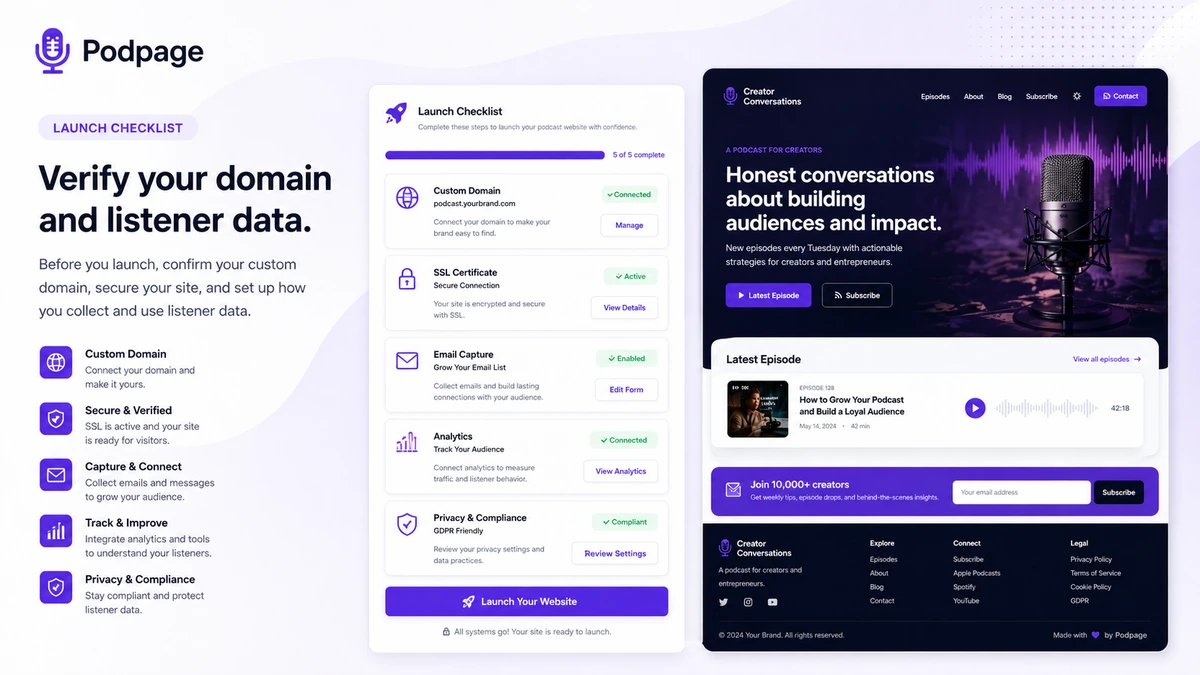
Quick verdict
Podpage is worth considering if your podcast already exists and your website problem is simple: you need a clean, professional, automatically updated home for the show without managing WordPress, plugins, hosting, themes, and episode pages by hand.
That is the real buying tension.
Podpage is not trying to be a full website-building universe. It is a podcast-first website builder. You paste in an RSS feed, choose a design direction, connect a domain, and let the site stay in sync as new episodes go live. For many podcasters, that is exactly the point. The website should help listeners find episodes, sponsors take the show seriously, search engines understand the content, and the creator avoid another technical maintenance project.
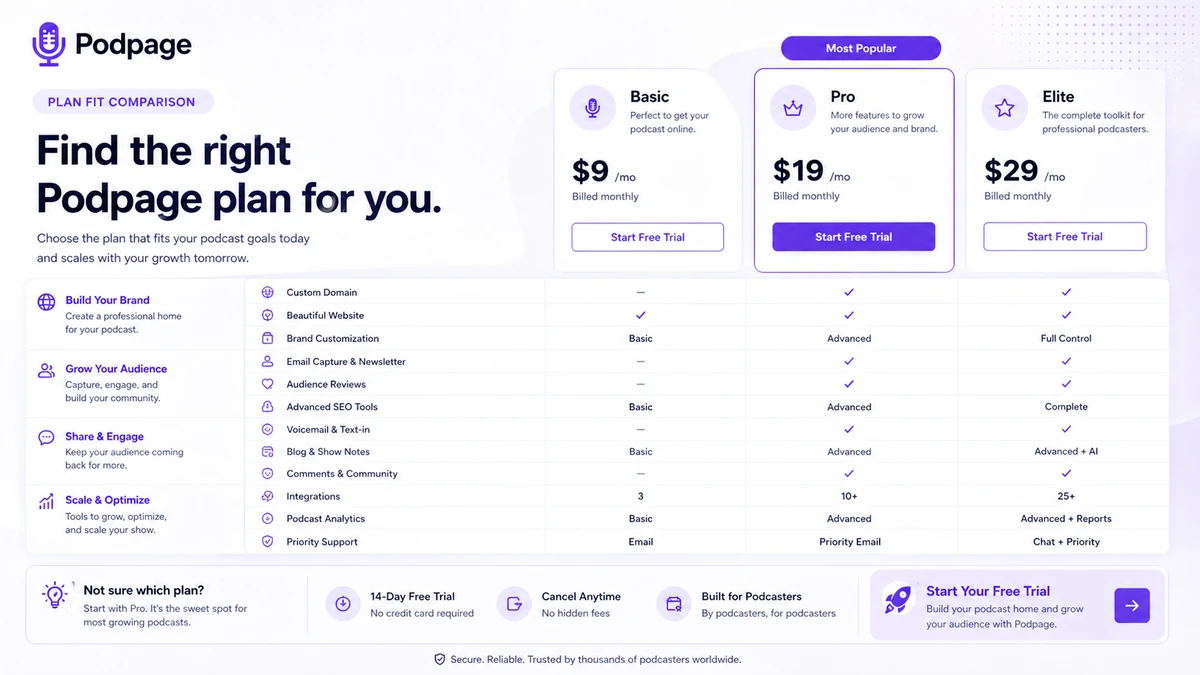
I would not judge Podpage only by whether the starting price looks affordable. The better question is whether its podcast-specific workflow is enough for your show. If you only need a listener hub, Basic may be close. If you want email capture, reviews, voicemail, blog posts, shortlinks, landing pages, and integrations, Pro becomes the more realistic comparison. If SEO analysis, transcription, Zapier, private feeds, and deeper growth tools matter, Elite is the plan to inspect.
The common buyer mistake is treating Podpage like a cheaper WordPress replacement. It can replace a lot of WordPress work for a podcast site, but it does not replace the flexibility of a fully custom website stack. The safest path is to build a real trial site from your live RSS feed before choosing monthly, annual, or a higher tier.
Next step: If Podpage sounds like the right kind of podcast website shortcut, test the real RSS-feed workflow before comparing paid plans.
Review snapshot
| Review point | Practical take |
|---|---|
| Best for | Podcasters who want a managed podcast website built from an RSS feed |
| Not ideal for | Buyers needing deep WordPress control, ecommerce, memberships, or unusual layouts |
| Main use case | Turn a podcast feed into a custom-domain website with episode pages and listener tools |
| Trial path | 14-day free trial with no credit card required |
| Current public pricing note | Basic starts at $12/month billed annually or $19/month monthly at the time of review |
| Main strength | Podcast-specific automation with lower maintenance than a DIY site stack |
| Main concern | Plan gates, annual billing, design flexibility, and listener-data responsibilities |
| Direct alternatives | Podcastpage-style builders and other podcast website tools are closest, but approved comparison routes include Castos, Podcastle, Simvoly, and GeneratePress |
| Best next step | Connect a real RSS feed in the trial, then decide whether Basic, Pro, or Elite fits |
What is Podpage?
Podpage is a podcast website builder for creators who already have a podcast feed and want a dedicated website without building every page manually.
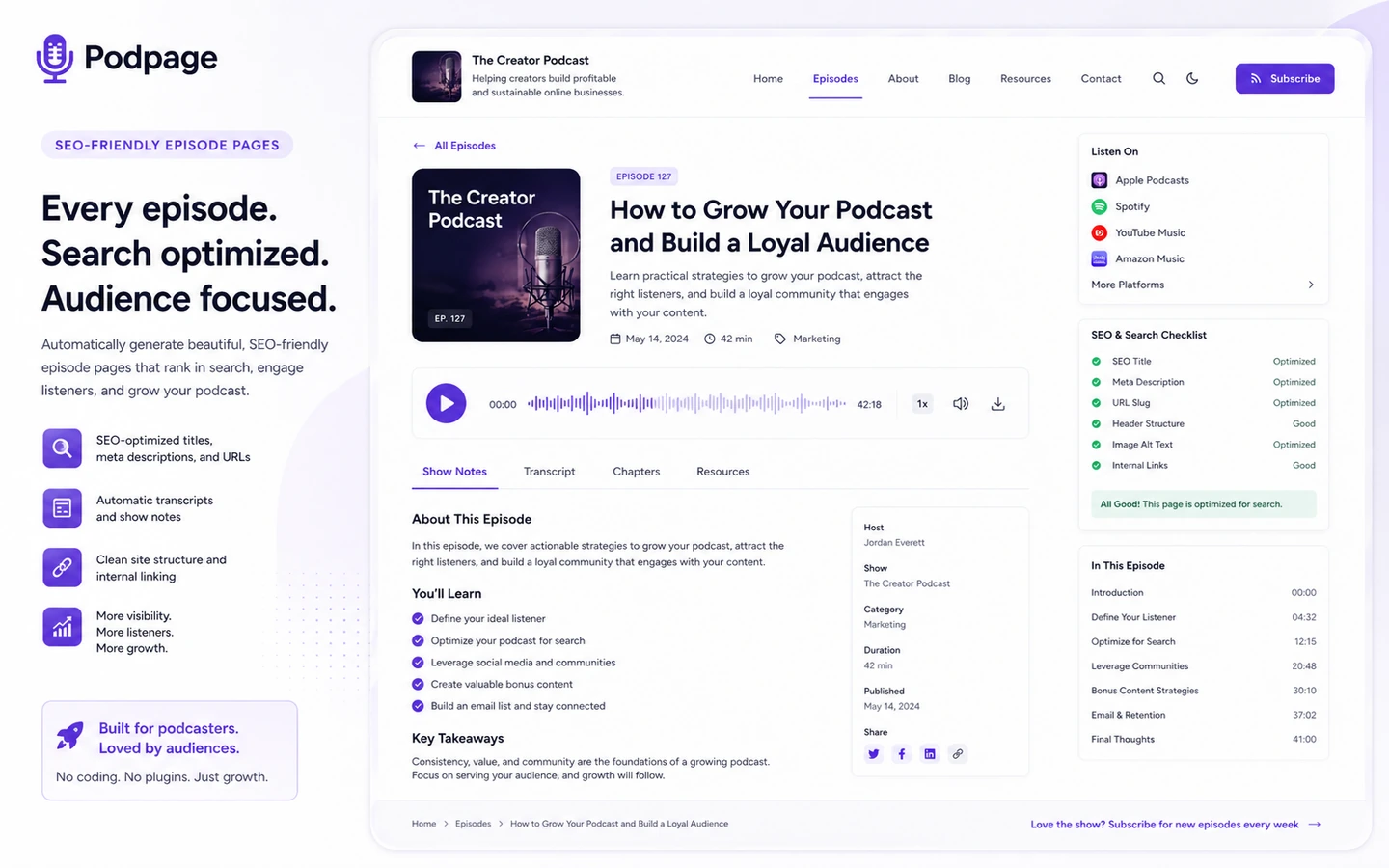
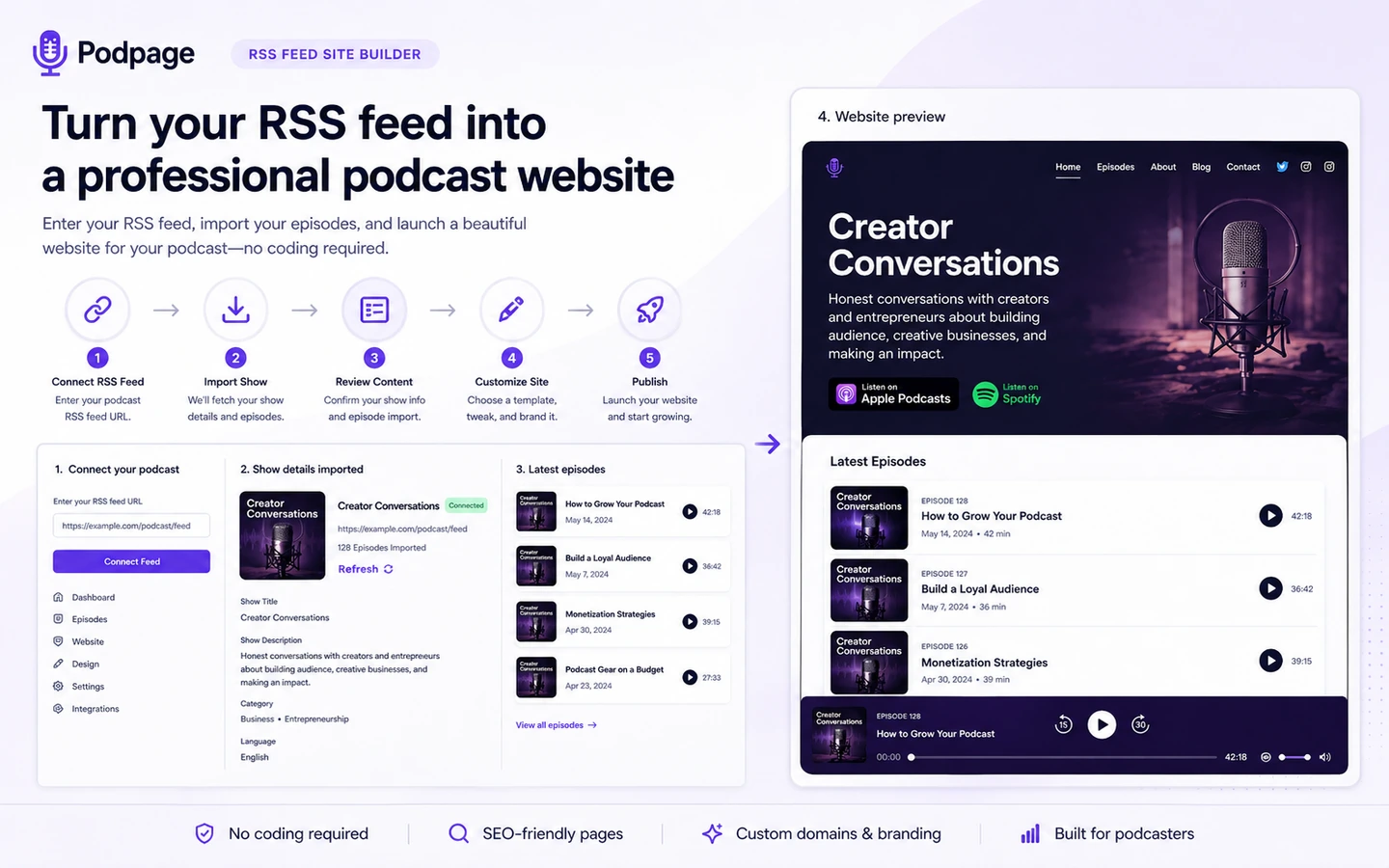
The product’s central job is straightforward: it takes an existing podcast RSS feed and turns it into a hosted podcast website with episode pages, templates, mobile-friendly design, custom-domain support, SEO-oriented structure, and podcast-specific listener tools. The appeal is not that Podpage gives you unlimited design freedom. The appeal is that it removes a lot of repetitive podcast website work.
That distinction matters.
A general site builder starts with a blank page or a template. WordPress starts with hosting, a theme, plugins, maintenance, and setup choices. Podpage starts with the show. That makes it a better fit for podcasters who want their website to follow the episode feed instead of forcing every episode into a manual web publishing process.
The wrong expectation is to treat Podpage as a full business website platform. It can support custom pages, blogs, email capture, reviews, voicemail, landing pages, and integrations on the right plans. But the product is still centered on podcast websites. If your real need is a custom media brand site with memberships, ecommerce, complex content types, gated courses, or heavy design control, Podpage may feel too narrow.
Our review approach compares public product pages, pricing details, help documentation, deal terms, buyer workflow fit, and nearby alternatives. I would not treat a discount, annual saving, or clean homepage demo as proof that Podpage fits the buyer. The fit has to come from a real feed, real episode pages, and the actual features the show will use.
Who should use Podpage?
Podpage makes the most sense for podcasters who want the website to stop being a technical project.
Solo podcasters with an active RSS feed
If you already publish episodes and your current web presence is just a thin host page, Podpage can be a sensible upgrade. The condition is that your podcast feed must be clean enough to power the site. Before paying, I would connect the real feed during the trial and inspect how episode titles, show notes, images, links, and media players appear.
Shows that need a credible custom-domain site
A show looks more serious when it has a real domain, clear episode archive, about page, contact route, and search-friendly structure. Podpage is useful when the goal is to get that credibility without hiring a developer. The buyer should still test the domain setup path and check whether the design controls feel strong enough for the show’s brand.
Creators who want podcast SEO without a custom stack
Podpage is relevant if your podcast episodes need searchable pages, metadata, schema, sitemaps, and easier discovery. I would not overstate this as a magic ranking system. The real value is that episodes become structured web pages instead of only audio entries inside podcast apps.
Podcasters who want listener engagement tools
If your show needs email capture, reviews, voicemail, blog posts, shortlinks, landing pages, and integrations, Podpage’s higher plans become more interesting. The buyer condition is simple: those tools only matter if you will actually use them. A mailing list feature is not valuable without a follow-up plan.
Buyers comparing Podpage against WordPress maintenance
Podpage can be a good choice for creators who would rather pay for a managed podcast-specific site than maintain WordPress. If you dislike plugin updates, theme decisions, episode-page formatting, and hosting admin work, Podpage’s narrower workflow may be a relief.
Who should avoid Podpage?
Podpage is not the right answer for every podcast website.
Avoid it if you need deep design control. If you want unusual page layouts, custom content models, complex landing pages, or a heavily branded editorial site, a flexible website builder or WordPress setup may fit better.
Be careful if ecommerce, memberships, gated content, courses, or community features are central to the business. Podpage can support a podcast web presence, but it is not primarily a full commerce platform or membership engine.
I would also slow down if your show has no real podcast feed yet. Podpage is strongest when it can build from the feed. If you are still planning the show, recording episodes, or choosing a host, the site builder may not be the first bottleneck.
Larger podcast networks should inspect network-site pricing and feature needs carefully. A single-show website is different from managing multiple shows, cross-promotion, permissions, analytics, and shared brand architecture.
Finally, avoid buying Podpage only because the annual price looks better. Annual billing can be sensible after the workflow is proven, but I would not use annual savings as the reason to skip a real trial.
How Podpage fits into a real workflow
A sensible Podpage workflow starts before the design choice.
First, the buyer checks the podcast feed. Episode titles, show notes, descriptions, images, links, and categories need to be clean enough to become website content. Podpage can automate a lot, but it cannot turn messy source material into a perfect editorial site without the buyer reviewing it.
Second, the creator builds the trial site from the real RSS feed. This is the moment where Podpage either makes sense or does not. The buyer should inspect episode pages, navigation, media player behavior, mobile layout, search experience, template fit, and how much editing is needed.
Third, the buyer tests the custom domain path. For a serious podcast, the domain is not a minor detail. It affects credibility, sponsor perception, listener memory, and long-term ownership.
Fourth, the buyer checks whether audience tools are needed. Email capture, reviews, voicemail, blog posts, landing pages, shortlinks, integrations, SEO tools, and transcription can be valuable, but they also change the plan decision.
The decision point is not “can Podpage make a site?” It can. The better question is: does the generated site reduce enough work while still giving the show enough control?
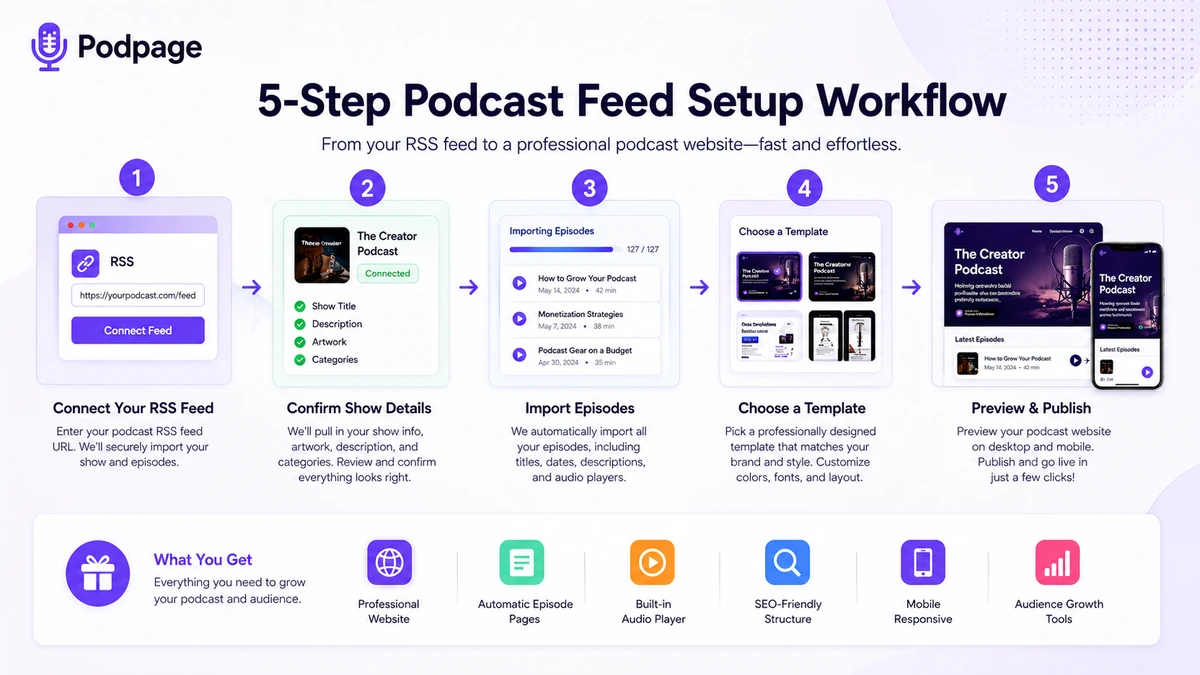
Trial check: Podpage is easiest to judge with a real feed, real episode archive, and real domain plan rather than a feature list alone.
Real-world buyer scenarios
The solo host with a weak podcast-host landing page
This buyer already publishes episodes, but the default podcast-host page feels thin. Podpage can make sense because it creates a more credible owned destination with episode pages, an about page, custom domain support, and better listener navigation. The risk is overbuying Pro or Elite before knowing whether the show needs audience-growth tools.
The show trying to attract sponsors
A sponsor-facing site needs to look serious. Podpage can help if the show needs a clean archive, clear branding, reviews, contact options, and easy sharing. The buyer should verify whether Basic provides enough credibility or whether Pro features like landing pages, reviews, email capture, and shortlinks support the pitch process.
The podcaster escaping WordPress maintenance
This is one of the stronger Podpage use cases. If the creator is tired of plugin updates, site-speed worries, theme decisions, hosting renewals, and manual episode formatting, Podpage may be the more practical path. The tradeoff is control. A managed podcast builder can reduce friction, but it also gives less freedom than a custom WordPress stack.
The creator building a broader media business
Podpage may still help as the show website, but it may not be the whole system. If the buyer needs funnels, ecommerce, courses, memberships, or complex content hubs, a broader builder such as Simvoly or a WordPress setup with GeneratePress may be a more flexible direction.
Key features that actually matter
RSS-fed website generation
This is the core feature. Podpage pulls from the podcast feed and creates a website around the show. The buyer benefit is less manual upkeep: new episodes can become website pages instead of separate publishing chores.
Buyer note: test this with your real feed. A clean feed makes Podpage look better. A messy feed may require more editing than expected.
Podcast-specific episode pages
Episode pages matter because they give each episode a searchable, shareable home. Podpage’s pricing page and product language emphasize episode imports, pretty links, metadata, schema, sitemap generation, search, videos, transcripts on higher plans, and related episode tools.
Buyer note: the site should help listeners and search engines. Do not judge it only by the homepage design.
Custom domain and design controls
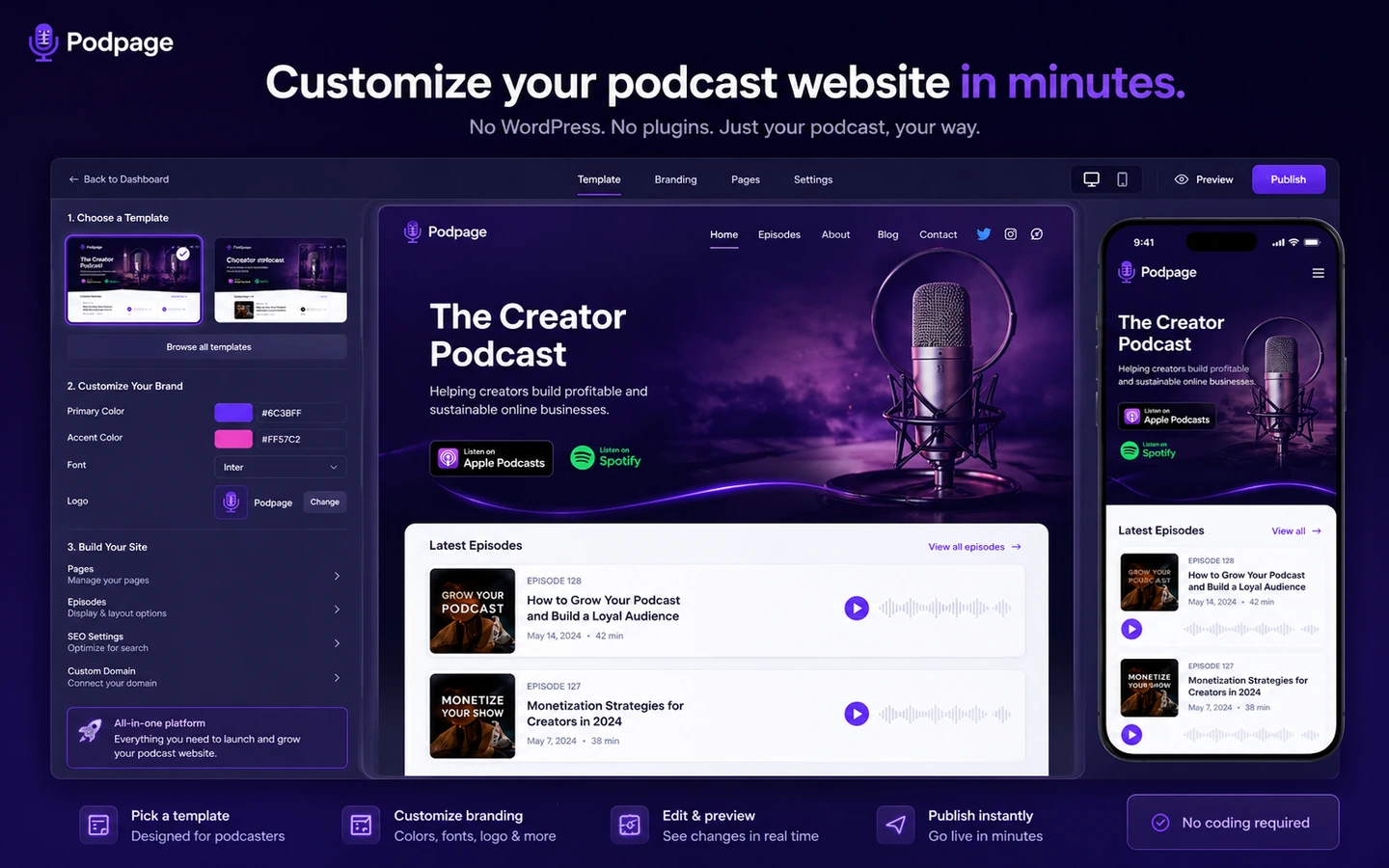
A custom domain is important for credibility. Podpage also gives templates and design customization, which can be enough for many shows.
Buyer note: if your brand needs very specific design control, test this carefully. Template convenience and brand flexibility are not the same thing.
Listener growth tools
Pro-level and Elite-level features can move Podpage from “show website” toward “lightweight podcast marketing hub.” Email capture, reviews, voicemail, landing pages, shortlinks, integrations, transcription, and SEO tools can all matter depending on the show.
Buyer note: these features are valuable only if they match a real marketing routine. Do not pay for audience tools you will not maintain.
SEO and content expansion
Podpage’s Elite positioning includes more serious SEO and content support, including advanced SEO analysis and transcription-related features. That can be useful for shows that want episodes to become part of a search strategy.
Buyer note: SEO still depends on content quality, topic demand, internal linking, and ongoing publishing discipline. A podcast website builder can help structure the site, but it cannot replace the editorial work.
Pricing and plan value
At the time of review, Podpage’s public pricing page presents Basic at $12/month when billed annually and $19/month on monthly billing. Pro is shown at $19/month annually or $29/month monthly. Elite is shown at $39/month annually or $59/month monthly. The page also emphasizes a 14-day free trial with no credit card required and a 30-day money-back guarantee.
That makes the pricing easy to understand on the surface, but the plan choice still needs thought.
Basic is the plan I would look at when the main job is a clean podcast website with a custom domain, automatic episode imports, and low maintenance. It is the right starting comparison for creators who want the website problem solved without turning the site into a marketing platform.
Pro becomes more relevant when the show needs listener engagement. Email capture, voicemail, reviews, blog content, custom landing pages, shortlinks, and integrations can justify the higher plan if those features support a real growth workflow.
Elite should be judged more cautiously. It adds serious-show features such as automatic transcription, advanced SEO analysis, Zapier, guest alert emails, episode deep linking, private feed support, shortlink performance, and downloadable files. That can be useful, but only for buyers who know those features will be used.
The annual plans lower the effective monthly price, but annual billing also makes the decision heavier. Podpage support language says annual subscriptions are not typically prorated if cancelled early. That does not make annual billing bad; it just means I would not choose it until the trial proves the site will stay live.
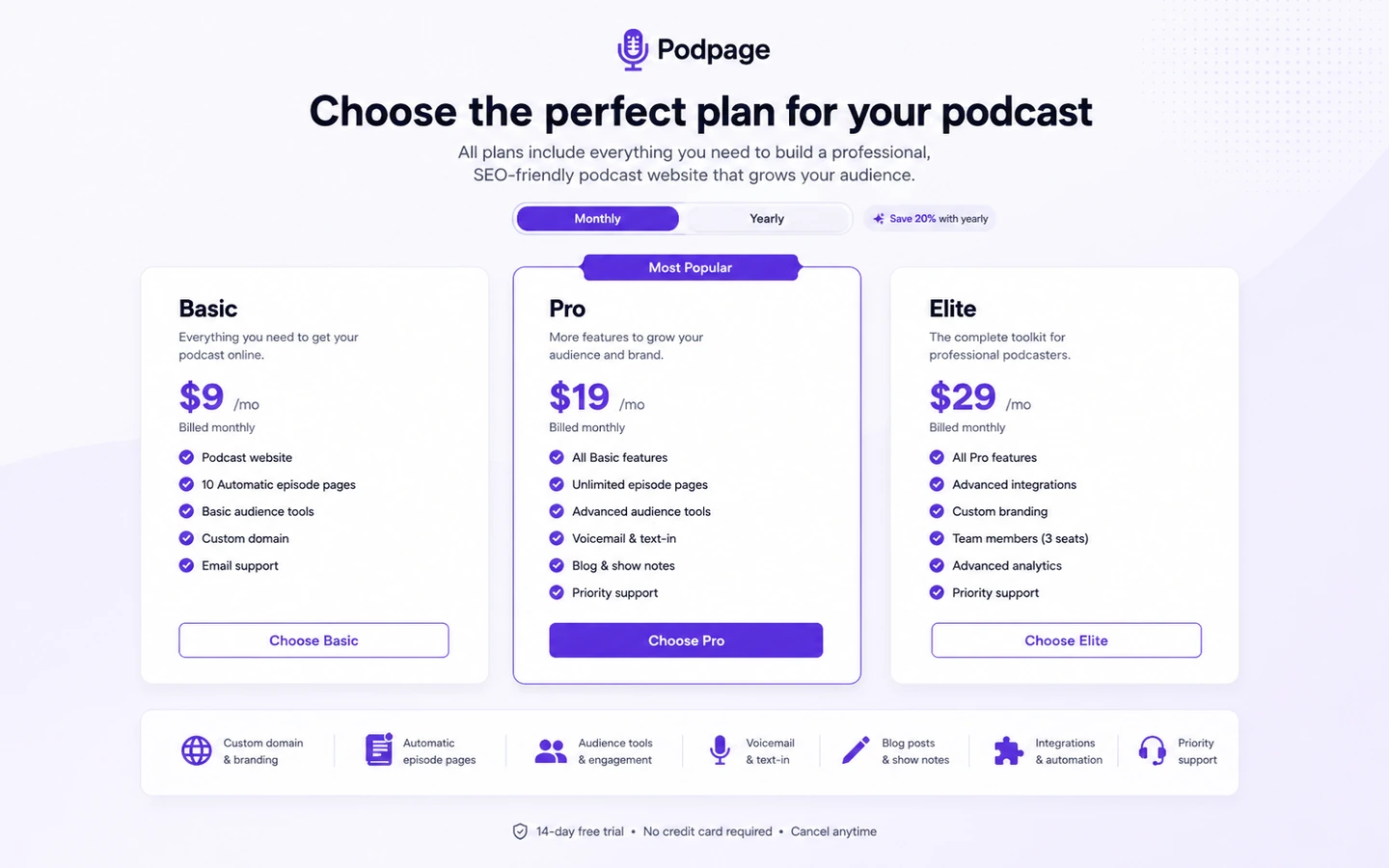
Pricing check: Compare Podpage plans only after testing the feed import, template fit, episode pages, and audience tools you would actually use.
Free plan, trial, coupon, and checkout notes
The current buyer path is trial-first, not free-plan-first. Podpage publicly presents a 14-day free trial with no credit card required. That is the best place to judge the product because the buyer can connect a real podcast feed and see whether the generated site is good enough to publish.
A reliable public coupon path should not be the main reason to buy. The smarter order is:
- Start the trial.
- Connect the real podcast RSS feed.
- Check episode pages and template fit.
- Test the custom domain path.
- Decide whether Basic, Pro, or Elite fits.
- Check the Podpage coupon page or current offer route only after the workflow fit is clear.
I would also check the renewal and refund language before paying annually. Podpage’s terms describe a refund request window, but support guidance around annual plans suggests buyers should not assume a prorated refund after committing for the year.
A discount can improve a good purchase. It should not turn a poor fit into a good one.
What I would check before buying Podpage
If I were buying Podpage for a real show, I would check these items before moving past the trial.
- RSS feed quality: Does the live feed create episode pages that look publishable without too much cleanup?
- Template fit: Does the design feel credible for the show’s audience, sponsors, and brand?
- Custom domain setup: Can you connect the domain without creating a technical mess?
- Basic versus Pro: Do you actually need email capture, voicemail, reviews, blog posts, landing pages, shortlinks, and integrations?
- Elite justification: Are transcription, advanced SEO analysis, Zapier, guest alerts, private feeds, and downloadable files part of the real workflow?
- Annual billing risk: Are you confident the site will stay live for the full year?
- Listener data responsibility: If you collect emails, form submissions, surveys, or voicemails, do you understand your privacy and consent obligations?
A simple test before paying
Before paying, I would run a small test like this:
- Use the real podcast RSS feed, not a sample show.
- Build the trial site and inspect at least five older episodes.
- Check the homepage, episode page, about page, navigation, search, and mobile layout.
- Try the custom domain setup or at least review the steps carefully.
- List the features you used during the trial and map them to Basic, Pro, or Elite.
- Decide whether the site would still be useful without the higher-plan growth tools.
- Choose monthly first if you are not sure the show will keep the site for a full year.
This kind of test is more useful than reading another feature comparison. Podpage is a workflow product. If the workflow feels right with your real feed, the pricing conversation becomes much easier.
Pros explained
The first major advantage is speed. Podpage can get a podcast website live without the normal WordPress stack of hosting, plugins, theme configuration, episode templates, and maintenance. That matters for creators who would rather spend their energy on the show.
The second advantage is podcast focus. A general website builder can create a podcast page, but Podpage starts from the podcast. Episode imports, show pages, media players, podcast reviews, quick links, SEO metadata, and related tools are closer to the problem podcasters actually have.
The third advantage is a low-risk trial. Because the trial does not require a credit card, buyers can test the feed and site structure before paying. For this product category, that is important. You cannot judge Podpage properly until you see your own show inside it.
The fourth advantage is the plan ladder. Basic, Pro, and Elite are understandable tiers. The buyer can start from a website-only need, then move toward audience growth and deeper SEO if the show justifies it.
The fifth advantage is lower maintenance. This is not glamorous, but it may be the biggest value. A podcast website that updates itself is more useful than a beautiful site the creator stops maintaining after three episodes.
Cons explained
The first limitation is flexibility. Podpage is not a blank-canvas website platform. That is part of why it is simple, but it also means buyers with complex design or business requirements may outgrow it.
The second drawback is feature gating. Basic may look affordable, but Pro or Elite may be the real fit if audience growth, email capture, reviews, transcription, SEO analysis, or integrations matter. The cheapest plan is not automatically the best deal.
The third caution is annual billing. Annual pricing lowers the monthly equivalent, but it should come after proof. If the show changes direction, pauses, or moves to a different stack, annual billing can feel heavier than expected.
The fourth issue is that Podpage does not remove all responsibility from the buyer. Custom domains, listener data, email capture, privacy language, third-party integrations, and show content still require careful setup.
The fifth limitation is category fit. If the buyer needs hosting, recording, editing, private podcast infrastructure, a full WordPress system, or a broader funnel builder, Podpage may only solve one part of the workflow.
Green flags and red flags
Green flags are easy to spot with Podpage.
A strong green flag is that your RSS feed imports cleanly and the episode pages look good with minimal editing. Another is that the Basic plan covers the main job: a clean podcast site, custom domain, automatic updates, and episode discoverability. A third green flag is that the show already has a clear reason to collect emails, use reviews, build landing pages, or publish companion content.
The red flags are different.
If you are spending most of the trial fighting the template, Podpage may not be flexible enough. If you cannot explain why you need Pro or Elite, you may be paying for features that sound useful but will not become part of your routine. If your real need is podcast production, hosting, membership content, or custom site architecture, Podpage may be adjacent rather than central.
The biggest red flag is buying annually before the trial site feels publishable. Annual savings are useful only when the site has already proven it can support the show.
Podpage vs alternatives
Podpage’s alternatives need to be separated carefully. Not every related tool is a one-to-one replacement.
Castos vs Podpage
Castos is a better comparison when podcast hosting, private feeds, and podcast infrastructure matter more than the standalone website. Podpage is stronger when the buyer already has hosting and mainly wants a better podcast website.
The tradeoff is control over the podcast stack versus simplicity of the website layer. If hosting is the bottleneck, compare Castos. If the website is the bottleneck, Podpage is more direct.
Podcastle vs Podpage
Podcastle is not a direct podcast website builder replacement. It is more relevant when the buyer’s problem is recording, editing, or producing podcast content.
Podpage may still make sense after the episode exists. Podcastle helps create the content; Podpage helps publish a listener-facing web destination around it.
Simvoly vs Podpage
Simvoly is the broader route if the buyer wants a website and funnel builder with more general business-site flexibility. It can be better for creators who need funnels, landing pages, ecommerce-style flows, and a business website beyond the podcast.
Podpage is better when the podcast feed is the center of the site and automation matters more than flexible funnel building.
GeneratePress vs Podpage
GeneratePress is a WordPress theme route, not a managed podcast website service. It fits buyers who want control over hosting, plugins, layout, performance, and custom architecture.
Podpage is the simpler managed path. GeneratePress is the more flexible DIY path. The right choice depends on whether you value control or reduced maintenance more.
Trust, refund, and buyer-risk notes
Podpage is fairly clear about its product category, pricing, trial path, and plan tiers. That is a positive signal. I would still treat several areas as buyer checks before paying.
Pricing should be verified at live checkout because public pages can change. The current pricing page shows annual and monthly pricing, but the final billing choice matters.
Refund and cancellation terms should be read before annual billing. The terms describe a refund request window, while help content says annual plans are not typically prorated after cancellation. That means annual billing is best after the trial proves the site will stay in use.
Listener data deserves attention. Podpage’s terms say the podcast owner is responsible for listener data collected through forms, surveys, emails, or similar site features. That is normal for website tools, but podcasters should not ignore it. Email capture and listener engagement features are useful only when the buyer understands consent, privacy, and follow-up.
Integrations also need a realistic view. Connecting tools can improve the workflow, but third-party services have their own terms and limits. Do not assume every integration will behave exactly the way your broader marketing stack needs.
The safest buyer mindset is this: use Podpage to remove podcast website maintenance, not to avoid thinking about the site. A good podcast website still needs clear copy, good episode descriptions, useful navigation, privacy-aware forms, and a plan for listener engagement.
Final verdict
Podpage is a strong fit if your podcast already has a feed and your main website problem is maintenance. It gives podcasters a practical way to create a real site, keep episode pages updated, connect a domain, and add podcast-specific listener tools without building a custom web stack.
I would consider Podpage if you want a clean podcast-first site, care about automatic episode updates, and do not want to manage WordPress. I would start with Basic if the website itself is the job, then compare Pro or Elite only if audience growth, reviews, voicemail, landing pages, integrations, transcription, or SEO tools are part of the real plan.
I would skip Podpage if the website needs to become a complex media business platform, ecommerce site, membership hub, or highly custom brand property. In that case, a broader website builder or WordPress route may fit better.
I would compare it with Castos if hosting infrastructure matters, Podcastle if production is the bottleneck, Simvoly if funnels and broader website tools matter, and GeneratePress if you want WordPress control.
The safest next step is simple: build the trial site from your real feed. If the result looks like a site you would publish, Podpage becomes a serious option. If you spend the trial wishing for more control, that is useful information too.
