Quick verdict
Podcastle is still worth considering, but I would not judge it by the old “podcast recorder” label anymore.
The current product route points buyers toward Async: a broader AI audio, video, voice, recording, editing, dubbing, subtitle, clip-making, and repurposing workspace. That can be useful. It can also be more than a creator actually needs.
For my money, Podcastle makes the most sense if you regularly move from raw recording to publishable audio or video and you want fewer tools in the middle. A solo podcaster may use it to record, clean audio, transcribe, edit, and export. A video podcaster may care more about captions, clips, dubbing, and short-form repurposing. A small team may care about collaboration, brand consistency, storage, and workflow control.
The caution is not that Podcastle lacks features. The caution is that the buying decision now depends on plan limits and AI credit behavior. Recording hours, storage, transcription, export quality, watermark removal, credit resets, credit expiry, trial timing, and refund rules matter more than the headline price.
The safer path is simple: use the free plan first, run one real recording-to-export workflow, then compare paid plans only if the workflow actually saves time. A discount or annual price should improve a good fit, not create one.
Next step: If Podcastle still fits your creator workflow, verify the current Async pricing and plan limits before upgrading.
Review snapshot
| Review point | Practical take |
|---|---|
| Best for | Podcasters, video creators, solo creators, and small teams that want one workflow for recording, cleanup, editing, subtitles, clips, and publishing |
| Not ideal for | Buyers who only need simple audio cleanup, pure remote recording, deep desktop editing, or one occasional free export |
| Current brand reality | Podcastle currently routes to Async, so live Async pages matter more than older Podcastle references |
| Main use case | Turning raw audio or video into publishable episodes, clips, transcripts, captions, and repurposed assets |
| Free path | Useful for testing, but limited enough that real production may require a paid plan |
| Pricing style | Subscription plans plus AI credits, recording hours, storage, export quality, and team limits |
| Main strength | Broad all-in-one creator workflow |
| Main concern | Credit usage, trial/refund rules, and annual billing risk |
| Direct alternatives | Riverside, Descript, Adobe Podcast, Cleanvoice |
| Best next step | Test one real recording, edit, export, and repurposing workflow before paying |
What is Podcastle?
Podcastle is best understood as an AI audio and video production workspace that now lives under the Async brand.
The older mental model is “podcast recording and editing.” That is still part of the story, but it is no longer the whole story. The current public positioning is closer to an all-in-one AI media platform: record audio and video, edit content, clean sound, generate subtitles, create clips, dub or translate content, use AI voices, and repurpose longer recordings into shorter assets.
That broader scope is the reason this review needs a little caution.
A buyer who only wants clean audio after recording may not need the full platform. A buyer who wants high-quality remote recording may compare Riverside first. A buyer who likes text-based editing may prefer Descript. But a creator who wants recording, cleanup, transcription, editing, subtitles, clips, hosting, and AI creation in one workflow may find Podcastle more appealing than stitching together several smaller tools.
Our review approach compares the current public product pages, pricing details, help documentation, terms, buyer workflow fit, and nearby alternatives. I do not treat a free trial, coupon path, or yearly discount as proof that the product fits. The real question is whether Podcastle saves enough repeated production time to deserve a place in the creator stack.
The easy mistake is judging it by feature count.
The better way to judge Podcastle is by the path from raw recording to finished asset. If the platform shortens that path, it can make sense. If it adds a lot of menus, credit math, and renewal risk to a workflow you rarely repeat, the free plan may be enough.
Who should use Podcastle?
Podcastle is a better fit for creators who already know they need a repeatable production workflow.
Solo podcasters should consider it if they want a browser-based place to record, clean, transcribe, edit, and export without building a heavier editing stack. The condition is that the final export quality, recording limits, transcription allowance, and audio cleanup features match the publishing cadence.
Video podcasters and interview creators may get more value from Podcastle if they turn long recordings into captioned clips. In that situation, the platform is not only a recorder. It becomes a repurposing layer for Shorts, Reels, TikToks, LinkedIn clips, and social previews.
Creator businesses and content marketers should consider it when one recording needs multiple outputs: transcript, blog draft, subtitles, clips, translated version, voiceover, or branded asset. The tool becomes stronger when the same source content is reused in several channels.
Small production teams may find the Teams or Business paths useful when collaboration, brand consistency, storage, rollout support, security, and permissions matter. The buyer check here is plan-level detail. Do not assume team workflow is covered just because the product has a team plan.
Beginner creators can also use Podcastle, but I would keep them on the free path first. A beginner-friendly interface is useful only if the buyer can produce and publish without getting trapped by plan limits or credit usage.
Who should avoid Podcastle?
I would be careful with Podcastle if your need is narrow.
If you only want remote recording quality, compare Riverside before paying. Riverside may be the more natural choice when recording reliability, guest capture, and studio-style remote sessions matter more than AI editing or repurposing.
If you mainly want text-based editing, compare Descript. Podcastle has editing tools, but Descript may be the stronger fit if your workflow is built around transcript editing, screen/video editing, and creator post-production.
If you only need simple audio enhancement, Podcastle may be too broad. Adobe Podcast can be the simpler route when the job is closer to cleanup than full production.
If you only need filler-word removal and spoken-audio polish, compare Cleanvoice. A specialized cleanup tool may make more sense than paying for a larger AI media workspace.
I would also avoid jumping into annual billing if you have not run a real project through the workflow. Async’s current product promise is wide, and wide platforms can feel exciting on the homepage. The risk is paying for breadth before proving that the actual editing flow works for your own content.
How Podcastle fits into a real workflow
A useful Podcastle workflow starts before the recording button.
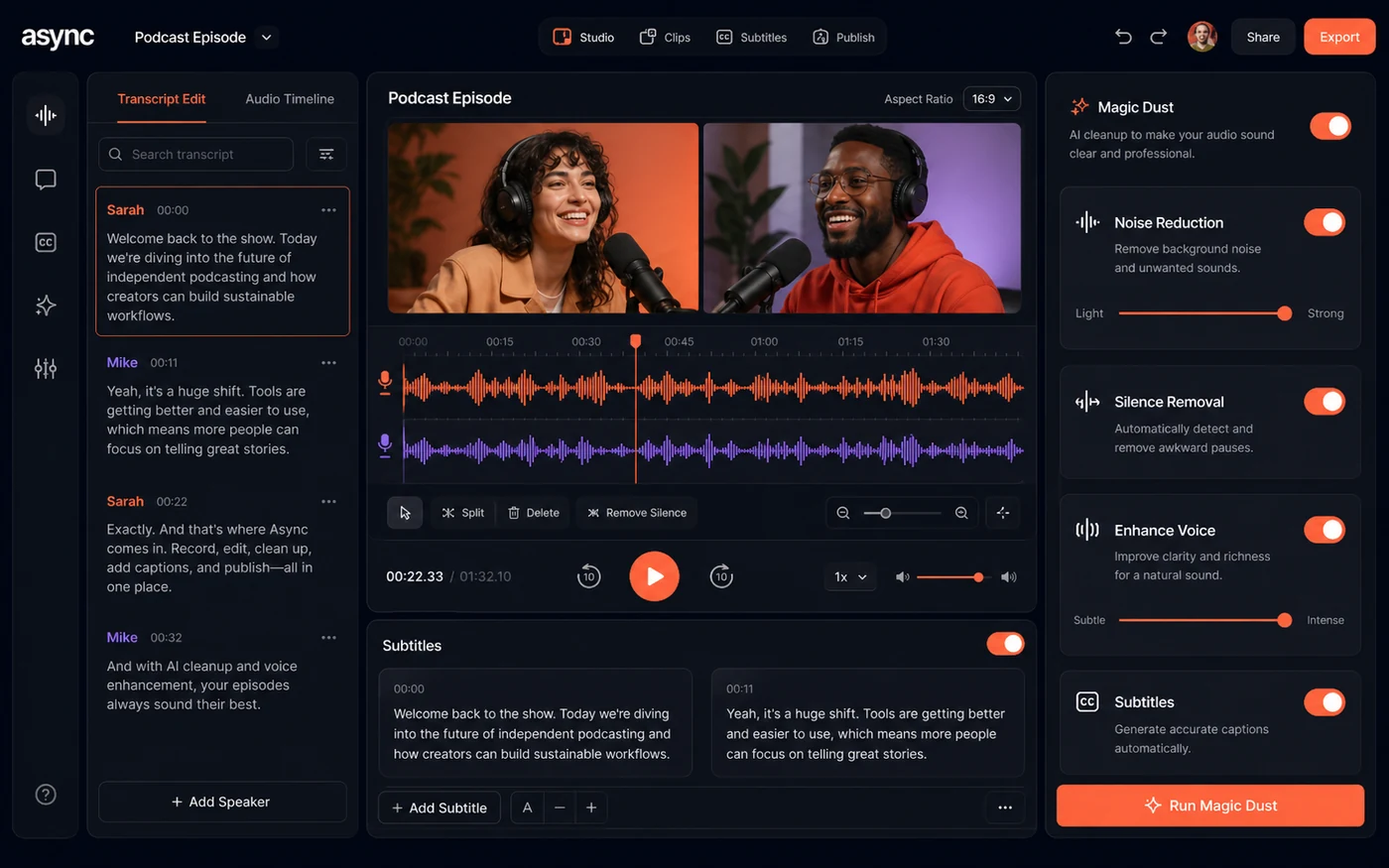
First, you decide the output: audio episode, video podcast, short clips, transcript, subtitled video, translated clip, or social-ready asset. Then you record or upload content. After that, the value depends on what happens post-recording: audio cleanup, silence removal, text-based edits, transcript review, captions, clip selection, dubbing, export, hosting, or sharing.
A careful creator workflow might look like this:
- Plan the episode or video.
- Record a short test with the same microphone, camera, browser, and guest setup you plan to use.
- Clean the audio and remove obvious dead space.
- Generate a transcript and check accuracy.
- Make a simple edit from the text or timeline.
- Add captions or subtitles if video is part of the output.
- Export one publishable file.
- Create one short clip from the same source.
- Check how many credits, minutes, and storage resources were used.
That last step matters. The interface can feel easy, but the plan decision lives in usage. If a single episode consumes more credits or storage than expected, the cheap-looking plan may not be the best plan.
Workflow test: Try Podcastle with one real episode or video before comparing annual pricing or AI credit packs.
Real-world buyer scenarios
A solo podcaster publishing weekly has a clear reason to test Podcastle. The product can reduce tool switching if recording, cleanup, transcription, editing, and publishing all happen in one place. It may fail if the creator already has a polished editing workflow and only needs one small AI feature.
A YouTube interview creator has a different decision. Podcastle becomes more interesting if the same recording turns into a full video, transcript, subtitles, clips, and social posts. The risk is that AI credits and export limits become part of the real monthly cost.
A content marketing team may use Podcastle when webinars, interviews, and founder recordings need to become multiple assets. That buyer should not judge only the creator price. Team collaboration, brand control, recording hours, storage, support, and security language matter more.
A beginner who wants to “start a podcast someday” should slow down. The free plan is the right first step. Paid value appears only when the person actually records, edits, exports, and publishes enough content to make the workflow repeatable.
Key features that actually matter
Recording and remote capture
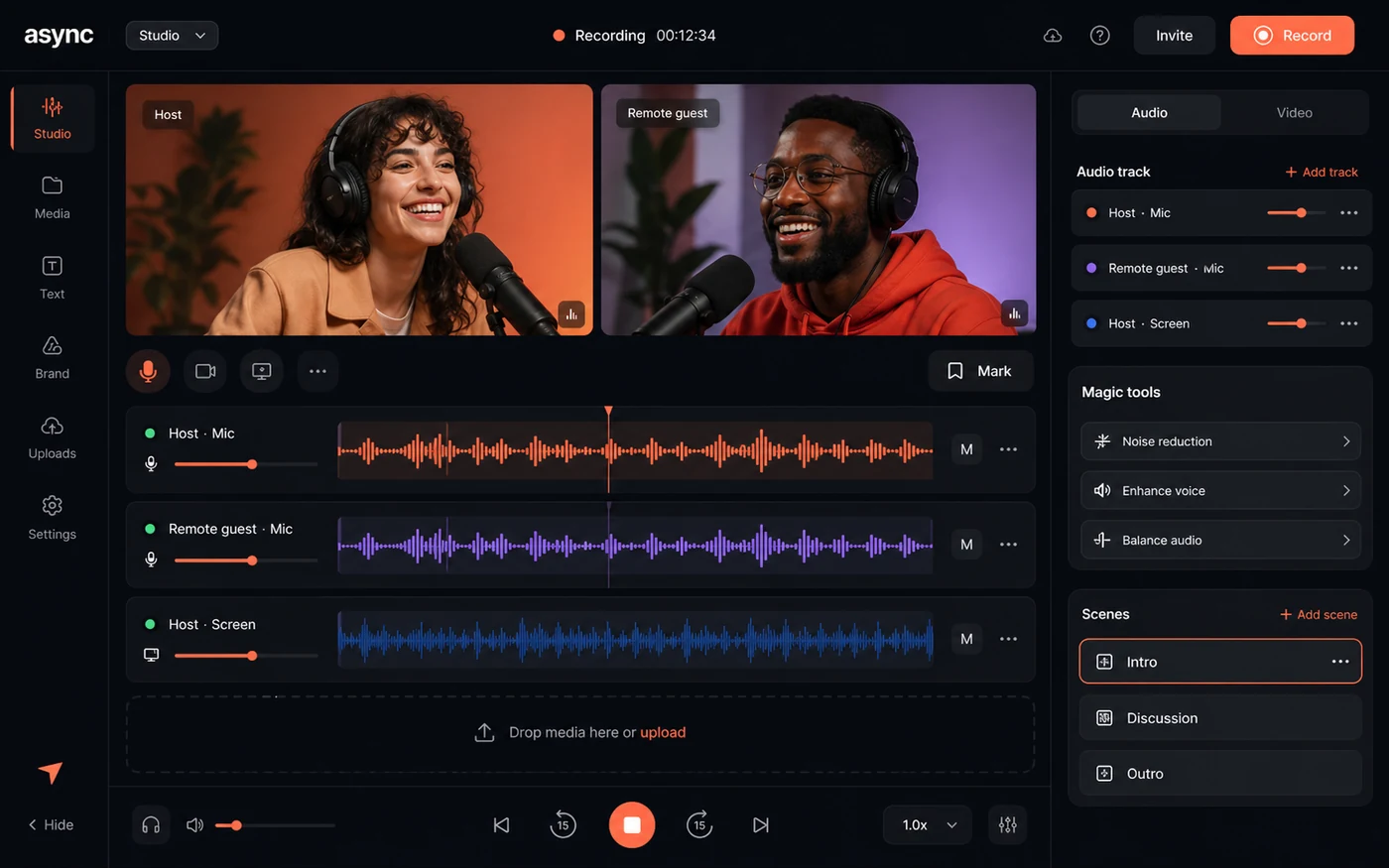
Podcastle’s recording workflow is one of the core reasons to consider it. Browser-based recording is attractive because it reduces setup friction for creators and guests.
Buyer note: Check recording limits, guest workflow, browser requirements, upload behavior, and export quality before trusting it for an important interview. Recording tools are only valuable if they are reliable when a guest is involved.
AI audio cleanup
Magic Dust, noise reduction, silence removal, and leveling-style features are useful because many creators record in imperfect rooms. This is where Podcastle can save time for non-engineers.
Buyer note: Do not expect AI cleanup to turn every bad recording into studio audio. Test with your real microphone and room noise before paying.
Text, transcript, and editing workflow
Transcription and text-based editing help creators move faster after recording. This matters when the bottleneck is not recording but turning raw content into something publishable.
Buyer note: Check transcript accuracy on your own accent, topic, background noise, and guest setup. A transcript workflow is only fast if corrections do not eat the time you expected to save.
Subtitles, clips, dubbing, and repurposing
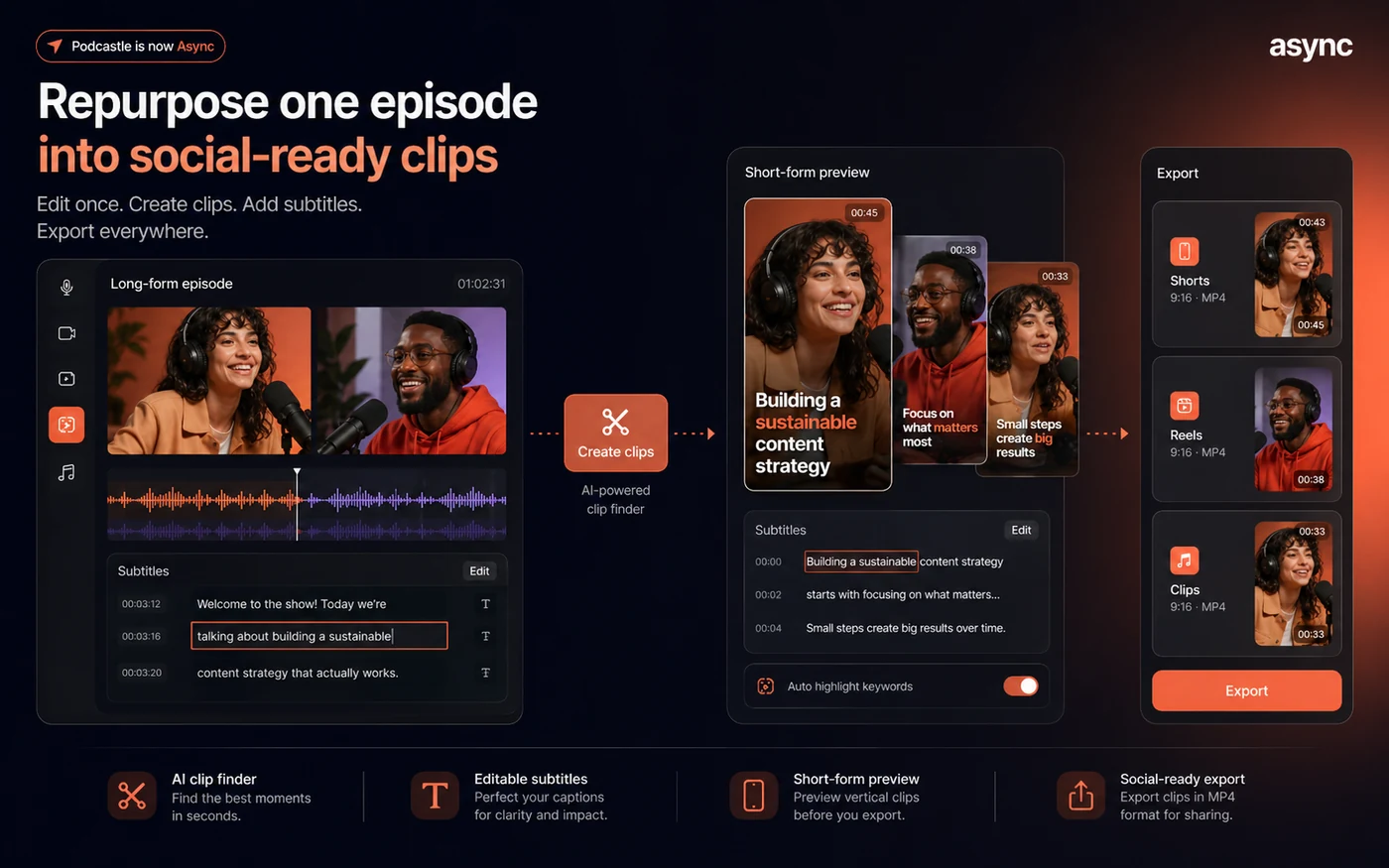
This is where the current Async direction becomes more interesting. Podcastle is not only helping you finish one episode; it may help you turn that episode into multiple distribution assets.
Buyer note: Credit consumption matters here. AI subtitles, clips, reframe, dubbing, lip sync, thumbnails, or generation features may affect plan fit more than basic recording.
Team and business workflow
Teams and Business plans can matter when production is shared across collaborators. Brand Kit, Producer Mode, advanced user management, support, onboarding, and security language can be relevant for organizations.
Buyer note: Do not assume you need team features until collaboration is actually painful. A solo creator should not pay for team workflow just because it sounds more professional.
Pricing and plan value
The current Podcastle buying decision should be read through Async’s live pricing and help docs.
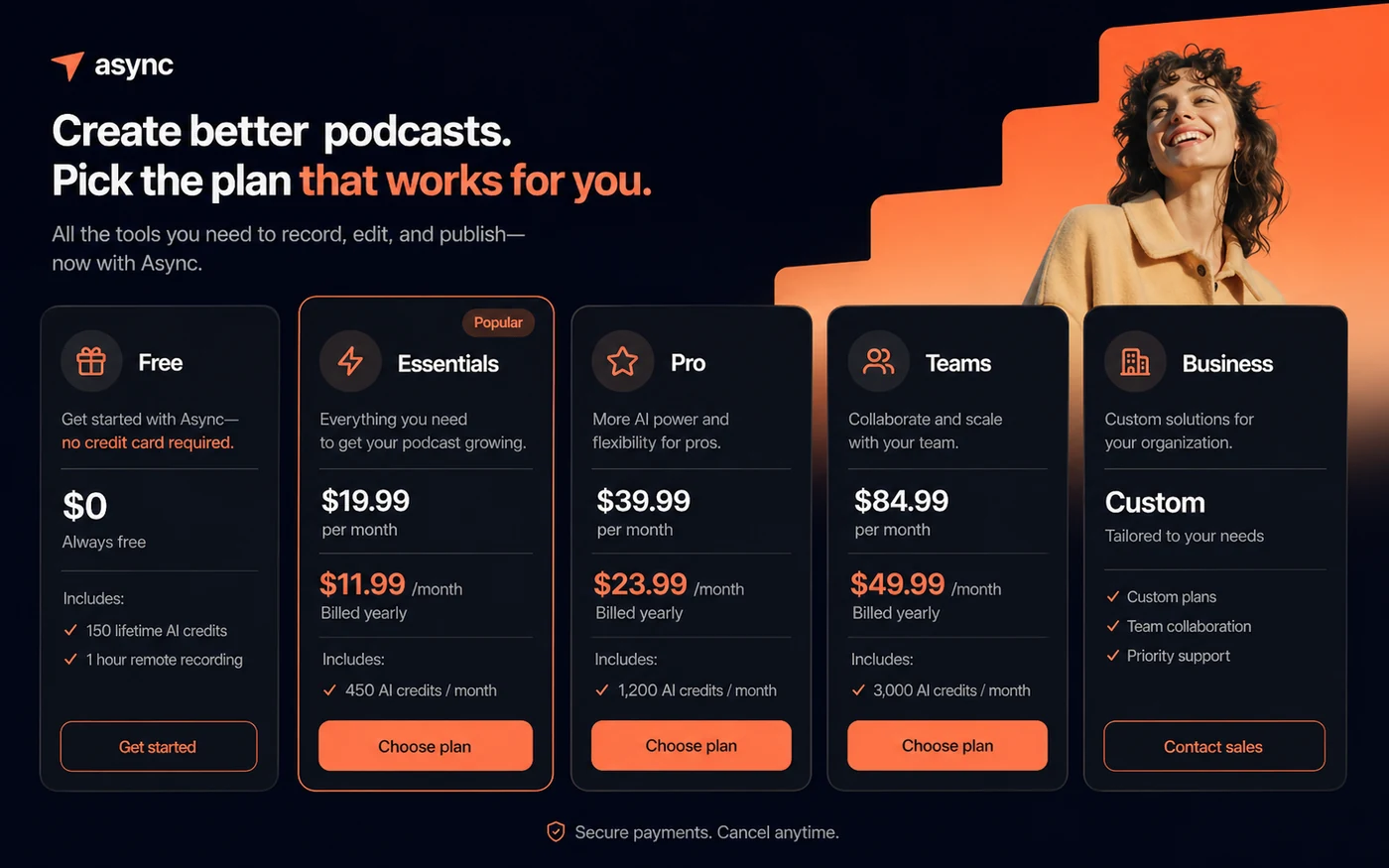
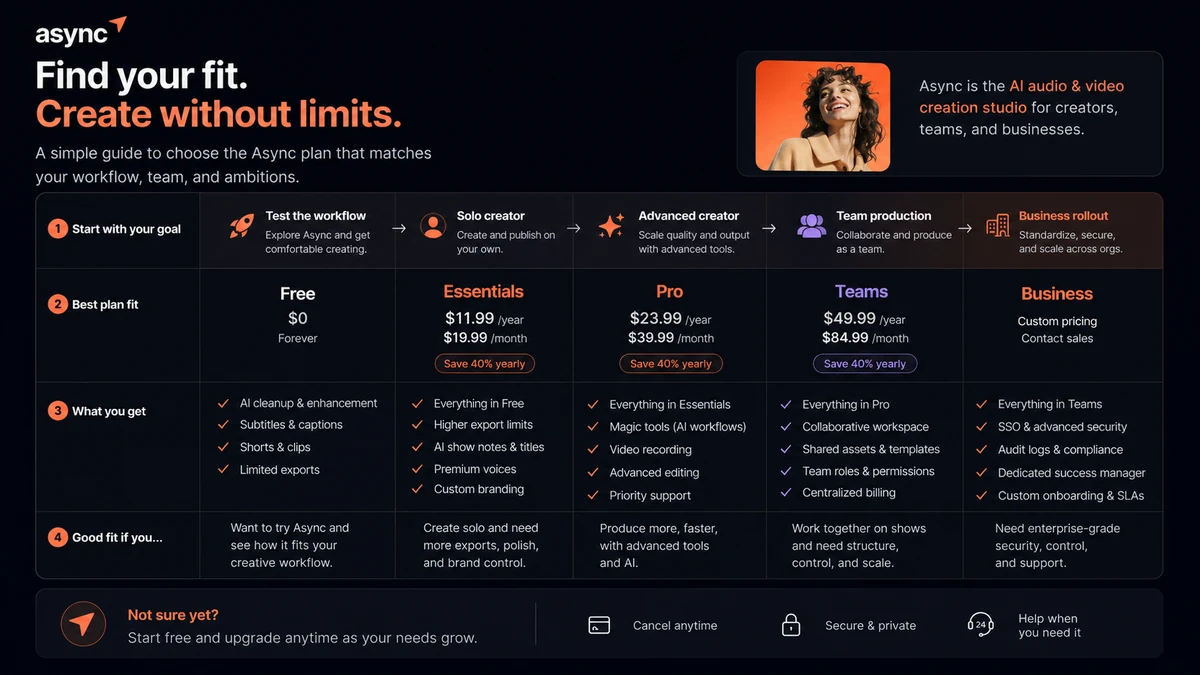
At the time of review, the public creator path includes a Free plan and paid plans such as Essentials, Pro, Teams, and Business. The help center describes Essentials at $19.99 monthly or $11.99 per month when billed yearly, Pro at $39.99 monthly or $23.99 per month when billed yearly, and Teams at $84.99 monthly or $49.99 per month when billed yearly. Business pricing is custom.
That is only the headline.
The real plan value depends on AI credits, recording hours, storage, export quality, transcription, text-to-speech, watermark limits, collaboration, support, and whether the credit allowance matches your actual content production. The Free plan is useful for testing, but the help documentation describes limits such as lifetime AI credits, lifetime remote recording, basic tools, limited exports, and limited storage. That is enough to learn the interface, not always enough to run a serious creator workflow.
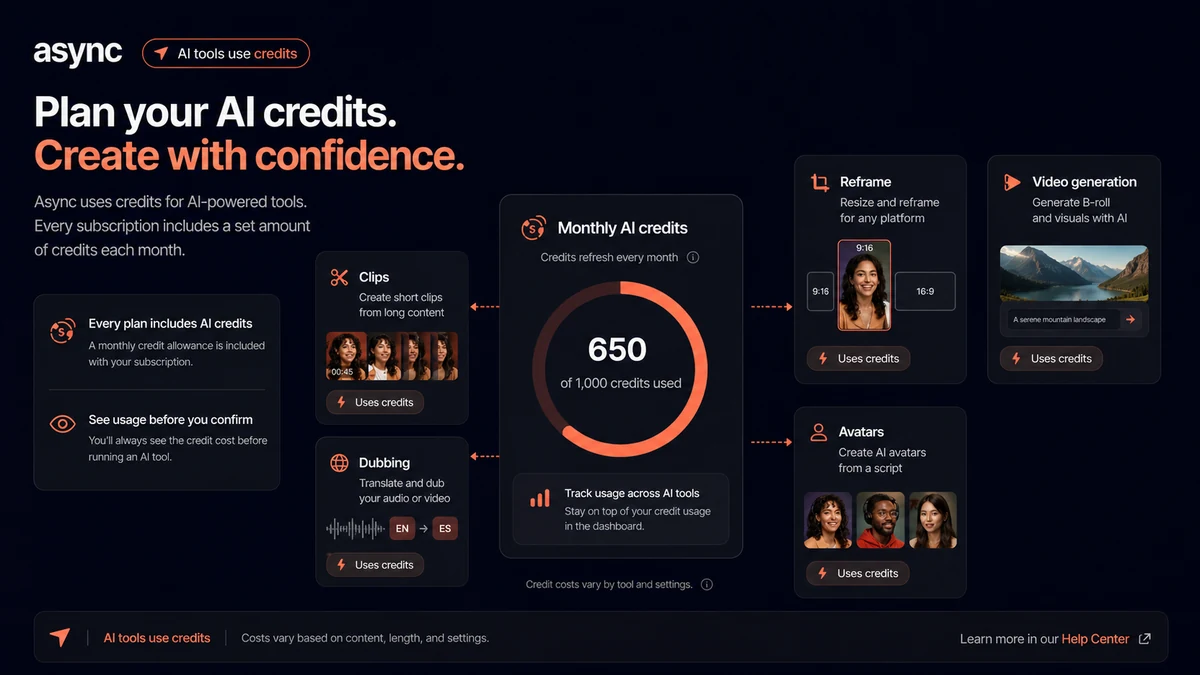
The credit system deserves special attention. Async explains credits as the unit used to generate AI media, with consumption depending on feature type, complexity, duration, and resolution. Monthly subscription credits reset each cycle. Top-up credits are available, but the current credit explanation says top-up credits expire after a limited period. Yearly billing does not mean you receive and keep all annual credits at once.
That changes the buying logic. A creator who mostly records and cleans audio may feel the credit system less. A creator using AI clips, AI reframe, subtitles, dubbing, lip sync, thumbnails, image or video generation may reach the limits faster.
Pricing check: Before upgrading, compare Podcastle plans against one real month of recording, editing, subtitles, clips, and credit usage.
Free plan, trial, coupon, and checkout notes
The Free plan is the right first step for most buyers. It lets you test the interface before you commit to a subscription, and that matters because Podcastle’s value depends heavily on workflow comfort.
I would not treat a coupon or yearly discount as the main reason to buy. If a current deal exists, use it only after the workflow is proven. A cheaper annual plan can become expensive if the product does not stay in your weekly production process.
The trial and refund language deserves extra care. The public terms emphasize that users should cancel before the trial ends or before the next billing cycle, and they state that processed subscription charges are not refundable, with no prorated refunds for partially used services. Some pricing or store guidance may mention a new-subscription refund path, but the safest buyer behavior is to verify the live checkout language and terms before paying.
AI credits add another layer. Used credits are not something I would treat casually. If your test requires AI dubbing, clips, subtitles, video generation, voice generation, thumbnails, or other credit-consuming tools, read the credit rules first.
Checkout caution: Use the free path first, then verify trial, renewal, credit, and cancellation language before choosing monthly or annual billing.
What I would check before buying Podcastle
If I were buying Podcastle for a real creator workflow, I would check these points before paying:
- Whether the current plan names and limits are shown under Async rather than older Podcastle pages.
- Whether the Free plan lets me complete one realistic recording-to-export test.
- How many AI credits my actual workflow consumes for clips, subtitles, dubbing, thumbnails, or generation.
- Whether monthly credits reset, whether top-up credits expire, and whether annual billing changes credit timing.
- Whether export quality, watermark removal, transcription hours, recording hours, and storage match my publishing schedule.
- Whether refund and cancellation terms are clear enough before I use paid credits.
- Whether Riverside, Descript, Adobe Podcast, or Cleanvoice solves my narrower need more cleanly.
The first thing I would verify is not the biggest feature list. It is whether the plan fits one real month of production.
A simple test before paying
Before paying, I would run a small test like this:
- Record a 10-to-15-minute sample using the same microphone and browser you would use for real content.
- Add a guest if guest recording is part of your normal workflow.
- Apply audio cleanup and listen for artifacts, volume changes, and background noise handling.
- Generate a transcript and check how much editing is needed.
- Create one captioned clip from the recording.
- Export the finished asset and check quality, watermark behavior, and download comfort.
- Check credits, recording time, storage, and plan limits after the test.
This small test is more useful than reading another feature list. It tells you whether Podcastle shortens the actual path from raw recording to publishable content.
Pros explained
The first real pro is workflow consolidation. Podcastle can reduce tool switching for creators who otherwise need a recorder, editor, cleanup tool, transcript tool, subtitle tool, clip maker, and hosting or publishing workflow. That is meaningful when the same creator publishes regularly.
The second pro is beginner accessibility. A browser-based tool with AI cleanup and guided editing is easier for many creators than a desktop audio or video editor. It lowers the barrier for people who care more about publishing than engineering.
The third pro is repurposing depth. Podcastle becomes more valuable when one episode needs to become clips, subtitles, translated assets, or social-ready media. This is where an all-in-one platform can justify itself.
The fourth pro is team expansion. Teams and Business paths make sense when production becomes collaborative. Brand controls, support, storage, security, and onboarding matter more when content creation is no longer a solo workflow.
Cons explained
The first con is brand and pricing confusion. Many buyers still search for Podcastle, while official public pages now present Async. Older third-party pricing references may not match the current plan structure, so live pricing matters.
The second con is credit complexity. Credits are not automatically bad, but they make the real price harder to judge. A buyer who uses AI media features heavily needs to understand consumption, reset timing, top-ups, and expiry.
The third con is refund risk. The terms are not casual about processed charges or prorated refunds. That does not mean every buyer will have a bad experience, but it does mean the trial and cancellation window should be taken seriously.
The fourth con is specialization. Podcastle is broad. Broad is useful when you need the whole workflow. It is less useful when a narrower tool does one job better.
Green flags and red flags
Green flags:
- You publish audio or video every week.
- You already need recording, cleanup, transcripts, subtitles, and clips.
- Your current workflow involves too many disconnected tools.
- The free plan lets you complete a real test without pressure.
- You can estimate your monthly AI credit usage before upgrading.
Red flags:
- You only need one occasional recording.
- You are buying because of annual savings before testing the workflow.
- Your main need is specialized remote recording, not editing or repurposing.
- You expect AI cleanup to fix poor recording discipline.
- You do not understand the refund, renewal, and credit rules yet.
Podcastle vs alternatives
Podcastle’s best alternatives depend on the job you actually need solved.
Riverside vs Podcastle
Riverside is the more direct comparison when remote recording quality is the main concern. It is especially relevant for interview shows, guest recordings, webinars, and video podcasts where capture reliability matters most.
Podcastle may still make sense if you want a broader workflow after recording: cleanup, transcripts, subtitles, clips, dubbing, and AI editing in the same environment.
Descript vs Podcastle
Descript is the stronger comparison for text-based editing and creator post-production. If your workflow revolves around editing from transcripts, screen/video editing, overdub-style edits, and polished creator output, Descript deserves a serious look.
Podcastle may be better if your priority is a simpler all-in-one path for recording, cleanup, and repurposing without building a more advanced editing system.
Adobe Podcast vs Podcastle
Adobe Podcast is an adjacent route for buyers who mainly want audio enhancement. It is not a one-to-one replacement for Podcastle’s broader production workspace.
Podcastle may make more sense if your workflow goes beyond enhancement into recording, editing, captions, clips, and publishing.
Cleanvoice vs Podcastle
Cleanvoice is a narrower tool for spoken-audio cleanup, filler-word removal, and podcast polish. If your audio workflow is already built elsewhere, Cleanvoice may be enough.
Podcastle may be the better fit if you want the cleanup step inside a larger creation and editing platform.
Trust, refund, and buyer-risk notes
The main trust issue with Podcastle is not whether the product has useful tools. It does. The buyer risk is around expectations.
First, verify current public pricing. Because Podcastle now routes through Async, old reviews and directory pages may show stale plan names or numbers. Use live Async pages before making a decision.
Second, read the credit rules. Monthly subscription credits reset each billing cycle. Top-up credits have their own expiry behavior. Used credits are not something to treat as risk-free experimentation.
Third, understand the trial and refund position before paying. The terms place responsibility on the user to cancel before the trial or next billing cycle and state that processed subscription charges are not refunded. If a refund path is shown during checkout or in a pricing FAQ, treat the live checkout language as something to save and verify before using credits.
Fourth, check data and privacy expectations. Podcastle/Async workflows involve recording, uploading, processing, editing, and storing media. If your content includes client interviews, internal company discussions, sensitive voices, or confidential material, read the privacy policy and plan-level security language before uploading production files.
Fifth, do not assume team readiness from the plan label alone. Team workflow may require brand controls, user management, support, onboarding, storage, security, and permissions that are more important than the per-month number.
The safer buying move is boring but effective: test free, use monthly if you need paid features, move to annual only after the workflow has proven itself.
Final verdict
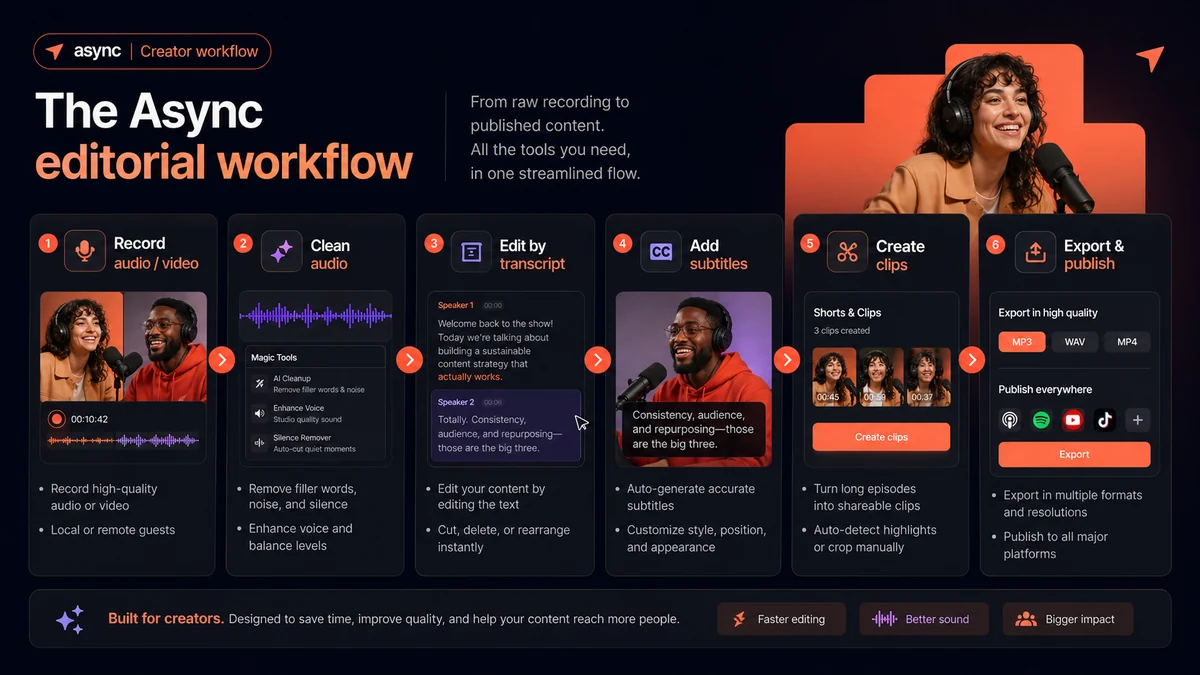
I would consider Podcastle if I needed a single place to record, clean, transcribe, edit, subtitle, clip, dub, and repurpose audio or video on a regular schedule.
I would skip it if I only needed one narrow job. Riverside may be cleaner for remote recording. Descript may be better for text-based editing. Adobe Podcast may be enough for simple enhancement. Cleanvoice may be better for spoken-audio cleanup.
The product is most attractive when it replaces several tools. It is least attractive when the buyer pays for a broad platform but only uses one feature.
The safest next step is to treat the Free plan as a real evaluation, not a quick tour. Run one actual project through the workflow. Watch the credits. Check the export. Read the refund and cancellation terms. Then decide whether the paid plan fits your content cadence.
A good creator tool should reduce friction after the excitement fades. That is the real test for Podcastle.
