Quick verdict
Nuelink is worth a serious look if social posting has become repetitive because your content already starts somewhere else.
That is the key distinction.
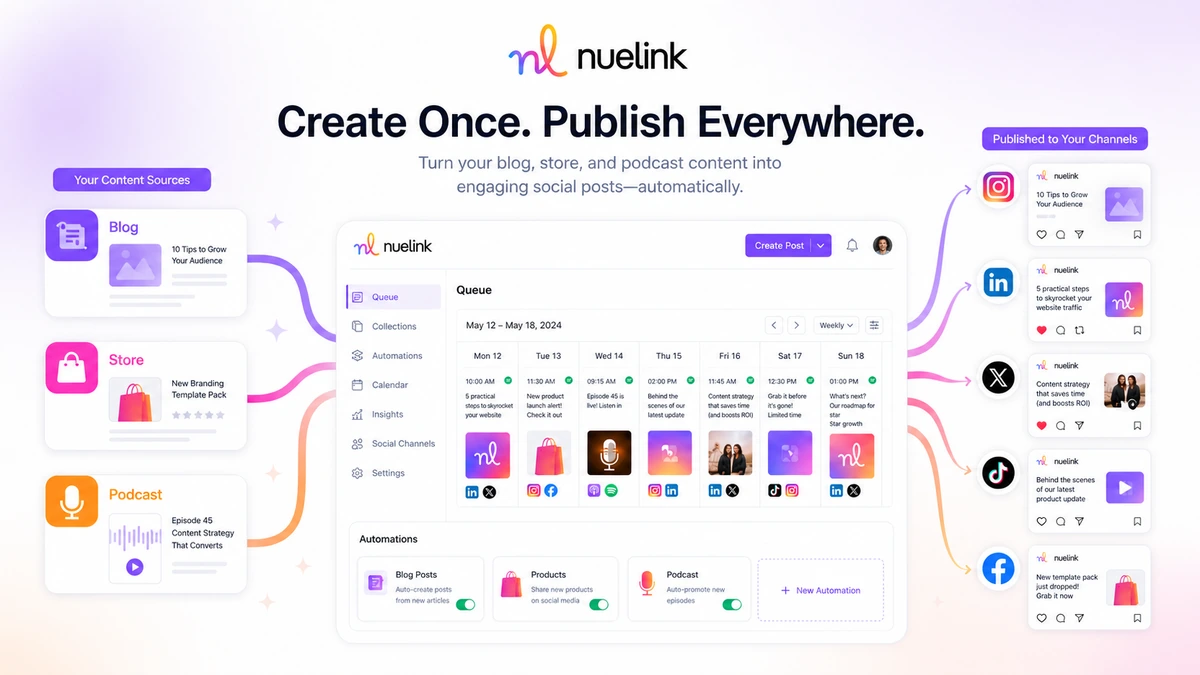
If you publish blog posts, new products, podcast episodes, YouTube videos, RSS updates, or workflow-triggered content and then keep turning those assets into social posts manually, Nuelink has a clear job. It is not just another calendar scheduler. Its better use case is source-to-social automation: connect the source, organize the content into collections, queue it across platforms, and reduce the weekly copy-paste work.
I would be more cautious if you only need occasional manual posting. In that case, the automation depth may be more than you need, and the cheapest plan is not automatically the best deal once brand, channel, automation, queue, and AI-credit limits come into play.
The main strength is workflow leverage. Nuelink can make sense for creators, small businesses, ecommerce sellers, and agencies that already have a content engine and need a more repeatable social distribution layer. The main risk is buying too quickly because the annual price looks better than the monthly price, before the trial has proven the exact automation you plan to use.
The safer path is simple: test one real workflow first, check the current plan limits, and only then decide whether Standard, Premium, Business, Agency, or Agency-Plus fits your actual publishing volume.
Next step: If Nuelink looks like it fits your workflow, verify the current trial, pricing, and buyer route before choosing monthly or annual billing.
Review snapshot
| Review point | Practical take |
|---|---|
| Best for | Creators, ecommerce sellers, content sites, small businesses, and agencies with repeatable social publishing workflows |
| Not ideal for | One-off posters, enterprise teams needing heavy governance, or buyers who only want the cheapest scheduler |
| Main use case | Turning blogs, products, podcasts, RSS feeds, YouTube updates, and workflow triggers into scheduled social posts |
| Trial note | Public pricing/FAQ materials show a trial path, but buyers should verify the current trial length and credit card requirement at signup |
| Starting price | Standard is publicly listed at $18/month monthly or $12/month when paid yearly |
| Main plan limits | Brands, members, social channels, automations, collections, queued posts, link-in-bio pages, and Nue AI credits |
| Main strength | Automation-first social scheduling with collections, queues, integrations, AI caption help, analytics, and link tools |
| Main concern | Annual billing, API alpha status, platform rule changes, and plan-limit mismatch |
| Direct alternatives | Ocoya, Typefully, Vista Social, Post Planner |
| Best next step | Build one real source-to-social automation during the trial before paying |
What is Nuelink?
Nuelink is a social media scheduling and automation platform for people who want to plan, publish, recycle, and automate social content across multiple platforms from one workspace.
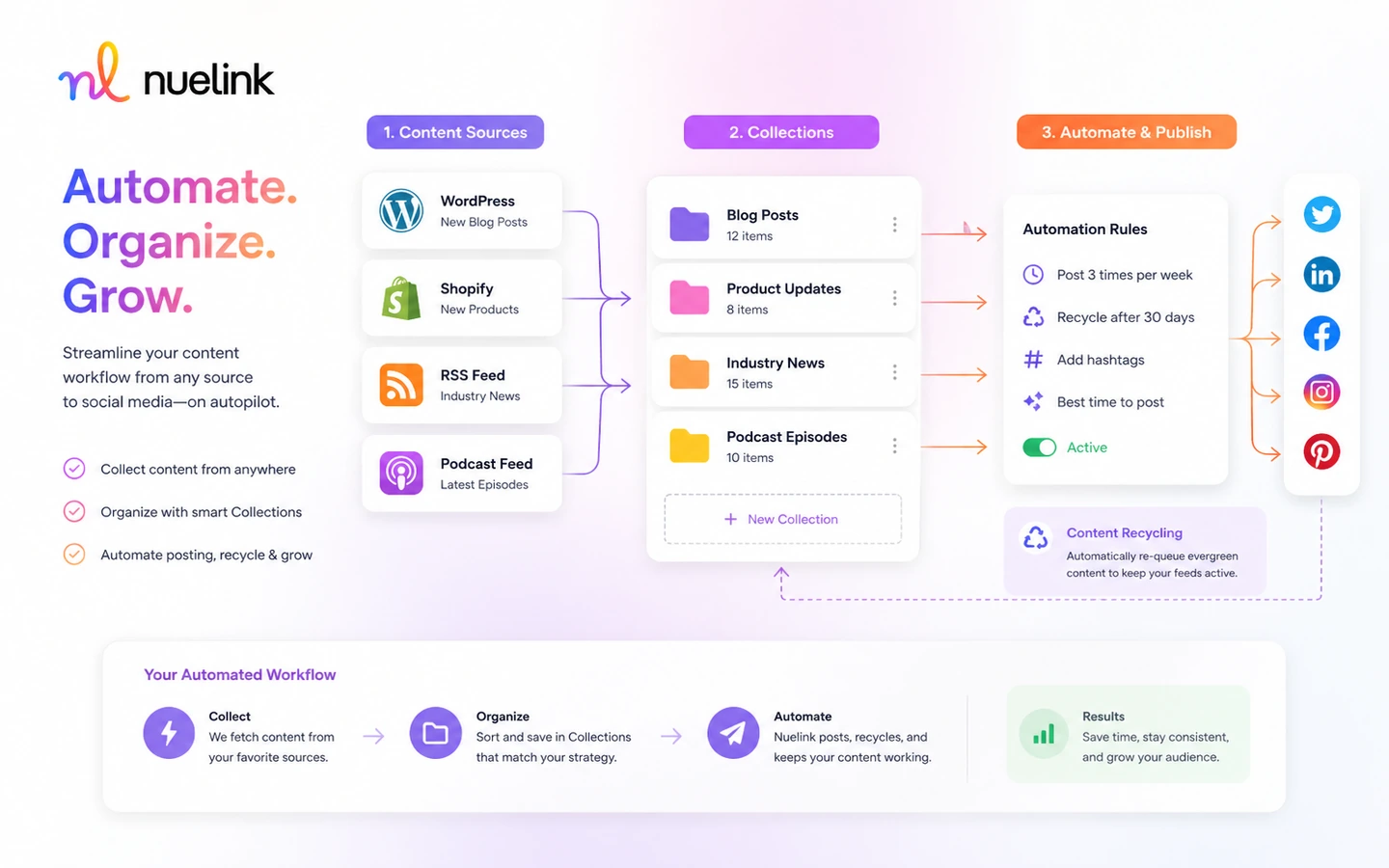
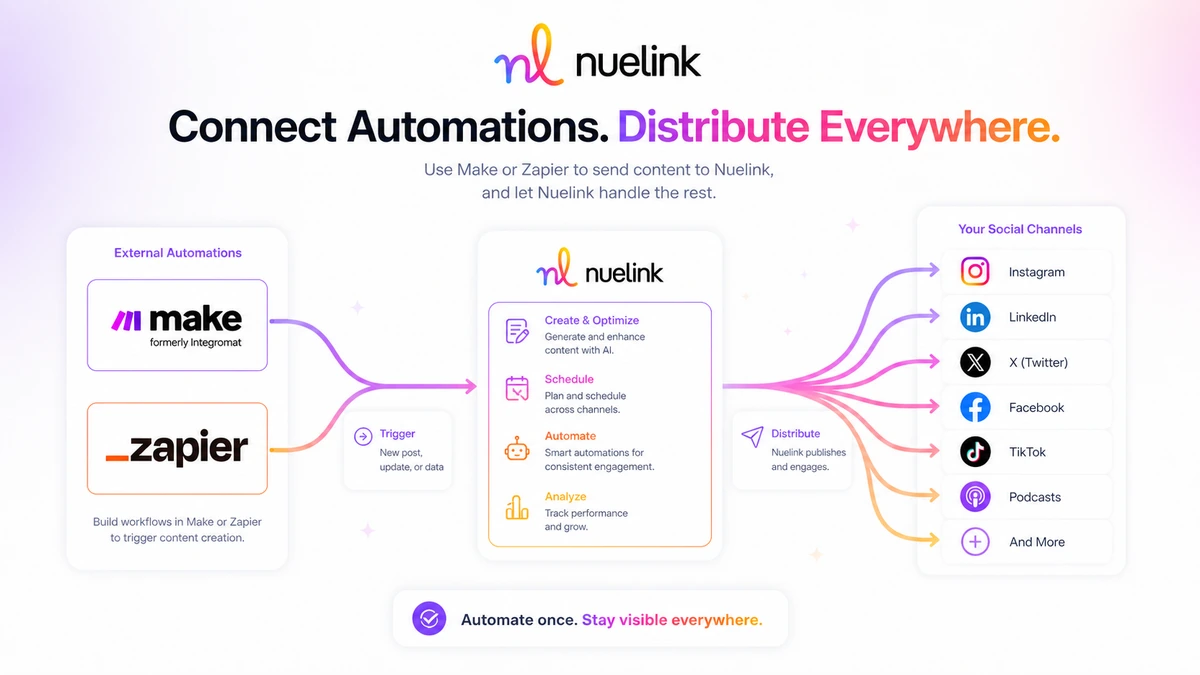
The product is best understood as a bridge between your existing content sources and your social channels. A blog post can become social updates. A store product can become a scheduled post. A podcast episode can feed social promotion. A workflow in Make, Zapier, n8n, Pabbly, or another connector can push content into a social publishing process.
That is different from a simple manual scheduler.
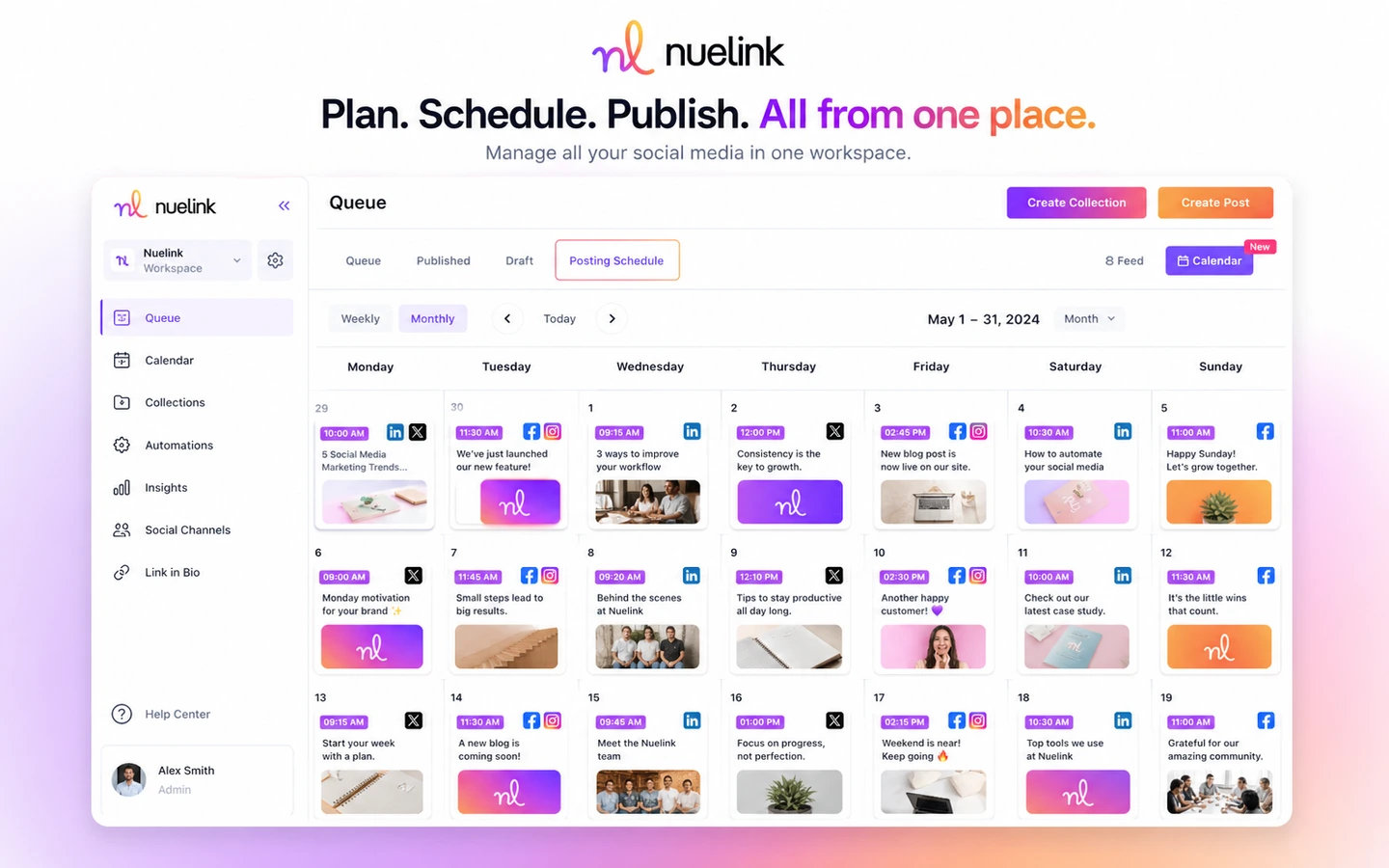
A basic scheduler helps you place posts on a calendar. Nuelink can do that, but the more interesting buyer case is automation: collections, queues, source imports, AI caption support, link-in-bio pages, short links, analytics, comment management, and integrations that reduce repeated social operations work.
The mistake buyers can make here is judging Nuelink only by the price of the entry plan. The better question is whether your content system has enough recurring input to justify an automation layer.
Our review approach compares public product pages, pricing details, support documentation, buyer workflow fit, refund and checkout language, and nearby alternatives. I would not treat a low monthly price, a trial, or a coupon path as proof that the product fits. With a tool like Nuelink, the value only becomes clear when you test the exact publishing loop you expect it to handle after you pay.
Who should use Nuelink?
Nuelink makes the most sense for buyers who already publish consistently and want fewer manual steps between content creation and social distribution.
Creators with blogs, YouTube channels, newsletters, or podcasts are a natural fit. If each new piece of content needs to become several social posts, Nuelink can help turn that into a repeatable process instead of a weekly chore. The condition is that the creator still reviews the output. Automation saves time, but it does not replace good judgment about caption quality, timing, and platform fit.
Small businesses can also benefit when social posting is necessary but not the main work of the business. A restaurant, local service company, digital product seller, or niche publisher may not need a complex social media suite. They may simply need a reliable system for planning posts, reusing content, and keeping channels active.
Ecommerce sellers are another good candidate. Nuelink’s product autoposting angle is useful when new Shopify, WooCommerce, Etsy, or similar store items need regular promotion. The buyer should test product templates, media formatting, and destination-channel behavior before assuming the workflow is hands-off.
Agencies may find Nuelink useful when they manage multiple brands and want separate workspaces, team members, queues, collections, and social channels. For agencies, the plan decision matters more than the headline price. The wrong tier can become tight quickly if each client needs multiple channels, automations, and content collections.
Marketing teams that already use automation tools may also be a fit. If your workflow already includes RSS, Google Sheets, Make, Zapier, n8n, Pabbly, or other triggers, Nuelink can be the social publishing end of that system. I would still verify connector support and API scope before treating it as production infrastructure.
Who should avoid Nuelink?
Nuelink is not the tool I would choose for someone who posts manually once in a while.
If you only publish a few updates per month, a simpler scheduler or even native platform tools may be enough. Nuelink becomes more useful when automation, collections, queues, and multi-platform distribution save time repeatedly.
I would also be cautious if you do not have a content engine yet. Nuelink can help distribute content, but it cannot fix a weak offer, inconsistent publishing habit, unclear audience, or poor creative direction. If there is nothing reliable feeding the system, automation can simply make a messy process faster.
Large teams should look carefully before buying. Nuelink has team and brand support, but buyers who need advanced approval workflows, legal review, deep client controls, social listening, complex reporting, or enterprise governance may need a broader platform. The pricing page marks some richer collaboration and reporting items as limited or still developing, so teams should verify current capability before assuming mature enterprise depth.
Technical buyers should also slow down if public API access is a major reason to buy. Nuelink’s API documentation is presented as an alpha release. That does not make it useless, but it does mean a buyer should verify endpoint scope, rate limits, breaking-change risk, and whether the current API supports the workflow they actually plan to build.
Finally, avoid buying only because the annual price looks cheaper. The annual plan can make sense after a workflow is proven. It is a weaker first move if you have not tested your real content source, social destinations, media formats, and team process.
How Nuelink fits into a real workflow
A good Nuelink workflow starts before you open the scheduling calendar.
First, identify the source content. That might be a WordPress article, RSS feed, Shopify product, WooCommerce update, Etsy listing, podcast episode, YouTube video, spreadsheet row, or automation trigger from another app.
Second, decide where the content should go. A blog article may belong on LinkedIn, X, Facebook, and Pinterest. A product update may need Instagram, Facebook, TikTok, and Google Business. A podcast episode may need a different social pattern. This is where platform fit matters. The same caption rarely works perfectly everywhere.
Third, organize the content inside Nuelink. Collections and queues matter because they turn one-off posting into a repeatable publishing rhythm. If you skip this step and only use Nuelink as a manual calendar, you may miss the real reason to pay for it.
Fourth, check the generated or prepared posts. Nue AI can help with captions and ideas, but I would still review tone, hashtags, links, previews, and media formatting before publishing. Social automation should reduce repetitive work, not remove your editorial eye.
Fifth, track whether the workflow saves time. If the automation only adds setup work and does not reduce weekly publishing friction, the plan may not be worth keeping.
Workflow check: If your buying reason is automation, test a real blog, store, podcast, RSS, or connector workflow before choosing a paid tier.
Real-world buyer scenarios
A solo content creator with a blog has a clear reason to test Nuelink. Each new article can become several social posts, and the creator can use collections and queues to avoid rebuilding the same promotion process every week. The risk is over-automation. The creator still needs to check captions, tone, and whether each social platform deserves a different angle.
An ecommerce seller has a different use case. New products, seasonal collections, and store updates can feed social channels automatically. That can save time, especially for small shops without a dedicated social manager. The buyer should test product images, titles, descriptions, and links carefully because ecommerce social posts can look lazy if the automation template is too generic.
An agency may care less about one workflow and more about capacity. How many brands? How many members? How many social accounts? How many automations and collections per client? This is where Nuelink’s plan limits become the real pricing discussion. An agency should not choose a tier by monthly price alone.
A technical marketer may use Nuelink as the social output layer for a larger automation stack. For example, source data flows through a spreadsheet or automation app, then Nuelink publishes the final social post. This can be powerful, but it depends on connector reliability, account permissions, media handling, and API scope. I would not build a production process around assumptions here. I would test it first.
Key features that actually matter
Source-to-social automations
This is the feature category that makes Nuelink more interesting than a basic scheduler. Automations for blogs, stores, podcasts, RSS feeds, YouTube, Substack, and connector-based workflows can reduce repeated social publishing work.
Buyer note: this matters only if you already have source content. If you do not publish consistently, automation will not create a content strategy for you.
Collections and queues
Collections help organize content by theme, campaign, source, or client. Queues help control when posts go out. Together, they make social scheduling feel more like an operating system and less like a scattered calendar.
Buyer note: test whether collections match the way you actually plan content. A messy collection structure can become another thing to manage.
Multi-platform publishing
Nuelink supports many common social destinations, including major networks and newer or niche channels. The pricing page also breaks limits down by number of social media accounts.
Buyer note: verify the exact account types you need. A platform logo does not always mean every format, group, media type, or posting behavior is supported in the way your workflow requires.
Nue AI and content helpers
Nue AI can help with captions, brainstorming, hashtags, and text improvements. That is useful when it speeds up first drafts or repurposing.
Buyer note: do not treat AI captions as final copy. Social posts still need brand voice, platform awareness, and a human check before publishing.
Link-in-bio, short links, and analytics
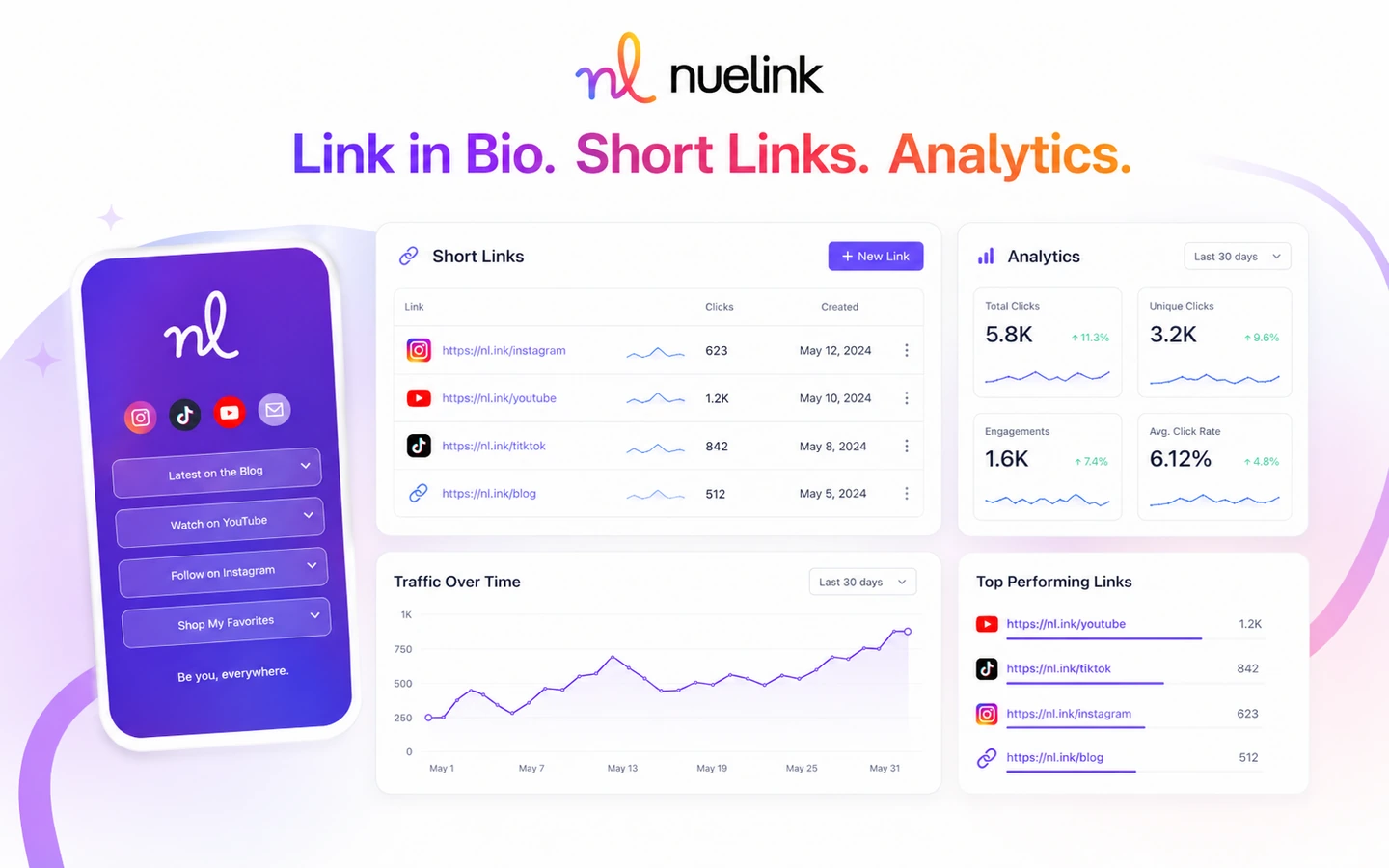
These tools make Nuelink more useful for buyers who need campaign routing and basic performance tracking, not just scheduling. Link-in-bio pages, short links, click tracking, post history, and insights can help decide what to repeat.
Buyer note: if you need deep analytics, social listening, competitor tracking, or executive reporting, compare Nuelink with broader social media management platforms before committing.
Pricing and plan value
Nuelink’s pricing looks straightforward at first, but the real plan decision is about capacity.
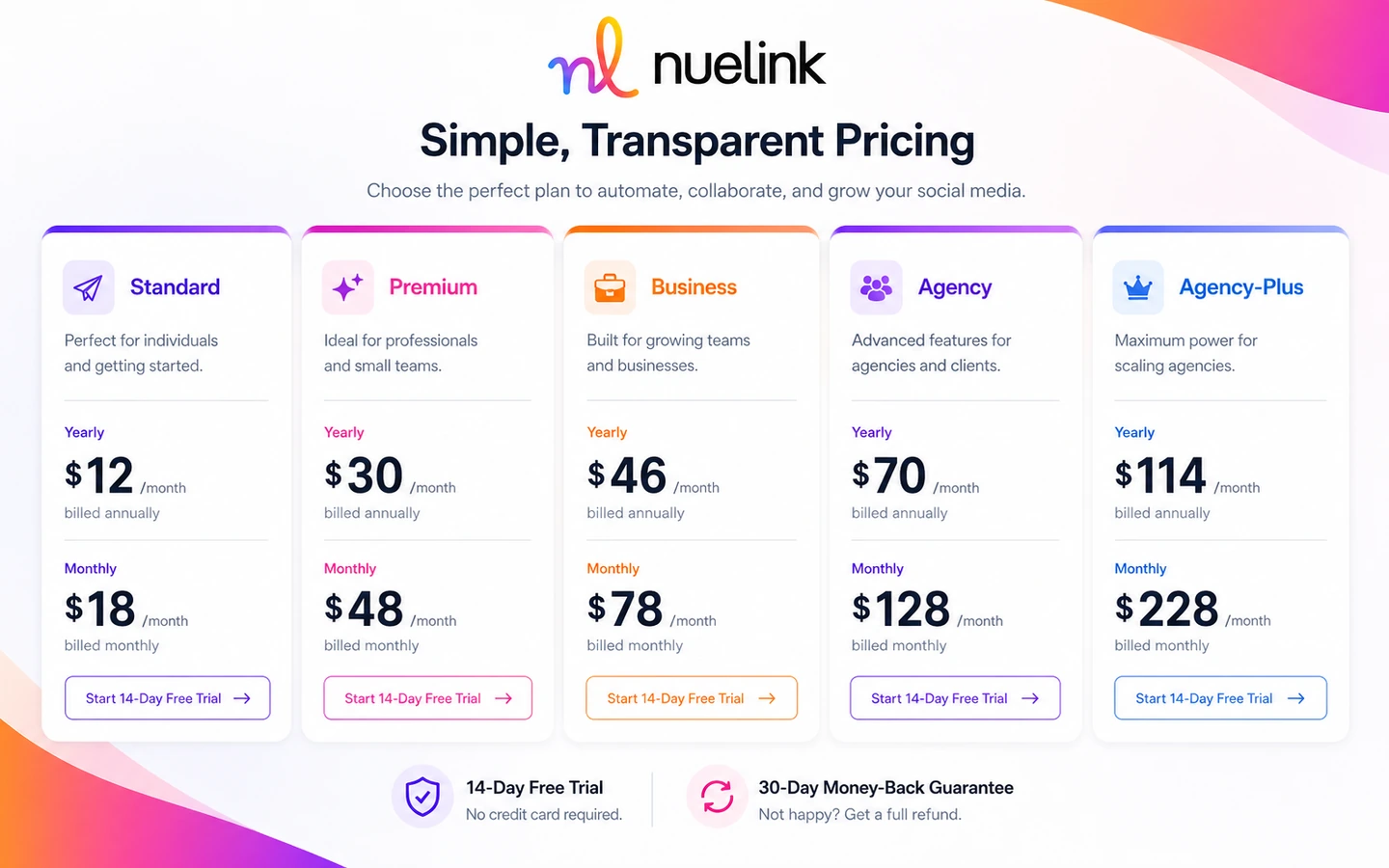
The public pricing page lists Standard at $18/month on monthly billing or $12/month when paid yearly. Premium is listed at $48/month monthly or $30/month yearly. Business is listed at $78/month monthly or $46/month yearly. Agency is listed at $128/month monthly or $70/month yearly. Agency-Plus is listed at $228/month monthly or $114/month yearly.
Those numbers matter, but the limits matter more.
Standard includes 1 brand, 1 member, 7 social channels, 7 automations, 7 collections, 100 scheduled posts in the queue, 100 monthly Nue AI credits, and 1 link-in-bio page. That can be enough for a lighter creator or small business workflow.
Premium increases capacity to 2 brands, 2 members, 20 social channels, 20 automations, 20 collections, 365 queued posts, and 200 monthly Nue AI credits. That is where team and multi-brand use starts to feel more realistic.
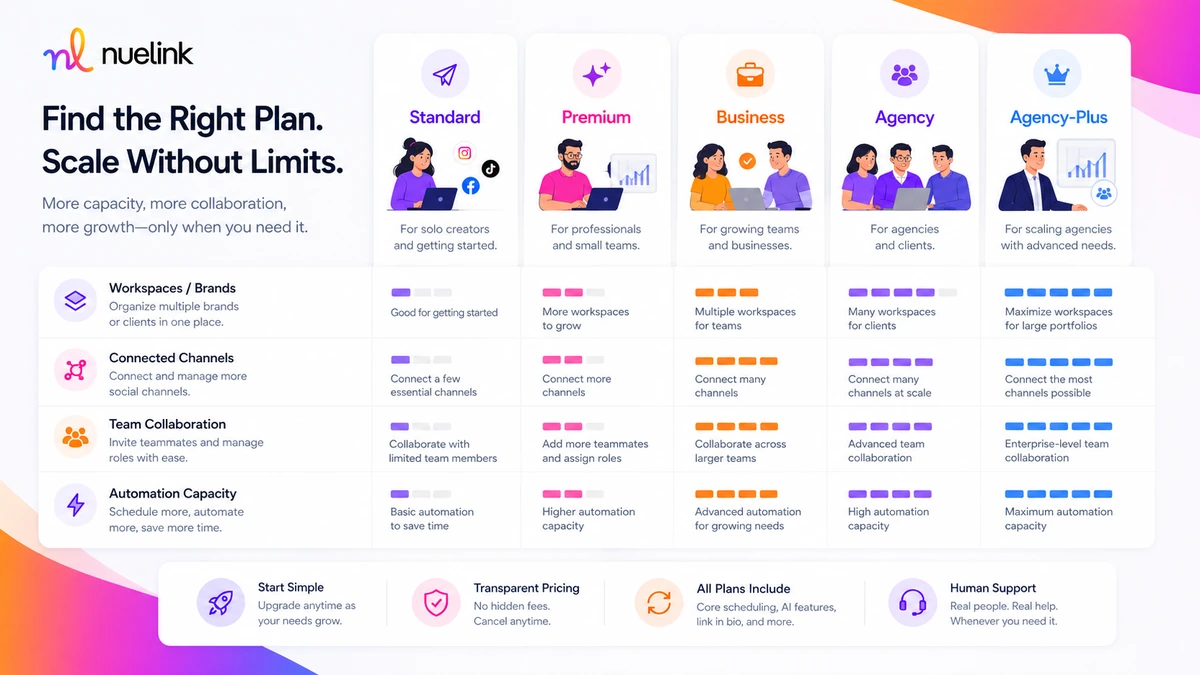
Business and agency tiers are less about casual scheduling and more about volume. More brands, more members, more channels, more automations, and larger AI-credit allowances are the reason to move up.
The pricing page also shows a 14-day trial and a 30-day money-back guarantee, while some homepage-style copy may show a different trial message. I would treat the pricing page, FAQ, and live checkout as the safer source of truth when deciding what applies today.
Pricing check: Before paying, compare the current monthly and annual plan limits against your real number of brands, channels, automations, and queued posts.
Free plan, trial, coupon, and checkout notes
Nuelink does not appear to be a permanent free-plan product. The safer assumption is that it is a paid platform with a trial path.
The current pricing and FAQ materials present a 14-day free trial, and the FAQ says a credit card is required to start the trial. Buyers should still verify the exact trial length, billing date, and cancellation behavior during signup because marketing pages can change and checkout is what ultimately matters.
For savings, the cleanest public path is usually annual billing or any current official checkout offer. Annual billing can reduce the effective monthly price, but it also increases commitment. I would not choose annual billing until the trial has proven the workflow.
Nuelink may have coupon or promotional paths at different times. The review should not treat any public code claim as guaranteed unless it is accepted at checkout. The buyer-safe order is:
- Confirm the workflow fit.
- Check the current pricing page.
- Review the refund and cancellation language.
- Compare monthly versus annual billing.
- Check the current coupon page or live checkout only after the product fit is clear.
A discount can improve the purchase. It should not be the reason you buy.
What I would check before buying Nuelink
If I were buying Nuelink for a real social workflow, I would check these points before moving past the trial:
- Whether the trial length, credit card requirement, and first billing date are clear at signup.
- How many brands, members, and social channels I need right now, not in an optimistic future plan.
- Whether the exact automation source I care about is supported, such as WordPress, RSS, Shopify, WooCommerce, Etsy, podcast RSS, YouTube, Make, Zapier, n8n, Pabbly, or another connector.
- Whether media previews, captions, links, and platform-specific formatting look acceptable before publishing.
- Whether Nue AI credits are enough for the amount of caption or content help I expect to use.
- Whether API access matters, and if so, whether the current alpha API supports my required endpoints and stability needs.
- Whether annual billing is worth the commitment after the trial, not before.
A simple test before paying
Before paying, I would run a small but realistic test.
- Pick one real source, such as a blog feed, store product, podcast episode, YouTube channel, or spreadsheet-triggered workflow.
- Connect the social channels you actually plan to use after purchase.
- Build one collection and one queue that match your real posting cadence.
- Create or import several posts, then inspect captions, previews, media, links, and channel-specific formatting.
- Use Nue AI only where it saves time, then manually edit anything that sounds too generic.
- Check whether the queue reduces weekly work or simply moves the work into another dashboard.
- Compare the plan limit you would need if you repeated this workflow every week.
This test is intentionally practical. It is not about exploring every feature. It is about proving whether Nuelink saves time in the one workflow you would actually pay to keep.
Pros explained
The first real advantage is automation depth. Nuelink makes more sense when the buyer has recurring source content and wants it distributed across social channels without rebuilding every post manually.
The second advantage is plan clarity. The pricing table does a decent job of showing the limits that matter: brands, members, channels, automations, collections, queue size, AI credits, and link-in-bio pages. That makes plan comparison easier than with tools that hide the real capacity behind vague feature labels.
The third advantage is the mix of practical social tools. Scheduling, collections, queues, AI assistance, link shorteners, link-in-bio pages, analytics, comments, browser extensions, mobile apps, and integrations all live near the same workflow. For a small team, that can reduce tool sprawl.
The fourth advantage is that Nuelink has credible evidence of real user adoption across review platforms. The praise pattern is mostly about time savings, automation, ease of use, support, and multi-account management. That matches the product’s strongest buying case.
These pros matter most when the buyer is already publishing enough content to need a system. They matter less for someone who only posts occasionally.
Cons explained
The first drawback is that there is no permanent free plan to lean on. A trial can prove fit, but it is not a long-term free option. Buyers who only need light scheduling should compare simpler or lower-commitment tools.
The second drawback is annual-billing pressure. The yearly price is more attractive, but annual billing is only a good deal after the workflow is proven. If you choose yearly too early, the discount can hide the cost of a tool you may not use enough.
The third drawback is API uncertainty. Nuelink’s public API documentation is marked alpha, and the first release focuses on a narrower posting and media workflow. Technical buyers should not assume mature API coverage before checking the docs.
The fourth drawback is that Nuelink is not a full enterprise social suite. It can support brands, teams, channels, and automations, but buyers who need deep approvals, white-label client portals, social listening, compliance workflows, or advanced reporting should compare broader platforms.
The fifth drawback is platform dependency. Social networks change APIs, permissions, content rules, and posting behavior. Any social automation product is exposed to that risk, and Nuelink is no exception.
Green flags and red flags
A green flag is when you can describe your automation in one sentence: “Every new blog post should become scheduled posts for LinkedIn, X, Facebook, and Pinterest,” or “Every new product should become a social post after launch.” That means Nuelink has a clear job.
Another green flag is when your plan math is clear. If you know the number of brands, channels, automations, queued posts, and AI credits you need, choosing a plan becomes much less emotional.
A third green flag is when the trial reduces a real weekly task. If you can feel the time savings during the trial, a paid plan is easier to justify.
The red flags are just as important.
Slow down if you are buying because the annual price looks attractive but you have not tested the workflow. Slow down if you are expecting automation to create strategy. Slow down if API access is the main reason to buy and you have not checked the alpha documentation. Slow down if your team needs review workflows or reporting depth that Nuelink may not currently handle.
The strongest buyer is not the person most excited by automation. It is the person who knows exactly which repeated task automation should remove.
Nuelink vs alternatives
Nuelink’s most direct alternatives depend on what problem the buyer is actually trying to solve.
Ocoya vs Nuelink
Ocoya is usually the closer comparison if your main need is AI-assisted social content creation plus scheduling. It may appeal more to buyers who want campaign copy, creative suggestions, and publishing in one flow.
Nuelink may still be stronger if your bigger problem is automating content from existing sources such as blogs, stores, podcasts, RSS feeds, or workflow connectors. If the source-to-social loop matters more than AI content creation, Nuelink deserves the closer look. You can compare the commercial route on the Ocoya store guide.
Typefully vs Nuelink
Typefully is a better fit for text-led creators, especially people focused on X and LinkedIn writing. It is more about drafting, polishing, and scheduling strong text posts than automating many content sources.
Nuelink is broader for multi-platform automation. I would compare Typefully if the content itself is the main work. I would compare Nuelink if distribution and automation are the bigger bottleneck. The safer route is to review the Typefully store guide if your workflow is mostly writing-led.
Vista Social vs Nuelink
Vista Social is the stronger comparison for buyers who want a broader social media management suite. It may be a better fit when reporting, inboxes, reviews, collaboration, or team management matter more than lightweight source-to-social automation.
Nuelink may still be better for smaller teams that want automations, queues, and integrations without moving into a heavier social operations platform. Compare the Vista Social store guide if you need a more complete management stack.
Post Planner vs Nuelink
Post Planner is more relevant when your bottleneck is finding, planning, and repeating content ideas. It is less of a direct automation engine for moving source content into social queues.
Nuelink makes more sense if you already know what content should be posted and need a system to publish it consistently. Post Planner may be the better next tab if ideation and planning matter more than source imports. Use the Post Planner store guide if content discovery is your main need.
Trust, refund, and buyer-risk notes
The buyer-risk picture is mixed but manageable.
On the positive side, the pricing page shows a 14-day trial path and a 30-day money-back guarantee. The FAQ says users can cancel during the trial and will not be charged, and support can be reached through chat or email. That lowers the initial risk if the buyer actually uses the trial properly.
The caution is that legal terms also include more restrictive service and premium-fee language. That is not unusual, but it means buyers should read the active refund and cancellation terms before paying annually or buying for an agency workflow.
Data and account access also matter. Nuelink connects to social platforms, publishes content, and uses platform APIs. The privacy policy says Nuelink may collect account, payment, log, and social-account-related information needed to provide the service. It also notes that no security system is perfect. Teams with stricter privacy or client-account requirements should review the policy before connecting many social accounts.
API buyers have a separate risk. The API documentation is labeled alpha and says endpoints or response shapes may change before general availability. For casual users, that may not matter. For technical buyers building a workflow around the API, it matters a lot.
The practical rule is this: test monthly or trial-first, prove the workflow, then consider annual billing only after the value is clear.
Final verdict
I would consider Nuelink if you already have recurring content and want a more automated way to move it into social channels. Blog-to-social, store-to-social, podcast-to-social, RSS-to-social, and connector-to-social workflows are where the product makes the most sense.
I would skip it if you only need occasional manual scheduling, if your content process is still inconsistent, or if your team needs enterprise-level approvals, governance, social listening, or reporting before anything else.
I would compare it with Ocoya if AI-assisted social content creation matters more, Typefully if text-led publishing is the job, Vista Social if you need a broader management suite, and Post Planner if content discovery is the bigger bottleneck.
For my money, Nuelink is not a tool to buy because the annual price looks good. It is a tool to test because you have a repeated publishing problem. If the trial proves that automation saves time without damaging post quality, the paid plan becomes easier to justify. If the workflow still feels manual or awkward after a real test, a discount will not fix the mismatch.
