
Ocoya Pricing, Plans & Social Fit
Ocoya is an AI social media management platform for creating posts, scheduling content, running automation workflows, and coordinating social campaigns across multiple channels. It combines AI captions, AI agents, design and ecommerce integrations, approval workflows, and a social calendar into one marketing workspace. The buying decision is not only about whether the AI features look attractive. The real question is whether your posting volume, number of profiles, team size, and automation needs justify the plan limits.
Fit → price → checkout
Use these routes after the official-site check: coupon first, review for fit, compare if unsure.
Ocoya pricing snapshot
Fast commercial checks before pricing, coupons, or a deeper review.
Ocoya product tour
Ocoya is easiest to understand visually because the buying decision depends on how the calendar, AI agents, workflows, social integrations, and team approvals fit together. The screenshots below focus on the screens a buyer needs to understand before starting the trial or choosing a paid tier.
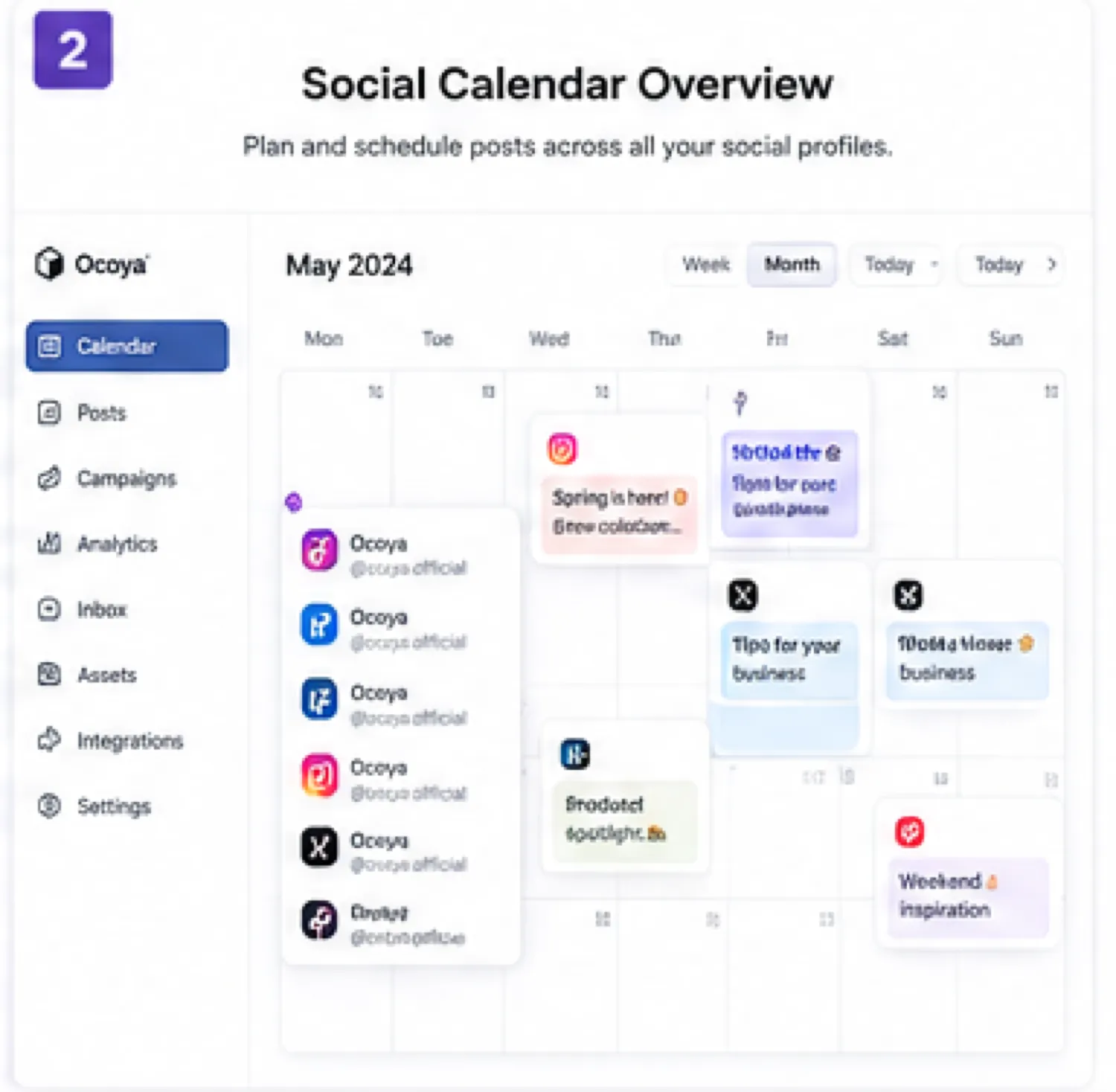
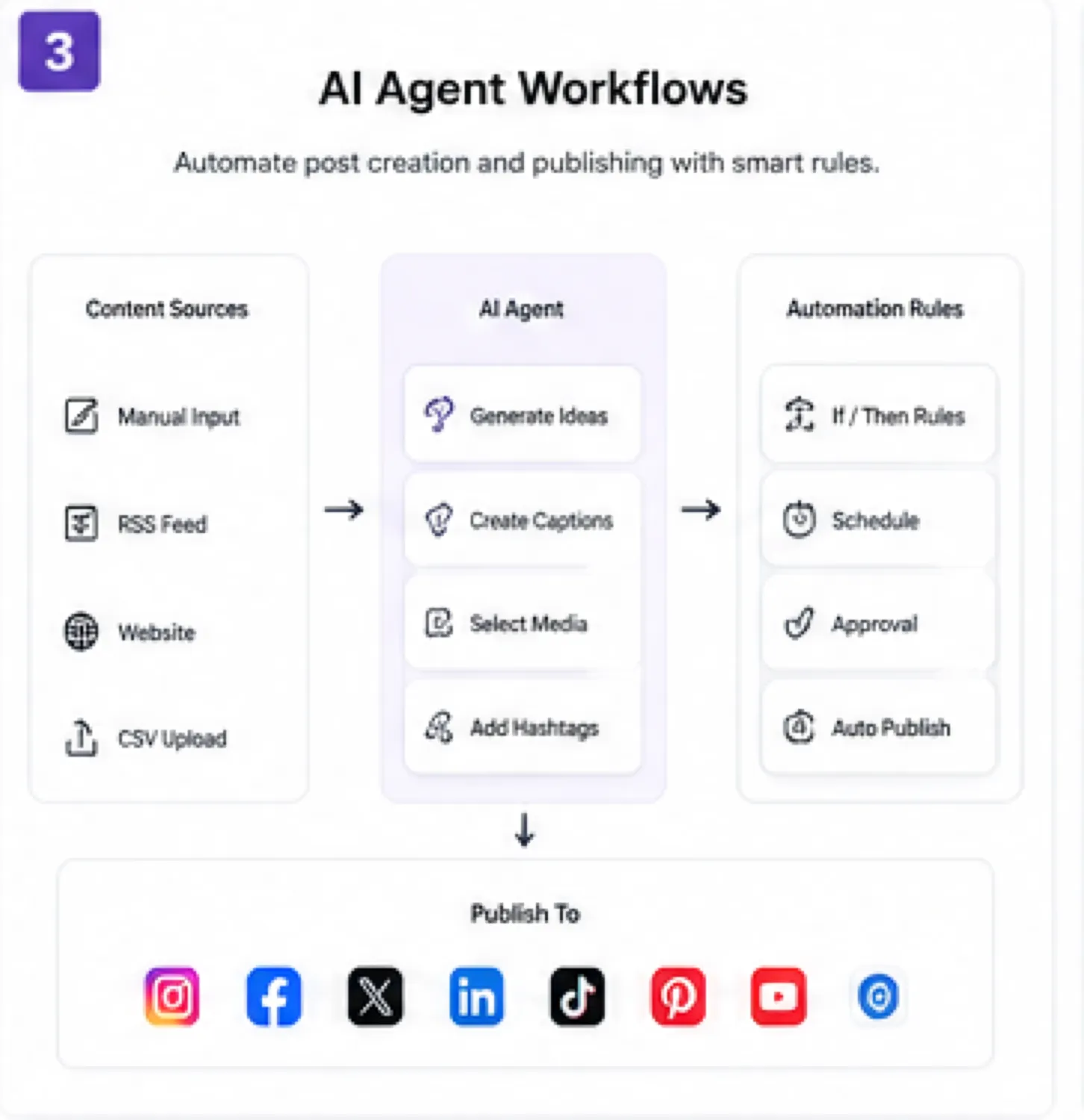
Ocoya belongs on a store page as an AI social media workflow tool, not as a generic AI writer. The useful buyer question is practical: can it reduce the time spent creating, approving, scheduling, and reusing social content across the channels you already manage? The trial is short and refunds are restrictive, so the page has to help buyers test fit before payment rather than chase a vague discount.
What Ocoya actually does
Ocoya combines social media scheduling, AI content creation, AI agents, workflow automation, social integrations, ecommerce support, and team approvals. The homepage frames it around content creation and engagement with AI agents and workflows, which makes it closer to an AI-assisted social operations hub than a single caption generator.
The strongest fit is a buyer who already posts consistently and wants fewer manual steps. If the team is still unsure what to post, which channels matter, or who approves content, Ocoya may feel heavier than a simple calendar.
- Create and schedule social posts from one workspace.
- Use AI agents and workflow rules for repeatable content tasks.
- Connect social, ecommerce, design, and developer workflows.
- Coordinate approvals before posts go live.
Pricing depends on limits, not just the monthly price
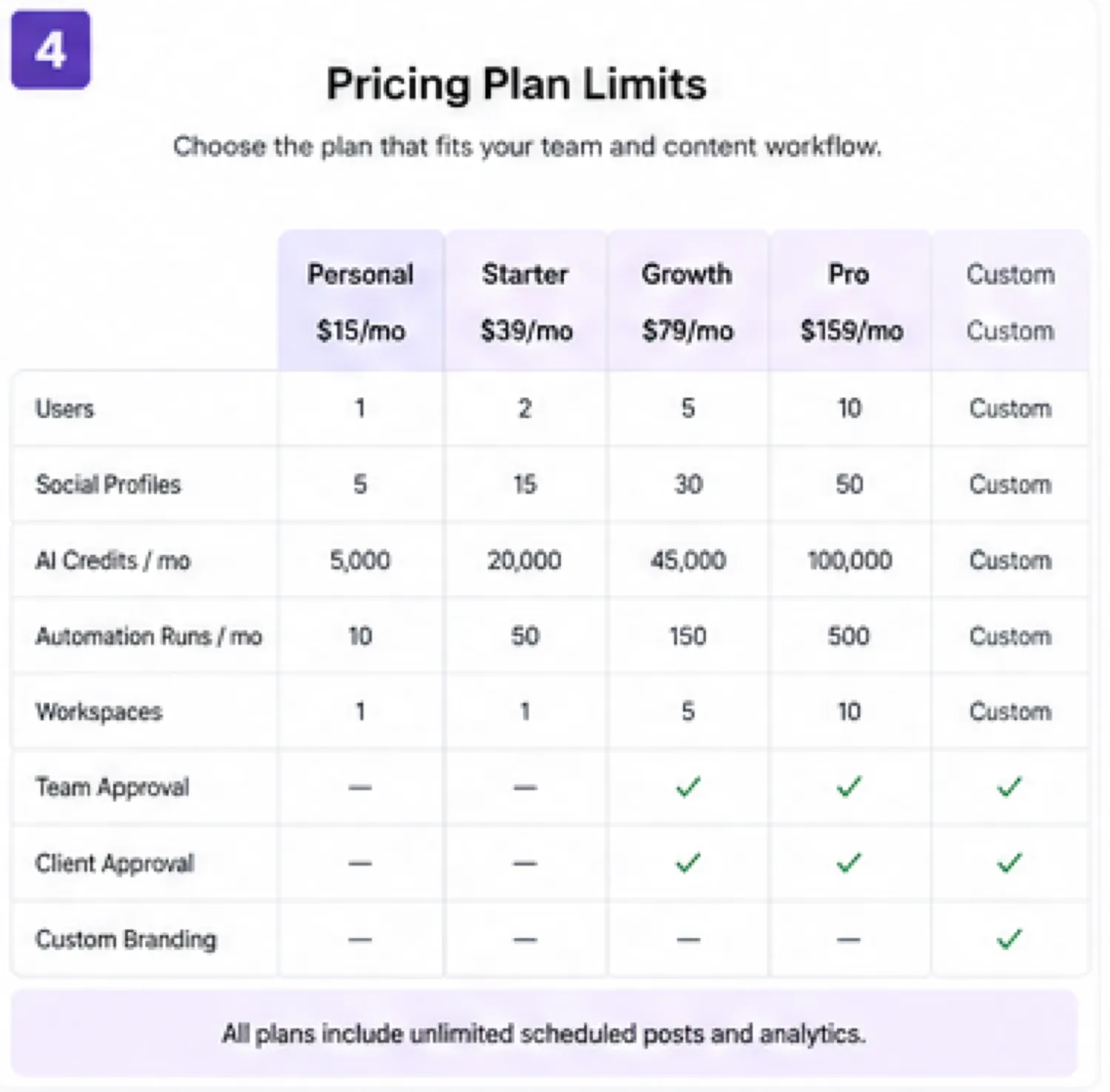
Ocoya starts at $15 per month on Bronze, with higher plans at $39, $79, and $159 per month. The visible limits include workspaces, users, social profiles, AI credits, and automation runs. That means a buyer can outgrow a plan because of profile count or automation needs even if the base price looks affordable.
The yearly toggle advertises 20% savings, but annual billing only makes sense after the trial proves Ocoya fits the daily or weekly routine. Buyers should compare Bronze against Silver carefully because one user and five social profiles may be too tight for client work or multi-brand campaigns.
- Bronze is the lowest paid plan at $15 per month.
- Silver increases workspaces, users, profiles, credits, and automation runs.
- Gold and Diamond are better matched to heavier teams or agency routines.
- Yearly billing can save money only when the workflow is already proven.
AI agents and automation are the main upgrade reason
Ocoya's stronger pitch is automation. The site describes AI agent templates for social posting, DM chatbots, and comment-to-DM workflows. It also describes scheduled triggers, RSS triggers, and ecommerce triggers that can generate and publish social content with rules.
This is useful for teams with recurring campaigns, product updates, or blog-to-social routines. It is weaker for users who only need a place to schedule manually written posts. Buyers should test one repeatable automation during the trial because that is where Ocoya has to prove time savings.
- Scheduled triggers can support recurring content creation.
- RSS triggers can turn new content into social posts.
- Ecommerce triggers can help convert product updates into posts.
- DM and comment automation may matter for campaign response workflows.
Teams and agencies need approval flow clarity
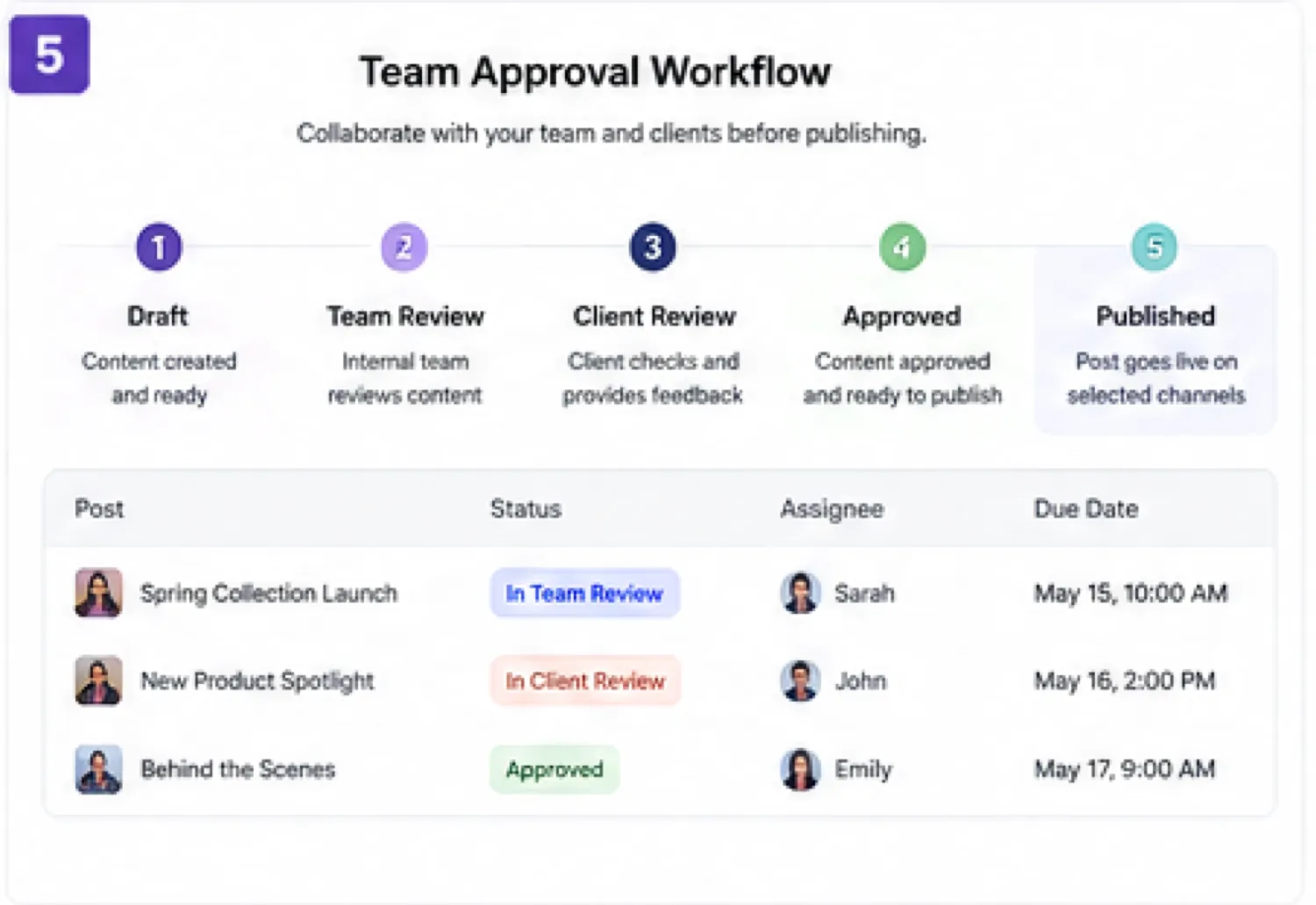
Ocoya highlights workspaces, team roles, internal approval, client approval, public links, and discussion around content status. That matters for agencies and small teams where content cannot go straight from idea to publish.
Before paying, buyers should check whether the chosen plan includes enough users, workspaces, and profiles for the accounts they manage. A solo creator can start smaller, but an agency should be careful because profile count and team roles can become the buying pressure quickly.
- Team buyers need to compare users and workspaces by tier.
- Client approval workflows are more relevant to agencies than solo users.
- Multi-channel planning can reduce missed posting windows.
- Plan fit should be checked against current accounts, not future hopes.
Video walkthrough for planning a social calendar
A calendar-planning video is useful because it shows whether Ocoya's workflow feels natural in practice. Watch for how quickly a user can move from content idea to scheduled posts, whether AI generation reduces actual steps, and whether the interface feels comfortable enough for repeated weekly use.
Safest buyer next step
The safest next step is not to buy an annual plan immediately. Start the 7-day trial only when you have a real campaign to test. Connect the minimum required profiles, create several posts, run or simulate one automation, check approval flow if relevant, and review the billing page before the trial ends.
If Ocoya saves real time, compare the smallest tier that covers your profile count, users, credits, and automation runs. If fit is still unclear, read the review route before checking the coupon route. Public coupons are not the safest first filter when refund terms are restrictive.
- Use the trial for a real campaign, not casual browsing.
- Check Billing and Manage Plan before the trial deadline.
- Choose annual billing only after workflow fit is proven.
- Use the coupon route after the tool already fits.
Best savings path from this store page
This is the clearest savings route to check once the product already looks like a fit.
Ocoya lists yearly billing with a 20% saving across its pricing table, making this the strongest official no-code saving path.
Try Ocoya free for 7 days
Bronze yearly plan at lower monthly equivalent
Use comparison routes when the category fit is still open
Use these comparison routes when the product still looks plausible, but the category fit is not fully settled.
Nuelink is worth checking when the priority is social scheduling and automation with a lighter decision path. Ocoya is the closer fit when AI agents, approvals, ecommerce triggers, and broader workflow automation matter.
Post Planner is the simpler next tab for buyers mainly looking for content discovery and scheduling. Ocoya is more relevant when AI generation, workflows, integrations, and team approvals are part of the buying reason.
Typefully fits buyers focused on writing and scheduling text-first social content, especially for creator-led posting. Ocoya is broader for multi-channel teams that need AI agents, calendar planning, and social automation.
Vista Social is a stronger comparison when the buyer wants a mature social media management suite. Ocoya deserves attention when AI workflows and content automation are the main differentiator.
Verification points worth checking before you click out
Where this store usually fits best in the workflow
A creator can use Ocoya to draft captions, plan a calendar, and schedule posts across a small set of profiles. Bronze may be enough only if the profile count, credits, and automation needs stay narrow.
A small team can use Ocoya to coordinate campaigns, review posts, and keep content moving across channels. Silver or Gold may be more realistic when multiple users and profiles are involved.
An agency can use workspaces, approval flows, and automation rules to manage client posting. The key is checking whether the plan supports enough clients, profiles, AI credits, and automation runs.
Ecommerce marketers can connect product or content inputs to social workflows. This use case works best when product updates, RSS items, or recurring launches need repeated social promotion.
Practical checkpoints before and after signup
- Choose one real campaign and list the social profiles that need testing.
- Decide which automation or approval flow must work for Ocoya to be worth paying for.
- Create posts, schedule content, test AI captions, and review whether the calendar feels repeatable.
- Check credit usage and automation-run pressure before assuming the entry plan is enough.
- Compare tiers by users, profiles, workspaces, credits, and automation runs.
- Confirm cancellation steps and billing interval before the 7-day trial ends.
- Track whether Ocoya saves time across real campaigns rather than isolated posts.
- Recheck plan fit before adding clients, profiles, or more automation-heavy workflows.
Fast-read signals for workflow fit and buying friction
Questions readers usually ask before choosing this store
What is Ocoya best for?
Ocoya is best for creators, marketers, small teams, and agencies that want AI-assisted social content creation, scheduling, workflow automation, and team approval in one place. It is most useful when there is already a repeatable posting routine to improve.
Does Ocoya have a free plan or free trial?
Ocoya publicly promotes a 7-day free trial. A free ongoing plan was not the main public pricing path during this update. Buyers should use the trial only when they are ready to test a real campaign before the billing window ends.
How much does Ocoya cost?
The public pricing page lists Bronze at $15 per month, Silver at $39 per month, Gold at $79 per month, and Diamond at $159 per month, with yearly billing advertised as saving 20%. Enterprise custom plans are available for larger businesses with specific needs.
Are public Ocoya coupon codes the main savings path?
Not usually. The clearer savings paths are the 7-day trial, yearly billing, any live checkout offer, and nonprofit or charity discount eligibility when applicable. Public coupon codes should only be trusted if they are accepted at checkout or listed on a verified offer page.
What should buyers verify before paying for Ocoya?
Buyers should verify the trial deadline, cancellation path, billing interval, plan limits, AI credits, automation runs, profile count, team needs, approval workflow, API requirements, and whether yearly billing is worth the commitment before paying.
Choose the next route that matches what you still need to decide
The strongest next click depends on whether you still need product judgment, a savings route, or a broader category comparison.