Quick verdict
Muso.AI is worth considering if your real problem is music credit visibility, not generic AI help.
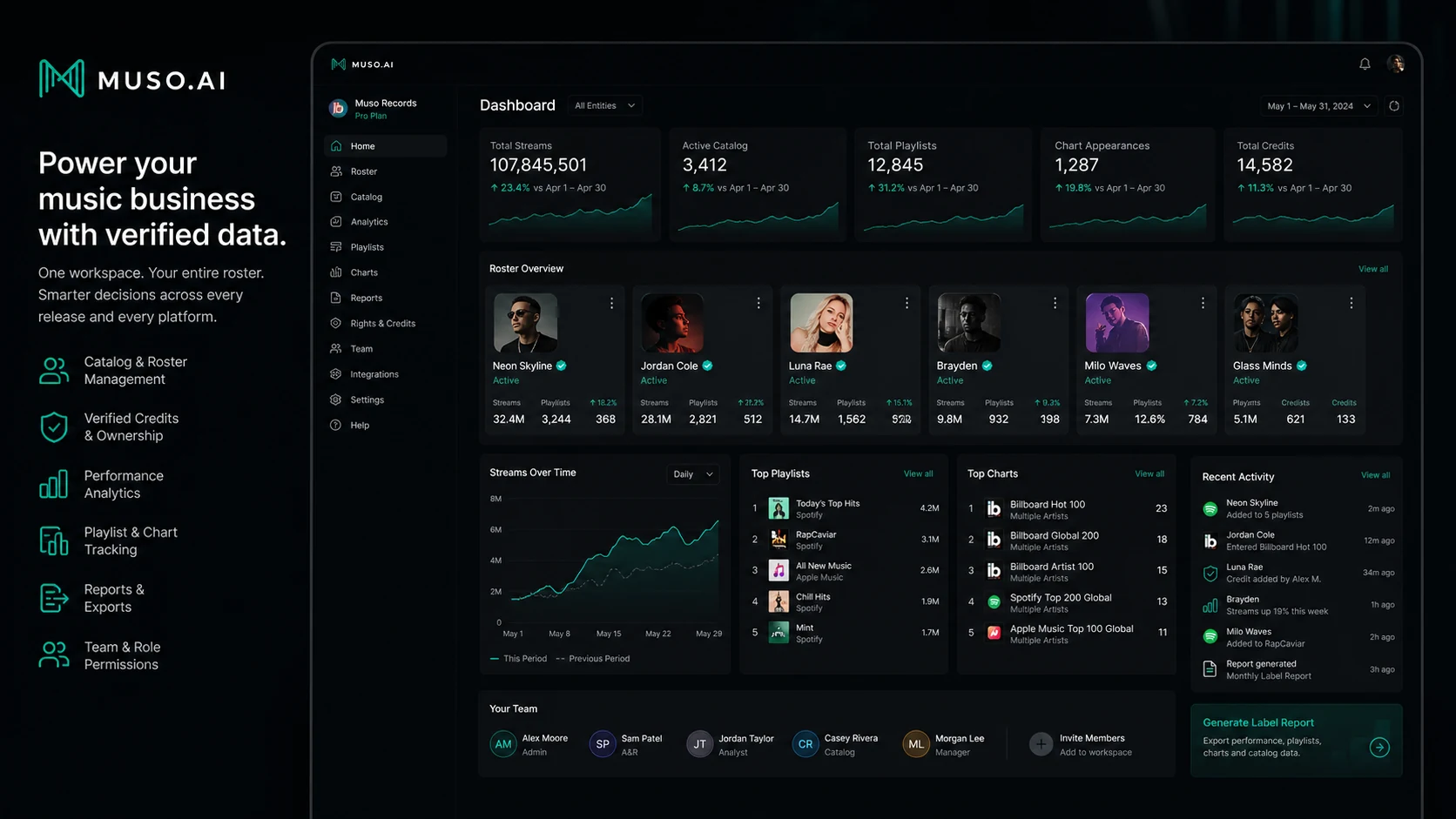
That distinction matters more than the brand name makes it sound. Muso.AI is not an AI music generator, not a beat maker, not a royalty-free music library, and not a chatbot workspace. It is better understood as a verified music credits and analytics platform for people who need to claim profiles, correct legacy credits, understand catalog activity, and monitor performance across a professional music career or roster.
The strongest reason to consider it is the free starting point. If you are a songwriter, producer, engineer, vocalist, artist, manager, label, studio, publisher, or educator with credits to clean up, Lite gives you a safer way to inspect the platform before paying. For my money, that is the right order: claim the profile first, check whether the credits are accurate, then decide whether Pro or Business analytics will change any real decision.
I would be more careful if you are only curious about music analytics, have no released catalog, or simply want a creator-audio tool. A paid plan makes sense only when the data will help you act: fix credits, monitor collaborators, report to clients, evaluate roster performance, or understand which tracks and roles are actually moving.
Next step: If Muso.AI sounds like the right credit-management workflow, start by checking the live product route and pricing before choosing a paid plan.
Review snapshot
| Review point | Practical take |
|---|---|
| Best for | Music professionals and teams that need to claim, verify, correct, and monitor credits |
| Not ideal for | Buyers looking for AI music generation, stock music, voice generation, or a generic AI assistant |
| Main use case | Credit management first, analytics second, business catalog visibility when needed |
| Free path | Lite is the safest starting point for profile and credit cleanup |
| Paid path | Pro fits individual analytics; Business fits teams managing multiple profiles or catalogs |
| Main strength | Combines credit visibility with career and catalog analytics |
| Main concern | Paid value depends on real credits, real catalog activity, and clear billing expectations |
| Best direct alternatives to compare | Chartmetric, Soundcharts, Viberate, Spotify for Artists or Apple Music for Artists for narrower native analytics |
| Adjacent internal routes | Mubert for AI music generation, Thematic for creator music licensing, ElevenLabs for voice/audio generation |
| Best next step | Claim the profile on Lite, clean up metadata, then test whether analytics would change decisions |
What is Muso.AI?
Muso.AI is best understood as a music credits, profile verification, catalog management, and analytics platform for music professionals.
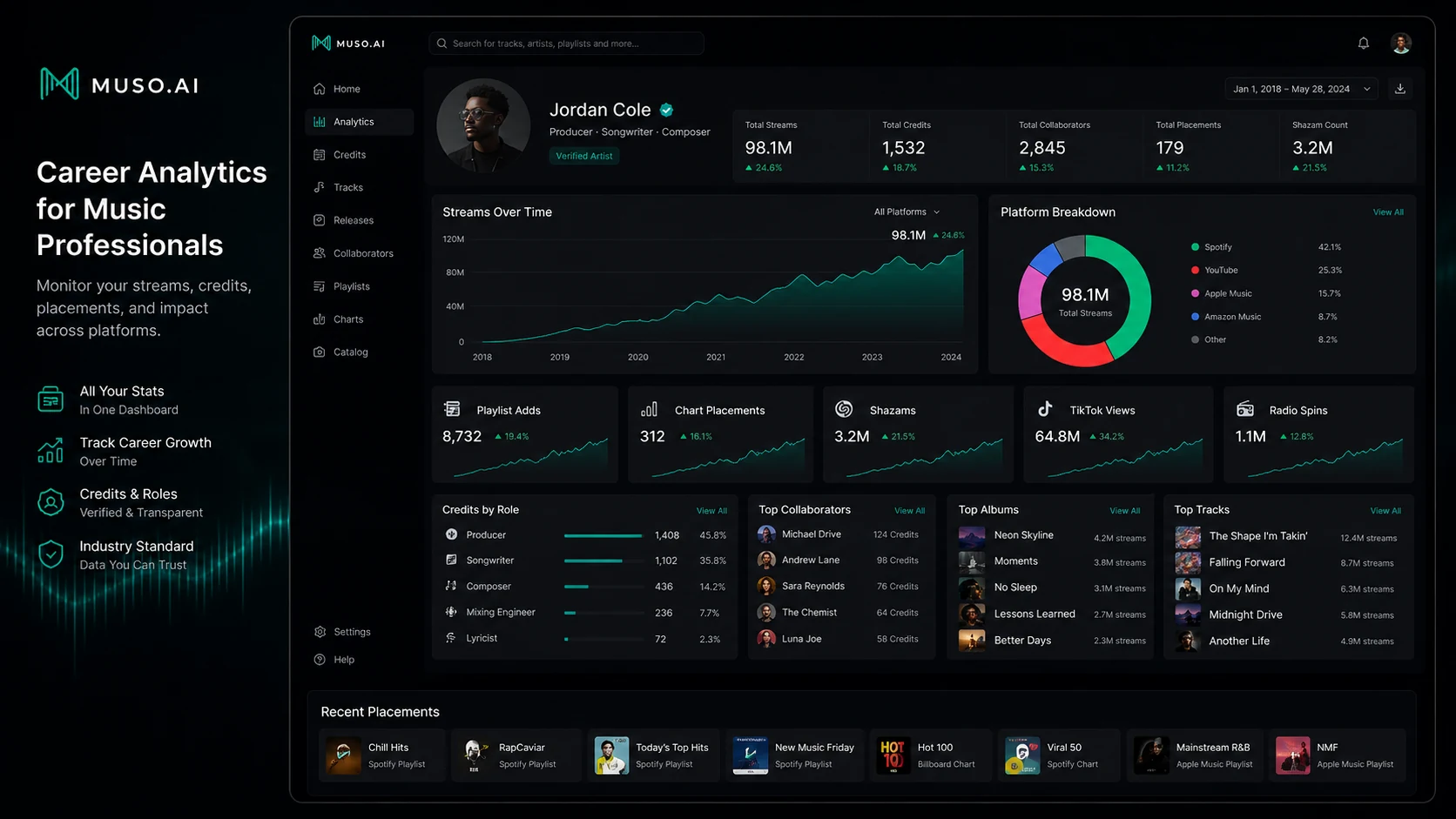
Its core job is practical: help people who contributed to music get their credits into cleaner shape, make those contributions more discoverable, and then connect the credit data to analytics. That can matter for behind-the-scenes contributors who are difficult to track across platforms: songwriters, producers, engineers, vocalists, musicians, mixers, managers, studios, publishers, labels, and education programs.
The common misunderstanding is that Muso.AI is an AI music creation tool. I would not judge it that way. If you want to generate background music, create AI songs, license tracks for videos, or produce voice audio, Muso.AI is the wrong comparison set. Its value is closer to “who made what, where is that credit represented, and what can the buyer learn from the catalog after it is cleaned up?”
Our review approach: we compare public product pages, pricing details, help documentation, terms, buyer workflow fit, marketplace information, and nearby alternatives. We do not treat a low monthly price, a free plan, or a coupon route as proof that a product fits the buyer.
The evidence is strongest around product role and public plan structure. I am more cautious around refund handling, long-term business workflow depth, and how useful the analytics will be for a specific buyer because those depend heavily on the catalog, the profile data, and the live checkout terms.
Who should use Muso.AI?
Muso.AI makes the most sense for music professionals who already have credits to manage.
A songwriter or producer with scattered credits may use it to claim a profile, inspect legacy credits, and correct messy metadata before the credits become part of a public professional story. In that case, the free Lite path is not just a sample. It is the first real test of whether Muso.AI can find and organize the buyer’s work.
An engineer, vocalist, mixer, or session musician may find it useful when behind-the-scenes work is spread across tracks, albums, collaborators, and streaming services. The practical value is visibility. If Muso.AI helps the buyer consolidate contributions that were previously difficult to show, it can support career proof, networking, and future opportunities.
An artist or artist-side team may care about artist page control, profile verification, and metadata correction. This is where the buyer should verify ownership and verification steps before assuming every catalog issue can be fixed quickly.
A manager, studio, label, publisher, or school may be a stronger Business candidate. These users are not just looking at one profile. They may need to monitor a roster, compare catalog performance, manage multiple users, and create a more structured view of credit-linked activity.
I would also include music professionals who care about analytics but feel platform-native dashboards are too fragmented. Muso.AI may become useful when the buyer wants career data arranged around credits, roles, collaborators, albums, tracks, charts, playlists, Shazams, TikTok views, or streaming activity instead of checking every source manually.
Who should avoid Muso.AI?
Avoid Muso.AI if your real goal is music generation.
This is the easiest mismatch. Muso.AI may have “AI” in the name, but it is not the tool I would choose for generating tracks, creating loops, producing beats, making voiceovers, or finding royalty-free music. If that is the buyer job, an adjacent route like Mubert, Thematic, or ElevenLabs makes more sense than forcing Muso.AI into the wrong category.
I would also skip paid Muso.AI if you have no released catalog or meaningful credit history yet. You may still want to create a profile, but paid analytics are only valuable when there is enough real data to analyze. Otherwise, the dashboard can become an expensive curiosity.
Be careful if you expect Muso.AI to guarantee royalty recovery. Cleaner credits and catalog audits can support better visibility, but that is not the same as a guaranteed payment outcome. If the buying decision depends on missing payments, understand the workflow carefully and verify what the platform can actually do.
Teams should avoid upgrading too quickly if they have not mapped profile count, user count, catalog ownership, reporting needs, and support expectations. Business pricing can look straightforward at the entry level, but roster and user requirements can change the real cost.
Finally, I would not buy only because a deal path exists. A discount is useful after product fit is clear. It is not a shortcut around catalog accuracy, billing terms, or workflow need.
How Muso.AI fits into a real workflow
A strong Muso.AI workflow starts before the paid plan.
The first step is to search for the relevant profile, artist page, tracks, albums, and collaborator credits. If the base catalog is empty, incomplete, or mixed with someone who has a similar name, that is the first problem to solve. Analytics can wait.
The second step is verification. This may involve proving identity or confirming access to an artist page. That is not just administrative friction. It is part of the trust layer. Credit data matters only if the right people can claim and correct it.
The third step is cleanup: legacy credits, duplicate profiles, missing roles, incorrect collaborators, or albums that need better attribution. For many buyers, this may be the highest-value part of Muso.AI even before Pro analytics becomes interesting.
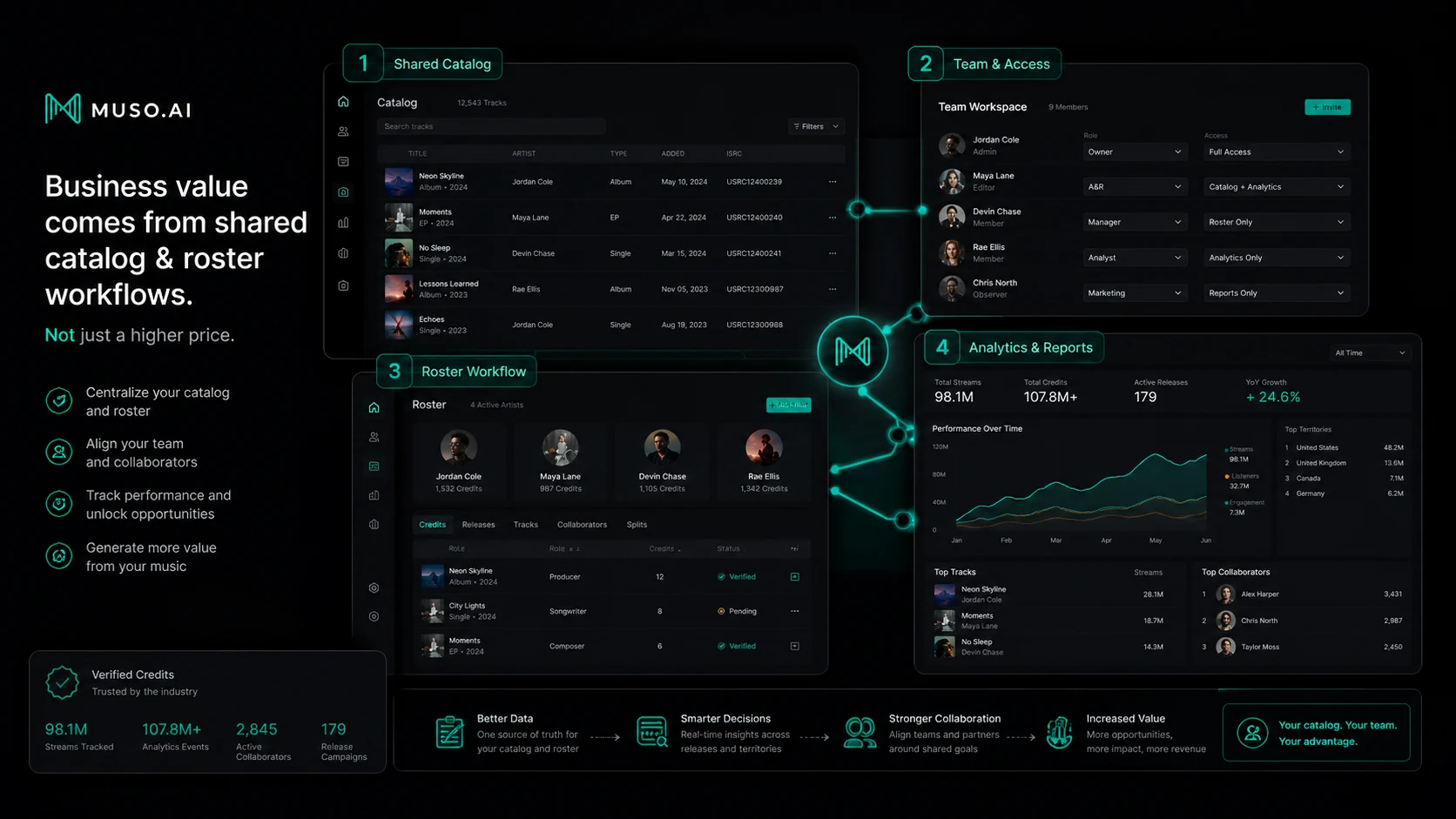
Only after that does the paid plan decision become serious. Pro is easier to justify when one professional wants deeper profile analytics, discography playlists, milestones, charts, or catalog audits. Business is easier to justify when several profiles, several users, company analytics, list analytics, and roster-level reporting become part of the work.
Workflow check: Use Muso.AI only after you know whether your profile and credits are present enough to make the analytics useful.
Real-world buyer scenarios
A songwriter with scattered credits
A songwriter may have credits across releases, collaborators, streaming services, and old metadata sources. Muso.AI fits if the buyer needs a central place to claim and correct those credits.
Where it may fail is volume. If the songwriter has only a few credits and no active need for analytics, Lite may be enough for now. I would not upgrade until the cleaned-up profile clearly supports a career need.
A producer or engineer proving behind-the-scenes work
For producers, engineers, mixers, and session musicians, the value is not only analytics. It is professional proof. A cleaner credit page can help show work that might otherwise be buried behind artist names.
The buyer check is accuracy. If the profile blends similar names or misses important contributions, fix that before trusting any performance view.
A manager watching a small roster
A manager may need to understand how multiple artists, producers, or writers are performing. This is where Muso.AI Business becomes more interesting, especially if roster performance, company analytics, and list analytics reduce manual reporting.
But I would not assume Business is needed on day one. First, check how many profiles need Pro access, how many users need seats, and whether the analytics are the same metrics the manager already uses for decisions.
A label, studio, publisher, or school
For organizations, Muso.AI is less about one profile and more about catalog or roster visibility. The platform can be useful when several contributors need to be tracked across roles, streams, playlists, charts, and catalog-level performance.
The risk is process fit. If the organization does not have someone responsible for maintaining credits and reviewing the data, the dashboard may become another subscription no one uses.
Key features that actually matter
Credit claiming and profile verification
This is the foundation. Muso.AI is most useful when it helps the right person claim the right profile and connect that profile to accurate credit data.
Buyer note: Do not judge the platform by analytics first. Start by checking whether your profile, artist page, albums, tracks, and collaborator history are represented correctly.
Legacy credit correction
Music metadata is messy. Muso.AI’s credit correction angle matters because many professionals have old, incomplete, duplicated, or misattributed credits.
Buyer note: This matters most for people with real historical work to clean up. If your discography is simple and already accurate, this feature may not justify upgrading by itself.
Career and profile analytics
Pro analytics can help buyers see performance tied to credits, roles, tracks, albums, playlists, charts, and collaborators. That can be useful for career positioning, promotion, client reporting, and understanding which work is gaining traction.
Buyer note: Analytics are valuable only if they change what you do next. If you will not use the data for pitching, reporting, promotion, catalog cleanup, or career planning, the paid plan may be more than you need.
Catalog audits
Catalog audits are interesting because they connect credit accuracy with missing or inconsistent data. For buyers concerned about gaps between credits and official catalog records, this can become more practical than a simple profile page.
Buyer note: Treat this as a serious verification workflow, not a guaranteed recovery tool. If money or royalties are involved, understand exactly what the audit shows and what action is still required outside the platform.
Business analytics and roster visibility
Business features matter when several people or several profiles need to be managed. Labels, studios, publishers, managers, and schools may care about company analytics, list analytics, profile brackets, user access, and reporting structure.
Buyer note: Business value depends on team process. If only one person checks one profile occasionally, Pro or Lite may be enough. If multiple users need shared visibility, Business becomes easier to defend.
Developer and data access path
Muso.AI has a developer/API direction, but this is not something I would casually treat as a plug-and-play buying reason. Public developer availability and API details should be verified carefully before any technical workflow depends on it.
Buyer note: If API access matters, confirm the current developer route, availability, terms, and support directly before building a product or internal process around it.
Pricing and plan value
Muso.AI’s pricing is reasonably understandable, but the best plan is not decided by price alone.
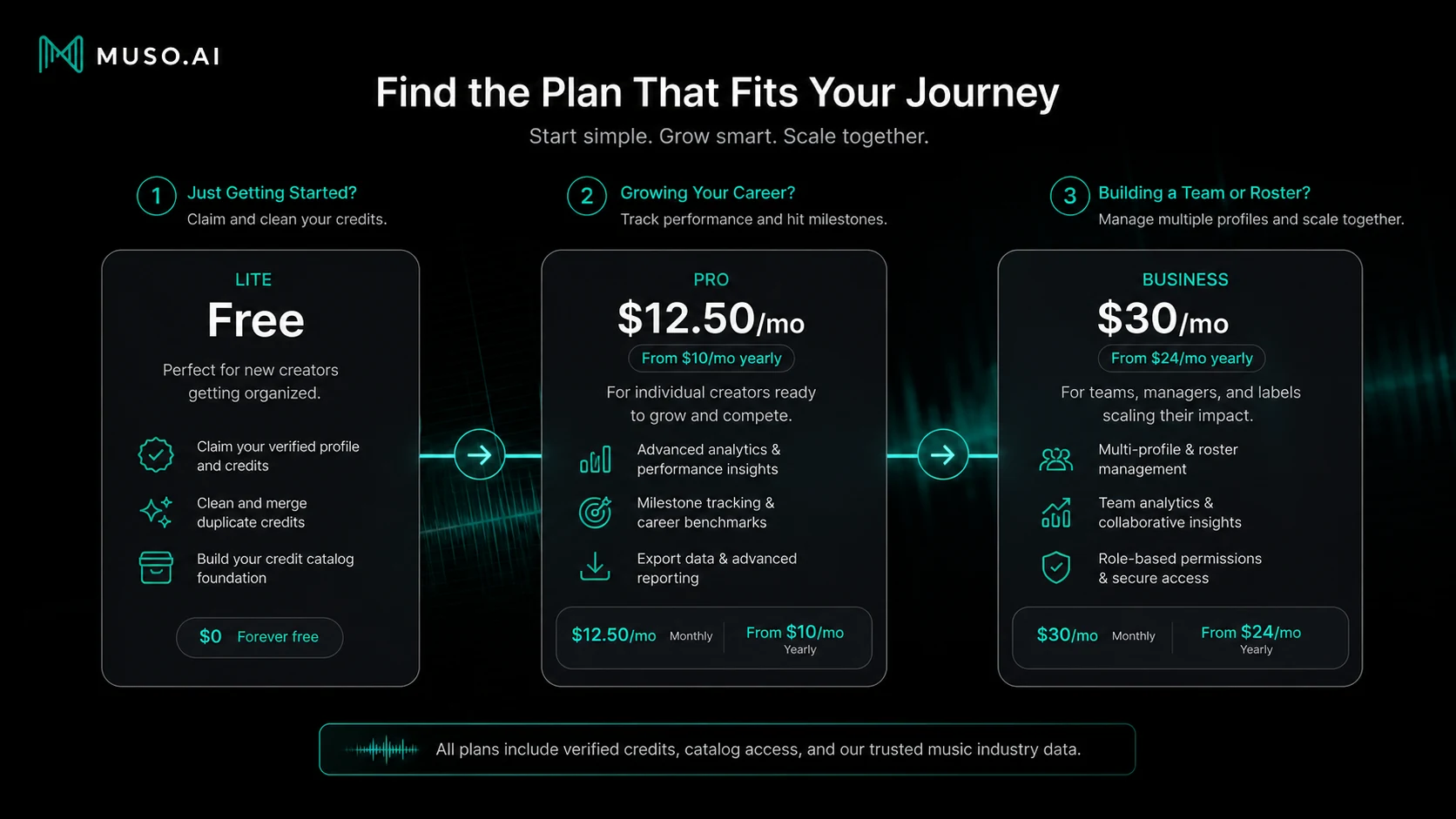
The free Lite plan is the natural starting point. It covers core credit management, profile-page updates, company-page access, and notifications. For many buyers, this is enough to answer the first question: “Does Muso.AI know enough about my credits to be useful?”
Pro is the first paid individual path. Public pricing currently presents Pro around $12.50 per month when billed monthly, with a lower monthly equivalent when billed yearly. Pro adds one profile, one user, profile analytics, discography playlists, milestones, charts, and related career analytics features.
Business starts higher and is built for team or catalog use. Public pricing presents Business around $30 per month monthly, with a lower monthly equivalent on annual billing, but the real Business cost can depend on profile brackets and user needs. That is the part I would inspect carefully before paying.
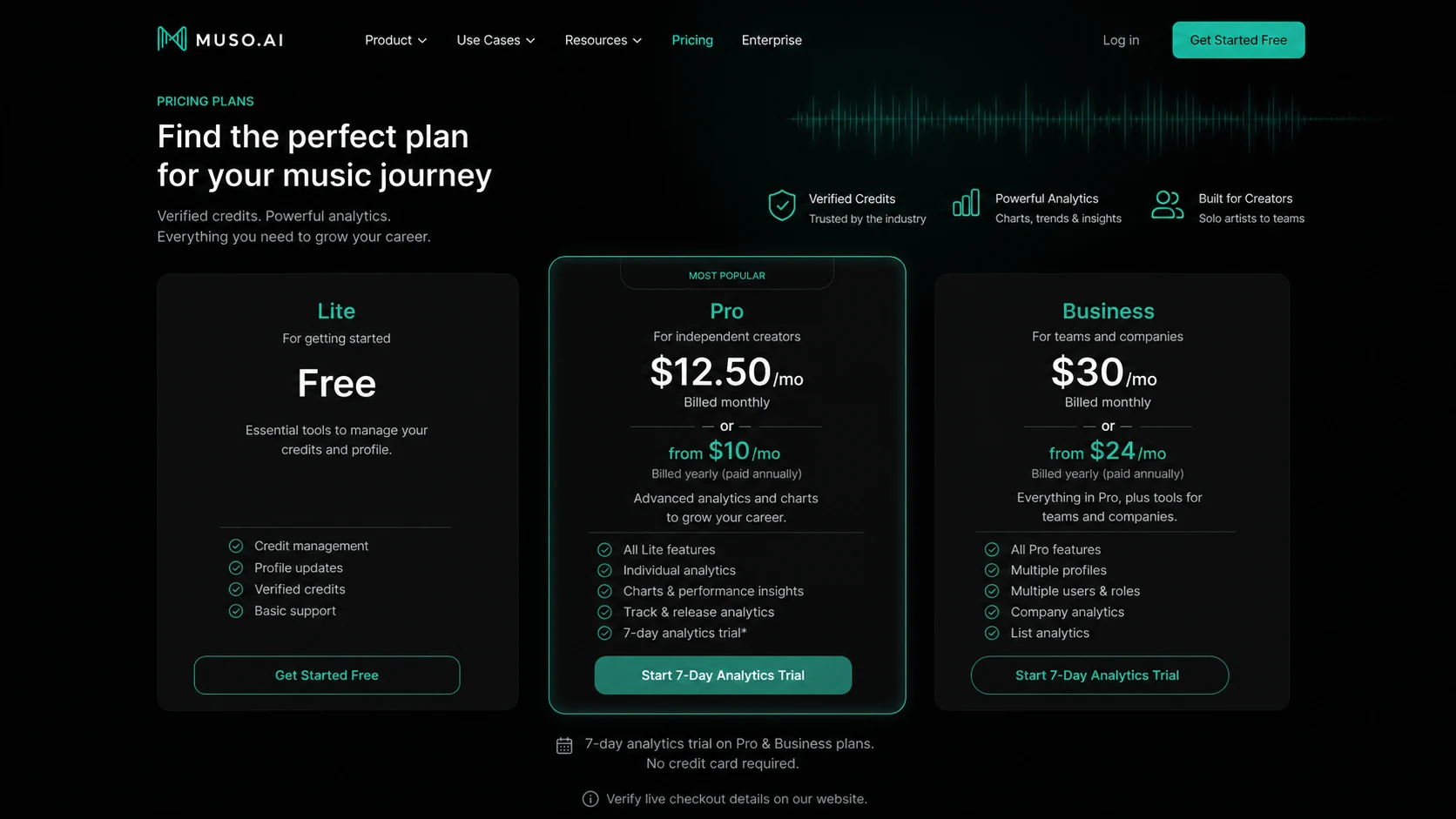
The annual pricing can look attractive, but annual billing should come after proof of use. I would not choose yearly simply because the monthly equivalent is lower. First confirm that the profile data is accurate, that the analytics answer a real question, and that cancellation or billing terms are clear enough for your risk tolerance.
Pricing check: If Pro or Business still looks useful, verify the live plan limits, billing interval, trial scope, and cancellation path before upgrading.
Free plan, trial, coupon, and checkout notes
The best savings path for Muso.AI is not a coupon-first path. It is a free-plan-first path.
Lite is useful because it lets buyers check the most important thing before paying: whether the profile and credit data are worth building on. If the catalog is wrong, thin, duplicated, or not relevant to your work, paid analytics may not fix the core problem. If the catalog is strong and the profile matters professionally, Pro becomes a more reasonable test.
The product also promotes a 7-day trial path around analytics. I would treat that as a focused evaluation window. Do not use a trial only to browse the dashboard. Use it to answer specific questions:
- Can you see the roles, albums, tracks, collaborators, and career signals you care about?
- Are streams, playlists, charts, Shazams, TikTok signals, or milestones useful for decisions?
- Does the data help with reporting, promotion, positioning, or credit cleanup?
- Would you use this every month?
The coupon route should come later. If Muso.AI already fits, you can check the Muso.AI coupon page before checkout. If the product does not fit, no coupon makes it a good purchase.
Checkout order: Confirm credit fit first, then compare plans, then check whether any current offer improves the purchase.
What I would check before buying Muso.AI
If I were buying Muso.AI for a real music workflow, I would check these items before paying:
- Whether my profile already exists and whether it is mixed with another person’s credits.
- Whether the platform shows the albums, tracks, collaborators, and roles that matter to my professional story.
- Whether I can verify ownership or identity without unexpected friction.
- Whether Lite solves enough of the credit-management problem before Pro becomes necessary.
- Whether Pro analytics answer a practical decision, not just curiosity.
- Whether Business profile limits, user limits, and catalog needs match the team’s workflow.
- Whether cancellation, billing cycle, annual pricing, and fee-dispute rules are clear before payment.
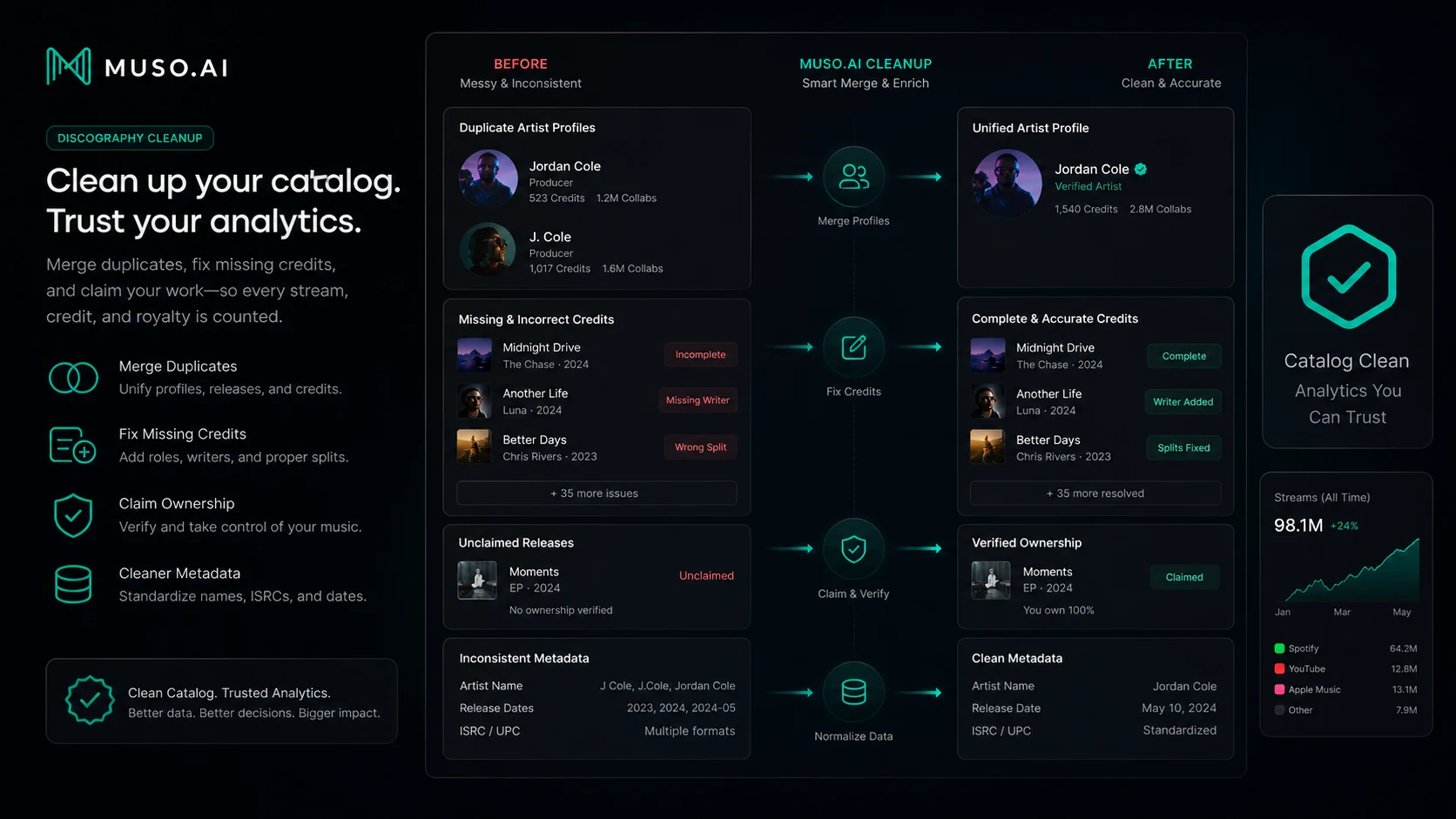
The easy mistake is jumping from “my credits are messy” to “I need a paid analytics plan.” The better order is cleaner: claim, verify, correct, evaluate, then upgrade only if the next layer has a job.
A simple test before paying
Before paying, I would run a small test like this:
- Create or open a Muso.AI Lite account.
- Search for your profile, artist page, tracks, albums, and known collaborators.
- Make a short list of missing, duplicated, or incorrect credits.
- Try the correction and verification workflow where available.
- Check whether the cleaned-up profile would help you professionally.
- If analytics are available through a trial, inspect only the data that would affect a decision.
- Decide whether Pro or Business would save time, support reporting, or improve career visibility every month.
That last phrase matters: every month.
A paid plan should not be justified by a one-time curiosity session. It should make sense because the buyer will keep using the credit, analytics, or reporting layer after the first cleanup pass.
Pros explained
The first major pro is that Muso.AI solves a specific industry problem. Music credits are not always clean, searchable, or properly connected to the people who did the work. A tool focused on that problem has a clearer reason to exist than another broad AI workspace.
The second pro is the Lite plan. A free plan is not automatically generous, but in this case it lines up with the safest buyer workflow. You can check profile fit before paying for analytics.
The third pro is the connection between credits and analytics. If your credits are accurate, analytics by role, collaborator, track, album, chart, playlist, or platform signal can become more useful than a generic dashboard.
The fourth pro is the Business direction. For teams, roster and catalog visibility can be a real operational problem. If Business helps a label, studio, publisher, manager, or school understand contributors and performance in one place, the plan has a stronger case than it would for a casual solo user.
The final pro is buyer segmentation. Lite, Pro, and Business are easy enough to understand at a high level: cleanup first, individual analytics second, team/catalog workflow third.
Cons explained
The biggest con is category confusion. Some buyers may see “AI” and assume Muso.AI creates music, writes songs, generates audio, or behaves like a chatbot. That is not the product’s real lane. The name can attract the wrong buyer unless the job is credit management or analytics.
The second con is that paid value depends on catalog substance. If you do not have enough credits, streams, collaborators, or released work, analytics may feel empty. A clean dashboard does not create career data where none exists.
The third con is billing and refund caution. Pricing pages are easier to understand than refund expectations. Cancellation appears to involve the billing area and support chat, and the terms include a written fee-dispute window. That does not mean Muso.AI is unsafe, but it does mean buyers should not ignore billing details.
The fourth con is Business complexity. Business can be useful, but profile brackets, user counts, roster needs, and onboarding expectations deserve more attention than the starting price.
The fifth con is that Muso.AI should not be treated as a royalty guarantee. Better credits and catalog audits can help with visibility and correction, but buyers should understand the limits before expecting direct financial outcomes.
Green flags and red flags
Green flags:
- You can find your profile and credits in Muso.AI before paying.
- You have legacy credits, duplicate profiles, or missing roles to correct.
- You would use analytics for promotion, reporting, pitching, catalog cleanup, or career positioning.
- Your team manages multiple profiles or a roster and needs shared visibility.
- You are willing to start with Lite instead of jumping straight to annual billing.
Red flags:
- You want AI-generated songs, voiceovers, or background music.
- You have no released catalog or meaningful credit history yet.
- You are buying only because paid plans look inexpensive.
- You expect Muso.AI to guarantee royalty recovery without additional work.
- You cannot verify cancellation, trial timing, or annual billing rules before paying.
Muso.AI vs alternatives
Muso.AI has two different comparison groups: direct music analytics and credit-adjacent tools, and adjacent creator-audio tools.
That separation matters. Mubert, Thematic, and ElevenLabs are useful internal routes for creator-audio decisions, but they are not one-to-one replacements for Muso.AI.
Chartmetric vs Muso.AI
Chartmetric is usually the stronger comparison if the buyer needs broad music market intelligence, artist discovery, playlist tracking, social data, and industry-level analytics. It is more of a market analytics platform.
Muso.AI may still make more sense if the buyer’s first problem is credit ownership, contributor visibility, and profile cleanup rather than broad music-market research.
Soundcharts vs Muso.AI
Soundcharts is another stronger comparison for labels, PR teams, A&R workflows, radio monitoring, playlist tracking, and broader music data operations.
Muso.AI is more focused when the buyer wants analytics tied to verified credits and contributor profiles. If credit identity is the starting point, Muso.AI deserves a closer look.
Viberate vs Muso.AI
Viberate is a better comparison for artists, music marketers, booking teams, and analytics buyers who want a wider industry dashboard around artists, tracks, playlists, venues, festivals, and market signals.
Muso.AI may be better when the buyer specifically needs to claim credits, manage profile data, and connect professional contribution history to analytics.
Spotify for Artists or Apple Music for Artists vs Muso.AI
Native artist dashboards are often the first place musicians should look. They are direct to the platform and useful for platform-specific performance data.
Muso.AI becomes more interesting when the buyer wants a credit-centered view that is not limited to one service. It is not necessarily a replacement for native dashboards; it may sit beside them.
Adjacent creator-audio routes
Mubert is a better route if the buyer wants AI-generated music for creative use. Thematic is closer to creator music licensing and brand-safe track discovery. ElevenLabs is stronger for voice and audio generation.
Those tools are relevant only if the buyer’s real job is audio creation, licensing, or voice production. They are not direct alternatives to Muso.AI’s credit-management workflow.
Trust, refund, and buyer-risk notes
The trust question with Muso.AI is not whether the product has a clear purpose. It does. The more important question is whether the buyer’s catalog and billing situation make paid use sensible.
Pricing is visible enough to evaluate the basic plan structure, but buyers should still verify live checkout. Plan pages, app store listings, and help-center articles can present details differently, especially when annual billing, trials, profile brackets, user brackets, and in-app subscriptions are involved.
Refund handling deserves a separate check. I would not assume a broad money-back guarantee unless the current terms or support team confirm it. The terms discuss fee disputes and written notice within a limited window, while cancellation guidance routes users through billing and support chat. That is enough reason to write down the trial end date and avoid annual billing until repeated value is clear.
Data and identity also matter. Credit verification may require proving who you are or that you control an artist page. That can be normal for this category, but it is still something a buyer should understand before uploading or verifying sensitive professional information.
For Business buyers, the risk is operational rather than emotional. If the team does not know who owns credit cleanup, who monitors analytics, who maintains profiles, and who uses reports, Business can become an underused subscription.
Final verdict
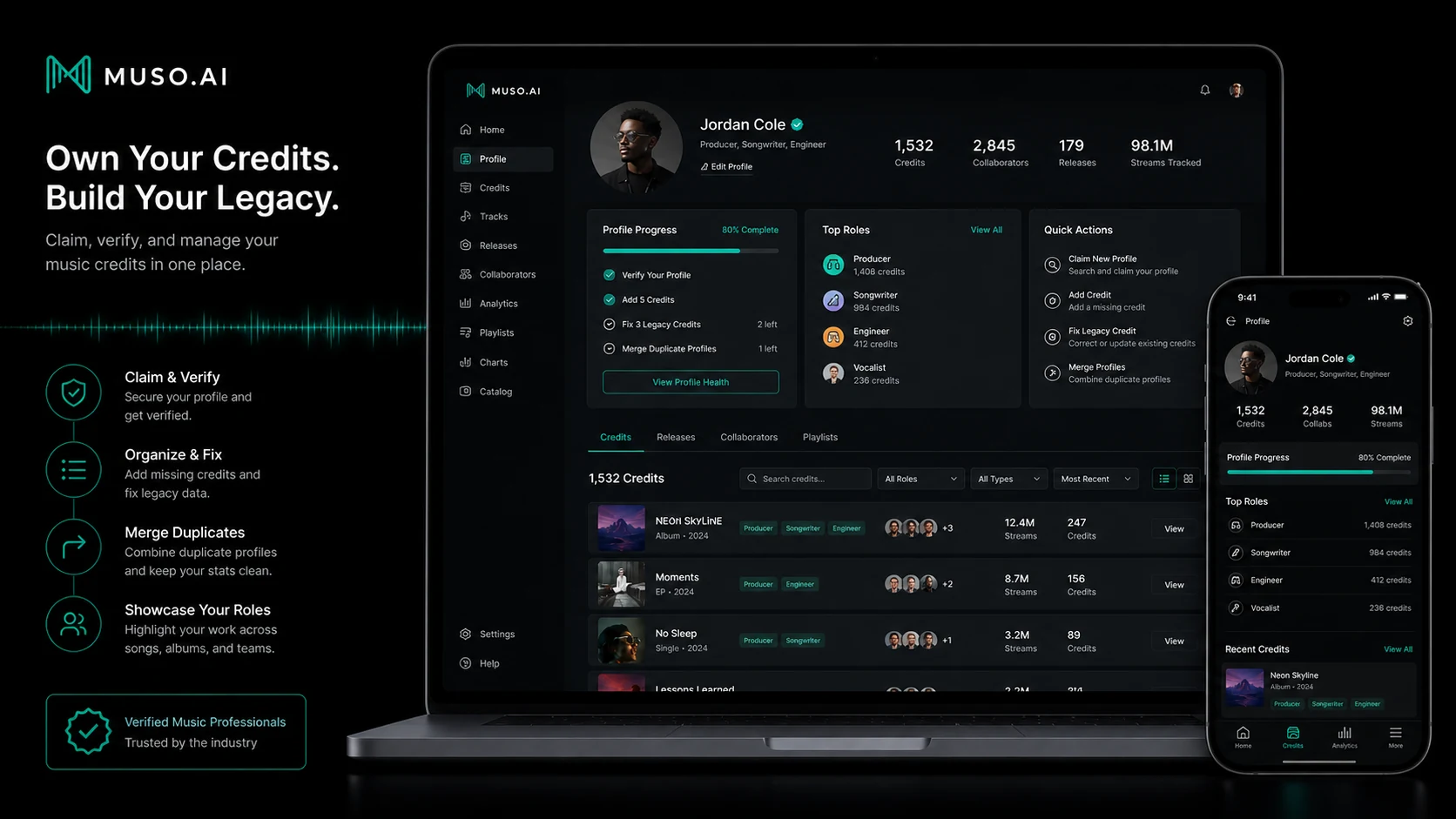
I would consider Muso.AI if your credits matter professionally and you need a cleaner way to claim, verify, correct, and monitor them.
I would start with Lite. That is the buyer-protective path. If the platform helps you clean up your professional profile, Pro becomes easier to evaluate. If the analytics help with real career decisions, client reporting, promotion, catalog audits, or collaborator visibility, the paid plan has a stronger case.
I would skip Muso.AI if you are looking for AI music generation, creator soundtracks, voice generation, or a general AI assistant. The product is not weak because it does not do those things. It is simply solving a different problem.
I would compare Muso.AI with Chartmetric, Soundcharts, or Viberate if your main need is broader music-industry analytics. I would compare it with native platform dashboards if you only need Spotify or Apple Music performance data. I would look at Mubert, Thematic, or ElevenLabs only if the real job is audio creation, licensing, or voice production.
The safest next step is simple: claim the profile, inspect the credits, clean up what you can, then decide whether paid analytics will help you make better music-career or catalog decisions. Do that before treating any discount, trial, or annual plan as the real reason to buy.
