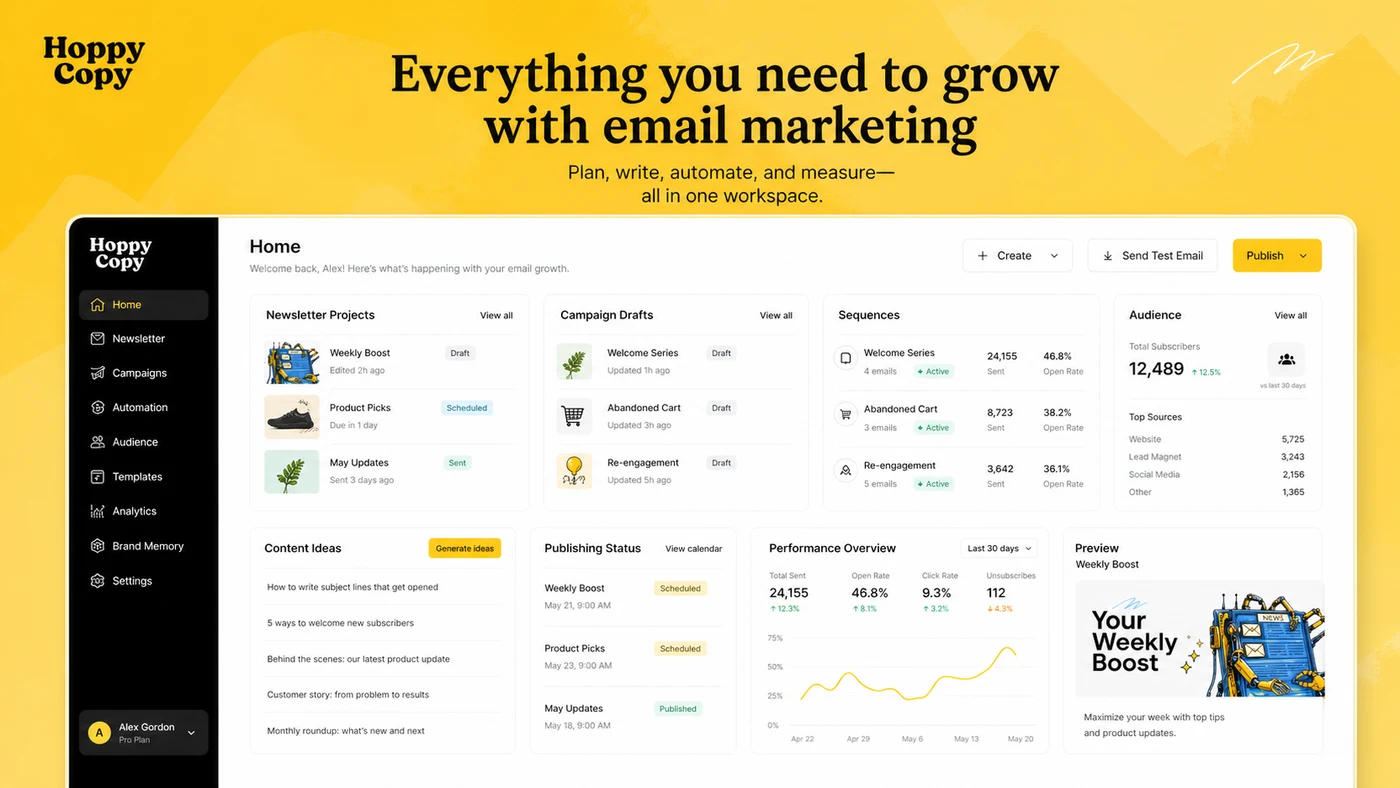
Quick verdict
HoppyCopy is worth a serious look if email is already a repeated part of your business, not just something you write once in a while when a launch comes up.
That is the first line I would draw.
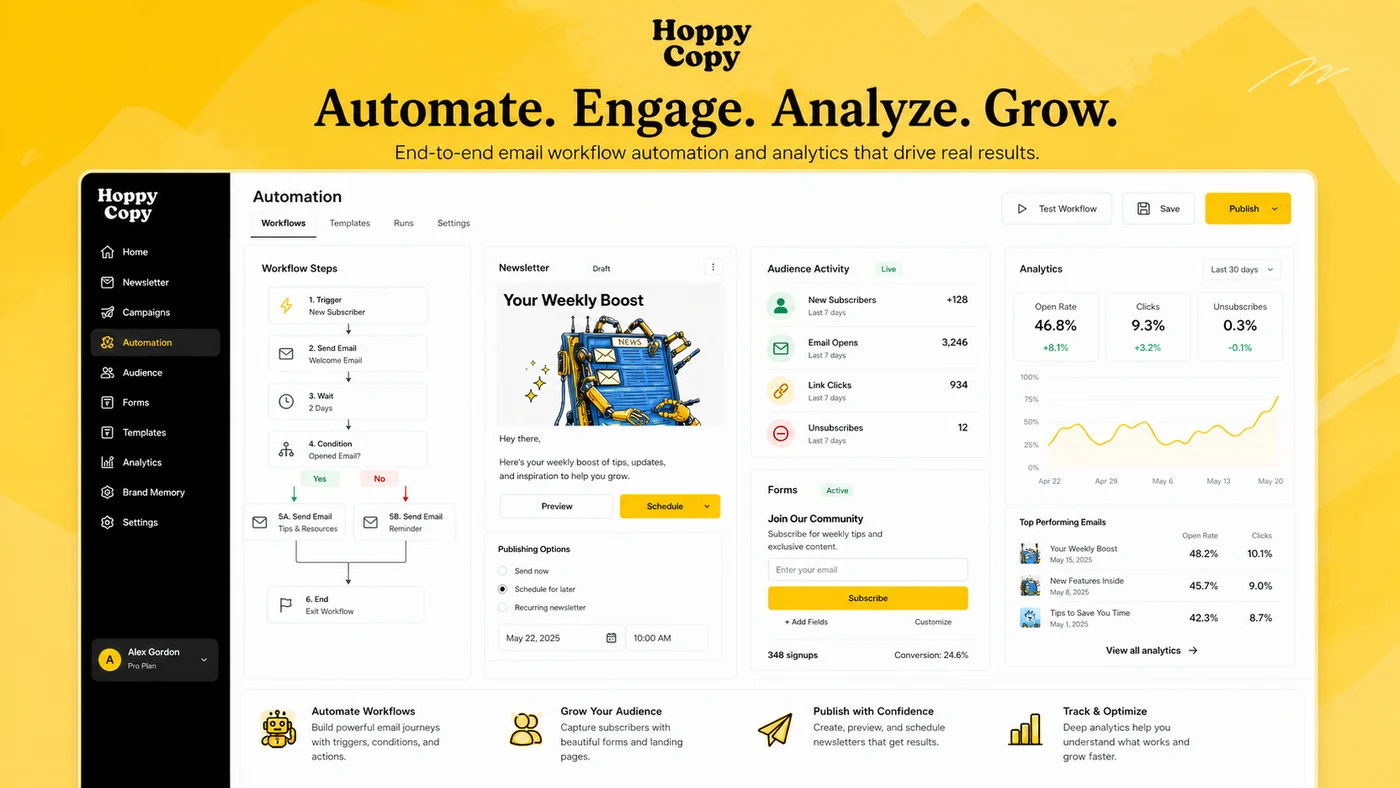
The product is not best judged as “another AI writer.” Its public positioning is broader and more specific: AI writing, email design, newsletter creation, brand memory, competitor monitoring, publishing, automations, forms, and analytics around email marketing. That makes HoppyCopy more interesting than a blank AI chat box for buyers who need weekly newsletters, product announcements, nurture sequences, launch emails, or agency campaign drafts.
But the same breadth also makes the buying decision more careful.
If you only need a few subject lines or a quick promotional email, HoppyCopy may be more platform than you need. If you already have a mature email service provider, CRM automation, segmentation, deliverability setup, and reporting, HoppyCopy may fit better as a drafting layer than as a replacement platform. The mistake would be buying it because the homepage makes email growth look simple.
For my money, the safer test is practical: use the 7-day trial, set up brand memory, create one real newsletter, create one real email sequence, and see whether the output actually reduces editing time. Only then should the pricing page matter.
Next step: If HoppyCopy still fits your email workflow, verify the current trial, pricing toggle, and buyer route before checkout.
Review snapshot
| Review point | Practical take |
|---|---|
| Best for | Creators, consultants, agencies, and small teams producing recurring newsletters or email campaigns |
| Not ideal for | Buyers who only need occasional generic copy or enterprise-grade CRM automation |
| Main use case | Turning brand context, campaign ideas, and audience notes into newsletters, sequences, and promotional emails |
| Trial path | 7-day free trial promoted on the public pricing page |
| Pricing note | Starter, Pro, and Pro+ plan tables appear with monthly and yearly views, so the live billing toggle matters |
| Main strength | Email-first workflow with brand memory, templates, monitoring, publishing, and integrations |
| Main concern | Plan limits, subscriber limits, workspaces, refund language, and platform replacement risk |
| Direct alternatives | Copy.ai, Jasper, Writesonic |
| Adjacent route | ActiveCampaign if CRM automation and lifecycle marketing matter more than AI drafting |
| Best next step | Test one real newsletter and one real sequence before choosing a paid plan |
What is HoppyCopy?
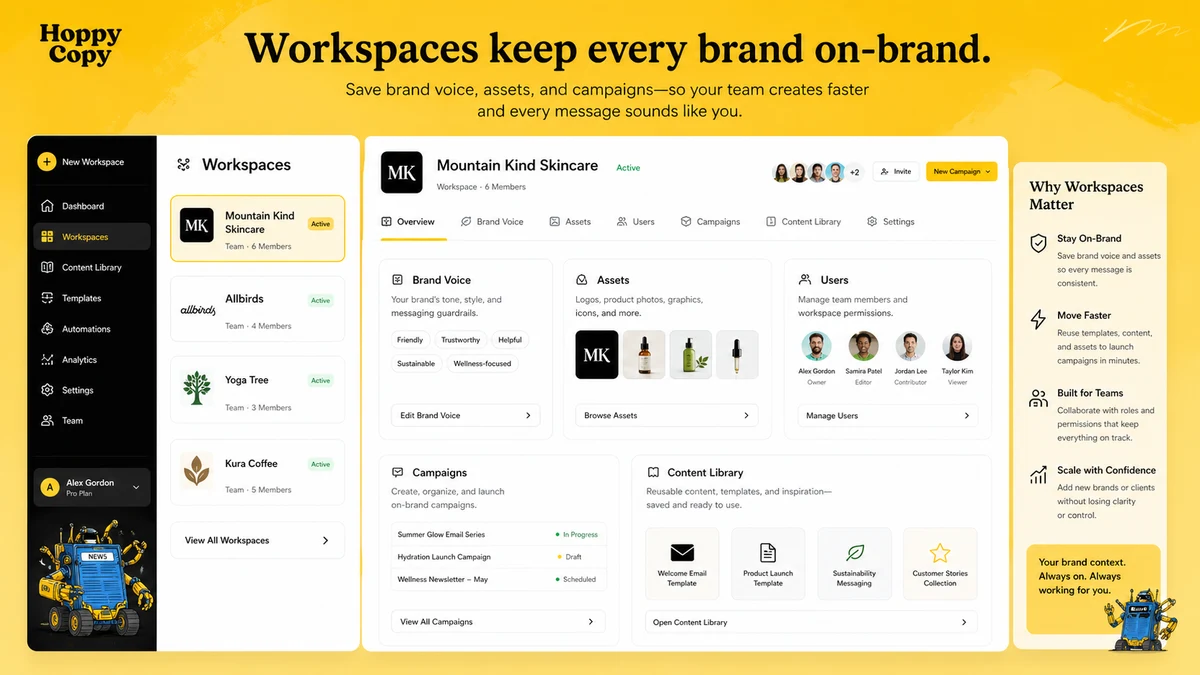
HoppyCopy is an AI-powered email marketing and content platform. In plain buyer language, it helps you write, design, organize, and in some workflows send email content: newsletters, promotional campaigns, sequences, brand-aware drafts, and competitor-inspired campaign ideas.
The important phrase is “email marketing.”
A general AI writer can draft a subject line. HoppyCopy is trying to own more of the email workflow around that subject line: brand memory, writing tools, content blocks, design, publishing, automations, forms, analytics, integrations, and competitor monitoring. That is why the buying decision should not be framed as “Can AI write emails?” It should be framed as “Does this platform reduce the work around the emails I already send?”
Our review approach compares public product pages, pricing details, help documentation, buyer workflow fit, deal terms, and nearby alternatives. I would not treat a low monthly price, an annual discount, or a trial button as proof that HoppyCopy fits. The product has to earn its place inside a real content and email process.
HoppyCopy is not a full replacement for every email service provider in every case. It may help with publishing and automation, but a business with advanced CRM journeys, deep segmentation, deliverability controls, and complex lifecycle reporting should be cautious before moving too much of the stack too quickly.
It is also not mainly a long-form SEO article tool. It can help with marketing copy, but its strongest reason to exist is email-first work.
Who should use HoppyCopy?
HoppyCopy makes the most sense for creators who publish newsletters consistently. If you already have topic ideas, links, product updates, or audience notes but struggle to turn them into a clean weekly email, HoppyCopy can reduce the blank-page problem. The condition is simple: you need to send often enough for the workflow to matter.
It can also fit consultants, coaches, and small businesses that sell through email. These buyers may need welcome sequences, launch messages, nurture campaigns, seasonal promotions, or product update emails. HoppyCopy gives them a more structured starting point than a generic chat prompt.
Agencies may find the workspace and brand memory angle useful. Separate clients, voices, assets, and campaign drafts can become messy inside a general AI tool. HoppyCopy is more interesting if the agency can keep client context organized and still apply human review before anything goes out.
Small marketing teams should look at HoppyCopy when email content is a bottleneck but the team is not ready to manage a larger content operation. The product can help bridge planning, drafting, design, and publishing. The buyer still needs to verify users, workspaces, subscriber limits, and whether existing tools must remain part of the workflow.
Competitor-aware marketers are another fit. HoppyCopy’s monitoring angle can help with inspiration and market awareness. I would use that as a research input, not as permission to copy competitors. The value is pattern recognition, not imitation.
Who should avoid HoppyCopy?
I would avoid HoppyCopy if you only need a cheap general writing assistant. Tools like Copy.ai, Jasper, or Writesonic may be easier to justify if your work spans sales copy, SEO drafts, ads, social posts, and broad campaign assets without an email-first workflow.
I would also be careful if your current email platform is already mature. If you rely on advanced CRM segmentation, complex automations, attribution reporting, ecommerce triggers, deliverability controls, and lifecycle journeys, HoppyCopy may be useful as a content layer but not necessarily as the system of record.
One-off users should slow down. A 7-day trial is useful, but a paid plan is harder to justify if you do not publish newsletters, sequences, or campaigns regularly.
Teams that expect AI to produce fully send-ready emails without review should also be cautious. Email sits close to customers. Claims, discounts, legal language, personalization, tone, and brand promises all need human judgment before sending.
The last group is coupon-first buyers. A discount can improve the purchase, but it should not decide the purchase. If HoppyCopy does not save time in your actual email workflow, a lower checkout price only makes the wrong tool cheaper.
How HoppyCopy fits into a real workflow
A practical HoppyCopy workflow starts before the first generated email.
First, define the email job. Are you writing a weekly newsletter, a product launch, a welcome sequence, a nurture campaign, or a one-off promotion? The tool is easier to judge when the use case is narrow.
Second, set up brand context. HoppyCopy becomes more useful when it knows the voice, audience, product, positioning, and content sources. If you skip this step, you are more likely to judge the product by generic first drafts.
Third, create the email draft or sequence. This is where the AI writing layer matters, but it is not the whole workflow. The buyer should check whether the output has the right structure, call to action, tone, and offer logic.
Fourth, edit like a marketer. AI can help with speed, but it cannot know every compliance concern, product promise, customer sensitivity, or brand nuance. I would check claims, personalization, links, discount language, and audience fit manually.
Fifth, decide whether HoppyCopy stays as a drafting layer or moves closer to publishing. Exporting to an existing ESP is a lighter decision. Moving forms, subscribers, automations, analytics, or sending workflows into a new system is a bigger operational decision.
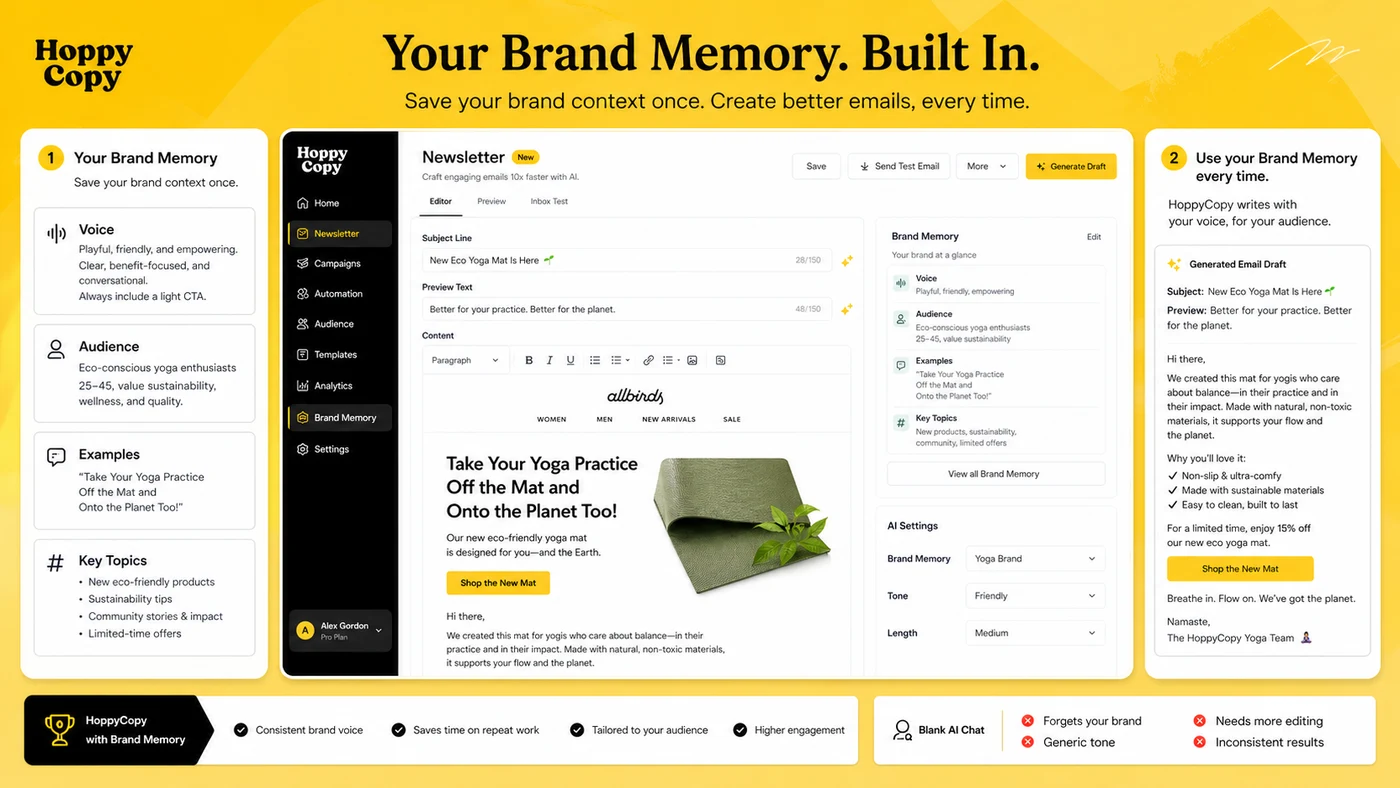
Workflow test: Try HoppyCopy with one real newsletter and one real sequence before judging the paid plan.
Real-world buyer scenarios
A creator with a weekly newsletter is probably the cleanest scenario. The creator already has ideas, posts, offers, or audience questions, but the weekly email still takes too long. HoppyCopy may help turn that raw material into a draft faster. The risk is that the creator still needs to edit the voice carefully so the newsletter does not feel machine-written.
A consultant launching a new service has a different need. They may need a welcome sequence, an announcement email, a follow-up message, and a few promotional angles. HoppyCopy can provide structure. The buyer should still check whether the output handles nuance, trust, and offer clarity well enough for a professional audience.
An agency managing multiple clients should focus on workspaces and brand memory. The tool may help separate client voices and repeatable campaign formats. The risk is plan fit. More clients can quickly mean more users, more workspaces, more review overhead, and more need for approval workflows.
A business considering HoppyCopy as a publishing platform needs the slowest test. Drafting is one thing. Subscriber management, forms, automations, sending, analytics, and integrations are another. I would not move a list casually unless the team has tested the workflow, exports, analytics, domain setup, and support expectations.
Key features that actually matter
Email-first AI writing
HoppyCopy’s strongest feature is not that it can generate text. Many tools can do that. The stronger angle is that the writing tools are shaped around email jobs: newsletters, sequences, promotions, updates, subject lines, and campaign copy.
Buyer note: judge output by a real email you would actually send, not by a playful test prompt.
Brand memory and voice assets
Brand memory matters because repeat email work gets painful when every draft starts from zero. A useful brand setup can reduce repeated prompting and make the first draft closer to your normal tone.
Buyer note: do not judge HoppyCopy before setting up enough brand, product, and audience context.
Workspaces for teams and agencies
Workspaces can help separate brands, clients, documents, images, and users. This is especially useful when multiple campaigns or client accounts are involved.
Buyer note: verify how many users and workspaces the selected plan includes before assuming agency fit.
Competitor monitoring
Competitor monitoring is useful when it helps you understand angles, timing, offers, and market patterns. It is weaker if the buyer treats it as a swipe file to copy from.
Buyer note: use competitor monitoring for inspiration and positioning checks, not for imitation.
Publishing, automation, and integrations
The publishing and automation layer can make HoppyCopy feel more like a workflow platform than a writing tool. That is useful when the buyer wants fewer tools. It also increases risk because email infrastructure is closer to the customer.
Buyer note: test export and integration paths before replacing an existing ESP.
Pricing and plan value
HoppyCopy pricing needs a careful read.
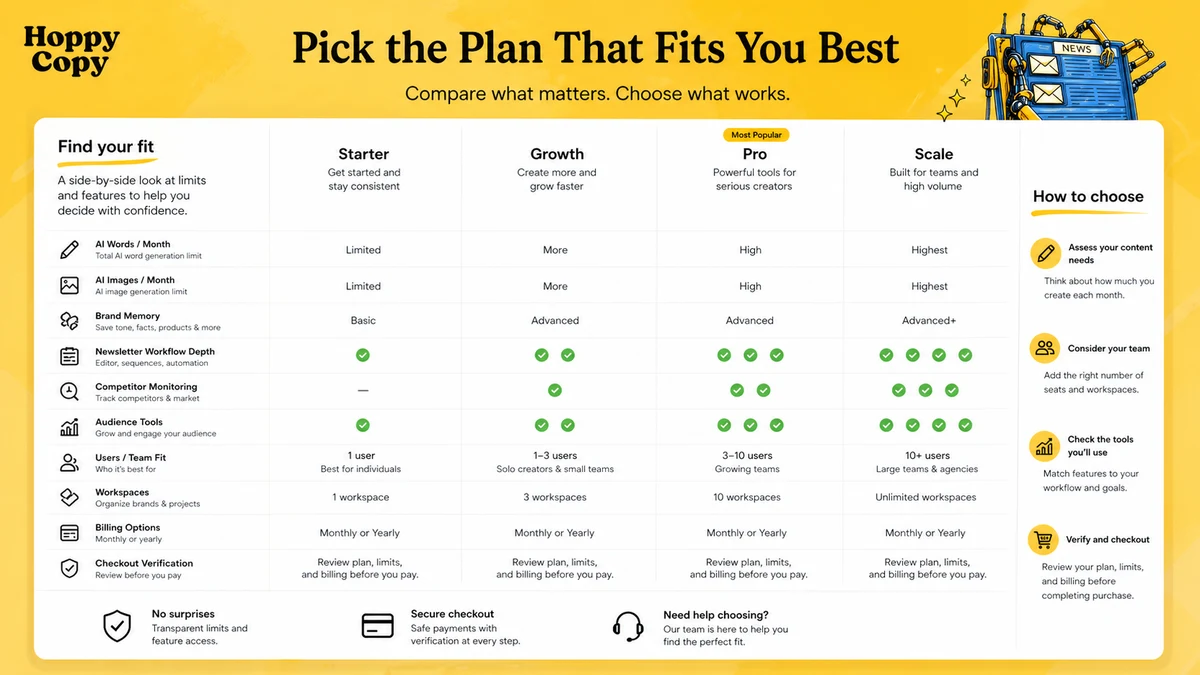
At the time of review, the public pricing page promotes a 7-day free trial and shows monthly and yearly billing views. The Starter, Pro, and Pro+ table shows monthly pricing at $29, $49, and $99 per month, while the yearly view shows lower monthly-equivalent prices of $23, $39, and $79. The same page also presents broader platform-style positioning around an email growth engine, so I would not reduce the buying decision to one headline number.
The plan limits matter more than the first price you notice.
Starter is easier to understand for individual creators and lighter content work. It includes lower limits around generated words, AI images, competitor monitoring, newsletter subscribers, users, and workspaces. That can be enough for testing, but it may not be enough for a team or agency.
Pro is the more realistic comparison point for growing creators and small teams. The higher word, image, competitor, subscriber, user, and workspace limits make it more practical for repeated weekly use.
Pro+ is for teams that need more scale. This is where the buyer should be especially careful with subscriber limits, extra subscriber pricing, users, workspaces, and whether the platform is becoming part of the actual email operation.
The cheapest plan is not automatically the best deal. The right plan is the one that fits your real send volume, content volume, brand structure, and team workflow.
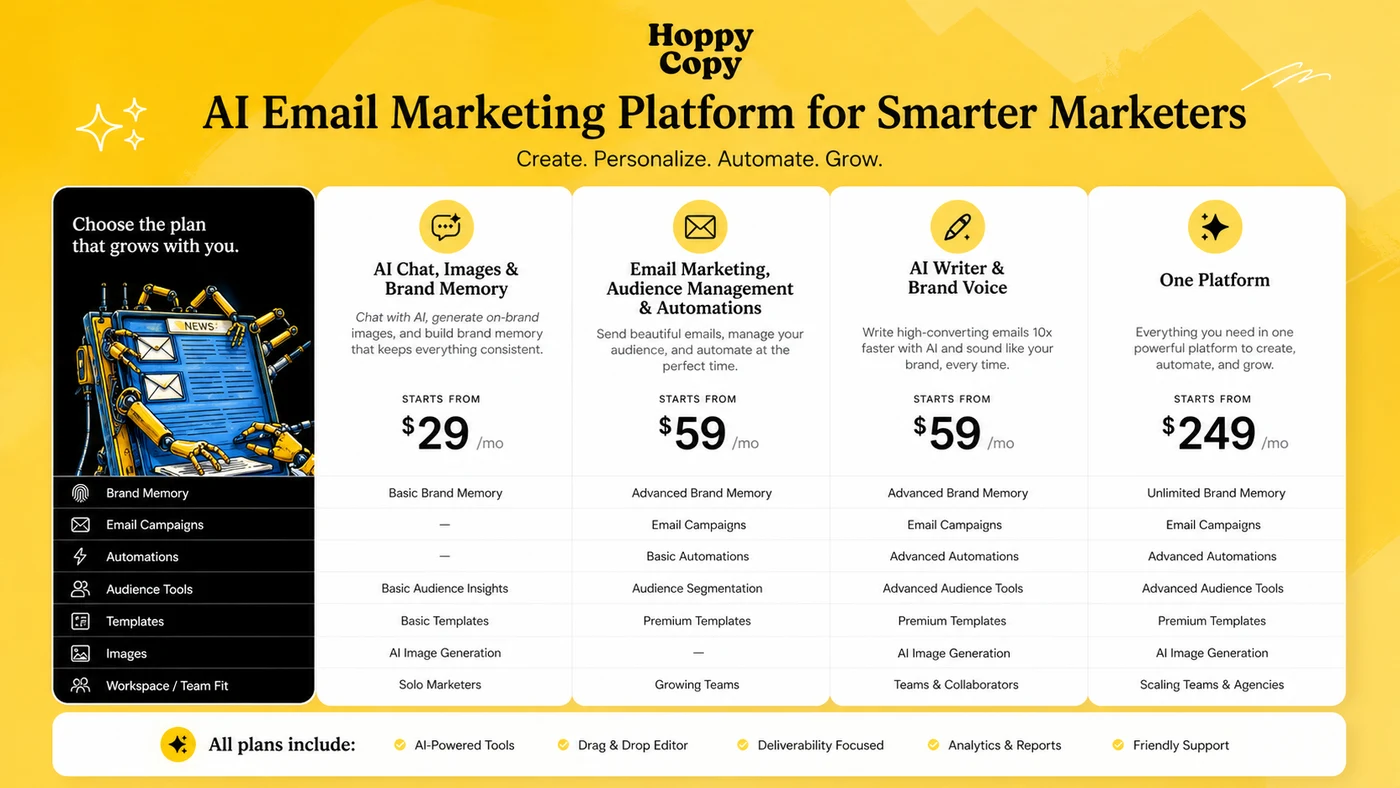
Pricing check: If HoppyCopy looks useful, compare the live monthly and yearly pricing views against your real email volume before paying.
Free plan, trial, coupon, and checkout notes
HoppyCopy publicly promotes a 7-day free trial with no credit card required on its pricing table. That is the path I would use first.
I would not start by hunting for a coupon. The trial is more valuable than a small discount because it tells you whether the tool fits the email work you actually do. During the trial, build one newsletter, one sequence, and one export or publishing path. If those tests feel useful, then compare monthly versus yearly billing.
A permanent free plan was not verified as the main long-term path in the current public pricing flow. Treat the free access as trial-based unless the live pricing page says otherwise.
The coupon path should be secondary. Use the HoppyCopy coupon page to check active offers only after the workflow fit is clear. Do not assume a reusable public checkout code exists.
Refund language deserves attention. The help center says first-month buyers can request a refund within 7 days of the initial purchase, while the terms page contains broader all-sales-final style language. That does not mean buyers should panic. It means refund eligibility should be treated as a live verification point before annual billing.
Checkout note: Use the trial to prove workflow fit first, then check active offers and current refund language before choosing annual billing.
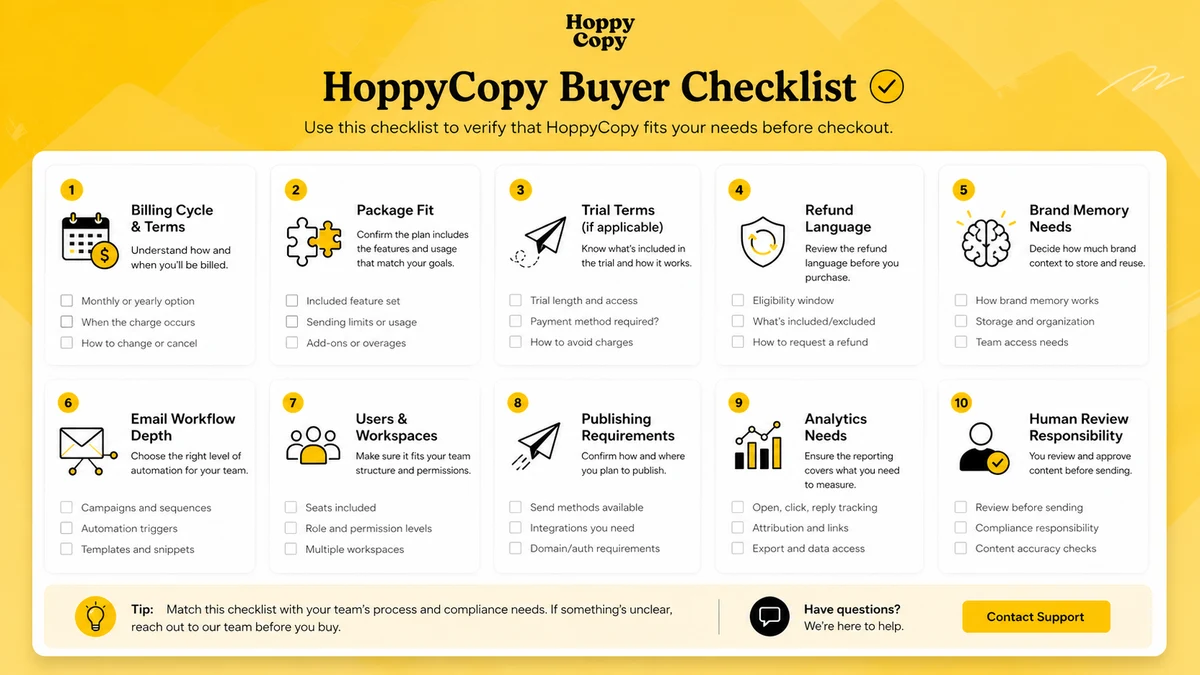
What I would check before buying HoppyCopy
If I were buying HoppyCopy for a real email workflow, I would check these points before paying:
- Whether the visible price is monthly billing or yearly billing.
- Whether the selected plan includes enough generated words and AI images for real weekly use.
- Whether competitor monitoring limits match the number of brands or markets you track.
- Whether newsletter subscriber limits fit your list size and expected growth.
- Whether users and workspaces match your team, client, or brand structure.
- Whether you plan to export into an existing ESP or use HoppyCopy for publishing and automation.
- Whether the current refund language is clear enough before annual billing.
The big mistake is assuming the trial proves every paid-plan use case. It may prove that the AI drafting layer is useful. It may not prove that the publishing, automation, subscriber, and team workflow is ready for a full rollout.
A simple test before paying
Before paying, I would run a small test like this:
- Set up one real brand voice or brand memory profile.
- Create one newsletter from an actual topic, offer, or content source.
- Create one short email sequence for a real product, service, or lead magnet.
- Edit both drafts manually and measure how much time HoppyCopy actually saved.
- Test export, publishing, or integration flow depending on how you plan to use it.
- Compare the trial workflow against your current AI writer or email platform.
- Choose a monthly plan first if the annual commitment still feels uncertain.
This test is intentionally narrow. It is better to learn that HoppyCopy saves two hours a week on one real workflow than to browse every feature and still not know whether it belongs in your stack.
Pros explained
The first real pro is focus. HoppyCopy understands that email has its own patterns: subject lines, sequences, product updates, calls to action, audience timing, deliverability concerns, and brand trust. That makes it more relevant for email-heavy buyers than a generic AI writer.
The second pro is the trial path. A 7-day trial is short, but it is enough to test a newsletter and sequence if the buyer comes prepared. I would use that window seriously rather than casually playing with prompts.
The third pro is brand memory. Repeat content work becomes much easier when the tool can remember voice, product context, and audience direction. This does not remove editing, but it can reduce the setup time for every new campaign.
The fourth pro is workflow breadth. HoppyCopy can sit closer to publishing, automation, forms, analytics, and integrations than many AI writing tools. That is useful when the buyer wants a more connected email process.
The fifth pro is competitor monitoring. For marketers, seeing patterns in competitor emails can help with timing, angle selection, and positioning. The value is strategic input, not direct copying.
Cons explained
The first con is pricing complexity. The public pricing page has more than one layer of positioning, including platform-style language and Starter, Pro, and Pro+ plan tables. Buyers need to verify the live view instead of relying on one remembered price.
The second con is plan-limit pressure. Words, images, competitors, subscribers, users, and workspaces can all become constraints. A plan that looks affordable for one creator may become too tight for an agency or team.
The third con is refund uncertainty. The help center refund article is buyer-friendly, but the terms page includes stricter language. Before annual billing, I would confirm the current rule through the live help center or support.
The fourth con is platform replacement risk. HoppyCopy can be used lightly as a drafting layer, but using it for publishing, forms, automation, audience management, or analytics is a bigger decision. That path affects more than copy quality.
The fifth con is category fit. HoppyCopy is not the strongest first choice for long-form SEO production, enterprise CRM automation, or buyers who only need a cheap AI assistant.
Green flags and red flags
A green flag is that you already send emails every week. If email is a recurring channel, HoppyCopy has more chances to save time.
Another green flag is that your team struggles with consistency. Brand memory, workspaces, templates, and campaign structures can help when different people write in different styles.
A third green flag is that you want email inspiration, not just email generation. Competitor monitoring and campaign structure can support better marketing judgment.
A red flag is buying before testing a real campaign. A nice first draft does not prove paid value.
Another red flag is assuming HoppyCopy will replace a mature ESP without friction. Subscriber workflows, automations, analytics, and deliverability need careful testing.
A final red flag is annual billing before plan limits are clear. If you do not yet know your word volume, subscriber needs, workspaces, or team seats, monthly billing is the safer first step.
HoppyCopy vs alternatives
HoppyCopy has a clearer email-first angle than many AI writing tools, but that does not make it the best fit for every buyer.
Copy.ai vs HoppyCopy
Copy.ai is the stronger comparison if the buyer wants broader go-to-market content, sales enablement, or general marketing workflows. HoppyCopy may still make more sense when newsletters and email sequences are the recurring bottleneck.
Jasper vs HoppyCopy
Jasper is more natural for brand-heavy marketing teams that need broader campaign content, governance, and content operations. HoppyCopy is narrower, but that narrowness can be an advantage for email-first teams that do not need a larger content platform.
Writesonic vs HoppyCopy
Writesonic is a better route when the buyer wants a wider writing and content toolkit across different formats. HoppyCopy is the cleaner fit when the main job is email marketing, newsletter production, and recurring campaign copy.
ActiveCampaign vs HoppyCopy
ActiveCampaign is an adjacent route, not a direct AI writer replacement. It is the stronger comparison when CRM automation, segmentation, lifecycle marketing, and mature email operations matter more than AI-assisted drafting. HoppyCopy may fit earlier in the content creation process; ActiveCampaign may fit deeper in the customer journey.
Trust, refund, and buyer-risk notes
HoppyCopy is close to customer communication, so buyer risk is not only about price.
Pricing should be verified live. The monthly and yearly views, plan names, subscriber limits, users, workspaces, generated words, images, and competitor monitoring can all affect value. Do not buy on the lowest visible number alone.
Refund terms should also be checked before payment. The help center describes a first-month refund request window within 7 days of initial purchase, but the terms page contains stricter language. The safest move is to treat refund eligibility as something to verify before annual billing.
Data and privacy matter because email workflows can include customer context, audience information, brand assets, product claims, and campaign strategy. Read the current privacy policy if the content you plan to enter is sensitive.
AI reliability is another buyer-risk point. HoppyCopy can help create drafts, but the sender remains responsible for accuracy, compliance, tone, and claims. This matters especially for health, finance, legal, ecommerce, coaching, and high-trust offers.
Finally, be careful with platform migration. Using HoppyCopy to draft and export emails is low-risk. Moving subscriber workflows, automations, forms, and analytics is a larger operational change. Test slowly.
Final verdict
I would consider HoppyCopy if email is already one of your main marketing channels and the weekly work feels heavier than it should. The product makes the most sense when newsletters, sequences, brand voice, campaign drafts, competitor inspiration, and publishing workflow all matter together.
I would skip it if you only need occasional generic copy, long-form SEO articles, or a full enterprise email automation stack. In those cases, a broader AI writer or a dedicated ESP may be a better first comparison.
I would compare it with Copy.ai, Jasper, or Writesonic if your content needs are broad. I would compare it with ActiveCampaign if the real problem is lifecycle automation and CRM depth.
The safest next step is not to pick a plan from the pricing table immediately. Use the 7-day trial, build one real newsletter and one real sequence, then decide whether HoppyCopy saves enough editing, planning, and production time to earn a monthly plan. Annual billing should come later, after the workflow proves itself.
