Quick verdict
HeyGen is worth considering if video production is already a real bottleneck in your workflow. If you regularly need avatar-led explainers, product videos, sales clips, training content, localized videos, or presenter-style assets without filming every time, HeyGen can make practical sense.
But I would not judge it by the best-looking avatar demo alone.
The real question is narrower: will HeyGen save enough production time across videos you actually repeat? A polished AI presenter is impressive the first time. The buying decision becomes more serious when you compare video length, export quality, translation minutes, premium credits, custom avatar needs, team seats, API usage, and refund flexibility.
For my money, the safest path is to treat the Free plan as a workflow test, not as proof that a paid plan is right. Create one real video with your own script, brand expectations, and audience in mind. If the output style feels acceptable, then compare Creator, Pro, Business, Enterprise, or API pricing against the workflow you plan to repeat.
I would be careful if you only need a one-off clip, want timeline-level manual editing, or expect synthetic avatars to feel right for every brand. HeyGen is strongest when it replaces a repeated production process. It is weaker when the buyer is only chasing a shiny AI video demo or a possible discount.
Next step: If HeyGen still fits your video workflow, test the current buyer route before choosing monthly, annual, team, or API use.
Review snapshot
| Review point | Practical take |
|---|---|
| Best for | Creators, marketers, sales teams, training teams, and businesses that need recurring AI avatar or presenter-led videos |
| Not ideal for | Buyers who need cinematic editing, deep timeline control, or only one casual video |
| Main use case | Script-to-video, avatar videos, product explainers, training content, translation, and AI video automation |
| Free path | Free plan is useful for testing output style, editor friction, and avatar fit |
| Paid path | Creator and Pro fit solo production; Business and Enterprise fit teams; API pricing is a separate developer path |
| Main strength | Broad avatar-video workflow with web editor, translation, team features, and API options |
| Main concern | Video limits, premium credits, translation minutes, add-ons, seats, and refund rules can change the real cost |
| Direct alternatives | Synthesia, Elai, AKOOL |
| Adjacent route | Fliki for lighter text-to-video and voiceover workflows |
| Best next step | Build one real test video before moving to annual billing or team rollout |
What is HeyGen?
HeyGen is best understood as an AI video creation platform for avatar-led videos, presenter-style explainers, video translation, product clips, training content, and programmatic video workflows.
It is not just a simple text-to-video toy. It is also not a traditional video editor in the same sense as a manual timeline tool. The better way to think about HeyGen is this: it helps turn scripts, images, product messages, avatars, and existing video assets into finished or near-finished videos without arranging a camera, actor, studio, or repeated recording session.
That is the appeal.
A creator can use it to make short presenter videos without appearing on camera. A marketer can use it for product explainers or UGC-style clips. A learning team can use it for onboarding or internal training. A global team can test video translation and localization. A developer or product team can look at HeyGen as an API layer for video generation rather than only a web editor.
Our review approach compares public product pages, pricing details, help documentation, deal terms, buyer workflow fit, and nearby alternatives. We do not treat a coupon, low monthly price, or impressive demo as proof that the product fits the buyer.
The common wrong expectation is assuming HeyGen replaces all video judgment. It does not. You still need to check script quality, voice tone, avatar realism, brand fit, audience trust, consent, disclosure, export quality, and whether the final video feels appropriate for the context where it will appear.
Who should use HeyGen?
HeyGen makes the most sense for creators who publish presenter-led videos often enough that filming becomes friction. If the buyer needs recurring explainers, short social videos, educational clips, or simple product updates, HeyGen can remove the need to record every single asset manually. The condition is that the avatar style must fit the audience. Some brands can use synthetic presenters naturally. Others will feel off immediately.
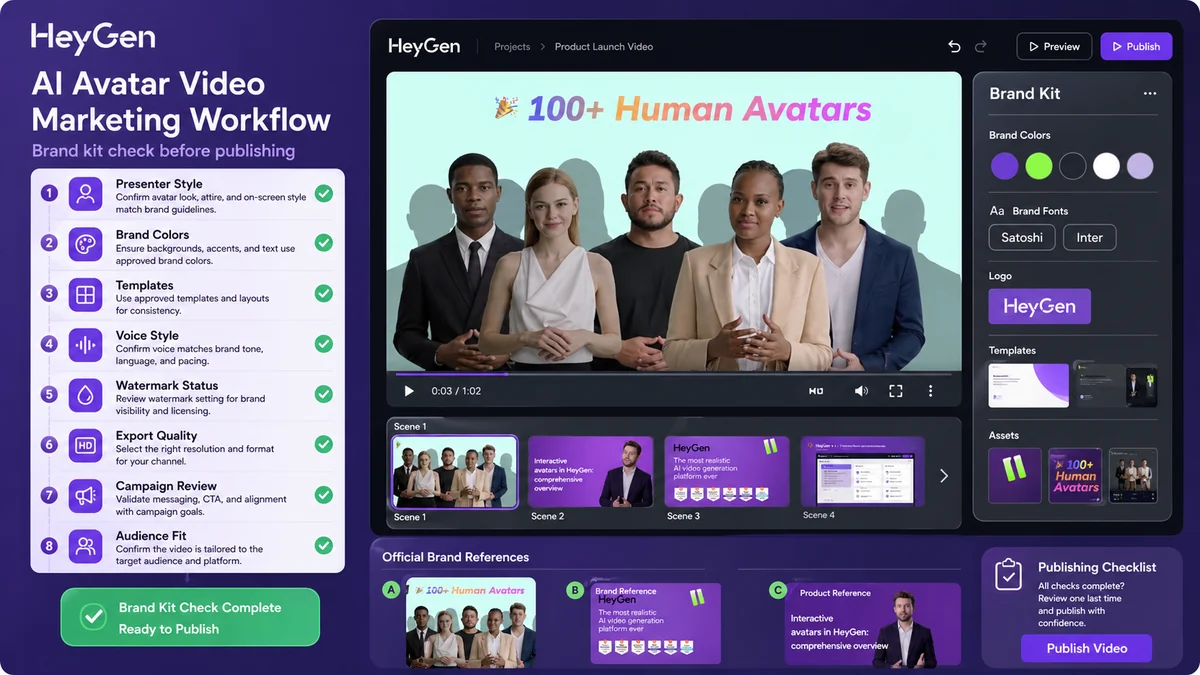
Marketing teams are another strong fit. HeyGen can support product explainers, campaign assets, localized variants, product ads, sales videos, and UGC-style formats. The buyer should verify whether the visual style, brand kit, export quality, and review workflow are strong enough for live campaigns before committing to a higher plan.
Learning and development teams may also find HeyGen useful, especially when training content needs to be updated repeatedly. A presenter-led training clip can be easier to refresh than a fully filmed module. The buyer should check whether Business or Enterprise features such as collaboration, commenting, LMS-related support, SCORM export, SSO, and workspace controls are actually needed.
Sales teams can use HeyGen for outbound, onboarding, product education, or account-based video assets. I would be careful here, though. Personalized synthetic video can be useful, but it can also feel odd if the message is too automated. The safer path is to test it with one controlled sales workflow before scaling.
Developers and product teams should consider HeyGen only if video generation belongs inside a product, internal tool, or automation workflow. API buying is a different decision from subscribing to a creator plan. It requires checking API pricing, endpoints, usage volume, error handling, support, and whether pay-as-you-go economics still make sense at scale.
Who should avoid HeyGen?
I would skip HeyGen if you need deep manual editing control. It can help produce polished AI video, but it is not a replacement for a full editing workflow where every frame, cut, camera angle, animation layer, and sound choice must be controlled manually.
I would also be careful if you only need one quick clip. The Free plan may be enough to test, and a paid subscription can become wasteful if video creation is not a recurring need.
Teams with strict brand, legal, or compliance review should slow down before using synthetic avatars publicly. The issue is not only whether the technology works. The issue is whether the audience understands what they are seeing, whether likeness rights are clean, whether the voice/avatar use is approved, and whether disclosure expectations are met.
Buyers who want a guaranteed refund after experimenting heavily should also be cautious. HeyGen’s public terms and Help Center language make refund flexibility something to verify before generating significant paid content.
Finally, HeyGen is not automatically the best fit for every AI video use case. If the job is mostly voiceover over slides, Fliki may be lighter. If the job is corporate training at scale, Synthesia may be the more direct enterprise comparison. If the job is campaign-style creative with avatars and image-to-video assets, AKOOL deserves a closer look.
How HeyGen fits into a real workflow
A useful HeyGen workflow starts before the editor opens.
The buyer should first define the video job: creator clip, product explainer, training lesson, sales outreach, localization, or API generation. That distinction matters because each path stresses the product differently. A social creator cares about speed and style. A training team cares about consistency and review. A localization team cares about language quality, lip sync, and proofreading. A developer cares about API cost and reliability.
A practical workflow looks like this:
- Choose one real script or existing video asset.
- Decide whether the format should use a stock avatar, photo avatar, custom avatar, or no avatar.
- Generate a short test video.
- Review voice, pacing, lip sync, facial realism, captions, scene layout, and brand fit.
- Check export quality and watermark rules.
- If translation matters, test one language pair before assuming the workflow scales.
- If the video will be used publicly, run a human review for consent, disclosure, legal comfort, and audience trust.
- Only then compare paid plan limits.
The strongest HeyGen workflow is repeatable. If you can create a video format once, improve it, then reuse it across product updates, lessons, ads, sales messages, or localized variants, the platform becomes much easier to justify.
The weakest workflow is emotional. A buyer sees a demo, upgrades too quickly, generates a few clips, and then realizes the output does not match the brand, the plan limits are tighter than expected, or the team still needs a full review process.
Real-world buyer scenarios
Solo creator making recurring educational clips
A creator who makes explainers, summaries, or short educational videos may find HeyGen useful if appearing on camera slows production. The tool can help turn scripts into presentable talking-head clips without filming every time.
Where it may fail: if the audience expects the creator’s real face, personality, or live reactions, synthetic presentation can feel too polished or detached. I would test one real channel-style video before paying annually.
Marketing team producing product explainers
A marketing team may use HeyGen for feature announcements, product demos, campaign assets, short ads, or localized explainers. The value is speed and repeatability.
The risk is brand mismatch. If the avatar, voice, script, or pacing feels generic, faster production does not help. The buyer should check templates, brand kit, export quality, review workflow, and whether the team can keep output on-brand.
Training team updating internal lessons
A training team can benefit when scripts change often. Re-recording a human presenter for every update is slow. An avatar-led training clip can be easier to revise, translate, and distribute.
This is where Business or Enterprise features matter more. The buyer should verify seats, commenting, workspace collaboration, SCORM export, LMS support, SSO, and internal review needs before rollout.
Product team using video generation through API
A product team may want to generate personalized videos, onboarding clips, translated outputs, or template-based videos inside a software workflow. That is not a normal creator-plan decision.
Before building around HeyGen, I would check API pricing, pay-as-you-go balance behavior, developer docs, webhook flow, support level, production reliability, and whether Enterprise gives better economics at higher volume.
Key features that actually matter
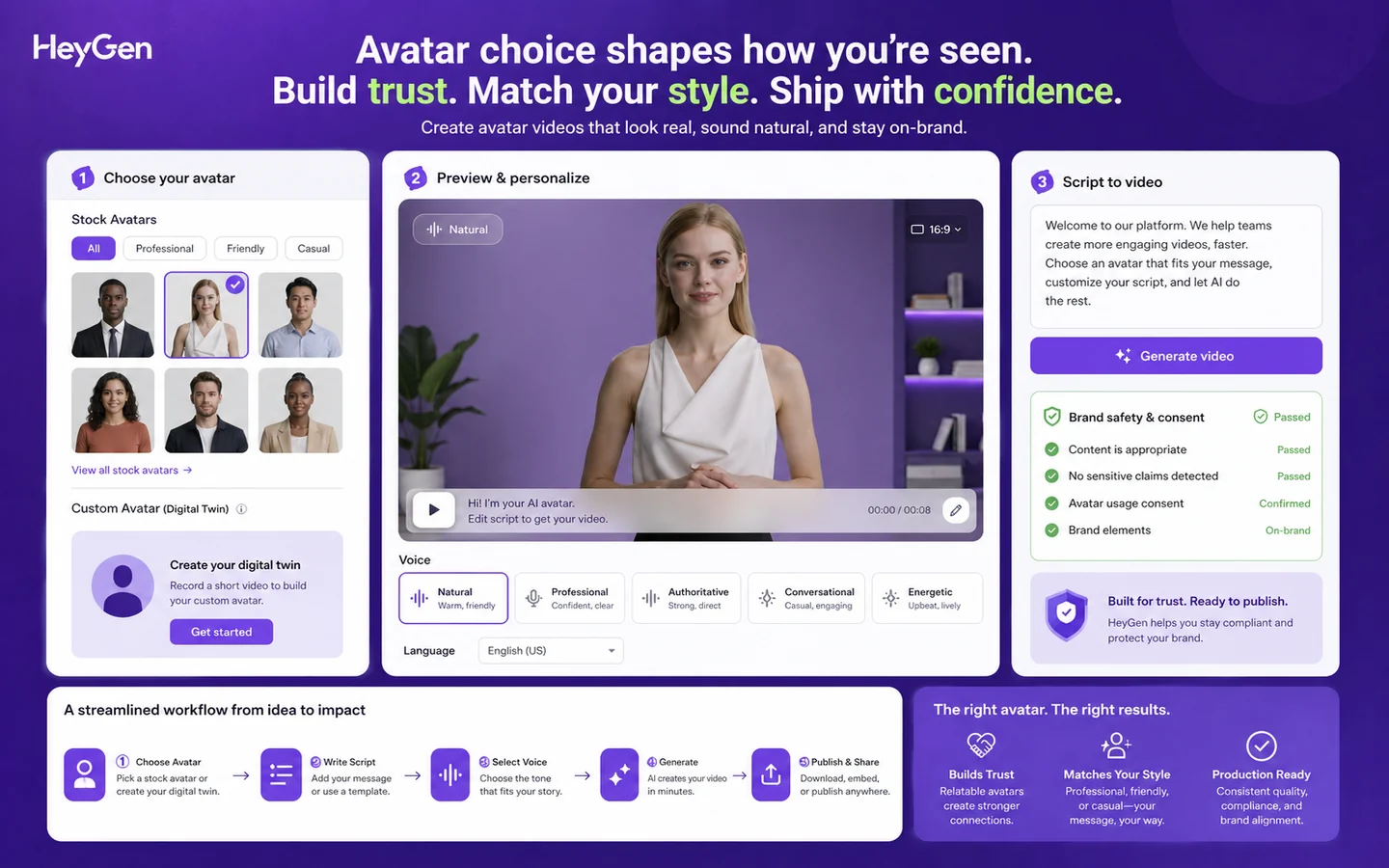
Avatar and digital twin video creation
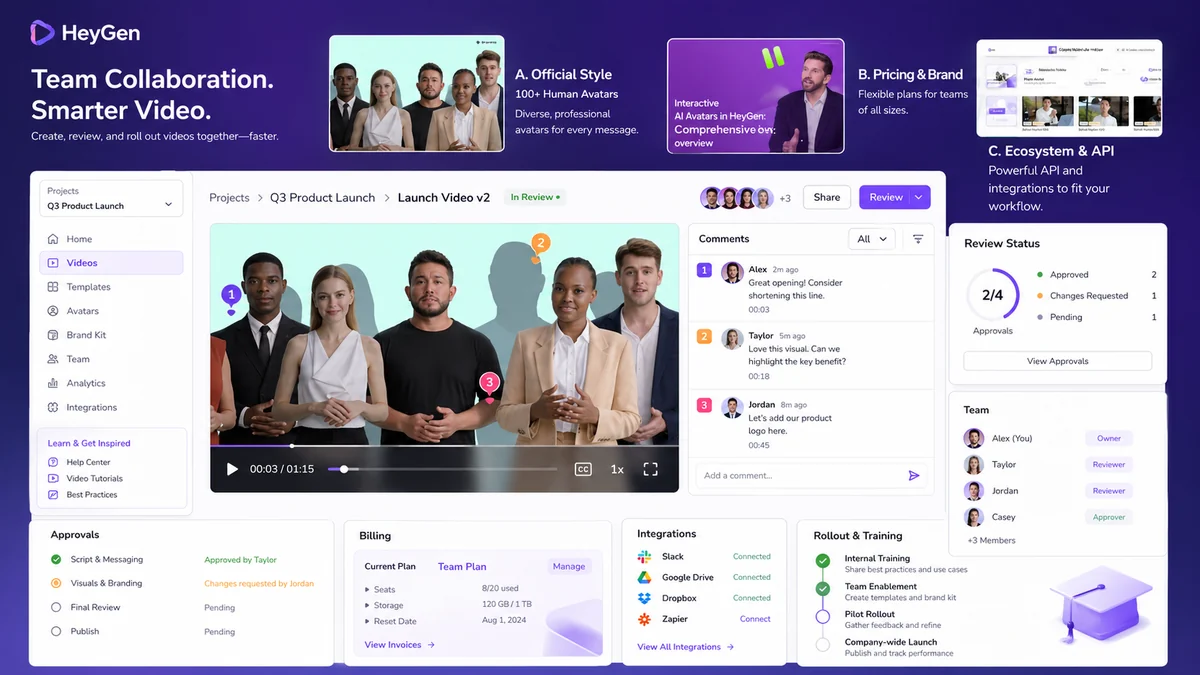
The avatar workflow is HeyGen’s most visible feature, but the buyer should not judge it only by realism. A realistic avatar still has to match the brand, audience, voice, script, and context.
Buyer note: test a real script. A generic sample can hide pacing, pronunciation, brand tone, and disclosure problems that become obvious in a real video.
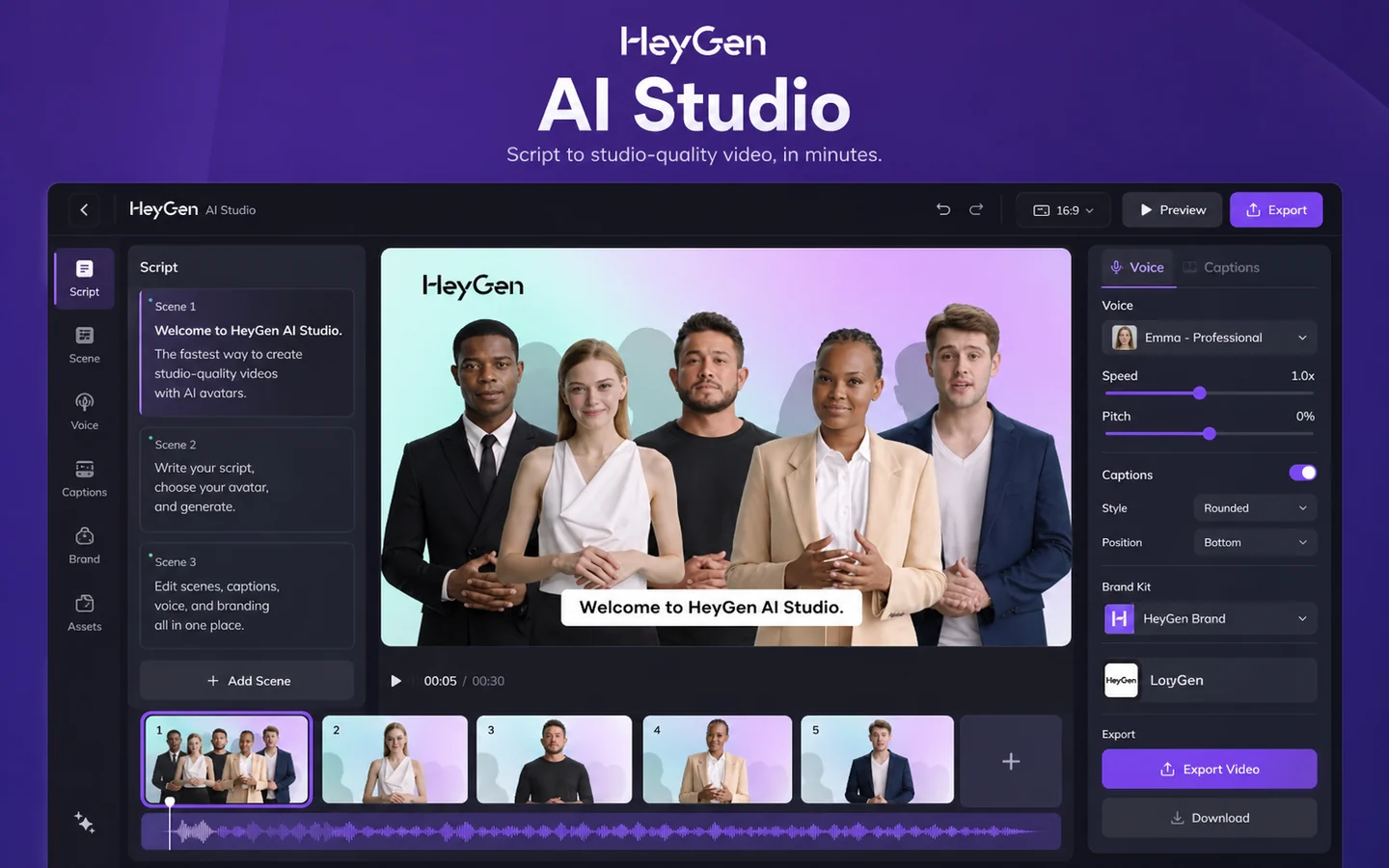
Text-to-video and AI Studio workflow
HeyGen’s AI Studio path matters because it determines whether the tool feels faster than filming and editing. The buyer should look at how quickly a script becomes a usable video, how much control remains, and how much cleanup is needed before publishing.
Buyer note: if the editing step still requires heavy manual work elsewhere, the time savings may be smaller than the demo suggests.
Video translation and localization
Translation is one of the more serious business use cases. A team with existing English videos may want localized versions for new markets, customer training, or sales enablement.
Buyer note: do not treat translation as automatic trust. Check script review, language support, lip sync quality, cultural fit, and whether plan minutes or credits match your expected volume.
Team collaboration and training features
Business and Enterprise paths become more relevant when multiple people create, review, localize, publish, or manage video assets. Features such as workspace collaboration, commenting, centralized billing, SSO, SCORM export, LMS support, and enterprise controls can matter for organizational use.
Buyer note: if only one person creates occasional videos, higher team plans may be more than needed. If video becomes part of training operations, the rollout checklist becomes more important than the avatar demo.
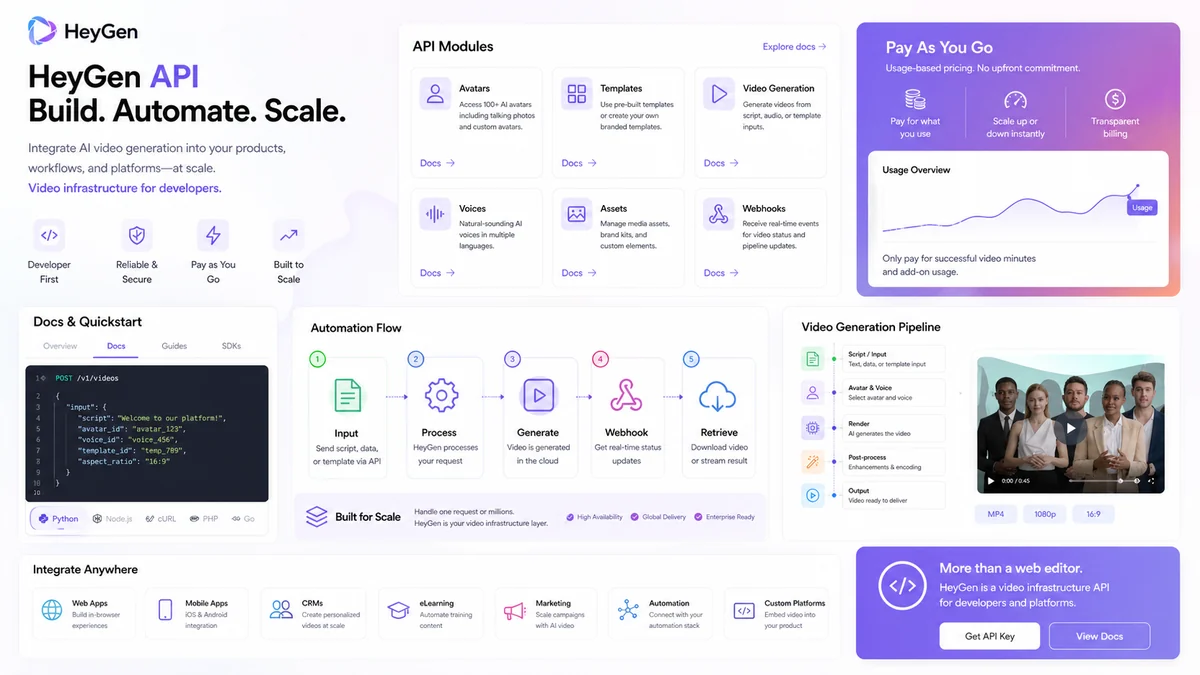
API and automation access
HeyGen’s API path matters for teams that want video generation inside products, internal tools, or automated workflows. This is useful for personalized outreach, onboarding, training automation, localization, or template-based video systems.
Buyer note: API value depends on usage economics. A pay-as-you-go path can be useful for testing, but higher-volume buyers should calculate expected generation volume before depending on it.
Pricing and plan value
HeyGen pricing should be judged by workflow volume, not by the lowest visible price.
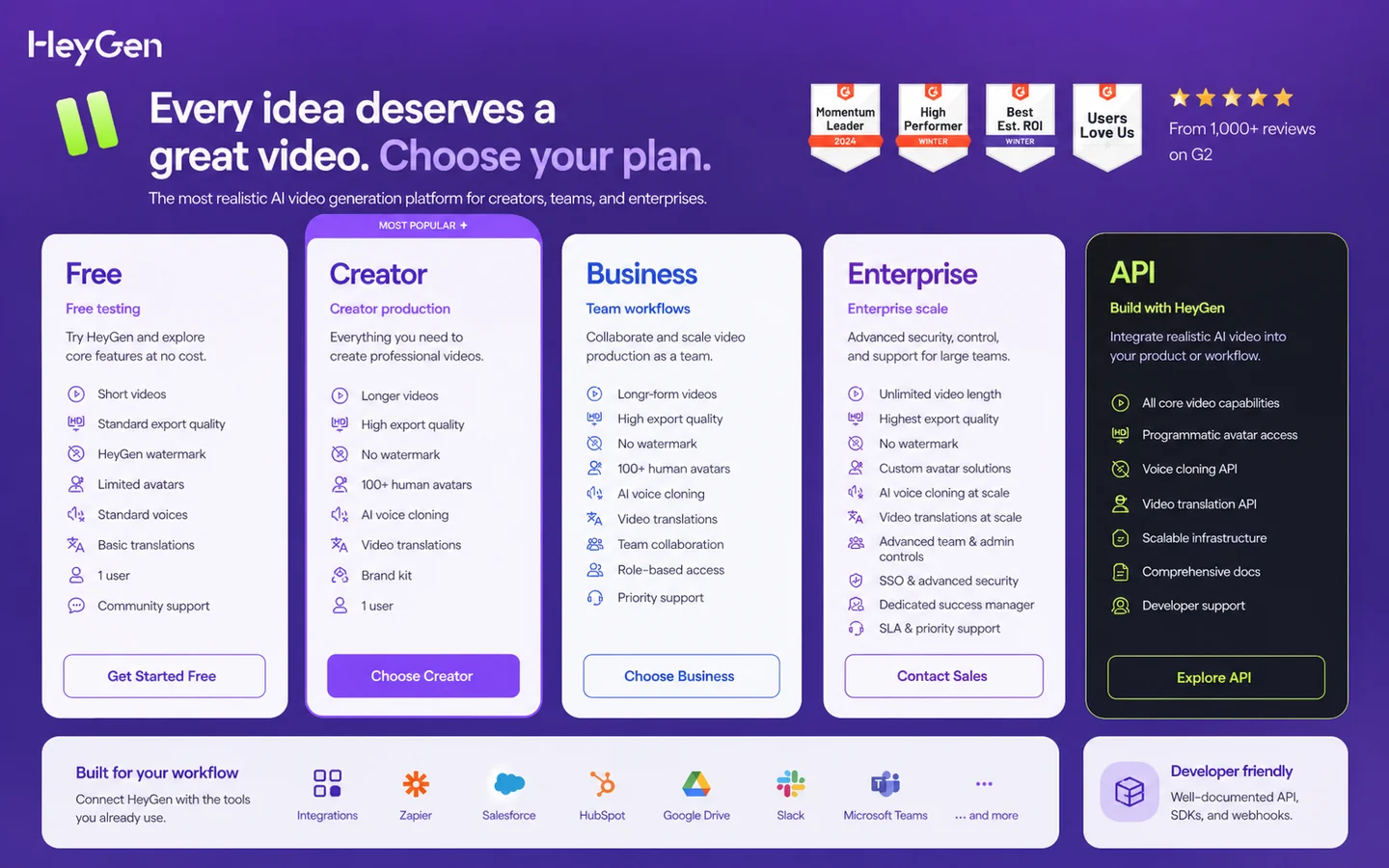
At the time of review, HeyGen’s public pricing and Help Center describe a Free plan for basic exploration, a Creator plan at $29 per month or $24 per month billed annually, a Pro plan at $99 per month or $79 per month billed annually, a Business plan at $149 for the first seat plus $20 per additional seat, and Enterprise as a custom plan. The Help Center also explains that regular Avatar & Video subscriptions are separate from API and LiveAvatar plans.
The Free plan is useful, but mostly as a testing lane. It lets a buyer check the interface, avatar feel, short-video output, and basic export experience. It is not the plan I would treat as proof that HeyGen can support serious recurring production.
Creator is the natural first paid plan for an individual who needs longer videos, watermark removal, voice cloning, brand kit, more avatar options, and 1080p export. Pro is more appropriate when premium usage, faster processing, 4K export, and translation-related capacity become real constraints.
Business is a different buying decision. It adds team-oriented needs: more serious collaboration, centralized billing, SAML/SSO, SCORM export, LMS integration support, interactive video features, and additional seat costs. If the buyer is a training team, sales enablement group, or marketing organization, this may be the more relevant path. If the buyer is a solo creator, it may be overkill.
The API path should be priced separately. HeyGen’s API pricing describes pay-as-you-go starting at $5, with Enterprise API adding custom scalability, dedicated developer support, Digital Twin Creation API, Proofread API, and discounted rates. That makes API use better for technical pilots and product workflows, but only after the buyer estimates generation volume.
I would start monthly before annual billing unless the workflow is already proven. Annual pricing can lower the effective monthly cost, but it also makes a mismatch more expensive.
Pricing check: If HeyGen fits your use case, verify the current plan limits, monthly versus annual toggle, and refund language before checkout.
Free plan, trial, coupon, and checkout notes
The Free plan is the best first stop for most buyers. It gives you a practical way to test the editor, avatar style, short-video output, and export friction before spending money.
That said, a free plan can create false confidence. A short test video may look promising, but the paid decision should still consider longer videos, premium credits, translation minutes, watermark removal, voice cloning, custom avatars, export quality, team seats, and API needs.
The coupon path should come after product fit. HeyGen’s terms reserve the right to impose conditions on coupons, discounts, or similar promotions, so I would not build the buying decision around a third-party code. If the product fits, then check the HeyGen coupon page or the current checkout route for active offers.
Refunds deserve extra caution. HeyGen’s terms say payments are non-refundable except where required by law, while the Help Center allows refund requests within 15 days in certain cases and at HeyGen’s discretion, especially if a significant amount of content has not been created. That is not the same as a simple no-questions guarantee.
My checkout order would be simple: test free, create one real draft video, compare the plan limits, read refund/cancellation language, then decide whether monthly or annual billing makes sense.
What I would check before buying HeyGen
If I were buying HeyGen for a real workflow, I would check these points before paying:
- Whether the avatar style feels credible for my audience, not just impressive in a demo.
- Whether the plan supports the video length, export quality, watermark removal, and premium model usage I need.
- Whether translation minutes, proofreading, dubbing, and lip-sync requirements match the content I plan to localize.
- Whether Creator or Pro is enough, or whether Business features such as collaboration, seats, SSO, SCORM, LMS support, and centralized billing are actually required.
- Whether add-on pricing, premium credit packs, and additional seats change the real monthly cost.
- Whether refund eligibility still applies after I generate meaningful paid content.
- Whether Synthesia, Elai, AKOOL, or Fliki better matches the specific video job.
The easy mistake is buying because the output looks futuristic. The better way to judge HeyGen is to ask whether it gives you a repeatable, reviewable, brand-safe video system.
A simple test before paying
Before paying, I would run a small test like this:
- Choose one real script you would actually publish.
- Create a short video using the avatar or format closest to your intended workflow.
- Review voice, pacing, facial expression, lip sync, pronunciation, and brand fit.
- Export the video and check watermark, resolution, and file quality.
- If translation matters, translate the same video into one target language and review it manually.
- If a team will use the tool, ask another person to review the draft and note collaboration friction.
- Compare the actual workflow against the current pricing page before upgrading.
This test is small, but it is enough to reveal whether HeyGen feels like a production shortcut or just a novelty.
Pros explained
The first real pro is workflow breadth. HeyGen can support avatar videos, text-to-video, photo-to-video, translation, training content, creator clips, product explainers, and API use. That breadth matters if a buyer has multiple video needs, not just one.
The second pro is the Free plan. It gives cautious buyers a way to check output style before paying. This matters because synthetic video is subjective. A tool can be technically impressive and still feel wrong for your brand.
The third pro is the plan ladder. Creator, Pro, Business, Enterprise, and API paths serve different buyer types. That is useful because a solo creator and a training department should not be forced into the same buying model.
The fourth pro is team depth on higher plans. Collaboration, commenting, centralized billing, SSO, LMS-related features, and enterprise controls are important if video creation becomes an operational workflow.
The fifth pro is developer flexibility. HeyGen’s API path lets technical buyers test video generation beyond the web app. This matters for SaaS products, automated onboarding, personalized video, and localization systems.
Cons explained
The first con is that the Free plan is only a test, not a serious production answer for most buyers. It is useful for evaluation, but paid value depends on how often you create, export, translate, and revise videos.
The second con is pricing complexity. HeyGen is not only a simple monthly subscription. The real cost can involve premium credits, translation minutes, add-ons, additional seats, annual billing, API balance, and enterprise negotiation.
The third con is refund caution. Because payments are generally treated as non-refundable and refunds are discretionary, buyers should avoid heavy content generation until they are confident the plan fits.
The fourth con is brand risk. Synthetic avatars can save time, but they can also feel uncanny, overly polished, or inappropriate for sensitive content. Human review is still necessary.
The fifth con is that HeyGen may be too broad for simple use cases. If all you need is a quick voiceover video, a lighter tool may be easier. If you need a governed enterprise training system, a more enterprise-first competitor may be safer.
Green flags and red flags
Green flags:
- You already publish repeatable presenter-led videos.
- You need avatar-led content, training clips, product explainers, or localization often enough to justify a workflow tool.
- The Free plan output feels acceptable with your own script, not just a demo prompt.
- Your team has a review process for brand, accuracy, disclosure, and consent.
- You can estimate video volume, translation needs, credits, and seat count before paying.
Red flags:
- You are buying mainly because an avatar demo looked impressive.
- You have not tested a real script or brand use case.
- You expect a flexible refund after creating many paid videos.
- You need manual timeline editing more than AI video generation.
- You cannot explain whether you need Creator, Pro, Business, Enterprise, or API access.
HeyGen vs alternatives
Synthesia vs HeyGen
Synthesia is the more direct comparison if the buyer cares about structured corporate training, enterprise communication, governance, and repeatable business video programs. HeyGen may feel more flexible for creators, marketers, avatar experiments, and broader AI video generation.
I would compare Synthesia first if the buying team is enterprise training or internal communications. I would keep HeyGen high on the list if avatar variety, creator workflows, translation, and API exploration all matter.
Elai vs HeyGen
Elai is a direct alternative for buyers focused on presenter-led videos, training, explainers, and education-style workflows. It may feel simpler for some teams that do not need HeyGen’s broader creator and API surface.
HeyGen may still make more sense when the buyer wants a wider mix of avatar video, product marketing, translation, and developer paths.
AKOOL vs HeyGen
AKOOL is a closer comparison when the buyer cares about campaign-style creative assets, avatar marketing, image-to-video, and more experimental brand content. It can be relevant for marketing teams that want AI video as part of broader creative production.
HeyGen may be the safer first test if the buyer wants a more straightforward avatar video and localization workflow. AKOOL may be worth checking if the workflow is more campaign creative than training or explainer production.
Fliki vs HeyGen
Fliki is an adjacent route, not a one-to-one replacement for every HeyGen buyer. It can be better for lighter text-to-video, voiceover-led content, fast social videos, and simpler content creation workflows.
HeyGen is stronger when the buyer specifically needs avatars, digital twins, video translation, team features, or API-driven avatar/video generation. If the job is mainly quick narrated videos, compare Fliki before paying for a broader platform.
Trust, refund, and buyer-risk notes
The biggest trust question with HeyGen is not whether AI video is impressive. It is whether the buyer can use it responsibly and predictably.
For creators and marketers, that means reviewing synthetic avatars before publishing. A video may look polished, but the script still needs fact-checking, the presenter style needs brand review, and the audience may need disclosure depending on the context.
For training and enterprise buyers, trust shifts toward governance. Check roles, access, workspace management, security requirements, SSO, SCIM, LMS support, SCORM export, and support expectations. Do not assume those details are available on the plan you first clicked.
For API buyers, trust becomes operational. API access is useful only if documentation, billing, usage limits, support, webhooks, reliability, and error handling match the system you plan to build.
Refund risk is also real. HeyGen’s terms say payments are non-refundable except where required by law, and its Help Center frames refunds as discretionary and limited by factors such as timing and how much content has already been created. That makes testing before heavy usage important.
Coupon risk is simpler: do not let a discount decide the purchase. Check the current deal path only after the tool fits your workflow.
Final verdict
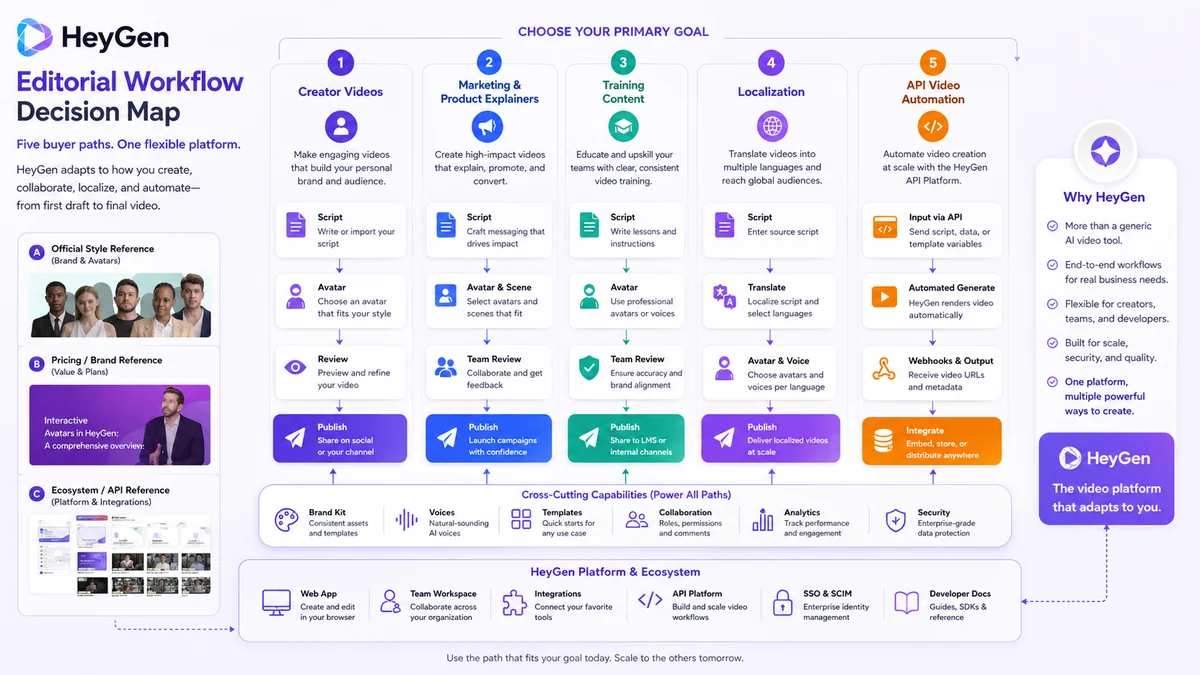
I would consider HeyGen if you need repeatable avatar-led videos, product explainers, training content, localized videos, or AI video generation inside a broader creator, marketing, training, or product workflow.
I would skip it if your real need is traditional manual editing, cinematic production control, or a single quick clip that does not justify learning plan limits and refund rules.
I would compare it with Synthesia if enterprise training and governance matter most, Elai if you want a simpler presenter-led learning workflow, AKOOL if campaign-style avatar creative is the priority, and Fliki if lightweight text-to-video or voiceover content is enough.
The safest next step is not to buy the biggest plan first. Start with one real test video, judge the result against your audience and brand, then check the current pricing, plan limits, refund language, and buyer route before committing.
