Quick verdict
HeadshotPro is worth considering if you want a faster, lower-friction path to professional-looking headshots without booking a studio shoot.
But I would not judge it only by the homepage examples.
The real buying question is narrower: do you need enough usable business portraits to justify uploading personal face photos, choosing a package, sorting through generated results, and checking whether the final keepers are profile-worthy for your actual use case?
If the answer is yes, HeadshotPro can make sense. It is built for LinkedIn refreshes, CV photos, company bio pages, founder profiles, sales teams, consultants, real estate agents, and remote teams that need a cleaner public image without organizing a physical photo day.
If the answer is no, the starting price and refund language should not pull you into a purchase too quickly. AI headshot tools can produce strong results, but they can also produce images that look slightly off: an expression that feels unlike you, a face shape that is close but not right, a suit that looks polished but too generic, or a background that does not match your professional context.
That is the tension with HeadshotPro. The product is useful when you want options. It is weaker when you expect photographer-level direction or one perfect portrait on demand.
For my money, the safest way to evaluate HeadshotPro is not to ask, “Can it create a lot of headshots?” It is to ask, “Can it create enough headshots I would actually use on LinkedIn, a company page, a proposal, or a client-facing profile?”
Next step: If HeadshotPro already sounds like the right kind of AI headshot workflow, check the current package and offer route before uploading photos.
Review snapshot
| Review point | Practical take |
|---|---|
| Best for | Professionals, founders, consultants, sales teams, remote teams, and company pages that need business-style headshots quickly |
| Not ideal for | Buyers who need one manually directed portrait, exact studio lighting, or strict brand-approved photography |
| Main use case | Turning uploaded selfies or existing photos into a batch of professional AI headshot options |
| Pricing style | One-time package path rather than a normal monthly SaaS subscription |
| Free path | Separate free AI headshot generator, useful as a concept preview but not equivalent to the paid professional workflow |
| Main strength | Fast business portrait generation with team, API, and commercial-use positioning |
| Main concern | Output predictability, likeness, refund conditions, data handling, and team rollout expectations |
| Best alternatives to compare | ProfilePicture.AI, PhotoPacks.AI, StudioShot, and other AI headshot services with different workflow styles |
| Safest next step | Test expectations first, then verify package details, refund rules, and privacy terms before checkout |
What is HeadshotPro?
HeadshotPro is an AI headshot generator for professional business portraits. The basic workflow is simple: upload existing photos or selfies, choose the style or business look you want, let the system generate a batch of portraits, then download the headshots that are strong enough for public use.
That sounds simple. The buying decision is not quite that simple.
A physical photographer gives you direction, adjusts lighting, watches your expression, and edits toward a specific final result. HeadshotPro gives you speed and volume. You are not paying for a photographer to manage every detail. You are paying for a generated set of options and hoping that enough of them look like you, fit your role, and feel professional enough to use.
That can be a good trade.
A founder who needs a better speaker bio photo this week may not want to wait for a studio session. A consultant may need several polished versions for LinkedIn, a website, and a proposal deck. A remote company may need consistent staff photos without flying people into one location. In those cases, an AI headshot workflow can solve a real logistics problem.
The product becomes less convincing if you expect exact creative control. You may not get the exact angle, expression, shoulder position, background tone, or brand style you had in mind. That does not make HeadshotPro bad. It just means the product should be judged as a batch-based AI portrait tool, not as a guaranteed substitute for a photographer.
How I would evaluate HeadshotPro
Without confirmed hands-on testing in this specific account, I would not make a strong claim that every buyer will get a certain number of usable photos. That would be the wrong kind of confidence for this category.
The better review standard is buyer-fit logic.
I would evaluate HeadshotPro on five things:
| Evaluation layer | What to check |
|---|---|
| Input quality | Do you have enough clear, varied, well-lit photos to give the model a fair chance? |
| Likeness | Do the generated portraits still look like you, not just like a polished business avatar? |
| Professional fit | Would you actually use the best outputs on LinkedIn, a team page, a resume, or a sales profile? |
| Package value | Does the number of usable keepers justify the package price? |
| Trust terms | Are the refund, data-retention, ownership, and team rules acceptable for your use case? |
This is where buyers can overestimate the value of AI headshot tools. A large batch sounds generous, but the number that matters is the keeper count.
If you get several strong, realistic, profile-worthy images, HeadshotPro can feel like a bargain compared with a traditional studio session. If most images miss your likeness or do not fit your industry, the batch count does not matter very much.
Who should use HeadshotPro?
HeadshotPro makes the most sense for buyers who need professional-looking portraits but do not need photographer-level direction.
A solo professional may use it to refresh a LinkedIn profile, CV, personal website, or conference bio. This is probably the cleanest use case. The buyer only needs a handful of strong images, and the cost of a physical shoot may feel too high or too inconvenient.
Founders, consultants, coaches, realtors, and sales professionals are also a natural fit. These buyers often need to look credible online but may not have time to schedule a shoot, pick outfits, wait for edits, and coordinate image formats across different platforms.
Small teams can get more value if the goal is consistency. A remote company team page often looks messy because every employee has a different photo style. HeadshotPro gives teams a more centralized route, especially when the company wants a cleaner public presence without organizing a full photo shoot.
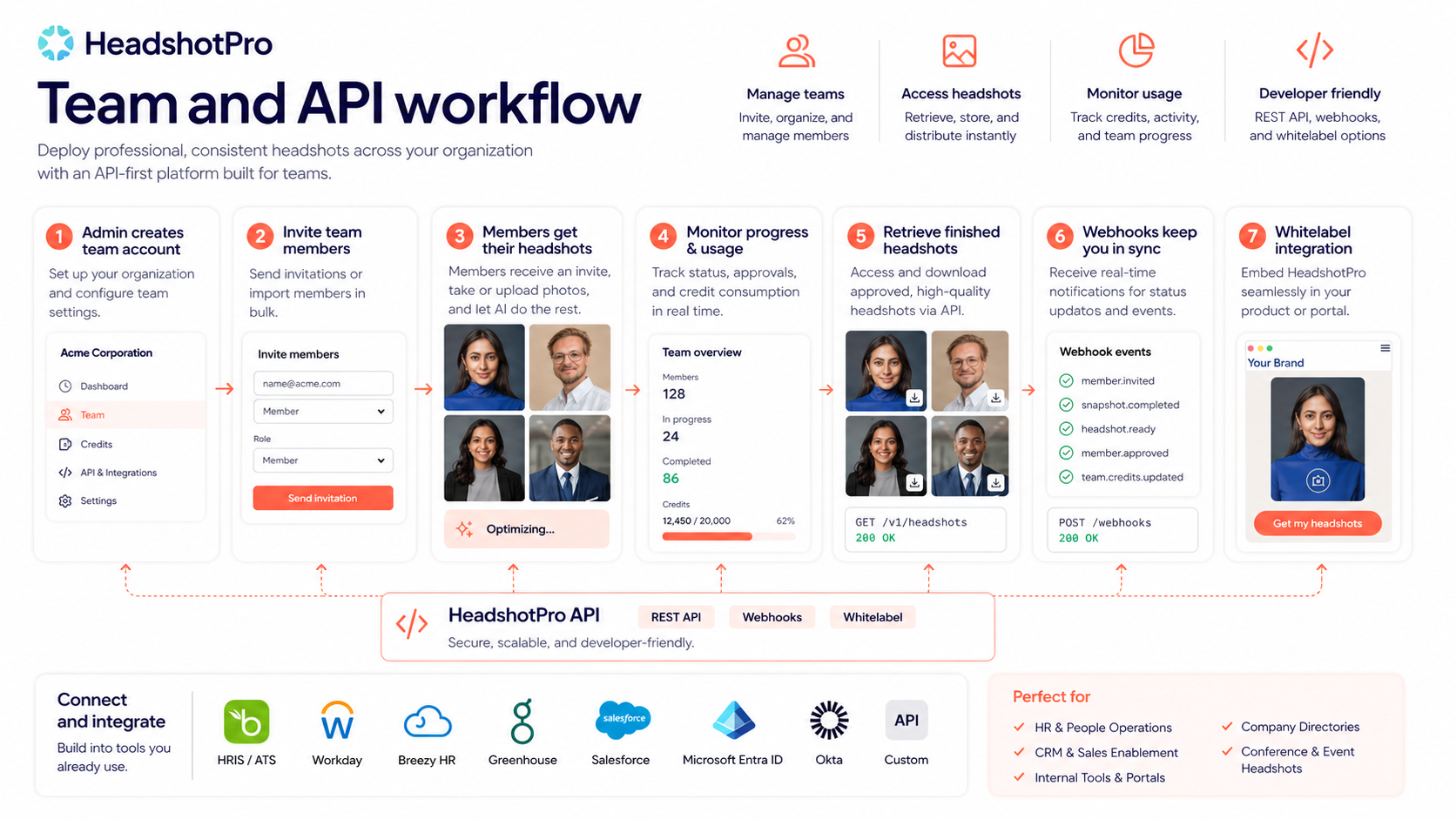
Agencies and platforms may care about the API and whitelabel path. That is a more advanced use case, but it matters. HeadshotPro is not only positioned as a personal headshot tool; it also has documentation for organization workflows, team members, photo access, credits, webhooks, and whitelabel integration.
The common thread is repeatable need. If headshots matter to your public trust, hiring process, founder brand, sales funnel, or team page, HeadshotPro is more interesting than it looks at first glance.
Who should avoid HeadshotPro?
I would be careful with HeadshotPro if you need a single exact photo with tight creative control.
AI headshot generation is not the same as sitting with a photographer who can adjust your posture, expression, lighting, tie, jacket, hair, and background in real time. You are selecting from outputs. You are not directing every detail.
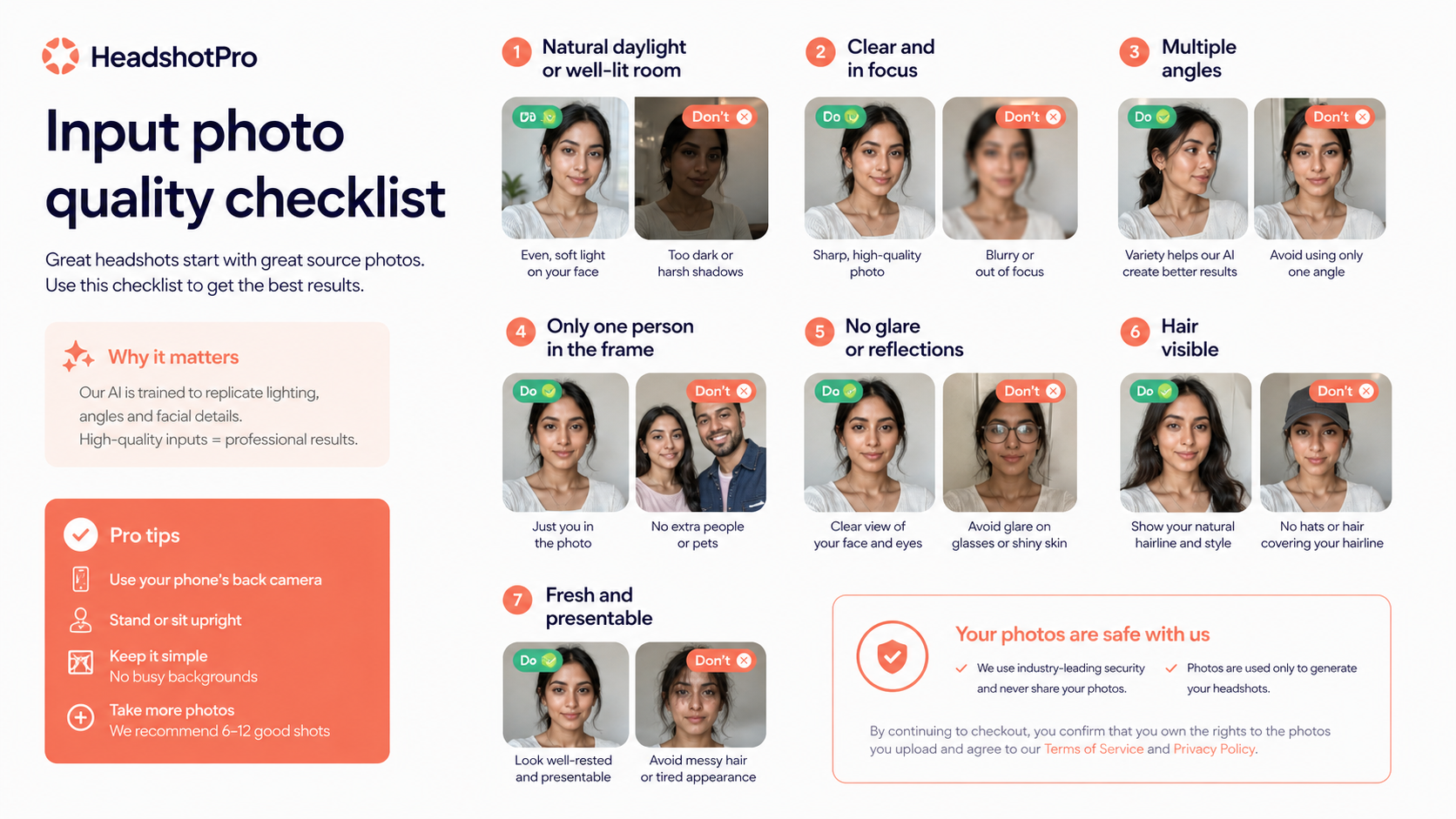
I would also avoid treating it as a low-effort fix for weak input photos. If your source photos are blurry, poorly lit, heavily filtered, or too similar to each other, the final results may disappoint you. The tool can improve presentation, but it still depends on what you give it.
Privacy-sensitive buyers should slow down too. A headshot generator processes face photos. That deserves more scrutiny than a normal graphic design tool. Individuals may feel fine with the tradeoff. HR teams, regulated businesses, executives, and agencies handling other people’s photos should read the legal, privacy, security, and data-retention pages before collecting uploads.
The product is also not ideal if you need heavily retouched executive portraits, brand-directed photography, or images that must pass a formal marketing approval process. In that case, a local photographer or a more service-driven headshot provider may be safer.
And one more buyer note: do not buy only because an offer path exists. A lower price can improve the purchase, but it should not be the reason you trust an AI-generated face-photo workflow.
How HeadshotPro fits into a real workflow
A practical HeadshotPro workflow starts before checkout.
First, ask what the headshots are for. LinkedIn refresh? Company team page? Speaker bio? Sales deck? Investor profile? Resume? Realtor page? The use case changes the quality bar.
Second, check whether you have the right input photos. Clear face visibility, varied angles, natural expressions, and good lighting matter. If the input set is weak, the paid package may be blamed for a problem that started before generation.
Third, choose the package based on the number of usable outputs you need, not only the total number promised. A solo buyer may be happy with a few strong portraits. A company rollout needs consistency across many people.
Fourth, sort the outputs with a hard eye. The best AI headshot is not just sharp and polished. It still needs to look like you. It needs to feel believable for your industry. It needs to avoid strange details around eyes, teeth, skin, hair, hands, clothing edges, and backgrounds.
Fifth, use the keeper photos in the right places. A slightly stylized headshot may work on a personal brand page but feel wrong on an executive bio. A friendly image may work for a coach but not for a law firm partner. A photo can be technically good and still be wrong for the buyer’s role.
Workflow check: If you already know the headshots will be used for LinkedIn, a team page, or client-facing profiles, compare the live package against your real keeper-photo needs.
Key features that matter
The feature list is less important than the buyer decision behind each feature.
AI-generated business headshots
This is the core product. HeadshotPro turns uploaded personal photos into professional-style portraits. The buyer benefit is speed and variety. The risk is that AI may produce some images that look polished but not quite like the person.
I would judge this feature by usable outputs, not by the total output count.
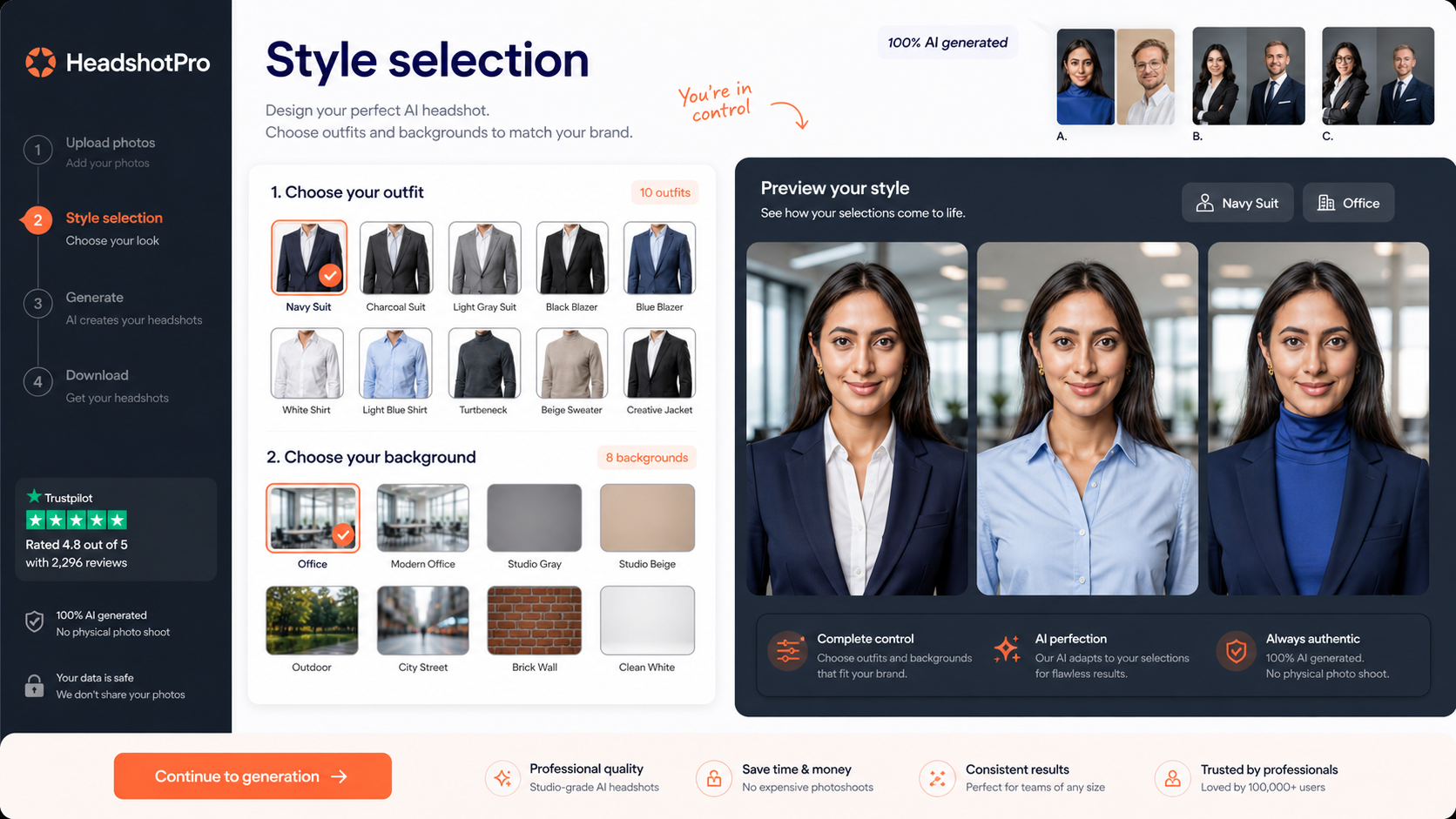
Style and outfit selection
Style control matters because professional does not mean the same thing for every buyer. A founder, realtor, software consultant, executive assistant, coach, and finance professional may all need different visual signals.
This feature is useful when it helps the buyer match the photo to the intended profile. It is less useful if the buyer chooses a style that looks impressive but feels false for their real role.
Team workflow
The team angle is one of the more interesting parts of HeadshotPro. A remote team can spend a surprising amount of time trying to standardize employee photos. A centralized AI workflow can be cheaper and faster than coordinating a full photo shoot.
The risk is consent and consistency. Teams should not just ask employees to upload photos without explaining the process, privacy expectations, review standards, and final approval path.
API and whitelabel path
The API path gives HeadshotPro a more serious business angle. If a platform, agency, or HR-adjacent workflow needs to generate headshots programmatically, API access can matter.
That does not mean every buyer needs it. API features are relevant only if headshot generation becomes part of a repeatable operational workflow. A solo LinkedIn buyer should not overvalue this.
Ownership and commercial use language
Ownership and commercial-use positioning matter because headshots are not just personal images. Buyers may use them on business websites, sales collateral, resumes, proposals, directories, social profiles, and company pages.
Still, I would read the current terms before using generated photos in a company-wide or client-facing setting. Face-photo rights deserve a careful check.
Pricing and plan value
HeadshotPro’s pricing is easier to understand than a lot of AI SaaS tools because it is positioned around one-time headshot packages rather than a monthly subscription.
That is good for the right buyer. You can think in terms of a specific job: “I need professional headshots now.” You are not necessarily signing up for another recurring software bill.
But the cheapest package is not automatically the best deal.
The real pricing question is whether the package gives you enough usable photos for the job. A solo buyer may need only three to five strong portraits. A team buyer may need consistent results across many people. An agency may need a repeatable workflow with API or whitelabel needs. Those are not the same buying decision.
The public store data points to a paid professional path starting at $29. That is an attractive entry point compared with many physical photo shoots. But I would still verify the live pricing page before checkout because AI headshot packages can change output counts, turnaround claims, style options, and team discount mechanics over time.
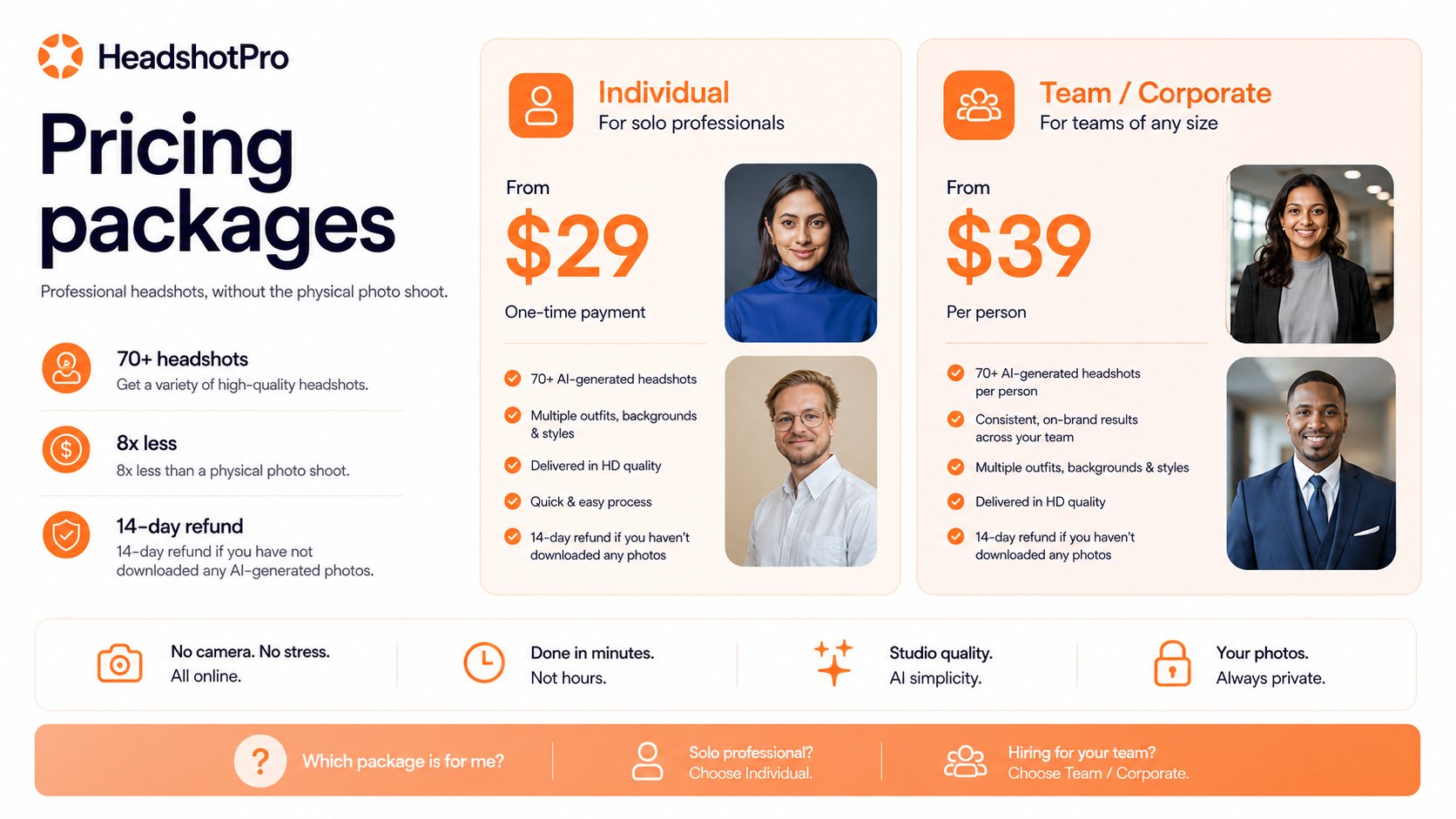
Pricing note: Treat the public starting price as an entry signal, then verify the live package details and refund conditions before paying.
Free tool, refund, and checkout notes
HeadshotPro has a separate free AI headshot generator. That is useful, but I would treat it carefully.
The free tool can help you understand the basic idea: upload a photo, see how an AI headshot process feels, and decide whether this category is worth exploring. It should not be treated as a perfect preview of the paid professional generator. The official positioning itself separates the free experience from the paid professional workflow.
The refund language is also important. HeadshotPro publishes a profile-worthy guarantee, but it comes with conditions. The main buyer-friendly idea is that you should receive at least one usable, professional headshot. The practical caution is that refund eligibility can depend on timing, downloads, and the type of account.
For individuals, the safest reading is simple: check the refund page before downloading or using final photos. If you download everything first and then decide you are unhappy, you may not be in the same position as a buyer who has not downloaded the generated photos.
For teams, I would be even more careful. Larger team accounts can have different refund handling once many models have already been created. That is reasonable from a processing-cost perspective, but it means HR, operations, or marketing buyers should review the terms before collecting employee photos.
A coupon or offer route belongs after these checks, not before them.
Checkout check: If the workflow fit is clear, use the offer route only after checking package details, refund terms, and whether the free tool is enough for your risk tolerance.
Privacy and data-retention considerations
I would put privacy higher on the checklist for HeadshotPro than I would for a normal image tool.
This is not just a prompt generator or a stock image search app. The product processes face photos. For individuals, that may be acceptable if the data-retention and ownership rules are clear enough. For companies, it becomes a policy question.
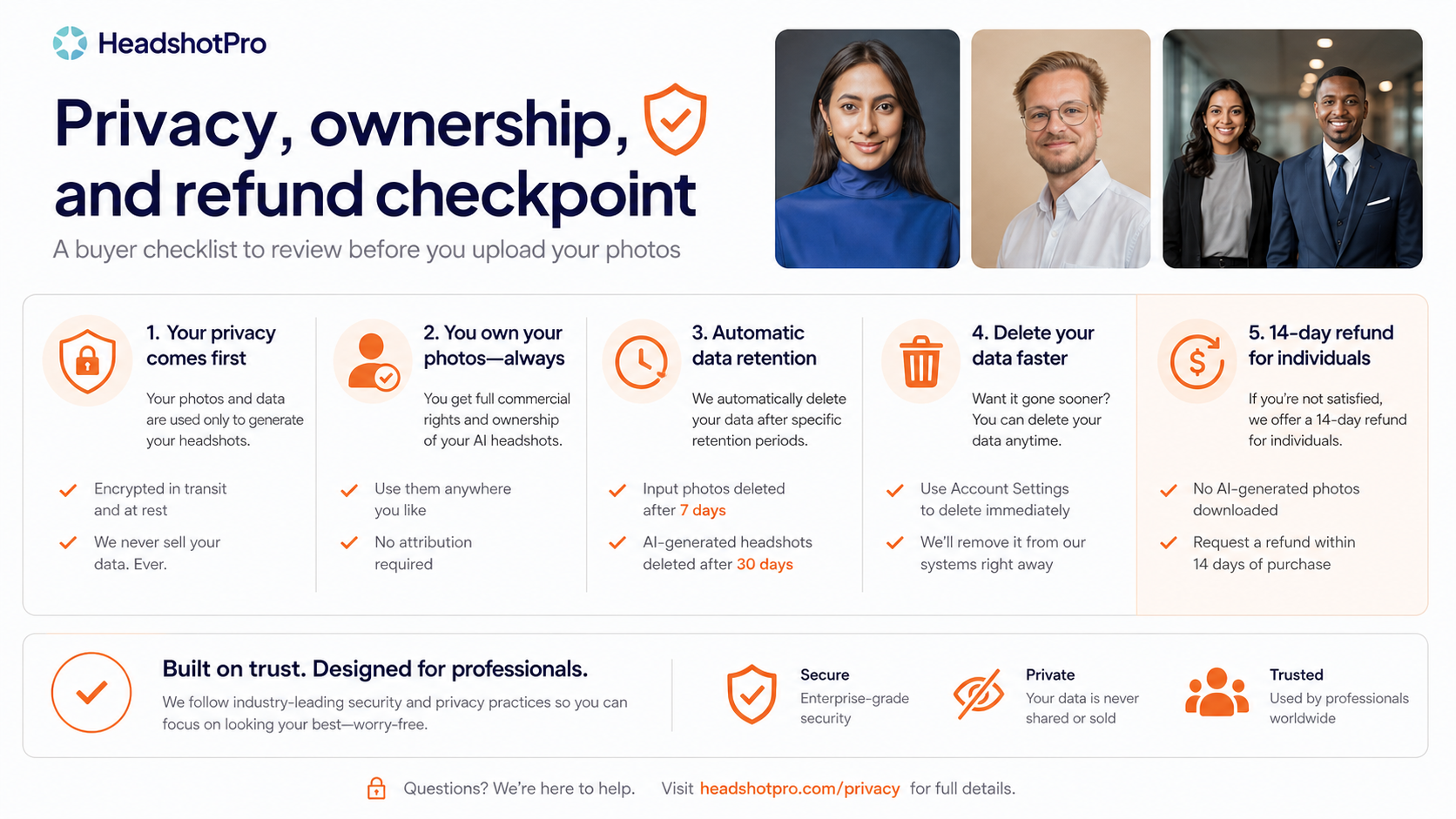
The public HeadshotPro materials mention commercial rights, deletion timelines for uploaded and generated photos, security documentation, and legal pages covering privacy, terms, data processing, retention, subprocessors, and security policy. That is a better trust base than a thin AI image tool with only a landing page.
Still, business buyers should not skip the policy review.
If you are an HR manager, team lead, founder, or agency operator, I would check these points before rolling it out:
| Trust checkpoint | Why it matters |
|---|---|
| Employee consent | Team members should know what they are uploading and why |
| Data retention | Face photos should not be stored longer than your policy allows |
| Commercial rights | Company pages, proposals, and sales material need clear usage rights |
| Deletion control | Teams may need a way to remove uploaded or generated images quickly |
| Refund handling | Large team orders may not work like individual refunds |
| Brand review | AI output should be approved before appearing on public company assets |
Where HeadshotPro can disappoint
The main disappointment risk is expectation mismatch.
Some buyers want AI headshots to feel like a studio session without the studio. That is not quite the right expectation. A studio photographer works toward one controlled result. HeadshotPro gives you a batch and asks you to choose the strongest outputs.
The second risk is likeness. An AI headshot can look professional while still not feeling like you. That is a strange but real problem in this category. The lighting may be good, the suit may look sharp, and the background may feel executive, but the face may be slightly off.
The third risk is using the wrong image in the wrong context. A headshot that works for a casual founder profile may not fit a legal bio. A confident sales image may look too polished for an academic CV. A corporate team page may need consistency more than individual variety.
The fourth risk is privacy comfort. Some buyers simply do not want to upload face photos into an AI tool. That is a valid reason to skip it, even if the product has retention and security pages.
The fifth risk is assuming the refund policy removes all risk. It reduces risk, but it does not remove the need to read the conditions.
This is why I would not treat HeadshotPro as an impulse buy. It is a practical tool when the job is clear. It is a weaker purchase when the buyer is mostly reacting to polished examples.
HeadshotPro vs alternatives
HeadshotPro should be compared with other AI headshot and professional portrait workflows, not with broad AI design tools in general.
The direct alternatives depend on the buyer’s real job.
| Alternative | Better fit when… | Tradeoff against HeadshotPro |
|---|---|---|
| ProfilePicture.AI | You want broader profile-picture variety, casual avatar options, or a less corporate visual style | It may be less focused on business headshot consistency for teams |
| Profile Picture AI | You care more about personal-brand profile images than a structured corporate rollout | It may not be the strongest fit for team pages or business-photo standardization |
| PhotoPacks.AI | You want broader AI photo packs, lifestyle portraits, or creator-friendly visual variety | It may be less direct if your main goal is polished LinkedIn or company headshots |
| StudioShot | You want a more service-like professional headshot workflow with a stronger photography feel | It may be a better fit for buyers who want more human-guided polish than a simple AI batch |
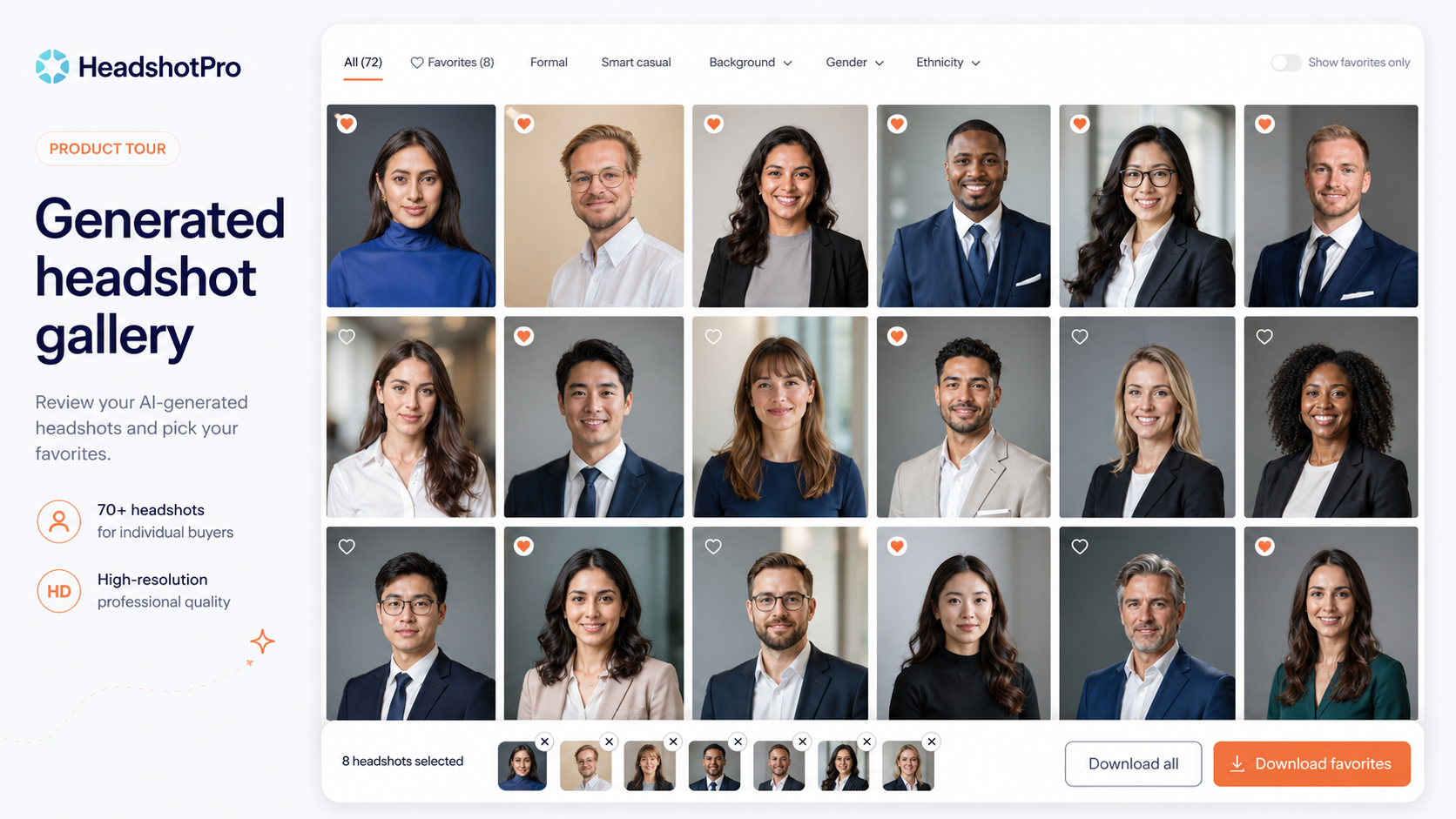
If you only need a LinkedIn refresh, HeadshotPro is a reasonable first comparison. If you need a broader personal-brand image set, compare ProfilePicture.AI or PhotoPacks.AI. If you need something closer to a managed professional headshot service, StudioShot may be worth checking before you pay.
For broader AI design discovery, the AI design hub is the more useful route than forcing every photo tool into the same bucket.
Pros and cons explained
The good part
HeadshotPro solves a real problem. Getting professional headshots is still annoying for many people. You need time, money, confidence in front of a camera, and usually a photographer nearby. For remote teams, the logistics get worse.
HeadshotPro reduces that friction. That is the main value.
The one-time package model is also easier for buyers to understand. This is not another tool you keep paying for every month unless your workflow requires ongoing team or API use. For a solo buyer, the job is specific: get better headshots and use the best ones.
I also like that the product has a visible trust layer: refund page, privacy policy, security policy, data-retention messaging, API documentation, and team workflow language. That does not guarantee satisfaction, but it gives serious buyers more to inspect.
The weaker part
The weak point is output predictability.
AI portrait generation has improved a lot, but face-photo tools still require buyer judgment. Some outputs may look too smooth, too generic, too different from the person, or too stylized for the intended role.
The free tool is useful, but it should not be used as a perfect proxy for the paid generator. The paid workflow is the real commercial product.
Refund terms are helpful, but they are not a reason to skip reading the rules. For individual buyers, download behavior and timing matter. For teams, model-processing costs can matter.
And for brand-sensitive buyers, AI headshots may still need a human approval step before they go live.
What I would check before buying HeadshotPro
Before paying, I would check these items in order:
- Use case — Is this for LinkedIn, a CV, a company page, a sales profile, a speaker bio, or a full team rollout?
- Input photos — Do you have enough clear, varied, natural photos to give the generator a fair chance?
- Package contents — How many headshots, styles, backgrounds, or usable outputs are included in the current package?
- Turnaround time — Does the current expected delivery speed match your deadline?
- Commercial rights — Are you comfortable using generated images in public business contexts?
- Data retention — Are uploaded photos and generated outputs handled in a way that fits your privacy expectations?
- Refund conditions — What happens if you dislike the results, and what actions could affect refund eligibility?
- Team rules — If buying for employees, how are consent, admin workflow, discounts, and refunds handled?
- Alternatives — Would a casual profile-photo tool, broader AI photo pack, or service-like headshot provider fit better?
That may sound like a lot, but it is a face-photo product. A little extra caution is reasonable.
Simple test before paying
For a solo buyer, I would do a simple test before paying.
First, collect your best existing photos. Do not use blurry selfies, extreme filters, sunglasses, group photos, or low-light images. Start with photos that already look like you on a good day.
Second, try the free headshot generator as a category preview. Do not overread the result. Use it to decide whether you like the general idea of AI headshots.
Third, check the paid package details. Look at output quantity, turnaround, style options, refund language, and whether the package is sized for your actual need.
Fourth, compare against the cost of doing nothing. If your current LinkedIn photo is hurting trust, a paid AI headshot package may be reasonable. If your current photo is already strong, the upgrade may be optional.
For a team, I would not start with the full company. I would test with a small internal group first, define what “usable” means, then decide whether the process is consistent enough for everyone.
Evidence confidence
My confidence in HeadshotPro’s positioning is fairly strong because the official site, pricing page, refund page, API docs, legal pages, and store data all point in the same direction: professional AI headshots, one-time packages, free preview path, team workflows, API access, commercial-use language, and refund conditions.
My confidence in individual output quality is more cautious.
That is not specific criticism of HeadshotPro. It is the nature of the category. AI headshot results depend heavily on the person, input photos, style choices, expectations, and what the buyer considers usable. Public review signals can be helpful, but they cannot tell you whether your own generated portraits will feel right.
The safest judgment is this: HeadshotPro has a clear use case and a credible buyer path, but the buyer should evaluate it as a batch-selection workflow rather than a guaranteed portrait outcome.
Final verdict
HeadshotPro is a practical AI headshot tool for buyers who want professional-looking portrait options without scheduling a physical shoot.
I would consider it if you need a LinkedIn refresh, founder profile, CV photo, consultant headshot, sales bio, real estate profile, speaker image, or remote team photo workflow. The one-time package style makes the purchase easier to understand, and the team/API path gives it more depth than a simple personal-avatar generator.
I would skip it if you need exact photographer direction, heavy manual retouching, strict executive brand control, or a single guaranteed perfect portrait. I would also slow down if you are uncomfortable uploading personal face photos to an AI workflow.
The safest path is simple: understand the use case first, check the free tool only as a light preview, verify the current paid package, read the refund and privacy terms, then compare nearby alternatives if the fit is still unclear.
A discount can make HeadshotPro cheaper. It should not be the reason you buy.