Quick verdict
3D AI Studio is worth considering if you need fast 3D asset drafts from text prompts or reference images, but I would not judge it by the demo promise alone.
The real buying question is narrower: can it produce assets that are useful enough for your actual workflow after you account for credit cost, failed attempts, export checks, and cleanup?
That is where the product becomes interesting. 3D AI Studio is not only a simple text-to-3D toy. Its public positioning covers image-to-3D, text-to-3D, image generation, texture tools, remeshing, rigging, animation, format conversion, commercial ownership, common export formats, and API access. For the right buyer, that makes it a useful creative shortcut.
For the wrong buyer, it can become a credit meter attached to uncertain output quality.
I would consider 3D AI Studio if you are an indie game developer, 3D printing hobbyist, product visualization team, creative agency, or developer who needs many early 3D drafts quickly. I would be careful if you need strict topology, consistent production art direction, guaranteed print-ready geometry, or final assets that require no manual review.
The safest next step is to use the free credits on one real asset request before choosing Basic, Studio, Pro, annual billing, or one-time credits. A lower price or coupon path only matters after the generated model survives your actual export and quality check.
Next step: If 3D AI Studio still fits your asset workflow, test the current buyer route before choosing a credit plan.
Review snapshot
| Review point | Practical take |
|---|---|
| Best for | Creators, indie game developers, product teams, 3D printing users, and developers who need fast 3D asset drafts |
| Not ideal for | Buyers who need guaranteed production-ready topology, strict art direction, or one perfect final model without cleanup |
| Main use case | Turning text prompts or reference images into downloadable 3D asset drafts |
| Pricing model | Credit-based monthly plans, free credits for new users, and one-time credit packs |
| Free path | Free credits can test real workflow fit before payment |
| Main strength | Broad 3D generation and asset tooling in a browser, with export and API options |
| Main concern | Credit burn and output variability can change the real value of a plan |
| Direct alternatives | Meshy, Tripo, Sloyd, Rodin |
| Best next step | Generate one realistic test asset, download it, and inspect it outside the platform |
What is 3D AI Studio?
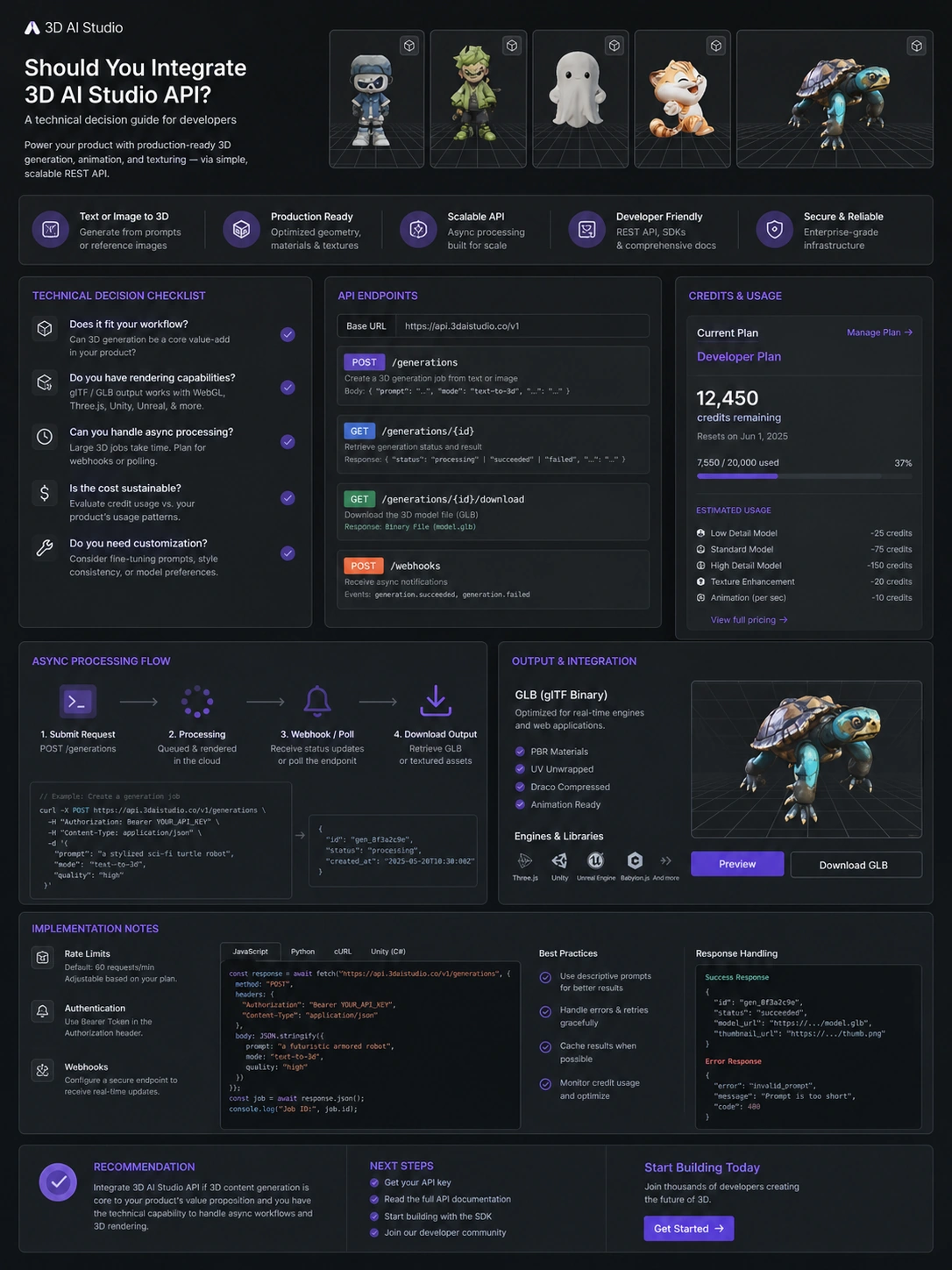
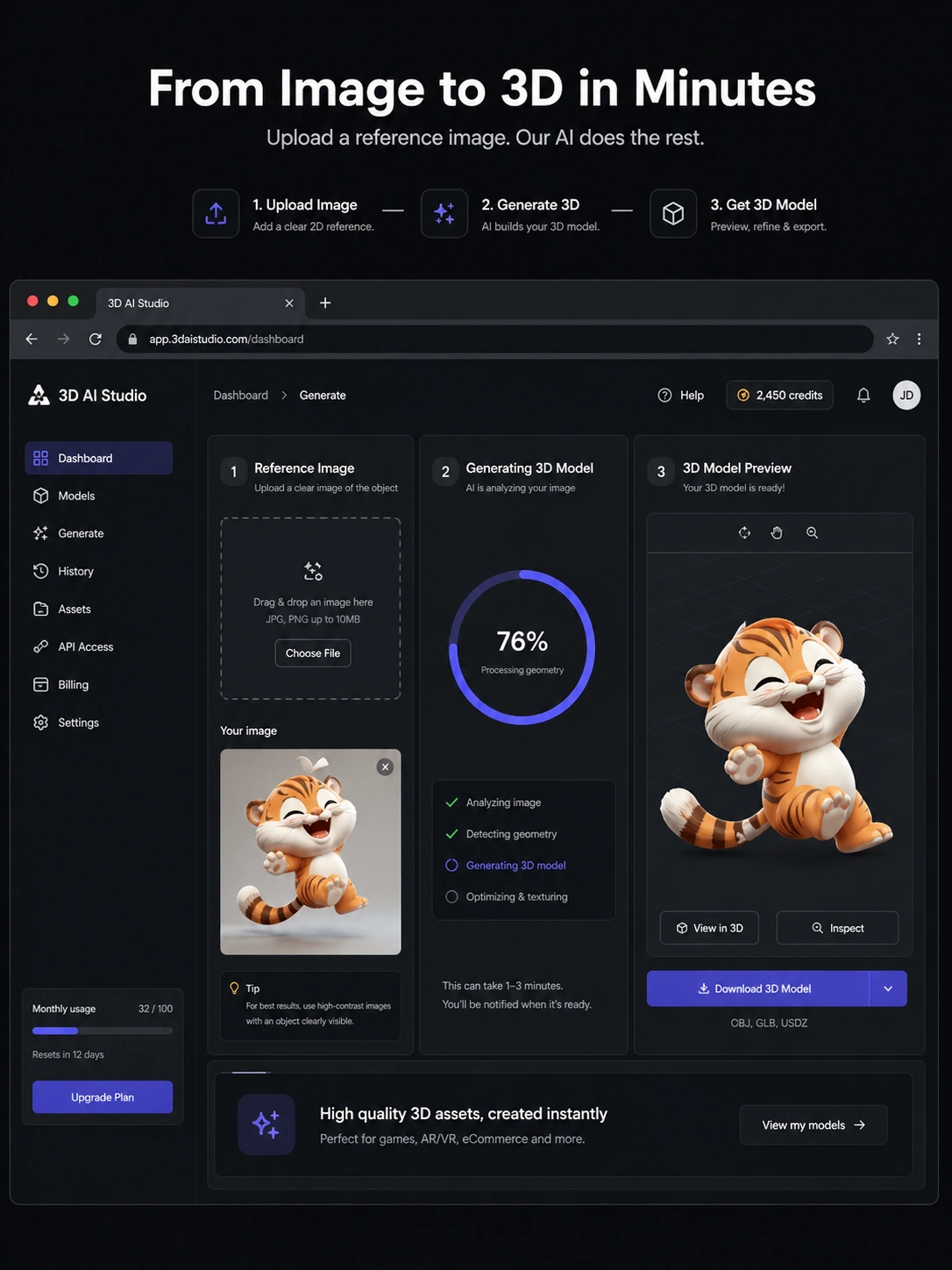
3D AI Studio is a web-based AI 3D asset creation platform. In plain language, it helps users turn text prompts or reference images into 3D models, then work with those assets through surrounding tools such as texturing, remeshing, rigging, animation, rendering, compression, and format conversion.
That makes it more than a single generator, but less than a full professional 3D production pipeline.
The useful way to think about it is as a draft asset workflow. You describe or upload what you want, generate a model, inspect the result, download it in a format that fits your toolchain, and decide whether it is good enough for concept work, prototyping, presentation, game development, 3D printing exploration, or further manual cleanup.
What it is not: a guaranteed replacement for a skilled 3D artist, technical artist, CAD specialist, or production pipeline. AI 3D tools can move quickly, but generated geometry still needs inspection. Textures can look promising in a preview and still need review in a game engine, Blender, print slicer, or client presentation.
Our review approach compares public product pages, pricing details, terms, API documentation, buyer workflow fit, and nearby alternatives. I would not treat a free credit path, a monthly price, or an attractive sample render as proof that the tool fits your own project.
The common mistake is judging 3D AI Studio from the first impressive output. The better test is whether several realistic generations produce assets that are usable after download.
Who should use 3D AI Studio?
3D AI Studio makes the most sense for buyers who need speed, variation, and a workable starting point.
Indie game developers are an obvious fit. If you need props, environment objects, creature concepts, collectibles, or rough background assets, a text-to-3D or image-to-3D workflow can save time during ideation. The condition is simple: you still need to inspect the asset in your actual game engine or 3D editor before treating it as production-ready.
Product and ecommerce teams may also find value here. A quick 3D concept can help with early visualization, campaign ideas, product mockups, or internal creative direction. The buyer check is whether the model accurately represents the object, material, proportions, and brand expectations. Close enough for a concept deck is not the same as accurate enough for a product page.
3D printing hobbyists can use it for idea exploration. The value is not that every generated file will print cleanly. The value is that a maker can move from idea to shape quickly, then inspect geometry, scale, thickness, supports, and mesh repair needs.
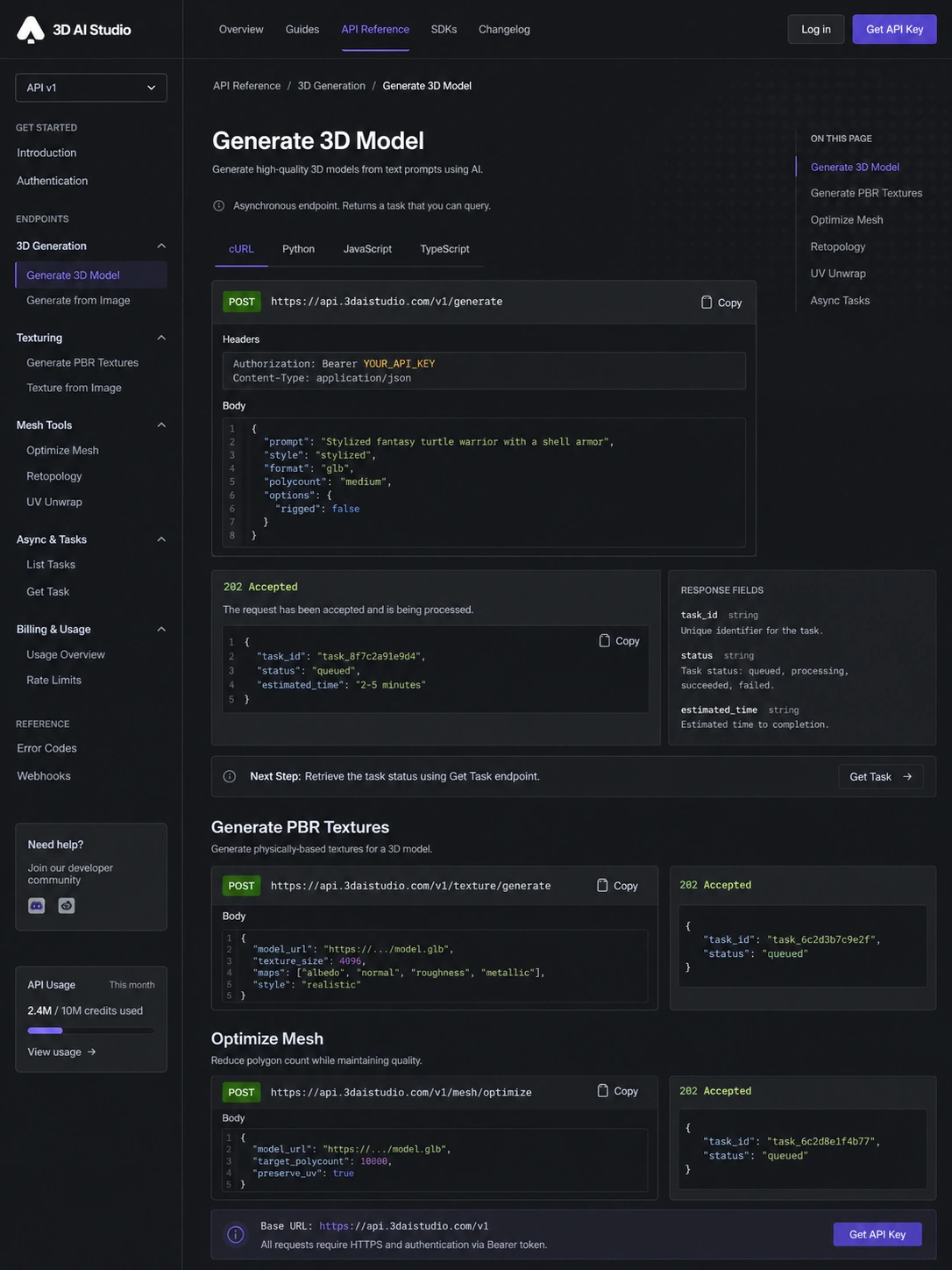
Developers and technical teams should look at it differently. If the API route matters, the buying decision becomes less about one nice model and more about endpoint coverage, async handling, credit billing, output review, and whether the generated results can be integrated safely into a product workflow.
Creative agencies can use 3D AI Studio as a concept layer. It can help move client conversations faster. It should not be sold internally as a no-review final asset machine.
Who should avoid 3D AI Studio?
I would avoid 3D AI Studio if you only need one polished asset and you have no appetite for iteration. A marketplace model, a freelancer, or a specialist 3D artist may be safer when the final quality standard is high and the asset count is low.
Studios with strict production pipelines should be careful. If your workflow depends on clean topology, consistent UVs, controlled rigging, exact material handling, or a specific art bible, AI generation can help with rough direction, but it may not fit the final production step without manual work.
Teams working with confidential client concepts should also slow down. Before uploading reference images or product ideas, read the current privacy and terms language and decide whether the platform fits your confidentiality rules.
Buyers who are mainly chasing the cheapest plan should be cautious. Credit-based tools can look affordable until you count failed generations, refinements, texture work, and repeated attempts. The cheapest plan is not automatically the best deal if the credit ceiling is too low for your asset workflow.
I would also be careful with annual billing before testing. If the product becomes part of your monthly asset workflow, annual savings can make sense. If you are still uncertain about output quality, pay less attention to the discount and more attention to the first real project test.
How 3D AI Studio fits into a real workflow
A realistic 3D AI Studio workflow should not start with a random demo prompt. It should start with the asset you actually need.
For a game developer, that might be a low-poly fantasy barrel, a sci-fi crate, a background statue, or a prop that needs to work in Unity, Unreal Engine, Godot, or Blender. For a maker, it might be a printable object idea that needs to survive slicing and repair. For a product team, it might be a reference image that needs to become a rough 3D visualization.
The workflow I would use is simple:
- Pick one realistic asset request.
- Generate from text or image.
- Track how many credits the attempt uses.
- Download the result in the required format.
- Inspect the file in the downstream tool.
- Check shape, texture, scale, topology, and usability.
- Estimate how many attempts a usable asset really takes.
Only after that would I judge the plan value.
This is where 3D AI Studio can save time. It moves the buyer from blank canvas to draft asset quickly. But the final decision still happens outside the generator. If the exported model behaves poorly, requires heavy cleanup, or does not match the intended style, the fast generation speed matters less.
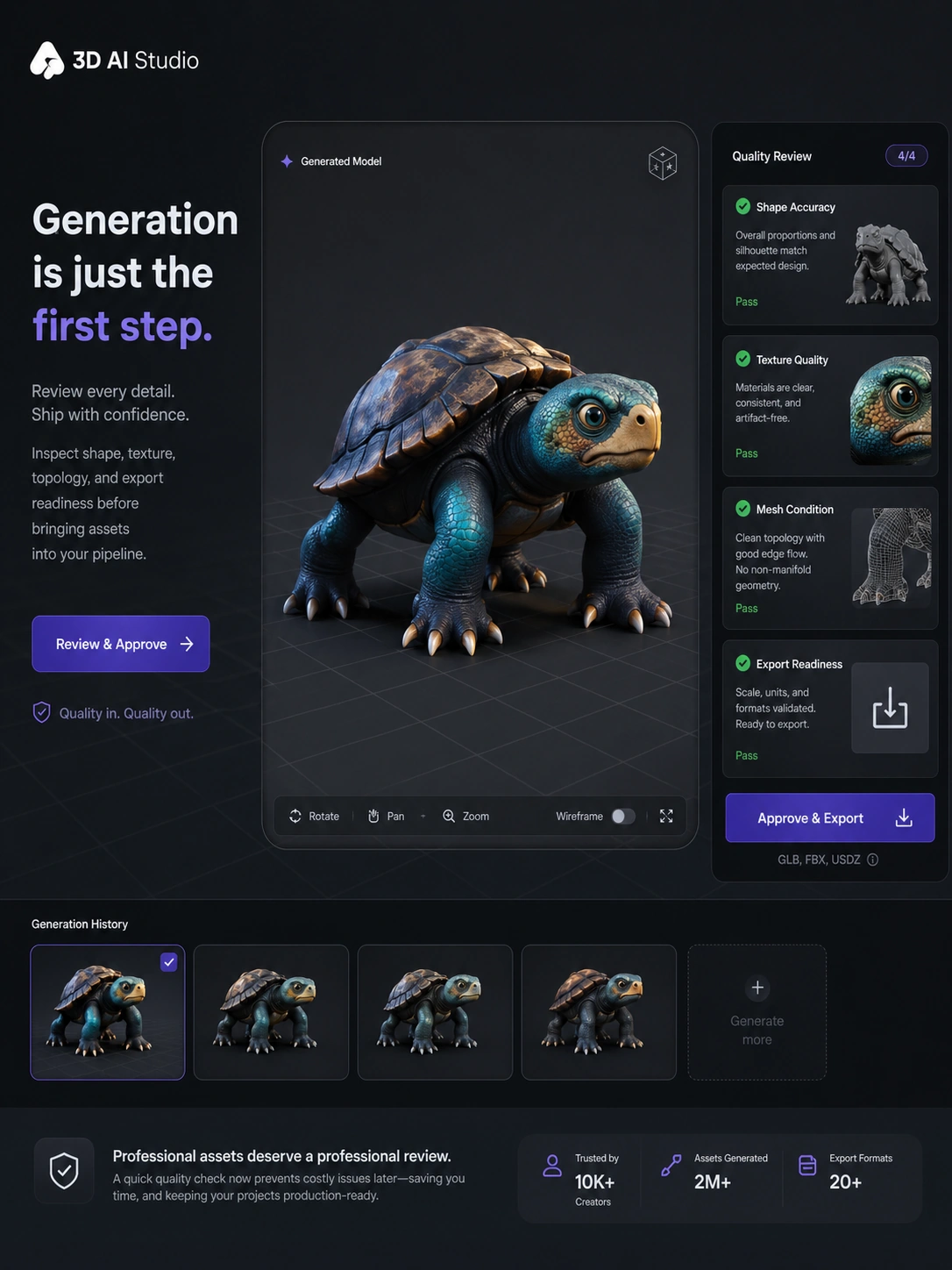
Workflow test: Before treating 3D AI Studio as a production shortcut, run one realistic generation and inspect the exported result.
Real-world buyer scenarios
A solo game developer may use 3D AI Studio to generate many small prop ideas before choosing which ones deserve manual polish. In this scenario, the platform can be useful even if not every output is final. The win is speed and variety. The risk is assuming every model will be game-ready without checking polycount, texture quality, and export behavior.
A 3D printing hobbyist may use it to explore object ideas faster. This can be a good fit if the user already understands that generated geometry may need repair. It is a weaker fit for someone who expects a clean printable STL from a vague prompt with no inspection.
A product marketing team may use it for early visualization. The tool can help communicate shape, material direction, or campaign concepts before a full 3D modeling cycle. The caution is accuracy. If the model represents a real product, the team should verify proportions, surface details, and brand expectations before using it publicly.
A developer may use the API to add generation into an app, internal tool, or creative pipeline. That is a more serious buying decision. API use means thinking about credit billing, async jobs, failed requests, output storage, user expectations, and review steps. I would not build around it until the API has been tested with the exact asset types the product needs.
Key features that actually matter
Text-to-3D generation
Text-to-3D is the headline feature most buyers will notice first. It matters because it removes the blank-canvas problem: you can describe an object and receive a draft model quickly.
The limitation is control. A text prompt may produce something close, but not exact. For concept work, that can be enough. For production assets, buyers should expect iteration and inspection.
Buyer note: judge text-to-3D by repeatability, not by a single lucky result.
Image-to-3D generation
Image-to-3D is often more practical when the buyer already has a reference. It gives the model generator a clearer visual starting point than text alone.
The risk is that the generated model may interpret the reference in ways that look fine in preview but fail in downstream use. Shape accuracy, depth assumptions, material interpretation, and cleanup needs still matter.
Buyer note: test with a real reference image, not only an easy demo object.
Texture, mesh, and supporting tools
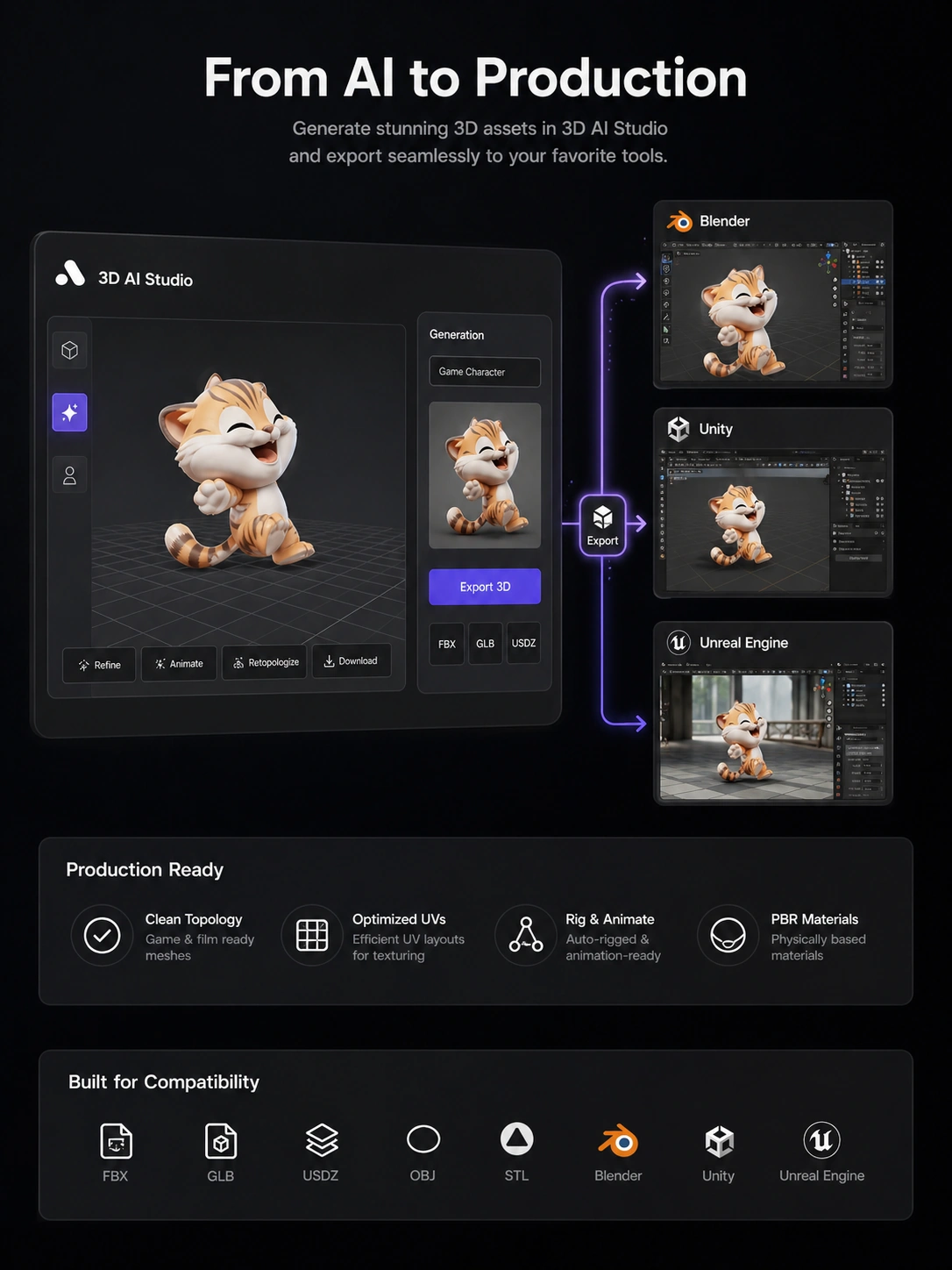
The surrounding tools are a major reason 3D AI Studio feels broader than a basic generator. Texturing, remeshing, LOD generation, rigging, animation, rendering, and file conversion can reduce the need to jump between too many tools early in the workflow.
That does not mean every supporting tool will replace a specialist workflow. It means the platform may be more useful for draft-to-export movement than a generator that stops at the first model.
Buyer note: check which supporting tools are included in your plan and which ones affect credit usage or output quality.
Export formats
Common export support matters because a 3D model only becomes useful when it can move into the buyer’s real environment. GLB, OBJ, FBX, STL, USDZ, and PLY cover many common web, game, printing, and 3D editing workflows.
The buyer check is not just whether the format exists. It is whether the exported file behaves correctly after import.
Buyer note: always download and test an output before judging the plan.
API access
API access changes the product from a creator tool into a possible product or automation layer. That is valuable for technical teams, but it also raises the evaluation bar.
A developer should check authentication, async task handling, credit billing, endpoint coverage, rate behavior, model quality, and error handling. AI-generated outputs can vary, so a production API workflow needs review logic, not just generation logic.
Buyer note: API access should be validated with small tests before any serious implementation.
Pricing and plan value
3D AI Studio’s pricing is best understood as a credit decision, not a simple monthly subscription decision.
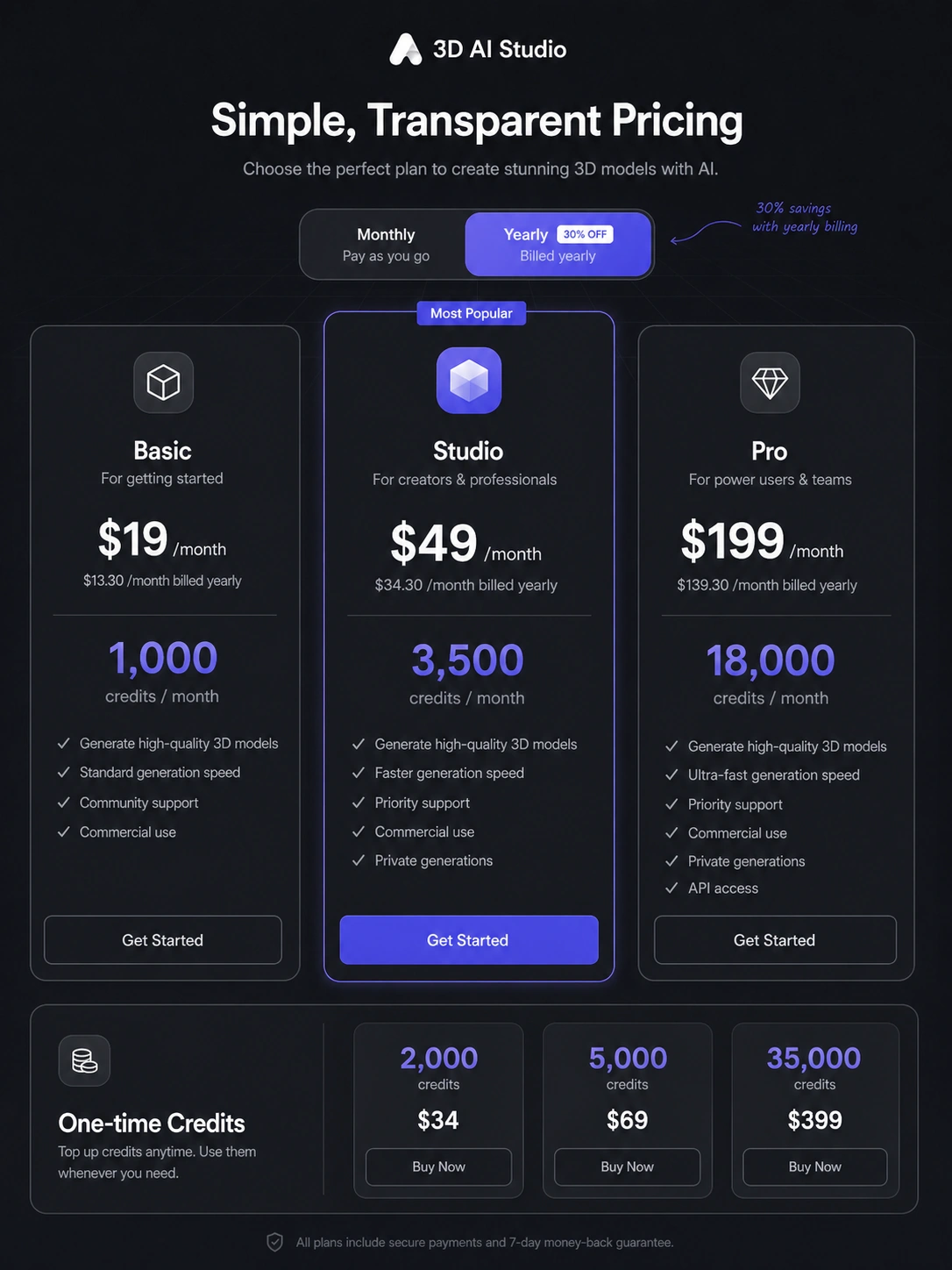
At the time of review, the public pricing page presents free credits for new users with no credit card required. It also presents a Basic plan with 1,000 monthly credits, Studio with 3,500 monthly credits, and Pro with 18,000 monthly credits for power users and teams. The page also describes annual savings and one-time credit packs.
The headline monthly price is only part of the story.
The better question is how many credits it takes to produce one asset you can actually use. A simple generation may look affordable. A real workflow may include multiple attempts, refinements, image generation, texture work, export checks, and failed outputs. That is where the real cost appears.
Basic can make sense for light testing and occasional generation. Studio becomes easier to justify when the buyer needs more credits, broader tools, faster generation, multi-image workflows, or API access. Pro is more relevant for heavy users and teams, but I would verify the current workspace, seat, priority, and support details before treating it as a team solution.
One-time credits are worth checking for occasional projects. If you only need a burst of assets, a credit pack may be safer than a recurring plan. Annual billing should wait until the product has already proven repeated value.
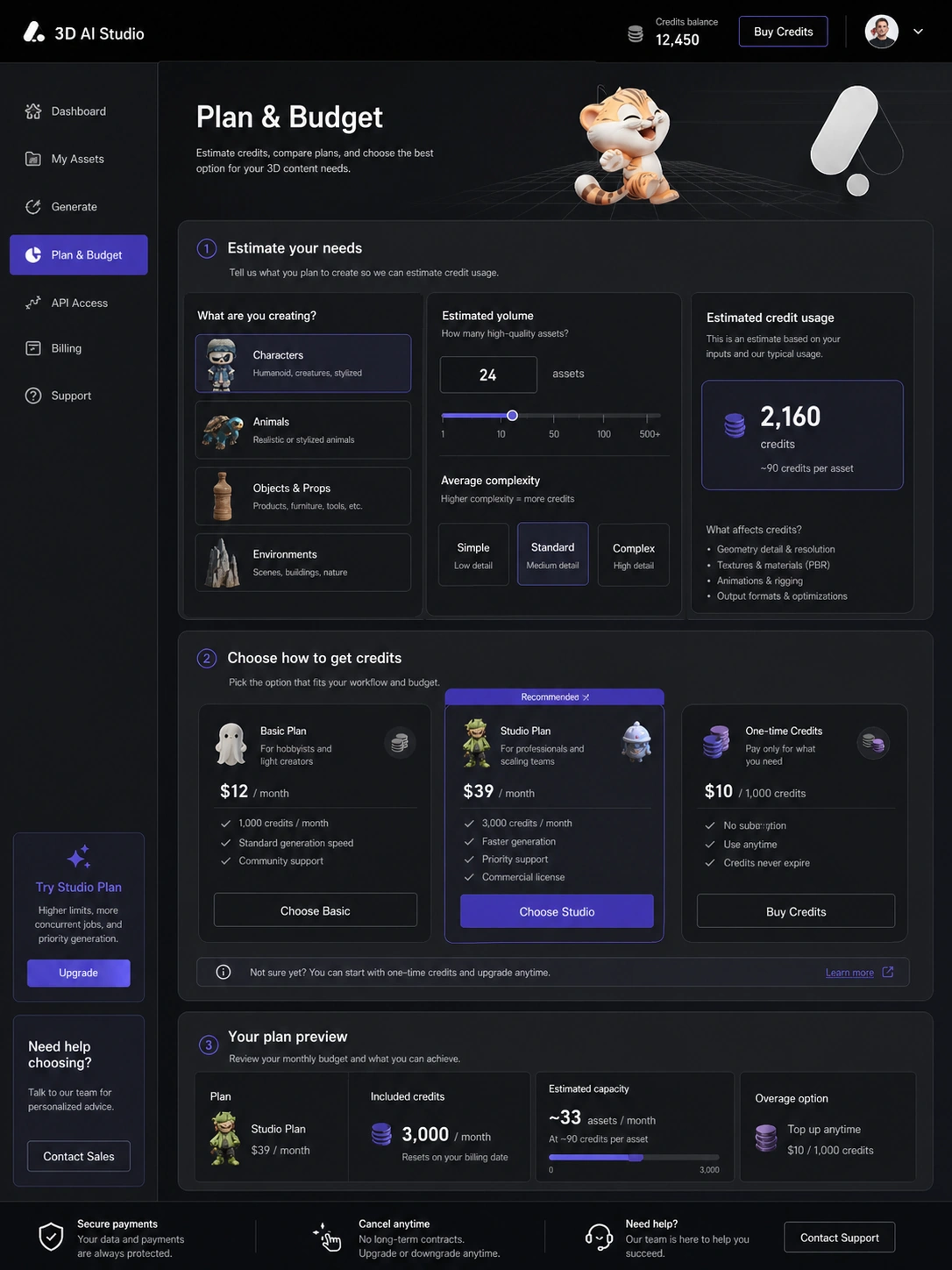
Pricing check: If the free test produces usable assets, compare monthly credits, annual billing, and one-time packs before paying.
Check 3D AI Studio pricing Check current offers Read store guide
Free plan, trial, coupon, and checkout notes
The best first step is the free credit path. It lets buyers test the generator before turning the product into a recurring expense.
I would use those credits on one real asset, not a playful prompt. If you are evaluating it for game development, generate a real prop. If you are evaluating it for product visualization, use a relevant reference image. If you are evaluating the API path, run a small technical test before building expectations around it.
The coupon or offer path should come later. A discount can improve the purchase, but it should not decide the purchase. With a credit-based creative tool, the value comes from usable outputs per credit, not from the fact that a checkout route looks cheaper today.
Before paying, verify:
- current plan prices
- monthly credit amounts
- one-time credit availability
- annual billing terms
- cancellation and refund wording
- commercial ownership language
- export format support
- API access if needed
For this product, I would be especially careful with annual billing and larger credit purchases until the model quality is proven in your workflow.
What I would check before buying 3D AI Studio
If I were buying 3D AI Studio for a real workflow, I would check seven things before paying.
First, I would test credit consumption. The plan table only matters after you know how many usable assets you get per month.
Second, I would download the model and inspect it outside the platform. A preview is not enough.
Third, I would check export format behavior. A format can be listed and still require cleanup after import.
Fourth, I would review the commercial ownership and privacy language, especially for client work, product concepts, or confidential references.
Fifth, I would compare one-time credits against a subscription. Occasional users may not need a monthly plan.
Sixth, I would verify refund and cancellation terms before annual billing. Public wording can differ between general refund language, cancellation rights, and terms language.
Seventh, I would compare at least two specialist alternatives before committing. AI 3D generation is moving quickly, and output style can vary a lot between platforms.
A simple test before paying
Before paying, I would run a small test like this:
- Choose one asset that represents your real use case.
- Generate it from text or a reference image.
- Track the credits used for the first attempt.
- Try one or two refinements if needed.
- Download the best result in the format you need.
- Open it in Blender, Unity, Unreal Engine, Godot, a slicer, or your target workflow.
- Decide whether the cleanup time still makes the tool worth paying for.
This test is intentionally practical. It does not ask whether AI 3D generation is impressive in general. It asks whether 3D AI Studio creates something useful enough for your own work.
That is the only test that matters before choosing a plan.
Pros explained
The first real pro is speed. 3D AI Studio can shorten the distance between idea and model draft. For early creative work, that can be valuable even when the output still needs cleanup.
The second pro is workflow breadth. Text-to-3D, image-to-3D, texture tools, mesh utilities, exports, and API access make the product feel more complete than a narrow generator. This matters when the buyer wants a single browser-based place to create, adjust, and export draft assets.
The third pro is the free credit entry path. Creative AI tools are hard to judge from marketing pages. Free credits give the buyer a lower-risk way to test output quality before payment.
The fourth pro is export and commercial-use positioning. For game, product, web, and client workflows, export support and commercial ownership language are not small details. They influence whether the output can be used beyond experimentation.
The fifth pro is API potential. For developers, 3D AI Studio is more interesting when generation can be added to an internal system, SaaS product, or creative automation workflow. That said, API value should be tested rather than assumed.
Cons explained
The biggest con is output uncertainty. AI-generated 3D models can be useful, but they are not guaranteed to meet production standards. Geometry, materials, topology, scale, and style consistency all need review.
The second con is credit pressure. Credit systems can be fair when outputs are predictable. They can feel expensive when a buyer needs many attempts before one model is usable. This is the cost most buyers underestimate.
The third con is that 3D AI Studio may be too broad for some users and not specialized enough for others. A casual user may not need the full toolkit. A professional studio may need more control than an AI generator can reliably provide.
The fourth con is refund and cancellation complexity. The product has public refund-support language, general terms, and cancellation information. Buyers should verify the current checkout and terms before relying on a specific refund expectation.
The fifth con is API responsibility. API access sounds strong, but technical buyers still need to handle async processing, variable outputs, credit cost, errors, and downstream quality review.
Green flags and red flags
Green flags are easy to spot when the buyer already has a repeated 3D asset need. If you need many drafts, can tolerate iteration, and know how to inspect outputs, 3D AI Studio has a clearer role.
Another green flag is format awareness. If you already know whether you need GLB, OBJ, FBX, STL, USDZ, or PLY, you are in a better position to test the platform properly.
A third green flag is credit discipline. Buyers who track failed attempts and usable outputs will understand the real cost faster.
The red flags are different.
If you expect a perfect final model from one vague prompt, slow down. If you cannot inspect geometry, printability, or game-engine behavior, slow down. If you are buying annual billing because it looks cheaper before testing free credits, slow down.
The most common buyer mistake is treating AI generation as a finished asset pipeline. The better view is that 3D AI Studio can be an asset drafting tool. Whether it becomes a production tool depends on your quality standard.
3D AI Studio vs alternatives
3D AI Studio sits in a fast-moving AI 3D generation category, so I would compare it with direct alternatives before paying. The goal is not to find the most famous tool. The goal is to find the tool whose output style, pricing model, and workflow friction fit your actual use case.
Meshy vs 3D AI Studio
Meshy is one of the clearest direct comparisons for AI 3D model generation. I would compare it first if your priority is output quality, generation style, and a focused 3D asset workflow.
3D AI Studio may still make sense if you prefer its broader web toolkit, export flow, credit structure, API positioning, or surrounding mesh and texture tools. The tradeoff is that buyers should test both with similar prompts before judging by feature lists.
Tripo vs 3D AI Studio
Tripo is another direct text-to-3D and image-to-3D comparison route. It may be a better fit for buyers who care about approachable generation, quick iteration, or the specific look of Tripo outputs.
3D AI Studio may be stronger if the buyer wants a wider toolset around generation and a documented API path. The decision should come from output testing, not homepage claims.
Sloyd vs 3D AI Studio
Sloyd is a different kind of comparison because it can appeal to buyers who want structured, game-ready, editable 3D asset generation rather than purely prompt-driven AI output.
If your priority is game asset control and repeatable structured models, Sloyd deserves a serious look. 3D AI Studio is more attractive when you want AI prompt/image generation plus a broader creative toolkit.
Rodin vs 3D AI Studio
Rodin is worth comparing if high-detail 3D generation and visual quality are central to the decision. It may be better for buyers who want to push quality and production fit more deeply.
3D AI Studio may still be easier to evaluate for buyers who want a broad browser workflow, free credit testing, and several supporting tools in one place.
Trust, refund, and buyer-risk notes
The trust question with 3D AI Studio is not whether the product is interesting. It clearly solves a real creative problem. The trust question is whether the buyer understands the limits before paying.
Pricing should be verified at live checkout. Credit amounts, annual discounts, one-time packs, and plan features can change faster than an evergreen review.
Refund and cancellation language should also be read carefully. The public homepage says users can contact support for refund requests. The general terms state that fees are non-refundable except where required by law or explicitly stated. A separate cancellation page describes cancellation rights. That combination does not mean buyers should assume a simple universal refund window. Read the current terms before annual billing or larger purchases.
Data and privacy deserve attention if you upload confidential reference images, product concepts, client designs, or unreleased IP. AI generation requires processing your inputs. That may be normal for the category, but professional buyers should still review current privacy and rights language.
API buyers have another risk layer. API documentation is useful, but integration adds responsibility: async jobs, credit usage, task failures, output variability, storage, and end-user expectations. Do not promise your users instant perfect 3D assets until the full workflow has been tested.
Finally, do not treat commercial ownership language as a substitute for legal review when a project is high-value, client-facing, or brand-sensitive. For casual assets, the risk may be small. For commercial production, the buyer should be more careful.
Final verdict
3D AI Studio is a useful tool if you treat it as a fast 3D asset drafting system, not as a guaranteed replacement for professional 3D production.
I would consider it if you need repeated text-to-3D or image-to-3D generation, can inspect exported models, and want a broad browser-based workflow with supporting tools and API potential. It is especially interesting for concept assets, indie game props, 3D printing ideas, product visualization drafts, and developer experiments.
I would skip it if you need strict topology, exact art direction, highly controlled production assets, or a one-click final model with no cleanup. I would also avoid annual billing until the free-credit test proves that the product fits your actual asset needs.
I would compare it with Meshy, Tripo, Sloyd, and Rodin before committing. The right choice depends on the output you get from your own test prompt, not the most impressive feature list.
For my money, 3D AI Studio makes sense when speed and iteration matter more than perfect first-pass control. Use the free credits, test a real asset, inspect the export, and only then decide whether the credit plan supports your workflow.
