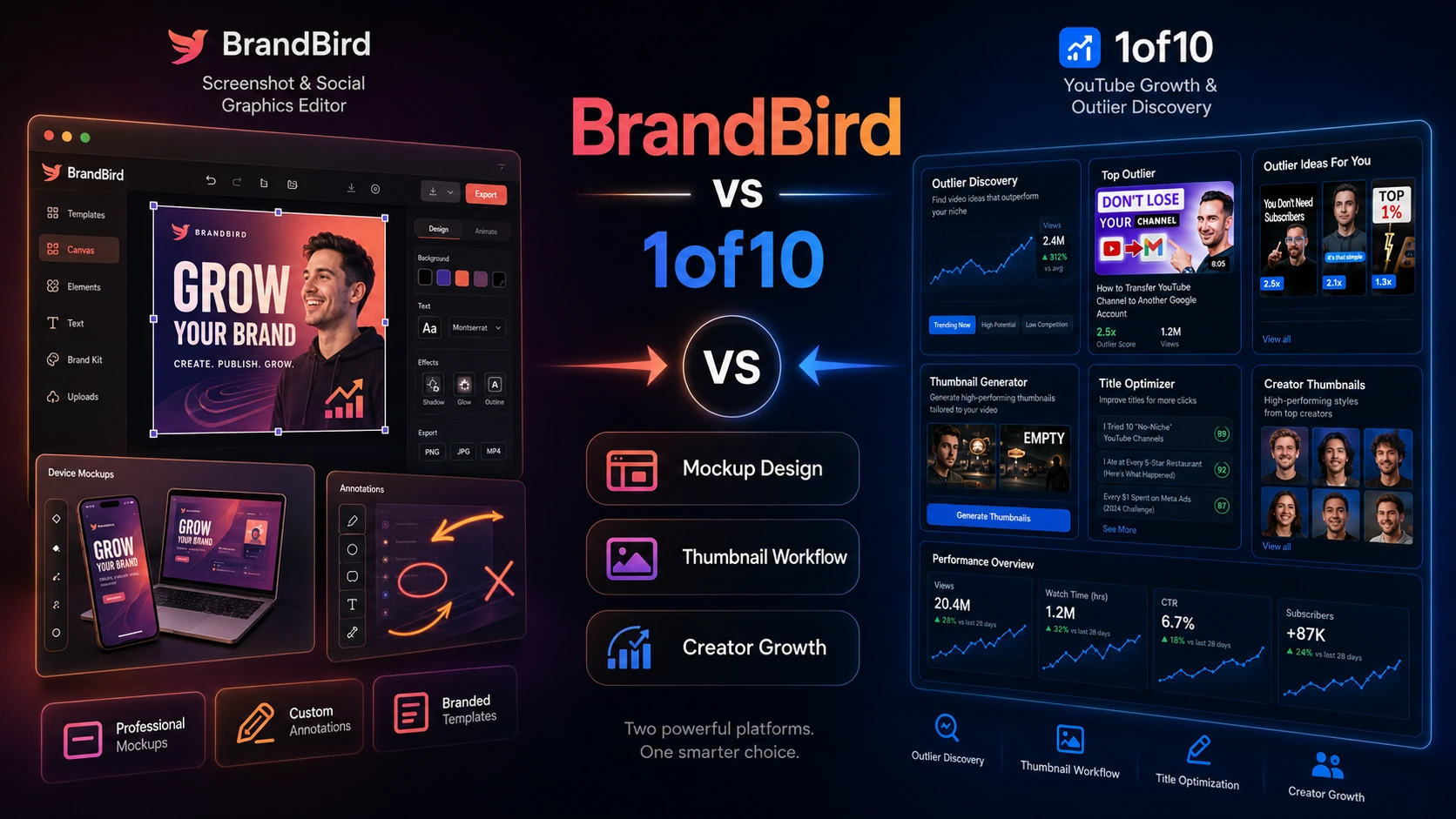
BrandBird vs 1of10 is not really a fight between two identical creator tools. BrandBird is closer to a screenshot and social graphic editor for founders, marketers, and creators. 1of10 is closer to a YouTube packaging tool for ideas, outlier research, titles, and thumbnails.
That distinction matters. One tool helps you make existing visuals look more polished for launches, newsletters, product posts, and landing pages. The other helps you decide what kind of YouTube video to make and how to package it before publishing. If you choose by “creative tool” alone, you may buy something useful that still solves the wrong weekly job.
Quick verdict
Choose BrandBird if your main workflow is visual presentation: turning screenshots, app screens, tweets, website captures, and product images into branded graphics for LinkedIn, X, Instagram, Product Hunt, blogs, newsletters, and landing pages.
Choose 1of10 if your main workflow is YouTube packaging: studying outlier videos, tracking competitor ideas, generating title angles, testing thumbnail directions, and improving the creative decision before upload.
The mistake is comparing them as if both are generic image tools. BrandBird helps package screenshots and marketing visuals. 1of10 helps package YouTube video ideas. Start there, then check pricing, plan limits, and any current deal path only after the workflow is clear.
At-a-glance comparison
| Decision point | BrandBird | 1of10 |
|---|
| Best for | Screenshot mockups, social graphics, product visuals, branded creator assets | YouTube idea research, outlier discovery, titles, thumbnails, video packaging |
| Pricing style | Free path, Pro subscription, and lifetime option when available | Free plan, Basic and Pro creator plans, Enterprise path |
| Free plan or trial | Free path for testing editor fit | Free plan for testing research and limited AI tools |
| Workflow strength | Fast visual polish for existing screenshots and images | Research-led YouTube packaging before publishing |
| Team fit | Useful for small marketing or founder teams needing repeatable visuals | Better for creator teams if research and Pro tools are used often |
| Main risk | Narrow refund window and limited fit outside screenshot-led design | Paid value depends on how often you use research and AI credits |
| Best next step | Start with the BrandBird store guide or BrandBird review | Start with the 1of10 store guide or 1of10 review |
Choose BrandBird if…
BrandBird makes more sense if you already have the source material and need to make it look better. That source material might be a product screenshot, SaaS dashboard, tweet, landing page section, testimonial, website capture, or mobile app screen. The job is visual polish, not channel strategy.
That makes BrandBird a strong fit for SaaS founders, indie makers, marketers, newsletter writers, and creators who publish a lot of screenshot-led content. If your week includes launch posts, changelog images, product tutorial graphics, Product Hunt assets, LinkedIn visuals, blog images, or branded tweet screenshots, BrandBird is the cleaner match.
Its advantage is focus. You use it for backgrounds, mockups, device frames, 3D effects, annotations, watermarks, brand kits, reusable layouts, and export-friendly visuals without rebuilding every graphic manually. The official site also points to Chrome capture and Figma export paths, which can matter when your visuals start from a webpage or design frame.
The limitation is the same focus. BrandBird will not tell you which YouTube idea is likely to work. It will not replace a serious brand system. It will not give you full Figma, Canva, or Photoshop-style layout control. If your work is mostly video topic research, thumbnail testing, or channel strategy, BrandBird is the wrong first click even if its graphics look good.
Commercially, test the free path before paying. BrandBird’s public pricing currently shows a free entry point, a Pro plan, and a lifetime option, but buyers should verify the live checkout page before choosing monthly or lifetime access. The refund language appears narrow, so it is safer to test real screenshots, watermark tolerance, export quality, and workflow fit before payment.
Choose 1of10 if…
1of10 makes more sense if your bottleneck is not making a screenshot look good, but deciding what YouTube video to make and how to package it. Its workflow is built around outlier research, competitor tracking, thumbnail search, title generation, idea generation, and AI-assisted packaging.
That makes 1of10 a better match for YouTube creators who publish repeatedly. A casual creator may browse a few ideas and never return. A serious creator can use the research layer to study what is breaking out in a niche, save patterns, compare thumbnail directions, test title angles, and bring more evidence into the upload decision.
The important distinction is that 1of10 is not simply a thumbnail maker. The more useful part is the research workflow around video packaging. If you already have a product screenshot and need a launch graphic, BrandBird is closer. If you are still choosing the angle, title, and thumbnail style for the next upload, 1of10 is closer.
The limitation is specificity. 1of10 is not the better tool for general social graphics, product screenshot mockups, landing page images, or newsletter visuals. It is designed around YouTube creators. If your content does not live on YouTube or you do not publish often enough to use the research tools, the paid plan can be hard to justify.
Pricing also needs a different review. The public pricing page currently shows a free plan, Basic and Pro paid paths, and Pro-level AI tools with monthly AI credits. Buyers should verify the current billing toggle, plan limits, credit rules, team-seat terms, and refund wording before paying, especially if annual billing is selected.
Avoid both if…
Avoid both tools if you are looking for one complete creative operating system. BrandBird is not a full professional design suite. 1of10 is not a broad social design editor. They can support creator workflows, but they do not remove the need to know what you are trying to publish.
Avoid both if your real problem is inconsistent strategy. If you do not know your audience, offer, channel format, or publishing cadence, neither product fixes that alone. Also pause if you need strict brand governance, enterprise procurement, or a formal approval process before adding another subscription.
Pricing and plan fit
BrandBird is easier to evaluate by visual volume. Ask how often you create screenshot-led graphics each month. If the answer is “once in a while,” the free path may be enough for testing. If the answer is “every week for product updates, newsletters, launch posts, and tutorials,” then Pro or lifetime access may deserve a closer look.
The public pricing page currently shows Free at $0 and Pro at $15 per month, plus a lifetime option shown as a one-time payment when available. Since pricing pages can change, buyers should still confirm the live checkout amount, billing interval, watermark rules, premium tool access, brand kit access, and whether lifetime access is still being offered under the same terms.
1of10 is easier to evaluate by publishing cadence. If you publish to YouTube often, research and packaging can pay back through better decisions. If you upload rarely, the dashboard may become another subscription you admire but do not use.
The current 1of10 pricing page shows a free plan, a Basic plan for research and discovery tools, and a Pro plan that adds AI thumbnail, title, idea, and repackaging tools plus monthly AI credits. Buyers should verify the live monthly versus annual toggle, credit limits, team-member terms, and whether Basic or Pro contains the tools they actually need.
Before checkout, use this pair-specific checklist:
- For BrandBird, verify watermark removal, export needs, premium mockups, brand kits, saved layouts, Chrome extension use, Figma workflow, refund timing, and whether monthly or lifetime access is safer.
- For 1of10, verify whether you need Basic research tools or Pro AI tools, monthly AI credits, team seats, annual billing, refund wording, and whether the free plan gives enough evidence before paying.
- For both, check the current store or coupon route only after the product fit is clear.
- Do not choose a paid plan until you have tested one real workflow you would repeat monthly.
Workflow fit
BrandBird fits a workflow that starts with an existing visual and ends with a polished asset. The input is usually a screenshot, product UI, website capture, tweet, or image. The output is a better-looking graphic for social, blog, newsletter, product marketing, or launch communication.
1of10 fits a workflow that starts before the video is made. The input is a niche, competitor set, topic idea, or video angle. The output is a better packaging decision: which idea to pursue, what title direction to test, what thumbnail pattern to study, and how to make the next upload less random.
This is the core buying split. BrandBird improves presentation after you know what you want to show. 1of10 improves the YouTube decision before you publish. A creator may eventually use both, but they should not be bought for the same reason.
Feature depth and practical limitations
BrandBird’s useful features are practical: gradients, backgrounds, 3D effects, device mockups, annotations, watermarks, brand assets, social sizes, and browser capture workflows. These features matter when speed and consistency are more important than deep design control.
The practical limitation is that BrandBird works best when the content already exists. It can make a product screen look sharper. It cannot replace product-market clarity, copywriting, or a YouTube packaging strategy.
1of10’s useful features sit closer to content research: outlier discovery, competitor channel tracking, thumbnail search, niche exploration, title generation, idea generation, repackaging, and paid-plan AI tools. These matter when the buyer wants fewer random uploads and more structured creative decisions.
The practical limitation is that research can become browsing. A creator can spend hours looking at outliers without publishing. 1of10 is most valuable when it feeds an actual upload cadence, not when it becomes a substitute for making videos.
Team, business, or advanced use
BrandBird can fit small teams that need repeatable marketing visuals without turning every screenshot into a design ticket. It may be useful for founders, product marketers, DevRel teams, and newsletter teams that need consistent assets. Before using it as a team workflow, verify reusable layouts, brand kits, export formats, user access, and whether the selected plan supports the way your team shares work.
1of10 can fit creator teams when YouTube packaging is a shared job between strategists, editors, thumbnail designers, and channel owners. Its higher paths mention team access and onboarding-style support, but buyers should verify the current plan or sales route before assuming it fits a multi-person operation.
For business buyers, the approval question is different for each tool. With BrandBird, ask who owns brand consistency and export standards. With 1of10, ask who chooses the topic, approves the title, and checks whether the thumbnail is original enough for the channel’s style.
Coupon, deal, and next-step path
Do not start with the coupon page if you are still unsure which product fits. A discount can make the right purchase cheaper, but it cannot turn a screenshot editor into a YouTube research workflow or a YouTube packaging platform into a general screenshot design tool.
Start with BrandBird if you need polished social and marketing visuals from screenshots. Read the BrandBird store guide or BrandBird review if you need deeper product context, then check the BrandBird coupon route only before checkout.
Start with 1of10 if your YouTube topic, title, or thumbnail decisions need more structure. Use the 1of10 store guide or 1of10 review first, then check the 1of10 coupon route only after you know the plan fits.
The safest savings path is simple: test the free option, confirm the plan you actually need, verify billing and refund language, then inspect the final checkout total.
Final verdict
Choose BrandBird if you repeatedly need branded screenshots, product mockups, social graphics, launch visuals, newsletter images, and screenshot-led marketing assets. It is the better fit for visual polish after the content already exists.
Choose 1of10 if you repeatedly need better YouTube video ideas, title angles, thumbnail directions, competitor research, and packaging decisions before upload. It is the better fit when your channel growth problem begins before the design asset is made.
If you are still unsure, do not start with the discount. Start with the workflow split: BrandBird for branded screenshot and social graphics; 1of10 for YouTube research and packaging. After that, check the current store, review, or coupon route only when the better match is clear.
FAQ
Is BrandBird or 1of10 better for beginners?
BrandBird is easier for beginners who already have screenshots or product visuals and just want them to look polished. 1of10 is better for beginners who publish on YouTube and need help choosing ideas, titles, and thumbnail directions.
1of10 is the more direct fit for YouTube thumbnail strategy because it connects thumbnails to outlier research, titles, ideas, and video packaging. BrandBird can create polished graphics, but it is not a YouTube research platform.
BrandBird is the stronger fit for social graphics, product screenshots, launch posts, newsletter visuals, and marketing images. 1of10 is more specific to YouTube content planning and packaging.
Should I choose based on coupon availability?
No. Use coupon or deal routes only after choosing the better workflow. If you need screenshot-led visuals, start with BrandBird. If you need YouTube research and packaging, start with 1of10.
What should I check before paying?
For BrandBird, check watermark rules, export quality, brand kits, premium tools, lifetime availability, and refund timing. For 1of10, check whether Basic or Pro fits, AI credit limits, team access, annual billing, and refund wording. For both, test one real workflow before choosing a paid plan.