Taja AI Pricing, Creator Workflow & Plan Fit
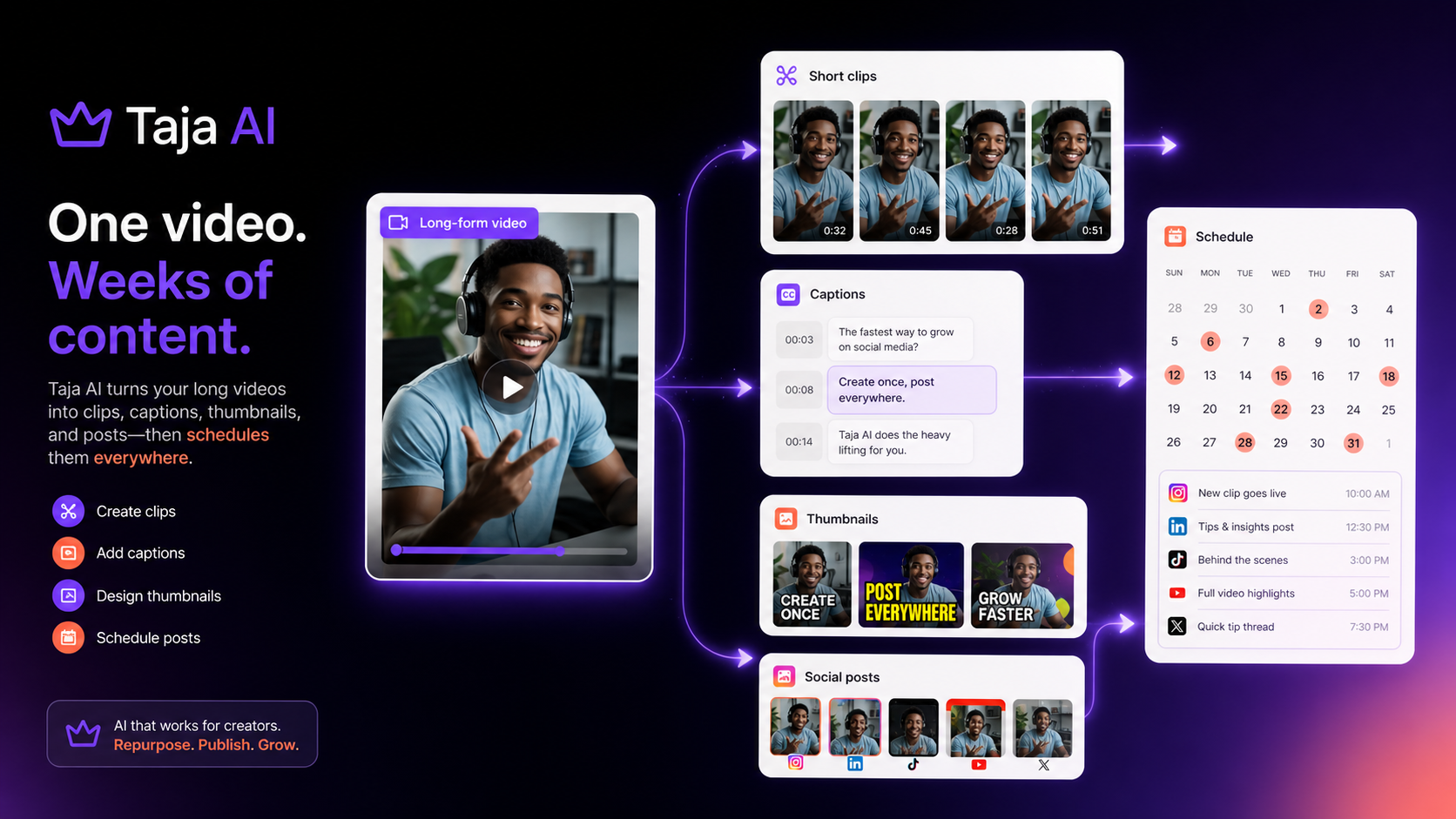
Taja AI is a creator workflow tool for turning long-form video into YouTube metadata, Shorts, social clips, captions, thumbnails, blog-style output, and scheduled social posts. It is best judged as a post-production and distribution assistant for people who already publish video often. The useful buying question is not whether it can create more assets from one upload. It is whether your posting rhythm, video volume, and quality-control habits are strong enough to justify a paid plan after the trial.
Fit → price → checkout
Use these routes after the official-site check: coupon first, review for fit, compare if unsure.
Taja AI pricing snapshot
Fast commercial checks before pricing, coupons, or a deeper review.
Taja AI product tour
This product tour is useful if you are deciding whether Taja AI can replace several small creator tasks or simply create more content for you to review. Watch how a long-form video moves into optimization, short clips, captions, thumbnails, and scheduling. Pay attention to the editing steps, not just the automation claim, because the buyer decision is whether the generated assets are good enough to publish with light review.
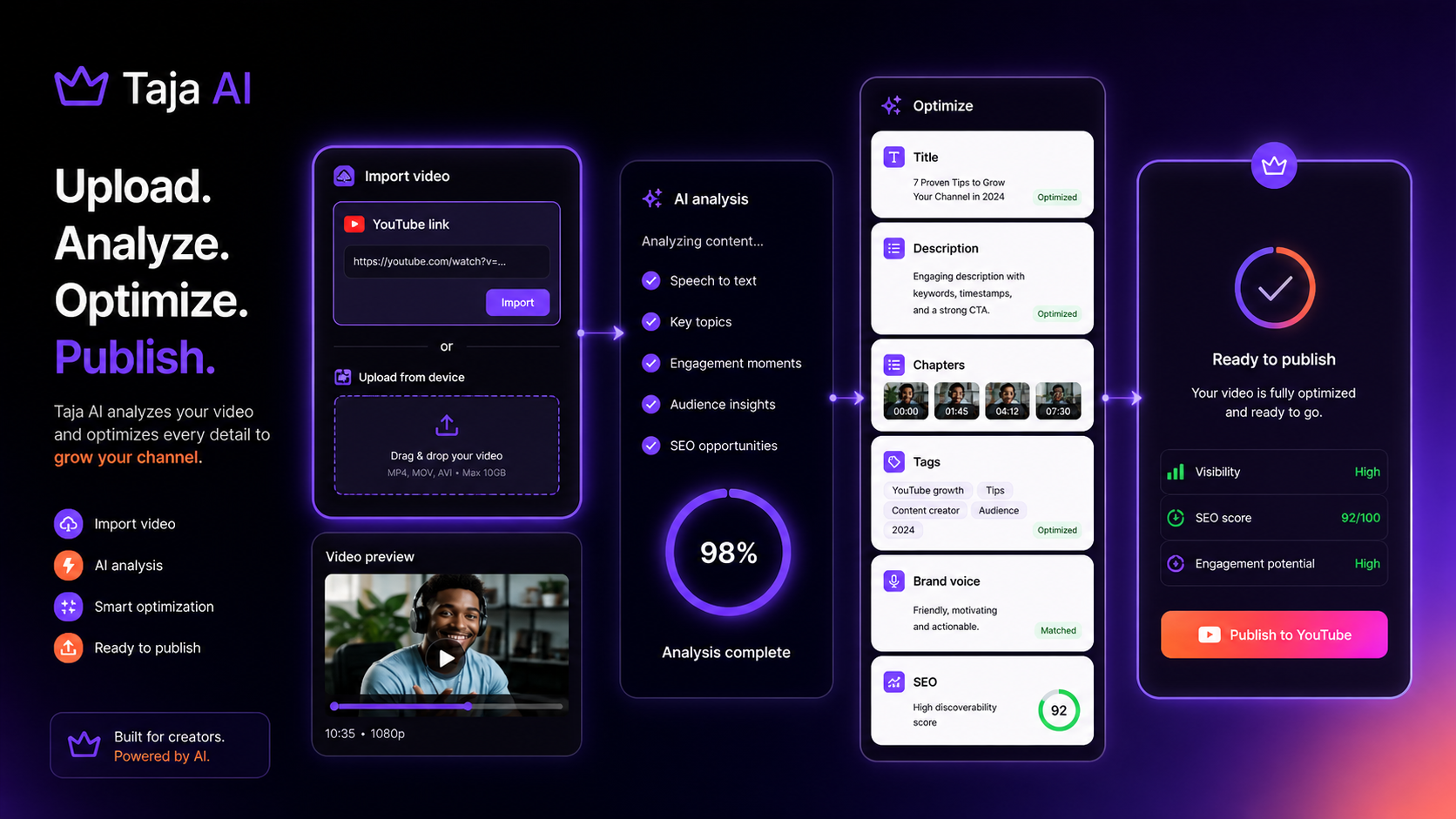
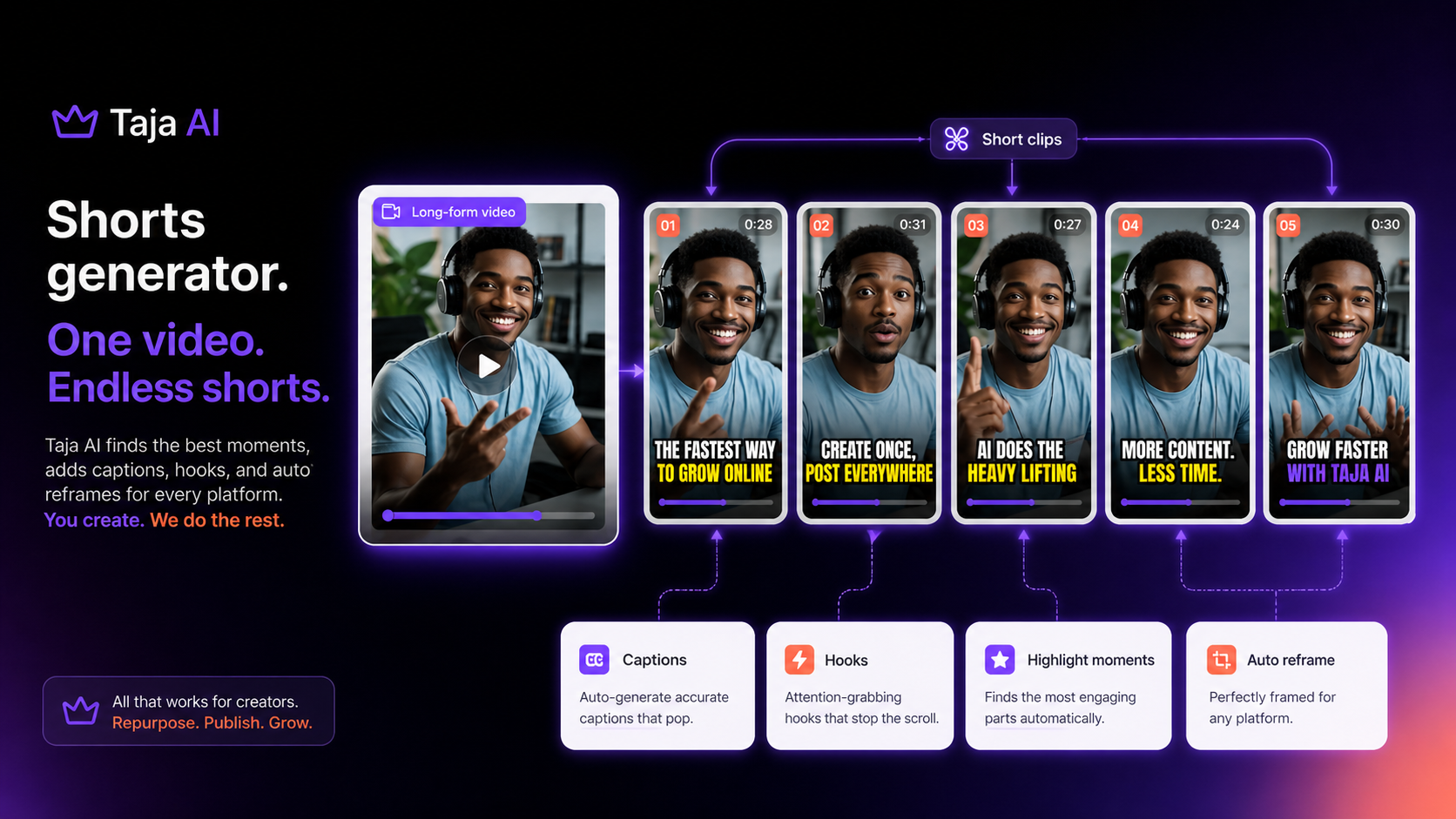

Taja AI should be evaluated as a creator workflow tool, not as a generic video editor. Its promise is to take a long-form recording and help you turn it into YouTube SEO metadata, short clips, social captions, thumbnails, blog-style output, and scheduled posts. That can be valuable, but only if you already have a repeat publishing rhythm. If you do not publish enough video, the plan limits and automation may look better than the practical return.
What Taja AI actually does
Taja AI takes long-form video and turns it into a set of creator assets: optimized YouTube titles and descriptions, chapters, tags, short clips, social posts, captions, thumbnails, and scheduled distribution. The official site also highlights idea generation and multi-channel scheduling, which makes it closer to a repurposing and publishing workflow than a simple clipping app.
The buyer question is whether you need that whole chain. A creator who only wants a few manual clips may find the workflow too broad. A podcaster, coach, or agency publishing every week may get more value because the same upload can support YouTube, Shorts, Reels, TikTok, LinkedIn, X, and other social output.
- Turns long-form video into short-form clips and text outputs.
- Helps with YouTube SEO metadata, captions, thumbnails, and scheduling.
- Makes most sense when you publish video often enough to use the plan limits.
Pricing and plan fit
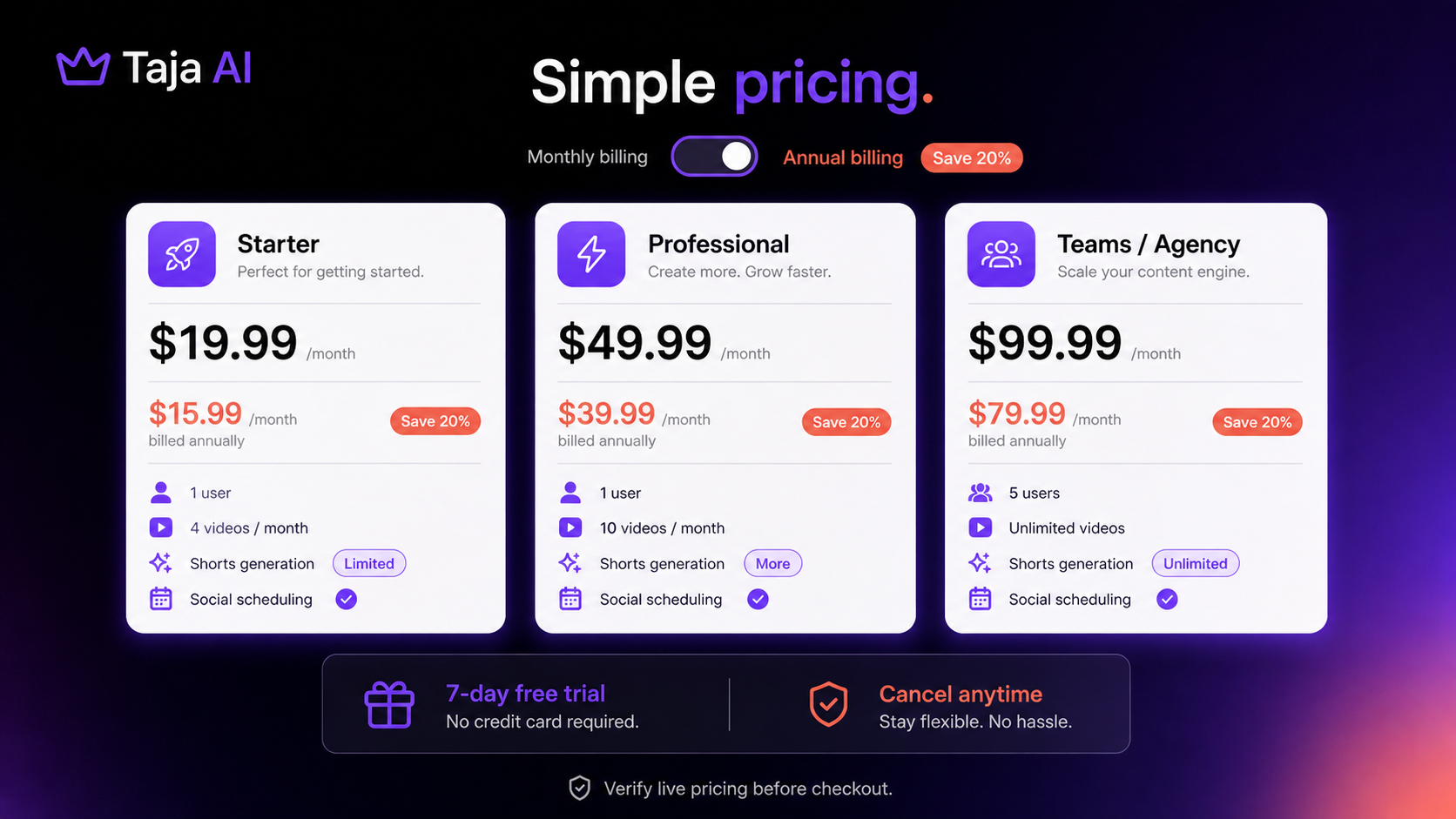
Taja AI's official pricing page shows a 7-day free trial. The monthly view lists Starter at $19.99/month, Professional at $49.99/month, and Teams/Agency at $99.99/month. The annual view shows a 20% discount, including annual-equivalent prices such as Starter at $15.99/month, Professional at $39.99/month, and Teams/Agency at $79.99/month.
The plan decision should not be made from the monthly price alone. Starter is better for individual creators testing a small monthly video volume. Professional makes more sense when you need more videos and more short outputs. Teams/Agency is the route to compare if you need up to 5 users, unlimited videos, more social sets, and collaborative work.
- Starter is the lower-friction entry point for individual creators.
- Professional fits heavier solo creators, podcasters, and influencers.
- Teams/Agency is the relevant path for multi-seat and agency workflows.
- Annual billing can save money, but only after the trial proves the workflow.
Trial, cancellation, and refund risk
The official pricing FAQ says Taja AI offers a 7-day free trial and that users retain access through the current billing cycle after cancellation. The same page gives account-level cancellation guidance through the profile and billing area. That is useful, but it is not the same as a clearly advertised money-back guarantee for direct subscriptions.
Buyers should treat the trial as the main risk-control window. Process a real video immediately, check output quality, export or schedule something practical, then decide before the trial ends. If buying through AppSumo or another marketplace, verify the marketplace terms separately because those protections may not match direct Taja AI billing.
- Trial length is 7 days, so test quickly.
- Direct refund protection was not clearly stated as a simple public window.
- AppSumo deal protection should only be relied on when purchasing through AppSumo.
Product tour video to watch
Watch this tutorial if you want to understand whether Taja AI can reduce your post-production workload without creating a new editing burden. Pay attention to how the platform analyzes a video, creates outputs, and gives you review points before publishing. That helps you decide whether Taja AI is a workflow fit or just an interesting content multiplier.
Who should compare Taja AI against alternatives
Taja AI is strongest when you want a combined repurposing, YouTube SEO, social caption, and scheduling workflow. It is not automatically better than specialist tools. If your main pain is YouTube keyword research, TubeBuddy or vidIQ-style tools may feel deeper. If your main pain is short-form clipping and caption polish, Klap or Submagic-style tools may be easier to compare. If your main pain is full editing, Descript-style tools may be closer to the job.
DealBestDaily's internal routing also connects this store to nearby creator and AI design tools, so the safest buyer path is to compare by workflow, not category label. Taja AI belongs in the AI video and creator workflow bucket because its real value sits after filming: packaging, clipping, optimizing, and scheduling.
- Compare Taja AI when you want one upload to become many publishable assets.
- Compare Klap or Submagic when short-form clip polish is the only priority.
- Compare YouTube SEO tools when metadata and analytics matter more than repurposing.
- Compare broader video editors when you need manual creative control.
Safest next step before checkout
The safest next step is to start the free trial, process one normal long-form video, and score the results against your real workflow. Check whether the suggested titles and descriptions match your channel voice, whether the clips are worth posting, whether captions and thumbnails need heavy edits, and whether the scheduler saves time across your actual platforms.
If the trial result is strong, compare monthly versus annual billing. If you are still unsure, read the review page before moving to the coupon or deal path. The store page should qualify the product, the review should test the fit, and the coupon page should only handle the final savings check.
- Start with a real trial video.
- Measure edit time saved, not just number of assets generated.
- Choose annual billing only if monthly usage is predictable.
- Use the coupon path after fit is clear, not before.
Best savings path from this store page
This is the clearest savings route to check once the product already looks like a fit.
AppSumo lists a Taja lifetime deal starting from one code with larger stacked-code tiers for higher content limits.
Try Taja AI before paying
Save 20% with annual billing
Use comparison routes when the category fit is still open
Use these comparison routes when the product still looks plausible, but the category fit is not fully settled.
Klap is a closer comparison when the buyer mainly wants AI short-form clips from long videos and does not need the broader scheduling and YouTube metadata workflow.
Submagic is worth checking when caption styling, short-form polish, and creator-facing edits matter more than full YouTube repurposing.
1of10 should be treated as a nearby internal comparison route only if the buyer is still exploring creator or AI workflow tools from the broader hub.
Aitubo is more image and creative-generation oriented, so it is relevant only when the buyer's problem is visual asset creation rather than video repurposing.
Verification points worth checking before you click out
Where this store usually fits best in the workflow
A weekly YouTuber can use Taja AI to turn a long video into titles, descriptions, chapters, hashtags, Shorts, and social posts, then decide whether the review time saved justifies a paid plan.
Podcasters can test whether Taja AI finds strong moments from long episodes and turns them into useful social clips, captions, and posts without requiring a separate clipping stack.
Coaches and solopreneurs can use one recording to create multiple social touchpoints, but should verify whether the output matches their brand voice before annual billing.
Agencies can compare Teams/Agency when they need several users, higher volume, and repeat scheduling across clients or channels.
Practical checkpoints before and after signup
- Pick one normal long-form video that represents your real channel or client workflow.
- List the outputs you actually need: titles, descriptions, clips, captions, thumbnails, blog text, and scheduled posts.
- Decide what would count as useful time saved before seeing the generated output.
- Process the full video and check whether the selected clips make sense without heavy manual editing.
- Review title, description, chapter, hashtag, and social post quality against your normal publishing standard.
- Test scheduling only if the connected platforms are part of your real weekly workflow.
- Compare Starter, Professional, and Teams/Agency around video count, seats, social sets, and watermark removal.
- Verify whether monthly billing or annual billing fits your publishing cadence.
- Confirm cancellation behavior and marketplace terms if you are using an AppSumo or deal route.
- Track how much editing time each video still needs after Taja AI generates outputs.
- Revisit the plan if your publishing volume changes or if a team member needs access.
- Keep a separate quality checklist for titles, clips, captions, thumbnails, and scheduled posts.
Fast-read signals for workflow fit and buying friction
Questions readers usually ask before choosing this store
What does Taja AI actually do?
Taja AI turns long-form video into creator assets such as YouTube metadata, short clips, captions, thumbnails, blog-style output, social posts, and scheduled content. It is best understood as a repurposing and publishing workflow, not just a video editor.
Is Taja AI free to try?
Yes. The official pricing page says Taja AI offers a 7-day free trial, and the trial can optimize and repurpose up to 4 long-form videos. Use that window with a real video because it is the safest way to test output quality before paying.
How much does Taja AI cost?
The official monthly pricing view lists Starter at $19.99/month, Professional at $49.99/month, and Teams/Agency at $99.99/month. Annual billing shows a 20% discount, but buyers should verify the live pricing page before checkout because plan limits matter as much as price.
Does Taja AI have a public coupon code?
A guaranteed public coupon code was not treated as verified during this update. The safer savings paths are the free trial, annual billing discount, and any live marketplace or DealBestDaily routing that works at checkout.
What should I verify before buying Taja AI?
Verify the live plan limits, video quota, seat count, watermark rules, annual billing terms, cancellation process, and whether your generated clips and social posts are publishable with light editing. If output quality is still uncertain, read the review before using the coupon path.
Choose the next route that matches what you still need to decide
The strongest next click depends on whether you still need product judgment, a savings route, or a broader category comparison.