
KorpiAI Pricing, Plans & Creator Workflow Fit
KorpiAI is a short-form AI video platform for creators who want to produce faceless Shorts, TikToks and Reels from niche templates rather than edit every clip manually. The strongest fit is a repeat creator workflow: choose a viral niche, generate or shape the script, use AI voice and captions, then render a finished short-form video. The buying decision depends heavily on credits, niche type and publishing volume, not just the headline monthly price.
Fit → price → checkout
Use these routes after the official-site check: coupon first, review for fit, compare if unsure.
KorpiAI pricing snapshot
Fast commercial checks before pricing, coupons, or a deeper review.
KorpiAI product tour
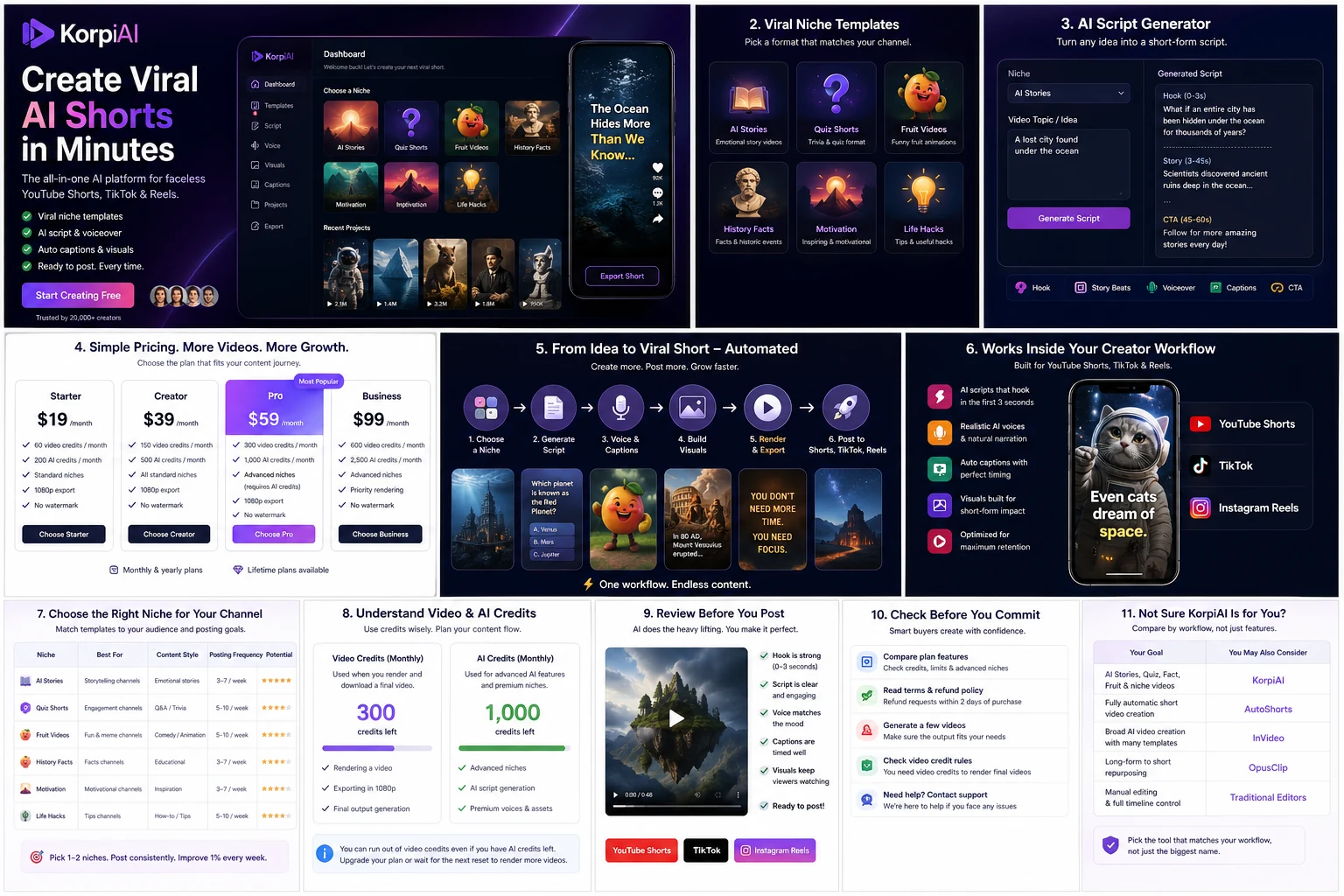
These visuals focus on the practical buying questions: what KorpiAI creates, how templates and scripts shape the workflow, how plan limits affect output volume, and why credit rules matter before checkout.


KorpiAI should be evaluated as a creator workflow tool, not just another AI video name in a directory. It is built around short-form, faceless video production: niche templates, AI-generated scripts, voiceovers, captions, rendering and automation. The real buyer question is whether its template system and credit model match the way you plan to publish.
What KorpiAI actually does
KorpiAI helps creators generate short-form AI videos for platforms such as YouTube Shorts, TikTok and Reels. The official positioning is clear: choose a viral niche, let the system help with scripts, voiceovers and captions, then render the final video without needing traditional editing skills. That makes it more useful for repeat faceless-content production than for custom brand videos or detailed timeline editing.
- Creates short-form AI videos from niche-led workflows
- Includes AI script generation, voiceovers, captions and rendering
- Focuses on faceless formats rather than filmed creator footage
- Works best when the creator already has a posting strategy
Who gets the best fit from KorpiAI
The best fit is a creator who wants to test or scale faceless short-form formats without assembling scripts, voices, images, captions and renders across several separate tools. Beginners may like the guided template path, while higher-volume creators should focus on plan limits, automation access and output consistency. It is not the cleanest choice for agencies that need approval workflows or brands that require tight creative control.
- Best for faceless Shorts, TikTok and Reels workflows
- Stronger for repeat output than one-off experiments
- Less suitable for agency review or custom brand production
- Worth comparing against AutoShorts, Crayo and InVideo when automation is the main question
Pricing and credit logic to verify
KorpiAI's pricing is not just monthly versus yearly. The plan table shows monthly, annual and lifetime options, but the credit rules add another layer. Every rendered video uses a video credit, while advanced niches can also require separate AI credits for image generation, scene generation and animation. Buyers should compare plan price, video allowance, export length, automation access and AI credit needs together.
- Hobby is the entry paid plan shown at $16.99/month
- Clipper adds more output volume and automation access
- Pro is positioned for creators scaling higher-volume channels
- Advanced niches can require AI credits in addition to video credits
Video workflow example to watch
A workflow video is useful because KorpiAI is easier to judge when you see a real niche become a finished short-form video. Watch for how much control the creator has over the idea, script, visuals and final output. Also pay attention to whether the workflow feels repeatable for your own channel or only impressive as a demo.
- Use the video to judge niche-to-output flow
- Look for the amount of manual editing still required
- Compare the demo niche against the formats you would actually publish
Refund, cancellation and checkout risk
KorpiAI's refund policy is narrow. The terms describe a 1-day refund request window tied to core features not working as described or the buyer being unable to generate any videos. They also say refunds are not available after that window or once videos have been successfully generated. That does not make the product a bad fit, but it does change the buying behavior: verify the plan, run a real test quickly and keep support channels handy.
- Read the refund language before choosing annual or lifetime pricing
- Test quickly if you buy, especially if you are unsure about output quality
- Keep screenshots or support notes if a core feature fails
- Avoid overcommitting before your channel workflow is proven
Alternatives and safest next step
KorpiAI belongs in the faceless video and creator automation space, so the most useful alternatives depend on the job. Compare AutoShorts when automatic faceless posting is the priority, Crayo when short-form templates and creator-market traction matter, InVideo when broader video creation is needed, and OpusClip when repurposing existing long videos is the core workflow. The safest next step is to open the official pricing page, check the credit model, then read the KorpiAI review before using the coupon path.
- Compare AutoShorts for automated faceless publishing
- Compare Crayo for template-led short-form creator workflows
- Compare InVideo for broader AI video production
- Compare OpusClip for clipping existing long-form content
Best savings path from this store page
This is the clearest savings route to check once the product already looks like a fit.
KorpiAI lists monthly, yearly, and lifetime billing choices, with yearly savings shown across Hobby, Clipper, and Pro plans. This is the cleanest official savings route because it does not depend on a coupon code being accepted.
Use this offer as a buyer-safe entry point. Pricing, plan limits, and coupon acceptance can change at checkout.
One-time lifetime pricing is shown for core plans
Reported 25% off fresh orders
Use comparison routes when the category fit is still open
Use these comparison routes when the product still looks plausible, but the category fit is not fully settled.
AutoShorts.ai is the closer comparison when the buyer wants a more direct faceless-video automation and posting workflow.
Crayo is relevant when the buyer is comparing short-form creator templates and social-video production speed.
InVideo may fit better when the workflow needs broader AI video creation beyond faceless niche Shorts.
OpusClip is a better comparison when the source material is existing long-form video that needs clipping rather than newly generated faceless Shorts.
Verification points worth checking before you click out
Where this store usually fits best in the workflow
KorpiAI fits creators testing faceless YouTube Shorts, TikTok or Reels formats where templates, scripts, voiceovers and captions can reduce setup friction.
Creators can use KorpiAI to test specific viral niches, but the plan only makes sense if the chosen niches match a repeat publishing strategy.
Higher-volume creators should compare Clipper or Pro against expected monthly renders, automation access and export length before committing.
KorpiAI can help beginners avoid complex editing software, but buyers still need to review output quality, platform fit and credit usage before scaling.
Practical checkpoints before and after signup
- Confirm that KorpiAI's available niches match the channel or content format you actually want to publish.
- Compare KorpiAI against AutoShorts, Crayo, InVideo and OpusClip by workflow, not just by price.
- Read the credit explanation before judging whether Hobby, Clipper or Pro is enough.
- Verify monthly, yearly and lifetime prices on the live checkout route.
- Check whether your planned niches require AI credits on top of video credits.
- Review the 1-day refund language before choosing a longer billing commitment.
- Generate a real video in your target niche soon after purchase.
- Check script quality, voice fit, caption style, render speed and final export quality.
- Decide whether the workflow is repeatable before upgrading or moving to annual billing.
Fast-read signals for workflow fit and buying friction
Questions readers usually ask before choosing this store
What is KorpiAI best for?
KorpiAI is best for creators who want to make faceless short-form videos using templates, AI scripts, voiceovers, captions and automated rendering. It fits YouTube Shorts, TikTok and Reels workflows better than custom brand-video production.
Does KorpiAI have a free plan?
A clearly verified free plan was not visible in the pricing section during this update. The official pricing section shows paid Hobby, Clipper and Pro paths with monthly, yearly and lifetime options, so buyers should confirm the current entry path at checkout.
How does KorpiAI pricing work?
KorpiAI lists Hobby, Clipper and Pro plans with monthly, yearly and lifetime pricing. Buyers should also understand the credit model because every rendered video uses a video credit and some advanced niches also require separate AI credits.
Can I get a refund from KorpiAI?
KorpiAI's terms describe a conditional refund request window within 1 day of purchase if core features do not function as described or if the buyer has been unable to generate any videos. Refunds are not available after that window or once videos have been successfully generated, so test quickly.
What should I compare before buying KorpiAI?
Compare the niche templates, monthly video allowance, export length, automation access, AI credit needs and refund terms. If those match your channel plan, open the review for deeper fit judgment, then use the pricing or coupon path for the final buying check.
Choose the next route that matches what you still need to decide
The strongest next click depends on whether you still need product judgment, a savings route, or a broader category comparison.