
Blogify Pricing, Plans & Blogging Workflow Fit
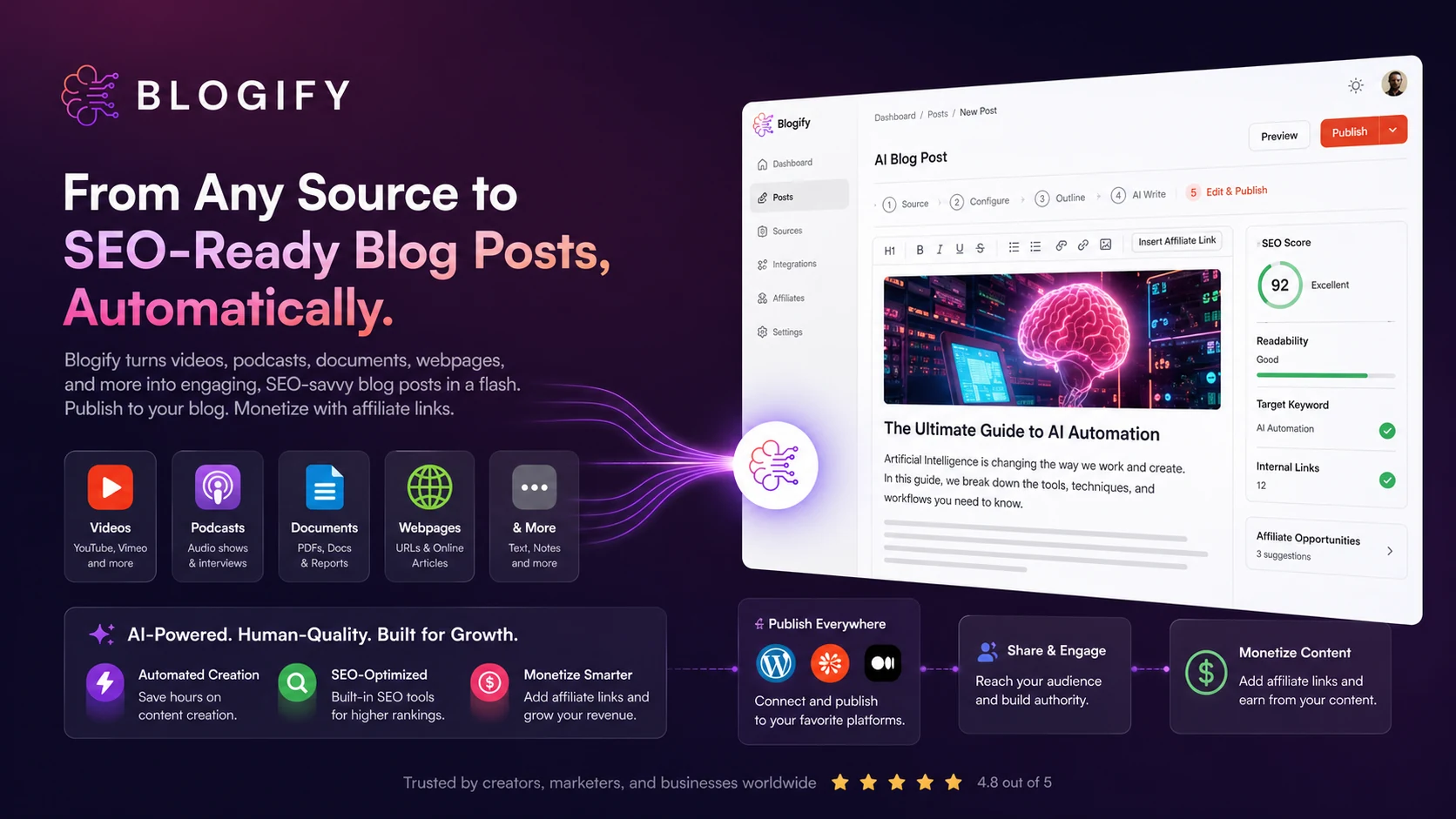
Blogify is an AI blogging automation platform for turning existing content into SEO-oriented blog posts. Its strongest angle is repurposing: videos, podcasts, audio files, documents, webpages, and e-commerce sources can become blog drafts that are then edited, scheduled, published, and monetized through supported platforms and affiliate-link workflows.
Fit → price → checkout
Use these routes after the official-site check: coupon first, review for fit, compare if unsure.
Blogify pricing snapshot
Fast commercial checks before pricing, coupons, or a deeper review.
Blogify product tour
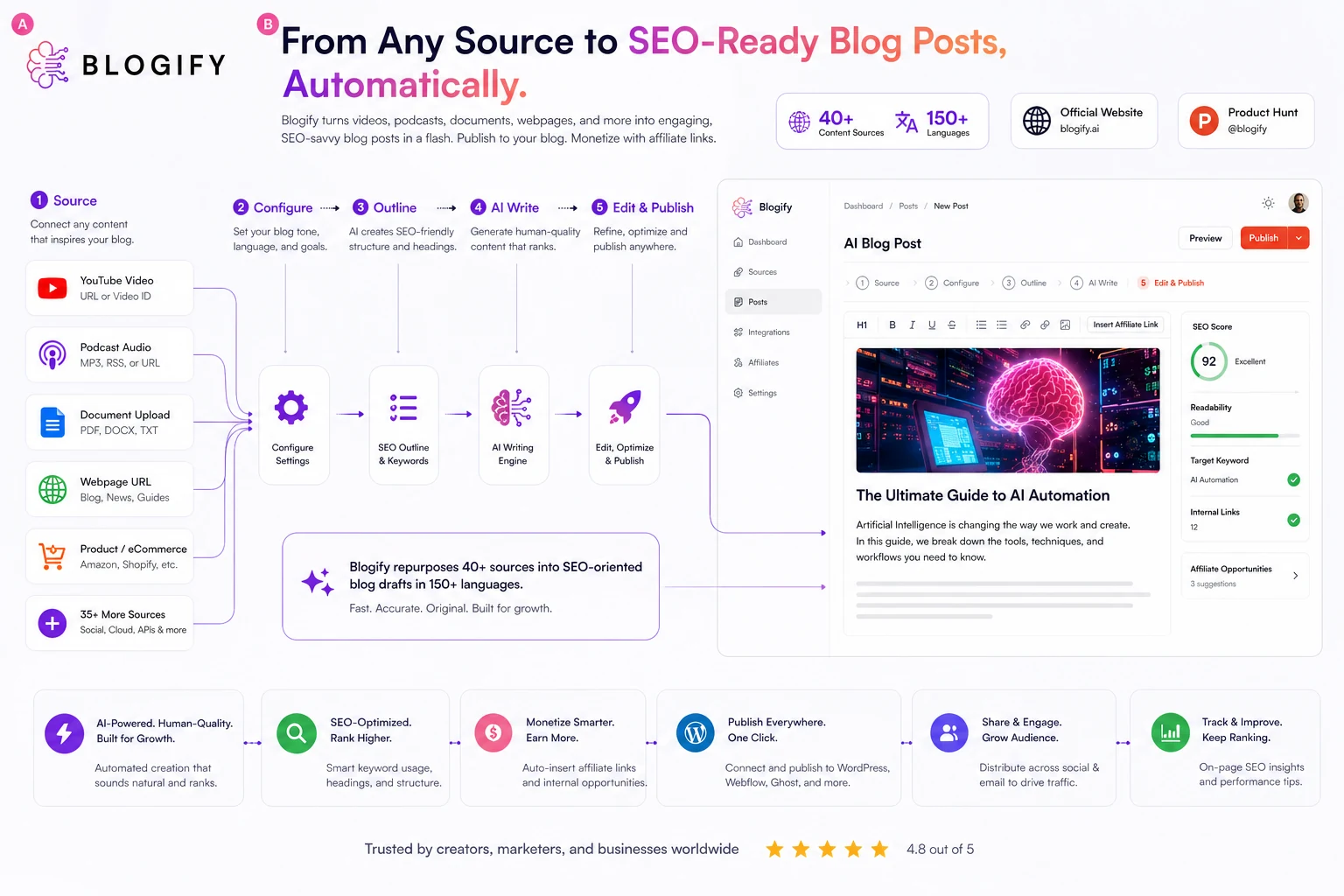
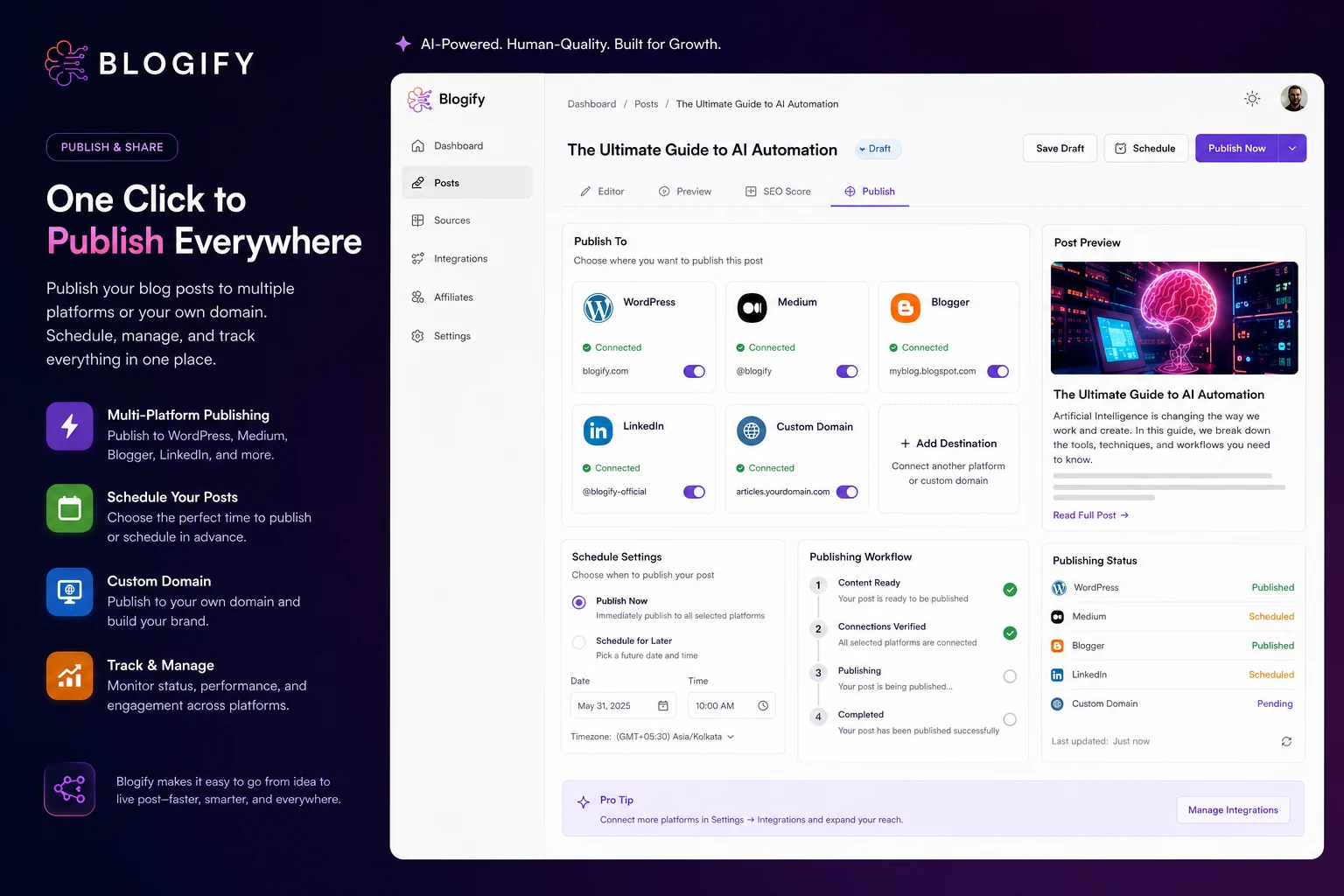
Blogify is easiest to judge by following the source-to-blog path: choose a source, generate the article, check SEO and formatting, then publish or schedule it. The best visuals for buyers are the pricing table, the source import flow, the publishing controls, and the monetization area because those decide whether Blogify is a real workflow tool or just another AI writer.
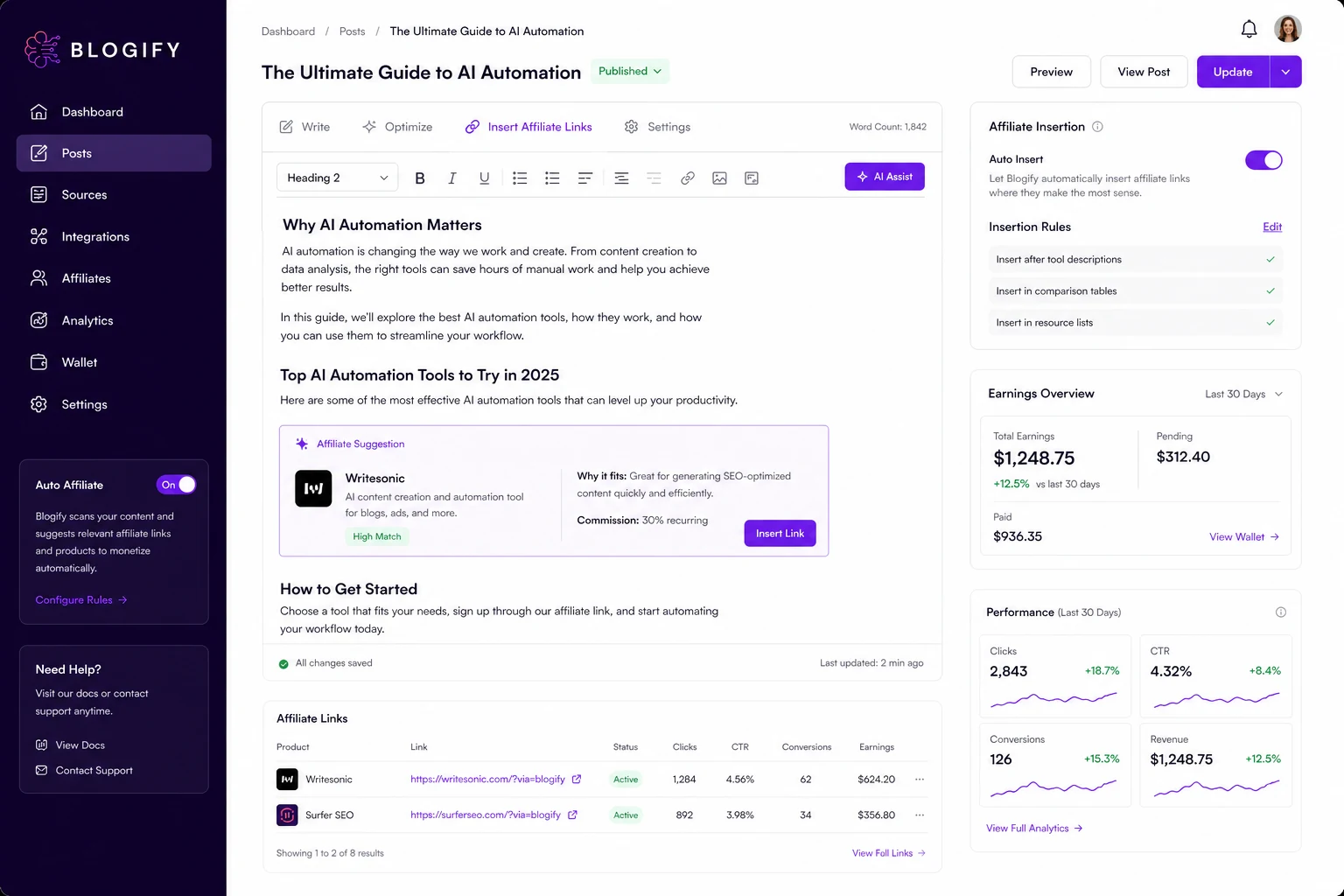
Blogify should be judged as a content repurposing and blog publishing workflow, not only as an AI writing prompt box. It makes the most sense when the buyer already has videos, podcasts, source files, product pages, or web URLs that can become blog assets every month. The buying risk is also clear: low entry pricing is not the same as the right plan if your workflow needs more credits, longer source files, SEO scoring, scheduling, or publishing integrations.
What Blogify actually does
Blogify turns existing material into blog posts. The strongest use case is not writing from a blank page, but converting source content into articles: YouTube videos, podcasts, audio files, webpages, documents, and other supported sources. From there, the buyer can edit the article, optimize it, publish it, schedule it, or use monetization features.
This matters for creators because many teams already have useful source material trapped in video or audio formats. Blogify can help turn that material into searchable written assets, but the output still needs a human check for facts, structure, tone, links, and buyer intent.
- Best for repurposing existing media or web content into blog drafts
- Useful when the same creator needs blog, social, and publishing workflows together
- Less useful when the buyer only wants one polished standalone article
Pricing and plan fit
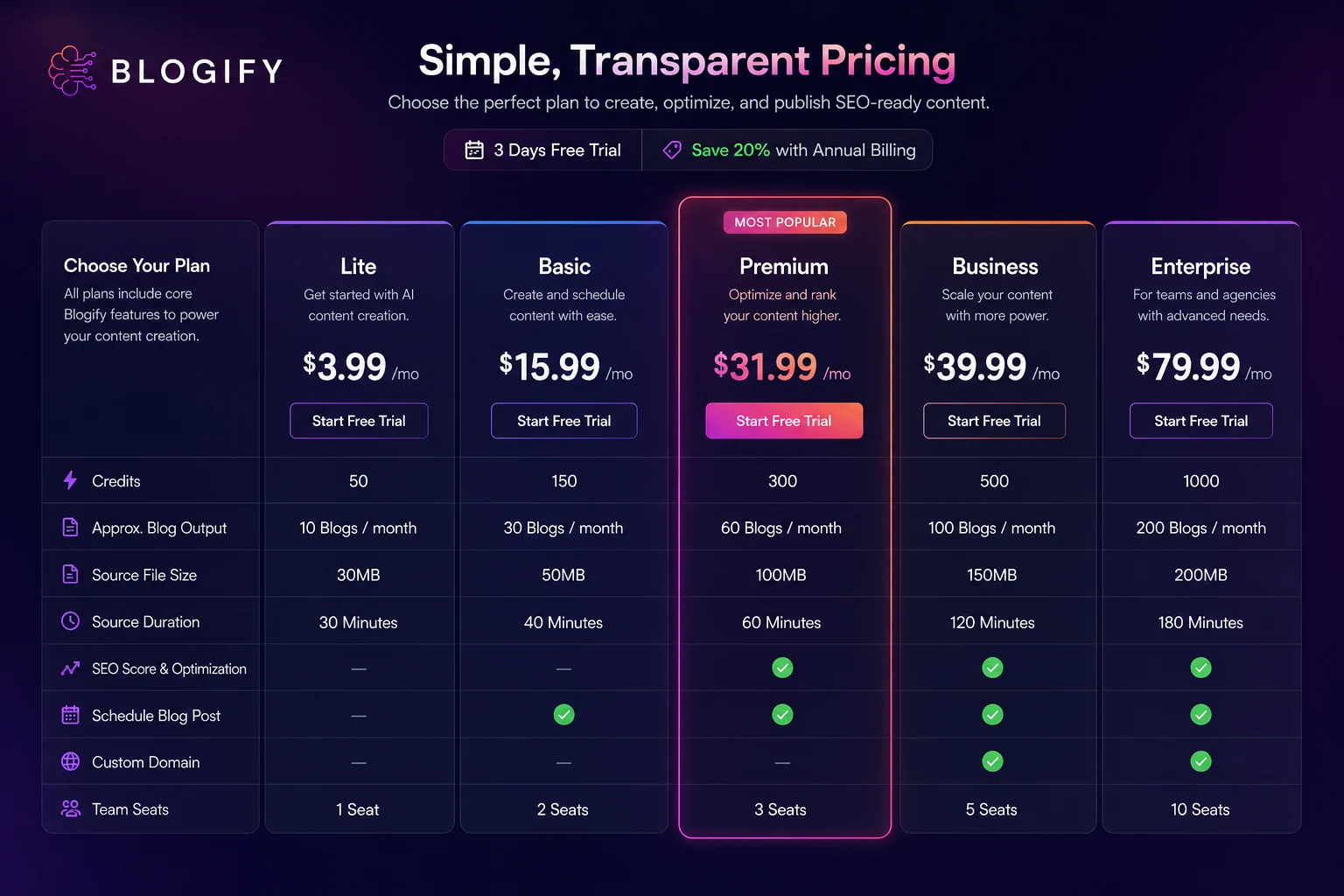
Blogify's public pricing starts low, but buyers should read the plan table carefully. Lite starts at $3.99 per month at the latest store update, while higher tiers add more credits, longer source duration, larger file limits, SEO scoring, Co-Pilot creation, scheduling, more blog sites, team seats, and advanced publishing paths.
The practical question is not simply which plan is cheapest. It is how many real blogs you expect to create, which source platforms you need, whether SEO scoring matters, and whether you will publish manually or directly from Blogify.
- Lite is the cheapest test path but has lower credits and limits
- Premium and above matter more when SEO scoring and Co-Pilot creation are needed
- Business and Enterprise become relevant when custom domain publishing, teams, or YouTube Connect add-ons matter
Video, audio, and webpage repurposing
The core workflow is useful when a creator wants one piece of source content to produce more surface area across search and social channels. A YouTube video can become a blog. A podcast can become a written article. A webpage or document can become a rewritten post. That is the main reason Blogify belongs in a repurposing shortlist rather than a basic copywriting shortlist.
The tradeoff is control. AI can structure a post quickly, but buyers should still check source accuracy, quotes, affiliate claims, product details, and search intent before publishing. This is especially important if the source belongs to someone else or includes claims that need attribution.
- Good fit for creators who already publish video, audio, podcast, or product content
- Useful for expanding one asset into a blog channel or companion article
- Requires rights checks and editorial cleanup before commercial publishing
SEO scoring and blog quality checks
Blogify markets SEO-ready blog creation, but the buyer should separate generation from judgment. A tool can produce meta elements, tags, headings, and a draft structure quickly, yet it cannot guarantee that the final post fits your keyword, brand, evidence standard, or affiliate disclosure needs.
The video below is useful because it focuses on Blogify's SEO scoring workflow rather than only the basic generation path. Buyers should watch how the scoring view handles keywords, article improvement, and publish-readiness before assuming a higher plan is worth it.
Publishing and WordPress workflow
Blogify is stronger when the buyer cares about publishing workflow, not just text generation. The homepage mentions publishing to platforms such as WordPress, Medium, Blogger, LinkedIn, and social channels, while the WordPress.org plugin confirms direct publishing from Blogify to WordPress with formatting and scheduling control.
This is important for small teams because the manual handoff from AI draft to CMS often costs more time than the generation itself. Still, the buyer should test formatting, categories, images, links, and author settings before trusting any automation on a production site.
- WordPress plugin support can reduce copy-paste publishing work
- Platform support matters most for teams publishing frequently
- CMS formatting should be tested before connecting an important production site
Affiliate monetization and buyer caution
Blogify's monetization angle is interesting for affiliate publishers because the platform says it can place affiliate links and help manage affiliate-link analytics. That can be useful for creators who want to turn existing content into revenue assets, especially if they already know their niche and disclosure rules.
The danger is publishing too fast. Automatically inserted affiliate links still need relevance checks, compliance review, link routing, disclosure, and content quality control. For DealBestDaily-style workflows, Blogify is better treated as a draft and repurposing accelerator, not a replacement for editorial QA.
- Monetization features may help affiliate publishers move faster
- Link placement should still be reviewed for relevance and disclosure
- Generated commercial content should go through human QA before publication
Safest next step
The safest next step is to open the pricing page, start with the 3-day trial, and run one real source through the full workflow. Use a source you would actually publish from, such as your own YouTube video, podcast episode, product page, or document. Then check article quality, credit usage, formatting, SEO scoring, and publishing friction.
If the first workflow is clean, compare the public code, annual savings, lifetime option, and higher-tier limits. If the draft still needs heavy editing or the source limits are too narrow, compare Blogify against a lighter AI writer or a more specialized SEO content platform before paying.
- Trial with one real content asset, not a generic sample topic
- Check final article quality and CMS formatting before upgrading
- Compare plan limits against monthly publishing volume before choosing annual or lifetime access
Best savings path from this store page
This is the clearest savings route to check once the product already looks like a fit.
Blogify displays an official coupon path on its pricing and FAQ pages. Reveal the checkout code only when you are ready to test it against the live plan you want.
Use this as the primary Blogify offer because it is surfaced by Blogify itself rather than only by a coupon directory.
Reported 20% off annual plans
Reported monthly plans from $4.99/month
Use comparison routes when the category fit is still open
Use these comparison routes when the product still looks plausible, but the category fit is not fully settled.
Rytr is usually a simpler fit for short-form AI writing, while Blogify is more relevant when the source-to-blog and publishing workflow matters.
Writesonic is broader for AI writing and marketing workflows, while Blogify is more focused on repurposing existing media and URLs into blog posts.
Jasper is stronger for brand-controlled marketing content teams, while Blogify is better to test when repurposing and publishing automation are the main pressure points.
AI-Writer.com is closer to research-led article drafting, while Blogify leans toward source conversion, publishing, scheduling, and monetization routing.
Verification points worth checking before you click out
Where this store usually fits best in the workflow
Blogify fits creators who already produce YouTube or other video content and want written articles to support search visibility, email content, and affiliate pages.
Podcasters can use Blogify to convert episodes into searchable written drafts, but the final article still needs speaker accuracy, source checks, and editorial cleanup.
Affiliate site owners may like the monetization and repurposing angle, especially when the workflow includes manual review for claims, links, offers, and disclosure.
Small teams that publish frequently can test Blogify as a bridge between content generation and CMS publishing, especially when WordPress or multi-platform posting matters.
Practical checkpoints before and after signup
- Choose one real source asset that matches your recurring publishing workflow.
- Check whether Lite, Basic, Premium, Business, or Enterprise supports the source type and duration you need.
- Confirm whether the public discount code, annual billing, or lifetime plan is the better savings path.
- Generate one blog from your own source and measure edit time, not only generation speed.
- Check output structure, factual accuracy, SEO fields, links, images, and CMS formatting.
- Track credit usage so you know whether the entry plan can handle real monthly volume.
- Verify billing interval, coupon application, plan limits, add-ons, and cancellation terms at the final checkout step.
- Confirm whether SEO scoring, Co-Pilot mode, scheduling, custom-domain publishing, and team seats are included.
- Avoid long billing commitments until the publishing workflow works on your actual site.
Fast-read signals for workflow fit and buying friction
Questions readers usually ask before choosing this store
Is Blogify a normal AI writing app?
Not exactly. Blogify can generate blog content, but its stronger use case is repurposing videos, podcasts, audio, files, webpages, and other sources into blog drafts that can be edited, optimized, scheduled, published, and monetized.
Does Blogify have a free trial?
Blogify promotes a 3-day free trial on its public site. Buyers should use that trial with a real source asset and check credit usage, editing time, publishing quality, and checkout terms before choosing a paid plan.
What is the cheapest Blogify plan?
The public pricing area shows Lite from $3.99 per month at the latest store update. The cheapest plan is mainly a testing path because credits, source file size, source duration, SEO scoring, scheduling, and add-ons can determine whether it is enough for real use.
Does Blogify have a coupon code?
Blogify official pages display a public BLOGIFY_25 code for a 25% discount at the latest store update. Buyers should test the code at checkout and compare it against annual or lifetime pricing before assuming it is the best savings route.
What should buyers verify before paying for Blogify?
Buyers should verify the final billing interval, plan credits, supported source types, file-size and duration limits, SEO scoring access, publishing integrations, add-ons, coupon acceptance, and cancellation or refund language before paying.
Choose the next route that matches what you still need to decide
The strongest next click depends on whether you still need product judgment, a savings route, or a broader category comparison.