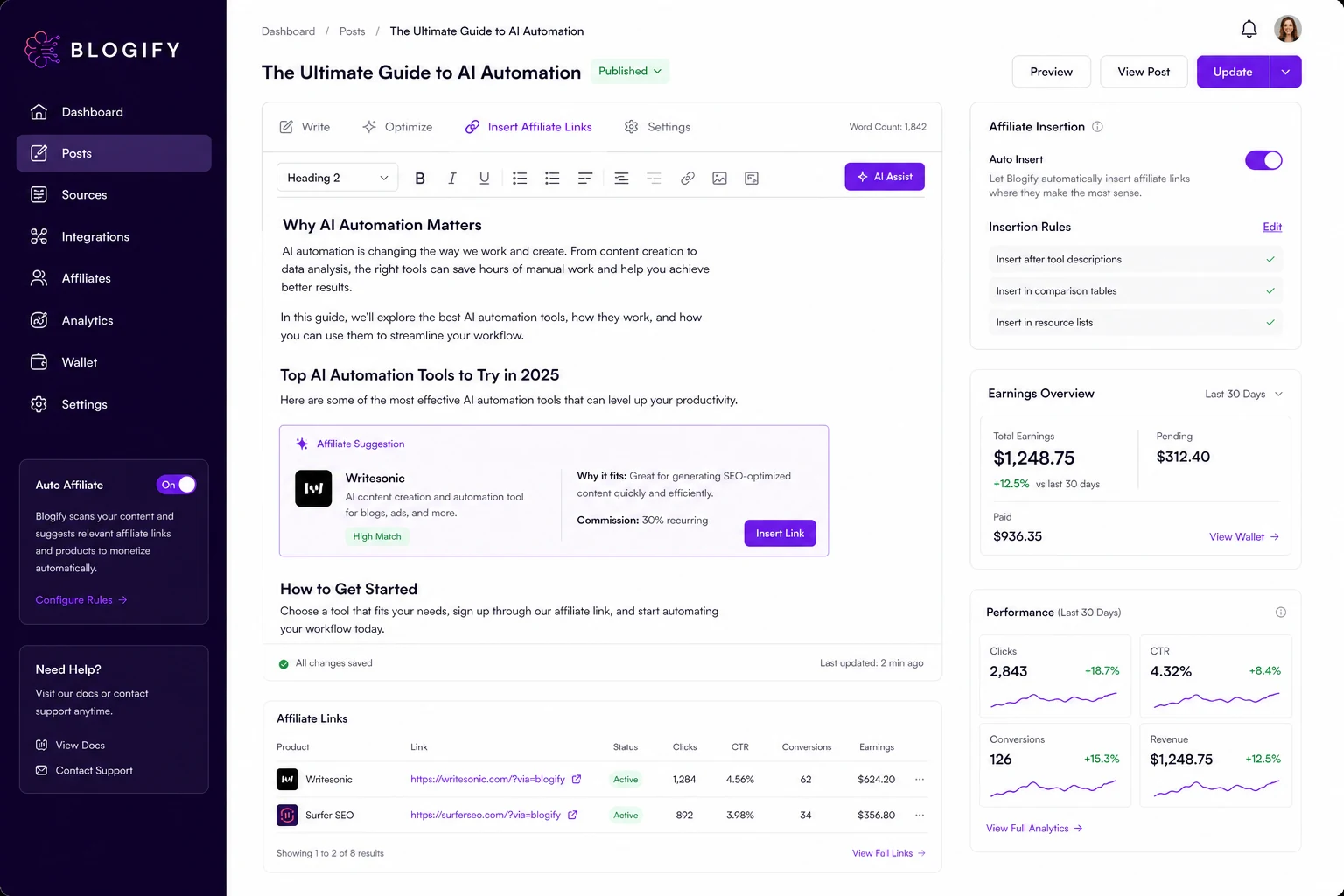
Quick verdict
Blogify is worth considering if your real problem is not “I need an AI writer,” but “I already have source material and I need to turn it into useful blog content faster.”
That distinction matters.
A normal AI writing tool starts with a prompt. Blogify is more interesting when the starting point is a YouTube video, podcast, audio file, document, webpage, product page, or other source asset. The current public positioning is built around blog creation, publishing, and affiliate monetization, not just blank-page copy generation. That gives Blogify a clearer role for creators, affiliate publishers, and small teams that want to repurpose existing material into search-friendly written assets.
The buying risk is also obvious. A low starting price can make Blogify look easy to try, but the real decision sits inside credits, source duration, source file size, SEO scoring, Co-Pilot access, publishing support, add-ons, and how much human editing the output still needs. If the first generated blog still requires heavy cleanup, the cheapest plan will not feel cheap for long.
For my money, Blogify makes the most sense as a workflow accelerator, not an editorial replacement. Use it to create a first structured draft from material you already own, then review the article for accuracy, helpfulness, formatting, links, affiliate disclosure, and search intent before publishing.
Next step: If Blogify still sounds like the right repurposing workflow, test the current buyer route with one real source asset before choosing a larger plan.
Review snapshot
| Review point | Practical take |
|---|---|
| Best for | Creators, podcasters, YouTubers, affiliate publishers, bloggers, and small teams repurposing source content |
| Not ideal for | Buyers who only need occasional short-form copy, enterprise approval workflows, or final publish-ready content with no editing |
| Main use case | Turning videos, podcasts, webpages, files, and source assets into blog drafts that can be edited and published |
| Pricing note | Public pricing currently starts low, but plan value depends heavily on credits, source limits, SEO features, publishing needs, and add-ons |
| Trial path | A 3-day trial is the safer first step before annual, lifetime, or unlimited commitments |
| Main strength | Source-to-blog repurposing plus publishing and monetization workflow in one platform |
| Main concern | AI draft quality, rights checks, credit limits, refund clarity, and checkout verification |
| Direct comparisons | RightBlogger, Writesonic, Jasper, AI-Writer.com, Frase |
| Best next step | Run one real source-to-blog project and measure editing time before paying long term |
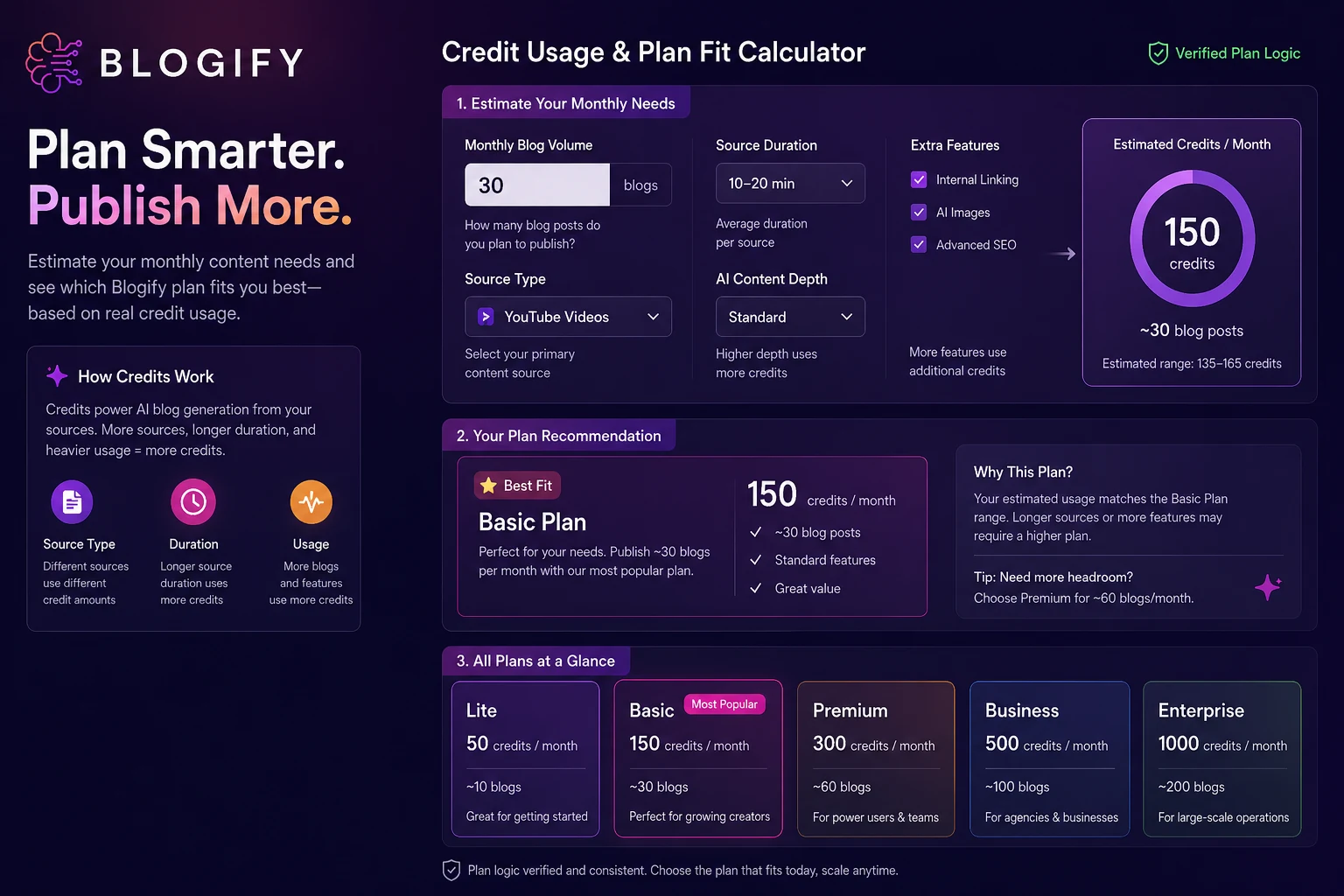
What is Blogify?
Blogify is an AI blogging and content repurposing platform. Its current public positioning is built around turning many kinds of source material into blog posts, then helping users publish, schedule, share, and monetize that content.
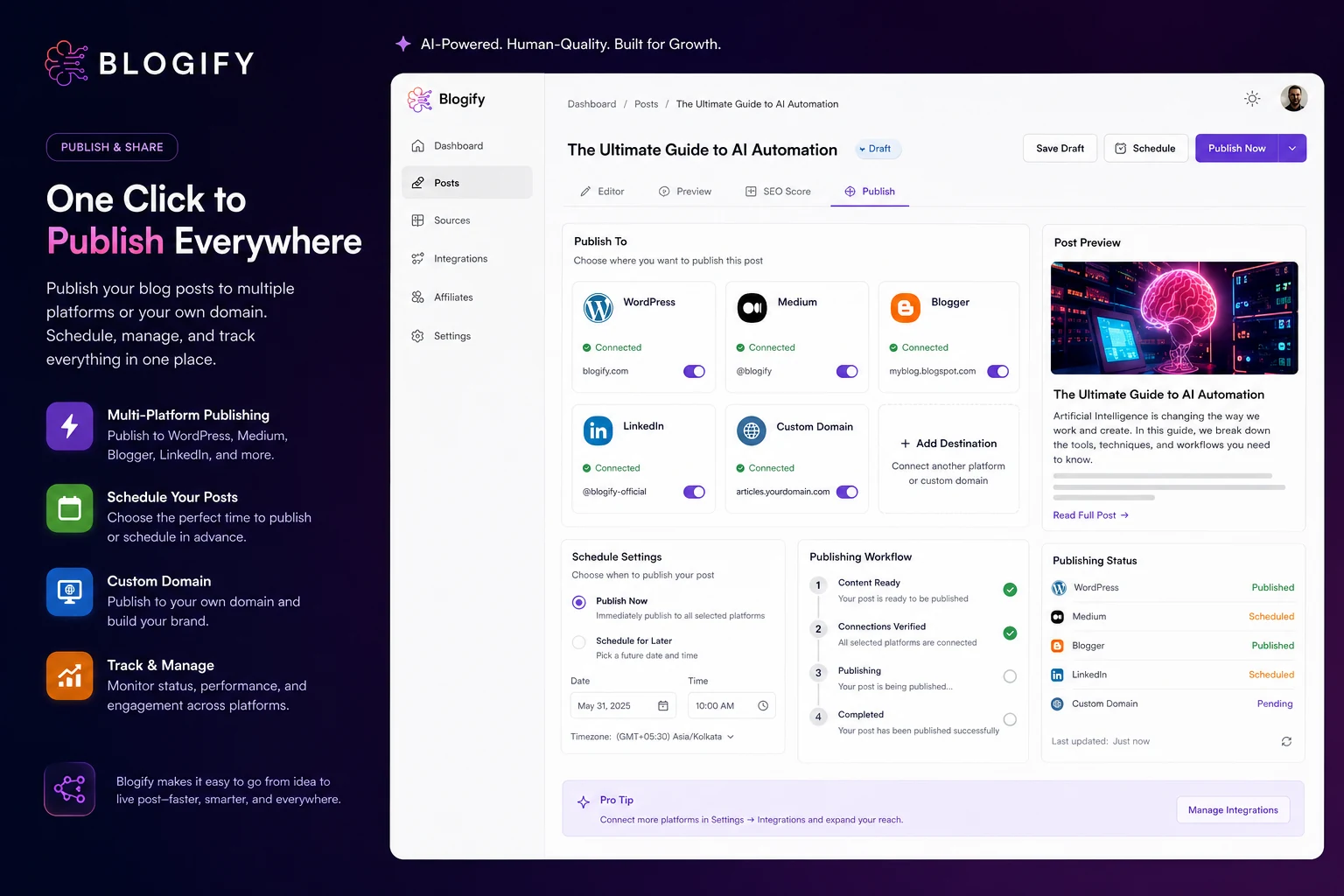
The homepage emphasizes repurposing 40+ sources into blogs in 150+ languages, publishing to platforms such as WordPress, Medium, Blogger, LinkedIn, and social channels, and using affiliate monetization features. That makes Blogify different from a basic prompt-based writing assistant.
The simplest way to understand it is this:
Blogify is for people who already have material.
A creator may have a YouTube video. A podcaster may have an episode. A marketer may have a product page. An affiliate publisher may have comparison material, media clips, or existing pages that could become new blog assets. Blogify tries to shorten the path from that source to a structured article.
That does not mean the article is automatically ready to publish.
Our review approach compares public product pages, pricing details, help documentation, terms, privacy language, buyer workflow fit, and nearby alternatives. I would not judge Blogify by the promise of automation alone. The better question is whether the output can survive a real editorial pass without costing more time than it saves.
The common wrong expectation is thinking Blogify replaces a blog editor. It does not. It can help create drafts, structure content, publish faster, and support monetization workflows. But facts, links, attribution, product claims, search intent, and affiliate disclosures still need human judgment.
Who should use Blogify?
Blogify is strongest for buyers who already publish or plan to publish repeatedly.
YouTubers are one of the clearer fits. If you have videos that already explain a topic, review a product, teach a process, or answer audience questions, Blogify can help turn those assets into blog drafts. The condition is that you still need to check whether the article captures the source accurately and reads naturally as a standalone page.
Podcasters can also benefit. A podcast episode often contains useful ideas that are hard for search engines and casual readers to access. Blogify can help transform that material into written posts, show notes, or supporting articles. I would verify speaker accuracy and remove rambling sections before publishing.
Affiliate publishers may find Blogify interesting because the platform leans into monetization, affiliate links, and publishing workflow. This can be useful when you already know your niche and have a review process. It becomes risky if you publish generated commercial posts without checking claims, links, pricing, and disclosure.
Small marketing teams can use Blogify as a bridge between content creation and CMS publishing. If the team already produces webinars, videos, product pages, interviews, or tutorials, Blogify can help build blog drafts from that material. The value depends on whether it reduces handoff work, not just generation time.
Agencies may consider it when they need source-based first drafts for clients. The condition is stricter here: client work needs editorial QA. A generated blog may be a useful starting point, but it should not be sent or published without a human review.
Who should avoid Blogify?
I would skip Blogify if you only need one or two short pieces of copy. A simpler tool like Rytr or another lightweight AI writer may be easier to justify if you do not need video, podcast, file, webpage, publishing, or monetization workflows.
I would also be cautious if your main need is deep SEO research. Blogify has SEO-oriented features, but if your buying decision revolves around briefs, SERP analysis, topic gaps, and content optimization, Frase may be the more natural comparison.
Teams that need approval workflows, permissions, governance, and brand-control systems should slow down as well. Blogify has team and publishing angles, but it should not be treated as a mature enterprise editorial suite unless the current plan and workflow prove that fit.
Another poor fit is the buyer who wants to publish without editing. Blogify can help generate structure and content, but AI-generated posts still need fact-checking, link review, formatting cleanup, and content-quality judgment.
I would also avoid using Blogify casually with third-party videos or source material if you are not sure about rights and attribution. The terms place responsibility on the user to have the necessary rights and proper attribution for video content. That is not a small detail for bloggers and affiliate publishers.
Finally, do not buy just because a current offer appears on the pricing path. A discount can improve the purchase, but it should not become the reason you automate content you are not ready to review.
How Blogify fits into a real workflow
A practical Blogify workflow starts before the tool opens.
The buyer needs a real source asset first. That could be a YouTube video, podcast episode, audio file, document, webpage, or product source. Then the workflow becomes less about “generate me a blog” and more about turning an existing asset into a useful written page.
A careful process looks like this:
- Choose a source you own or have rights to use.
- Generate a blog draft from the source.
- Review the structure, headings, source interpretation, and factual claims.
- Check whether the output matches the intended search query or audience need.
- Edit the voice, examples, links, images, affiliate mentions, and disclosure.
- Use SEO scoring or improvement tools if your plan includes them.
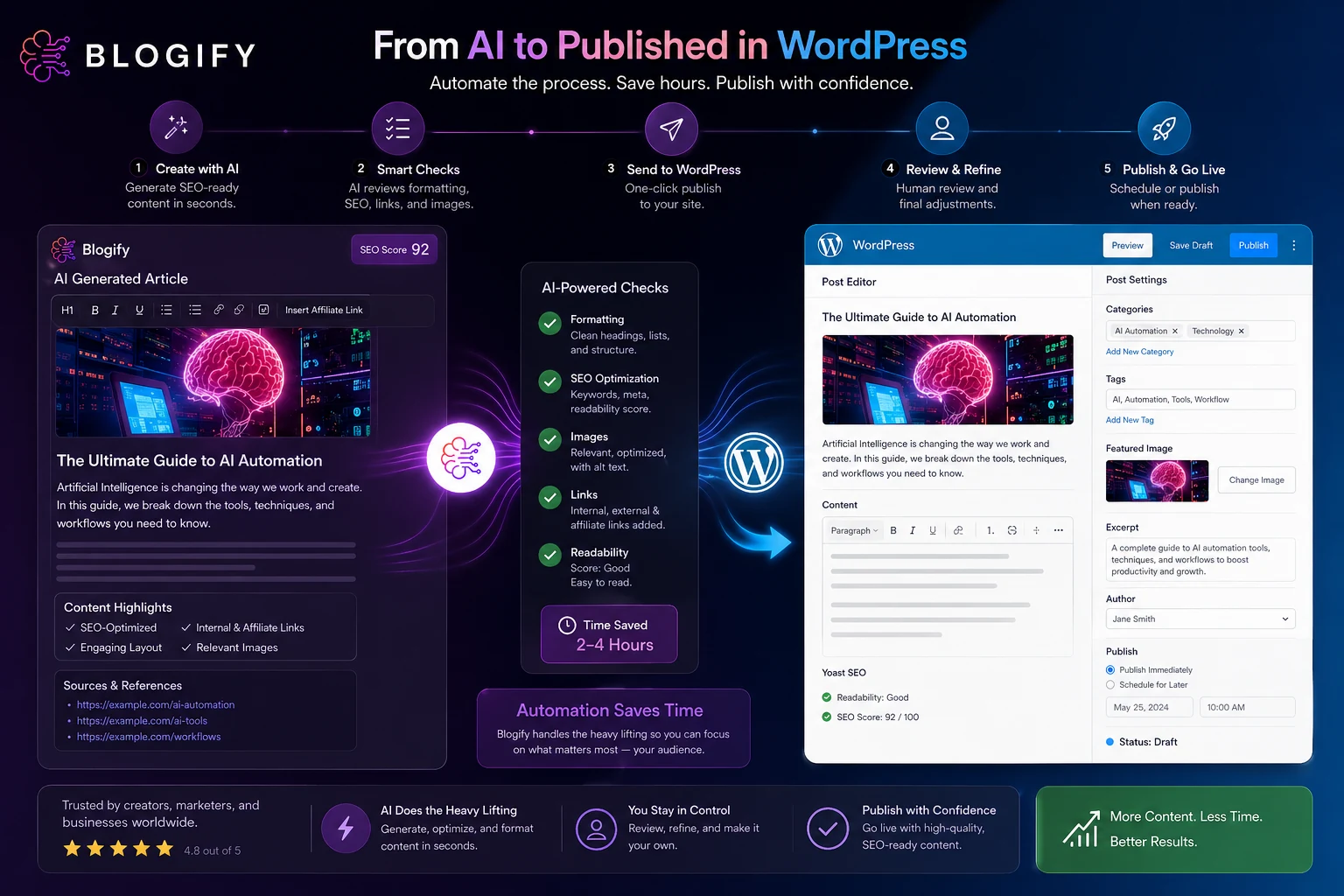
- Publish, schedule, export, or send the post to WordPress or another platform.
- Review the live page after publishing.
That workflow is where Blogify can make sense. It may reduce the blank-page problem and the copy-paste publishing burden. It may also give creators more ways to reuse existing work.
But the human review stage is not optional.
The easy mistake is to judge Blogify by how quickly it creates a draft. The better test is how quickly that draft becomes a page you would actually publish under your name.
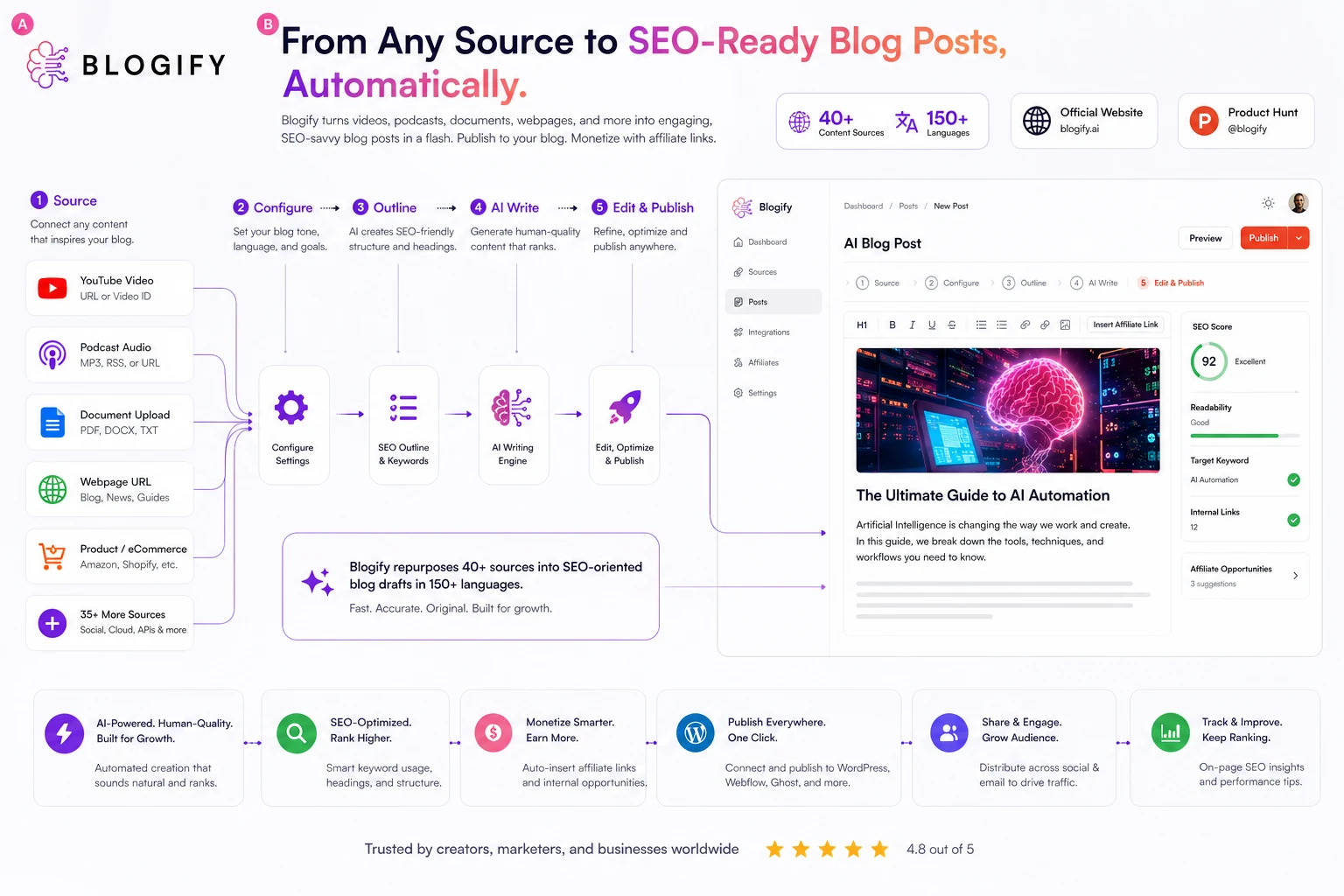
Workflow check: Try Blogify with a source you would genuinely publish from, not a generic sample topic that hides editing and publishing friction.
Real-world buyer scenarios
A YouTube creator with a backlog of useful videos is probably the cleanest Blogify scenario. The creator already has original material, the audience already understands the topic, and the blog can become a searchable companion asset. Blogify may help turn that backlog into written content faster. The buyer should still verify source accuracy, tone, and whether the post stands alone for people who never watched the video.
A podcaster has a similar but slightly harder workflow. Episodes often include conversation, filler, tangents, and speaker nuance. Blogify may turn the episode into a structured article, but the final piece may need more editing to avoid sounding like a transcript wearing blog formatting.
An affiliate publisher might use Blogify to build supporting posts from product videos, tutorials, or existing pages. This can be useful, but it is also where I would be most careful. Affiliate pages need accurate offers, current pricing, clear disclosures, and clean internal routing. Automatically inserted links are not automatically good links.
A small business owner may want Blogify to turn service pages, FAQs, webinars, or explainers into blog content. That can work if the business has someone willing to review every claim. If no one owns the final editorial quality, Blogify may simply produce more pages that need cleanup.
An agency can use Blogify for first drafts, but client delivery raises the standard. The agency should check whether source handling, editing control, publishing permissions, and plan limits match client volume before using it in production.
Key features that actually matter
Source-to-blog conversion
Blogify’s most important feature is its ability to create blog drafts from existing source material. The official pages mention videos, podcasts, audio, webpages, documents, and other sources.
Buyer note: this matters most when you already have content assets. If you are starting from a blank prompt every time, Blogify’s biggest advantage becomes less important.
Publishing and scheduling workflow
Blogify is not only about generating text. It also promotes publishing to WordPress, Medium, Blogger, LinkedIn, and other platforms, with scheduling and sharing paths. The WordPress plugin adds a more direct route for users who want to publish AI-generated posts from Blogify into WordPress.
Buyer note: publishing support is useful only after you test formatting, categories, images, links, and scheduling on a non-critical post.
SEO scoring and optimization
Blogify markets SEO-ready blog creation, and its pricing table ties some SEO scoring and optimization features to plan choice. This can help buyers who want a more structured draft rather than plain text.
Buyer note: an SEO score is not the same as search intent judgment. You still need to check whether the article answers the query better than competing pages.
Affiliate monetization features
Blogify’s monetization angle is unusual for an AI writing tool. It promotes affiliate link placement and analytics, which may interest publishers who want content and monetization workflows together.
Buyer note: affiliate automation needs manual review. Link relevance, disclosure, offer accuracy, and user trust matter more than fast insertion.
Language and multi-format support
The public site highlights 150+ language support and many source types. That can matter for creators working across markets or repurposing material in different formats.
Buyer note: test one real source in your target language before assuming the output quality is strong enough for commercial publishing.
Pricing and plan value
Blogify’s pricing looks attractive at first glance, but this is exactly where buyers should slow down.
At the time of review, the public pricing area showed a 3-day trial and monthly plans starting with Lite at $3.99 per month, followed by Basic, Premium, Business, and Enterprise tiers. The pricing area also shows annual savings, lifetime paths, and an Unlimited plan option. Those paths are useful to know, but they also make the decision more complicated.
The real pricing question is not the headline monthly number.
It is whether the plan gives you enough monthly credits, supported source types, source file size, source duration, SEO scoring, Co-Pilot creation, publishing support, blog sites, team access, and add-ons for your actual workflow.
Lite may be enough for testing, especially if you want to see whether Blogify can turn a short source into a usable article. But if you need longer source files, more blogs per month, SEO scoring, advanced publishing, team usage, or YouTube channel integration, the entry plan may not reflect the real cost of using Blogify seriously.
I would also treat annual, lifetime, and unlimited paths carefully. Those can make sense only after you know your monthly publishing rhythm. If you do not yet know whether generated posts reduce editing time, a larger commitment can lock you into a workflow that looks better on the pricing table than it feels in production.
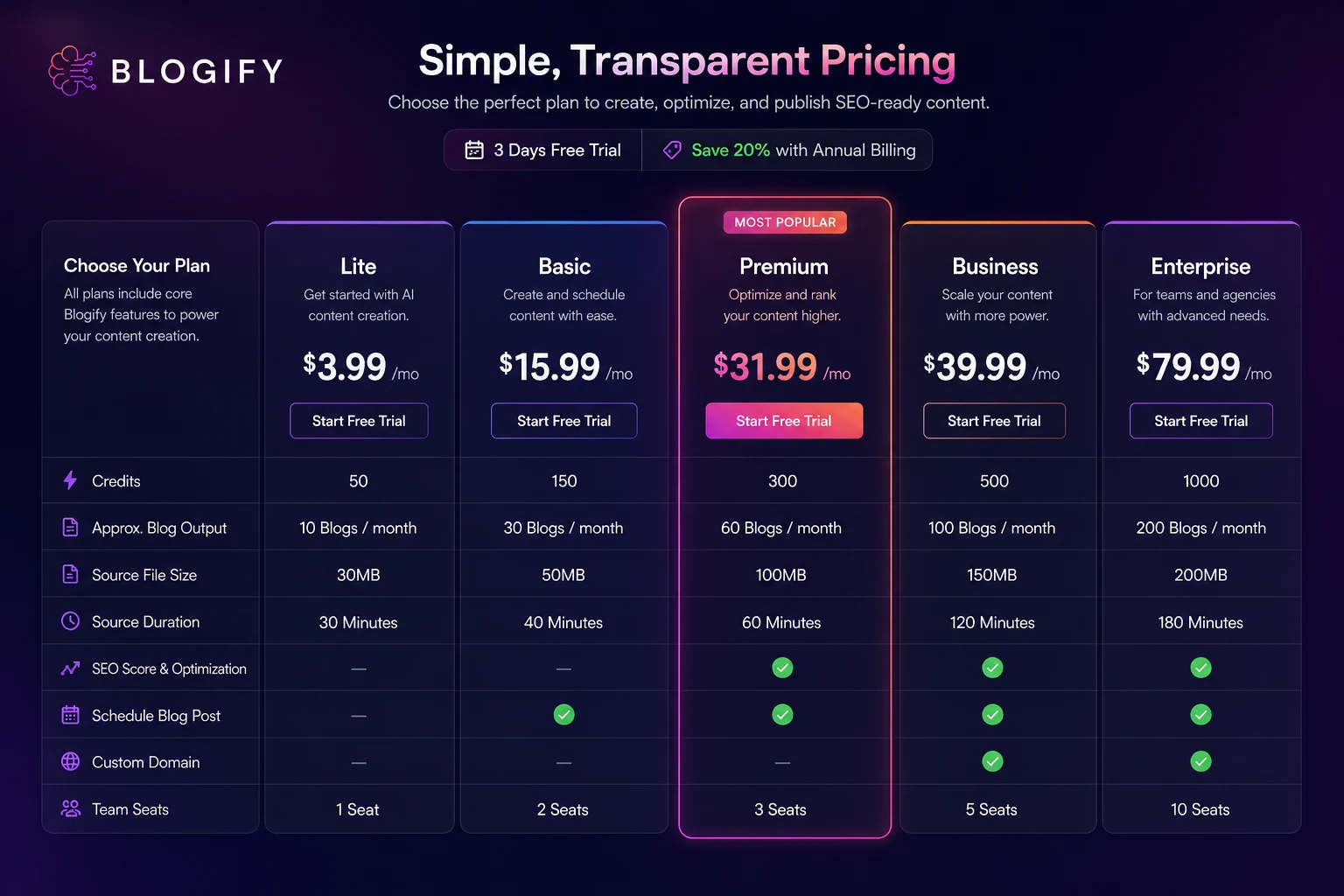
Pricing check: Before choosing a paid Blogify plan, compare the current checkout price against source limits, credit usage, and the publishing features you actually need.
Free plan, trial, coupon, and checkout notes
Blogify currently promotes a 3-day trial. That is enough to run a small real-world test, but it is not enough to casually evaluate every workflow the platform supports.
Use the trial with a real source asset. Do not waste it on a generic topic like “write a blog about productivity.” The point is to see whether Blogify can turn your source material into a structured post that you would actually edit, optimize, and publish.
The current public pages also show a discount banner and multiple savings paths, including monthly, annual, lifetime, and plan-based options. I would treat any active offer as a checkout item to verify, not a permanent promise.
The safer order is:
- Test the workflow.
- Check credit usage.
- Estimate monthly blog volume.
- Compare plan limits.
- Verify the current offer or coupon page.
- Read cancellation and refund language.
- Choose monthly before longer billing unless repeat value is already proven.
Do not let the coupon route make the decision for you. A cheaper Blogify plan is still a poor buy if your source material needs heavy editing, your plan lacks the required features, or your publishing workflow stays manual.
What I would check before buying Blogify
If I were buying Blogify for a real content operation, I would check these items before entering payment details:
- Whether the plan supports the source types I actually use, such as YouTube, podcasts, documents, webpages, or product pages.
- How many credits one real blog consumes and whether the monthly credit limit fits my publishing plan.
- Whether source file size and source duration limits match my videos, podcasts, or recordings.
- Whether SEO scoring, Co-Pilot creation, scheduling, custom-domain publishing, and WordPress publishing are included in the selected tier.
- Whether any current offer applies to the exact monthly, annual, lifetime, or unlimited plan I am considering.
- Whether cancellation and refund terms are clear enough for the billing interval I choose.
- Whether my team has the rights to use each source asset and the process to review affiliate links, claims, and disclosures before publishing.
The part I would check first is credit usage. If one normal source burns through more credits than expected, the entry price becomes less meaningful.

A simple test before paying
Before paying for Blogify beyond the trial, I would run a small test like this:
- Choose one source you own and would actually publish from.
- Generate a blog draft from that source.
- Track how many credits the job uses.
- Edit the article for accuracy, voice, headings, links, images, and disclosure.
- Check whether SEO scoring or optimization tools improve the draft meaningfully.
- Send the post to WordPress or your publishing platform in a low-risk environment.
- Compare the total time saved against the plan price you would need for monthly use.
This test is simple, but it reveals the real buying answer. If Blogify produces a usable draft and reduces publishing friction, it may be worth exploring. If it creates a draft that still requires a full rewrite, you may be better off with a simpler AI writer or a stronger SEO editorial workflow.
Pros explained
The first major pro is repurposing fit. Blogify is more compelling when source material already exists. A creator with videos, podcasts, files, or webpages may get more value from Blogify than from a general AI writer because the workflow starts with reusable assets.
The second pro is publishing support. Many AI writing tools stop at the draft. Blogify’s WordPress plugin and platform publishing angles can reduce handoff work for buyers who publish frequently. That said, publishing automation should be tested before connecting important production sites.
The third pro is its monetization angle. Affiliate publishers may like that Blogify thinks beyond blog text and into affiliate links and analytics. This can be useful for content operations, but only when paired with manual disclosure and link review.
The fourth pro is the low-friction trial path. A 3-day trial is not generous enough for deep testing, but it is enough to run one real source-to-blog experiment before paying.
The fifth pro is category clarity. Blogify has a clearer job than many broad AI writing tools: convert source content into blog assets. That makes it easier to decide whether it belongs in your workflow.
Cons explained
The biggest con is that plan value is tied to limits. Credits, source duration, file size, source types, SEO scoring, publishing options, and add-ons all affect the real cost. A buyer who only looks at the lowest monthly price may choose the wrong plan.
The second con is editorial risk. Generated articles can look complete while still needing fact-checking, source verification, link cleanup, and search-intent improvement. Blogify can speed up drafting, but it does not remove editorial responsibility.
The third con is refund clarity. Pricing is public, but refund and cancellation expectations should be verified carefully at checkout and in the current terms. I would not rely on vague “cancel anytime” messaging as a full refund guarantee.
The fourth con is rights and attribution. Blogify’s source-based workflow is powerful, but using third-party videos or public source material carelessly can create content-rights problems. This is especially relevant for commercial and affiliate sites.
The fifth con is that Blogify may be too much for simple writing needs. If you mainly need product descriptions, emails, short social posts, or quick ad copy, a simpler AI writing platform may be a cleaner fit.
Green flags and red flags
Green flags are easy to spot with Blogify.
You have original source material. You publish repeatedly. You already use WordPress or another supported platform. You care about turning video, podcast, or webpage content into written search assets. You have a human review process. You can measure whether the tool saves time.
Those are buying signals.
Red flags are just as important.
You have no recurring content source. You want final articles without editing. You are choosing based only on the cheapest plan. You are unsure whether you can use the source material legally. You need strict editorial approval workflows. You plan to commit annually before testing one full source-to-publish cycle.
The mistake buyers often make here is comparing Blogify against generic AI writers only by price. The better comparison is workflow: does Blogify reduce the time between source material and a publishable page?
Blogify vs alternatives
RightBlogger vs Blogify
RightBlogger is a more direct comparison for bloggers who want blogging-focused AI tools without necessarily building the workflow around video, podcast, or source-file conversion. Blogify may be stronger when source repurposing and publishing automation are the main pain points.
Writesonic vs Blogify
Writesonic is broader for AI writing and marketing content. It may fit buyers who need landing pages, ads, general copy, and marketing assets. Blogify is narrower but potentially more useful when the workflow starts with existing media or webpages and ends with a blog post.
Jasper vs Blogify
Jasper is usually a stronger route for brand-controlled marketing teams that need campaign content, tone control, and broader content operations. Blogify is more interesting for creators and publishers who care about turning source material into blog posts quickly.
AI-Writer.com vs Blogify
AI-Writer.com leans more toward article drafting with a research-oriented angle. Blogify leans toward source conversion, publishing, and monetization. If you need source-backed article creation, AI-Writer.com may deserve a look. If you need media-to-blog repurposing, Blogify is the clearer comparison.
Frase vs Blogify
Frase is an adjacent route, not a one-to-one replacement. It makes more sense when SEO briefs, SERP analysis, and content optimization are the main job. Blogify makes more sense when the job is turning source material into blog drafts and getting them closer to publication.
Trust, refund, and buyer-risk notes
Blogify has enough public information to make a practical evaluation, but buyers should still verify volatile details before checkout.
Pricing is the first check. Current public pricing shows multiple plans and billing paths, but plans can change. Credits, source file limits, source duration, SEO scoring, and add-ons should matter more than the lowest visible monthly price.
Refund and cancellation terms are the second check. The site promotes a trial and cancel-anytime messaging, while the terms give Blogify room to change pricing, credit limits, and services. That does not mean buyers should avoid the product. It means the trial matters.
Source rights are the third check. Blogify’s terms put responsibility on the user to have the needed rights and attribution for video content. If you use your own videos, podcasts, and documents, the risk is simpler. If you use third-party content, slow down.
Privacy and connected accounts also matter. Blogify’s privacy language discusses YouTube information use and disconnection controls. Buyers using YouTube Connect or other connected publishing paths should read the current privacy policy and understand what data is being accessed.
AI reliability is the final practical risk. A generated blog can be helpful and still contain weak claims, awkward phrasing, thin analysis, or poor search-intent fit. Blogify should be treated as a drafting and repurposing assistant, not a guarantee that every post is publish-ready.
Final verdict
I would consider Blogify if you already have videos, podcasts, webpages, documents, or other source material that can become useful blog content. It is especially interesting for creators, affiliate publishers, and small teams that publish repeatedly and want drafting, SEO structure, publishing, scheduling, and monetization closer together.
I would skip Blogify if you only need occasional short-form writing, if you expect AI output to be final without editing, or if your team needs a mature editorial approval system before publishing anything.
I would compare it with RightBlogger if you want a blogging-first AI toolkit, Writesonic if you need broader marketing copy, Jasper if brand-controlled team content matters more, AI-Writer.com if research-led article drafting is the priority, and Frase if SEO briefs and optimization are more important than source-to-blog automation.
The safest next step is not to chase the cheapest plan or the current offer first. Start with one real source, run the full source-to-blog workflow, measure the editing time, check the publishing handoff, and only then decide whether Blogify deserves a recurring place in your content process.
