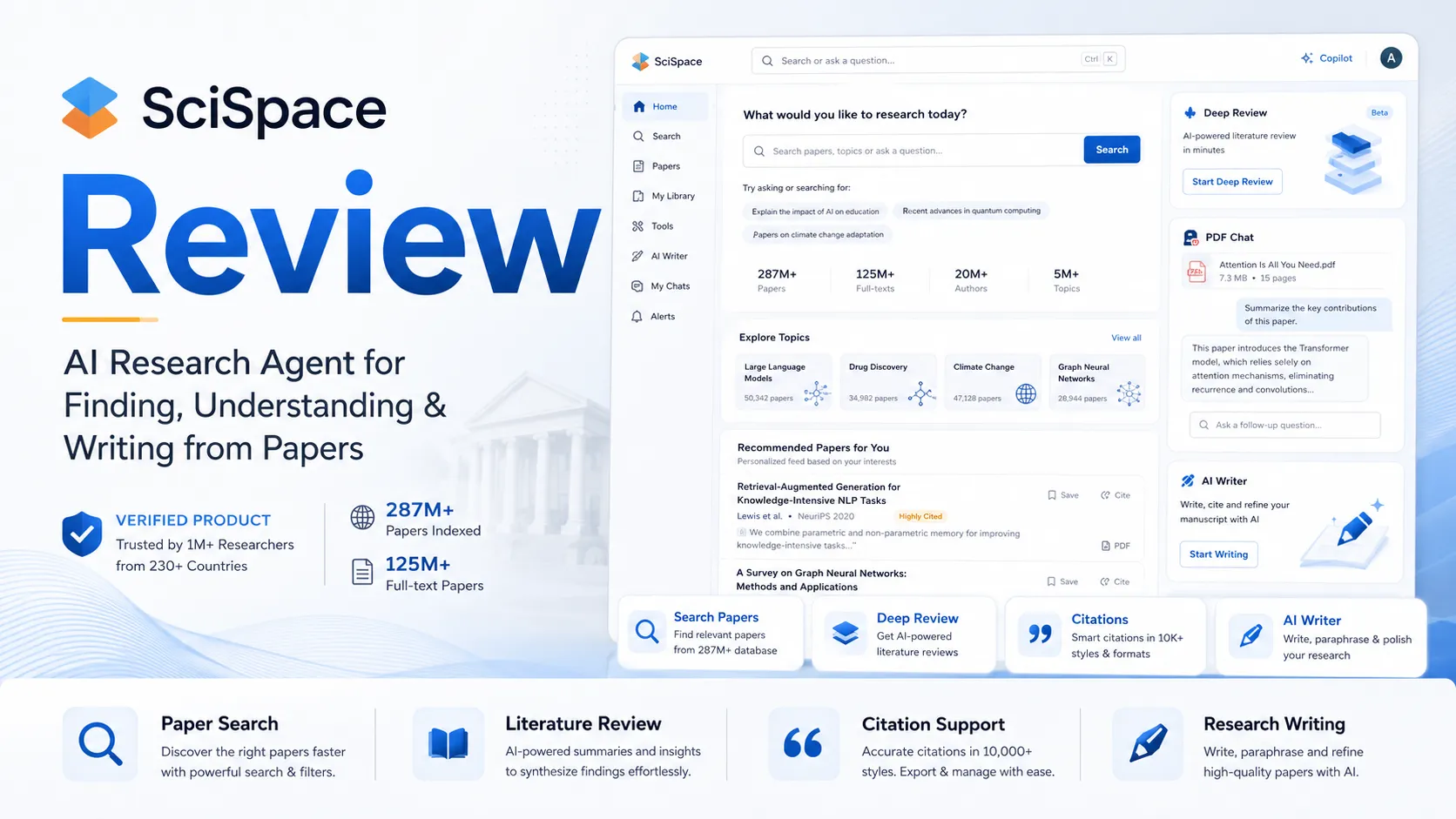
Quick verdict
SciSpace is worth considering if your real problem is research workflow, not just AI detection.
That distinction matters. SciSpace can look like several products at once: paper search, Chat PDF, Copilot-style explanations, AI writing support, research-agent tasks, and an AI detector. That breadth is useful when you regularly work with papers. It is also where buyers can overestimate the tool if they only need one narrow job done.
For my money, SciSpace makes the most sense for students, researchers, academic writers, and research-heavy teams that repeatedly move between papers, PDFs, notes, citations, and drafts. If it saves time every week, the paid plan can become reasonable. If you only want to check whether a paragraph sounds AI-generated, the buying logic gets weaker.
The strongest reason to consider SciSpace is workflow depth. It can help you move from finding papers to understanding them, asking questions, extracting ideas, drafting around research, and checking originality risk before submission. The main caution is commercial: pricing depends on plan tier, credits, annual billing, and refund limits. A cheaper annual number is not automatically a better decision.
The safest next step is to test the free path with a real research task before paying. If the product still fits, use the SciSpace store page to check the current buyer route, then review the SciSpace coupon page only after the workflow fit is clear.
Next step: If SciSpace fits your research workflow, verify the current pricing and credit limits before choosing a paid plan.
Review snapshot
| Review point | Practical take |
|---|---|
| Best for | Researchers, students, academic writers, and teams that repeatedly read, compare, and synthesize papers |
| Not ideal for | Buyers who only need a standalone AI detector or one-off paper summary |
| Main use case | Paper discovery, Chat PDF reading, Copilot-style explanations, literature review, research-agent tasks, and originality checks |
| Free path | Available, useful for testing fit before paid credits |
| Paid path | Makes more sense when repeated research-agent usage justifies plan limits and billing commitment |
| Pricing model | Free entry plus paid tiers tied to credits, features, and annual/monthly choice |
| Main strength | Broad academic research workflow in one product |
| Main concern | Credits, annual billing, refund limits, and detector overconfidence |
| Best alternatives to compare | Elicit or Consensus for research workflow; Originality.ai, Copyleaks, or GPTZero for detection-first needs |
| Best next step | Test with one real paper or research question before paying |
What is SciSpace?
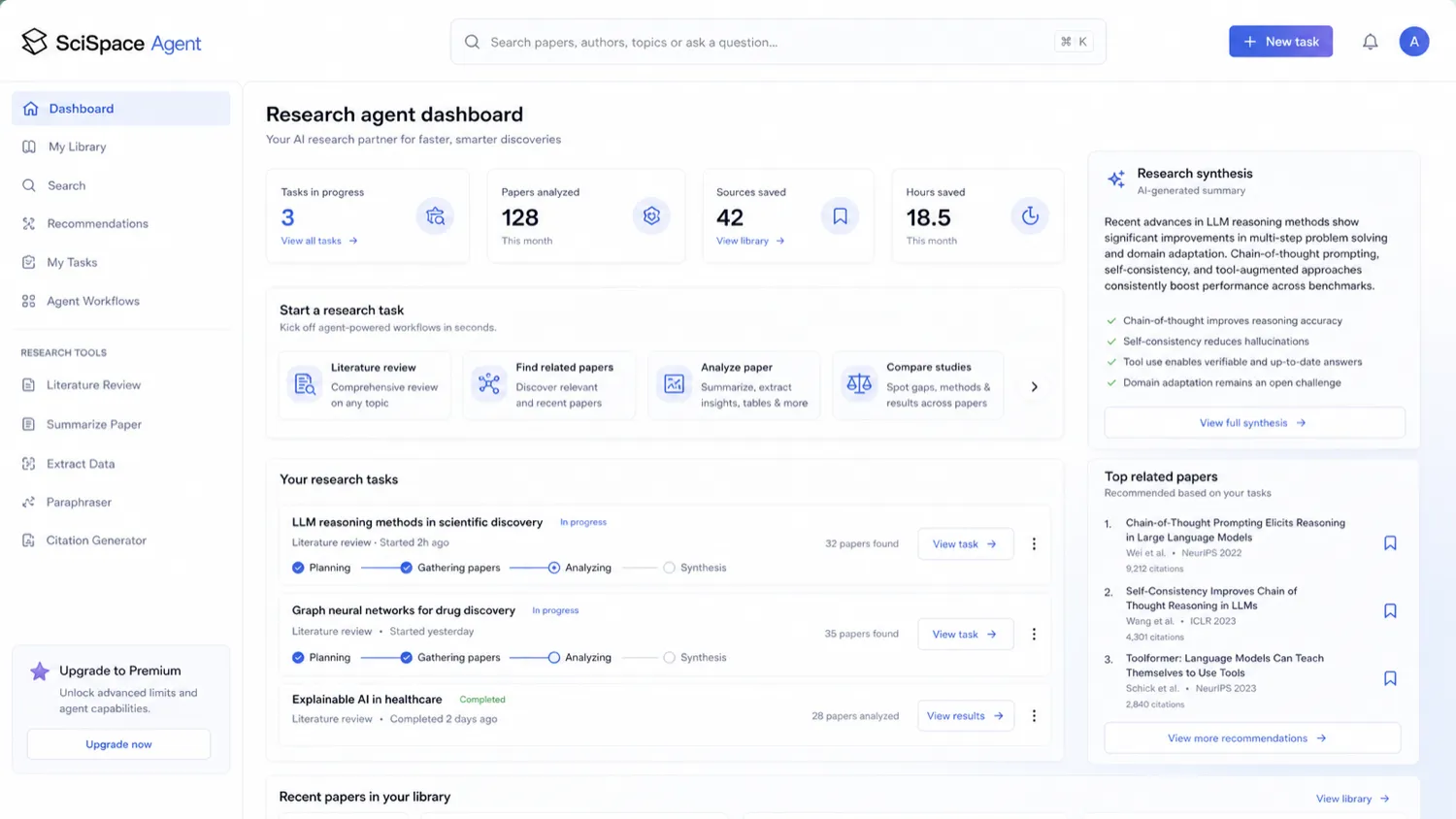
SciSpace is best understood as an AI research workspace for people who work with academic papers.
It is not only an AI detector. It is not only a PDF summarizer either. The current public positioning is broader: search across a large research-paper base, ask questions about PDFs, simplify dense technical language, generate research-backed explanations, support writing and manuscript-related tasks, and run agent-style research workflows.
That makes SciSpace more interesting than a simple paste-and-check tool. A researcher can use it while exploring a topic. A graduate student can use it to understand difficult passages. A writer can use it to turn a paper-heavy brief into clearer notes. A team can use it to reduce friction across literature review, synthesis, and drafting.
The wrong expectation is that SciSpace will make research judgment automatic.
It will not. A research assistant can help you find papers, explain concepts, and organize material. It cannot replace domain expertise, source checking, academic policy, journal judgment, or careful citation review. That is especially important because some public user feedback around AI research tools, including SciSpace, praises workflow speed while also raising concerns about citations, niche-domain interpretation, credit usage, and refund experience.
Our review approach: we compare public product pages, pricing details, help documentation, refund terms, buyer workflow fit, and nearby alternatives. We do not treat a coupon, free plan, or impressive research-agent demo as proof that the product fits the buyer.
Who should use SciSpace?
SciSpace fits buyers who already have a research process that feels slow, fragmented, or hard to manage.
A student reading dense academic papers may get value from Chat PDF and Copilot-style explanations. The tool can reduce the friction of jumping between papers, search tabs, definitions, and notes. The condition is simple: the explanations must be accurate enough for the buyer’s field, and the buyer still needs to verify claims against the source text.
A researcher preparing a literature review may find SciSpace more useful than a generic writing assistant. The product is built around research discovery and paper understanding, so it can be a better fit when the work involves finding, comparing, and extracting ideas from multiple papers.
An academic writer may use SciSpace during the early drafting process. It can help with research-backed writing support, paper context, and source discovery. I would still be careful with citations and manuscript claims. The more serious the submission, the more important manual review becomes.
A content or editorial team working with technical topics may also consider SciSpace. It can help non-specialist editors understand technical literature faster. The buyer should verify whether the credit model fits team usage, especially if several users will run heavier agent tasks.
A buyer who needs both research assistance and a pre-submission AI-detection checkpoint may also find SciSpace appealing. But the detection feature should be treated as one signal inside a broader review process, not a final verdict.
Who should avoid SciSpace?
I would avoid paying for SciSpace if your only real need is AI detection.
SciSpace includes a detector path, but its broader value is academic research assistance. If you mainly want originality checking, publishing-side detection, institutional workflows, or a simpler detector-first tool, compare Originality.ai, Copyleaks, or GPTZero before paying for the whole SciSpace workflow.
I would also be careful if you only read papers occasionally. The free path may be enough for light testing. A paid plan makes more sense when SciSpace becomes part of your weekly routine.
Buyers who dislike credit-based limits should slow down. SciSpace Agent credits are part of the commercial decision, and heavier research tasks can make credits feel more important than the headline monthly price. If credit limits make you anxious, test the free tier first and watch how quickly usage builds.
I would also be cautious with annual billing unless you already know the product fits. Public pricing may show a lower monthly equivalent when paid annually, but annual billing changes the risk profile. The refund policy is not something I would ignore.
Finally, buyers who need verified citation accuracy for high-stakes work should not treat SciSpace as the last review step. Use it to move faster, then verify references, source context, and claims manually.
How SciSpace fits into a real workflow
The best SciSpace workflow starts before you open the pricing page.
Start with a real research task. Not a random abstract. Not a toy prompt. Use a paper, topic, or literature-review question that represents your actual work.
A practical workflow might look like this:
- Define the research question you need to understand.
- Search for papers or open a PDF you already trust.
- Use SciSpace to simplify difficult language, methods, equations, tables, or terminology.
- Ask follow-up questions and check whether answers point back to the relevant source context.
- Use the research-agent path only if the task requires deeper search, extraction, synthesis, or drafting.
- Save useful notes, but verify claims and citations manually.
- If AI detection matters, run it as a pre-submission check, not as final proof.
- Decide whether the time saved is enough to justify credits and billing.
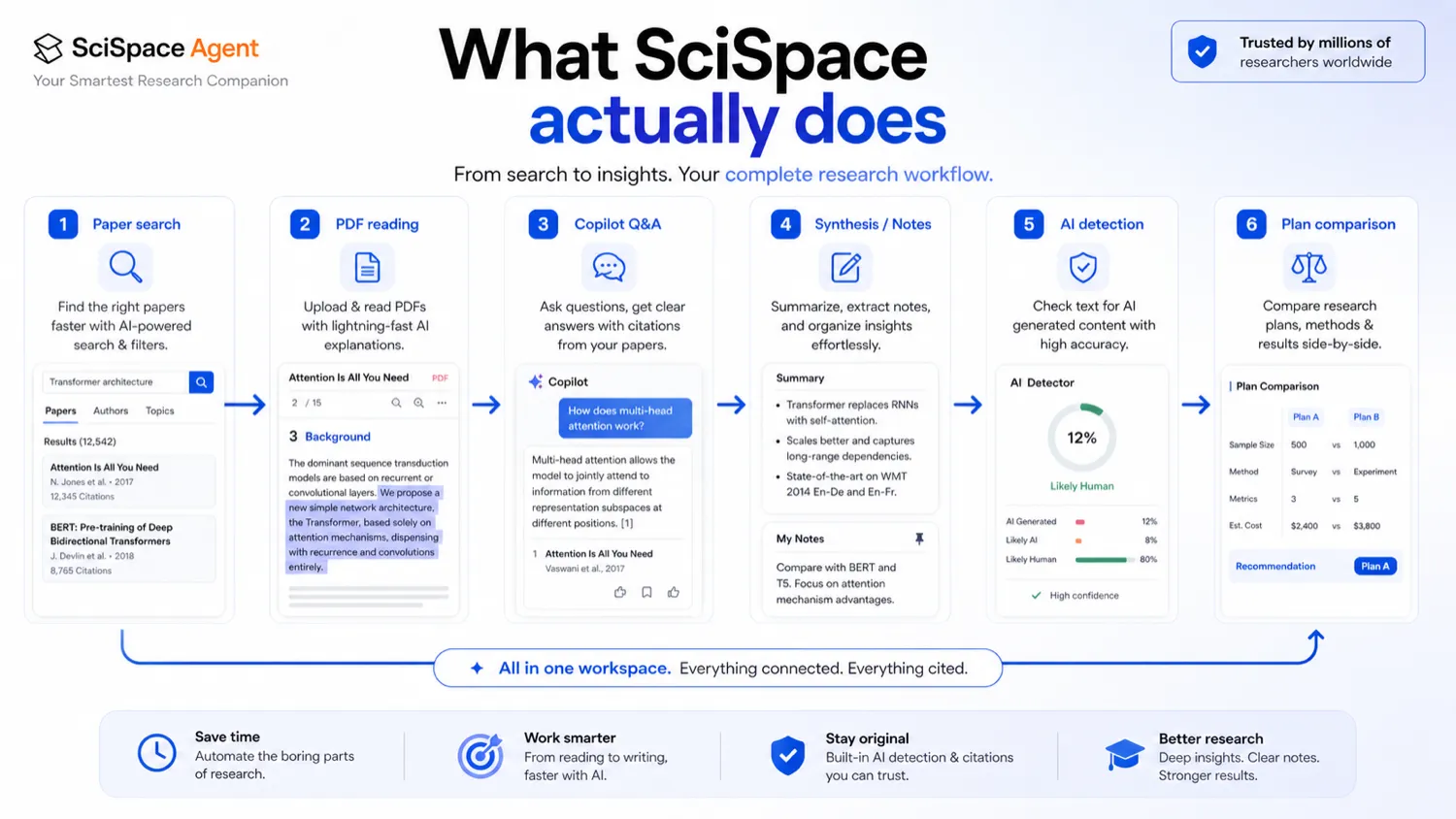
The important decision point is not whether SciSpace can answer questions about a paper. Many tools can do that now. The decision point is whether SciSpace helps you move through a full research loop with less wasted time.
That loop is where the product becomes more defensible. Search, read, explain, synthesize, draft, check, revise. If you use only one step, the paid value may be thin. If you use several steps every week, SciSpace becomes easier to justify.
Workflow check: If SciSpace looks useful, test it with one real paper or literature-review question before comparing paid tiers.
Real-world buyer scenarios
Graduate student reading papers weekly
A graduate student may use SciSpace to understand dense research papers faster. This is one of the cleaner use cases because the pain is recurring: reading, explaining, translating concepts, and connecting ideas across papers.
The risk is overtrusting summaries. The student should still check the original paper, especially when methods, statistical claims, or citations matter.
Researcher preparing a literature review
A researcher working on a literature review may use SciSpace to search papers, extract relevant points, and structure early thinking. This can be useful when the alternative is juggling many tabs, PDFs, and notes manually.
The buyer should verify whether the research-agent output respects inclusion criteria, domain-specific terminology, and citation context. If the agent saves time but requires heavy correction, the credit cost may feel less attractive.
Academic writer drafting around sources
SciSpace can support academic writing when the buyer needs research-backed context. It may help surface relevant papers and explain concepts before drafting.
I would not use it as the final authority for references or manuscript readiness. Public feedback around AI research tools shows that citation reliability and niche-domain interpretation can still be sensitive areas. A serious draft needs human source review.
Buyer who only needs AI detection
This buyer should be careful. SciSpace’s detector may be useful as a pre-submission checkpoint, but detector-only buyers should compare detection-first tools before paying for a broad research workspace.
A simple rule: if you would not use Chat PDF, paper search, Copilot explanations, or research-agent tasks, SciSpace may be more product than you need.
Key features that actually matter
Paper search and research discovery
SciSpace is strongest when paper discovery is part of the job. The product’s public positioning emphasizes large-scale paper search and research-agent support, which matters for buyers trying to build literature context quickly.
Buyer note: judge search quality by your field. A tool can feel strong in broad topics and still struggle with niche terminology, technical methods, or very recent literature.
Chat PDF and Copilot-style explanations
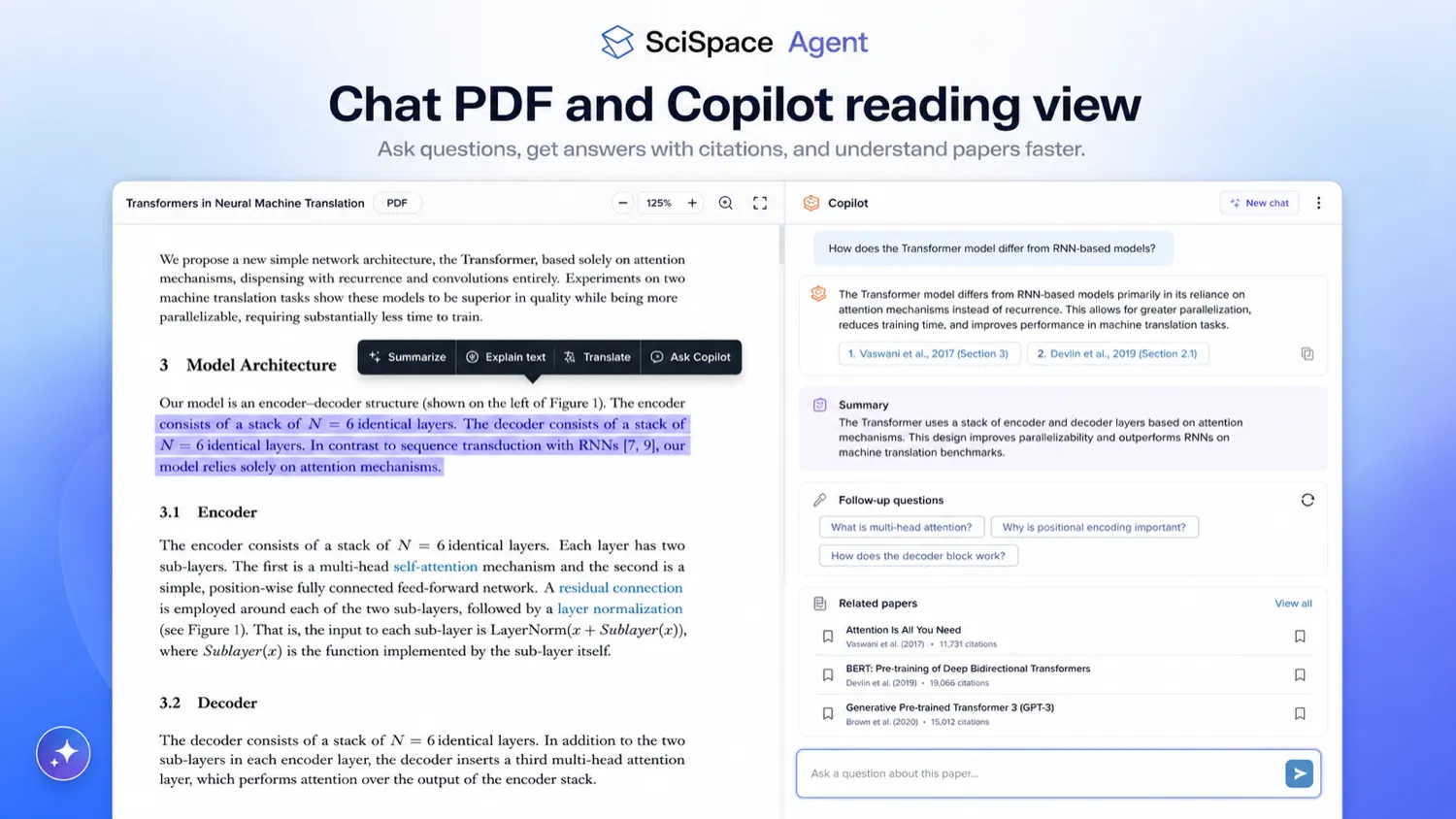
The PDF reading workflow is one of SciSpace’s practical strengths. The Chrome Web Store listing describes highlighting text, getting plain-language explanations, asking follow-up questions, handling math and tables, and receiving answers with citations.
Buyer note: this is useful when it reduces reading friction. It becomes weaker if the buyer stops checking the original passage.
Research-agent tasks and credits
SciSpace Agent is where the product becomes more serious commercially. Credits power agent tasks, and concurrent task limits can influence heavier workflows. That means pricing should be judged by actual task volume, not only by the plan name.
Buyer note: use a realistic task during the free path. A small test can reveal whether credits disappear quickly for the kind of work you actually need.
AI writing support
SciSpace also offers academic writing support. This can help researchers and students build drafts around scholarly material, but it should not be treated as a substitute for research judgment.
Buyer note: writing help is useful when it keeps sources close. It becomes risky when the buyer accepts generated claims or citations without checking them.
AI detection
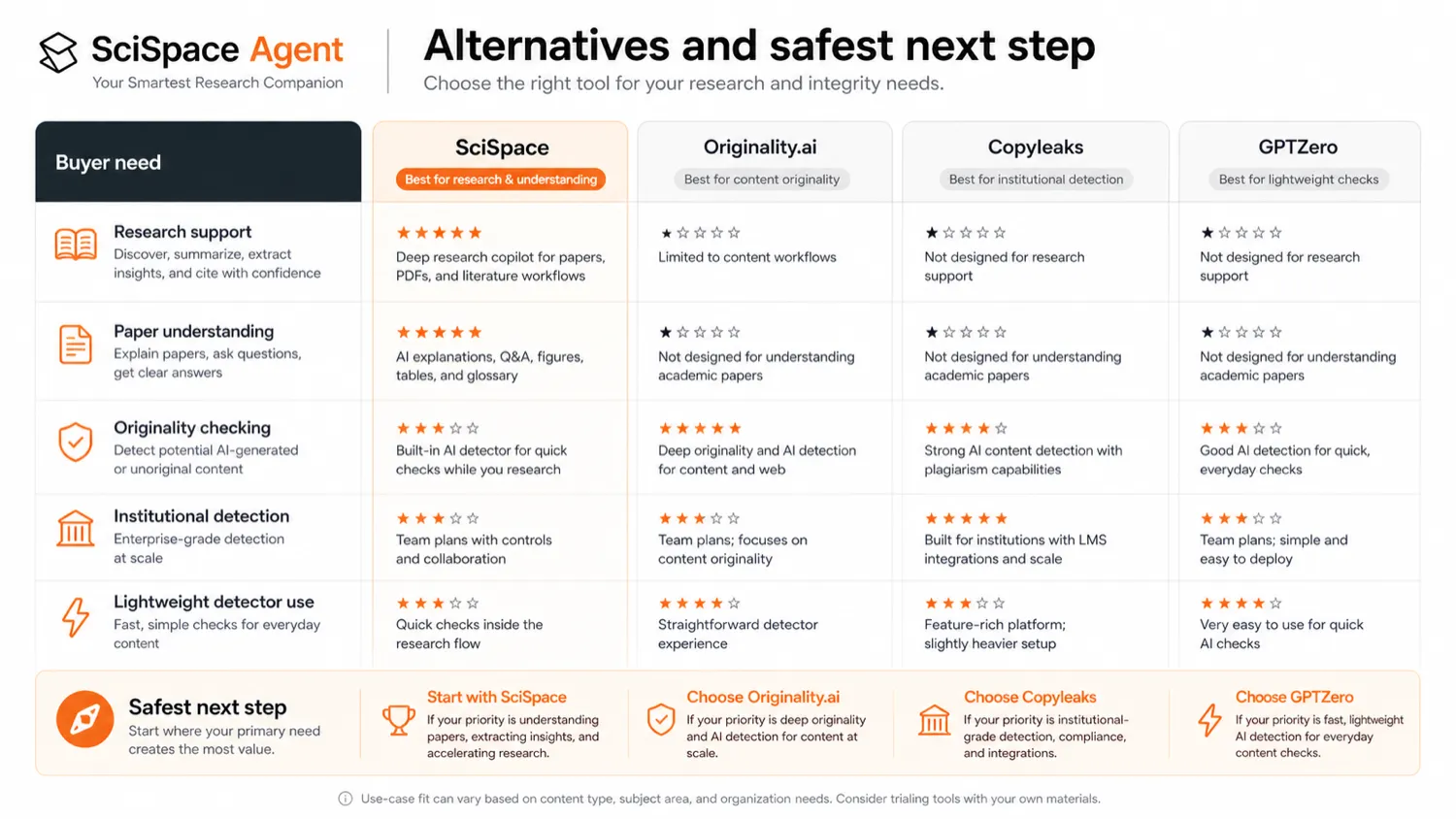
The detector path can help buyers review text or PDFs before submission. That can be useful for academic writers, researchers, and teams that want an originality-risk checkpoint.
Buyer note: detection should support judgment. It should not become the only basis for accusing someone, approving a paper, or deciding whether writing is acceptable.
Pricing and plan value
SciSpace pricing should be read through usage, not only the visible monthly number.
The public pricing page shows a free entry path and paid tiers. Public pricing sources have shown Premium at $20 per month monthly or $12 per month when billed annually, with higher tiers for heavier use. But the more important issue is the credit model. If your workflow depends on agent tasks, the plan’s monthly credits and task limits matter more than the headline price.
That is where buyers can make a mistake. A lower annual price can look sensible, but annual billing is a bigger commitment. A higher plan can look excessive until you realize your actual research tasks burn through credits faster than expected. The only way to know is to test with real work.
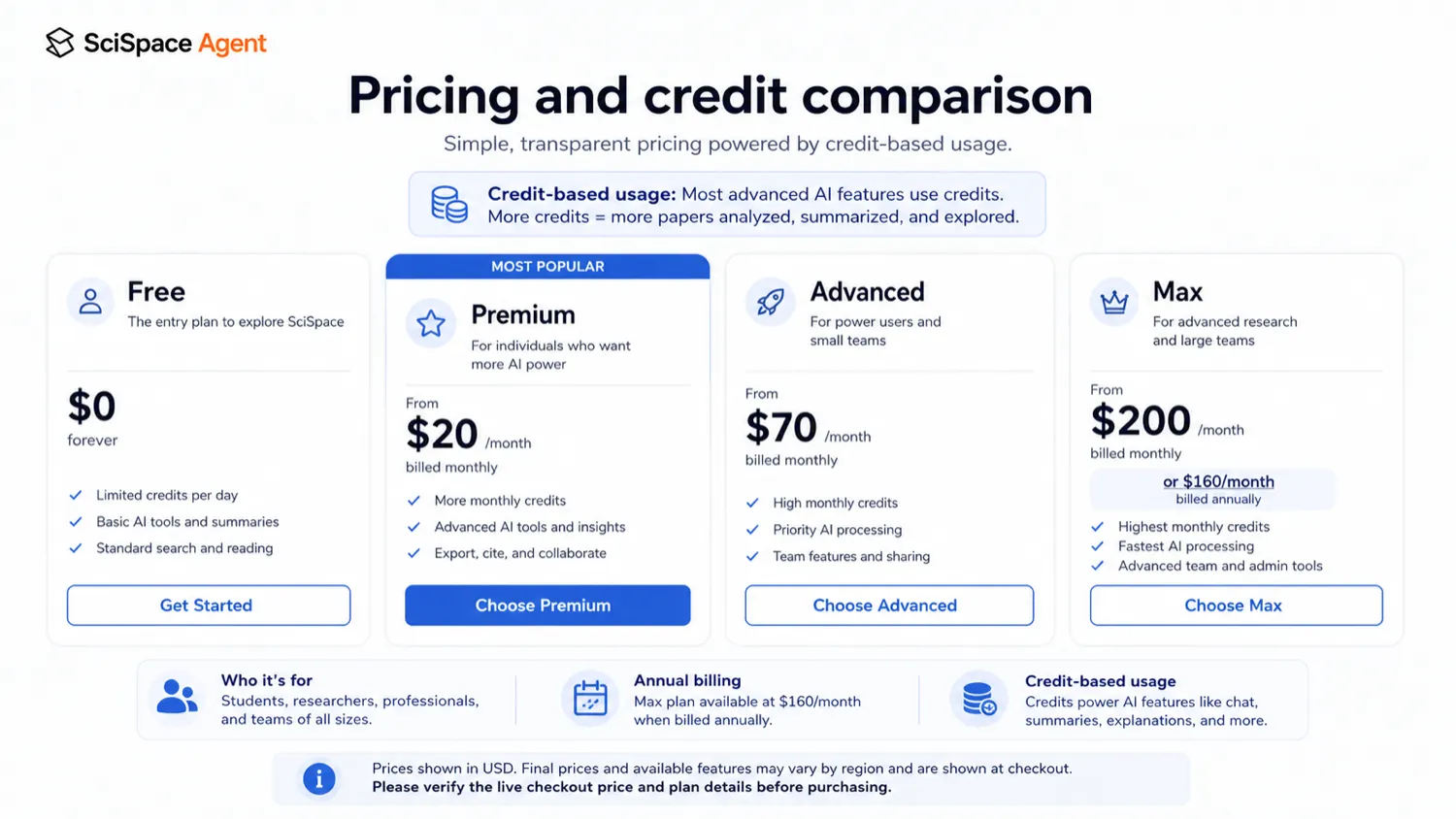
My pricing take is straightforward: start free, test a representative research task, then decide whether your usage pattern justifies Premium, Advanced, Max, or a team path.
I would not move to annual billing until the product has already helped with several real tasks. If the tool only feels useful once, stay cautious. If it becomes part of your weekly research workflow, the paid plan becomes easier to defend.
For the current buyer route, use the SciSpace store guide and live pricing page before checkout.
Pricing check: Do not choose SciSpace only by the monthly-equivalent price. Compare credits, annual commitment, and refund limits first.
Free plan, trial, coupon, and checkout notes
The free path is the right starting point for most SciSpace buyers.
Use it to test the real workflow: paper search, PDF reading, Copilot explanations, research-agent tasks, and AI detection if that matters. A free plan does not prove paid value. It only gives you a safer way to see whether SciSpace belongs in your routine.
Coupon logic should come later. SciSpace may have annual savings, public coupon paths, or partner-style offers, but a discount should not drive the decision. The product either saves you enough research time or it does not.
If SciSpace still fits after a real test, check the SciSpace coupon page before checkout. The important phrase is “before checkout.” Public codes and partner routes can change, so the final checkout screen matters more than old coupon copy.
The refund policy deserves special attention. The published policy limits refund eligibility for initial orders to a short window and low credit use. That makes paid testing riskier if you immediately run heavy research-agent tasks.
Checkout order: Test the free path, confirm the workflow, then check current offers. Do not let a coupon decide the purchase for you.
What I would check before buying SciSpace
If I were buying SciSpace for a real research workflow, I would check these points first:
- Whether the free path is enough to test one serious paper or research question.
- How many credits a realistic agent task consumes.
- Whether Premium, Advanced, or Max matches expected monthly usage.
- Whether annual billing is worth the commitment after refund limits are considered.
- Whether the AI detector is only a side feature or a core buying need.
- Whether the Chrome extension fits the way you actually read papers.
- Whether your institution, team, or client workflow allows uploading or processing research documents.
The easy mistake is treating SciSpace like a normal subscription tool. It is not only a subscription; it is also a workflow and credit decision. If the workflow is weak, the plan will feel expensive. If the workflow is repeated and credits are predictable, the plan becomes easier to evaluate.
A simple test before paying
Before paying, I would run a small test like this:
- Choose one real research question you are already working on.
- Open two or three papers that matter to that question.
- Use SciSpace to explain difficult passages, tables, or methods.
- Ask follow-up questions and check whether answers point to useful source context.
- Run one research-agent task only if it matches your real workflow.
- Check how many credits the work consumed.
- Decide whether the output saved enough time to justify a paid plan.
Do not test with an easy abstract. Use something that would normally slow you down.
The goal is not to prove that SciSpace can produce an impressive answer. The goal is to see whether it changes your research process enough to pay for it.
Pros explained
Strong academic workflow fit
SciSpace has a clearer role than many generic AI tools because it is built around research work. Paper search, PDF explanation, citation-backed Q&A, research-agent tasks, writing support, and detection all point toward the same buyer problem: academic information is hard to find, read, and organize.
That strength matters when the buyer works with papers often. It matters less for casual users.
Useful PDF and browser reading support
The Chrome extension adds practical value because research reading often happens inside the browser. Highlighting difficult text, asking questions, and getting explanations without opening multiple tabs can reduce friction.
This does not remove the need to verify answers. It simply makes the reading process less painful.
Free path before paid commitment
A free entry path is important for this product category. Research workflows vary too much for a buyer to judge fit from the homepage alone.
The free path is strongest when used with a real task. A casual five-minute demo will not tell you whether the credit model fits monthly use.
Research plus detection in one workspace
Some buyers may like having research assistance and AI detection in the same product. A writer can understand papers, draft around sources, and then use detection as a checkpoint before submission.
The caution is that detection should not dominate the decision. SciSpace is a stronger research workflow product than a detector-only purchase.
Cons explained
Credit-based usage can change the real cost
Credits are the biggest commercial detail to watch. If your agent tasks are heavy, the plan can feel more limited than the monthly price suggests. If your usage is light, a paid plan may be more than you need.
The safer move is to test the credit rhythm before annual billing.
Refund flexibility is narrow
The refund terms are buyer-sensitive because eligibility appears tied to a short initial window and credit usage. That makes it important to read the current policy before running real paid tasks.
This is not a reason to avoid SciSpace automatically. It is a reason to avoid careless checkout behavior.
AI detection can create false confidence
Detector features are useful only when handled carefully. A flagged result is not proof. A clean result is not a guarantee. The output should guide review, not replace it.
This matters more in academic settings, where a detector-based misunderstanding can create real consequences.
Citation and niche-domain reliability still need human review
Public feedback around SciSpace includes many positive comments about paper reading and literature-review speed, but also concerns around misinterpretation, credit usage, and reference reliability. That is typical of AI research tools: they can move quickly, but the buyer still owns verification.
For serious academic work, do not skip the source check.
Green flags and red flags
Green flags:
- You read and compare research papers every week.
- You need a smoother PDF and literature-review workflow.
- You can test SciSpace with a real research task before paying.
- You understand that credits are part of the buying decision.
- You will verify sources and citations manually before relying on outputs.
Red flags:
- You only need one AI detector check.
- You are buying because of a coupon before testing the workflow.
- You plan to pay annually before knowing your credit usage.
- You expect SciSpace to decide whether a manuscript is ready for submission.
- You want a long refund window after heavy paid usage.
The green flags point to repeated research work. The red flags point to overbuying or expecting too much certainty from an AI workflow.
SciSpace vs alternatives
Elicit vs SciSpace
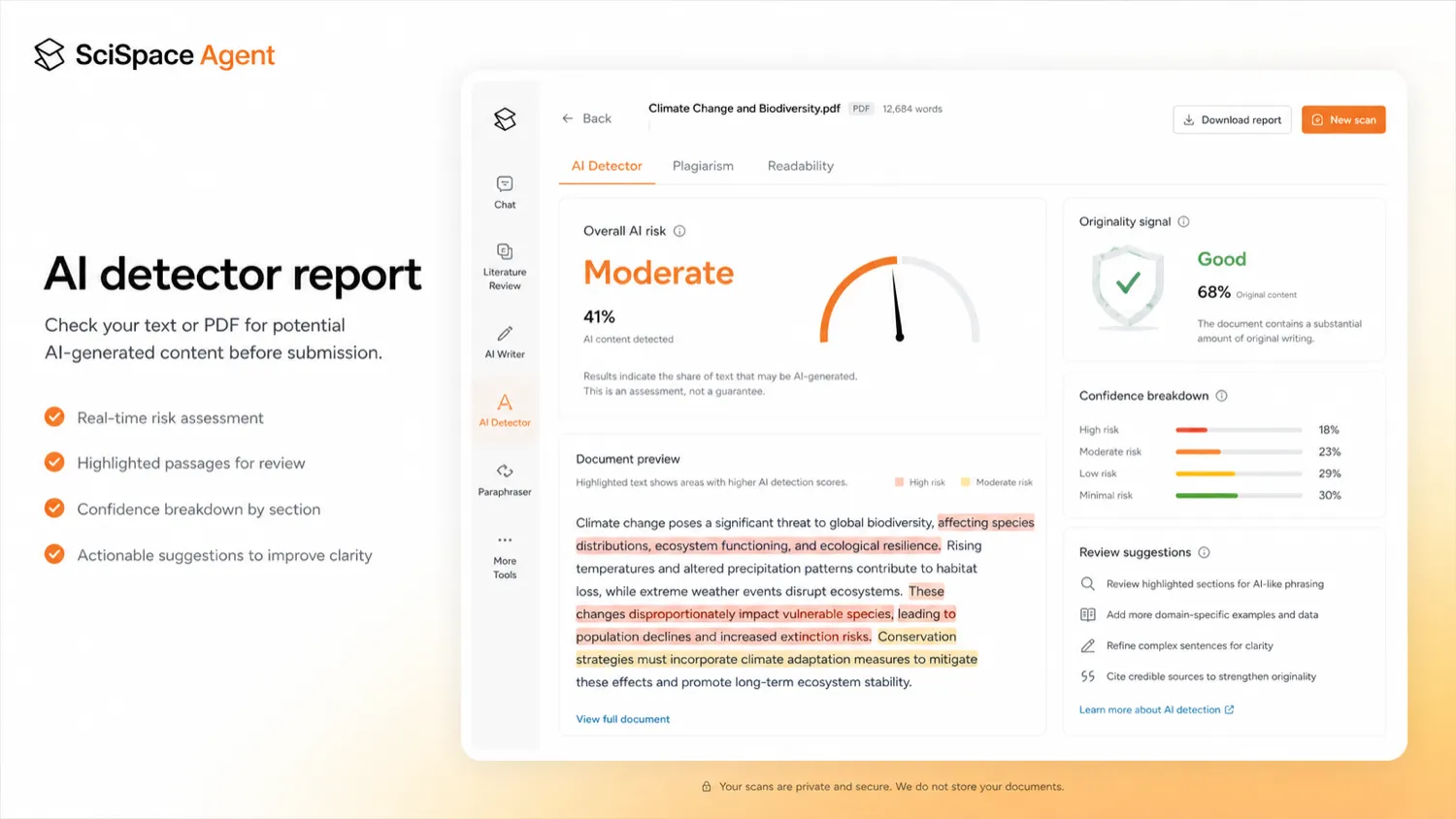
Elicit is a more direct research-assistant comparison for buyers focused on literature review, evidence extraction, and research question exploration. SciSpace may be the better fit if you want a broader paper-reading environment with Chat PDF, Copilot-style explanations, research-agent tasks, and an AI detector inside one ecosystem.
The tradeoff is breadth versus focused research-review flow.
Consensus vs SciSpace
Consensus is worth comparing when the buyer wants evidence-backed answers from research literature. SciSpace feels broader when the workflow includes opening papers, asking questions against PDFs, using browser support, and moving across multiple research tools.
The tradeoff is answer discovery versus full paper workflow.
Originality.ai vs SciSpace
Originality.ai is a detection-first comparison route, not a one-to-one SciSpace replacement. It makes more sense when the buyer’s main job is publishing-side originality checking, AI detection, or content review rather than academic research assistance.
SciSpace may still make more sense if you need research reading first and detection only as a secondary checkpoint.
Copyleaks vs SciSpace
Copyleaks is the stronger comparison when institutional detection, plagiarism-style checks, LMS workflows, or broader compliance needs matter. SciSpace is more natural when the buyer’s day-to-day work is finding, reading, and understanding papers.
The tradeoff is institutional checking versus research workflow.
GPTZero vs SciSpace
GPTZero is easier to compare if the buyer wants a simpler AI-detection-first product. SciSpace is the broader choice when detection is only one part of a research process.
If your buying question starts and ends with AI detection, GPTZero may be easier to evaluate. If your question starts with literature review and paper understanding, SciSpace is the more relevant product.
Trust, refund, and buyer-risk notes
My confidence is strongest around SciSpace’s product role: it is clearly positioned as a research workflow product with paper search, PDF understanding, Copilot-style reading, agent tasks, writing support, and AI detection as part of the broader package.
I am more cautious around live pricing, credit usage, refund experience, and renewal behavior. Those details can change faster than editorial copy, and public feedback shows that some buyers pay close attention to credits and refunds after purchase.
The refund policy is the point I would read twice. If a refund is only available within a short initial window and under a credit-use threshold, then the buyer should not run heavy paid tasks casually and assume they can undo the purchase later.
Data and document handling also matter. SciSpace is used around academic papers, PDFs, notes, and potentially sensitive research workflows. Before uploading private, confidential, unpublished, or institution-controlled material, check the current privacy policy and your organization’s rules.
The detector path also deserves restraint. Use it as a review signal, not as final proof. In academic settings, that distinction is not cosmetic. It affects how responsibly the tool is used.
Final verdict
I would consider SciSpace if your work regularly involves reading academic papers, asking questions against PDFs, building literature context, comparing sources, and turning research into notes or drafts.
I would skip or delay it if you only need one AI detector check, one quick paper summary, or a tool you will open once a month. In that case, the free path may be enough, or a narrower alternative may be cleaner.
I would compare SciSpace with Elicit or Consensus if research workflow is the main problem. I would compare it with Originality.ai, Copyleaks, or GPTZero if detection and originality checking are the real buying job.
The safest next step is simple: test SciSpace with one real research task, watch credit usage, read the refund policy, and only then decide whether the paid plan belongs in your workflow. A coupon can improve the final checkout. It should not be the reason you buy.
