Quick verdict
Make is worth considering if your automation problem is bigger than a simple “when this happens, do that” workflow.
That is the real line for buyers.
Make looks attractive because the visual builder is flexible, the app library is broad, the Free plan is real, and the platform is leaning hard into AI and agentic automation. But I would not judge it by the homepage alone. The buying decision is not only whether Make can connect your apps. It is whether your team can design the workflow, estimate credit usage, monitor failures, and maintain the scenario when the process changes.
For my money, Make makes the most sense when you have repeatable cross-app work: lead routing, CRM updates, content operations, support handoffs, spreadsheet cleanup, internal notifications, AI classification, or business processes with filters and branches. It becomes weaker when the buyer only needs a couple of basic automations and does not want to think about scenario structure, credit usage, or debugging.
The current public pricing page is also important. Make now presents a Free plan, a paid Make Plan, and Company-level enterprise pricing, with monthly credit tiers and a stated $9/month starting point for the paid plan at the selected credit level. Older third-party references may still mention older plan names, so the safe path is to verify live pricing before checkout.
I would start free, build one real workflow, measure credit consumption, and only then decide whether a paid tier or annual billing makes sense.
Next step: If Make still fits your automation workload, verify the current pricing and credit model before building production workflows.
Review snapshot
| Review point | Practical take |
|---|---|
| Best for | Buyers who need visual workflow automation across multiple apps, teams, or AI-assisted processes |
| Not ideal for | Users who only need one or two simple automations and want the least possible setup |
| Main use case | Connecting apps, routing data, applying logic, and automating repeatable business work |
| Pricing model | Credit-based, with a Free plan and paid pricing that should be checked live before checkout |
| Free path | Free plan with up to 1,000 credits per month for testing real workflows |
| Main strength | Visual scenario builder with routers, filters, AI workflow support, and many app integrations |
| Main concern | Credit usage can grow quickly when scenarios have many modules, AI steps, or frequent runs |
| Direct alternatives | Zapier, n8n, Pabbly Connect, Activepieces, Workato |
| Best next step | Build one real scenario on Free, then estimate credit volume before paying |
What is Make?
Make is a visual workflow automation platform for connecting apps, moving data, and building repeatable processes without writing a full custom integration stack.
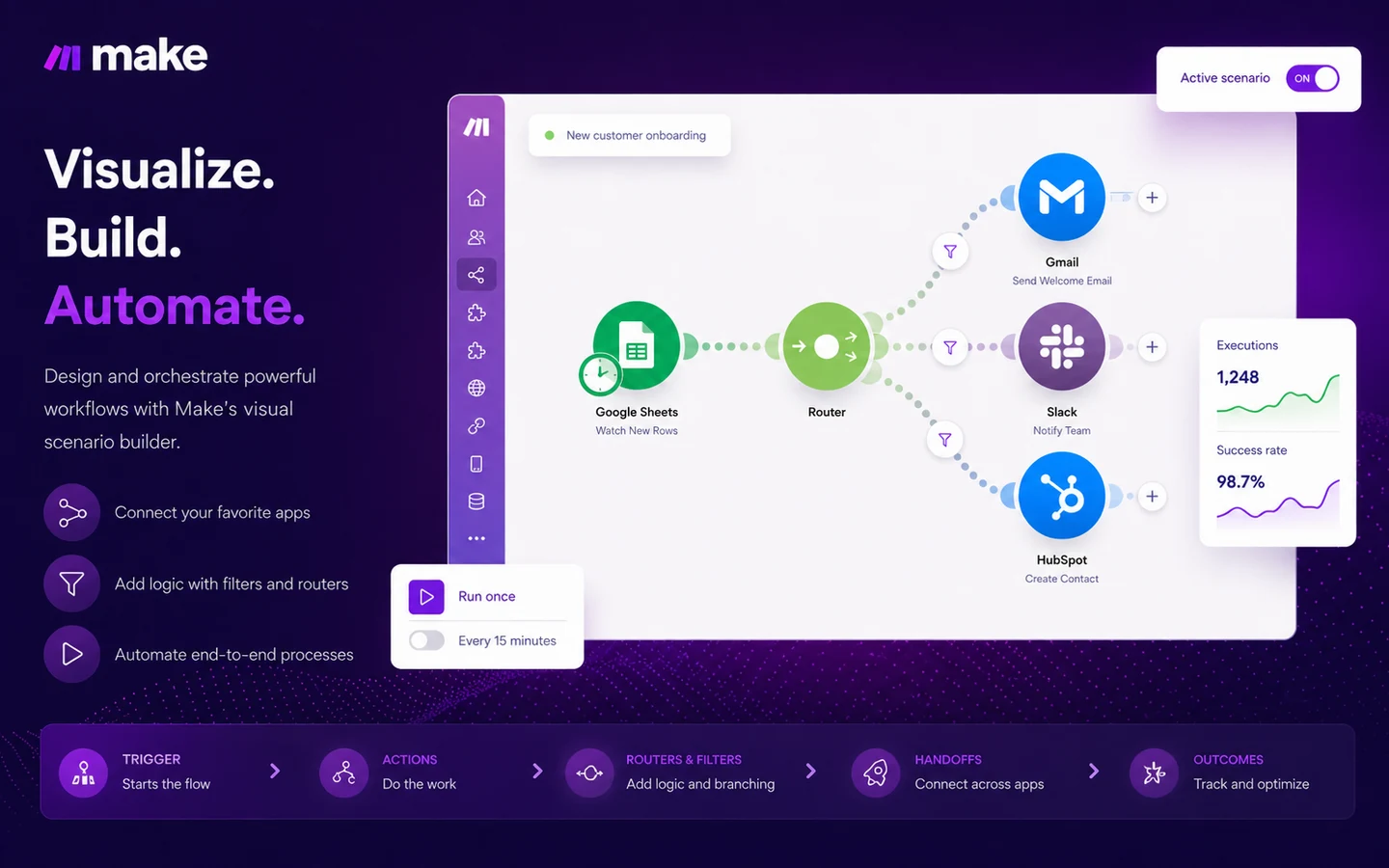
The simple version is this: Make lets you build scenarios. A scenario can watch for a trigger, pass information through modules, apply filters, branch with routers, transform data, call APIs, use AI steps, and send the result to another app or system.
That makes Make useful for business operations, marketing automation, sales handoffs, content workflows, reporting, support processes, finance tasks, HR steps, and AI-assisted routing. It is not just a single-purpose AI app. It is closer to an automation control layer that sits between the tools a business already uses.
The homepage now leans into AI workflow automation, agentic automation, Make AI Agents, AI apps, and a large app ecosystem. That positioning is useful, but it can also make the product sound easier than it is. Automation still needs process design. AI steps still need guardrails. A beautiful scenario canvas does not remove the need to know what should happen when data is missing, a webhook fails, or an AI output needs human approval.
Our review approach compares public product pages, pricing details, help documentation, cancellation behavior, buyer workflow fit, and nearby alternatives. I do not treat a low monthly entry price or an AI automation headline as proof that Make fits every buyer.
The better question is narrower: does Make help you control a process you already repeat often enough to justify setup and maintenance?
Who should use Make?
Make is a strong fit for operations teams that need to connect tools without waiting for custom engineering every time a process changes. If leads move from forms to spreadsheets to a CRM to Slack or email, Make can help turn that manual handoff into a visible workflow.
It also fits marketing and content teams that rely on many tools. A team might use Make to pass briefs between databases, AI tools, publishing systems, project boards, email platforms, and reporting dashboards. The value is not only automation. It is seeing the whole path in one place.
Agencies and freelancers can also benefit when they repeat client workflows. If every client needs lead capture, enrichment, CRM updates, notifications, and reporting, Make can become a reusable operations layer. The condition is that the builder must save more time than it costs to maintain.
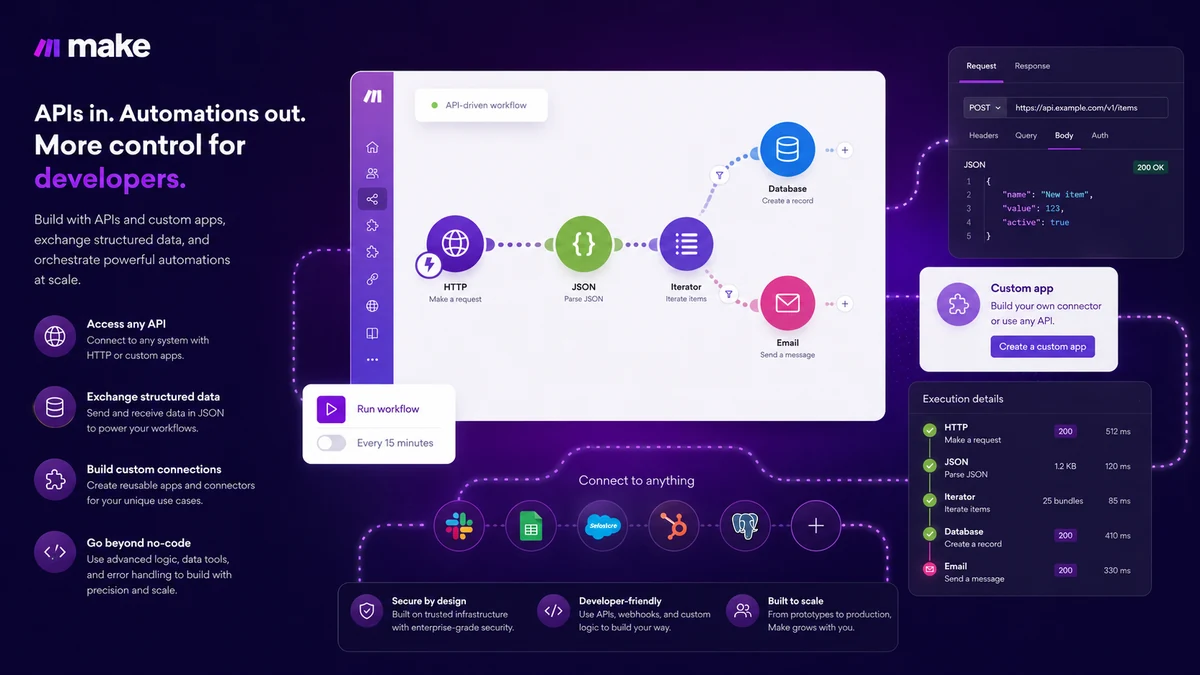
Technical operators may like Make because it can go beyond the beginner no-code path. API access, custom app possibilities, and developer documentation matter when prebuilt connectors are not enough. That does not make Make a developer platform in the same sense as building everything directly in code, but it gives technical buyers more room than a very simple automation app.
Teams exploring AI workflows should also consider it, but carefully. Make can help orchestrate AI steps across apps. The buyer still needs to check credit usage, token-related costs, model behavior, approval steps, and error handling before putting AI automation into a real business process.
Who should avoid Make?
Make is probably overkill if your automation need is tiny.
If you only want to send a form response to a spreadsheet or notify a Slack channel when a new lead arrives, a simpler tool may get you live faster. Make can do that work, but its flexibility may feel like extra setup if the workflow has no branching, data shaping, or meaningful logic.
I would also be careful if you cannot estimate monthly workflow volume. Credit-based pricing is not hard to understand, but it is easy to underestimate when a scenario runs frequently or includes many modules. The cheapest paid entry point is not automatically the safest plan.
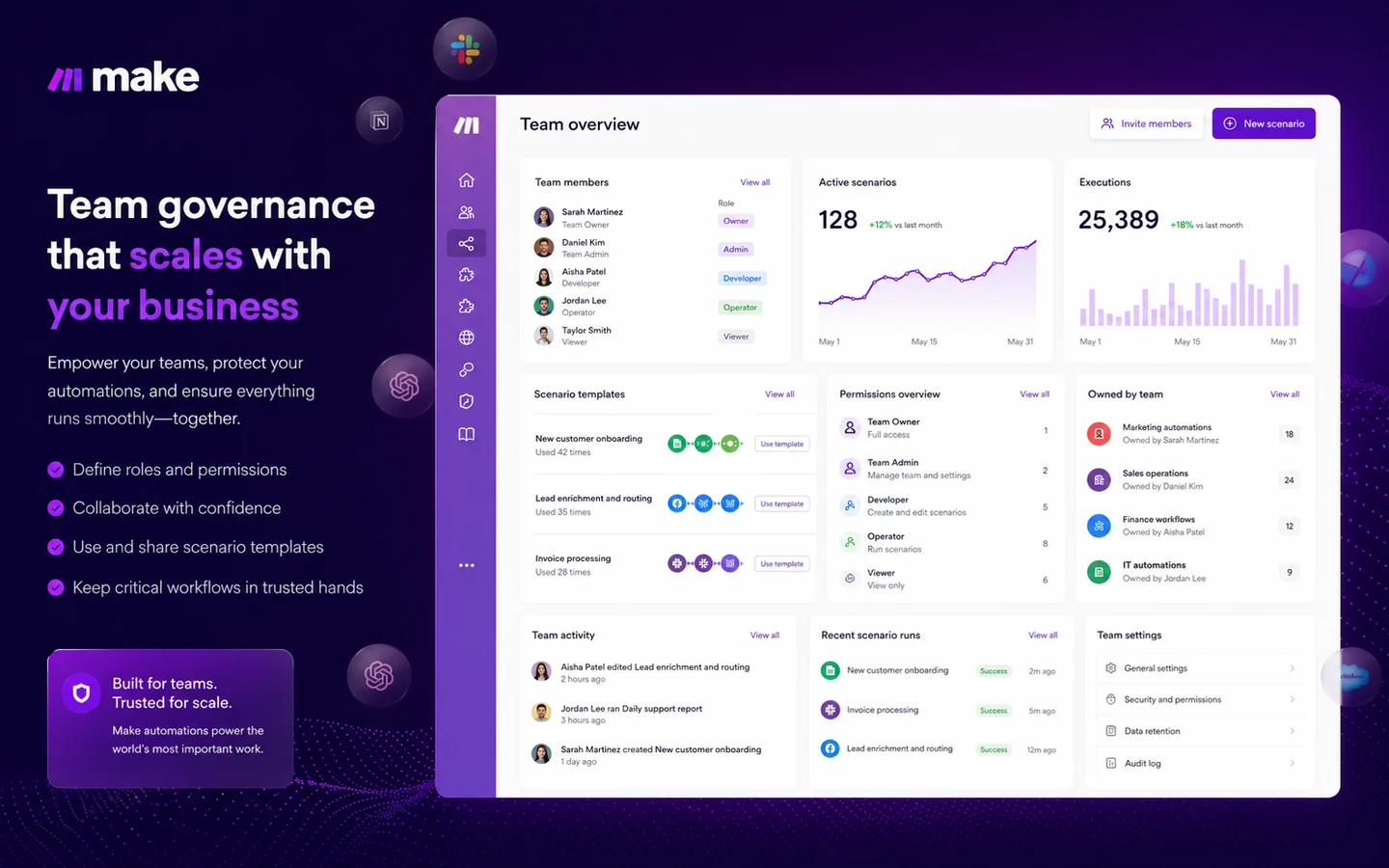
Make is not ideal for buyers who expect automation to run without ownership. Someone needs to monitor failures, update app connections, maintain naming, review execution logs, and adjust workflows when business rules change. The more important the workflow, the more important ownership becomes.
Enterprise buyers should avoid assuming the standard buying path covers every governance need. SSO, advanced security, support expectations, data residency, audit habits, and overage protection should be verified before choosing a plan for critical workflows.
And if you are buying because of a coupon or a low entry price, slow down. A discount can improve a good purchase, but it cannot fix a poorly mapped automation process.
How Make fits into a real workflow
A realistic Make workflow starts before the builder opens.
The buyer should first map the process: where the data starts, which app owns the record, which step triggers the workflow, which filters matter, which app receives the result, what happens when a step fails, and who gets notified.
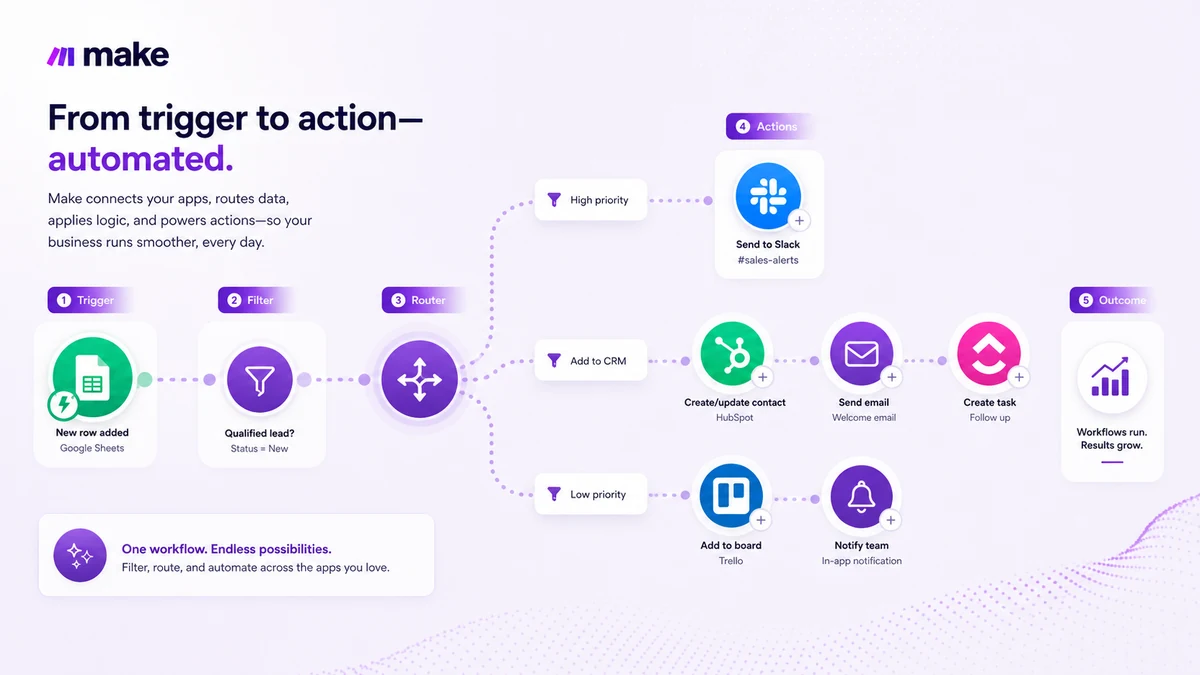
Then Make becomes useful. You can build the scenario visually, connect apps as modules, add routers, set filters, test individual steps, inspect outputs, and watch how the data moves. This is where Make can feel more transparent than a purely linear automation builder. You are not guessing what happens inside the workflow; you can usually see the chain.
A practical workflow might look like this:
- A lead form is submitted.
- Make checks whether required fields are present.
- The lead is enriched or categorized.
- An AI step summarizes the lead context.
- A router sends enterprise leads to sales and smaller leads to a nurture sequence.
- The CRM is updated.
- A notification goes to the right channel.
- Failed steps are reviewed by the workflow owner.
That kind of process is where Make starts to make sense. It is visual enough for non-developers to understand, but flexible enough to handle branches and app handoffs.
Workflow check: Build one real scenario before paying for a larger credit tier or annual billing.
Real-world buyer scenarios
A small marketing team might use Make to connect forms, spreadsheets, email software, CRM records, and Slack alerts. Make fits if the workflow has enough logic to justify the visual builder. It may fail if the team only needs one basic trigger and does not want to learn scenario design.
An agency might use Make to create repeatable client onboarding workflows. A new form submission can create folders, update a database, generate an internal brief, assign tasks, and send a welcome sequence. That is a stronger Make use case because the same structure can be reused across clients.
A content operation might use Make to connect Airtable, Google Sheets, AI writing tools, WordPress, project boards, and reporting dashboards. The benefit is reducing manual copy-paste work. The risk is over-automating draft decisions that still need editorial review.
A technical operator might use Make to bridge SaaS tools with internal systems. In this case, API access, custom connections, execution logs, and error handling matter more than the beginner interface. Make can fit, but the buyer should compare n8n or Workato if the workflow needs deeper control or enterprise governance.
Key features that actually matter
Visual scenario builder
Make’s visual scenario builder is the main reason to consider it over simpler automation tools. You can see modules, routes, filters, and data movement in one workflow view.
That matters when automation is more than a straight line. If a process branches based on lead type, document status, customer segment, order value, or AI classification, visual control helps the buyer understand and debug the workflow.
Buyer note: the visual builder is useful only if someone is willing to learn it and maintain it.
App ecosystem and connectors
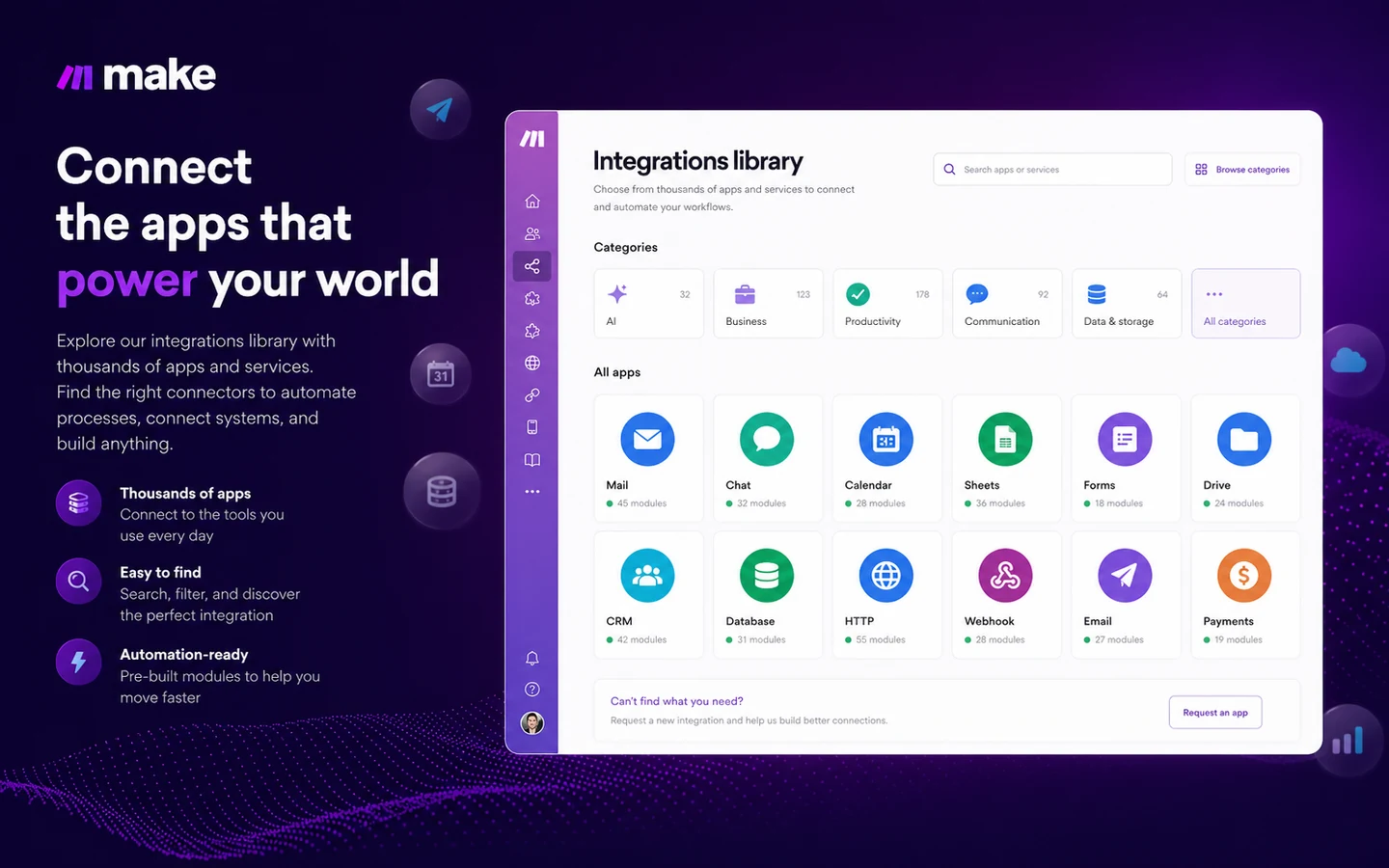
Make supports a large app ecosystem and presents thousands of prebuilt apps and integrations. This matters because automation value depends on whether your actual stack is covered.
Do not judge only by app names. Check the exact trigger, action, authentication method, data fields, and limitations for the apps you plan to use. A supported app is not always the same as a supported workflow.
Buyer note: before paying, test the exact apps and actions that matter to your process.
Routers, filters, and logic
Routers and filters are part of what makes Make more flexible. They let buyers build logic into the workflow instead of treating every automation as a single path.
This is useful for lead routing, approval workflows, content status changes, support escalation, and operational processes with different outcomes. It can also make workflows harder to maintain if the logic is not documented.
Buyer note: if a scenario has many branches, write down what each branch is supposed to do.
AI automation and agents
Make is increasingly positioned around AI automation, AI apps, Make AI Agents, and agentic workflows. This can be useful when AI is used to classify, summarize, route, extract, or draft information inside a broader process.
The risk is that AI can change credit usage and output reliability. Some AI-related usage may depend on token consumption, provider connections, or Make’s own AI provider logic. That is not a reason to avoid it, but it is a reason to test carefully.
Buyer note: treat AI automation as a workflow component, not a magic replacement for process design.
API and developer flexibility
Make is not limited to casual no-code users. API access, custom app paths, developer documentation, and platform controls make it more relevant for technical operators.
The practical advantage is extension. If a business uses internal systems or needs programmatic workflow management, Make may support a deeper setup than basic automation tools.
Buyer note: do not assume API access or advanced controls are available on every path. Verify current plan-level access before building around it.
Pricing and plan value
Make pricing should be judged by credits, not only by the headline monthly number.
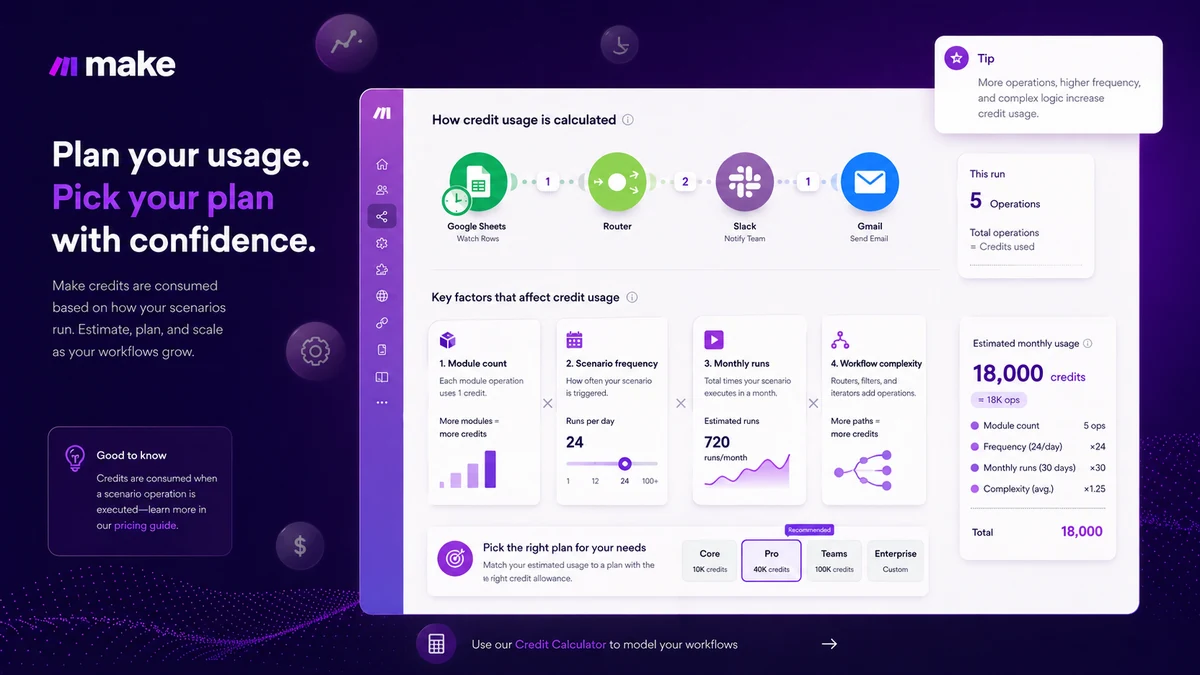
At the time of review, Make’s public pricing page shows a Free plan with up to 1,000 credits per month and no time limit. It also presents a paid Make Plan starting at $9/month at the selected credit level, with a slider for monthly credits, annual savings language, and Company-level enterprise pricing. The public page also explains that each module action in a scenario counts as one credit.
That is useful pricing information, but the buyer still has to do the math.
A scenario that runs once a day and uses five modules is very different from a scenario that runs every few minutes, branches into multiple routes, calls AI modules, handles files, and updates several systems. Make can look inexpensive during testing and become more expensive once the workflow is live.
The Free plan is valuable because it lets buyers test the builder, build the first scenario, and see how credits behave. I would use it for learning, not for judging full production cost.
The paid plan starts to make sense when you need more credits, unlimited active scenarios, faster intervals, API access, priority execution, team roles, or broader platform features. But I would not move to annual billing until the workflow has been tested for real usage.
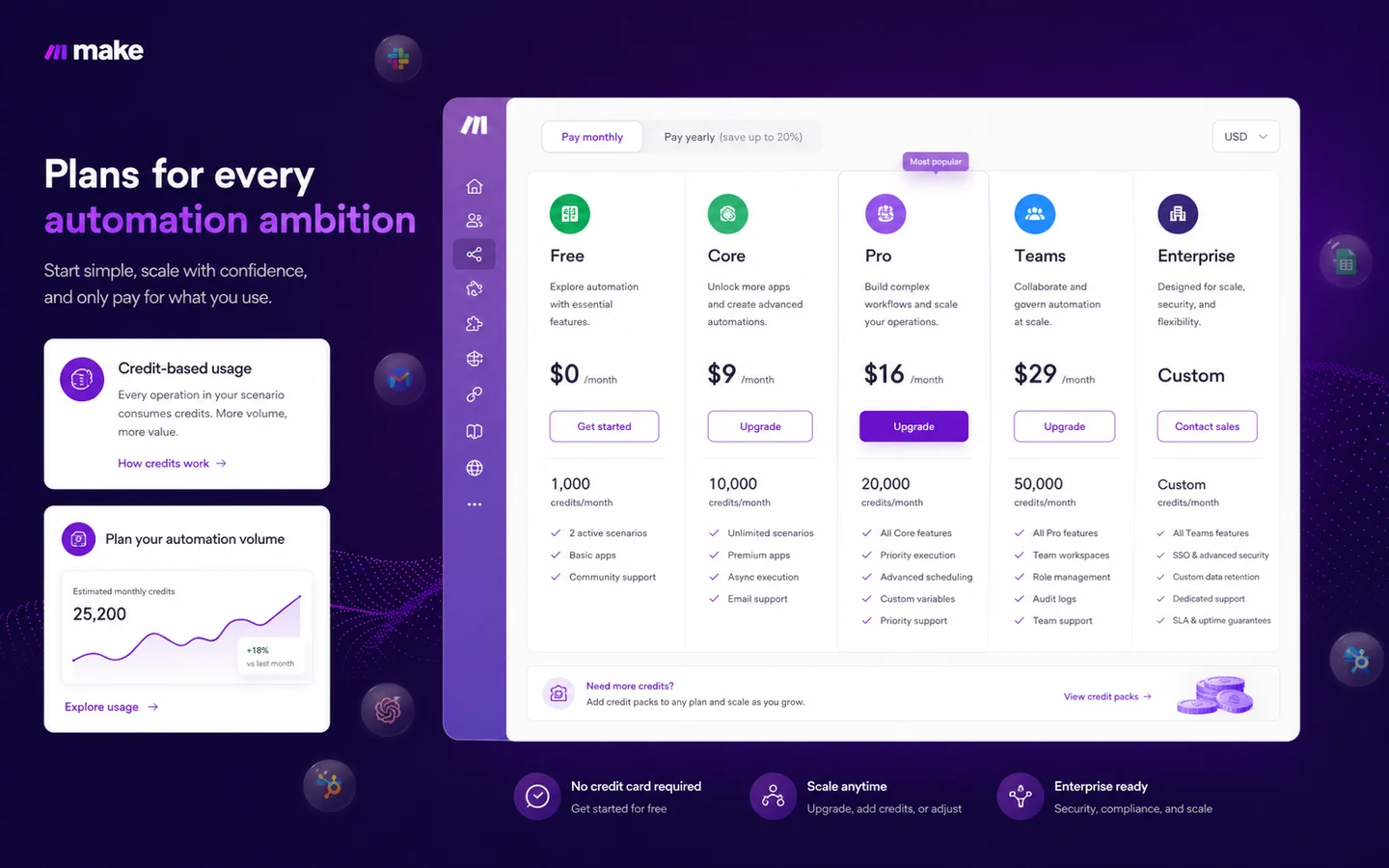
Pricing check: Use the Free plan to estimate credits before choosing a paid monthly or annual route.
Free plan, trial, coupon, and checkout notes
Make’s Free plan is the safest starting point because it is not just a short trial. It gives buyers room to experience the visual builder and create the first scenario before paying.
That matters more than a coupon.
A coupon page or reported deal path should be secondary for this product. The better savings path is to avoid buying too many credits too early, test the workflow, check monthly usage, then decide whether annual billing makes sense.
The official subscription help docs also matter. Make says a canceled paid subscription remains usable until the end of the billing cycle, then moves to the Free plan when eligible, and unused credits do not transfer to that Free plan. The help center also describes a no-cash-refund policy around subscription changes, with unused credits potentially converted to discounts or transferred during certain plan changes.
I would treat that as a reason to avoid casual annual billing. If your workflow is not proven yet, pay for flexibility first.
Checkout note: Treat coupons as secondary. The safer savings path is right-sized credits and verified cancellation behavior.
What I would check before buying Make
If I were buying Make for a real workflow, I would check these points first:
- How many times will the scenario run each month?
- How many modules does each run use?
- Are any steps AI-based, file-based, token-based, or dynamically priced by usage?
- Does the Free plan prove the workflow logic, or only the interface?
- Does the paid plan include the API, team roles, execution priority, or log features you need?
- What happens to unused credits after cancellation or plan changes?
- Who owns monitoring, debugging, and updating the scenario after launch?
The easy mistake is thinking the automation is finished when the first test succeeds. In real operations, the harder question is what happens when the data is messy, the API response changes, the app connection expires, the AI step returns something odd, or a teammate edits the wrong scenario.
For my money, Make should be bought only after the buyer understands both the workflow and the maintenance burden.
A simple test before paying
Before paying, I would run a small test like this:
- Pick one workflow you already repeat manually.
- Map the apps, trigger, actions, branches, and failure points.
- Build the simplest working version in Make’s Free plan.
- Run it with real but low-risk data.
- Check credit usage after several test runs.
- Add one realistic complication, such as a filter, router, AI step, or error path.
- Decide whether the saved time justifies the plan you are considering.
This test does not need to be dramatic. In fact, the boring test is often better. If Make cannot save time on one repeated workflow, it probably should not become your automation hub yet.
If the test works, the next question is plan fit. If the test does not work, a paid plan will not fix the process.
Pros explained
Make’s biggest strength is visibility. The visual builder helps buyers understand the workflow instead of burying the process inside a hidden automation chain. This matters when the workflow has branching, filters, data shaping, or multiple app handoffs.
The Free plan is another real advantage. Many tools force a paid decision before the buyer understands the product. Make gives buyers a safer way to build and test before committing.
The app ecosystem is also strong. Make can be useful across marketing, sales, operations, finance, IT, HR, content, and productivity workflows because it can connect many common business tools.
Its AI direction is worth watching. Make is not only connecting apps; it is also positioning around AI agents, AI apps, MCP, and AI-powered workflow orchestration. That can be useful for teams that want AI inside real business processes instead of isolated chat prompts.
The final pro is flexibility. Make can serve beginners, operators, agencies, and technical teams, but only when the buyer chooses the right use case.
Cons explained
The first drawback is the learning curve. Make is visual, but it is not always simple. A buyer who expects one-click automation may be frustrated when real workflows require scenario logic, data mapping, filters, and troubleshooting.
The second drawback is credit planning. Credit-based pricing can be fair when the buyer understands usage. It can also surprise buyers who build frequent or complex scenarios without estimating module actions and AI-related consumption.
The third drawback is maintenance. Automations are not permanent machines. App connections break, fields change, APIs update, and business rules evolve. Someone must own the workflow.
The fourth drawback is billing caution. Cancellation behavior, unused credits, plan changes, and annual billing should be read carefully before a buyer commits. I would not treat unused credits as cash-like value unless the current Make help documentation clearly supports the specific situation.
Make is powerful, but it rewards careful buyers more than impulsive ones.
Green flags and red flags
Green flags:
- You can describe the workflow before opening the builder.
- The workflow crosses several apps and includes real logic.
- You know the expected monthly run frequency.
- You have someone responsible for monitoring and maintaining scenarios.
- The Free plan test shows clear time savings.
Red flags:
- You are buying because the starting price looks low.
- You cannot estimate credit usage.
- Your workflow depends on AI output with no human review point.
- Nobody owns the automation after launch.
- You are considering annual billing before testing real volume.
The best Make buyers are not the ones who automate everything immediately. They are the ones who know which repetitive process is worth automating first.
Make vs alternatives
Make has several real alternatives, but they do not all solve the same buyer problem in the same way.
Zapier vs Make
Zapier is often easier for simple automations and has a very beginner-friendly setup flow. If your workflows are mostly linear and you want the quickest path to connecting popular apps, Zapier may be the easier comparison.
Make can be stronger when you need to see the whole scenario, use routers and filters, and manage more complex logic visually. I would compare both if ease of setup matters as much as flexibility.
n8n vs Make
n8n is a stronger comparison for technical teams that want deeper control, self-hosting options, or developer-friendly workflow infrastructure. It may fit buyers who are comfortable managing more of the technical side.
Make is usually friendlier for teams that want a managed visual automation platform without taking on as much infrastructure ownership.
Pabbly Connect vs Make
Pabbly Connect is worth checking when pricing predictability and simpler automation needs matter most. It may appeal to buyers who want a lower-cost automation path and do not need Make’s full visual logic approach.
Make may still be better when workflows involve more branching, app coverage, AI steps, or debugging visibility.
Activepieces vs Make
Activepieces is an adjacent but relevant route for buyers interested in open-source automation, AI-agent-style workflow experiments, and a different platform philosophy.
Make is the more established visual automation choice for many mainstream business users. Activepieces may be more interesting for teams that want openness or experimentation.
Workato vs Make
Workato is a heavier enterprise comparison. It is more relevant when governance, IT ownership, integration strategy, and enterprise support matter more than quick self-serve setup.
Make can be a better middle path for SMBs, operators, and teams that need serious automation without going straight to a heavier enterprise iPaaS.
Trust, refund, and buyer-risk notes
Make has enough public documentation to make the first buying decision reasonably transparent, but there are still buyer risks.
Pricing should be verified live because Make’s plan presentation and credit tiers can change. The current public page shows Free, Make Plan, and Company, while older references may still discuss Core, Pro, and Teams. Internal planning should follow the live checkout path, not stale screenshots or old pricing summaries.
Credit usage should be tested with a real scenario. Make’s help documentation explains that credits can be fixed or dynamic depending on the feature, with AI-related usage sometimes tied to tokens, operations, or other usage factors. That is especially important if your workflow uses Make AI features or third-party AI modules.
Cancellation behavior should be read before annual billing. Make’s help center says a canceled paid subscription remains active until the end of the billing cycle and then moves to the Free plan when eligible, but unused credits do not transfer to that Free plan. The subscription-change page also uses no-cash-refund language around certain changes.
Support expectations should be realistic. Public review sites show many positive signals around flexibility and visual workflow building, but support, complexity, and billing complaints appear in some public feedback channels. That does not make Make a bad product. It does mean buyers should test before depending on it for critical operations.
Security and enterprise claims should be verified at the plan level. The official homepage references GDPR, SOC 3, SOC 2 Type II, encryption, and SSO, but enterprise buyers should confirm current documentation, contract terms, data needs, and support coverage before making Make part of critical infrastructure.
Final verdict
Make is one of the more serious automation tools to consider when a buyer needs visual control over workflows that span multiple apps.
I would consider Make if you have repeatable cross-app work, enough workflow complexity to benefit from a visual builder, and a clear person responsible for maintaining the automation. It is especially interesting for teams connecting marketing, sales, operations, content, reporting, and AI-assisted processes.
I would skip it if your needs are very simple, if you do not want to learn scenario design, or if you cannot estimate credit usage before paying. A lower entry price is not the same as a safe buying decision.
I would compare it with Zapier if ease matters most, n8n if technical control matters most, Pabbly Connect if pricing predictability matters most, Activepieces if open-source direction matters, and Workato if enterprise governance is the real requirement.
The bottom line: Make is not the tool I would buy just because automation feels exciting. I would buy it when the workflow is mapped, the credit math is understood, and the team knows who owns the scenario after it goes live.
