Quick verdict
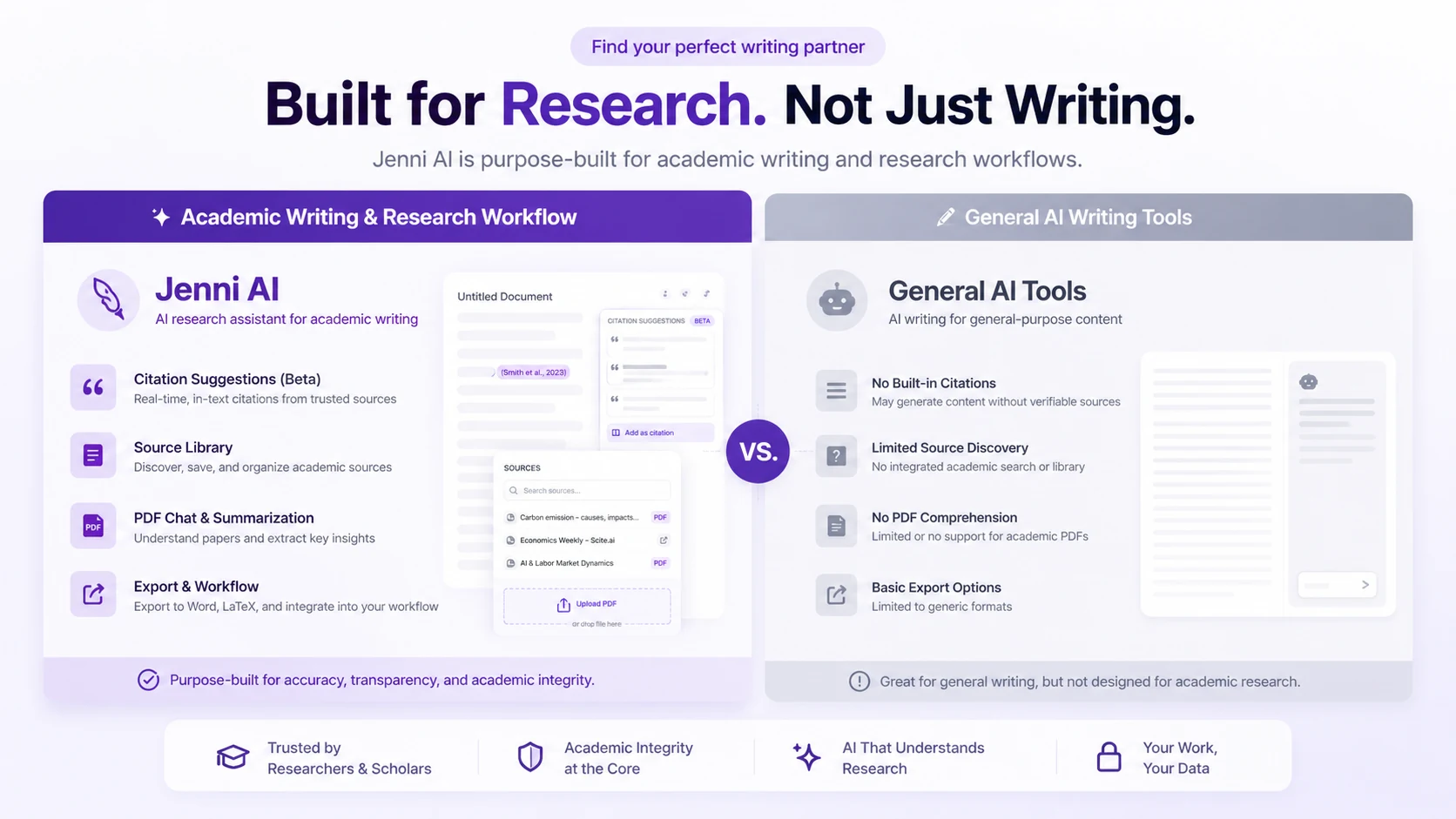
Jenni AI is worth a serious look if your writing problem is not just “I need words faster,” but “I need to write with sources, citations, PDFs, and a cleaner academic workflow.”
That distinction matters.
A general AI writer can help you brainstorm, outline, paraphrase, and draft. Jenni AI is trying to sit closer to the academic writing process itself: autocomplete inside the document, citation search, PDF and library workflows, AI Chat, AI edits, document review, and export options for formats that matter to students and researchers.
For my money, Jenni AI makes the most sense when the buyer already writes source-backed work often enough to feel the friction. A student working on one short assignment may not need a paid plan. A graduate student building literature reviews, research proposals, and long-form papers may get more value because the source workflow becomes part of the writing process.
The main caution is simple: do not treat Jenni AI as a replacement for academic judgment. Citations still need checking. Claims still need verification. AI-assisted paragraphs still need editing. And because Jenni’s public refund language is strict, I would not move to annual billing until one real document has already passed the workflow test.
Next step: If Jenni AI still fits your academic writing workflow, test the free path first and verify the current buyer route before checkout.
Review snapshot
| Review point | Practical take |
|---|---|
| Best for | Students, researchers, graduate writers, and academic users who draft with sources |
| Not ideal for | Marketers, casual one-off users, or buyers who only need short generic text |
| Main use case | Academic drafting with citations, PDFs, bibliography support, and export paths |
| Free path | Free plan is useful for testing the editor and basic limits |
| Paid entry | Public pricing currently shows Plus at $12/month and Pro at $29/month |
| Main strength | Academic workflow is more focused than broad AI writing tools |
| Main concern | AI text and citations still need human verification; refund flexibility appears limited |
| Direct alternatives | Paperpal, SciSpace, Yomu-style academic writing tools |
| Internal comparison route | AI-Writer.com for broader AI writing needs |
| Best next step | Test one real academic document before choosing Plus, Pro, or annual billing |
What is Jenni AI?
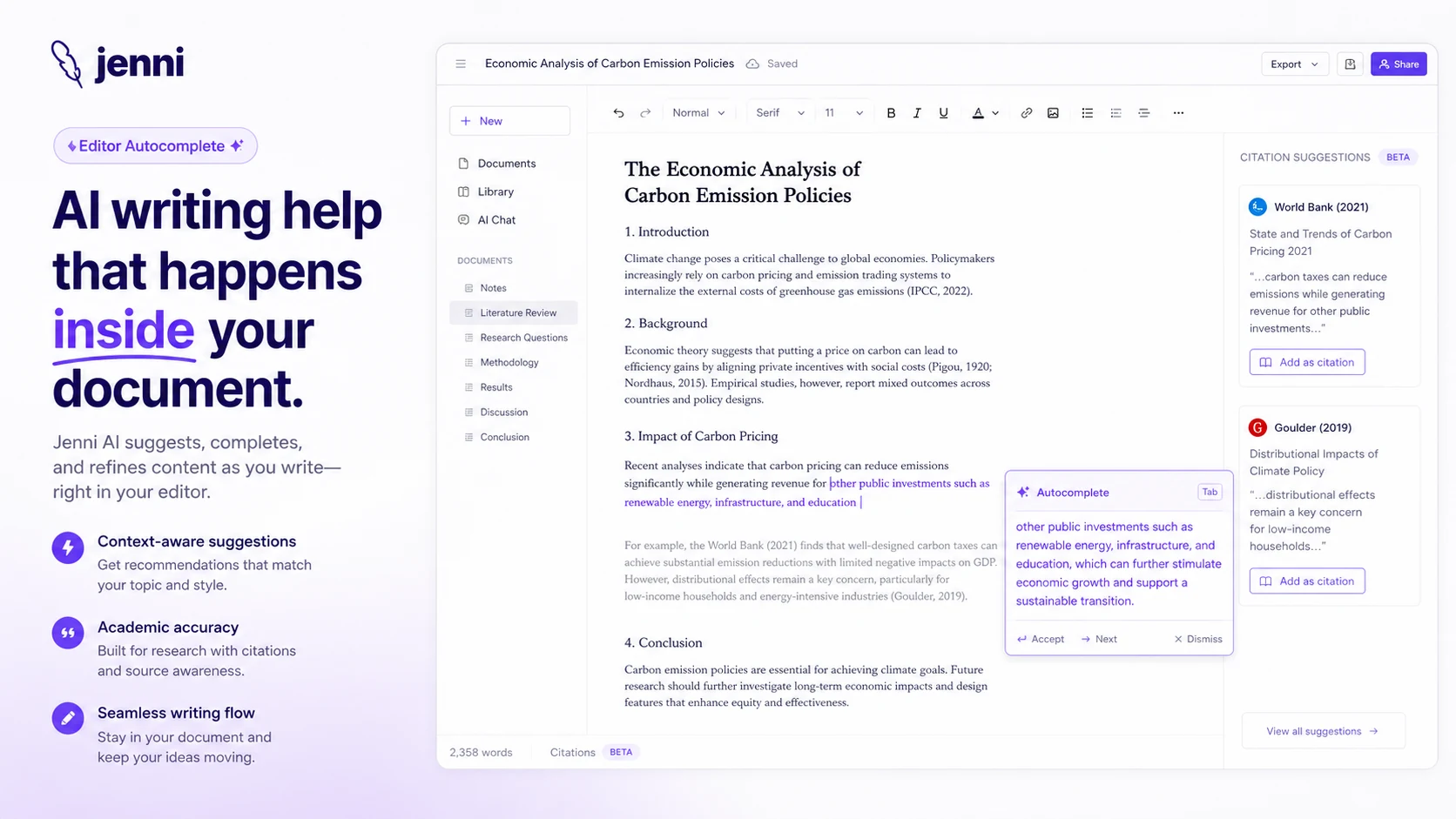
Jenni AI is an academic writing and research assistant built for people who draft with sources. Its public positioning is not the same as a broad marketing copy generator or a general chatbot. The product is closer to an academic workspace where the editor, autocomplete, citations, PDF/library features, AI Chat, and exports are meant to live near the draft.
That is the right way to judge it.
The homepage makes Jenni look simple because the core promise is easy to understand: write, cite, research, and collaborate faster. But the buying decision is not only about whether it can generate text. The better question is whether it reduces the friction that academic writers actually feel: finding sources, keeping references organized, continuing a section without losing flow, inserting citations, reviewing the document, and exporting the work in a usable format.
Our review approach compares public product pages, pricing details, documentation, refund terms, buyer workflow fit, and nearby alternatives. I would not treat any AI academic writing tool as a finished-authority machine. The safer standard is whether it supports a better writing process while still leaving the final claims, references, and argument structure under human control.
The common misunderstanding is thinking Jenni AI is “ChatGPT for essays.” That is too shallow. Jenni may overlap with general AI writing tools in drafting and rewriting, but its strongest argument is the academic layer around the writing: citations, PDFs, source library, AI-assisted review, and handoff formats like DOCX, LaTeX, BibTeX, and RIS.
If you do not need those pieces, Jenni AI can feel narrow. If you do need them every week, that narrowness may be the point.
Who should use Jenni AI?
Jenni AI fits buyers who already have a research-writing problem.
Students are the most obvious group. If you are drafting essays, research-heavy assignments, or papers where citations matter, Jenni can be useful because the writing help is tied more closely to sources than a blank chatbot window. The condition is that you still need to verify the references and edit the final text. A generated paragraph is not a submitted paper.
Graduate students and PhD candidates are probably a stronger fit. Literature reviews, research proposals, thesis sections, and journal-style drafts involve more source handling than ordinary short-form writing. If you are constantly moving between PDFs, notes, references, and a draft, the library and citation workflow becomes more relevant.
Researchers and academic professionals may also consider it when they need a writing companion for source-backed reports or early-stage drafts. The value is not that Jenni magically understands your field. The value is that it can keep some research and drafting activity in one workspace.
Academic writers who care about export formats should pay attention too. DOCX export may be enough for some users, while LaTeX, BibTeX, and RIS paths matter more for research-heavy workflows. Before paying, I would check whether the export route matches the tools you already use.
Jenni AI can also fit students who struggle with the blank page. Autocomplete can help keep momentum. But the buyer should not confuse momentum with accuracy. The writing may flow faster, but the argument still has to be yours.
Who should avoid Jenni AI?
Jenni AI is not the best first choice for general marketing teams.
If your main work is ad copy, landing pages, social posts, sales emails, brand voice systems, or SEO briefs, a broader AI writing platform will likely fit better. Jenni is built around academic and source-backed writing. That focus is a strength for students and researchers, but it can feel limiting for commercial content operations.
Casual users should also be careful. If you only need a few paragraphs once in a while, the free plan or a general chatbot may be enough. A paid subscription makes more sense when the writing workflow repeats.
I would also be cautious if refund flexibility matters to you. Jenni’s public refund language is conservative. That does not mean every buyer will have a bad experience, but it does mean annual billing should not be an impulse decision.
Buyers who expect perfect citations should slow down as well. Citation features can save time, but academic mistakes are expensive. References, page context, publication details, and claim support should still be checked manually.
Finally, developers looking for a public API workflow should not assume Jenni AI is an API product. The internal data does not point to a documented public API route, and the public buyer case is clearly the writing workspace, not developer automation.
How Jenni AI fits into a real workflow
A practical Jenni AI workflow starts before you open the editor.
The buyer should already know the document type, citation style, source set, and final export need. That sounds boring, but it is exactly where academic writing tools become useful or disappointing.
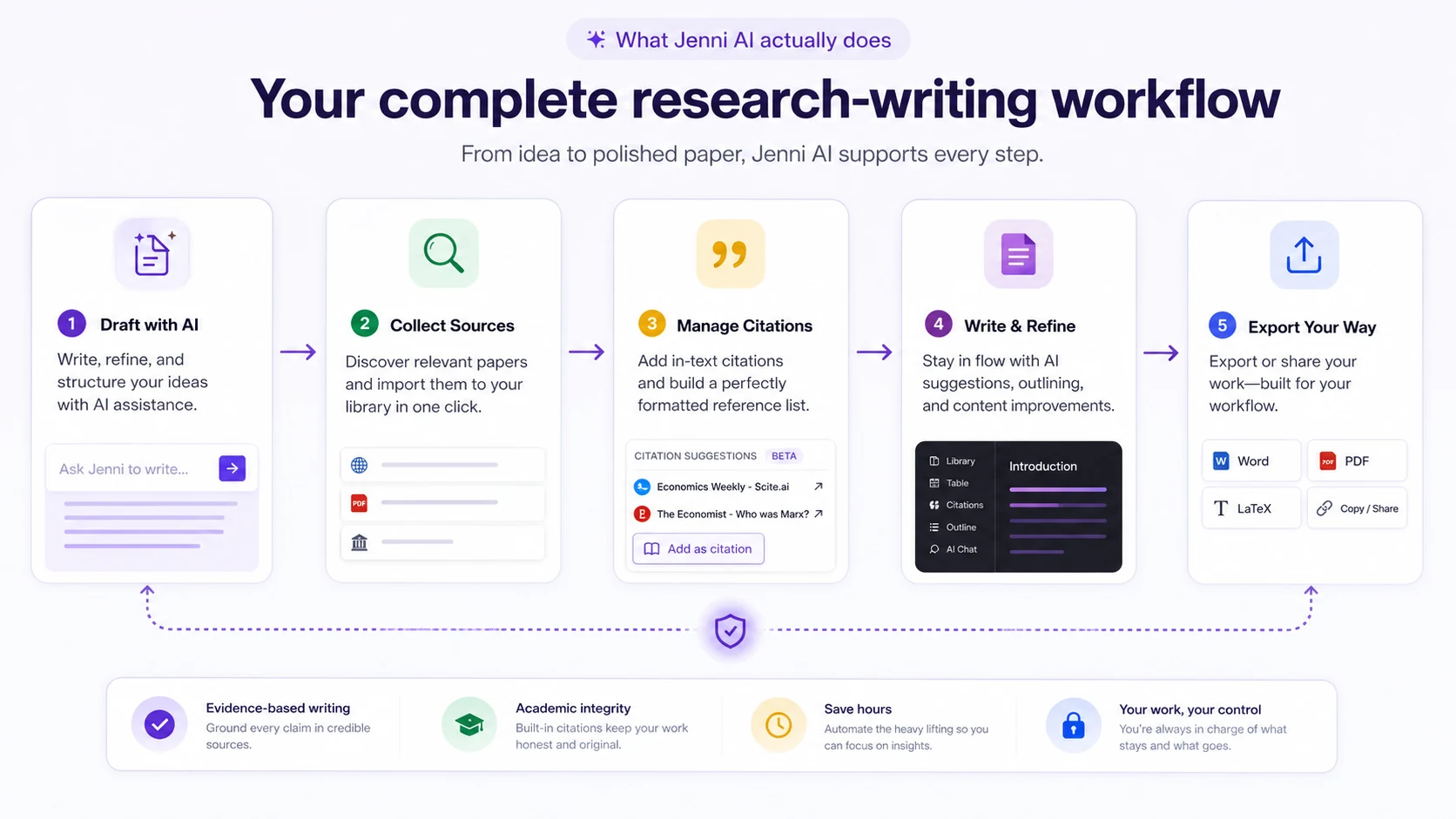
A realistic workflow might look like this:
- Choose one real essay, literature-review section, or research draft.
- Add or import sources into the library.
- Draft an outline or opening section in the editor.
- Use autocomplete only where it helps continue your own argument.
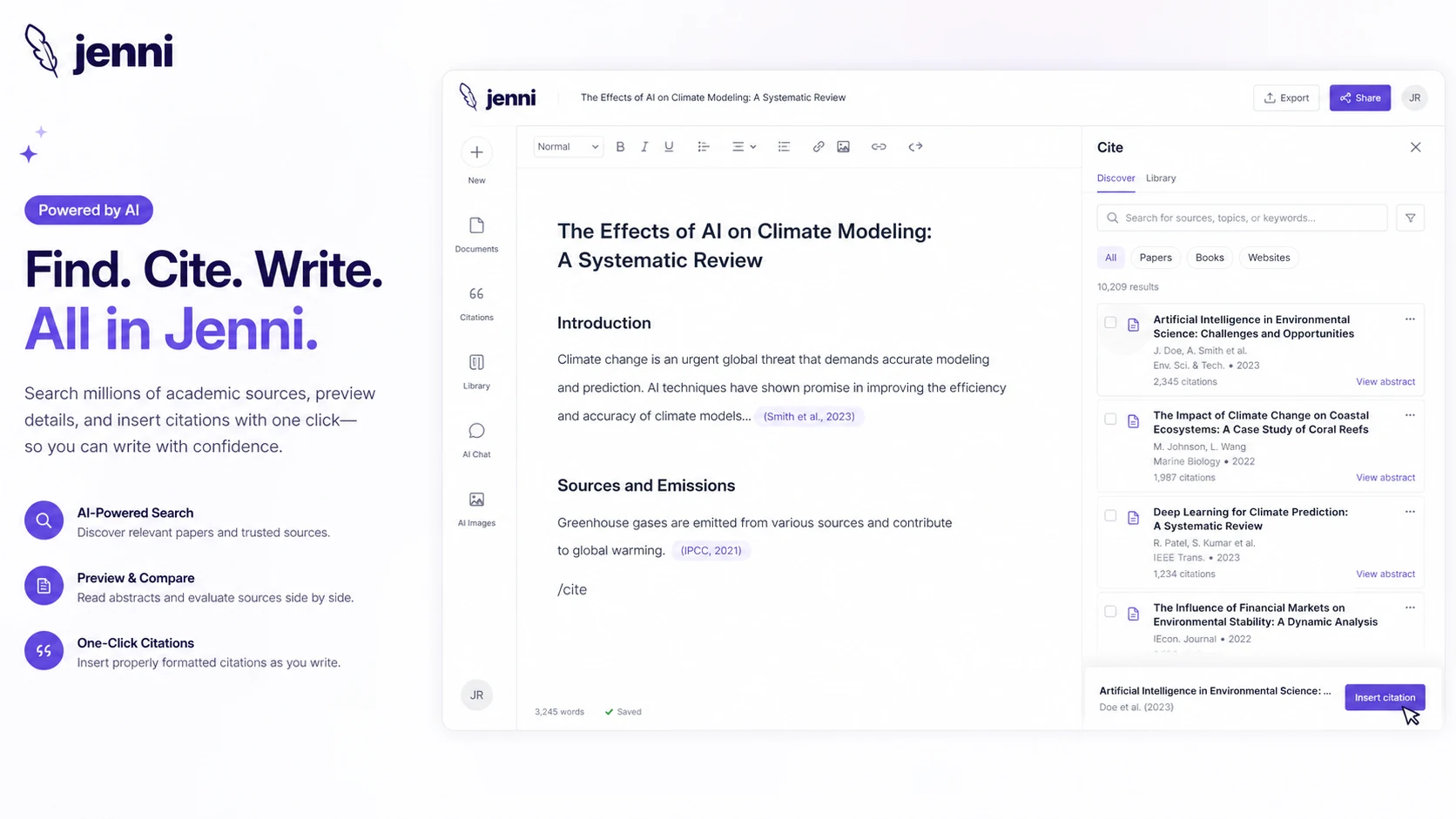
- Use citation tools to insert references, then verify them.
- Ask AI Chat questions against uploaded or selected sources when useful.
- Run edits or document review for clarity, structure, and wording.
- Export a sample draft into the format you actually need.
- Re-read the final text as a human writer before submission.
The product is most useful in the middle of that process. It can reduce switching between writing, citation search, PDF context, and draft improvement. It is weaker if you use it as a shortcut around reading, thinking, and checking.
Workflow check: If you are evaluating Jenni AI for real academic work, start with one document before comparing monthly and annual plans.
Real-world buyer scenarios
A first-year student writing one essay should probably start free. The goal is not to decide whether Jenni AI can write a paper. The goal is to see whether autocomplete, citation insertion, and basic review features make the assignment easier without creating accuracy problems.
A graduate student preparing a literature review has a stronger case for a paid plan. This buyer may work with many PDFs, recurring citations, and long documents over months. The plan decision should be based on writing volume, PDF needs, AI Chat usage, and export requirements, not the monthly price alone.
A researcher drafting a conference paper may value source-grounded drafting and citation workflow, but should be especially careful with factual claims. The tool can help with structure and momentum. It cannot take responsibility for whether the argument is correct.
A marketer looking for blog posts or ad copy is a different case. Jenni AI can still generate and edit text, but the product’s center of gravity is academic writing. If brand voice, campaigns, SEO briefs, and marketing templates matter more than citations, a broader AI writer may be the better route.
Key features that actually matter
Academic autocomplete
Autocomplete is the feature many buyers will notice first. It can help continue a sentence or paragraph without forcing the writer to leave the document.
The buyer note is important: autocomplete is useful when it keeps you in flow, not when it replaces your argument. If the suggestion is vague, generic, or not tied to the right source context, edit or reject it.
Citation search and reference support
Jenni’s stronger category fit comes from citation handling. The product supports citation workflows and positions itself around source-backed writing rather than pure text generation.
This matters for essays, papers, and literature reviews. But citations should still be checked. I would never submit academic work only because a citation tool inserted a reference. Verify the source, style, metadata, and whether the source truly supports the claim.
PDF and source library workflow
The library is one of the main reasons Jenni AI feels different from a general writing assistant. If you already work with PDFs, BibTeX, RIS, Zotero-style exports, or source collections, keeping research closer to the draft can reduce friction.
The buyer risk is that library tools only matter if you use them. If your work does not involve source management, this advantage shrinks quickly.
AI Chat and AI edits
AI Chat and AI Edit features can help with questions, rewrites, simplification, paraphrasing, and draft improvement. This is useful when the tool is working on material you understand and can evaluate.
The weak version of this workflow is asking the tool to think for you. The stronger version is using it to pressure-test sections you already understand.
Export paths
DOCX, LaTeX, BibTeX, and RIS support can matter a lot for academic handoff. This is one of the reasons Jenni AI should not be judged only as a text generator.
Before paying, I would test the export you actually need. A feature list is not enough. The exported file has to fit your school, supervisor, journal, or writing process.
Pricing and plan value
Jenni AI’s public pricing is clear enough to compare, but buyers should still verify the live page before checkout.
At the time of review, the public pricing page shows a Free plan at $0/month, Plus at $12/month, and Pro at $29/month. The Free plan has tighter limits, including daily autocomplete and limited AI Chat/Edit/Review usage. Plus raises the caps with 5,000 autocompletes per month, unlimited PDF uploads, 500 AI edits, 500 AI Chat messages, 10 reviews per month, full document export, and live chat support. Pro is positioned for heavier use with unlimited autocomplete, PDF uploads, AI edits, AI Chat, and reviews, plus priority support.
That does not mean Pro is automatically the best plan.
The buyer mistake here is choosing by price tier instead of writing workload. A student with one paper may not need Pro. A graduate researcher writing every week may outgrow Free or Plus quickly. The plan should be matched to monthly writing volume, PDF usage, AI Chat needs, export needs, and how often you want document-level review.
Annual billing may improve value if you use Jenni AI throughout an academic year. But annual billing should come after the workflow test, not before it. Refund flexibility appears limited, so a lower yearly price can become a poor decision if the product does not fit.
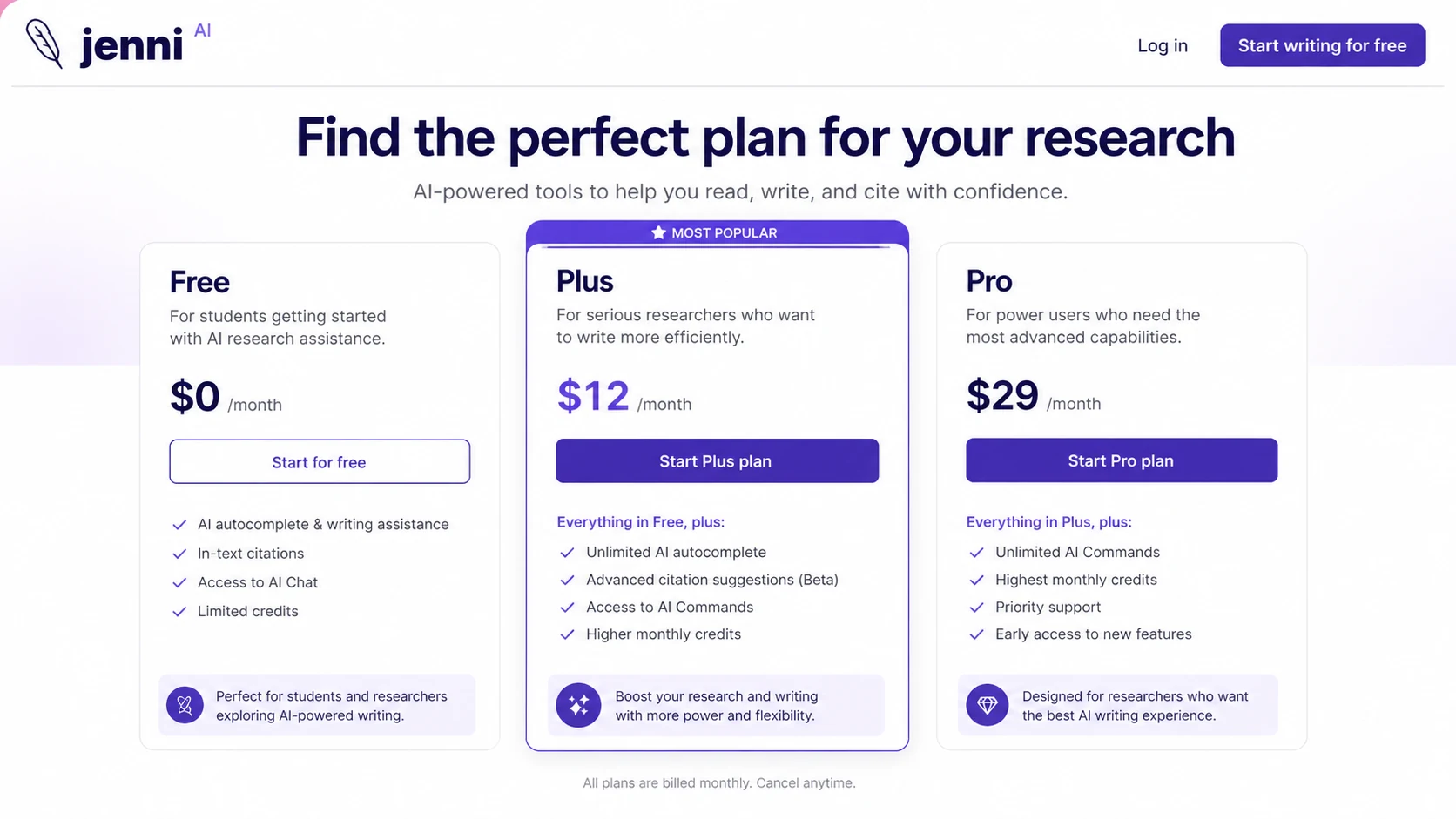
Pricing check: Compare Jenni AI plans by usage caps, export needs, and refund risk before moving from a free test to a paid plan.
Check Jenni AI pricing Check current offers Read store guide
Free plan, trial, coupon, and checkout notes
The free plan is the safest first step for most buyers.
It should be treated as a workflow test, not as proof that the paid plan is worth it. Use it to answer practical questions: Does autocomplete help your writing style? Does citation insertion feel reliable? Does the library workflow make sense? Does AI Chat help with your sources? Does export work the way you need?
A stable public coupon code was not verified in the internal data for this pass. That is not a problem. With Jenni AI, the safer savings path is free test first, plan comparison second, annual billing only after fit is clear, and coupon route last.
A discount can improve a good purchase. It should not be the reason you buy.
The checkout caution is refund language. Jenni’s public billing and terms pages present subscription and enterprise payments as generally non-refundable, with legal exceptions such as EU cancellation rights. Buyers should read the current refund and cancellation language before paying, especially before annual billing.
Checkout order: Use the coupon page as a final savings check only after Jenni AI has passed your real writing test.
What I would check before buying Jenni AI
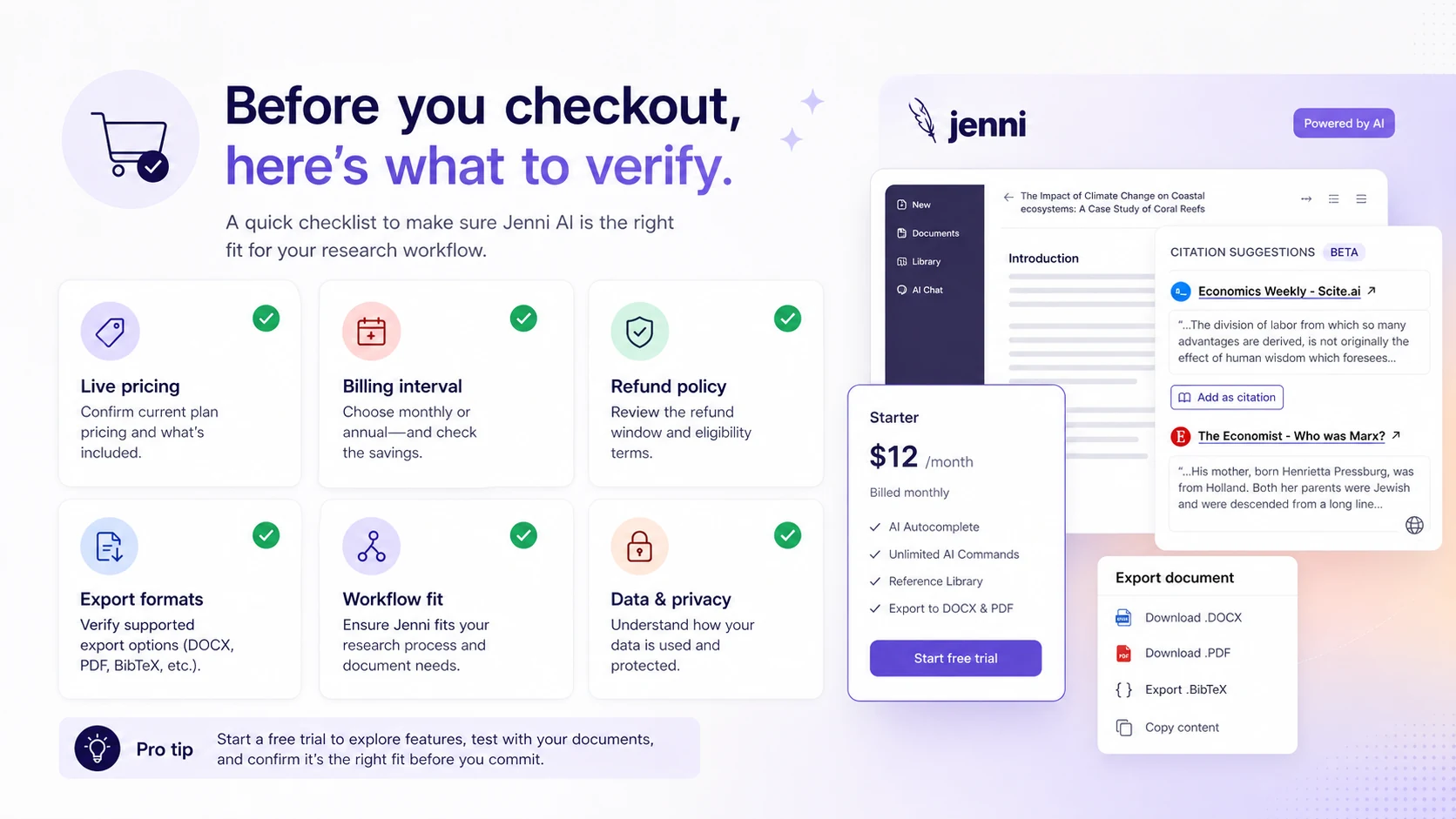
If I were buying Jenni AI for a real academic workflow, I would check these points before paying:
- Whether the Free plan is enough to test one real document.
- Whether Plus caps match your expected monthly autocomplete, AI Chat, AI Edit, review, and PDF usage.
- Whether Pro is genuinely needed or just feels safer because it says unlimited.
- Whether your preferred export format works cleanly enough for submission or collaboration.
- Whether citation style and source metadata are accurate enough after manual checking.
- Whether annual billing is worth the lock-in given the refund language.
- Whether a more specialized academic editing or research-reading tool fits your work better.
A simple test before paying
Before paying, I would run a small test like this:
- Pick one real essay, paper section, or literature-review draft.
- Add a few actual sources you plan to use.
- Try autocomplete on a paragraph where you already understand the argument.
- Insert citations and check whether the references truly support the claims.
- Use AI Chat or AI Edit on one difficult section.
- Export the draft into the format you actually need.
- Ask whether the workflow saved enough time to justify a recurring plan.
This test is intentionally small. The goal is not to prove the tool can handle every future project. The goal is to prevent the common mistake of buying a subscription before you know whether the workflow feels natural.
Pros explained
The first real pro is focus. Jenni AI is clearly built around academic and source-backed writing. That makes it more useful for students and researchers than a generic AI writing product that treats every task as another prompt box.
The second pro is the citation and library workflow. If you regularly work with PDFs, references, and bibliography requirements, keeping those pieces near the draft can reduce friction.
The third pro is the free entry path. A free plan gives cautious buyers a way to test the editor before paying. That matters because academic writing tools are personal. Some people love inline autocomplete. Others find it disruptive.
The fourth pro is visible pricing structure. Free, Plus, and Pro are easier to compare than vague sales-led pricing. Buyers still need to verify the current page, but the public structure makes plan-fit thinking possible.
The fifth pro is export relevance. DOCX, LaTeX, BibTeX, and RIS paths matter more to academic buyers than generic copywriting templates. That is one place where Jenni AI’s narrower category focus becomes an advantage.
Cons explained
The first con is that AI academic writing still needs careful verification. A citation workflow can save time, but it can also create false confidence if the buyer does not check whether the source supports the sentence.
The second con is refund flexibility. Public refund language is strict enough that I would not treat annual billing as a casual upgrade. Test first, then decide.
The third con is category narrowness. Jenni AI is not trying to be a marketing suite, SEO platform, or social content generator. That is fine, but buyers outside academic writing may get better value elsewhere.
The fourth con is that writing quality can still become generic. This is not unique to Jenni. It is a risk with AI drafting tools generally. The buyer should use Jenni to support argument development, not to outsource the thinking.
The fifth con is that plan limits matter. Free and Plus may be enough for some users, but heavier academic workflows can run into caps. Pro may solve that, but only if the buyer uses the product often enough to justify it.
Green flags and red flags
Green flags are easy to spot if the buyer is honest about their workflow.
Jenni AI is a stronger fit when you repeatedly write with sources, need citations close to the draft, manage PDFs, want export flexibility, and already understand that AI output needs review. It also looks better when the buyer can test one real document before paying.
The red flags are just as important.
Slow down if you only need one short assignment, if you mainly write marketing copy, if you want a tool to produce final academic work without checking, or if you are tempted to choose annual billing before testing. Also slow down if refund flexibility is a major requirement. The public language does not make that look like a buyer-friendly safety net.
The honest buying signal is not whether Jenni AI looks affordable. It is whether it reduces repeated academic writing friction.
Jenni AI vs alternatives
Jenni AI should be compared against academic writing and research workflow tools first, not every AI writer on the market.
Paperpal vs Jenni AI
Paperpal is a stronger comparison if your main need is academic editing, language improvement, and journal-style writing support. Jenni AI may be stronger if you want drafting, source library, citation insertion, and autocomplete in the same writing flow.
The tradeoff is editing rigor versus drafting workflow.
SciSpace vs Jenni AI
SciSpace is usually a better comparison for reading, understanding, and working through research papers. Jenni AI is more naturally positioned around drafting and citation-supported writing.
The tradeoff is research comprehension versus writing production.
Yomu-style academic assistants vs Jenni AI
Yomu-style tools sit close to Jenni AI because they also focus on academic writing. The buyer should compare editor feel, citation handling, export needs, and plan limits rather than choosing only by price.
The tradeoff is workflow feel. Academic writing tools can look similar on feature lists but feel very different inside a real draft.
AI-Writer.com vs Jenni AI
AI-Writer.com is the broader internal comparison route if the buyer wants AI writing beyond academic citation workflows. Jenni AI is the more focused choice when the writing job depends on sources, citations, and academic handoff.
The tradeoff is broad AI writing versus research-centered academic writing.
General chatbots vs Jenni AI
A general chatbot may be cheaper or more flexible for brainstorming, outlining, and short rewrites. Jenni AI may still make sense if the academic workspace around the writing saves enough time.
The tradeoff is flexibility versus built-in academic workflow.
Trust, refund, and buyer-risk notes
Jenni AI is a good example of a product where the buyer should separate workflow confidence from checkout confidence.
Workflow confidence comes from testing the editor, citations, library, AI Chat, document review, and export path. Checkout confidence comes from understanding plan limits, billing interval, refund language, and whether annual billing is worth the risk.
The refund point deserves attention. Jenni’s public billing documentation says subscription and enterprise license payments are generally not refundable. The terms also use non-refundable language, with legal exceptions such as EU cancellation rights. That means buyers should not rely on a refund as the main safety plan.
The data and academic integrity angle matters too. Do not upload sensitive research material unless you are comfortable with the current privacy and product terms. And do not submit AI-assisted writing without checking your institution, publisher, or client rules.
The citation risk is practical, not theoretical. Even when a tool provides references, the writer is still responsible for whether the source exists, whether the citation style is correct, and whether the cited material supports the claim.
For annual billing, I would use a simple rule: do not go annual until you have used the free or monthly path on a real document and still want the product after the deadline pressure is gone.
Final verdict
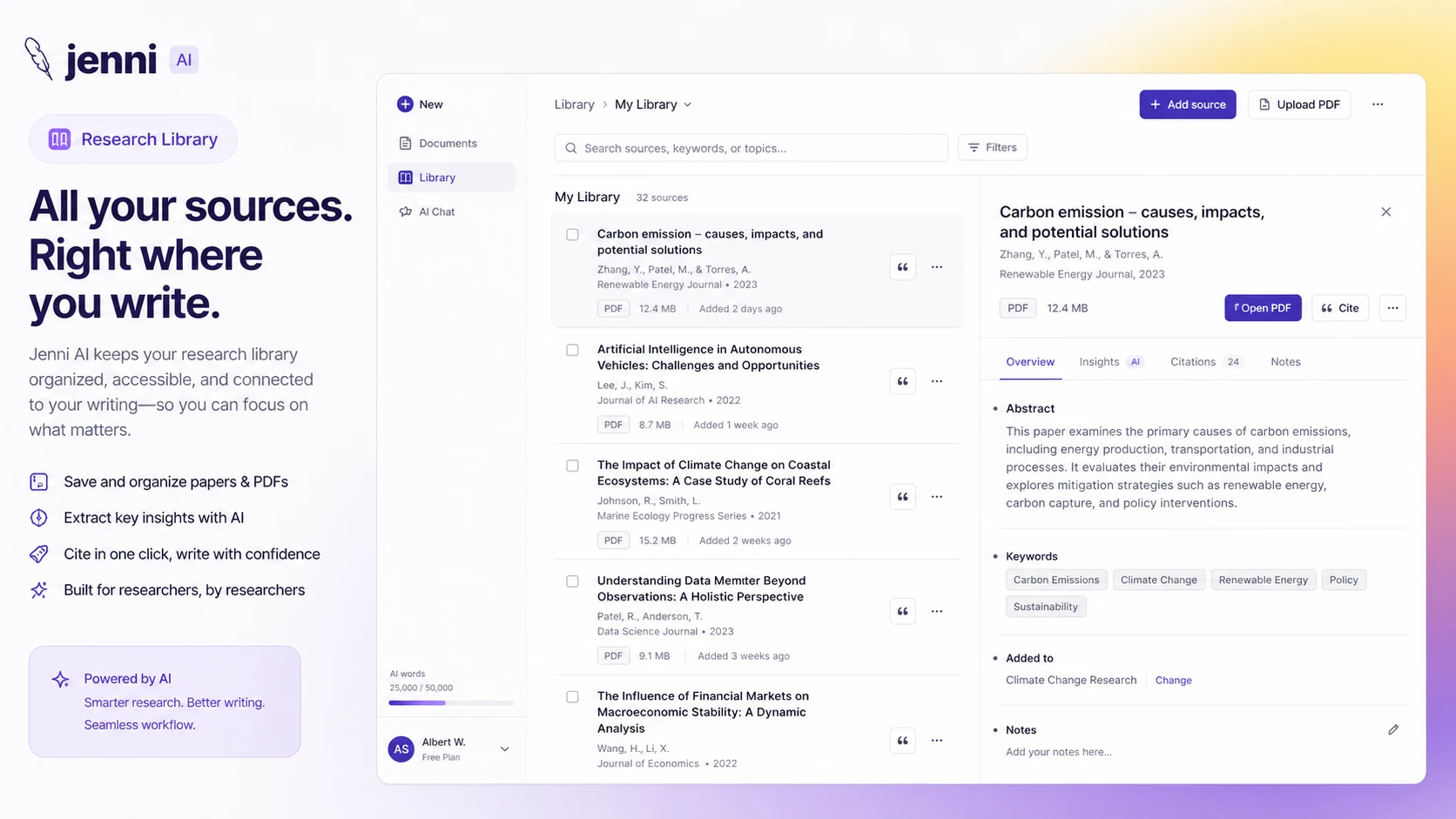
I would consider Jenni AI if academic writing is a repeated part of your life and you want a workspace that keeps drafting, citations, PDFs, source handling, and export closer together.
I would skip it if you mainly need marketing copy, casual paragraphs, short social content, or a general-purpose AI assistant. Jenni’s best value is too tied to academic workflow to make it the obvious choice for every writer.
I would compare it with Paperpal if editing rigor matters most, SciSpace if research reading is the bigger pain, Yomu-style tools if you want a direct academic writing comparison, and AI-Writer.com if your needs are broader than academic citations.
The safest next step is not to chase a coupon first. Start with one real document, test the writing and citation workflow, export a sample, check the current plan limits, and only then decide whether Free, Plus, Pro, or annual billing makes sense.
