
Quick verdict
HugoBlox is worth a serious look if you want a website you can actually own, edit as Markdown, deploy as a fast static site, and keep outside a closed website-builder database.
That is the real buying angle.
I would not judge HugoBlox as a simple Wix-style or Webnode-style builder. It is closer to a builder ecosystem for researchers, technical creators, academic portfolios, lab sites, documentation hubs, startup pages, and people who care about source files. The free open-core path is a major strength because it lets you test the workflow before paying for Ownable CMS, premium templates, or team features.
The caution is also clear. HugoBlox is easier to like when you are comfortable with the idea of Hugo, GitHub, Markdown, VS Code, or static deployment. If those words already make the project feel heavier than it should be, a simpler hosted builder may be the safer route.
For my money, HugoBlox makes the most sense when the site is not just a pretty landing page. It becomes more interesting when you have publications, papers, projects, documentation, technical notes, team profiles, or a professional portfolio that should remain portable for years.
The easy mistake is buying a premium template or paid productivity plan before checking whether the workflow fits. Start free, build a small real page, test the editing path, then decide whether Plus, Pro, Team, or a premium template actually removes friction.
Next step: If HugoBlox fits the kind of site you want to own long term, check the current buyer route before choosing a plan or template.
Review snapshot
| Review point | Practical take |
|---|---|
| Best for | Researchers, students, labs, technical founders, educators, and documentation-heavy creators |
| Not ideal for | Buyers who want a fully hosted, no-setup visual website builder |
| Main use case | Building Markdown-owned static sites, research portfolios, docs, academic CVs, and technical landing pages |
| Free path | Strong free open-core route with HugoBlox Kit, free blocks, starter templates, and community support |
| Paid path | Plus, Pro, Team, and Institution plans mainly unlock Ownable CMS productivity, AI, automation, sync, and team features |
| Main strength | Ownership: editable Markdown, static output, GitHub-friendly workflow, and research-specific structure |
| Main concern | Template purchases, subscription plans, support expectations, and refund rules are different paths |
| Direct alternatives | Pineapple Builder, Simvoly, Versoly, Webnode |
| Best next step | Build one small free project before buying a template, annual plan, or team seat |

What is HugoBlox?
HugoBlox is best understood as a Markdown-native static website framework plus an editing and productivity layer through Ownable CMS.
The open-source side gives buyers a way to build professional sites from structured Markdown: landing pages, portfolios, blogs, publications, documentation, academic CVs, and research sites. The Ownable CMS side adds a visual editing experience inside VS Code, AI-assisted fixes, drag-and-drop blocks, GitHub syncing, publication import, and plan-based productivity features.
That combination is the main point. HugoBlox is not only selling a template. It is not only a no-code editor. It is not only a developer framework. It sits between those worlds.
For a researcher, that can be valuable because publications, projects, talks, citations, math, notebooks, and CV content often need more structure than a simple business homepage. For a technical founder, the appeal is different: fast static pages, source control, Markdown, and a site that can be deployed without a database or heavy runtime. For a creator, the appeal may be ownership and portability.
The common wrong expectation is thinking HugoBlox will feel exactly like a hosted drag-and-drop builder. It may not. The product is friendlier than a raw Hugo setup in some ways, especially with Ownable CMS, but the buyer still needs to be open to the static-site mindset.
Our review approach compares public product pages, pricing details, documentation, refund language, buyer workflow fit, and nearby alternatives. I would not treat a low entry price, a free template, or a polished demo as proof that the workflow fits. The proof is whether you can build and maintain a real site without fighting the process.
Who should use HugoBlox?
HugoBlox is a strong fit for researchers and PhD students who need an academic CV, publication list, research portfolio, project pages, talks, biography, and long-term professional presence. The fit is strongest when the site will grow over time and should not be trapped inside a proprietary page builder.
It also makes sense for research labs and technical teams. A lab site is not just a homepage. It often needs team profiles, publication feeds, research projects, news, documentation, and a workflow that more than one person may eventually maintain. HugoBlox becomes more interesting when structured content matters.
Technical founders and developer-led startups may also like the product. If you want a static landing page, documentation hub, or technical blog that stays in source control, HugoBlox gives you a more ownable path than many closed builders. The condition is that someone on the team should be comfortable enough with GitHub, Markdown, and static deployment to keep the site healthy.
Educators and students are another natural group. The student route is useful if eligibility applies, but I would still start by testing the free path. A discount is nice. A maintainable academic site is better.
Finally, HugoBlox can fit creators who publish technical content: data science notebooks, math-heavy notes, docs, research summaries, or portfolio work. The more your content benefits from structure, citations, Markdown, and portability, the more HugoBlox starts to make sense.
Who should avoid HugoBlox?
I would be careful with HugoBlox if you want a fully hosted website builder where every decision is hidden behind a visual interface. If your priority is “I want a nice page online tonight and never want to think about GitHub, Markdown, Hugo, static hosting, or files,” this may be more workflow than you need.
It may also be a poor fit for a one-page project with no long-term content value. If you only need a simple brochure page and do not care about source ownership, a hosted builder may be faster and less mentally expensive.
Template buyers should slow down too. Premium templates are digital goods, and the refund language for templates is stricter than the subscription refund language. I would not buy a premium template until I had tested a free template and understood whether Hugo, the command line, or the editing workflow feels manageable.
Larger organizations should avoid assuming the Team plan is automatically enough. If you need SSO, custom security review, SLA, invoice billing, or dedicated support, the Institution path may be the more realistic conversation.
The last group I would warn is the “coupon-first” buyer. If you are mostly excited because there may be a discount, pause. HugoBlox is a workflow decision. A coupon cannot make Hugo or static-site ownership useful if your team does not want that workflow.
How HugoBlox fits into a real workflow
A sensible HugoBlox workflow starts small.
First, choose the site type: academic CV, research lab, documentation hub, startup landing page, portfolio, or technical blog. Then pick a free template or scaffold a project. The next step is not buying. The next step is editing real content.
For a researcher, that might mean adding a biography, two publications, a project page, and a talk. For a founder, it might mean creating a landing page, pricing section, FAQ, and docs page. For a technical creator, it might mean publishing one article with code, math, or notebook-style content.
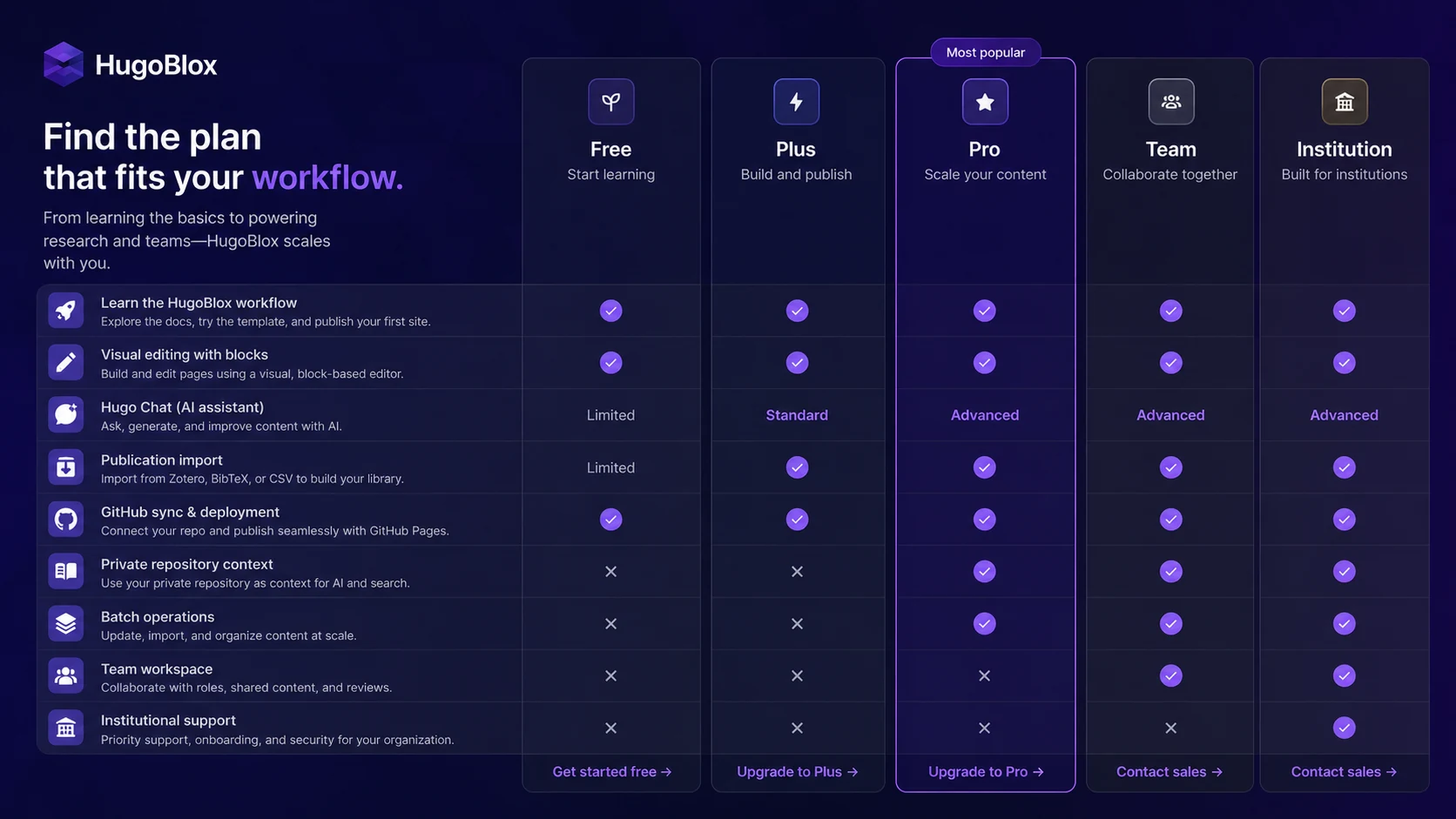
After that, the decision becomes clearer. Can you edit the site comfortably? Can you deploy it? Does the Markdown structure feel like an advantage or a burden? Does Ownable CMS remove enough friction to justify a paid plan? Do you need Hugo Chat, GitHub auto-sync, publication import, private repo context, batch operations, or team workspace features?
That is where HugoBlox should be judged.
The tool is useful when it turns a structured site into something you can maintain for years. It becomes weaker when the buyer only wanted a normal visual builder and does not care where the content lives.

Real-world buyer scenarios
A PhD student building a personal academic site is one of the clearest fits. HugoBlox can handle the kind of content a researcher actually needs: publications, projects, teaching, talks, biography, and a CV-style structure. The risk is setup friction. If the student is not comfortable testing templates and editing files, the free path matters before any paid upgrade.
A research lab has a different decision. The lab may need team profiles, research themes, publication pages, documentation, and a site that can survive staff changes. HugoBlox can fit well here, but Team or Institution value depends on actual collaboration needs. If only one technical person will maintain the site, a team seat may not be necessary.
A technical founder may use HugoBlox for a landing page and docs site. This can make sense when the founder wants fast static output and ownership, not a locked page builder. But if marketing people need to edit the site daily without touching a technical workflow, a more hosted platform may be easier.
A small business owner with no technical interest is the weaker scenario. HugoBlox may still produce a nice website, but the buyer may not enjoy the process. In that case, Webnode or another hosted builder could be a more practical fit.
Key features that actually matter
Open-core HugoBlox Kit
The free framework is the heart of the product. It lets buyers test the product category before paying, which is exactly what I want to see in a builder that requires workflow fit.
Buyer note: do not skip the free path. If you cannot build a small test site for free, a paid plan may not solve the deeper mismatch.
Markdown ownership
HugoBlox is strongest when content ownership matters. Pages live as readable files, which makes the site easier to version, move, review, and preserve over time.
Buyer note: this matters most for research sites, documentation, academic portfolios, technical blogs, and long-life professional websites. It matters less for a disposable campaign page.
Ownable CMS inside VS Code
Ownable CMS is the bridge between a raw static-site workflow and a more visual editing experience. It can help buyers edit blocks, preview changes, fix errors, and work with AI assistance without turning the site into a closed system.
Buyer note: this is where paid plan value begins. If you are happy editing HugoBlox manually, the upgrade pressure is lower.
Research and publishing features
Publication import, academic content types, LaTeX math support, notebook publishing, citation-style content, and structured templates are not generic website-builder extras. They are category-defining for academic and technical buyers.
Buyer note: if those features match your work, HugoBlox becomes much more interesting than a normal small-business builder.
Team and institution paths
Team and Institution paths matter when the site becomes organizational: shared billing, organization repository sync, support expectations, SSO, SAML, security review, SLA, or dedicated support.
Buyer note: do not buy team capability for a solo workflow. Upgrade when collaboration and support needs are real.
Pricing and plan value
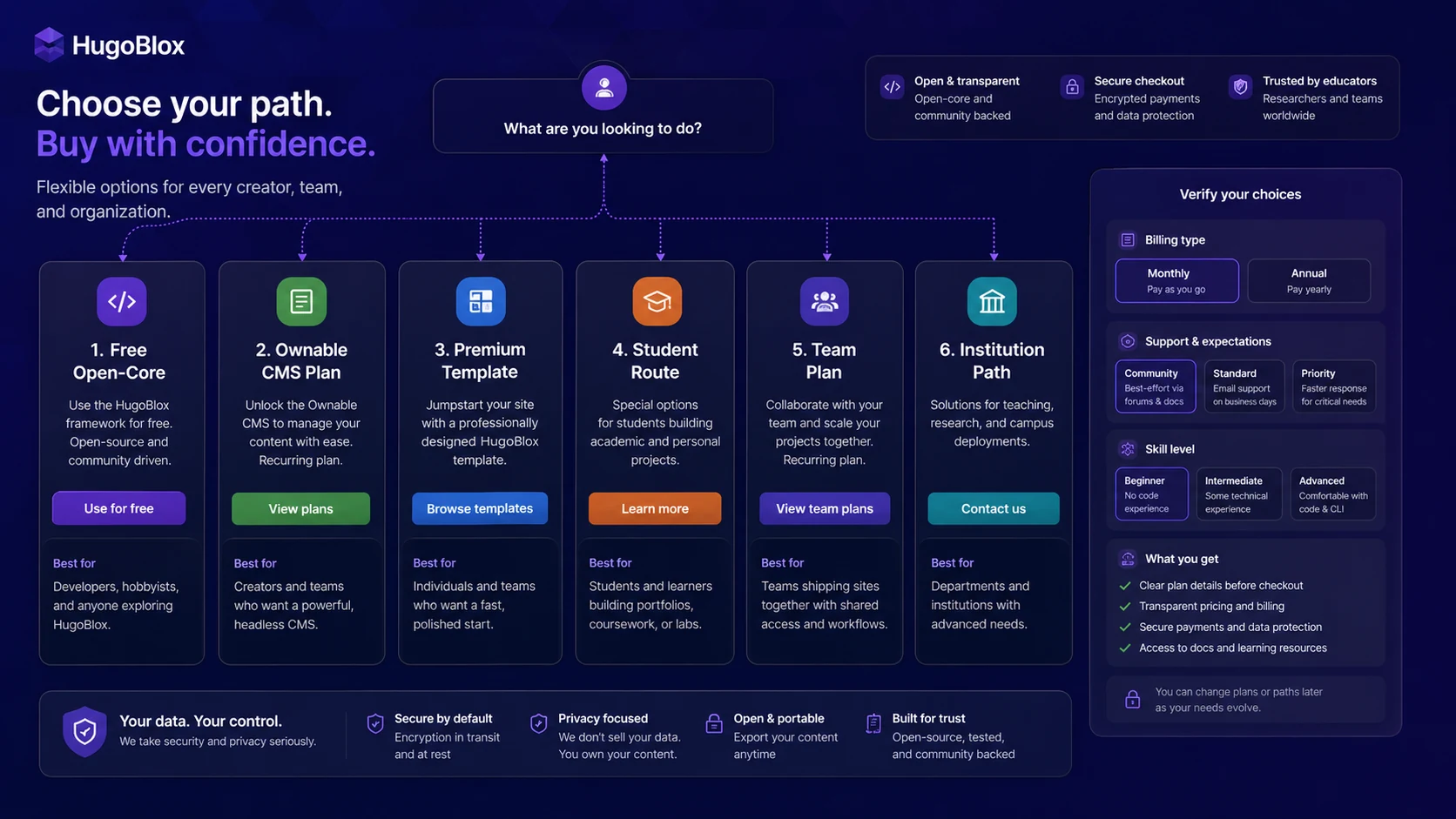
HugoBlox pricing is clear enough to evaluate, but the buyer must separate three purchase paths: the free open-core framework, recurring Ownable CMS subscriptions, and one-time premium template purchases.
The Free open-core path is the safest starting point. It includes the HugoBlox Kit, free blocks, starter templates, and community support. That is not just a teaser. It is enough to test whether the workflow makes sense.
Plus is the first paid productivity tier and is listed from $5 per month. It is aimed at everyday productivity and adds things like visual editing, Hugo Chat Standard, Fix-It Bot, publication importer standard access, GitHub auto-sync, and CV generation.
Pro is listed from $12.50 per month and is more relevant if you need higher AI usage, private repo context, batch operations, richer publication import, or job-tailored CV output. Team is listed from $33 per month per seat, paid yearly, and is a better fit for small teams, research groups, and startups that actually need shared workspace, pooled AI usage, organization repo sync, and priority support.
Institution is a contact-sales path for larger organizations with SSO, SAML, custom security review, SLA, invoice billing, or dedicated support needs.
Premium templates are different. They are sold separately as one-time digital purchases. That matters because the refund and support expectations are not the same as a recurring subscription.
The cheapest plan is not automatically the best deal. The better question is what friction you are trying to remove. If you only need a free academic CV site, Free may be enough. If visual editing and GitHub sync save time, Plus may be reasonable. If batch operations or private repo context matter, Pro becomes easier to justify. If multiple people will maintain the site, Team may be worth checking.

Plan check: If HugoBlox still fits your site workflow, verify current pricing, template terms, and checkout route before moving from free testing to a paid plan.
Check HugoBlox pricing Check current offers Read store guide
Free plan, trial, coupon, and checkout notes
The free route is the best first step for most buyers. HugoBlox is not a product I would buy blind, because the value depends heavily on whether you like the workflow.
There is no need to treat a coupon as the main decision. A discount can help, but the real savings path is usually more practical: start free, test a template, check whether student eligibility applies, compare monthly versus yearly pricing, and only then consider a paid plan or template purchase.
The coupon page is still useful after fit is clear. If you already know HugoBlox is the right direction, check the HugoBlox coupon page before checkout. Just do not let the offer route make the decision for you.
The checkout item matters. A recurring Plus, Pro, or Team subscription is not the same as a premium template bundle. Subscription refund language and template refund language can differ. Before paying, verify whether you are buying access to software services, a digital template, a bundle, student access, or a team seat.
This is especially important for premium templates. The official template language tells buyers to try free templates and demos first, and it is clear that lack of Hugo or command-line skill is not a strong refund reason. That is fair enough for a digital template product, but buyers should know it before checkout.
What I would check before buying HugoBlox
If I were buying HugoBlox for a real site, I would check these points before paying:
- Can I build one small site on the free path? If not, a paid plan may not solve the core fit issue.
- Do I actually want Markdown ownership? If source files and portability do not matter, a hosted builder may be simpler.
- Which purchase path am I choosing? Subscription, template bundle, student offer, team seat, and Institution plan are different decisions.
- What support do I need? Community support may be fine for technical users; teams may need priority or dedicated support.
- Do I understand the refund language? Subscription refunds and template refunds should not be treated as identical.
- Will I use the paid feature often? Visual editing, Hugo Chat, publication import, GitHub sync, batch operations, and team workspace should remove real friction.
- Is an alternative simpler? If the project is a basic website, compare HugoBlox with a more hosted builder before paying.
A simple test before paying
Before buying a premium template or paid plan, I would run a small test like this:
- Pick one free template close to your real site type.
- Add real content, not filler text: biography, publication, service section, project page, or documentation page.
- Edit the content as Markdown and check whether the structure feels manageable.
- Try the deployment path you would actually use, such as GitHub-backed static hosting.
- Identify the friction: design, editing, publication import, GitHub sync, AI help, or team workflow.
- Match that friction to a paid plan only if the paid feature clearly saves time.
- Compare one hosted alternative before committing to annual billing or a template purchase.
That test is not dramatic, but it is useful. HugoBlox is the kind of tool where the buyer should prove the workflow before paying for polish.
Pros explained
The first real pro is the free open-core path. A buyer can test HugoBlox without pretending that a demo equals fit. That is valuable because the product asks for more workflow commitment than a simple hosted builder.
The second pro is ownership. Your content can live as Markdown, which is a big deal for research, documentation, technical publishing, and long-term professional sites. The site is less dependent on a closed database or proprietary editor.
The third pro is research-specific depth. Academic CVs, publications, LaTeX math, notebook-style content, citations, project pages, and technical documentation are more natural in HugoBlox than in many generic site builders.
The fourth pro is the paid upgrade ladder. Plus, Pro, Team, and Institution are not identical plans with slightly different labels. They map to different levels of productivity, automation, collaboration, and support.
The fifth pro is that Ownable CMS makes the static-site workflow less harsh. Visual editing inside VS Code will not turn HugoBlox into a fully hosted no-code tool, but it can reduce the friction for buyers who want ownership without editing everything manually.
Cons explained
The biggest con is beginner friction. HugoBlox may be friendly for a static-site framework, but that does not make it the easiest builder for every buyer. A non-technical user who wants a purely visual, fully hosted, low-decision website tool may find it heavier than expected.
The second con is purchase-path complexity. Free framework, recurring subscription, premium templates, student route, team plan, and Institution path all serve different jobs. Buyers need to understand what they are paying for.
The third con is refund complexity. Subscription refund language is more flexible than template refund language. Premium templates are digital goods, and buyers should not assume they can simply change their mind after purchase.
The fourth con is that team value needs proof. Team pricing can make sense for labs, startups, and research groups, but only when multiple people will actually use shared workspace, repo sync, pooled AI usage, or priority support.
The fifth con is that design speed may still depend on your comfort with the ecosystem. A premium template can save time, but it does not remove the need to understand the kind of site you are building.
Green flags and red flags
Green flags are easy to spot.
HugoBlox is a good sign if you already like Markdown, use GitHub, publish technical content, need publications or docs, want long-term ownership, or dislike being locked inside a visual website builder. It is also a good sign if you can build a small free site and immediately see what paid editing or automation would improve.
Red flags are just as important.
Slow down if you want a website builder with no technical context. Slow down if you are buying only because a premium template looks polished. Slow down if you are relying on refund flexibility without reading the specific purchase terms. Slow down if your team needs enterprise support but you are trying to force the decision into a lower plan.
The strongest green flag is not the price. It is workflow fit.
The strongest red flag is assuming every website builder should feel the same.
HugoBlox vs alternatives
HugoBlox should be compared against two groups: direct website-building alternatives and adjacent routes for different buyer needs.
Pineapple Builder vs HugoBlox
Pineapple Builder is a better comparison if the buyer wants an AI-assisted website builder with less Hugo, GitHub, or static-site involvement. It may be easier for buyers who want quick page creation and less technical ownership.
HugoBlox is stronger when the site needs publications, documentation, academic content, or long-term Markdown portability.
Simvoly vs HugoBlox
Simvoly is more relevant for buyers who want a hosted website and funnel-building environment. It can make more sense for small businesses, marketers, and funnel workflows.
HugoBlox is more compelling when the buyer wants a static site, source ownership, academic structure, or technical publishing workflow.
Versoly vs HugoBlox
Versoly is closer for SaaS landing pages and marketing sites. If your main goal is a polished SaaS website with marketing pages, Versoly may feel more directly commercial.
HugoBlox is better when the site combines landing pages with documentation, research pages, technical notes, or Markdown content ownership.
Webnode vs HugoBlox
Webnode is simpler for general small-business websites and non-technical users. It may be the safer option if you want fewer setup decisions.
HugoBlox is better when you accept more workflow involvement in exchange for portability, static performance, and control.
Trust, refund, and buyer-risk notes
The trust picture is mixed in a normal way for this category. HugoBlox has an open-source core, public documentation, visible GitHub presence, clear pricing page, student route, premium template license, and a product structure that makes sense for researchers and technical builders.
The buyer risks are not about whether the product is real. They are about fit and checkout clarity.
First, verify the current pricing page before paying. Prices, plan features, AI quotas, and billing options can change. The public page currently separates Free, Plus, Pro, Team, and Institution paths, but the final checkout path should still be checked.
Second, separate subscriptions from premium templates. Subscriptions unlock Ownable CMS services and productivity features. Premium templates are one-time digital purchases. Do not treat the refund rules as identical.
Third, read the template license if you are buying premium designs. The template refund language is strict because the product is delivered digitally. If you do not have the required Hugo or environment comfort, that may not be a refund reason.
Fourth, check support expectations. Community and documentation may be enough for technical buyers. Priority support or dedicated support matters more for teams and institutions.
Fifth, be realistic about maintenance. HugoBlox gives you ownership, but ownership means someone should understand the workflow enough to update the site later.
Final verdict
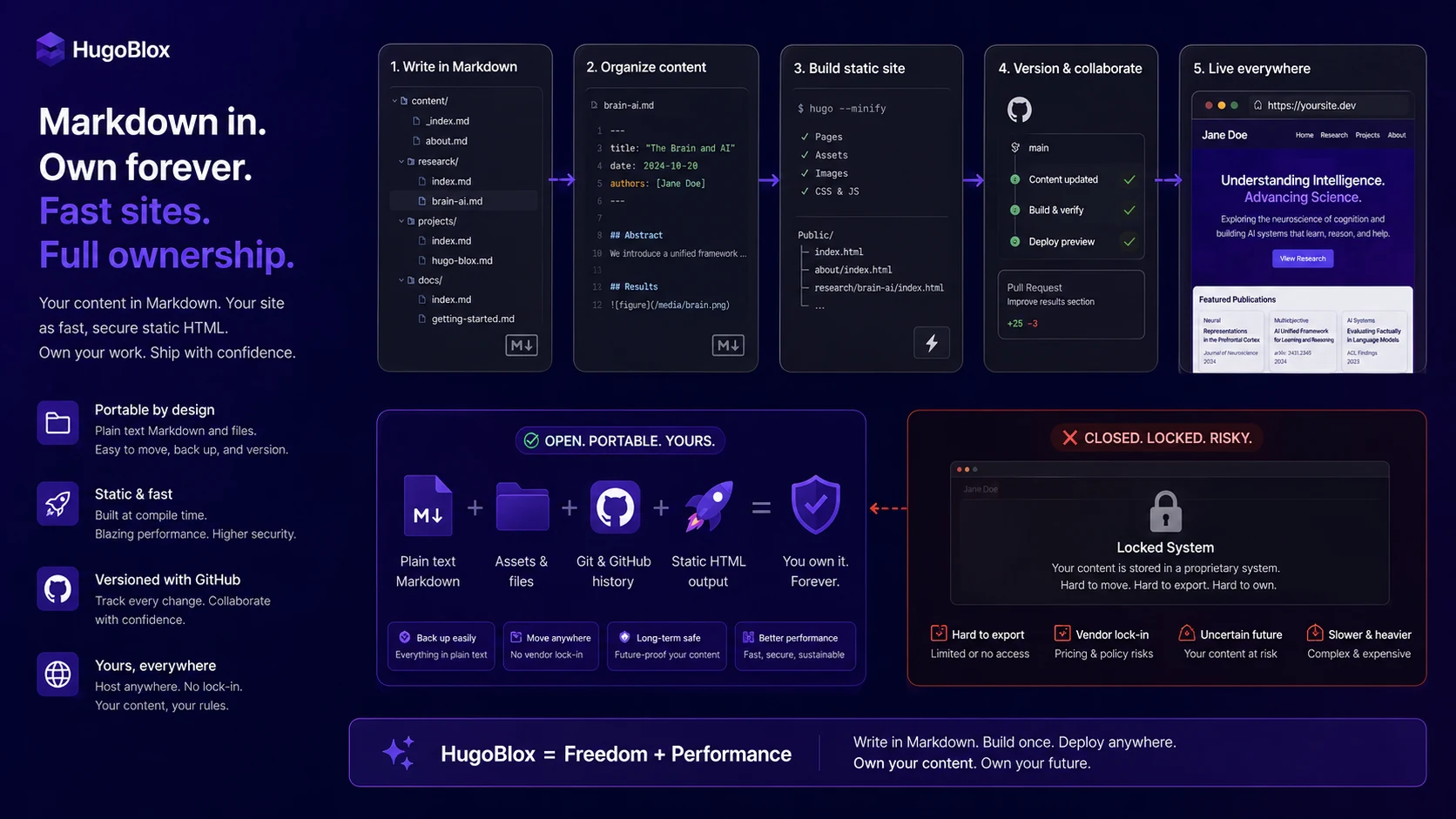
I would consider HugoBlox if you are building a research portfolio, academic CV, lab site, documentation hub, technical blog, startup page, or professional site where Markdown ownership and static deployment are real advantages.
I would skip it if you want a fully hosted visual builder with the least possible setup thinking. HugoBlox may be powerful, but power is not the same as simplicity.
I would compare it with Pineapple Builder if you want more AI-assisted website creation, Simvoly if funnels and hosted site building matter more, Versoly if the project is mainly a SaaS marketing site, and Webnode if the safest answer is a simple small-business website.
The safest next step is not buying the fanciest plan. Start free, build a small real page, test the editing and deployment path, then decide whether Plus, Pro, Team, or a premium template solves a real problem. If the workflow clicks, HugoBlox can be a smart long-term choice. If it feels like too much setup from the start, that signal is worth respecting.
