
Speak AI Pricing, Plans & Research Fit
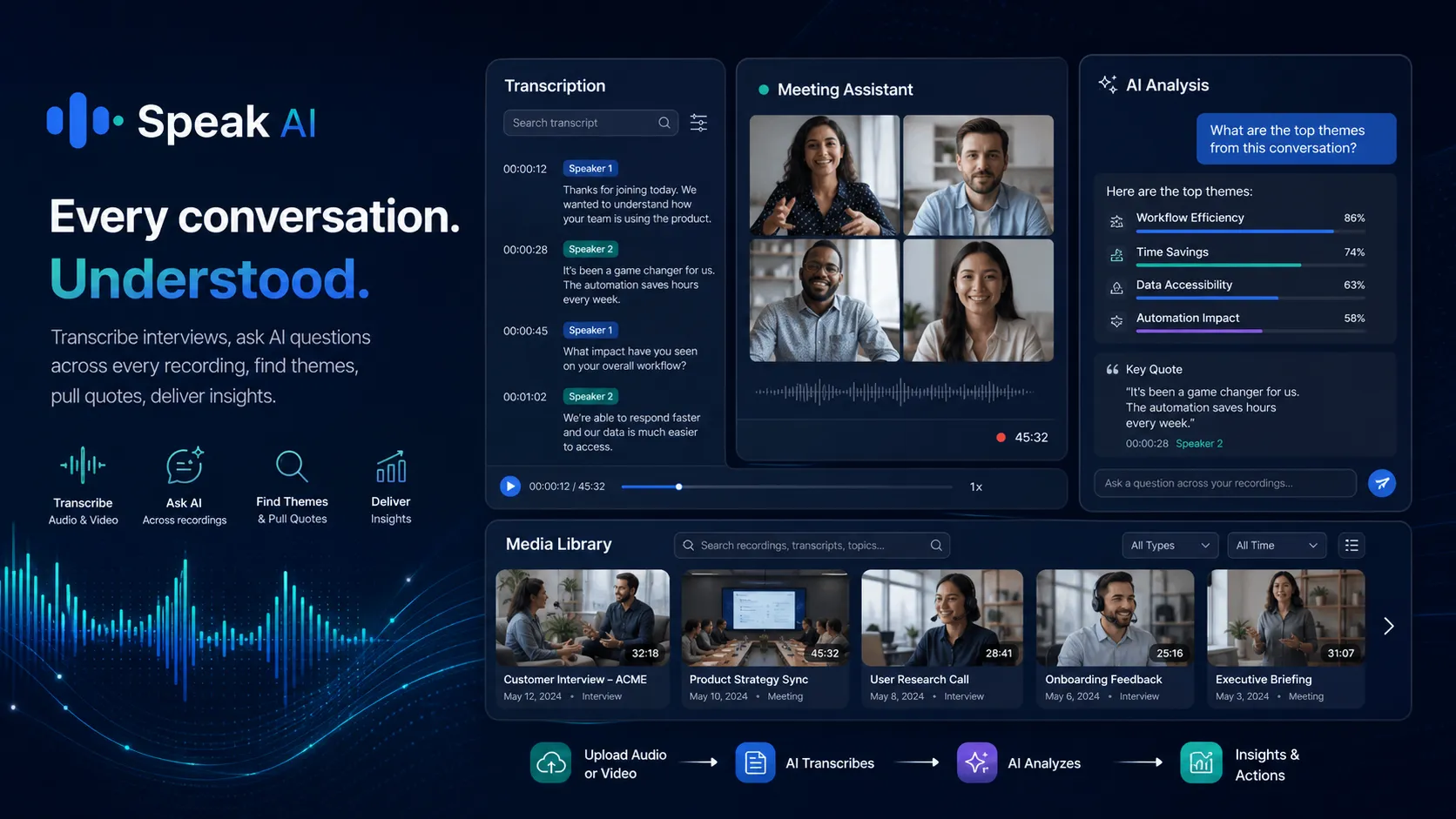
Speak AI is a transcription, AI analysis, meeting capture, media library, and voice-agent platform for people who work with recordings, interviews, meetings, calls, surveys, and audio or video archives. It is not just a note-taking app. The stronger use case is turning messy voice and video data into transcripts, searchable evidence, summaries, themes, AI chat, exports, and eventually team knowledge or agent workflows. The buying decision should start with volume and workflow: how many hours you process, whether your team needs shared libraries, and whether you need research-grade analysis or only a lightweight meeting summary.
Fit → price → checkout
Use these routes after the official-site check: coupon first, review for fit, compare if unsure.
Speak AI pricing snapshot
Fast commercial checks before pricing, coupons, or a deeper review.
Speak AI product tour
This meeting-assistant walkthrough is useful if you are deciding whether Speak AI solves your real capture problem or only gives you another transcript. Watch how the product records, transcribes, summarizes, and stores meeting data, then ask whether your team would actually return to the library for quotes, action items, and analysis. If you only need a quick note, a lighter tool may be enough. If you need searchable evidence across interviews, calls, and meetings, Speak AI deserves a deeper pricing check.
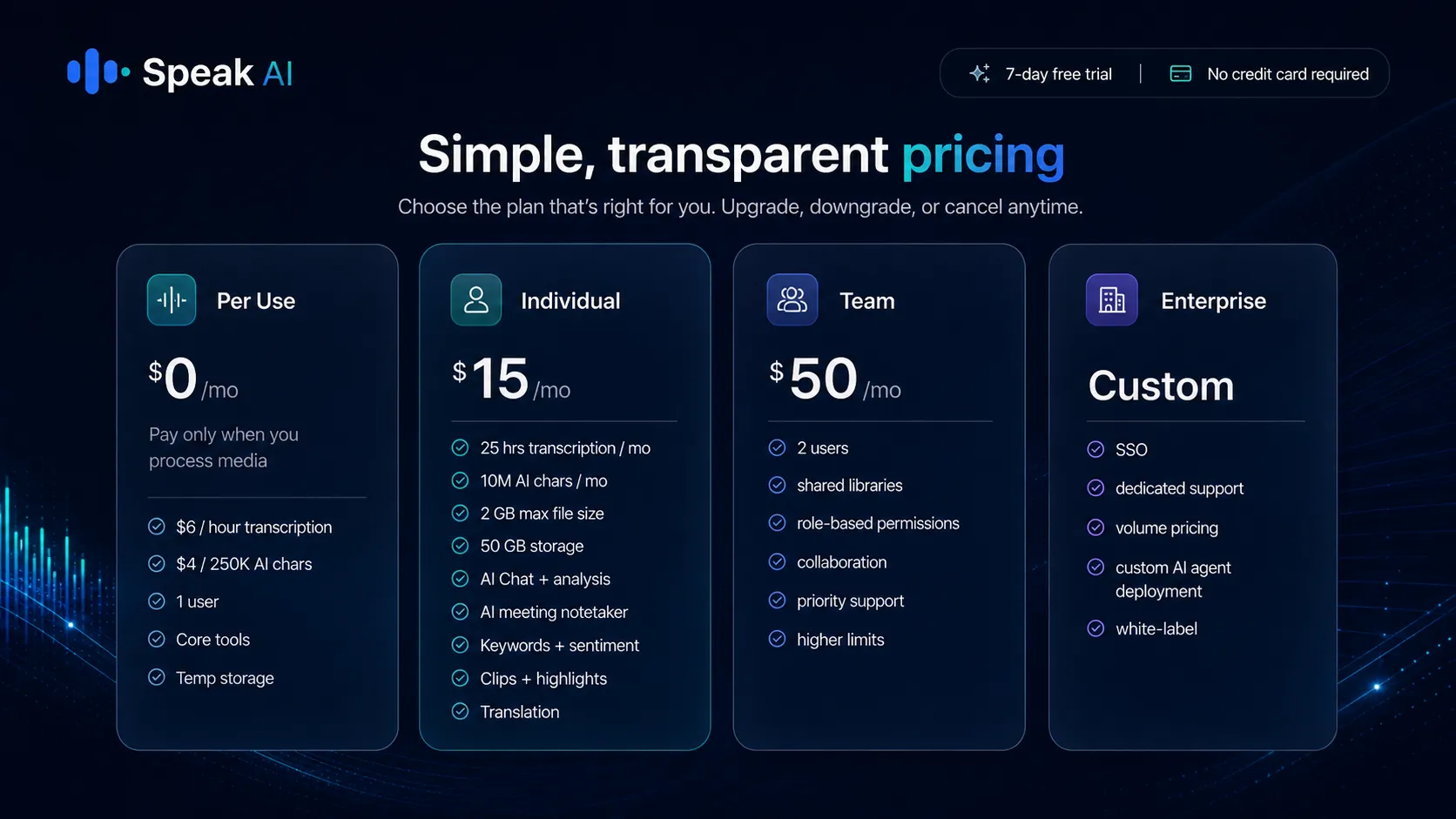
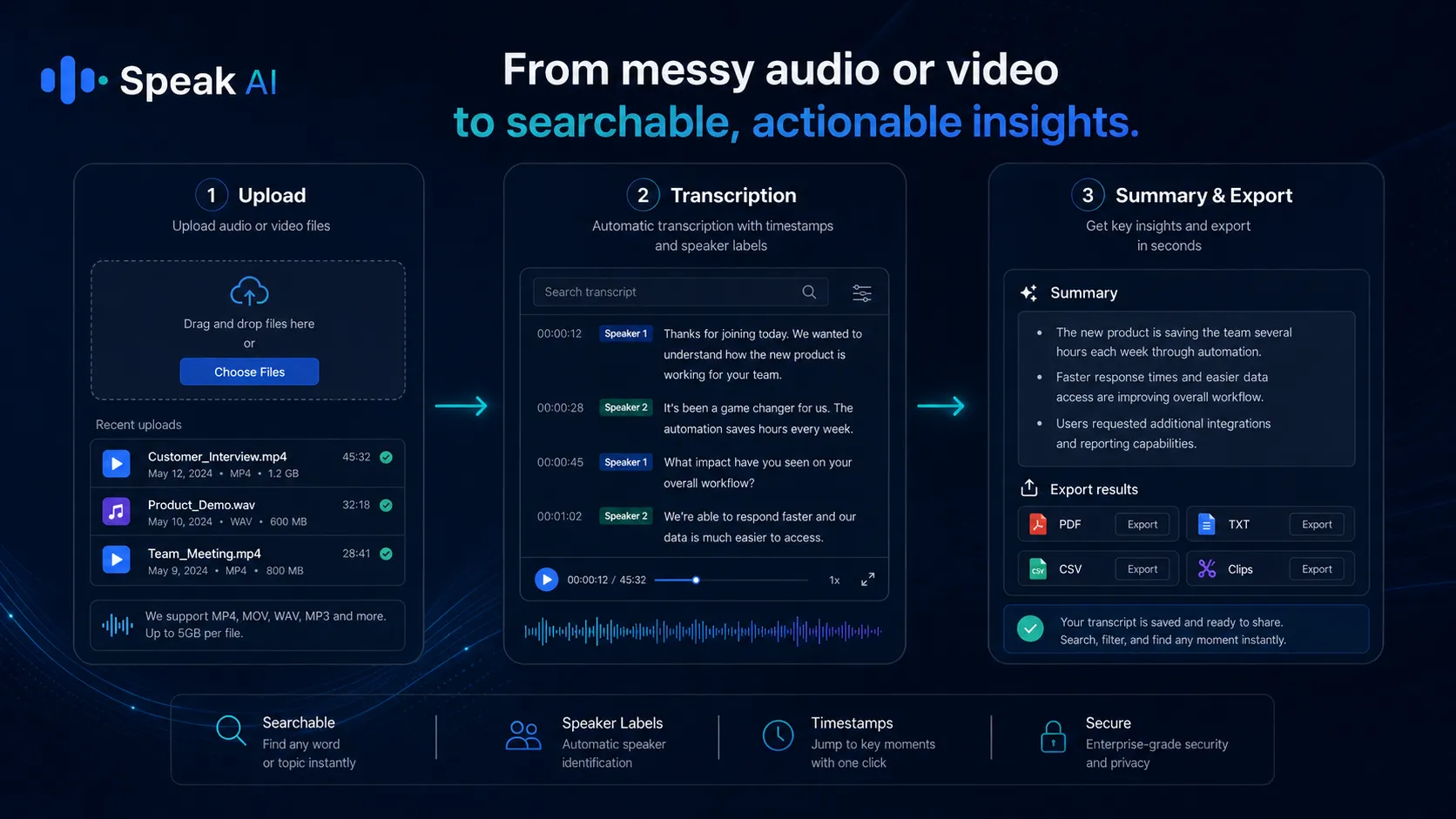
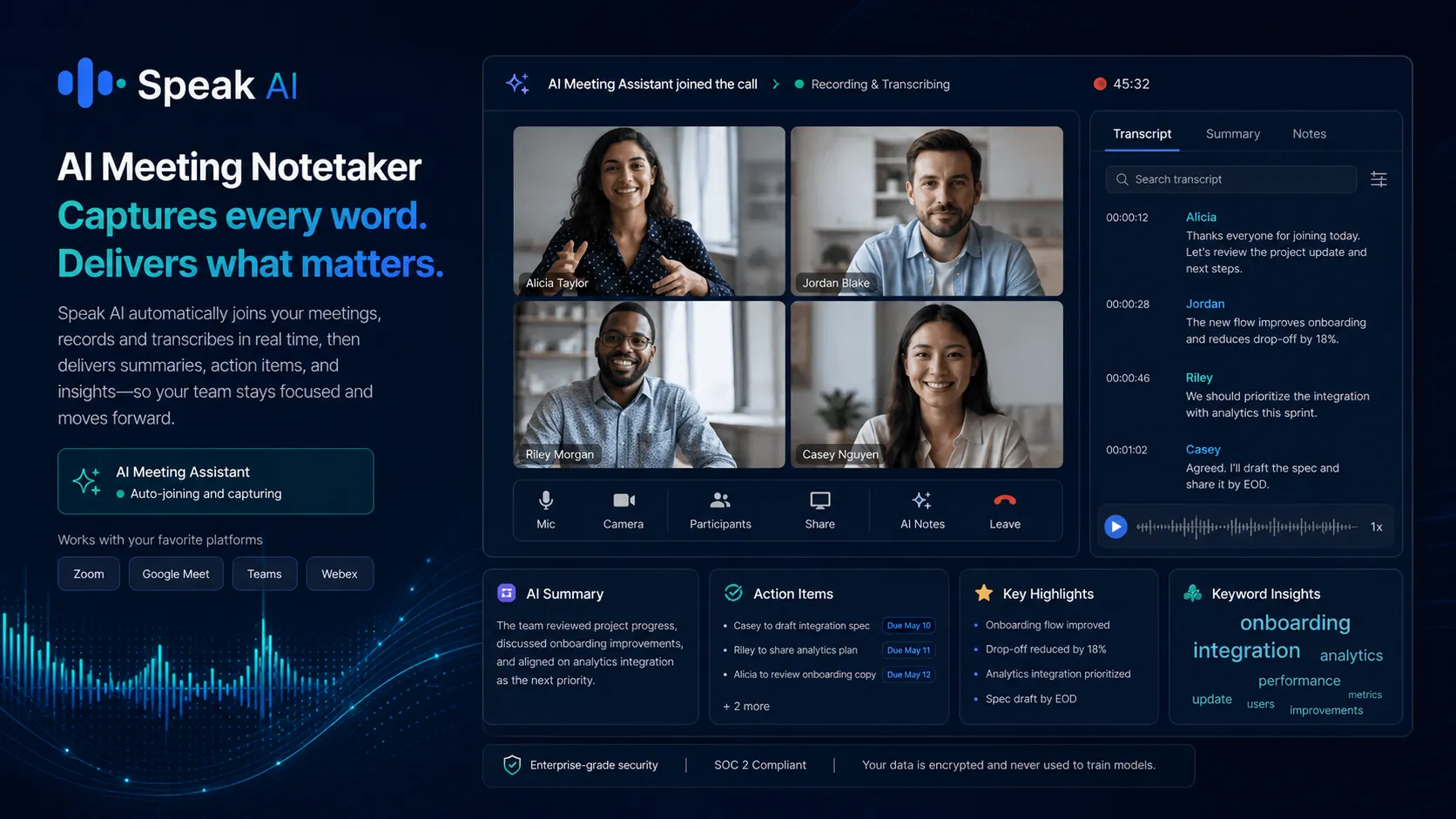
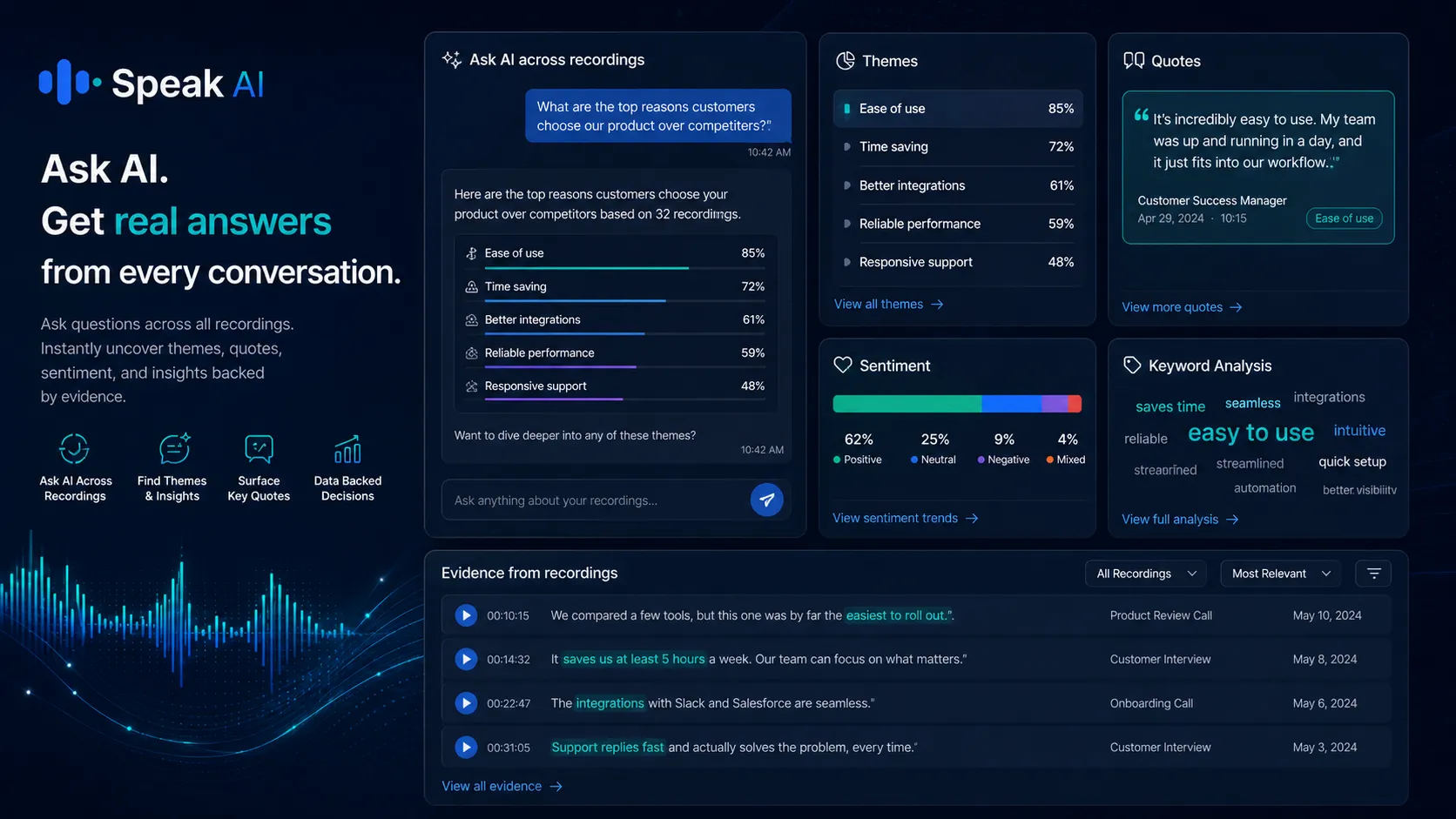
Speak AI is best evaluated as a voice and video intelligence platform, not as a simple transcript generator. It can capture meetings, transcribe files, analyze interviews, surface themes, search across recordings, export results, and support more advanced API or agent workflows. The safer buying path is to test one real file first, then decide whether Per Use, Individual, Team, or Enterprise matches your monthly volume and collaboration needs.
What Speak AI actually does
Speak AI turns audio, video, meetings, calls, interviews, and surveys into transcripts, summaries, searchable libraries, AI chat, analysis, and exports. The product is strongest when a buyer has repeated recordings to process, not just one random audio file. If your work involves research interviews, customer calls, webinars, stakeholder meetings, or multilingual content, the value is less about transcription alone and more about reducing manual evidence review.
- Use it for research interviews, focus groups, sales calls, meetings, surveys, podcasts, webinars, and media libraries.
- Expect the strongest fit when searchable transcripts, speaker labels, summaries, themes, and exports matter.
- Judge the platform with your own messy recording before paying for a recurring plan.
Pricing depends on recording volume
Speak AI's pricing decision is mainly a volume decision. Per Use is easier to justify when you only process media occasionally. Individual makes more sense when you have steady monthly recordings and want included transcription hours, AI characters, storage, and full analysis access. Team becomes relevant when multiple people need shared libraries, meeting capture, priority support, and collaboration. Enterprise is for buyers who need procurement, SSO depth, white-label workflows, custom agent deployment, data controls, or tailored usage.
- Per Use is the lowest-friction test path, but high monthly volume can push buyers toward subscription pricing.
- Individual fits solo users with regular transcription and analysis needs.
- Team should be checked by seat count, library sharing, SSO, and included monthly limits.
Meeting capture and team libraries
Speak AI is more compelling for teams when recordings do not have to be manually uploaded every time. The official integrations page confirms meeting platform, calendar, CRM, Zapier, API, and webhook paths. That means the tool can fit into a real workflow where calls are captured, transcribed, summarized, routed, and stored for later search. Buyers should still verify the exact setup steps for their meeting platform and whether summaries, action items, CRM routing, or shared folders work the way their team expects.
- Connect meeting platforms and calendars if recurring call capture is the main use case.
- Use shared libraries when multiple team members need to search the same recordings.
- Check Zapier, CRM, API, and webhook needs before committing to the wrong tier.
Video walkthrough for survey and form analysis
This second video is useful if your buying question is not just meeting notes, but whether Speak AI can help with structured research or feedback analysis. Watch for how uploaded form or survey data gets organized and analyzed, because that tells you whether Speak AI can support customer research, academic work, market studies, or internal feedback reviews. If the workflow feels too heavy for your needs, start with Per Use or stay in the trial before paying.
Developer, API, and automation fit
Speak AI also has a stronger technical path than many simple transcription tools. The developer page describes API access during the 7-day trial, API keys, transcription endpoints, and documentation for submitting audio files and receiving transcripts, speaker labels, timestamps, and analytics. The integrations page also mentions REST API and webhooks. Buyers should confirm whether these capabilities are included in the plan they intend to use, especially if the workflow depends on automated uploads, dashboards, CRM enrichment, portals, or client-facing delivery.
- Check API and webhook support if you plan to automate media processing.
- Use Enterprise conversations for white-label delivery, custom agents, SSO depth, or procurement-heavy rollouts.
- Do not assume every integration fits every plan without checking current plan details.
What to verify before checkout
Before paying, confirm the live pricing row, billing interval, included monthly hours, AI character limits, storage, user count, trial status, renewal timing, and cancellation terms. Speak AI can be valuable, but it can also be more platform than a buyer needs if the use case is only occasional transcription. The safest next step is to run one real file through the trial or Per Use path, compare the output quality against the time you would spend manually, then choose a plan only if the saved review time is obvious.
- Confirm whether the current price is monthly or annual before treating it as your renewal cost.
- Check whether coupon claims apply to the plan you actually want.
- Cancel before renewal if the trial does not prove workflow value.
Best savings path from this store page
This is the clearest savings route to check once the product already looks like a fit.
Speak AI officially offers a 7-day free trial with no credit card required. This is the safest first step for buyers testing transcription, analysis, meeting capture, and AI chat workflows.
$0/mo plus usage pricing
$15/mo individual path
Use comparison routes when the category fit is still open
Use these comparison routes when the product still looks plausible, but the category fit is not fully settled.
1min.AI is broader for everyday multi-model AI tasks, while Speak AI is more focused on transcription, meetings, voice data, and research-style analysis.
Aikeedo fits buyers building a self-hosted AI SaaS product, while Speak AI fits teams that need to process and analyze existing audio, video, and meetings.
Verification points worth checking before you click out
Where this store usually fits best in the workflow
Speak AI fits academic researchers, user researchers, and consultants who need to transcribe interviews, identify speakers, search across sessions, pull quotes, and summarize recurring themes without manually reviewing every recording from scratch.
Sales, customer success, and marketing teams can use Speak AI to record calls, summarize conversations, detect keywords, surface objections, and preserve customer evidence in a searchable library for coaching or reporting.
Teams that run regular Zoom, Google Meet, Microsoft Teams, or Webex calls can use Speak AI to capture meetings, generate summaries and action items, and make past conversations easier to search later.
Podcasters, webinar teams, educators, and creators can use Speak AI to convert recordings into transcripts, clips, highlights, translations, and exportable assets for publishing or internal documentation.
Practical checkpoints before and after signup
- Pick one real recording that represents your normal audio quality, speaker count, and workflow.
- List the outputs you actually need, such as transcript, summary, quotes, themes, clips, translations, or exports.
- Estimate monthly recording hours so you can compare Per Use, Individual, and Team pricing realistically.
- Check transcript accuracy, speaker labels, timestamps, summary usefulness, AI chat answers, and export formats.
- Test whether the meeting assistant, upload workflow, or survey analysis path fits the way your team already works.
- Compare the time saved against the plan you would need after trial.
- Verify billing interval, plan limits, storage, AI characters, extra user pricing, renewal timing, and cancellation terms.
- Test any public coupon path at checkout without exposing or relying on a code before it works.
- Move to Team or Enterprise only when shared libraries, SSO, API, webhooks, white-label delivery, or agent workflows are required.
- Track whether team members actually search the library and reuse insights.
- Review usage before renewal so transcription hours, AI characters, and extra seats do not outgrow the chosen plan.
- Keep sensitive recordings, permissions, exports, and retention practices aligned with your internal privacy requirements.
Fast-read signals for workflow fit and buying friction
Questions readers usually ask before choosing this store
Is Speak AI just a transcription tool?
Not exactly. Speak AI includes transcription, but the stronger use case is analyzing and reusing voice or video data through summaries, speaker labels, sentiment, keywords, AI chat, exports, meeting capture, media libraries, and automation paths.
Does Speak AI have a free plan or free trial?
Yes. The official pricing page shows a Per Use path at $0/month and a 7-day trial with no credit card. Buyers should use that entry path with a real recording before choosing Individual, Team, or Enterprise.
Which Speak AI plan should a solo user check first?
A solo user should usually compare Per Use against Individual. Per Use makes sense for occasional transcription. Individual starts to make more sense when monthly recording volume, AI analysis, storage, and exports are consistent enough to justify a subscription.
Is Speak AI good for teams?
It can be, especially when a team needs shared libraries, recurring meeting capture, higher limits, SSO, priority support, and searchable evidence across meetings, interviews, or calls. Team buyers should calculate extra user costs and confirm platform integrations before paying.
What should buyers verify before paying for Speak AI?
Buyers should verify live plan prices, billing interval, included transcription hours, AI character limits, storage, extra user cost, trial status, cancellation timing, refund discretion, API needs, and whether any coupon path works on the exact plan they want.
Choose the next route that matches what you still need to decide
The strongest next click depends on whether you still need product judgment, a savings route, or a broader category comparison.