GMB Everywhere Pricing & Local SEO Fit
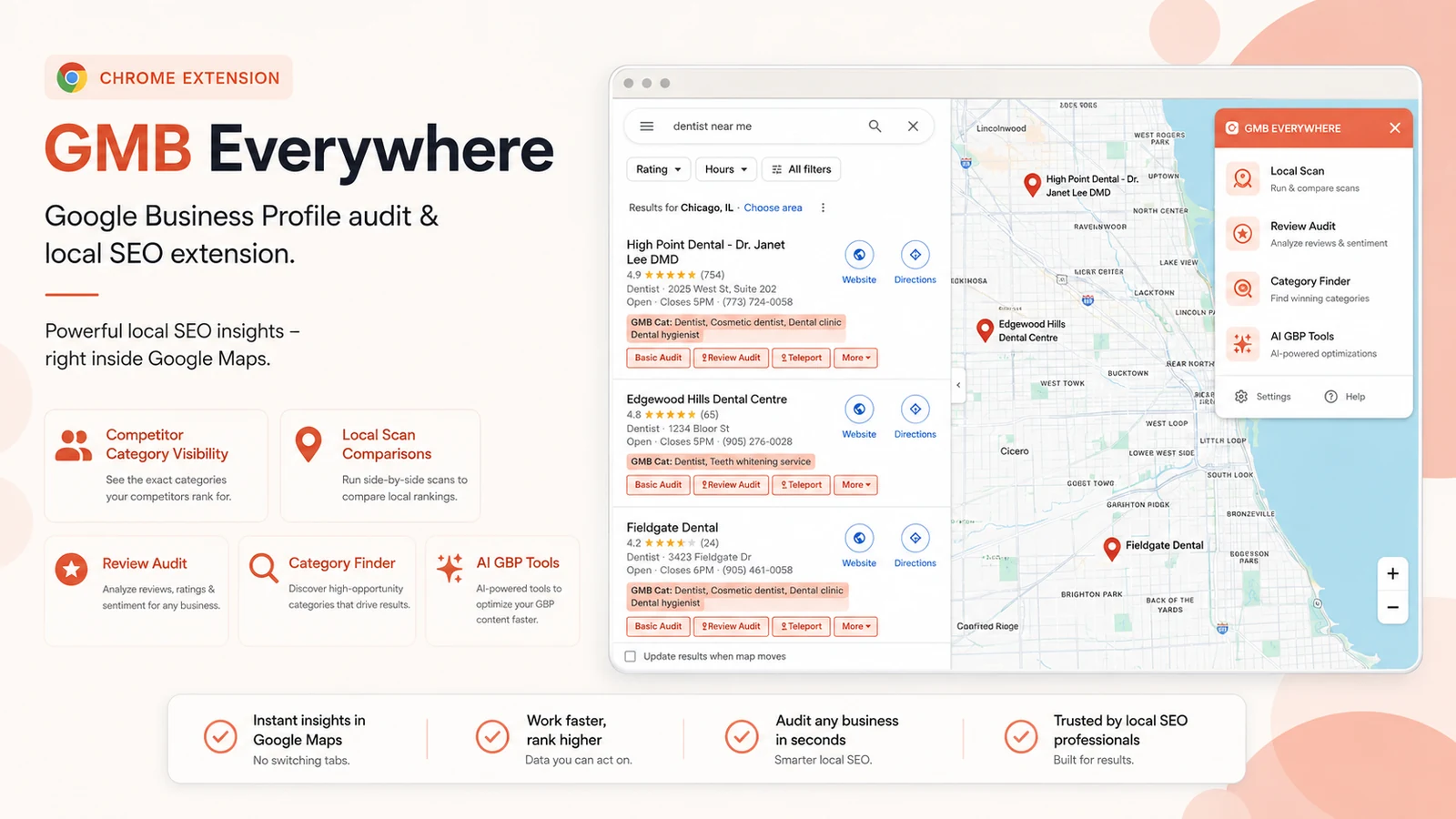
GMB Everywhere is a Chrome extension for local SEO work around Google Business Profiles. It is most useful when you want to see categories, run GBP audits, inspect competitors, check local visibility, and generate GBP-focused AI content directly while working inside Google Maps or local search results.
Fit → price → checkout
Use these routes after the official-site check: coupon first, review for fit, compare if unsure.
GMB Everywhere pricing snapshot
Fast commercial checks before pricing, coupons, or a deeper review.
GMB Everywhere product tour
These visuals focus on the buyer questions that matter most: where the extension appears, what it can audit, how the paid plan differs from the free plan, and whether the workflow feels useful for real local SEO work.
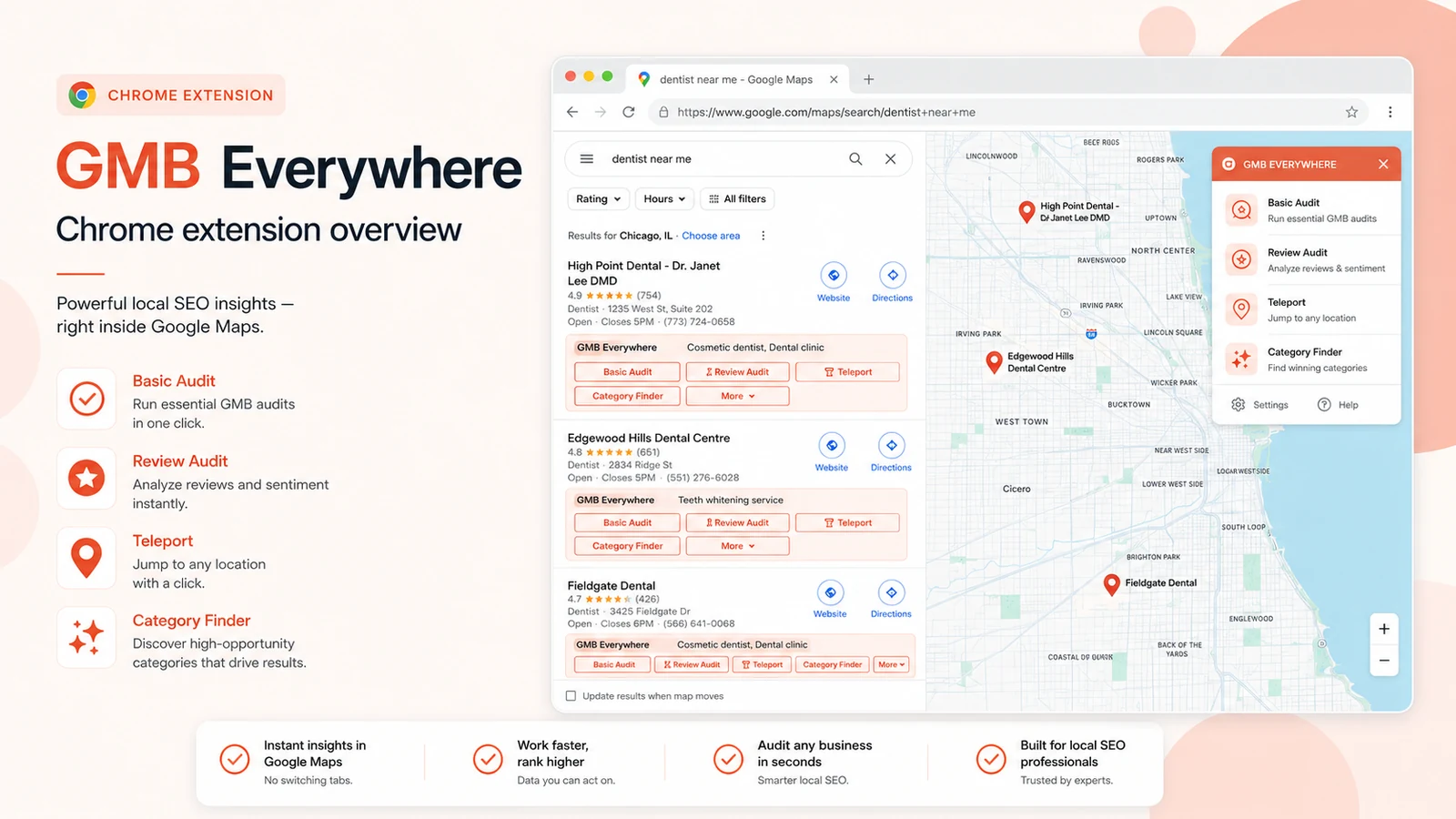
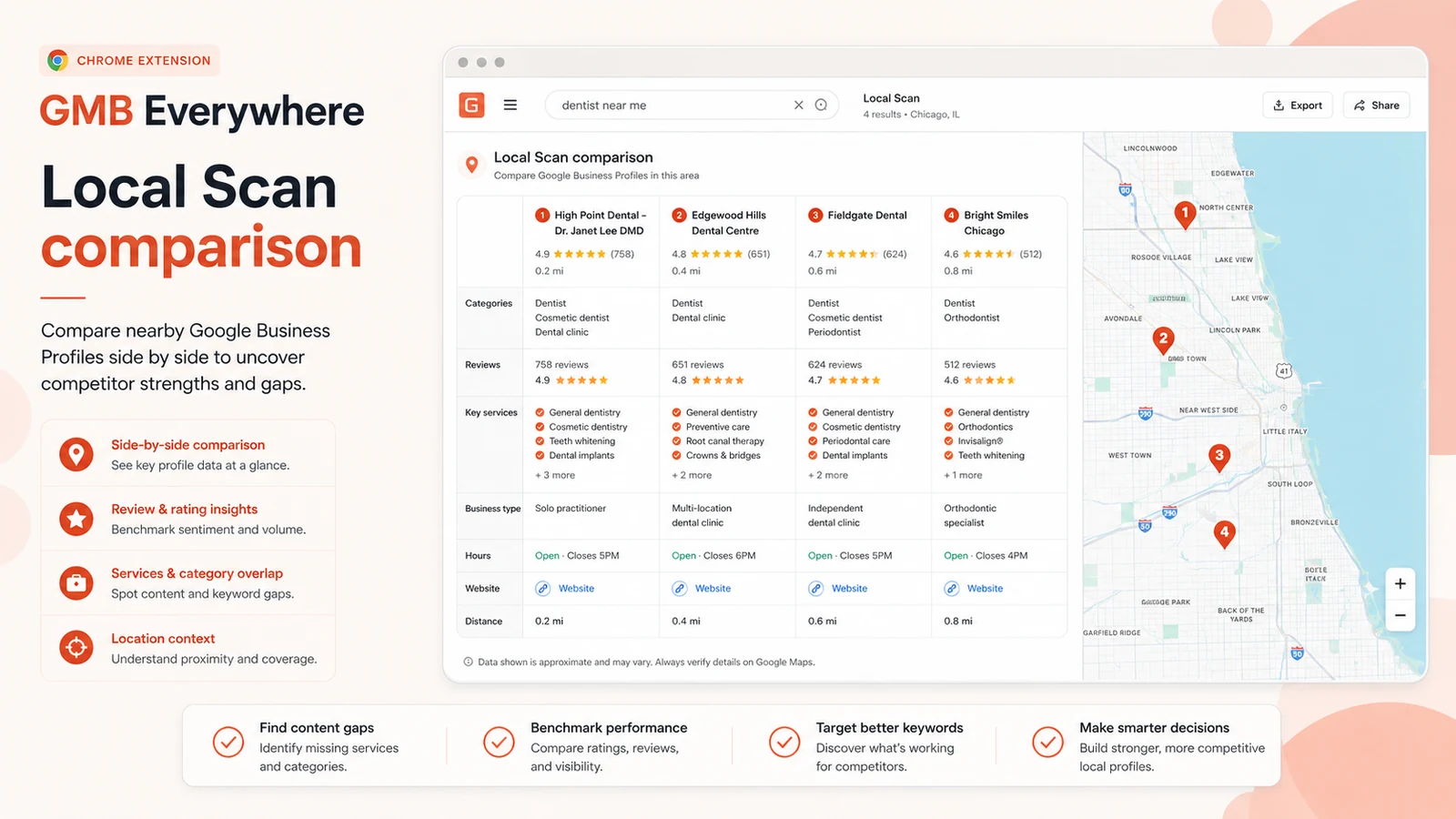
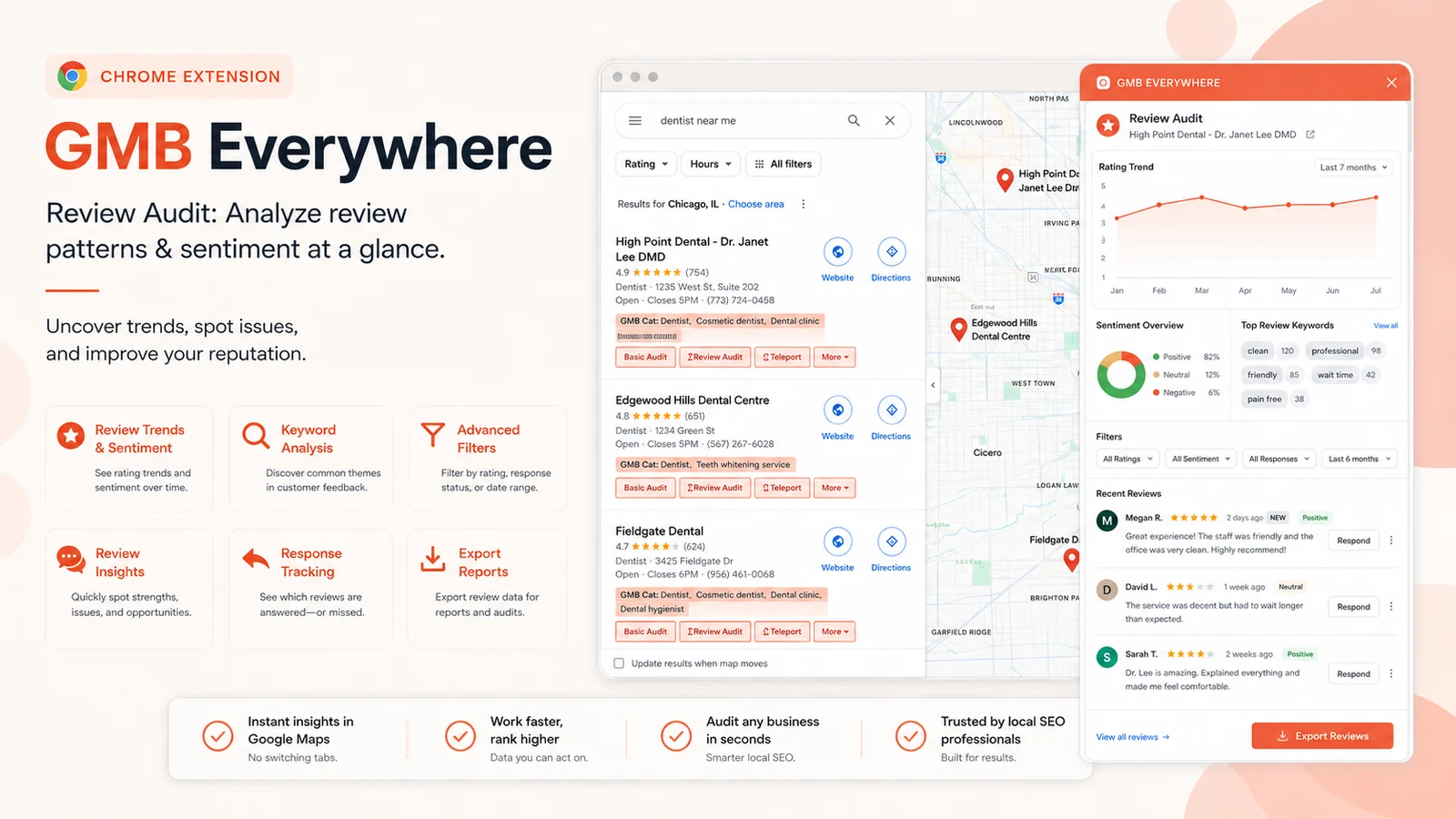
GMB Everywhere is best understood as a working local SEO extension, not a generic AI SEO app. It sits inside Google Maps and Google local results so you can audit Google Business Profiles, inspect competitor categories, run review and post checks, use local scan views, and generate GBP-focused AI content without leaving the browser.
What GMB Everywhere actually does
The main value is speed inside the place where local SEO research already happens. Instead of copying business names into another tool, you install the Chrome extension, search Google Maps or local results, and use the buttons that appear near GBP listings. That makes it useful for category checks, basic GBP audits, review audits, post audits, Teleport rank checks, and Local Scan competitor comparisons.
- Shows primary and secondary GBP categories directly in Google Maps.
- Adds audit actions beside business listings and local results.
- Supports Local Scan, Category Finder, Review Audit, Post Audit, Teleport, and AI tools.
- Works best when local SEO research is part of your weekly workflow.
Pricing and plan fit
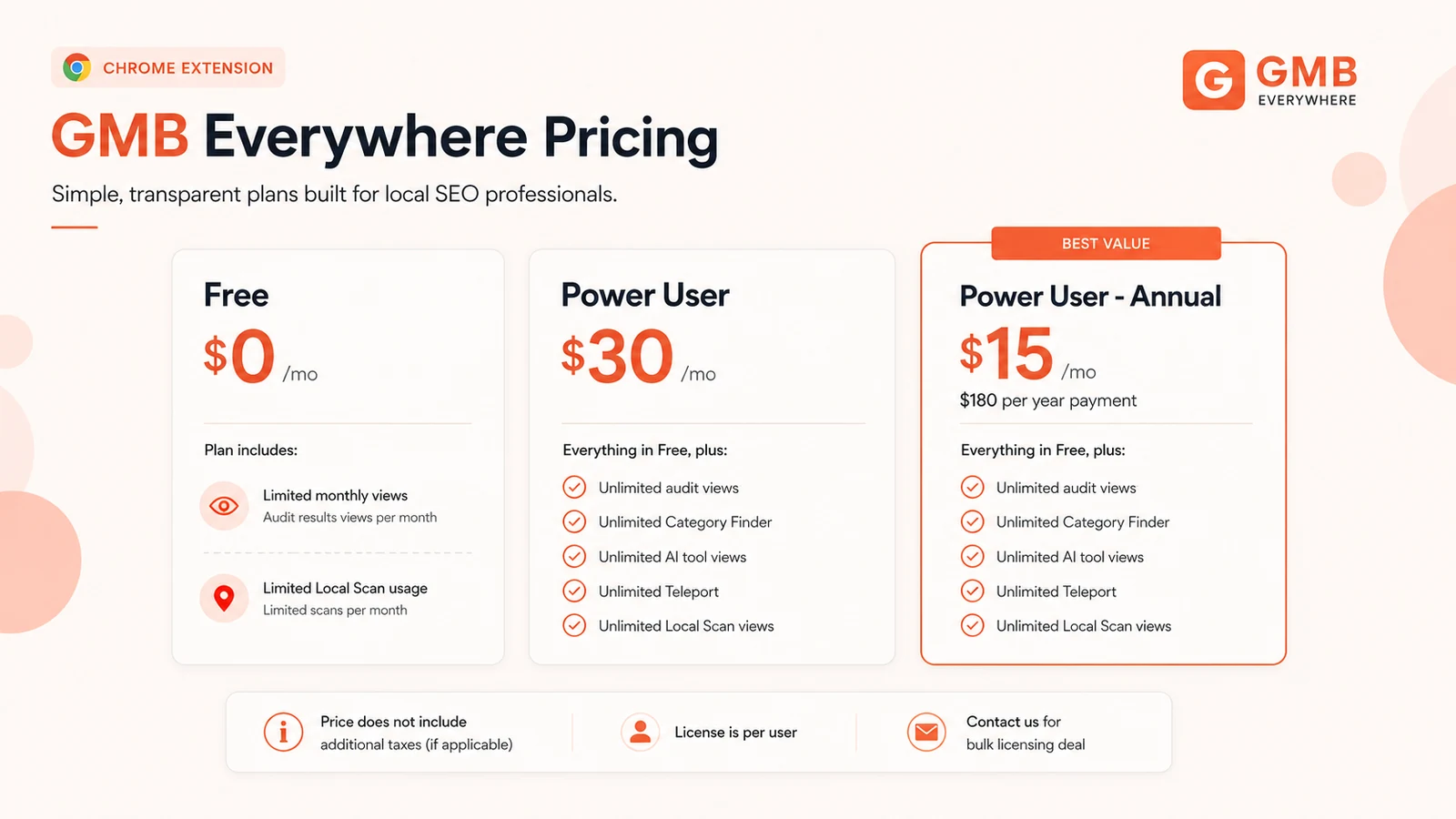
The free plan is useful because it lets you test the workflow without a credit card, but its monthly limits mean it is not built for heavy agency use. The paid Power User plan is where the tool starts making sense for recurring audit work, especially if you need unlimited audit views, Category Finder views, AI tool views, Teleport views, and Local Scan views.
- Free plan is best for workflow testing and light checks.
- Monthly Power User plan is easier if usage is uncertain.
- Annual Power User pricing makes more sense for recurring local SEO work.
- Agencies should confirm per-user licensing and bulk pricing needs.
Where agencies get the most value
Agencies are the clearest fit because they often need to compare multiple businesses in the same local result set. Local Scan, category visibility, review audits, and post audits can make competitor conversations more concrete. The tool also helps avoid vague recommendations because you can point to categories, review patterns, post cadence, and proximity context inside the same research session.
- Useful for competitor category checks before GBP optimization.
- Helpful for spotting review and post activity differences.
- Good for preparing quick local SEO observations before a client call.
- Less ideal if your agency needs white-label reports or API-driven exports.
The AI tools are useful, but they are not the whole product
GMB Everywhere includes AI tools for GBP posts, review responses, GBP descriptions, Q&A sections, and Facebook posts. That is useful if you already manage local business profiles and want faster first drafts. Still, the stronger reason to use the product is the combination of audit context and action support. If all you want is long-form SEO articles, a broader AI writing tool will usually be a better fit.
- AI GBP Post Generator can speed up profile content planning.
- AI Review Response Generator can help with response drafts.
- AI Description and Q&A tools support profile cleanup work.
- The AI layer is best when paired with actual GBP audit findings.
What to check before upgrading
Before paying, check how often you run GBP audits, how many listings you handle, and whether the free plan limits are already slowing you down. Also check the license model because the pricing page states that the license is per user. A solo consultant may find the annual plan easy to justify. A multi-person agency should check whether bulk licensing is cleaner than stacking individual accounts.
- Confirm current monthly and annual pricing before checkout.
- Check whether taxes apply in your billing region.
- Review the 7-day refund window before choosing annual billing.
- Confirm whether one user license is enough for your workflow.
Best next step
The practical next step is simple: install the free extension, run a few real checks on businesses you already understand, and only then decide whether unlimited views are worth paying for. If the extension saves time during category research, review analysis, or competitor scans, the paid plan becomes easier to evaluate. If it only feels useful once or twice, stay free or compare alternatives first.
- Start with the free Chrome extension.
- Run a few actual Google Maps checks, not just a demo test.
- Upgrade only if view limits block real work.
- Use the review page if you still need deeper workflow judgment.
Best savings path from this store page
This is the clearest savings route to check once the product already looks like a fit.
GMB Everywhere lists Power User at $30 per month and Power User Annual at $15 per month when paid yearly. This is the cleanest official savings path for buyers who expect ongoing local SEO usage.
Best primary route because the savings are shown on GMB Everywhere's own pricing page, not only on a coupon directory.
$30/month for unlimited audit, category, teleport, local scan and AI tool views
Contact path for teams that need more than one user license
Use comparison routes when the category fit is still open
Use these comparison routes when the product still looks plausible, but the category fit is not fully settled.
AISEO is a broader AI SEO writing and optimization tool, while GMB Everywhere is more focused on Google Business Profile audits and local Maps research.
Balzac AI is more relevant for content and writing workflows, while GMB Everywhere is a better fit when the buyer needs GBP-level competitor inspection.
Verification points worth checking before you click out
Where this store usually fits best in the workflow
Use GMB Everywhere when you need to quickly inspect a business profile, competitor category choices, reviews, posts, and local search context before making optimization recommendations.
Agencies can use Local Scan and category visibility to compare multiple nearby businesses in one workflow instead of building every competitor note manually.
The AI tools can help draft Google Business Profile posts, review responses, descriptions, Q&A content, and related local-business content after the audit context is clear.
A business owner can use the free plan to understand basic GBP gaps before deciding whether paid access or an agency engagement is necessary.
Practical checkpoints before and after signup
- Confirm that you actually work inside Google Maps, Google Search, or Local Finder often enough for a browser extension to matter.
- Use the Chrome Web Store listing to verify the extension identity before installing.
- Run audits on real listings rather than random examples.
- Check whether category, review, post, Local Scan, and Teleport views answer questions you already have.
- Compare the monthly Power User plan with the annual plan and confirm whether the per-user license fits your team.
- Read the refund terms and cancellation path before choosing annual billing.
Fast-read signals for workflow fit and buying friction
Questions readers usually ask before choosing this store
Is GMB Everywhere part of Google?
No. GMB Everywhere says it is an independent third-party tool that helps users manage and optimize Google Business Profiles. Buyers should treat it as an external browser extension, not an official Google product.
Does GMB Everywhere have a free plan?
Yes. The official pricing page lists a free plan at $0 per month with limited monthly usage across audits, Teleport, AI tools, Category Finder, and Local Scan views.
How much does GMB Everywhere cost?
The pricing page lists Power User at $30 per month and Power User Annual at $15 per month with a $180 yearly payment. Buyers should verify the current price, taxes, and license terms before checkout.
Does GMB Everywhere offer a refund?
The terms page states a 7-day money-back guarantee from the date of purchase. Refund requests require contacting the team with order details, so buyers should read the current terms before paying.
Who should avoid GMB Everywhere?
It is probably not the right first choice for buyers who need a broad AI writing platform, heavy reporting exports, API access, or a full local SEO dashboard outside the browser workflow.
Choose the next route that matches what you still need to decide
The strongest next click depends on whether you still need product judgment, a savings route, or a broader category comparison.