
AI Detector Pro Pricing, Plans & Workflow Fit
AI Detector Pro is a detection and rewriting workflow for people who want to scan text, identify AI-like passages, and revise the parts most likely to trigger an AI detector. It is strongest as a pre-submission or pre-publishing checkpoint, not as final proof that a document is safe from every detector.
Fit → price → checkout
Use these routes after the official-site check: coupon first, review for fit, compare if unsure.
AI Detector Pro pricing snapshot
Fast commercial checks before pricing, coupons, or a deeper review.
3 scans per month, no humanizations.
Official page also lists yearly pricing with the same public discount code.
Useful only if repeated scans and humanizations justify the higher tier.
Terms mention 60 days for annual subscribers, but monthly plans do not get prorated refunds.
AI Detector Pro product tour
These visuals should help buyers understand the real workflow: scan text, inspect highlighted passages, decide whether the rewrite tools are useful, and verify whether the paid plan fits the document volume.
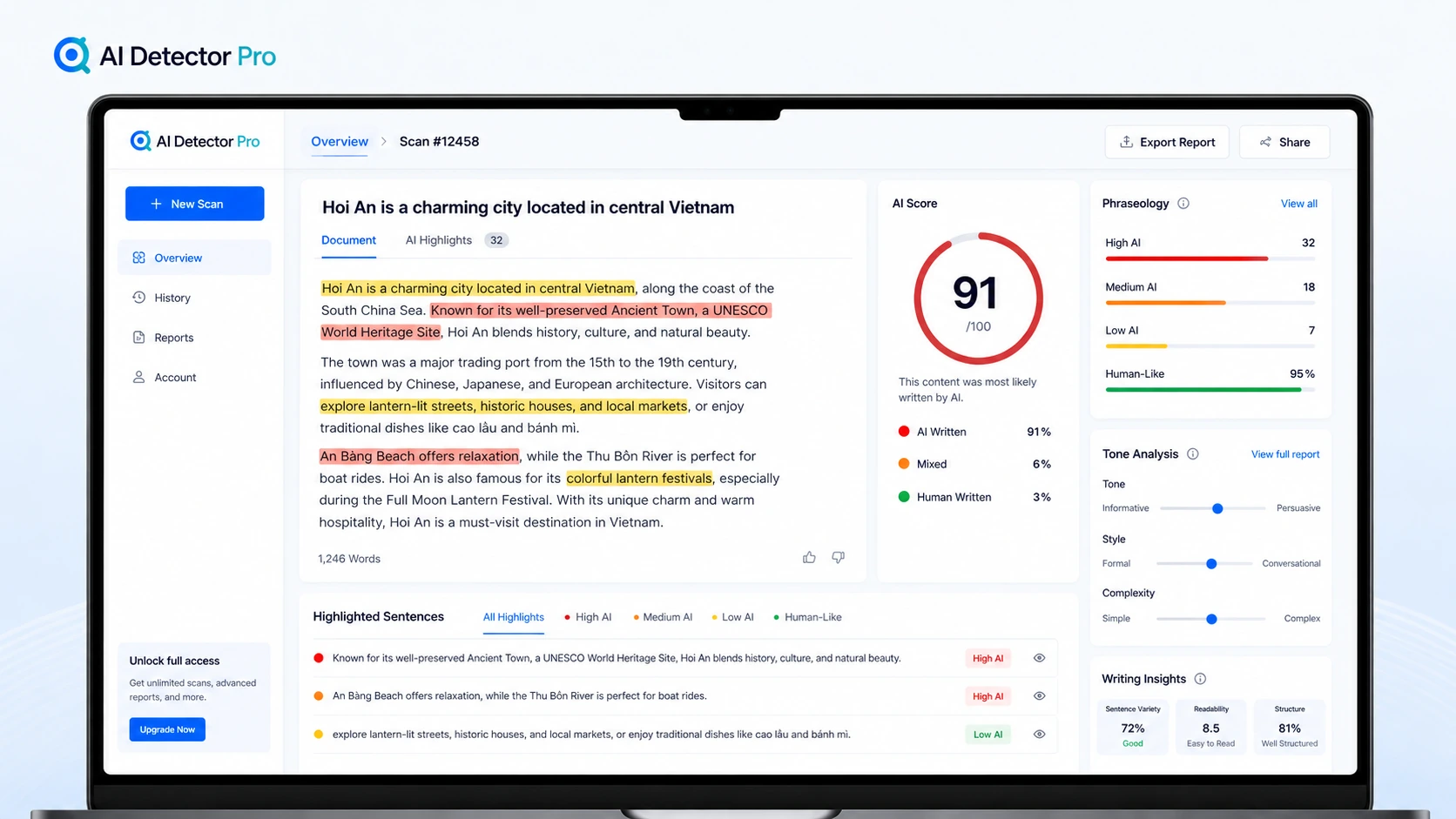
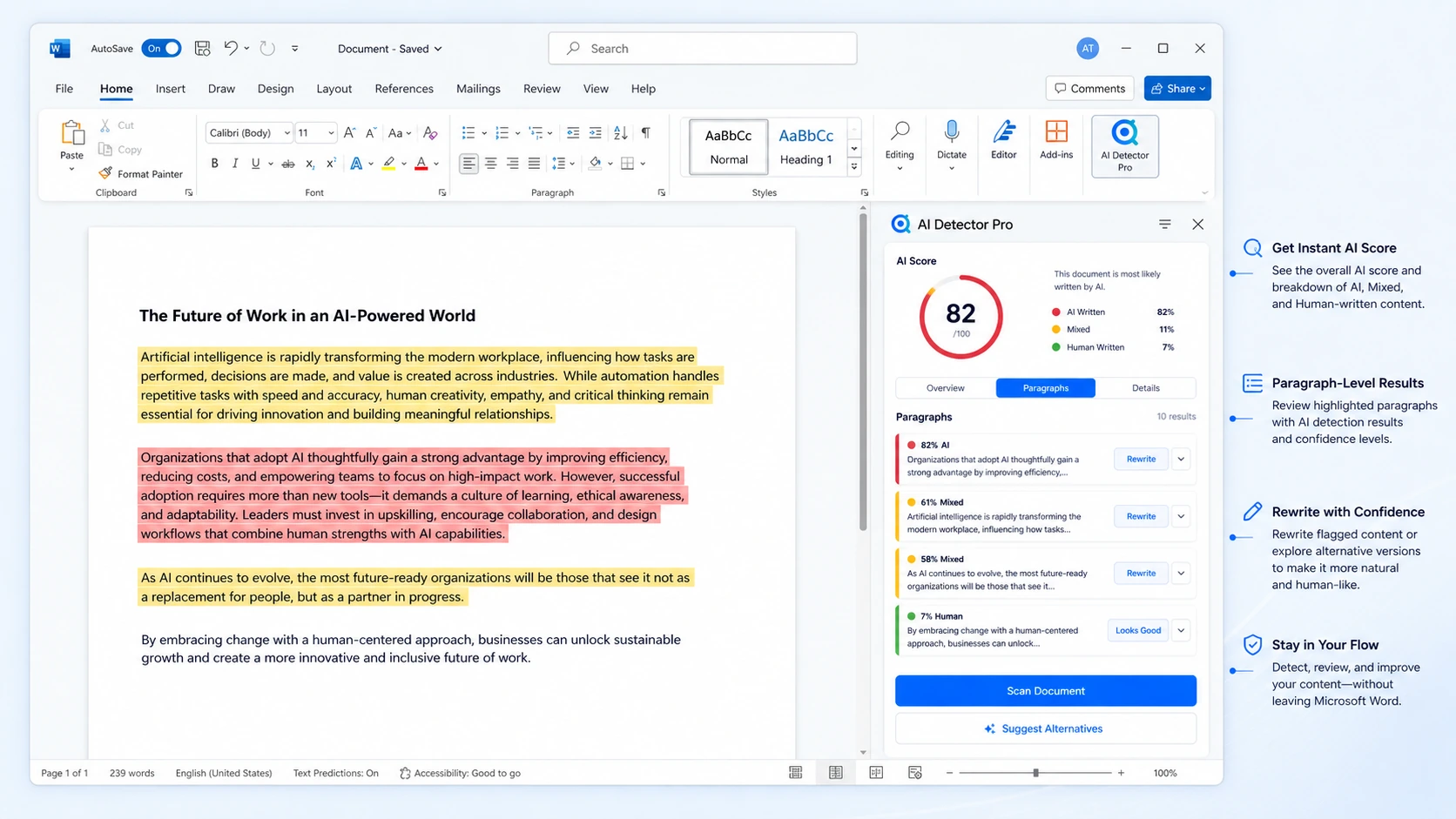
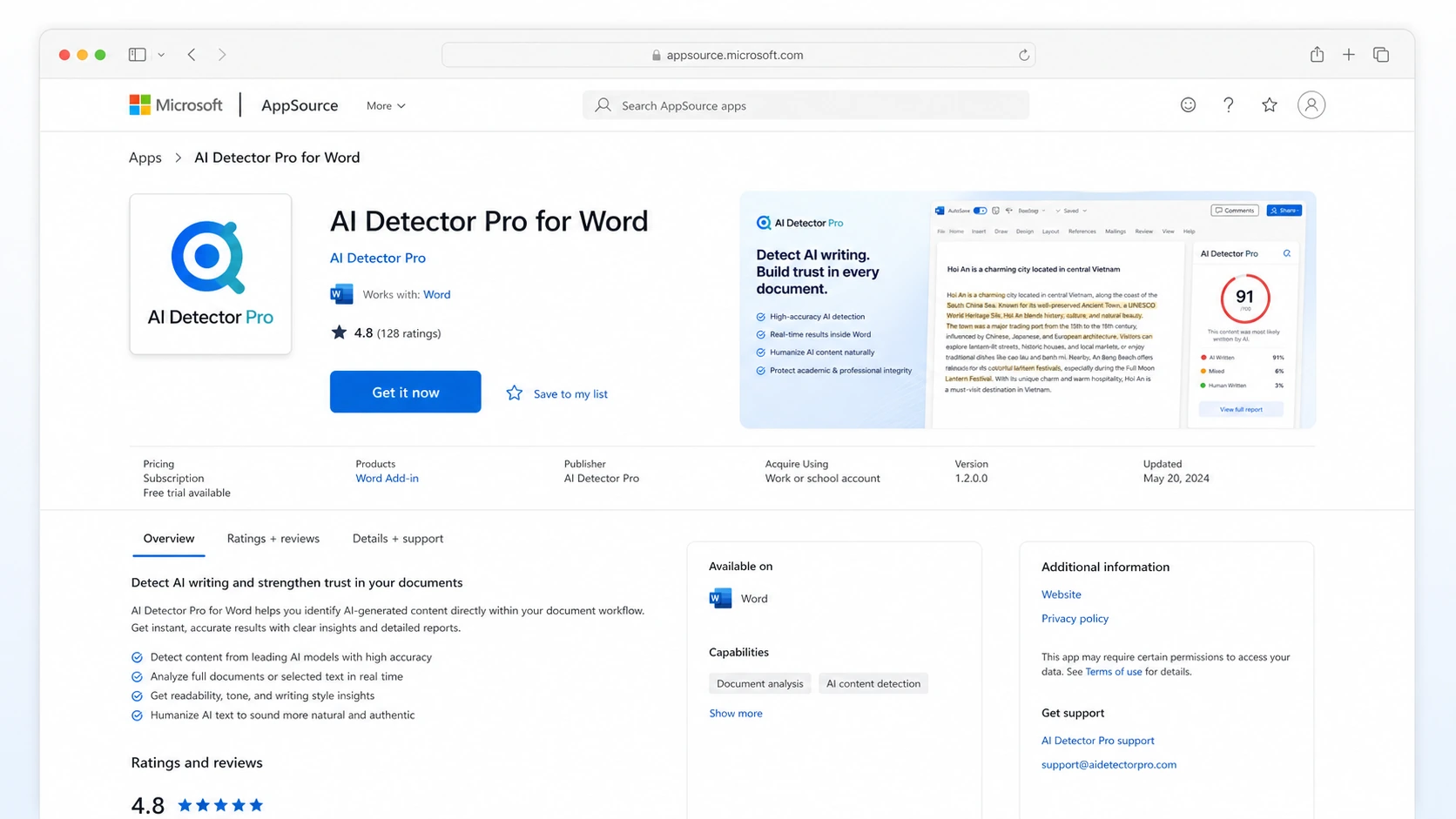
AI Detector Pro should be judged as a workflow tool, not just an AI detector with a coupon attached. The useful question is whether it helps a buyer review real drafts with less friction, then decide what needs rewriting before the text is submitted, published, or sent to a client.
The page also needs a careful pricing read. There is a free plan, a visible public code on the official pricing page, and a separate API path, but none of that removes the need to verify plan limits, renewal terms, and refund language before checkout.
What AI Detector Pro actually does
AI Detector Pro scans text for AI-like writing patterns, highlights suspicious areas, and gives the user ways to revise those passages. Its positioning is broader than a one-click AI score because it also includes Pinpoint Editor, Phraseology, tone analysis, and AI Eraser rewriting.
The most practical use is a pre-publication checkpoint. A writer can scan a draft, look at the passages that seem risky, and decide whether to rewrite manually or use the humanization tools. That does not mean the result becomes immune to every detector. It simply gives the buyer a more guided review process.
Pricing and plan fit
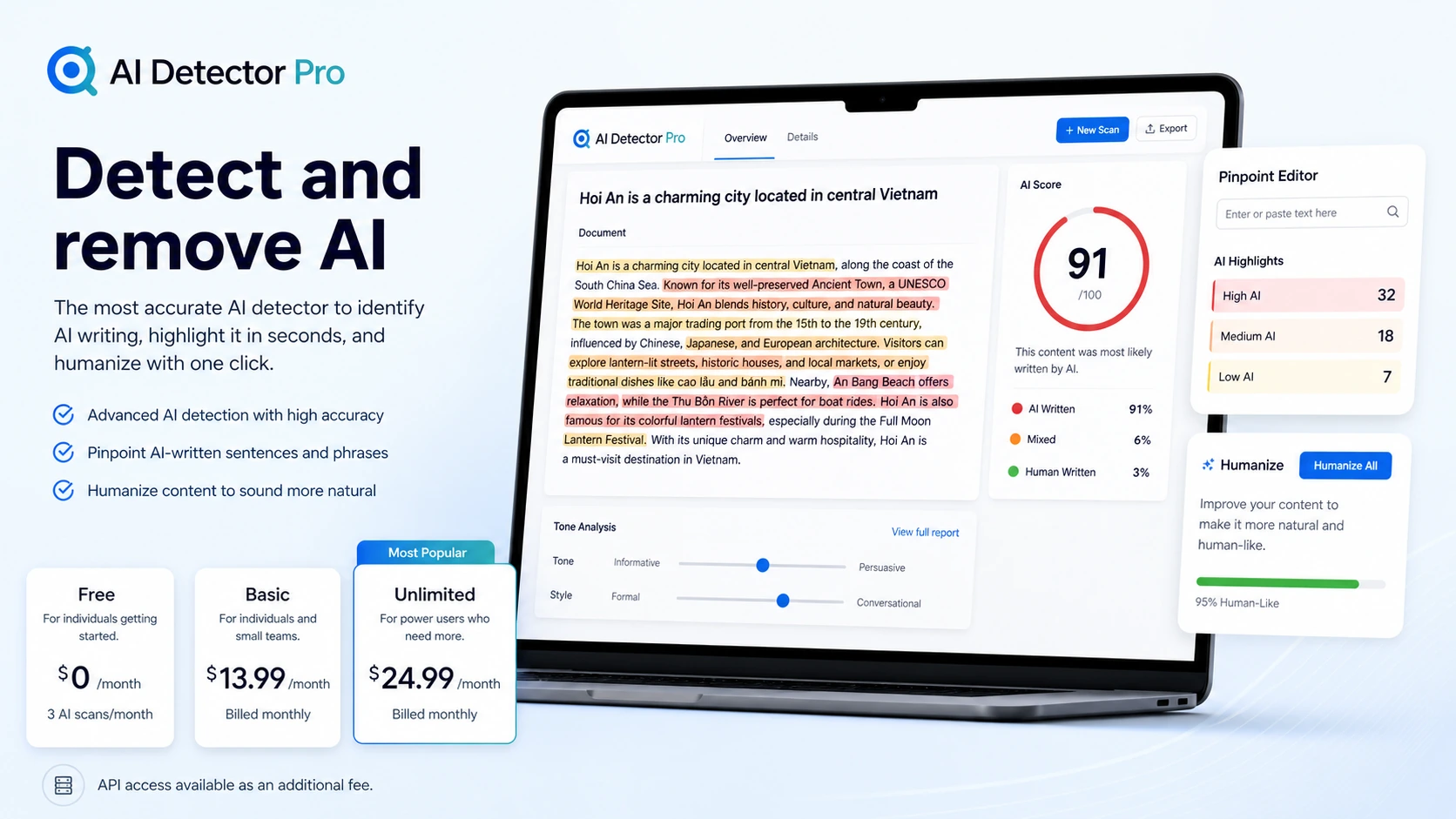
The official pricing page is unusually important here because the free plan is real but limited. It gives 3 AI scans per month and no humanizations, which is enough for a small test but not enough for a serious publishing workflow.
The Basic plan is the more realistic entry point for frequent users because it includes a monthly scan allowance and unlimited humanizations. Unlimited makes sense only if a buyer expects repeated scanning and rewriting across many documents. The displayed public discount code may make the paid plans look attractive, but buyers should verify the code, renewal behavior, and exact checkout total before committing.
Document workflow and Word add-in
AI Detector Pro becomes more interesting for buyers who work inside documents. The official Word add-in support page describes a task pane, paragraph-level scan details, red and yellow highlights, and suggested alternatives for flagged text.
This is the part to test if your workflow lives in Microsoft Word. The add-in can reduce copy-paste friction, but buyers should also think about document sensitivity because the marketplace listing says the app can read and modify documents and send data over the internet.
Humanization is useful, but not magic
The AI Eraser and humanization features are useful when the buyer wants help rewriting flagged passages. They are most valuable when treated as editing support, not as a guaranteed bypass system.
This distinction matters. If a buyer is trying to protect client work, school submissions, or public content, a rewrite tool can make the draft sound less formulaic, but the user still needs to check factual accuracy, voice, citations, and the policies of the platform or institution receiving the work.
Coupon, refund, and checkout reality
AI Detector Pro currently shows public discount code pricing on its official pricing page, so coupon behavior is part of the buyer path. That does not mean every buyer should jump straight to checkout.
The safer sequence is simple: test the free scans, confirm the paid tier matches your volume, check whether the code applies to your selected billing period, and read the refund terms. The terms are especially important for annual billing because the refund language is different from monthly cancellation.
Alternatives and safest next step
AI Detector Pro is most relevant when you want a guided detection and rewrite workflow. If you need stronger plagiarism workflows, enterprise controls, or broader originality reporting, compare it against tools such as Originality.ai, Copyleaks, and GPTZero before paying.
The safest next step is to open the live pricing page after reading the review. That order matters. The review helps decide whether the workflow is a fit, while the pricing and coupon path confirms whether the commercial terms still make sense.
- Choose AI Detector Pro when document scanning and rewrite guidance are the main need.
- Compare Originality.ai when content publishing and originality checks are the bigger concern.
- Compare Copyleaks when institutional, API, or plagiarism-oriented workflows matter more.
- Compare GPTZero when the priority is a familiar detector with education-facing use cases.
Best savings path from this store page
This is the clearest savings route to check once the product already looks like a fit.
AI Detector Pro lists coupon code directly on its official pricing page as a 50% off code for the paid Basic and Unlimited plans.
The official pricing page shows Basic at $13.99/month or $139.99/year and Unlimited at $24.99/month or $249.99/year with coupon code.
The official pricing page displays discounted Basic and Unlimited prices when using coupon code.
Use the coupon code for 50% off yearly Basic or Unlimited pricing shown on the official page.
Use comparison routes when the category fit is still open
Use these comparison routes when the product still looks plausible, but the category fit is not fully settled.
Originality.ai is the stronger comparison when the buyer cares about publishing workflows, plagiarism checks, and broader originality reporting rather than only rewriting AI-like passages.
Copyleaks deserves a closer look when the buyer needs institutional detection, API options, or a plagiarism-adjacent workflow with more compliance pressure.
GPTZero is worth comparing when the buyer wants a well-known AI detector with education-facing use cases and a simpler detection-first buying path.
Verification points worth checking before you click out
Where this store usually fits best in the workflow
Writers can scan drafts before submission and use highlighted passages to decide whether a manual rewrite or AI Eraser pass is needed.
Freelancers can use the tool as a final risk check before sending content to clients, especially when the client is sensitive to AI-generated wording.
Word and Google Docs users can keep the review process closer to the document instead of moving every draft through a browser-only checker.
Buyers considering API access can explore AI Detector Pro as part of a larger review workflow, but the extra API fee should be verified first.
Practical checkpoints before and after signup
- Prepare several real samples: human-written text, lightly AI-assisted drafts, and clearly AI-generated text.
- Do not judge the tool from one short paragraph.
- Use the 3 free scans to check whether the highlighting and tone feedback feel useful.
- Compare AI score changes against actual writing quality after edits.
- Confirm whether the public code applies to the billing interval you plan to choose.
- Read the refund terms if annual billing is tempting because of the lower effective price.
- Track whether the scan limit matches real usage.
- Keep human review in the workflow because detector and humanizer results can be wrong.
Fast-read signals for workflow fit and buying friction
Questions readers usually ask before choosing this store
What does AI Detector Pro actually do?
AI Detector Pro scans text for AI-like writing signals, highlights risky passages, and offers tools such as Pinpoint Editor, Phraseology, tone analysis, and AI Eraser rewriting. It is best understood as a document review and editing workflow, not just a simple AI percentage checker.
Is AI Detector Pro free?
Yes, there is a free plan on the official pricing page. It is limited to 3 AI scans per month and does not include humanizations, so it is better for testing the workflow than for ongoing publishing or client work.
Does AI Detector Pro have a coupon code?
The official pricing page currently displays a public discount code beside the paid plans. Buyers should still verify the code at checkout because coupon availability, renewal behavior, and plan pricing can change.
Is AI Detector Pro accurate enough to rely on completely?
No AI detector should be treated as final proof. AI Detector Pro can be useful as a risk signal and editing guide, but buyers should test their own samples and keep human judgment in the workflow, especially for academic, legal, or client-sensitive use.
What is the safest next step before buying AI Detector Pro?
Start with the free scans, test several real writing samples, compare Basic against Unlimited based on expected monthly volume, and verify coupon, API, refund, and renewal terms on the live checkout path before choosing a paid plan.
Choose the next route that matches what you still need to decide
The strongest next click depends on whether you still need product judgment, a savings route, or a broader category comparison.