Quick verdict
Everneed AI is worth considering if you want one account for many everyday content jobs, not if you need the deepest specialist tool in one narrow category.
That distinction matters more than the long feature list.
The current public product pages position Everneed AI as a broad AI content platform for writing, marketing copy, image generation, speech-to-text, code writing, chatbot use, and pre-built content templates. On paper, that sounds attractive for solo marketers, small business owners, creators, and content operators who do not want to jump between five separate apps just to draft a campaign.
The buying decision is less simple. Everneed AI has monthly subscriptions, yearly subscriptions, and one-time credit packs. It also has free credits for testing, which I would treat as the most important part of the buyer journey. The terms and pricing FAQ make the refund position clear enough that you should not pay first and evaluate later.
For my money, Everneed AI makes the most sense as a speed layer: ideas, drafts, first-pass copy, quick images, rough scripts, and simple content support. It is not the tool I would choose first for advanced SEO briefs, brand governance, detailed editorial workflows, or a serious image production pipeline.
The safest next step is to test the free credits on real content formats before choosing a monthly plan, yearly plan, or credit pack.
Next step: If Everneed AI still fits your content workflow, test the live buyer route before choosing a paid plan.
Review snapshot
| Review point | Practical take |
|---|---|
| Best for | Solo marketers, creators, small businesses, and lightweight content teams that need many draft formats in one account |
| Not ideal for | SEO teams, agencies, or brands that need deep optimization, approval workflows, or specialist creative tools |
| Main use case | Generating first-pass content for blogs, ads, emails, landing pages, social posts, video scripts, images, and simple business copy |
| Pricing note | Public pricing shows monthly, yearly, and one-time credit-pack paths; buyers should verify live pricing before checkout |
| Free path | Free account credits are the safest way to test output quality before paying |
| Main strength | Broad template coverage and flexible payment paths |
| Main concern | Final-sale refund language and plan limits tied to words, images, minutes, and usage volume |
| Direct alternatives | Rytr, Writesonic, Jasper, Simplified |
| Best next step | Use free credits on real weekly content tasks before moving to monthly or yearly billing |
What is Everneed AI?
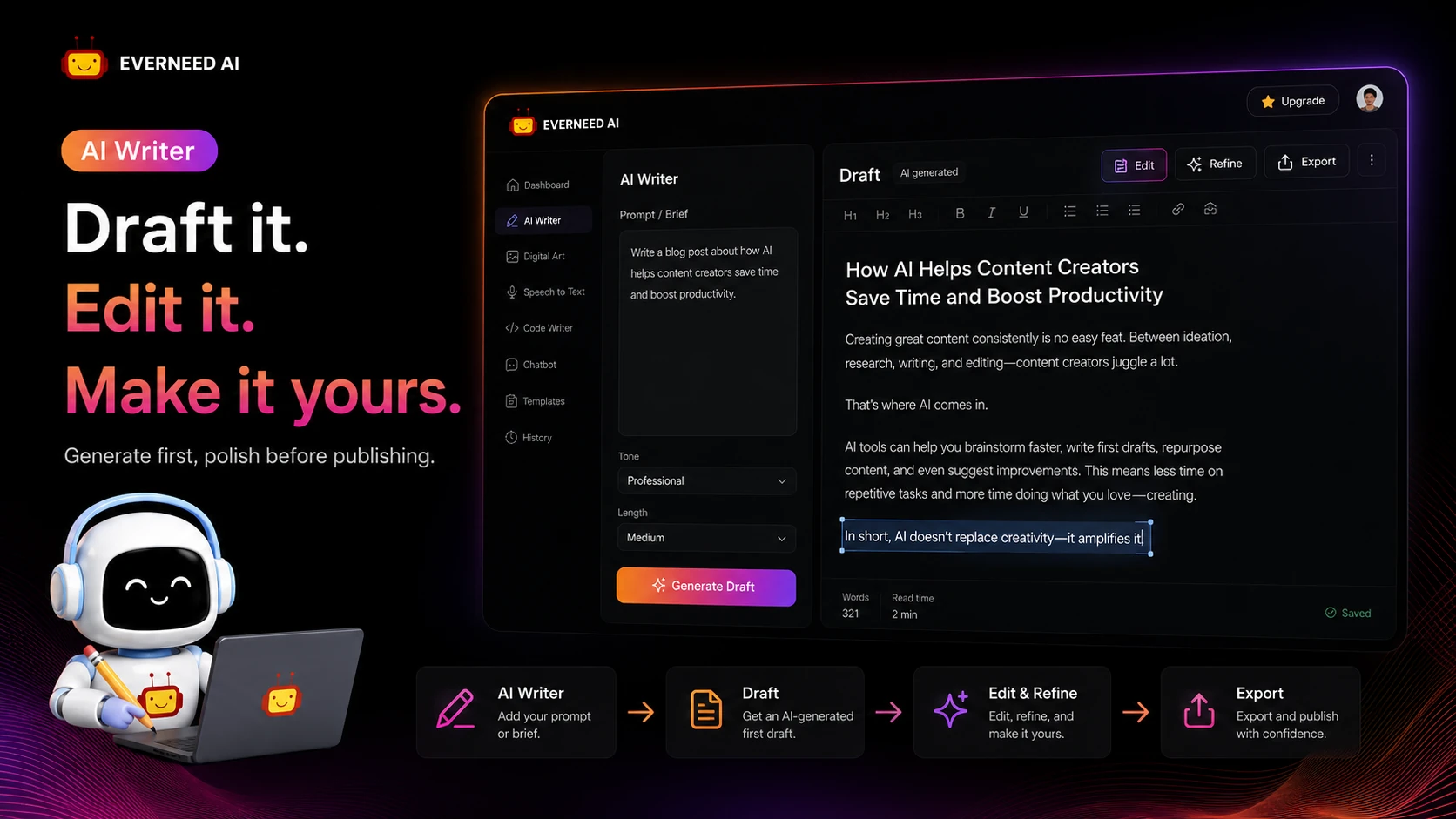
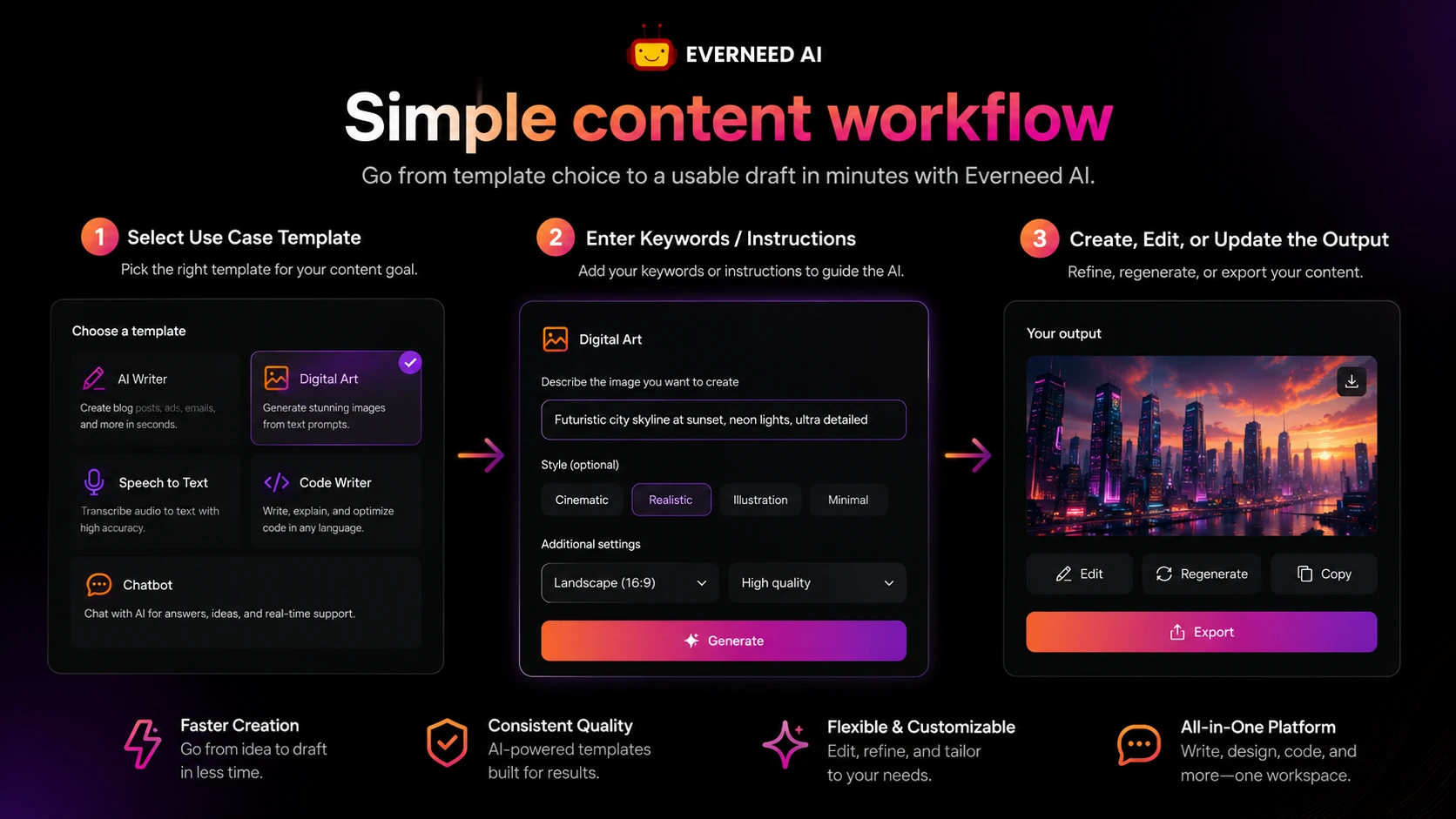
Everneed AI is an all-in-one AI content platform built around pre-built use cases. Instead of starting every task from a blank prompt, you choose a writing, marketing, website, profile, job, video, or general content template and turn a short input into an editable draft.
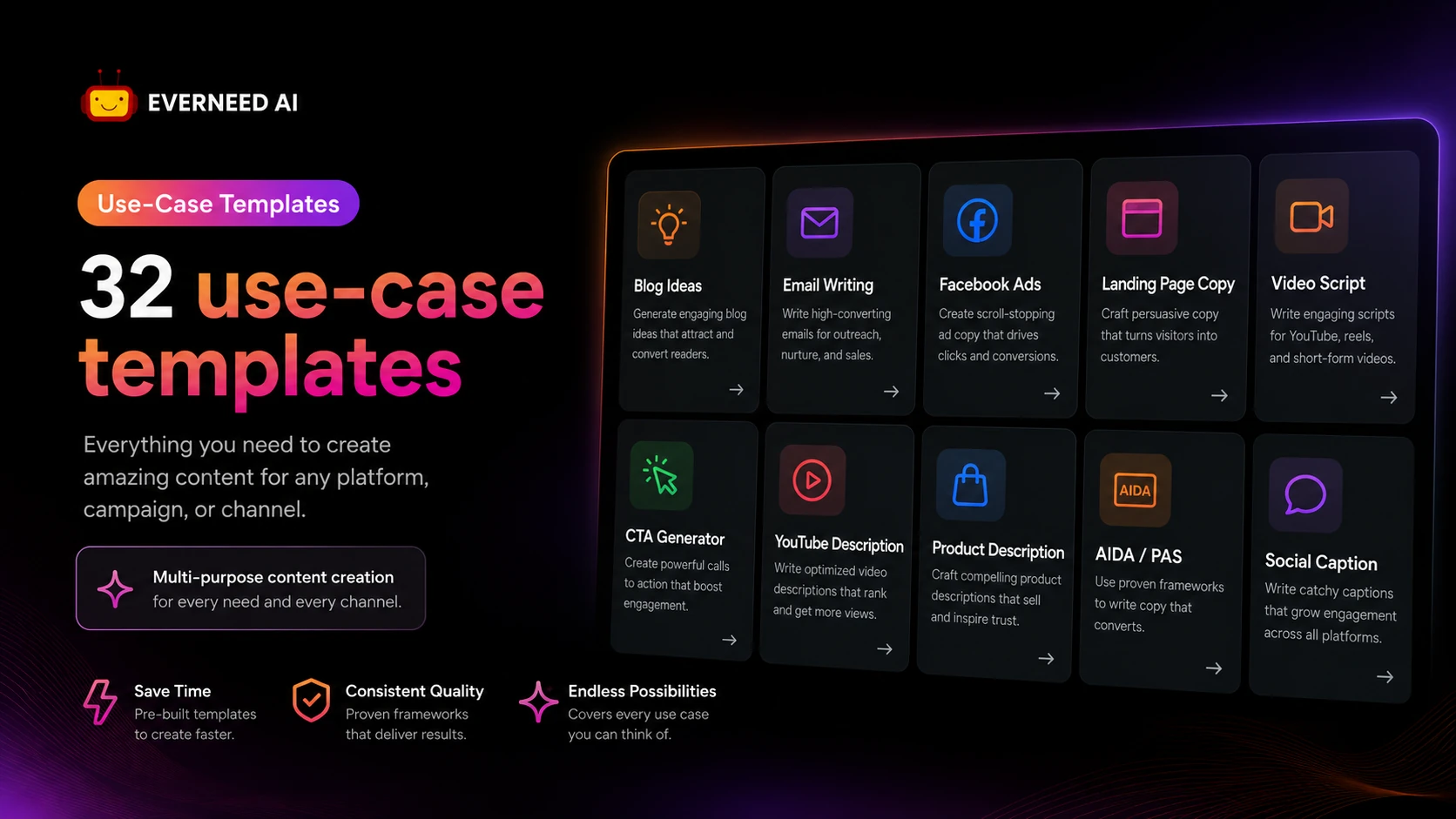
The official use-case page lists more than 32 templates, including Facebook ad copy, blog ideas, blog post writing, product descriptions, email writing, CTAs, AIDA, PAS, content improvement, text summarization, cover letters, job descriptions, video scripts, YouTube descriptions, LinkedIn profile copy, personal bios, and landing page or website copy.
That is the good part.
The part I would not ignore is that broad platforms can feel more useful in the demo than in a real workflow. If you use five content formats every week, Everneed AI may save time. If you only need one excellent blog optimizer, one serious image generator, or one dedicated transcription tool, the broad toolkit may feel shallow compared with a specialist.
Our review approach compares public product pages, pricing details, terms, buyer workflow fit, and nearby alternatives. We do not treat a low entry price, credit pack, or large template count as proof that the product fits the buyer.
The better question is not “How many tools does Everneed AI include?”
The better question is: “Which of these tools will I actually use every week?”
Who should use Everneed AI?
Everneed AI fits buyers who need steady first-draft motion across multiple content types.
A solo marketer may use it for ad copy, CTAs, email drafts, landing page text, and campaign ideas. This is probably the cleanest use case. The product is broad enough to help with many little content jobs that otherwise slow down a marketing day.
A small business owner may also find it useful when content is necessary but not the whole business. If you need product descriptions, short bios, announcements, social posts, and simple blog drafts, Everneed AI can reduce blank-page friction. The condition is that you still review the output before publishing.
A creator may use it for video scripts, YouTube descriptions, idea generation, profile copy, and social captions. This is where template breadth becomes practical. The tool can help move from “I need to post something” to a workable draft faster.
A lightweight content team may consider it when several people need access to a general AI writing workspace. The pricing table lists unlimited team members across plans, which could be helpful for small groups. I would still verify how collaboration actually works before assuming it replaces a full team content platform.
Everneed AI also fits occasional users who prefer one-time credit packs instead of a recurring subscription. That path is worth considering if your workload comes in campaigns rather than every week.
Who should avoid Everneed AI?
I would avoid Everneed AI if your main need is advanced SEO content production.
The platform includes writing use cases, but it is not positioned like a deep SEO suite with SERP analysis, entity coverage, internal linking, content scoring, and editorial optimization workflows. If ranking content is the main job, compare it with a search-aware writing tool before paying.
I would also be careful if you need serious brand governance. A brand team may need reusable voice rules, approvals, permissions, audit trails, and a mature review process. Everneed AI looks more like a general content toolkit than a full editorial operating system.
You may also want to skip it if you only need one narrow function. A dedicated image generator may be better for serious visuals. A dedicated transcription tool may be better for heavy speech-to-text work. A specialist copywriting tool may be cleaner if all you need is short-form copy.
The buyer type I would be most cautious about is someone who sees the low monthly entry price and pays without testing. Everneed AI’s public terms and pricing FAQ make the free-credit step important because paid subscriptions and credits are generally final sale.
The easy mistake is buying the toolkit because it looks inexpensive. The better move is to prove that at least two or three features will save you time repeatedly.
How Everneed AI fits into a real workflow
A practical Everneed AI workflow starts before the prompt.
First, decide which content formats you repeat every week. For one buyer, that might be product descriptions, Facebook ads, and email copy. For another, it might be blog outlines, YouTube descriptions, and short social posts.
Then use the free credits on those real formats. Do not waste the test on random prompts that have nothing to do with your work. If you sell products, test product descriptions. If you run a newsletter, test email drafts. If you publish YouTube videos, test scripts and descriptions.
After that, judge the output by editing time, not novelty. A draft that looks impressive for ten seconds can still be weak if it needs a full rewrite. A less flashy draft may be more valuable if it gives you a solid structure quickly.
The workflow looks like this:
- Choose a real content task.
- Pick the closest Everneed AI template.
- Add enough context for the draft to be useful.
- Generate the draft.
- Edit for accuracy, voice, product details, and claims.
- Check whether the time saved justifies the word, image, or minute cost.
- Only then decide whether monthly, yearly, or credit-pack pricing makes sense.
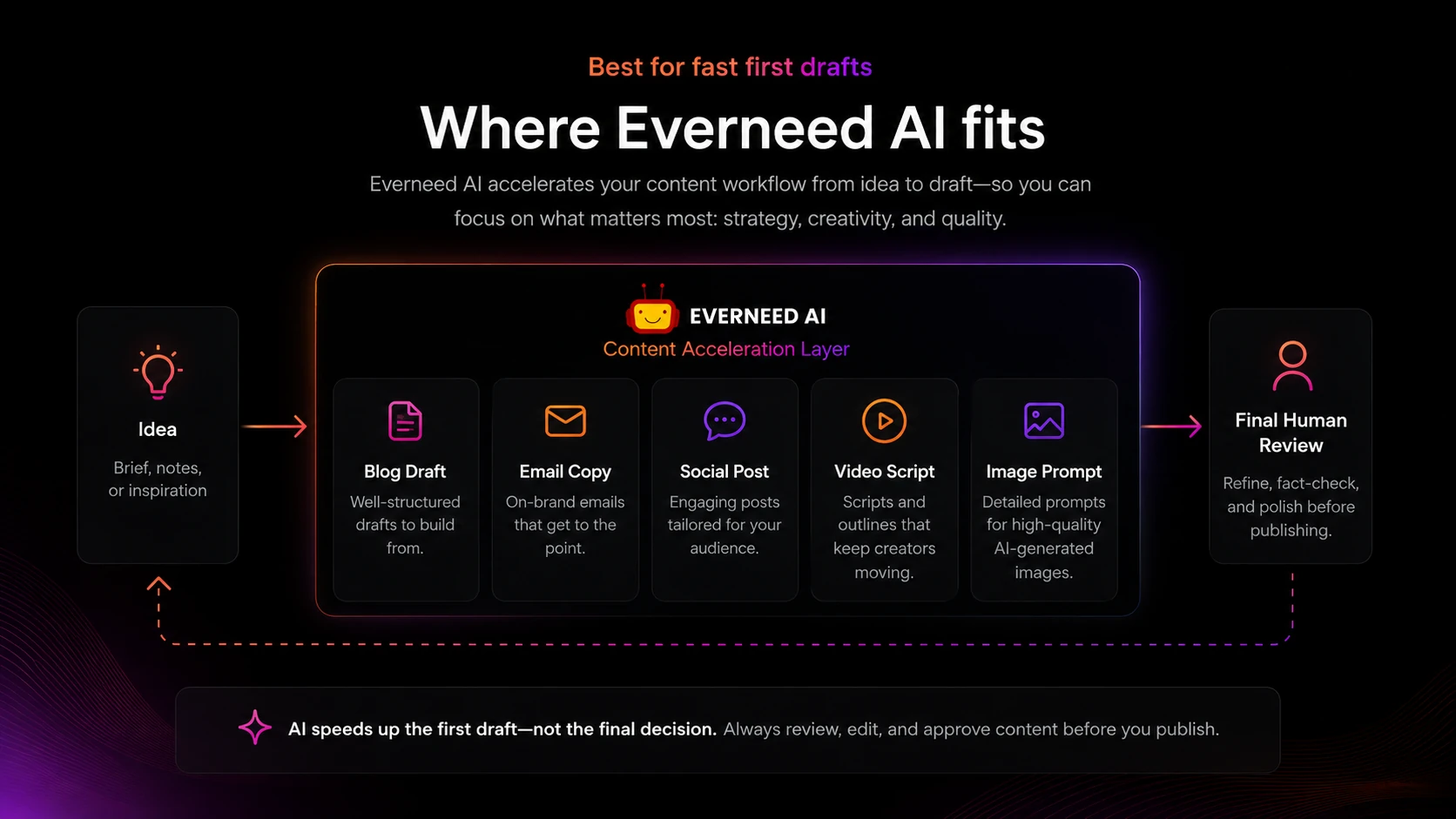
Everneed AI can help in the middle of this process. It does not remove the final editorial step.

Workflow check: Use Everneed AI on a real content task before treating any paid plan as a good deal.
Real-world buyer scenarios
A small e-commerce seller may use Everneed AI for product descriptions, Facebook ad copy, email announcements, and short landing page copy. This is a reasonable fit if the seller needs speed and is willing to edit claims, specs, benefits, and tone manually.
A creator may use it to brainstorm YouTube ideas, write video scripts, generate descriptions, and draft social captions. This can work well when the creator already knows the angle and needs help turning it into usable structure. It becomes weaker if the tool starts producing generic scripts that do not sound like the creator’s voice.
A local business owner may use Everneed AI for service page copy, profile bios, promotional emails, and simple blog posts. This is a practical use case, but the owner still needs to verify facts, pricing, service promises, and local details.
A small content team may use it as a shared drafting assistant. The pricing table’s unlimited team member language is interesting here, but I would not assume it replaces collaboration software. The buyer should check how access, editing, saved outputs, and team usage actually work in the account.
For each scenario, the decision is the same: does Everneed AI reduce production friction enough to justify the usage limits?
Key features that actually matter
Pre-built content templates
The template library is the reason Everneed AI is easier to understand than a blank chatbot. Templates for ads, blogs, emails, CTAs, ecommerce, profiles, jobs, videos, and website copy give users a starting point.
Buyer note: templates matter only if they match your repeated tasks. A long list of use cases is less valuable than three templates you actually use every week.
Writing and content improvement tools
Everneed AI covers draft generation, rewriting, summarizing, content improvement, and structured frameworks such as AIDA and PAS. This makes it useful for first-pass copy and content cleanups.
Buyer note: do not judge this by whether the first draft sounds polished. Judge it by how much editing it saves after you add real context.
Image generation
The platform includes AI image generation, and the plan table ties image usage to plan limits. This can be useful for simple visual support, but it should not be treated as a replacement for a dedicated design workflow without testing.
Buyer note: verify image limits, output quality, and how the images fit your content standards before choosing a higher plan.
Speech-to-text and chatbot access
Everneed AI also lists speech-to-text and chatbot features. This gives the product more utility beyond writing templates, especially for users who want one broad workspace.
Buyer note: if transcription is a major need, compare minute limits and quality against dedicated transcription tools before relying on it.
Monthly, yearly, and credit-pack choices
The pricing model is flexible. You can test monthly, commit yearly, or buy credit packs for occasional use.
Buyer note: flexibility is useful, but it also gives you more ways to overbuy. Start with the smallest commitment that can prove the workflow.
Pricing and plan value
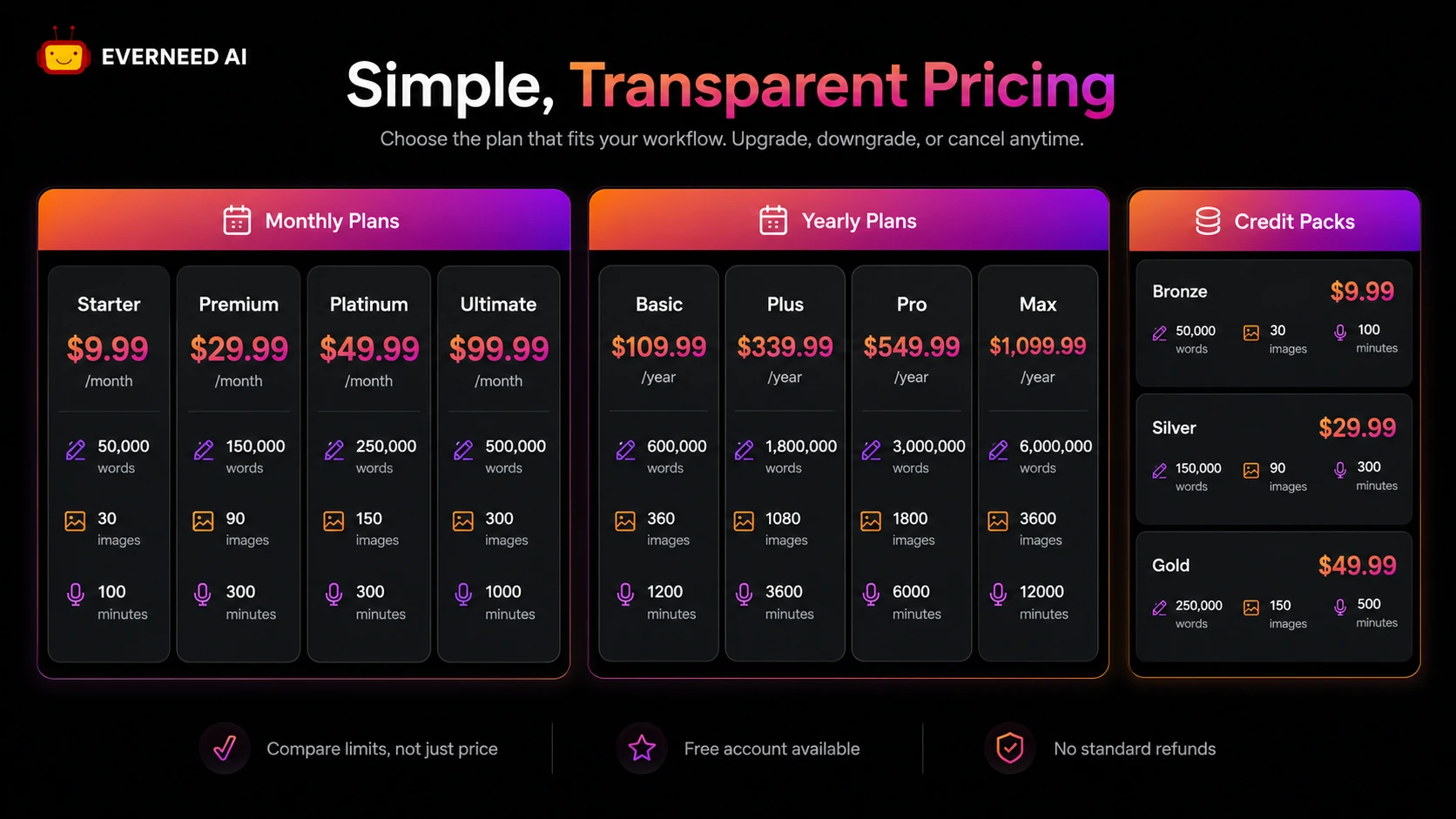
Everneed AI’s pricing is clearer than many small AI writing tools because the public pricing page lists monthly plans, yearly plans, and credit packs.
At the time of review, the monthly path starts with a Starter plan at $9.99 per month. Higher monthly plans include larger word, image, and minute limits, with the Ultimate plan listed at $99.99 per month. The yearly path starts at $109.99 per year and goes up to $1,099.99 per year for the largest public plan. The pricing table also shows one-time credit packs for buyers who want occasional usage without an ongoing subscription.
The trap is choosing by price alone.
A $9.99 plan may be enough if you only need light drafts. It may feel too small if you create long-form content, images, and speech-to-text output every week. A yearly plan may look efficient if you already use the platform regularly, but it is a bigger commitment under a restrictive refund position.
I would treat monthly billing as the safer paid test. Yearly billing makes sense only after Everneed AI has already become part of your weekly workflow. Credit packs make sense when you have campaign-based work and do not want a subscription.
The plan value depends on four practical limits:
- word usage for writing and rewriting
- image usage for visual creation
- minute usage for speech-to-text
- whether the templates you need are good enough to save editing time
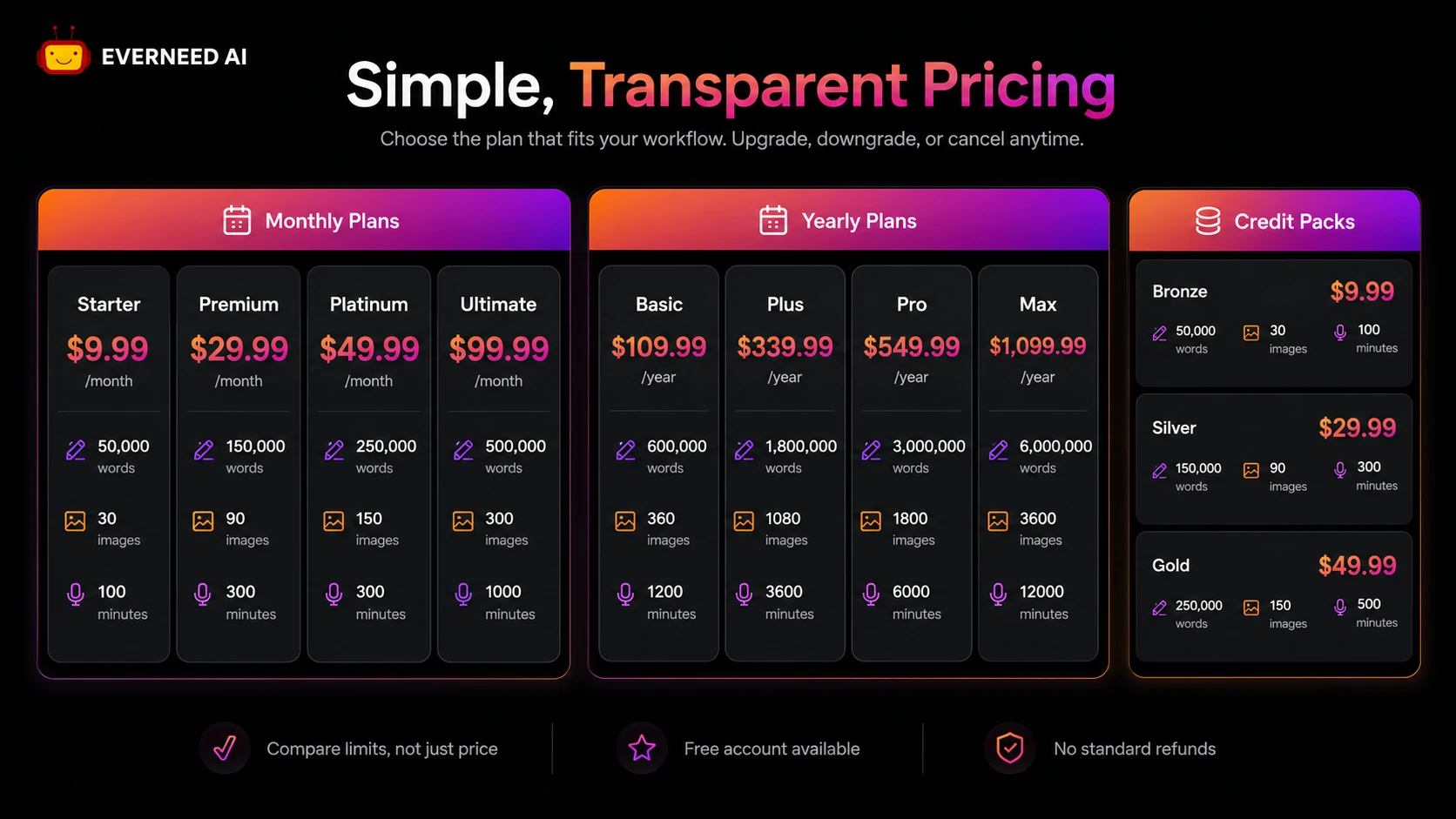
Pricing check: Compare the current word, image, and minute limits before choosing monthly, yearly, or one-time credits.
Free plan, trial, coupon, and checkout notes
The free-credit path is the most important checkout filter for Everneed AI.
The terms say users receive free credits at registration and are encouraged to test the platform before buying subscriptions or credits. That is not just onboarding language. It is practical buyer protection because the terms state that purchases made through the website, including subscriptions and credits, are final and generally non-refundable unless required by law or handled as an exceptional case.
A coupon page or current offer can still be useful, but it should come after workflow fit. I would not let a reported discount decide the purchase. A cheaper plan is still a poor buy if the content needs heavy rewriting or the limits are too low.
The safe order is:
- Use free credits.
- Test real content formats.
- Check plan limits.
- Choose monthly if still unsure.
- Use credit packs for one-off production.
- Consider yearly only after repeated value is clear.
Checkout note: Treat any offer as secondary to workflow fit, especially because subscriptions and credit purchases are generally final sale.
What I would check before buying Everneed AI
If I were buying Everneed AI for a real content workflow, I would check these points before paying:
- Whether the free credits produce drafts that save editing time.
- Whether the monthly word limit matches your expected blog, email, ad, and social volume.
- Whether image limits are enough if you plan to use visual generation.
- Whether speech-to-text minute limits matter for your workflow.
- Whether one-time credit packs are safer than a recurring subscription.
- Whether yearly billing is worth the commitment under the refund terms.
- Whether a specialist alternative would be better for your main use case.
The first check is output quality. The second is usage volume. The third is refund risk.
In that order.
A simple test before paying
Before paying, I would run a small Everneed AI test like this:
- Pick three content types you actually create every month.
- Use the closest Everneed AI templates for each one.
- Add real product, audience, tone, and goal details.
- Generate drafts and measure editing time.
- Check whether the output is usable after a normal editorial pass.
- Estimate monthly words, images, and minutes based on that test.
- Compare the smallest paid plan and credit pack against that usage.
This test is intentionally simple. It does not try to prove that Everneed AI is the best writing tool on the market. It proves whether the product fits your workload.
That is enough for a safer buying decision.
Pros explained
The first real pro is breadth. Everneed AI covers many everyday content jobs in one place, which helps buyers who need speed more than specialist depth.
The second pro is pricing visibility. Monthly, yearly, and credit-pack paths are easier to compare than vague “contact sales” pricing. Buyers can at least map the plan to expected output volume.
The third pro is the free-credit test path. This matters because the refund terms are strict. A free account lets buyers judge output quality before money is involved.
The fourth pro is template structure. For users who do not love prompting from scratch, templates can reduce friction and make content creation feel more guided.
The limitation behind all four pros is the same: Everneed AI still has to produce drafts worth editing. If the output is too generic for your brand or niche, the feature list does not solve the problem.
Cons explained
The biggest con is refund flexibility. Everneed AI’s public terms say subscriptions and credits are generally final sale. That does not make the product bad, but it makes pre-purchase testing more important.
The second con is specialist depth. Everneed AI is broad, but broad is not always better. SEO teams, agencies, design-heavy creators, and transcription-heavy users may find specialist products stronger.
The third con is plan-limit dependence. The pricing page includes words, images, minutes, and characters. If you do not estimate real usage, you may choose a plan that looks cheap but runs out too quickly.
The fourth con is integration uncertainty. Everneed AI is useful as a web-based content platform, but technical buyers should not assume API access, deep integrations, or advanced workflow controls unless the current product pages confirm them.
These are not reasons to dismiss Everneed AI. They are reasons to test carefully before paying.
Green flags and red flags
Green flags:
- You need several content formats every week.
- You prefer templates over blank prompting.
- You can use free credits to test real tasks first.
- Your expected usage fits the lower monthly plans.
- You value credit packs for occasional campaigns.
Red flags:
- You only need one specialist feature.
- You need deep SEO optimization or brand governance.
- You plan to buy annual before testing output quality.
- You are uncomfortable with final-sale subscription or credit terms.
- You expect AI drafts to be publish-ready without human review.
The most important red flag is not the product itself. It is buying too quickly because the tool appears to do everything.
Everneed AI vs alternatives
Everneed AI should be compared with broad AI writing and content tools, not only with narrow copy generators.
Rytr vs Everneed AI
Rytr is a more direct comparison for lightweight writing and short-form copy. It may feel simpler if you mostly need emails, ads, descriptions, and quick copy variants.
Everneed AI may make more sense if you want writing, images, speech-to-text, chatbot access, and template breadth in one account. The tradeoff is that the broader feature set may require more careful plan-limit checking.
Writesonic vs Everneed AI
Writesonic is usually the stronger comparison if search-aware writing and broader marketing content workflows matter. It is more established in the AI writing category and may be a better fit for buyers who care about SEO-oriented content creation.
Everneed AI may still fit buyers who want a lower entry point and a mixed toolkit for everyday content tasks. I would compare them if blog content and search visibility are important.
Jasper vs Everneed AI
Jasper is the more serious brand and team-content route. Buyers who need brand voice, campaign collaboration, and mature marketing workflows may find Jasper a better long-term fit.
Everneed AI is more appealing if you need a simpler all-in-one toolkit and do not want to pay for a premium brand-content platform. The tradeoff is governance depth.
Simplified vs Everneed AI
Simplified is an adjacent but useful comparison for buyers who want content, design, social media, and creative production inside one workspace.
Everneed AI is more writing-template centered, while Simplified may be more relevant when design and content planning are part of the same process.
Trust, refund, and buyer-risk notes
The trust picture for Everneed AI is mixed in a normal way for a smaller AI tool.
On the positive side, the public pricing page is specific. It shows plan names, monthly and yearly prices, word limits, image limits, minute limits, character limits, core tools, and credit-pack options. The use-case page is also specific enough to show what kinds of templates the product wants to serve.
The refund side is less forgiving. The terms say purchases through the website, including subscriptions and credits, are final and non-refundable unless required by law or handled as an exceptional case. The pricing FAQ also points users back to testing the platform before purchase.
That makes the free-credit test more than a nice bonus. It is the buyer’s risk-control step.
There is also limited but positive third-party feedback. Trustpilot shows a small number of reviews, with users praising ease of use, writing support, productivity, and content creation help. G2 feedback also points to workflow simplification and quick responsiveness, while noting that advanced customization and integrations could use more polish.
I would treat that as encouraging but not conclusive. A small public review base is not enough to make strong performance claims. It is enough to say that the product has some buyer traction, but the safest judgment still comes from testing your own content workflow.
Final verdict
Everneed AI is a sensible tool to consider if you need broad content assistance and you know you will use several of its features repeatedly.
I would consider it if you are a solo marketer, creator, small business owner, or lightweight content operator who needs everyday drafts for ads, emails, social posts, product copy, video scripts, website copy, images, and simple content ideas.
I would skip it if your main need is advanced SEO scoring, enterprise editorial workflow, serious design production, heavy transcription, or a single specialist tool. In those cases, the broad toolkit may be less valuable than a narrower product built for that exact job.
I would compare it with Rytr for lightweight copy, Writesonic for search-aware writing, Jasper for brand and team workflows, and Simplified if design plus social content matters.
The safest next step is not to buy the biggest plan. Start with free credits, test real content, choose monthly only if the output saves time, and move to yearly or credit packs only when the workflow is already proven.